KMS (Key Management Service) activation lets volume-licensed Windows, Windows Server and Office activate against a KMS host on your own network instead of contacting Microsoft one machine at a time.
This guide explains how KMS works, how to build a KMS host on Windows Server, how to activate Windows and Office clients against it, how VAMT fits in, and how to fix the KMS errors admins hit most often.
How to activate Windows with KMS server?
Volume-licensed editions of Windows and Windows Server ship as KMS clients, with the Generic Volume License Key (GVLK) already installed. If a KMS host is published in DNS, they activate on their own.
Run these commands only when a client needs a nudge, or when it was converted from a MAK, retail or KMS host key.
- Right-click Start and select Terminal (Admin) or open Command Prompt as administrator.
- Install the KMS client key for the edition, for example
slmgr /ipk NPPR9-FWDCX-D2C8J-H872K-2YT43for Windows 11 or Windows 10 Enterprise. - If DNS auto-discovery is not available, point the client at the host with
slmgr /skms kms01.contoso.com:1688. - Run
slmgr /atoto make the client try KMS activation now. - Run
slmgr /dliand look for License Status: Licensed in the dialog.
A client still shows as unlicensed until the KMS host reaches its activation threshold: 25 for Windows client editions and 5 for Windows Server and Office.
To see the full status from Windows itself, check if Windows is activated in Settings after slmgr /ato finishes.
KMS vs MAK vs Active Directory-based activation
Microsoft volume licensing offers three ways to activate. KMS suits large networks where machines can reach a host at least every 180 days.
| Your situation | Use this | Why |
|---|---|---|
| 25+ Windows clients or 5+ servers on one network | KMS | One host key activates every client locally; activation renews every 7 days |
| A few machines, or PCs that never join the corporate network | MAK (Multiple Activation Key) | Each machine activates once with Microsoft and stays activated permanently |
| Every machine is domain-joined and runs a current Windows version | Active Directory-based activation | The activation object lives in Active Directory, so there is no KMS host to maintain |
| Isolated lab with no internet access | MAK through VAMT proxy activation | Only the VAMT host needs internet access to fetch confirmation IDs |
Understanding KMS volume activation architecture
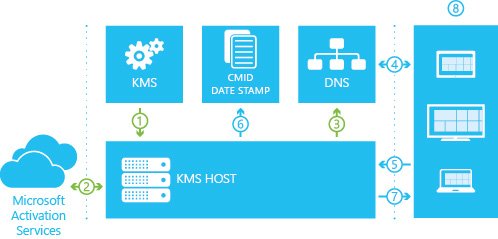
KMS is a client-server model. The KMS host holds your organisation's KMS host key (formally a Customer Specific Volume License Key, CSVLK) and activates with Microsoft once. Clients holding a GVLK then activate against the host.
| Part | What it does | Default |
|---|---|---|
| KMS host | Answers activation requests from clients on the local network; can be cohosted with other roles | Listens on TCP port 1688 |
| KMS host key (CSVLK) | Activates the host with Microsoft; one key activates up to 6 hosts, each reactivated up to 9 times | From the Microsoft 365 admin center volume licensing section |
| KMS client key (GVLK) | Public, edition-specific key that tells Windows or Office to look for a KMS host | Preinstalled on volume editions |
| DNS SRV record | Lets clients find the host automatically | _vlmcs._tcp, published by the host through dynamic DNS |
| Activation threshold | Minimum count of unique machines before clients activate | 25 for Windows clients, 5 for Windows Server and Office |
| Activation count window | Only recent unique contacts count | Last 30 days, 50 most recent contacts stored |
| Activation validity | How long a KMS activation lasts before it must renew | 180 days |
| Renewal interval | How often an activated client contacts the host | Every 7 days (10,080 minutes) |
| Activation interval | How often an unactivated client retries | Every 2 hours (120 minutes) |
A KMS host on Windows Server can activate both server and client editions. A KMS host on a Windows client edition can only activate client editions.
Microsoft recommends at least two KMS hosts once you pass 50 clients, so activation keeps working if one host goes down.
How to install Volume Activation Key Management Server on Windows Server?
Sign in to the server with an account in the local Administrators group. You need your organisation's KMS host key and internet access for online or phone activation of the host.
- Open PowerShell as administrator and run
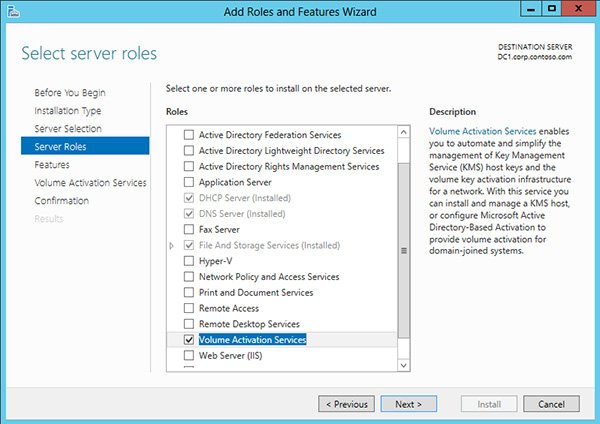
Install-WindowsFeature -Name VolumeActivation -IncludeManagementToolsto add the Volume Activation Services role. - Allow KMS traffic through Windows Firewall with
Set-NetFirewallRule -Name SPPSVC-In-TCP -Profile Domain,Private -Enabled True. - Run
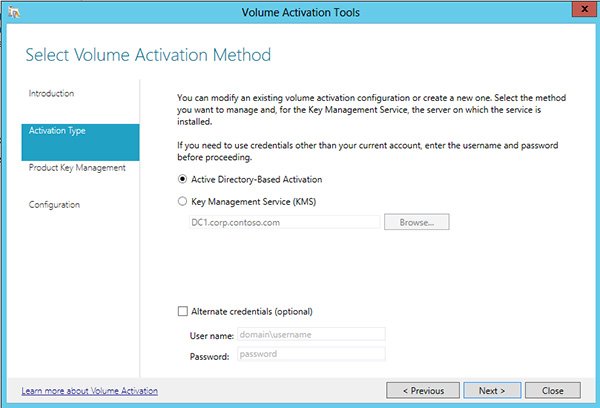
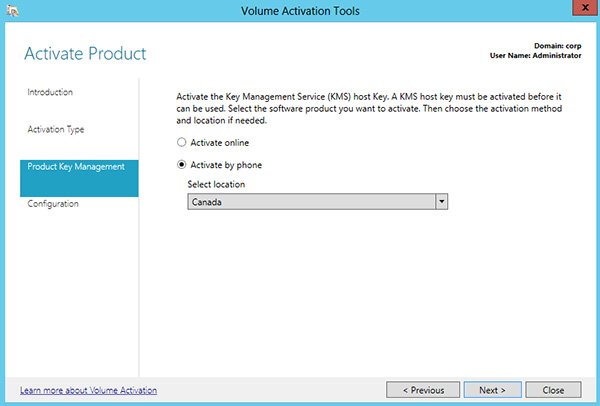
vmw.exeto open the Volume Activation Tools wizard, then select Next on the introduction page. - Select Key Management Service (KMS), enter
localhostfor the server, and select Next. - Select Install your KMS host key, enter the key, and select Commit.
- Select Next, choose the product under Select product, select Activate online, and select Commit; select Yes if asked to confirm.
- Review the KMS host configuration page and select Close to start serving clients with the default DNS publishing.
Server Manager works too: select Manage > Add Roles and Features, tick Volume Activation Services, then open Volume Activation Tools from Windows Administrative Tools.
A newer client may need an update on an older host. A Windows Server 2022 host needs KB5034765 or a later cumulative update to activate Windows Server 2025, and a Windows Server 2019 host needs KB5034768 or later.
How to activate a KMS host by phone with slmgr
Use phone activation when the KMS host has no internet access. The same commands work on a Windows client edition acting as a KMS host.
- Open an elevated Command Prompt and install the host key with
cscript.exe slmgr.vbs /ipk <KMS_Key>. - Run
cscript.exe slmgr.vbs /dtito display the installation ID. - Call the Microsoft Volume License Key assisted support number and enter the installation ID at the voice prompts.
- Write down the 48-digit confirmation ID that the system reads back.
- Run
cscript.exe slmgr.vbs /atp <confirmation_ID>to finish activating the host.
KMS client setup keys (GVLK) for Windows 11, Windows 10 and Windows Server 2025
These keys are published by Microsoft and only point a volume edition at your KMS host. They do not activate a retail copy of Windows and are not a licence on their own.
| Edition | KMS client product key |
|---|---|
| Windows 11 / Windows 10 Pro | W269N-WFGWX-YVC9B-4J6C9-T83GX |
| Windows 11 / Windows 10 Pro N | MH37W-N47XK-V7XM9-C7227-GCQG9 |
| Windows 11 / Windows 10 Pro for Workstations | NRG8B-VKK3Q-CXVCJ-9G2XF-6Q84J |
| Windows 11 / Windows 10 Pro Education | 6TP4R-GNPTD-KYYHQ-7B7DP-J447Y |
| Windows 11 / Windows 10 Education | NW6C2-QMPVW-D7KKK-3GKT6-VCFB2 |
| Windows 11 / Windows 10 Enterprise | NPPR9-FWDCX-D2C8J-H872K-2YT43 |
| Windows 11 / Windows 10 Enterprise N | DPH2V-TTNVB-4X9Q3-TJR4H-KHJW4 |
| Windows 11 Enterprise LTSC 2024 / Windows 10 Enterprise LTSC 2021 and 2019 | M7XTQ-FN8P6-TTKYV-9D4CC-J462D |
| Windows Server 2025 Standard | TVRH6-WHNXV-R9WG3-9XRFY-MY832 |
| Windows Server 2025 Datacenter | D764K-2NDRG-47T6Q-P8T8W-YP6DF |
Microsoft lists the keys for Windows Server 2022, 2019, 2016 and older editions on its KMS client activation and product keys page on Microsoft Learn.
Activating Microsoft Office volume license with KMS server
Volume-licensed Office LTSC 2024, Office LTSC 2021, Office 2019 and Office 2016, including Project and Visio, come with a GVLK preinstalled. Once the host carries an Office KMS host key, Office activates the first time it runs.
- In the Microsoft 365 admin center, go to Billing > Your products, open the Volume licensing tab, and get the KMS key for each Office version from Download and keys.
- On the KMS host, run the Office Volume License Pack for that version from the Microsoft Download Center; it opens the Volume Activation Tools wizard.
- Enter the Office KMS host key when the wizard asks for it and activate it online.
- If the firewall blocks the host, go to Control Panel > System and Security > Windows Defender Firewall > Allow an app or feature through Windows Firewall, select Change settings, tick Key Management Service, and select OK.
- On an Office client, open an elevated Command Prompt in
Program Files\Microsoft Office\root\Office16and runcscript ospp.vbs /actto trigger activation. - Run
cscript ospp.vbs /dstatusand look for a licensed status.
The host OS must support the Office version: Office LTSC 2024 needs at least Windows Server 2019 or Windows 10 volume editions, and Office LTSC 2021 needs at least Windows Server 2016 or Windows 10.
Office 2016 and Office 2019 reached end of support on October 14, 2025. Microsoft 365 Apps do not use KMS at all; they activate through the user's Microsoft 365 licence after you install Microsoft 365 apps.
Office GVLK keys for Office LTSC 2024, Office LTSC 2021 and Office 2019
Reinstall the GVLK with cscript ospp.vbs /inpkey:<GVLK> if an Office install was switched to a MAK and now needs KMS.
| Product | GVLK |
|---|---|
| Office LTSC Professional Plus 2024 | XJ2XN-FW8RK-P4HMP-DKDBV-GCVGB |
| Office LTSC Standard 2024 | V28N4-JG22K-W66P8-VTMGK-H6HGR |
| Project Professional 2024 | FQQ23-N4YCY-73HQ3-FM9WC-76HF4 |
| Visio LTSC Professional 2024 | B7TN8-FJ8V3-7QYCP-HQPMV-YY89G |
| Office LTSC Professional Plus 2021 | FXYTK-NJJ8C-GB6DW-3DYQT-6F7TH |
| Office LTSC Standard 2021 | KDX7X-BNVR8-TXXGX-4Q7Y8-78VT3 |
| Project Professional 2021 | FTNWT-C6WBT-8HMGF-K9PRX-QV9H8 |
| Visio LTSC Professional 2021 | KNH8D-FGHT4-T8RK3-CTDYJ-K2HT4 |
| Office Professional Plus 2019 | NMMKJ-6RK4F-KMJVX-8D9MJ-6MWKP |
| Office Standard 2019 | 6NWWJ-YQWMR-QKGCB-6TMB3-9D9HK |
Publisher is not part of Office LTSC 2024, so it has no 2024 GVLK.
Slmgr and ospp.vbs commands for KMS activation
Windows uses slmgr.vbs in Windows\System32. Volume Office uses ospp.vbs in its Office16 folder. Run both from an elevated Command Prompt; cscript prints results in the console instead of pop-up dialogs.
| Command | What it does |
|---|---|
slmgr /ipk <key> |
Installs a product key, such as a GVLK, and replaces the current one |
slmgr /ato |
Tries activation now; with a GVLK installed it contacts the KMS host |
slmgr /dli or slmgr /dlv |
Shows license status; /dlv adds the KMS host name, count and intervals |
slmgr /xpr |
Shows when the current KMS activation expires |
slmgr /skms <host:port> |
Sets a fixed KMS host and turns off auto-discovery |
slmgr /ckms |
Clears the fixed host and restores DNS auto-discovery |
slmgr /skms-domain <FQDN> |
Searches one DNS domain for KMS SRV records |
slmgr /sprt <port> |
Changes the KMS host's listening port from 1688 |
slmgr /cdns and /sdns |
Turns DNS publishing on the KMS host off or on |
slmgr /sai and /sri |
Sets the retry and renewal intervals in minutes (15 minutes to 30 days) |
cscript ospp.vbs /sethst:<host> |
Points Office at a specific KMS host |
cscript ospp.vbs /remhst |
Removes the Office KMS host name and resets the port to 1688 |
cscript ospp.vbs /dhistorykms |
Shows Office KMS activation history |
cscript ospp.vbs /ddescr:<code> |
Explains an Office activation error code |
How to check KMS activation status with slmgr /dlv
Check the host first, then a client. The host output tells you whether the threshold has been reached.
- On the KMS host, open an elevated Command Prompt and run
cscript slmgr.vbs /dlv. - Look for License Status: Licensed and the line Key Management Service is enabled on this machine.
- Read Current count; clients activate once it reaches 25 for Windows or 5 for servers and Office.
- For an Office host key, run
cscript slmgr.vbs /dlv alland find the Office KMS host edition in the list. - On a client, run
slmgr /dlvand check the KMS machine name and the activation expiration date. - On the host, open Event Viewer > Applications and Services Logs > Key Management Service and look for event ID 12290 entries naming each client.
Before the threshold is met, a client test returns an error that the KMS count is too low. That error still proves the client reached the host.
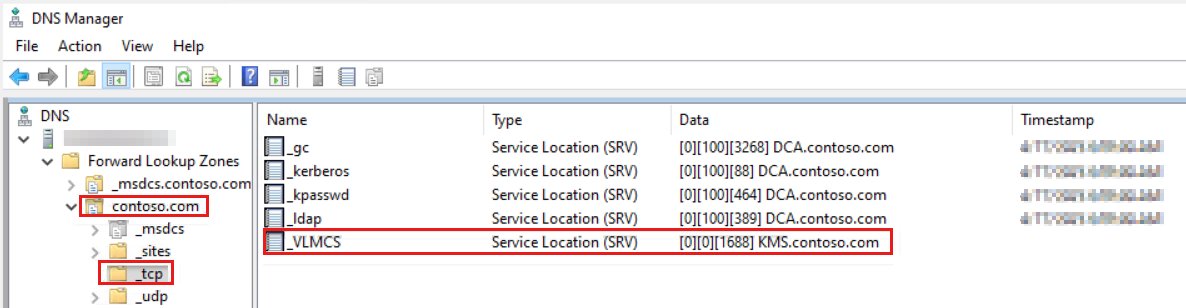
How to create the _vlmcs SRV record for KMS in DNS
Create the record by hand when your DNS does not accept dynamic updates. Then turn off publishing on the host so the event log stops filling with failed DNS publishing events.
| SRV record field | Value |
|---|---|
| Type | SRV |
| Service / Name | _vlmcs |
| Protocol | _tcp |
| Priority | 0 |
| Weight | 0 |
| Port number | 1688 (or the port set with slmgr /sprt) |
| Host offering this service | The fully qualified domain name of the KMS host |
To stop the host publishing, run vmw.exe, choose Key Management Service (KMS), select Skip to Configuration, clear Publish next to DNS Records, and select Commit. slmgr /cdns does the same from the command line.
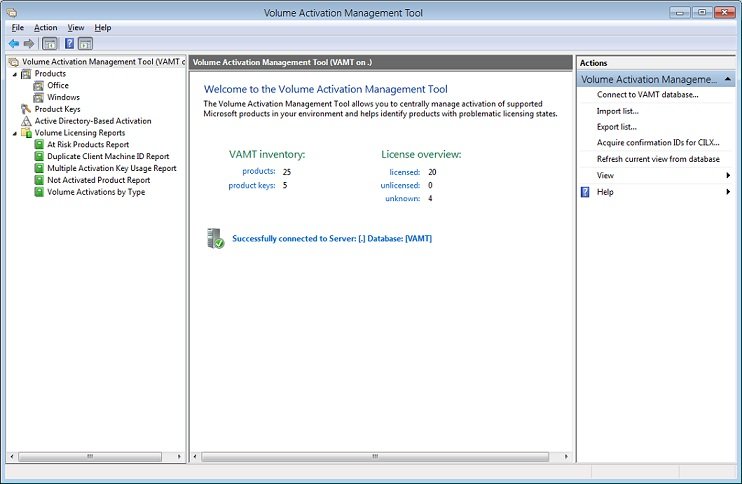
VAMT: Volume activation management tool
VAMT is an MMC snap-in that manages MAK, KMS host and retail activation across many computers at once. It ships in the Windows Assessment and Deployment Kit (ADK) and stores its data in a Microsoft SQL Server database.
For KMS, VAMT installs and activates GVLKs on client products and treats a KMS host key like a retail key. Office LTSC 2024, Office LTSC 2021 and Office 2019 need VAMT 3.1 or later.
- Install SQL Server Express with the Basic installation type and note the instance name, or use an existing SQL Server instance.
- Run the latest Windows ADK installer and select only Volume Activation Management Tool (VAMT) on the features page.
- Open Volume Activation Management Tool 3.1 from the Windows Kits Start menu folder.
- In Database Connection Settings, enter the SQL instance and a database name, select Connect, then select Yes to create the database.
- Add computers by searching Active Directory, a workgroup, a computer name or IP address, or an LDAP query.
- Select the discovered products, install the GVLK or MAK, and activate them; for isolated machines use proxy activation.
VAMT needs local administrator rights on every managed computer, and each product must answer WMI calls to be discovered and activated.
KMS activation known issues
The KMS client computer does not activate
The host count is below the threshold, or the request never reaches the host.
- Run
slmgr /dlion the KMS host and check that Current count is at least 25 for Windows clients or 5 for servers. - On the client, open the Application log in Event Viewer and find event ID 12289; a result code other than 0 is an error.
- Check that the host name and port in that event are correct.
- On the host, look for event ID 12290 from the client; if none exists, make sure routers and firewalls allow TCP 1688 to the host.
Clients are not adding to the KMS count
Machines deployed from one image share the same client machine ID (CMID), so the host counts them as one.
- Generalize the image with
sysprep /generalizebefore you deploy it. - On machines already deployed, run
slmgr /rearmto reset the CMID, then restart. - Run
slmgr /atoon each client and recheck the count on the host.
KMS hosts are unable to create SRV records
DNS refuses dynamic updates from the host, or only the first host has write permission on the record.
- Give the KMS host write access to the DNS zone, or create the _vlmcs SRV record by hand.
- If several hosts share one zone, change the default permissions on the SRV record so the other hosts can update it.
- Turn off host publishing with
slmgr /cdnswhen you maintain the records manually.
A KMS host key was installed on a KMS client
KMS host keys belong only on hosts; the client turned itself into a host.
- Install the correct GVLK with
slmgr /ipk <GVLK>. - Delete any SRV records the machine published from DNS.
- Restart the computer and run
slmgr /ato.
A KMS host failed
Clients that were pinned to the failed host with /skms cannot find another one.
- Install the KMS host key on a new server and activate it.
- Remove the failed host's SRV record, or reuse its name and IP address so the record stays valid.
- Run
slmgr /ckmson clients that had a fixed host so they return to auto-discovery.
KMS error 0xC004F074: no Key Management Service could be contacted
0xC004F074 when running slmgr /ato
The sppsvc service on the host stopped, TCP 1688 is blocked, or DNS points to an old host.
- Check that the Software Protection Platform service (sppsvc) is running on the KMS host and start it if it is stopped.
- On the client, run
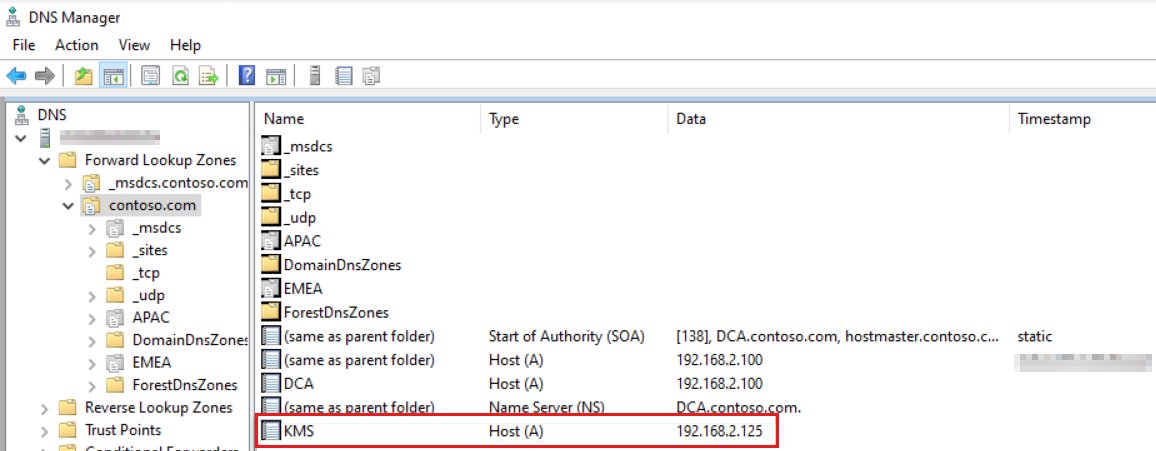
Test-NetConnection -ComputerName <KMS host> -Port 1688in PowerShell; TcpTestSucceeded : False means the port is blocked. - In the DNS management console, open the _tcp folder under your domain and check that the _VLMCS SRV record names the current KMS host.
- Check the host's A record and correct its IP address if it points to an old server.
0xC004F074 with info code 0xC004F06C
The client and host clocks differ by more than 4 hours in UTC.
- Sync both machines to an NTP source or Active Directory time.
- Run
w32tm /resyncon the client. - Run
slmgr /atoagain.
Unknown activation error code
Windows logs most activation errors only as hex codes.
- Run
slui.exe 0x2a <ErrorCode>, for exampleslui.exe 0x2a 0x8007267C, to see the description. - For Office, run
cscript ospp.vbs /ddescr:<ErrorCode>instead.
How to remove a KMS server from a Windows client
Use this when a client was pinned to a host that no longer exists, or when the machine should move from KMS to a MAK.
- Open an elevated Command Prompt on the client.
- Run
slmgr /ckmsto remove the stored KMS host name and port and restore auto-discovery. - To switch to a MAK instead, run
slmgr /ipk <MAK>and thenslmgr /atofor online activation. - For Office, run
cscript ospp.vbs /remhstto clear the Office KMS host name. - Restart the Software Protection Platform service (sppsvc) or the PC so the license service picks up the change.
KMS activation FAQ
How long does KMS activation last?
A KMS activation is valid for 180 days. Clients try to renew every seven days by default, and each successful renewal restarts the 180-day period, so a client that reaches the host regularly never expires.
How many computers do you need for KMS activation?
The KMS host must count at least 25 unique Windows client machines, or at least 5 for Windows Server and volume Office, in the last 30 days before it activates anyone. Below that, clients report that the KMS count is too low.
What port does KMS use?
KMS uses TCP port 1688 by default. You can change it on the host with slmgr /sprt, but you must then update the SRV record and any clients set with slmgr /skms to the new port.
Can a KMS client key activate a retail copy of Windows?
No. GVLKs only work on volume-licensed editions against a KMS host on your network. A retail copy of Windows needs a retail product key, a digital license or a MAK from a volume licensing agreement.
Where do you get a KMS host key?
The KMS host key, or CSVLK, comes from the volume licensing section of the Microsoft 365 admin center for Open, Open Value, Select, Enterprise and Services Provider License agreements. Your local Microsoft Activation Center can also help.
How many KMS hosts can one KMS host key activate?
One KMS host key activates up to six KMS hosts, and each host can be reactivated up to nine times with the same key. Organisations that need more hosts can request extra activations from the Microsoft Activation Center.
Can Windows 11 be a KMS host?
Yes. A Windows client edition can act as a KMS host with slmgr /ipk and /ato, but it can only activate other client editions. Only a KMS host on Windows Server can activate both Windows Server and Windows clients.
Should I back up KMS host information?
No backup is required for a KMS host. If you track activations through the Key Management Service event log, export that log regularly, because log cleanup tools can erase the activation history.
Is the KMS client computer activated?
Open Settings or the System control panel and look for the Windows is activated message, or run slmgr /dli. For a full view including the KMS host name and expiry, run slmgr /dlv.
Does ospp.vbs work with Microsoft 365 Apps?
No. ospp.vbs only manages volume-licensed Office such as Office LTSC 2024 and 2021. Microsoft 365 Apps use subscription activation, and Microsoft points admins to the vnextdiag.ps1 PowerShell script to check their license status.