To view your Yahoo Mail inbox, go to mail.yahoo.com, click Sign in, and enter your Yahoo email address and password; your inbox opens as soon as you are signed in.
This guide covers the inbox on a computer, iPhone, iPad and Android, in Outlook or another email app, how the inbox tabs work, and what to do when the inbox is empty, will not load or will not let you sign in.
The fastest way to open your Yahoo Mail inbox
These steps work in any current browser on Windows, Mac or Chromebook.
- Open your browser and go to mail.yahoo.com.
- Click Sign in at the top of the page.
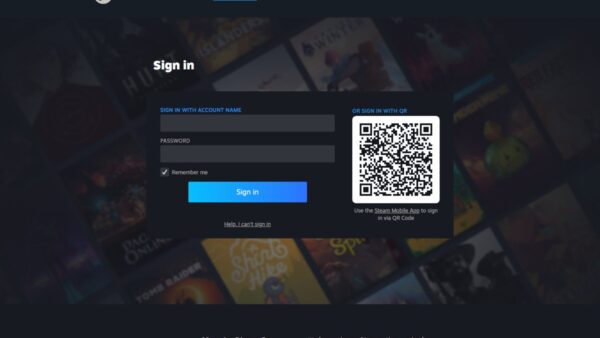
- Type your Yahoo address into the Username, email or phone number box and click Next.
- Enter your password, or approve the Account Key prompt on your phone if you use one.
- Read your mail in the inbox that opens. Click All if you want every message instead of only the Primary tab.
On a phone, the Yahoo Mail app does the same job and keeps you signed in, so the inbox is one tap away next time.
Which way to view your Yahoo inbox should you use?
| Your situation | Use this | Why |
|---|---|---|
| On a computer and want every feature | Yahoo Mail in a browser at mail.yahoo.com | Inbox tabs, starred panel, advanced search and all settings are here |
| On an iPhone, iPad or Android phone | The Yahoo Mail app | Stays signed in and can show Gmail, Outlook and AOL mail in one inbox |
| Phone without the app installed | mail.yahoo.com in the phone's browser | Nothing to install; sign in and read |
| Already use Outlook, Apple Mail, Thunderbird or Gmail | Add Yahoo through IMAP with an app password | Two-way sync keeps read, moved and deleted mail matched with Yahoo |
| Borrowed or public computer | A private browser window at mail.yahoo.com | Nothing is saved after you close the window and sign out |
What You Need Before You Start
| What you need | Why it matters | If you do not have it |
|---|---|---|
| Your Yahoo email address or phone number | It is the username the sign-in page asks for | Use Forgot username on the sign-in page |
| Your Yahoo password or Account Key | It unlocks the account; Account Key replaces the password with a prompt on your phone | Use the Sign-in Helper at login.yahoo.com/forgot |
| Access to your recovery phone or email | Yahoo may send a verification code when you sign in from a new device or place | Update recovery options once you are back in |
| A current browser with JavaScript turned on | Yahoo Mail will not work properly without it | Update the browser or try another one |
| iOS or iPadOS 17 or later for the iPhone/iPad app | The App Store listing for Yahoo Mail requires it | Use Safari at mail.yahoo.com instead |
| An app password for Outlook, Apple Mail or Thunderbird | Third-party apps that do not use Yahoo's sign-in page need one | Create it on the Yahoo Account Security page |
How to View Your Yahoo Mail Inbox on a Computer
New Yahoo Mail opens on the inbox after sign-in. Folders, including Spam and Trash, live behind the More options icon in the left pane.
- Go to mail.yahoo.com and sign in with your Yahoo address and password.
- Look at the message list in the centre of the page; this is your inbox.
- Click the Primary, Offers, Newsletters or Social tab to filter the list, or All to see every message.
- Click any message to open and read it.
- Click the More options icon in the left pane to reach other folders such as Trash.
- Check the starred panel at the top right of the inbox for messages you have starred.
How to View Yahoo Mail Inbox on iPhone or iPad
The official app is Yahoo Mail: Your Email & Inbox from Yahoo Inc. in the App Store. It needs iOS 17 or iPadOS 17 or later.
- Open the App Store and search for Yahoo Mail.
- Install Yahoo Mail: Your Email & Inbox, checking that the seller is Yahoo Inc.
- Open the app and sign in with your Yahoo address and password.
- Read your mail in the inbox that loads after sign-in.
- Tap your profile icon to see your folders, such as Trash, and tap one to open it.
No app? Open Safari, go to mail.yahoo.com and sign in. To use Apple's built-in Mail app instead, follow the IMAP section further down.
How to View Yahoo Mail Inbox on Android
- Open the Google Play Store and search for Yahoo Mail.
- Install the Yahoo Mail app published by Yahoo.
- Open the app and sign in with your Yahoo address and password.
- Read your mail in the inbox that opens.
- Tap your profile icon to reach other folders, such as Trash.
To read Yahoo mail inside the Gmail app, add it as an IMAP account using the settings in the next section. A mobile browser at mail.yahoo.com works too, with nothing to install.
How to View Yahoo Mail Inbox in Outlook, Apple Mail, Thunderbird, or Another Email App
Any app that is not Yahoo's own needs IMAP plus an app password. IMAP syncs both ways, so anything you read, move or delete in the app also changes in Yahoo Mail.
- Sign in to the Yahoo Account Security page in a browser.
- Click Create app password under External connections and follow the prompts.
- Copy the generated code; you only enter it once in the email app.
- In Outlook, Apple Mail, Thunderbird or the Gmail app, start adding a new email account and choose IMAP or manual setup.
- Enter your full Yahoo address and paste the app password as the password.
- Set the incoming server to
imap.mail.yahoo.com, port 993, with SSL on. - Set the outgoing server to
smtp.mail.yahoo.com, port 465 or 587, with SSL and authentication on. - Finish setup and open the Inbox folder the app creates for the Yahoo account.
App passwords stay active even after you change your main Yahoo password. Delete one on the same Account Security page to shut that app out.
Understanding the Yahoo Mail Inbox Layout
| Part of the inbox | What it shows | How to use it |
|---|---|---|
| Message list | Your emails, newest at the top | Click a message to open it |
| Primary tab | Personal and time-sensitive mail Yahoo picks out | Your default view when inbox categories are on |
| All tab | Every message in the inbox | Click it when you think something is missing from Primary |
| Offers, Newsletters and Social tabs | Deals, subscribed newsletters and social-network mail | Click a tab to see only that type |
| Starred panel | Messages you have starred | Sits at the top right of the inbox |
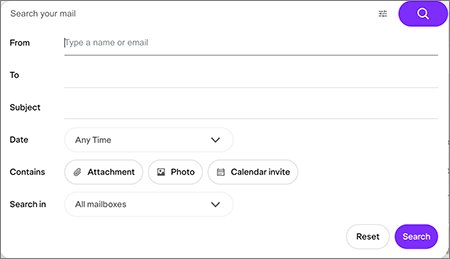
| Search bar | Search by sender, recipient, subject, date range, attachment, photo, calendar invite or mailbox | Use advanced filters to narrow results |
| More options icon | Folders such as Trash, plus Settings | Sits in the left pane |
| Expanded and compact view icons | More or less detail per email in the Primary tab | Click either icon to switch |
Your Yahoo Search history is separate from Mail. To find that, see how to find the Yahoo Search history.
How to Keep Your Yahoo Mail Inbox Easy to View
Two settings decide what the inbox shows first: inbox categories and the default category. Filters then keep routine mail out of the way.
- Open Yahoo Mail in a desktop browser.
- Click the More options icon, then select Settings.
- Click Inbox categories and click the Toggle icon to turn categories on.
- Under the default setting, choose Primary to open on important mail, or All to open on everything.
- In the Primary tab, click the Expanded view or Compact view icon to set how much detail each email shows.
- Create filters in Settings to send newsletters or receipts straight to a folder; Yahoo allows up to 500 and applies the top one first.
- Use the unsubscribe option at the top of an open newsletter to stop mailing lists you no longer read.
How to Refresh Your Yahoo Mail Inbox
| Where you read mail | How to refresh | If new mail still does not appear |
|---|---|---|
| On a computer | Reload the browser tab, or click another folder and then back to the inbox | Send yourself a test email to confirm delivery |
| On the Yahoo Mail app | Close the app fully and reopen it | Check the All tab and the Spam folder |
| In a third-party email app | Use the app's own send/receive or sync command | Check the IMAP settings and that the app password has not been deleted |
How to Switch Between Multiple Yahoo Mail Accounts
The Yahoo Mail app can sync several accounts, including Gmail, Outlook and AOL, into one inbox. In a browser, each Yahoo account needs its own sign-in.
- In a browser, sign out of the current Yahoo account.
- Go to mail.yahoo.com, click Sign in, and enter the other account's address.
- To keep two accounts open at once, sign in to the second one in a separate browser profile or a private window.
- In the Yahoo Mail app, tap your profile icon and pick the account you want to read.
- Use the unified inbox in the app when you want mail from every linked account in one list.
Linking several accounts in the mobile app has been possible for years; see accessing all your Yahoo Mail accounts from the mobile apps.
How to check your inbox is receiving mail
Yahoo's own test for a working inbox is to send yourself a message from a computer.
- Sign in to Yahoo Mail on a computer.
- Compose a new email to your own Yahoo address and send it.
- Click the All tab and look for the message at the top of the list.
- If it arrives with no error, your inbox is working as expected.
- If you get an error, follow the fix included in the error message.
- If nothing arrives, check the Spam folder and your filters, then read any delivery-failure notice you received.
What to Do If Your Yahoo Mail Inbox Is Empty
The inbox looks empty but you know mail arrived
The Primary tab only shows mail Yahoo rates as personal or time-sensitive.
- Click the All tab above the message list.
- Check the Offers, Newsletters and Social tabs.
- To stop this happening, open Settings > Inbox categories and set the default to All.
Specific emails never reach the inbox
A filter, a blocked address or domain, or the spam filter sent them elsewhere.
- Open the Spam folder and look for the message; Spam and Trash do not show in search results.
- Open Settings and review your filters for one that moves this sender's mail to another folder.
- Check your blocked addresses and blocked domains for the sender.
- Confirm your reply-to address is correct.
- Ask the sender to confirm they typed your full address correctly.
Emails were deleted or disappeared from the inbox
They were deleted in Yahoo, in an email app synced by IMAP, or by a POP app set to remove mail from the server.
- Click the More options icon and select Trash.
- Select the message and click the Restore to Inbox icon; Trash empties itself after 7 days.
- If the mail is older than Trash allows but was lost within the last 7 days, submit a Mail Restore request from Yahoo Help.
- In a POP email app, turn off the setting that deletes mail from the server.
The inbox is empty and settings look changed
Someone else may have access and set up forwarding or filters.
- Change your Yahoo password immediately.
- Check the auto-forwarding address, filters and blocked addresses for anything you did not set.
- Delete any app passwords you do not recognise.
- Turn on two-step verification.
Restore requests cannot be cancelled and are not always successful. Mail from Spam and Drafts is not restored, and Trash, Sent and Archive mail comes back to the Inbox.
What to Do If Yahoo Mail Inbox Won’t Load
Test Yahoo Mail after each step and stop once the inbox loads.
The inbox stays blank, spins or shows only part of the page in a browser
Old cached files, an outdated browser, disabled JavaScript or a browser extension.
- Clear your browser's cache.
- Update your browser to the latest version.
- Restart your computer.
- Make sure JavaScript is turned on in the browser.
- Turn off browser extensions and add-ons, then reload Yahoo Mail.
- Reset the browser to its default settings if nothing else works.
The inbox loads on one device but not another
The problem sits with that device, browser or network, not the Yahoo account.
- Open mail.yahoo.com on a different device or in a different browser.
- If it works there, repeat the browser steps above on the failing device.
- In the Yahoo Mail app, close the app fully and reopen it.
What to Do If You Can’t Sign In to View the Inbox
Forgotten password or username
You need your recovery phone number or email to prove it is your account.
- Go to the Sign-in Helper at login.yahoo.com/forgot.
- Enter your recovery phone number or email address.
- Follow the prompts to reset your password or find your Yahoo ID.
"Invalid ID or password" when the details are right
Caps Lock, an outdated saved password in autofill, or an unsupported browser.
- Turn off Caps Lock and type the password by hand instead of using autofill.
- Update any saved password in your browser's password manager.
- Try another browser.
- If it still fails, reset the password through the Sign-in Helper.
Account locked after several failed attempts
Yahoo locks the account temporarily to block guessing.
- Wait 12 hours for the lock to clear by itself.
- Or use the Sign-in Helper to get back in straight away.
The sign-in page keeps looping back
Stale cookies or a remembered account.
- Click Not you? on the sign-in page.
- Clear your browser cookies and restart the browser.
- Try a different browser.
Yahoo asks for a verification code
You are signing in from a new device or location.
- Enter the code Yahoo sends to your recovery phone or email.
- Once in, update your recovery options so future codes reach you.
Privacy and Security Tips When Viewing Yahoo Mail
| Situation | What to do | Why |
|---|---|---|
| Reading mail on a shared or public computer | Use a private window and sign out when done | Nothing stays signed in for the next user |
| Any Yahoo account | Turn on two-step verification and keep recovery phone and email current | Stops a stolen password from being enough |
| A message asks you to sign in or verify your account | Check it is from a legitimate Yahoo site before entering anything | Phishing pages copy the Yahoo sign-in screen |
| You stopped using an email app | Delete its app password on the Account Security page | App passwords stay valid after a password change |
| Logins from unexpected places, or spam sent from your account | Change the password now and review filters, forwarding and reply-to settings | These are Yahoo's listed signs of a hacked account |
Yahoo Mail has used HTTPS by default since 2014; see Yahoo makes HTTPS default in Yahoo Mail.
Frequently Asked Questions About Viewing Yahoo Mail Inbox
How do I view my Yahoo Mail inbox?
Go to mail.yahoo.com, click Sign in, and enter your Yahoo address and password. Your inbox opens straight after sign-in. On a phone, install the Yahoo Mail app from the App Store or Google Play and sign in there.
How do I check my Yahoo Mail inbox for new mail?
Sign in at mail.yahoo.com or open the Yahoo Mail app, then click the All tab to see every message. Reload the browser tab or reopen the app if the newest mail is not showing yet.
Where is my Yahoo Mail inbox?
The inbox is the message list you see right after signing in to Yahoo Mail. If only some mail shows, you are on the Primary tab; click All. Other folders, such as Trash, sit behind the More options icon in the left pane.
Where is my Yahoo email inbox in the app?
The Yahoo Mail app opens on your inbox after you sign in. Tap your profile icon to see the folder list, including Trash, and tap a folder to open it.
How do I view Yahoo Mail without the app?
Open any web browser, go to mail.yahoo.com and sign in. This works on computers, phones and tablets, and gives you the inbox tabs, search and settings without installing anything.
How do I view Yahoo Mail in Outlook?
Create an app password on the Yahoo Account Security page, then add the account in Outlook with IMAP. Use imap.mail.yahoo.com on port 993 with SSL, and smtp.mail.yahoo.com on port 465 or 587 with SSL.
How do I see my entire Yahoo inbox instead of only some emails?
Click the All tab above the message list. To open on every message by default, go to Settings, click Inbox categories, and choose All as the default category.
Why is my Yahoo Mail inbox empty?
Usually the Primary tab is hiding mail, or filters and the spam filter moved it. Check the All tab, Spam, Trash and your filters. If settings changed without your knowledge, change your password immediately.