Microsoft is improving Microsoft Edge‘s Find on Page feature. The company is currently testing showing related matches when you search for text or sentence in the Find bar in Edge 98. Here is how you can enable and use the feature.
Microsoft Edge’s Find on the Page feature
Like most of the modern web browsers, the new Microsoft Edge comes with a Find on page feature.
You can use Edge’s Find feature to search for particular text or a phrase on a web page. Edge highlights all instances of keywords on the page you enter in the Find bar, here is how to utilize it.
- Launch Edge browser
- Navigate to a web page. Press Ctrl +F or use shortcut F3 to open find on page bar, this bar appears at the top of the window below the address bar.
- Enter the text you want to find in the find bar, edge highlights all matches of it. You can either scroll down or use up and down arrows to reach them.
Recently, Microsoft started experimenting in the Edge browser by displaying related matches for find-on-page results. How useful this can be left to the user and there is a toggle in the Find bar to disable related matches.
Enable Related matches for Find on page in Micorsoft Edge
- Launch Microsoft Edge browser
- Visit edge://flags page
- Search for “related” and in the dropdown for “Related matches to find on page“, select Enabled, and restart the browser.

- Now load a webpage in Edge and initiate Find on search.
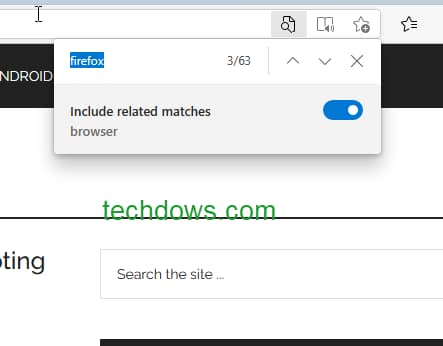
The feature is available in Edge 98 Canary. According to Edge release scheduled doc, Edge 98 is expected to release to the public on “week of 03-Feb-2022”
Microsoft is ruining Edge by adding bloatware
Microsoft Edge is getting better or maybe bloated with unnecessary things. and features Users complaining about later and annoyed with shopping features.
- For instance, the Buy Now Pay Later feature is being forced on users.
- Microsoft themselves not doing any good by showing Microsoft Start ads on the Edge New tab Page.
- Otherside, their uncompetitive practices of infuriating users by asking to use their Edge browser. To say more clear about the latest development, Edge started asking users to use Edge instead of Chrome when they attempt to download it from their browser by saying Chrome is from 2008.
More on Microsoft Edge:
Microsoft Edge on Android can now Scan for Leaked Passwords
How to turn off Notifications Icon on Microsoft Edge New Tab Page
How to enable Stacked Tabs in Microsoft Edge
Microsoft Edge integrates Microsoft Editor features for better writing





