One more reason to use the Micorsoft Edge browser. Microsoft Edge 96 dev and Canary builds come with Microsoft Editor‘s spellcheck and grammar suggestions built-in. If you’re using Editor Extension in Edge it will be redundant going forward unless you use its premium features.
Microsoft Editor Extension
Just like Grammarly, Micorsoft Editor is an AI-powered Intelligent Writing assistant available as an extension for Microsoft Edge and Chrome browsers.
Note: Microsoft Editor conflicts with Grammarly
Editor’s Free version comes with a spelling and grammar checker and requires a Microsoft account
Editor marks misspelled words and flags capitalization, subject-verb agreement, hyphen use, and other basic grammar errors.
Editor’s premium features such as advanced grammar and style refinements require Microsoft 365 subscription.

When switched to Chromium for Edge, Microsoft published an updated version of Editor to Edge Add-ons Store on request from users. Now, the company is stepping ahead and making the extension completely unnecessary in Microsoft Edge.
Microsoft Edge gets Editor’s spellcheck and Grammar suggestions
As of now, Edge dev and Canary users in the United States with the English language can see this feature.
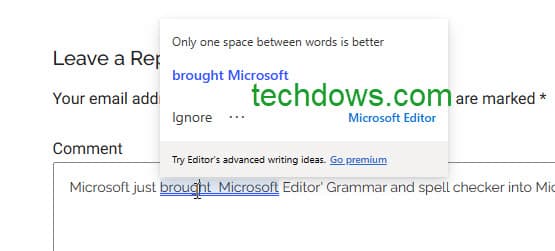
So from now on, Microsoft Edge will show you squiggly lines for misspellings and blue squiggly lines for grammar suggestions when you type into a text box.
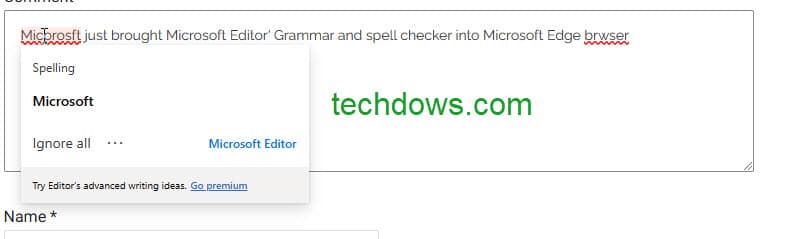
Click on an error to see what Microsoft Editor suggests, you can choose to correct the spelling or grammar or ignore the suggestion.
Microsoft promises it is working to expanding the feature.
Microsoft Edge already comes with Spellchecker by default, the browser offers grammar tools in Immersive Reader, now Microsoft is aiming to make you a better writer with Microsoft Editor’s spellcheck and basic grammar features in Microsoft Edge browser.
How do you react to this? Do you welcome this? Which Grammar extension do you use in the Edge browser? Let us know in the comments below.
More on Microsoft Edge:
Microsoft Edge Apps Interface refreshed with Grid view, Sorting options, and more
Microsoft Edge Web Widget gets Visual Refresh for Windows 11
Microsoft Edge adds Picture in Picture button to Videos
Microsoft Edge let you Save Pages as PDF from Context Menu





