Netlogon is the Windows service that connects domain-joined computers to Active Directory domain controllers, handling sign-in requests, domain controller discovery and the computer's secure channel to the domain.
This guide explains what the service does on members and domain controllers, how a Netlogon logon works step by step, where the NETLOGON folder and logs are, and how to fix the errors it reports.
What is Netlogon?
The name covers three related things: the Netlogon service, the Netlogon Remote Protocol (MS-NRPC) it speaks, and the NETLOGON shared folder on every domain controller.
The service runs inside lsass.exe and only runs when the computer is joined to an Active Directory domain. On a PC joined only to Microsoft Entra ID, or on a workgroup PC, it does not run.
Leave the Netlogon service running on every domain-joined Windows PC and server. Without it, the computer cannot find a domain controller, cannot pass NTLM sign-ins to the domain, and cannot keep its computer account password in sync, so domain sign-ins fail.
What does the Netlogon service do?
Netlogon has a shorter job list on domain members and a longer one on domain controllers. Every duty below comes from Microsoft's description of the service.
| Duty | Domain members | Domain controllers |
|---|---|---|
| Pass NTLM sign-in requests to a domain controller | Yes | Yes, and validates them |
| Verify the Kerberos Privilege Attribute Certificate (PAC) | Yes | Yes |
| Discover a domain controller (DC locator) | Yes | Answers clients with their site |
| Manage the computer account password | Yes | Yes |
| Manage service principal names (SPNs) | Host SPNs | Domain controller SPNs too |
| Share the SYSVOL and NETLOGON folders after startup | No | Yes |
| Register A, AAAA and SRV records in DNS | No | Yes |
| Maintain trust passwords and the list of trusted domains | No | Yes |
Netlogon depends on the Workstation (LanmanWorkstation) service. On domain controllers it also depends on the Server (LanmanServer) service, so a failure in either one stops Netlogon too.
How the Netlogon process works
Microsoft calls the core mechanism pass-through authentication: a server that receives a sign-in passes it through to a domain controller, because only the domain controller knows the user's password.
| Stage | What happens |
|---|---|
| 1. Domain controller location | Netlogon queries DNS for the domain's SRV records, such as _ldap._tcp.dc._msdcs.<domain>, and contacts a domain controller, preferring one in the client's site. |
| 2. Secure channel setup | The member and the domain controller compute a session key from a shared secret, the computer account password. Traffic between them is then encrypted. Microsoft calls this a workstation secure channel. |
| 3. User signs in | A user connects to a server, and the client and server run an authentication protocol such as NTLM. This is a network logon. |
| 4. Pass-through | The server's Netlogon service sends the logon request to the domain controller over the secure channel. |
| 5. Validation | The domain controller checks the credentials and returns the user validation information (the account attributes used for authorization) over the same channel. |
| 6. Access decision | The server uses that information to grant or refuse access, for example to a shared file. |
| 7. Trusts (when needed) | If the account lives in another domain, the domain controller forwards the request over a trusted domain secure channel, backed by a trust password, to a domain controller in the account's domain. Transitive trusts chain several of these channels. |
The protocol travels over remote procedure call (RPC) and mailslot datagrams. NTLM depends on it for pass-through, and Kerberos uses it to verify PAC signatures.
Where is the Netlogon folder?
The NETLOGON share exists only on domain controllers. It is the scripts folder inside the domain's SYSVOL tree, and clients read logon scripts from it.
| Item | Location | Notes |
|---|---|---|
| NETLOGON share (logon scripts) | %SystemRoot%\SYSVOL\sysvol\<domain name>\scripts on each domain controller |
Open it from a client as \\<DC name>\NETLOGON; it replicates with SYSVOL |
| Netlogon debug log | %windir%\debug\netlogon.log |
Written only when debug logging is turned on |
| Netlogon.dns | %SystemRoot%\System32\Config\netlogon.dns |
The DNS records a domain controller registers; useful with non-Microsoft DNS |
| Service binary | C:\Windows\system32\lsass.exe |
Netlogon runs as a shared process inside LSASS |
| Service settings | HKEY_LOCAL_MACHINE\SYSTEM\CurrentControlSet\Services\Netlogon |
Start type, dependencies and the Parameters subkey |
Windows Server 2016 is the last release that supports the older File Replication Service (FRS) for SYSVOL. Newer domain controllers require DFS Replication to replicate SYSVOL and the NETLOGON folder.
Check the Netlogon service status with sc qc
Use this to confirm the service's start type and dependencies before you troubleshoot anything else.
sc qc netlogonOpen Command Prompt as administrator and run the line. It prints the service's configuration from the Service Control Manager, including START_TYPE, BINARY_PATH_NAME and DEPENDENCIES.
You should see: On a domain controller you see START_TYPE : 2 AUTO_START, BINARY_PATH_NAME : C:\Windows\system32\lsass.exe and dependencies LanmanWorkstation and LanmanServer.
The same details appear in Services (services.msc) under the service's Dependencies tab.
How to start the Netlogon service
Netlogon starts automatically on a domain-joined computer. Start it by hand only after you fix whatever stopped it, and check its service dependencies first: if the Workstation service, or Server on a domain controller, is disabled, Netlogon cannot start either.
- Press Windows + R, type
services.mscand press Enter. - Find Workstation in the list. If its Startup type is Disabled, open it, set Startup type to Automatic, click Apply and then Start.
- Double-click Netlogon and set Startup type to Automatic if it shows anything else.
- Click Start, then OK, and confirm the Status column shows Running.
- To do the same from the command line, open Command Prompt as administrator and run
net start netlogon.
If the service starts and immediately stops, or Windows reports error 126 or error 2, use the startup failure fixes in the troubleshooting section below.
Test the Netlogon secure channel with PowerShell
A broken secure channel is the most common Netlogon failure on a member PC. This cmdlet tests it through the Netlogon service.
Test-ComputerSecureChannel -VerboseRun it in Windows PowerShell opened with Run as administrator on a domain member. Add -Repair to remove and rebuild the channel if the test fails; that needs local administrator rights.
You should see: The cmdlet returns True when the secure channel to the domain works and False when it does not.
Do not run this cmdlet on a domain controller; it returns false errors there. On domain controllers, use nltest /sc_query:<domain> to report the channel state, or nltest /sc_verify:<domain> to check it and rebuild it if it is broken.
Find which domain controller Netlogon uses with nltest
nltest /dsgetdc:<domain name>Replace <domain name> with your domain, such as contoso.com. The command queries DNS for domain controllers and contacts them to check connectivity, which is the DC locator step of the Netlogon process.
You should see: The output names a domain controller, its address and the domain, followed by The command completed successfully.
nltest /dclist:<domain name> lists every domain controller in the domain. If no domain controller is returned, check that the PC uses the domain's DNS servers.
Enable Netlogon debug logging to netlogon.log
Turn on logging when you need to see authentication, DC locator or account lockout activity. It applies to Windows 10, Windows 11 and supported Windows Server versions.
- Open Command Prompt as administrator.
- Type
nltest /dbflag:0x2080ffffand press Enter to turn on verbose logging. - Open
%windir%\debug\netlogon.logand check that new lines are being written. - If nothing new appears, run
net stop netlogonand thennet start netlogon. - Reproduce the sign-in or lockout problem, then read the new entries in the log.
- Run
nltest /dbflag:0x0to turn logging off when you finish.
For many computers, use the Group Policy setting Computer Configuration > Administrative Templates > System > Net Logon > Specify log file debug output level. The decimal value 545325055 equals 0x2080FFFF. Scope it to the affected computers, not the Default Domain Policy.
Netlogon protocols and security: secure RPC and CVE-2020-1472
The Netlogon Remote Protocol (MS-NRPC) is the RPC interface a domain controller exposes for user and machine authentication on domain networks. Members and domain controllers also use it to discover, manage and maintain domain and trust relationships.
The Zerologon vulnerability is CVE-2020-1472, the Netlogon elevation of privilege flaw patched in the August 2020 security updates. Within weeks, red teams and real attackers were scanning for unpatched domain controllers; in the cases Microsoft observed, attackers already had a foothold in the network and used Zerologon to reach domain controllers.
In 2020 Microsoft closed CVE-2020-1472, a flaw that allowed Netlogon secure channel connections without secure RPC. Since the February 9, 2021 updates, domain controllers enforce secure RPC for every Windows device, and only accounts named in a Group Policy allow list are exempt.
| NETLOGON event ID | Level | Meaning |
|---|---|---|
| 5827 | Error | A vulnerable secure channel connection from a machine account was denied |
| 5828 | Error | A vulnerable secure channel connection using a trust account was denied |
| 5829 | Warning | A vulnerable connection was allowed (logged only before enforcement) |
| 5830 | Warning | A machine account was allowed because it is on the Group Policy allow list |
| 5831 | Warning | A trust account was allowed because it is on the Group Policy allow list |
Events 5827 and 5828 usually point at an old or non-Windows device that cannot use secure RPC. Update or retire it rather than adding it to the allow list.
Fix common Netlogon errors
The NETLOGON share is not showing up on a domain controller
SYSVOL has not finished replicating, often because an upstream domain controller stopped DFS Replication after a dirty shutdown (event 2213).
- From another computer, run
net view \\<DC name>and check whether SYSVOL and NETLOGON are listed. - Open the DFS Replication event log in Event Viewer on each domain controller and look for event 2213 or 4012.
- Follow the recovery action the 2213 event describes on the upstream domain controller rather than deleting the DFS Replication database.
- Back up the SYSVOL contents on each domain controller before any authoritative or non-authoritative resync.
- Wait for event 4604, which shows SYSVOL has initialized, then run
net viewagain.
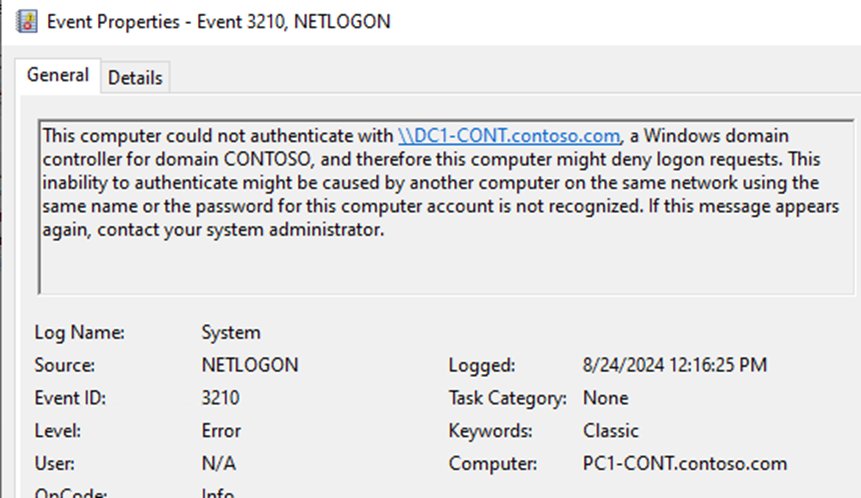
"The trust relationship between this workstation and the primary domain failed" (event 3210)
The computer's account password no longer matches the one in Active Directory, for example after a domain controller was restored from an old backup.
- Sign in with a local administrator account or cached credentials.
- Open Windows PowerShell as administrator and run
Test-ComputerSecureChannel. - If it returns
False, runTest-ComputerSecureChannel -Repair -Credential (Get-Credential)and enter a domain account allowed to reset the computer account. - Run
Test-ComputerSecureChannelagain and confirm it returnsTrue, then restart and sign in with your domain account.
Netlogon event ID 5719 at startup
The network was not ready when Netlogon tried to reach a domain controller, which is common with Gigabit adapters or 802.1x network authentication.
- Check whether the event appears only at startup and sign-in still works afterwards; if so, it is a timing message.
- Run
nltest /dsgetdc:<domain name>after sign-in to confirm a domain controller is reachable. - If no domain controller is returned, confirm the network adapter uses the domain's DNS servers.
- On Windows 10 and later, look for cannot pick trusted DC in
netlogon.loginstead of event 5719, which those versions no longer log in this case.
The Netlogon service will not start (events 7001, 7003 or error 126)
A service Netlogon depends on is disabled, a dependency entry is invalid, or a system DLL is missing.
- Open the System log in Event Viewer and find the Service Control Manager event that names the failed dependency.
- Open Services, set that service (for example Workstation) to its normal startup type, and start it.
- For event 7003, open the Netlogon registry key and remove the invalid entry from the
DependOnServicevalue. - For error 126, run
sfc /scannowfrom an elevated Command Prompt to restore missing system files. - Start Netlogon from Services and confirm its status shows Running.
Netlogon started and then stopped, or its status shows Paused
Wrong registry permissions on the service key stop it at boot. On a domain controller, a paused Netlogon usually means SYSVOL initial replication has not finished, the directory service is paused, or an administrator paused it.
- If Windows reports The Netlogon service on Local Computer started and then stopped, open the Netlogon registry key's permissions and remove any Deny entry for SYSTEM or Administrators.
- If the status shows Paused, open
netlogon.logand look for Netlogon Service Paused, NlInit: DS is paused, Waiting for RPCSS or SysVol not ready. - For an administrator pause, run
net continue netlogon. - For SysVol not ready, fix SYSVOL replication first; Netlogon resumes and shares SYSVOL and NETLOGON once replication completes.
Additional symptoms when the Netlogon service is not running
Other services and tools rely on Netlogon, so they log their own errors when it is stopped.
- Look in the System log for Windows Time events 159 or 130 and Group Policy event 1110; they often follow a stopped Netlogon service.
- Treat
nltest /sc_queryfailing with status 1722 (RPC server unavailable) as the same cause. - Treat
net usefailing with System error 1792 (the network logon service was not started) as the same cause. - Expect DC locator to fail with error 1355 until the service runs again.
- Start Netlogon, then restart the Windows Time service so it picks up domain peers again.
On a domain controller, you can also confirm the computer account still exists in Active Directory Users and Computers before you repair a broken trust.
Can you disable the Netlogon service?
Do not disable Netlogon on a domain-joined computer; on a workgroup or Entra-only PC it does not run, so there is nothing to disable. On a domain member, stopping Netlogon breaks domain controller discovery, NTLM pass-through sign-ins and computer password changes. On a domain controller it also stops the SYSVOL and NETLOGON shares and DNS record registration.
Netlogon service FAQ
What is the Netlogon service in Windows 11?
It is the same service as in other Windows versions: it finds a domain controller, passes sign-ins to it and manages the computer account password. On a Windows 11 PC that is not joined to an Active Directory domain, Netlogon does not run.
What is Netlogon in Active Directory?
In Active Directory, Netlogon is the service and protocol that carries authentication between members and domain controllers. On domain controllers it also shares SYSVOL and NETLOGON, registers DNS records and maintains trust passwords.
What is the NETLOGON folder?
The NETLOGON folder is a share on every domain controller that holds logon scripts. It maps to the scripts folder in the domain's SYSVOL tree and replicates to all domain controllers with SYSVOL.
Where is the NETLOGON folder on a domain controller?
It is at %SystemRoot%\SYSVOL\sysvol\<domain name>\scripts by default. From a client, open \\<DC name>\NETLOGON to reach the same folder.
Where is netlogon.log located?
The log is at %windir%\debug\netlogon.log, normally C:\Windows\debug\netlogon.log. Windows writes to it only after you turn on debug logging with nltest /dbflag:0x2080ffff.
Where is netlogon.dns?
Netlogon.dns is in %SystemRoot%\System32\Config on each domain controller. It lists the DNS records the domain controller registers, starting with its LDAP SRV record, and you can open it in Notepad.
Can I disable the Netlogon service?
Not on a domain-joined computer, because domain sign-ins and computer password changes stop working. On a workgroup PC or one joined only to Microsoft Entra ID, Netlogon does not run in the first place.
What does Netlogon event ID 5719 mean?
Event 5719 means Netlogon could not set up a secure session with a domain controller, usually because the network was not ready at startup. If sign-in works afterwards, it is a timing issue; otherwise check DNS and domain controller reachability.
Where are Netlogon logon scripts stored?
Logon scripts go in the NETLOGON share, which is the scripts folder under SYSVOL on a domain controller. Anything you place there replicates to the other domain controllers in the domain.
Why is the NETLOGON share not showing up?
A domain controller shares NETLOGON only after SYSVOL is initialized. A missing share usually means SYSVOL replication has stalled, often after a dirty shutdown on an upstream domain controller logged event 2213.