A BAK file is a backup copy that a program saves before it overwrites a file, and you open it with the same program that made it, usually after renaming the extension back to the original.
This guide shows how to tell which app created a BAK file, how to restore AutoCAD and SQL Server backups, and how to set or remove the .bak file association in Windows 11 and 10.
How to open a BAK file in Windows
Most BAK files sit next to the file they back up, with the same name. That neighbour tells you which program and which extension to use.
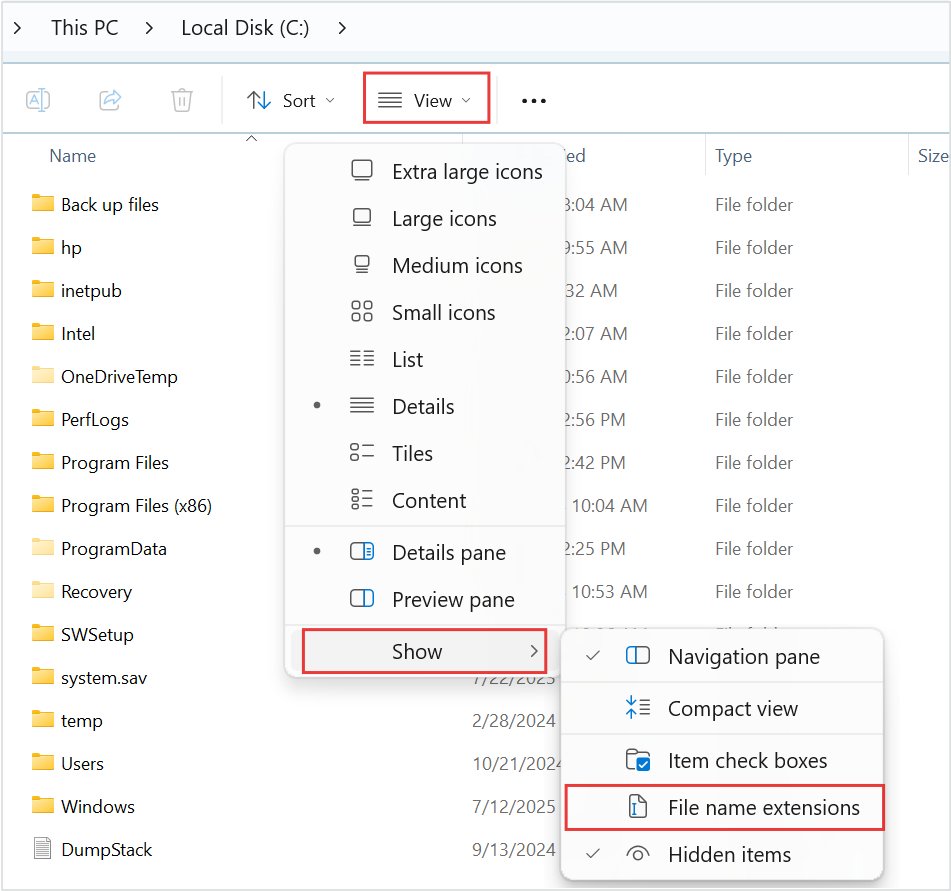
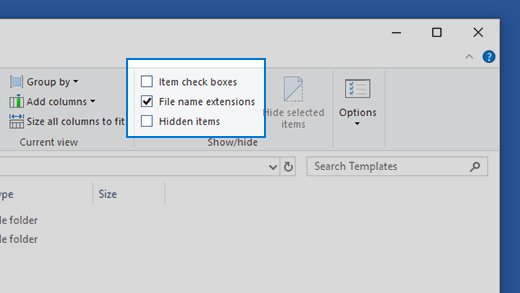
- Open File Explorer and select View > Show > File name extensions so the real extension is visible.
- Look in the same folder for a file with the same name but a different extension, such as
plan.dwgbesideplan.bak. - Right-click the BAK file, select Copy, then paste so you work on a copy and keep the original backup.
- Right-click the copy, select Rename and replace
.bakwith the original extension, for example.dwg. - Select Yes when Windows warns that changing the extension might make the file unusable.
- Double-click the renamed copy to open it in its program.
Renaming only changes the name; it does not convert the file. If the BAK came from a database server such as SQL Server, restore it inside that software instead of renaming it.
What is a BAK file in Windows?
BAK is short for backup. Windows itself does not own the extension, so there is no single BAK format: each program writes its own data under that name. Unlike a partially downloaded .crdownload file, a BAK file is a complete copy.
| Source | Why the BAK file is created | What is inside |
|---|---|---|
| AutoCAD and AutoCAD LT | Saved in the drawing's folder each time you save, when the ISAVEBAK system variable is 1 (the default) | The previous version of the DWG drawing |
| Microsoft SQL Server | Created by a database backup job or the BACKUP statement | A full, differential or log backup set, often several sets in one file |
| Text editors and config tools | Written before an edit or update replaces a settings file | Usually plain text, readable in Notepad |
| Manual backups | A person or script renamed a file to .bak before changing it | Whatever the original file was |
Every type of BAK file works the same way: the program keeps the previous copy under the .bak name, so restoring it returns you to the last good version after a bad save, a broken edit or a lost database.
What opens a BAK file?
| Where the BAK file came from | Open it with | How |
|---|---|---|
| Sits next to a .dwg drawing | AutoCAD or another DWG app | Copy, rename .bak to .dwg, open |
| Database server backup folder, large file | SQL Server Management Studio | Restore Database > Device |
| Sits next to a .txt, .ini, .xml or .cfg file | Notepad | Open with Notepad, or rename to the original extension |
| Unknown origin | Notepad first, to read any header text | See the unknown file type steps below |
| You want to view or open the BAK online | Notepad or the original program instead | Online openers upload the whole backup, which may hold private data, and cannot read a format they do not know |
Restore an AutoCAD BAK file to DWG
Autodesk documents this as the supported way to revert to the previous version of a drawing. AutoCAD saves the BAK file in the same folder as the DWG, including cloud-synced folders.
- Close the drawing in AutoCAD.
- In File Explorer, turn on View > Show > File name extensions.
- Open the drawing's folder and find the file with the same name and a
.bakextension. - Copy it and give the copy a different name so it cannot overwrite the current DWG.
- Rename the copy's extension from
.bakto.dwgand confirm the warning. - Open the renamed file in AutoCAD.
To stop AutoCAD creating BAK files, enter ISAVEBAK at the command line and set it to 0. The same setting appears as Create Backup Copy with Each Save on the Open and Save tab of the Options dialog box.
Restore a SQL Server BAK file in SSMS
A SQL Server BAK file is not a document and renaming it does nothing useful. Restore it into a SQL Server instance with SQL Server Management Studio.
- Open SQL Server Management Studio and connect to your instance in Object Explorer.
- Right-click Databases and select Restore Database….
- On the General page, under Source, select Device.
- Select the browse (…) button to open Select backup devices.
- Select Add, browse to the .bak file and select OK, then OK again.
- Pick the database under Source, check the sets in Backup sets to restore, and select OK.
Restore a .bak database with the T-SQL RESTORE statement
Run this in a query window connected to the target instance. Replace the database name and path with your own.
RESTORE DATABASE Sales FROM DISK = 'E:\BAK\Sales.bak' WITH RECOVERY;RESTORE DATABASE reads the backup from the disk file and WITH RECOVERY leaves the database ready to use. Run RESTORE FILELISTONLY FROM DISK = 'E:\BAK\Sales.bak' first to list the data and log files inside, and RESTORE HEADERONLY to list the backup sets when one file holds several.
You should see: The query completes without an error and the database appears under Databases in Object Explorer, ready to use.
How to open unknown file type in Windows 11
When nothing sits beside the BAK file, inspect it first. Many programs write a readable name or version string near the start of the file.
- Right-click the BAK file and select Open with, then choose Notepad.
- Read the first lines: plain settings text means a text backup, while an app name or version string points to the program that made it.
- Close Notepad without saving.
- Right-click the file and select Properties to check Type of file, Location and the dates, which hint at what created it.
- Open the matching program and use its own Open or restore command on a copy of the file.
If Notepad shows mostly unreadable characters, the file is binary. That is normal for drawings and databases; it does not mean the backup is damaged.
Set or change file associations & extensions in Windows 11
If you open text-based BAK files often, set a default app for the .bak type. Extensions tell Windows which app opens a file and which icon to show.
- Open Settings and select Apps > Default apps.
- In the search box under Set a default for a file type or link type, type
.bak. - Select the result and choose the app, such as Notepad.
- Alternatively, right-click a BAK file, select Properties, and next to Opens with select Change.
- Select More apps, pick the app, check Always use this app, and select OK.
Changing the extension of one file, such as .bak to .dwg, is a separate job. Turn on View > Show > File name extensions in File Explorer, then rename the file.
Remove file type associations using Registry Editor in Windows 11
Settings lets you change a default app but has no button to clear one. A per-user file type registration lives under HKEY_CURRENT_USER\Software\Classes, and removing the .bak entry there clears a mapping added for your account only. Export the key first so you can undo the change.
- Press Win + R, type
regeditand select OK, then select Yes at the prompt. - Go to
HKEY_CURRENT_USER\Software\Classes\.bak. If the key does not exist, no per-user mapping is set. - Right-click the .bak key, select Export and save the .reg file somewhere safe.
- Right-click the .bak key again, select Delete and confirm.
- Close Registry Editor and sign out and back in.
- If BAK files still open in the old app, set a new default under Settings > Apps > Default apps.
Do not edit HKEY_CLASSES_ROOT directly; Microsoft documents it as a merged view meant to be read, not written. To restore the old mapping, double-click the exported .reg file.
Check that the restored BAK file opened correctly
- Right-click the renamed file, select Properties and confirm Type of file now shows the original extension, such as (.dwg).
- Open it in its program and confirm the content is the earlier version you expected.
- For SQL Server, expand Databases in Object Explorer and confirm the restored database is listed and not marked restoring.
- Save the recovered file under a new name before you delete any BAK copy.
Fix a BAK file that will not open or rename
Renaming BAK to DWG does not change the extension
File name extensions are hidden, so the file became plan.dwg.bak.
- In File Explorer, select View > Show > File name extensions.
- Rename the file again and remove the trailing
.bak. - Confirm the extension change warning.
The renamed file says it is damaged or the wrong format
The BAK file came from a different program than the one you guessed.
- Rename the copy back to
.bak. - Open it in Notepad and look for a program name near the top.
- Try the program that matches, or check the folder for a sibling file.
SQL Server cannot find backup history for the database
The backup was taken on another server, so the destination has no history for it.
- In Restore Database, select Device instead of Database.
- Add the .bak file through Select backup devices.
- Pick the backup sets and restore.
Converting a BAK file to PDF or DWG by renaming does not work
Changing an extension never converts the file format.
- Rename the BAK to its original extension only.
- Open it in the original program.
- Use that program's Save As, export or print to PDF option.
Can you delete .bak files?
Yes, a BAK file is only a backup, so deleting it does not break the program that made it. Whether you should depends on whether it is still your only way back.
| BAK file type | Safe to delete? | Warning |
|---|---|---|
| AutoCAD BAK next to a DWG | Yes, once the current drawing opens and looks right | It is the quickest way back to the previous save. Set ISAVEBAK to 0 if you never want them. |
| SQL Server database BAK | Only when a newer backup has been restored or checked | It may be the only copy the database can be restored from. |
| Text or config BAK | Yes, after the app works with the new settings | Keep it until the change is confirmed, since it holds the old settings. |
| Manual BAK of unknown origin | Not until you know what it backs up | Open it in Notepad first to see which program wrote it. |
Practical tips for BAK files
| Tip | Why it matters |
|---|---|
| Turn on View > Show > File name extensions before renaming | With extensions hidden, a rename produces plan.dwg.bak instead of plan.dwg |
| Rename or restore a copy, never the only BAK file | A wrong guess about the program cannot damage the original backup |
| Rename only to the original extension | Changing an extension never converts the file to another format |
Restore SQL Server BAK files with SSMS or RESTORE, not by renaming |
A database backup is not a document any app can open |
Run RESTORE FILELISTONLY and RESTORE HEADERONLY first |
They list the files and backup sets inside before anything is overwritten |
| Save the recovered file under a new name | The BAK stays available if the recovered version turns out wrong |
BAK file FAQ
What is a .bak file?
A .bak file is a backup copy that a program saves before it overwrites or changes a file. AutoCAD, SQL Server, text editors and many setup tools create them. The content depends on the program, so the file opens in the app that made it.
What type of file is .bak?
There is no single BAK file type or format. The extension only marks the file as a backup; inside, it may be an AutoCAD drawing, a SQL Server backup set or plain text. Check the folder for a file with the same name to learn its real type.
Why is a BAK file created?
Programs create BAK files as a safety net so you can return to the previous version after a bad save or edit. AutoCAD, for example, writes one each time you save when its ISAVEBAK setting is on, which is the default.
What opens a BAK file?
The program that created it. Rename an AutoCAD BAK to .dwg and open it in AutoCAD, restore a SQL Server BAK in SQL Server Management Studio, and open a text-based BAK in Notepad.
How do I open a BAK file in PDF?
You cannot convert a BAK file to PDF by renaming it. Rename it to its original extension, open it in the original program, then export or print it to PDF from there.
Can I open a .BAK file in Excel?
Only if the BAK file is a copy of an Excel workbook. Rename a copy to .xlsx or the original extension and open it in Excel. A BAK file from AutoCAD or SQL Server will not open in Excel.
Is it safe to delete BAK files?
Yes, once you no longer need the previous version, because a BAK file is only a backup copy. Deleting AutoCAD BAK files removes your quickest way back to the prior save, so keep them for drawings in active work.
Is a BAK file the same as a BAT file?
No. A .bat file is a Windows batch file that runs commands, while a .bak file is a backup copy of another file. Never rename a BAK file to .bat.
Is there a BAK file viewer or online opener?
No universal BAK viewer exists because each program stores different data under the extension. Use the original program, or Notepad for text-based backups, rather than uploading backups that may contain private data.
In summary: Which program opens a BAK file?
Open a BAK file with the program that created it: rename a copy to the original extension for drawings and documents, open text backups in Notepad, and restore SQL Server backups in SSMS. The .bak extension only marks a file as a backup, so no single viewer can read every BAK file, and renaming never converts one format into another.