To watch Sky Go on a laptop or PC, install the Sky Go desktop app from Sky, sign in with the account that holds your Sky TV subscription, and pick a live channel or an on-demand title.
This guide covers what your laptop needs, installing on Windows and Mac, signing in, live TV and on-demand viewing, Sky's subscription rules, and fixes for the problems people search for most.
How to watch Sky Go on a laptop or PC quickly
Sky Go is included with a Sky TV subscription at no extra cost, so there is nothing extra to buy.
- Confirm your Sky TV subscription is active, because Sky Go is for Sky TV customers only.
- Open Sky's compatibility lookup at
www.sky.com/help/articles/app-desktop-lookupand confirm your Windows or macOS version is supported. - Download the Sky Go desktop app from Sky's own website and run the installer.
- Open Sky Go from the Start menu on Windows or the Applications folder on a Mac.
- Sign in with the username and password of the Sky account that holds your TV subscription.
- Choose a live channel or an on-demand programme and press play.
What you need before watching Sky Go on a laptop or PC
Most failed first attempts come from one of these six requirements, so check them before you install anything.
| Requirement | What Sky or Microsoft states | How to check it |
|---|---|---|
| Sky TV subscription | Sky Go is available to Sky TV customers only, and what you can watch depends on your Sky TV subscription. | Sign in to your Sky account and look at the TV products listed. |
| Activated account | Sky asks you to allow up to 24 hours for a new Sky TV account to be activated for Sky Go. | If you joined Sky today, wait a day before you troubleshoot. |
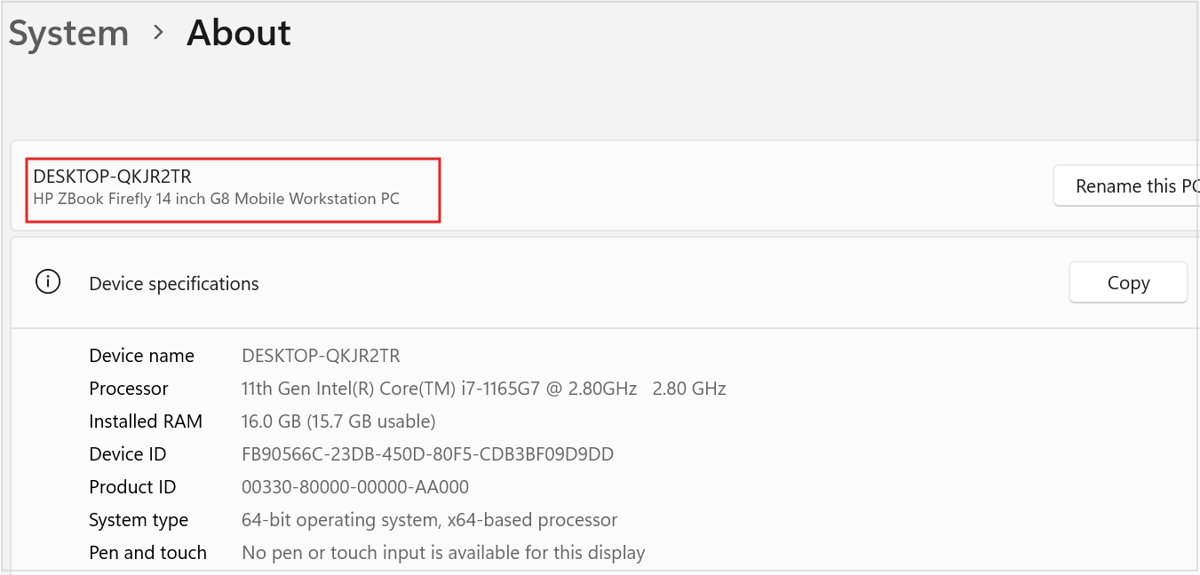
| Compatible device and software | Sky lists supported computers and operating system versions in its desktop lookup at sky.com/help/articles/app-desktop-lookup. | On Windows, right-click Start, choose Settings, select System, then About, and read Windows specifications. |
| Windows not in S mode | Windows in S mode runs only apps from Microsoft Store, so an installer downloaded from a website will not run. | Open Settings > System > Activation and see whether S mode is mentioned. |
| Internet connection | Sky Go streams over broadband or mobile data, and charges may apply on mobile data. | Use a wired connection or sit close to the router for the steadiest picture. |
| UK location for some channels | Sky states that ITV channels are available in the UK only. | Expect ITV channels to be missing if you open Sky Go outside the UK. |
How to download and install the Sky Go app
Sky Go on a computer is a desktop app supplied by Sky, and it installs like other apps on a Windows laptop. Get the installer from Sky's own website only, never from a download portal or a mirror site.
| Computer | Install steps | After installation |
|---|---|---|
| Windows laptop or PC | 1. Check the desktop lookup page for your Windows version. 2. Download the Sky Go installer from sky.com. 3. Open the downloaded file and follow the setup prompts. 4. Allow the installer to make changes if User Account Control asks. | Open Sky Go from the Start menu and pin it to the taskbar if you use it often. |
| Windows in S mode | Open Settings > System > Activation, find Switch to Windows 11 Pro, select Go to the Store, then select Get on the Switch out of S mode page. Install Sky Go afterwards. | Switching out of S mode is one-way and free; you cannot turn S mode back on. |
| Mac | 1. Check the desktop lookup page for your macOS version. 2. Download the Sky Go app for Mac from sky.com. 3. Open the download and follow the installer prompts. | Open Sky Go from the Applications folder and sign in. |
On Windows 10, the S mode switch sits under Settings > Update & Security > Activation instead, under Switch to Windows 10 Home or Switch to Windows 10 Pro. Do not use the Upgrade your edition of Windows link, which keeps you in S mode.
How to sign in and start watching Sky Go
Sign in with the same Sky account you use to manage your TV package. A Sky account without a TV subscription, such as broadband only, will not unlock Sky Go.
- Open the Sky Go app on your laptop or PC.
- Select the sign-in option and enter the username or email address of your Sky account.
- Enter your Sky account password and confirm.
- Browse live channels or on-demand programmes and select one to play.
- Use the player's full-screen control to fill the laptop screen.
If sign-in fails on a brand-new Sky TV account, wait the 24 hours Sky allows for activation before you reset your password.
Watching live TV, catch-up, and on-demand content
Sky Go offers three ways to watch on a laptop: live channels, catch-up and on-demand titles, and downloads for later. What appears in each depends on your Sky TV package.
| Way to watch | What you get | Limits Sky states |
|---|---|---|
| Live TV | Sky channels plus free-to-air channels including ITV, Channel 4 and 5. | Some live TV programmes are unavailable on Sky Go, and ITV channels work in the UK only. |
| Catch-up and on demand | TV shows, films and sport you choose to watch at any time. | Content depends on your Sky TV subscription. |
| Downloads | Shows and films saved to the device to watch later, as other services do when you download TV shows to watch offline. | Content available varies by device, so not every title can be downloaded on every computer. |
| Sky Box Office | Pay-per-view events and rentals. | Sky Box Office events and rentals are not available on Sky Go. |
| Continue across rooms | Pause on your TV in one room and pick up on a device in another. | Requires the same Sky account on both. |
Sky Go device limits and subscription rules
Sky ties Sky Go to the TV subscription, not to the computer, so the account rules decide what plays.
| Rule | What it means on a laptop or PC |
|---|---|
| Sky TV customers only | No Sky TV subscription means no Sky Go, even with a Sky account. |
| Included at no extra cost | Sky Go comes with the Sky TV subscription rather than as a separate paid plan. |
| Content follows your package | Channels outside your package, such as Sky Sports without a sports subscription, will not play. |
| Copy protection | Sky uses digital rights management and copy protection to control playback and copying, so recording or capture tools are not a supported way to watch. |
| Cancelling | Sky requires 31 days' notice to cancel a Sky TV subscription, and Sky Go access ends with it. |
How to check Sky Go is working on your laptop
- Play a live channel that is part of your package and confirm the picture starts after any adverts.
- Play an on-demand title and drag the progress bar to confirm it seeks without stopping.
- Confirm you hear sound; if not, open Settings > System > Sound > Volume mixer and check that Sky Go is not muted.
- Switch to full screen and confirm the picture fills the display.
If the app's own control does not fill the display, you can go full screen on Windows 11 with the system shortcuts instead.
How to fix common Sky Go problems on a laptop or PC
Why can't I watch Sky Go on my laptop?
The computer is not on Sky's supported list, Windows is in S mode, or the account has no Sky TV subscription.
- Check your Windows version under Settings > System > About and compare it with Sky's desktop lookup page.
- Open Settings > Windows Update and select Check for Windows updates, then install what is offered and restart.
- Check Settings > System > Activation for S mode and switch out of it if you accept that the change is permanent.
- Sign in to your Sky account in a browser and confirm a TV subscription is listed.
Sky Go keeps buffering or won't play on a laptop
Wi-Fi interference, distance from the router, or other programs using the connection.
- Move closer to the router and remove obstructions between the laptop and the access point.
- Keep 2.4 GHz devices such as cordless phones and microwaves away from the laptop while you watch.
- Close other programs that use the internet or a lot of memory.
- Connect with an Ethernet cable if your laptop has a port.
- Restart Sky Go and play the programme again.
Why can I not watch live sports on Sky Go?
Sports channels are outside your Sky TV package, or the specific live event is not offered on Sky Go.
- Check your Sky account for a sports subscription.
- Try another live sports channel in your package to rule out a blanket problem.
- Accept that some live programmes are not available on Sky Go even with the right package, and watch that event on your Sky box.
Why can't I watch BBC on Sky Go?
Sky lists Sky channels plus ITV, Channel 4 and 5 as the free-to-air channels on Sky Go; BBC channels are not among them.
- Open BBC iPlayer, the BBC's own service, in a browser or app on the same laptop.
- Sign in with a BBC account to watch BBC live channels and programmes.
Sky Go plays with no sound on Windows
The app is muted or sends audio to the wrong output in Windows.
- Open Start > Settings > System > Sound and select Volume mixer.
- Under Apps, make sure Sky Go is not muted and its slider is turned up.
- Confirm the correct Output device is selected for Sky Go.
- Open Device Manager, expand Sound, video and game controllers, right-click your audio device and select Update driver, then restart.
Sky Go sign-in fails on a new account
The Sky TV account has not been activated for Sky Go yet.
- Wait up to 24 hours after joining Sky TV.
- Sign in again with the same Sky account details.
- Reset your Sky password from Sky's sign-in page only if the error continues after 24 hours.
Sky Go on a laptop or PC: frequently asked questions
Can I watch Sky Go on my laptop?
Yes. Sky Go works on laptops for Sky TV customers through the Sky Go desktop app. Your computer must meet the requirements in Sky's desktop compatibility lookup, and you sign in with the Sky account that holds your TV subscription.
How do I watch Sky Go on a laptop with Windows 11?
Check Sky's desktop lookup for Windows 11 support, download the Sky Go app from sky.com, install it, and sign in with your Sky account. If the installer will not run, check whether Windows 11 is in S mode under Settings > System > Activation.
How do I watch Sky Go on a Mac?
Download the Sky Go app for Mac from sky.com, install it, open it from the Applications folder and sign in with your Sky account. Check Sky's desktop compatibility lookup first, because older macOS versions may not be supported.
Can I watch Sky Go online in a web browser?
Sky Go on a computer runs through Sky's desktop app. Sky's desktop compatibility lookup lists the supported computers and software, so use the app rather than a browser unless that page lists browser playback for your system.
Can I watch Sky Go on my TV?
Sky Go is built for mobiles, tablets and laptops rather than the TV. On the TV, watch through your Sky box. Sky uses copy protection on Sky Go, so connecting a laptop or phone to a TV may not show the picture.
Why can't I watch Sky Go on my tablet?
The tablet may not meet Sky's device and software requirements, the Sky TV account may still be activating, or the programme may not be offered on that device. Sky states that content available on Sky Go varies by device.
Can I watch Sky Go offline?
Yes, for titles that allow it. Sky Go lets you download shows and films to watch later without a connection. Which titles can be downloaded varies by device, so check for a download option on the programme page.
Why can I not watch live sports on Sky Go?
Live sport needs a sports subscription on your Sky TV package. Even with one, Sky states that some live TV programmes are unavailable on Sky Go, so a specific event may only be shown on your Sky box.
Why can't I watch BBC on Sky Go?
BBC channels are not among the channels Sky lists for Sky Go, which are Sky channels plus ITV, Channel 4 and 5. Use BBC iPlayer, the BBC's own service, to watch BBC programmes on a laptop.
Does Sky Go cost extra?
No. Sky Go is included with a Sky TV subscription at no extra cost. Sky Box Office events and rentals are not available on Sky Go, so pay-per-view purchases still need your Sky box.
Bottom line: is the Sky Go app the best way to watch on a laptop or PC?
Use the Sky Go desktop app from sky.com and sign in with the Sky account that holds your Sky TV subscription. It is included with Sky TV at no extra cost and covers live channels, on-demand titles and downloads, as long as your computer passes Sky's compatibility lookup and Windows is not in S mode.