Type the pi symbol (π) on Windows by holding Alt and typing 227 on the numeric keypad, or in Word by typing 03C0 and pressing Alt + X.
This guide covers Windows, Mac, Linux, Chromebook, iPhone, iPad and Android, plus the codes for Word, Excel, Google Docs, HTML, CSS, JavaScript and LaTeX.
Quick ways to type π
Find your device in the first column and press the keys in the second. Every route below produces the standard Greek small letter pi, U+03C0.
| Device or app | Fastest way to type π | Note |
|---|---|---|
| Windows, keyboard with a numeric keypad | Hold Alt, type 227 on the keypad, release Alt |
Num Lock must be on |
| Windows laptop with no keypad | Windows key + ., then pick π from Symbols | Works in any text box |
| Microsoft Word | Type 03C0, then press Alt + X |
Word swaps the code for π |
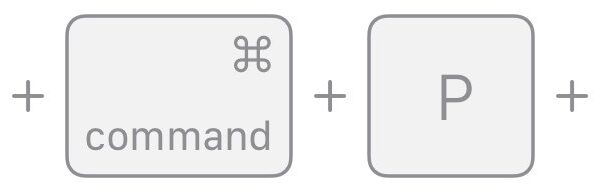
| Mac | Control + Command + Space bar, search pi, click π |
Opens the Character Viewer |
| Linux (GTK and Qt apps) | Ctrl + Shift + U, type 3c0, press Enter |
Releases into π at the cursor |
| Chromebook | Ctrl + Shift + U, type 3c0, press Enter |
Built into ChromeOS |
| iPhone, iPad or Android | Add the Greek keyboard, switch to it, tap π | One-time setup, then one tap |
| Anywhere | Copy π from this page and paste it | No codes needed |
Which method should you choose?
| Your situation | Use this | Why |
|---|---|---|
| You type π once in a while | The emoji panel on Windows or Character Viewer on a Mac | Nothing to remember beyond one shortcut |
| You type π every day | A Greek keyboard layout or a text replacement | One keystroke or a short word, every time |
| You write maths in Word | An equation with \pi |
Word formats the whole expression as maths |
| You need π inside a calculation | PI() in Excel or Google Sheets |
The character is text; the function is the number |
| You are writing a web page or script | π in HTML, \3C0 in CSS, \u03C0 in JavaScript |
Survives any file encoding |
| You need the italic maths form 𝜋 | Its own code point, U+1D70B | Alt codes and keyboards give the upright π |
Pi symbols and their Unicode codes
Unicode carries several pi characters. The one people mean by "the pi symbol" is the Greek small letter pi, U+03C0, the 16th letter of the Greek alphabet.
| Character | Unicode name | Code point | HTML entity |
|---|---|---|---|
| π | Greek small letter pi | U+03C0 | π or π |
| Π | Greek capital letter pi | U+03A0 | Π |
| ϖ | Greek pi symbol (variant pi) | U+03D6 | ϖ |
| ∏ | N-ary product | U+220F | ∏ |
| 𝜋 | Mathematical italic small pi | U+1D70B | 𝜋 |
| 𝛑 | Mathematical bold small pi | U+1D6D1 | 𝛑 |
| ℼ | Double-struck small pi | U+213C | ℼ |
In older 8-bit code pages π sat at position 0xE3 (decimal 227) in code page 437 and at 0xB9 in Mac OS Roman. That is where the Windows Alt code 227 comes from.
Which pi character should you use?
| You are writing | Use | Reason |
|---|---|---|
| The constant 3.14159 in ordinary text | π (U+03C0) | Every font with Greek letters has it, so it displays everywhere |
| Greek words | π (U+03C0) | The mathematical letters are meant for maths, not language |
| A typeset formula in plain text | 𝜋 (U+1D70B) | Matches the italic style of variables in printed maths |
| A product of a series | ∏ (U+220F) | The n-ary product operator, not the capital letter |
| Angular frequency or another specialist meaning | ϖ (U+03D6) | The variant pi, a separate character |
Using the mathematical letters to spell words, or the reverse, gives uneven spacing and mismatched glyphs. Stick to π unless a style guide asks for 𝜋.
Why you may get π instead of 𝜋
Every keyboard route produces the upright letter π. The italic 𝜋 is a different character with a five-digit code, so it needs a route that accepts long codes.
| Route | Gives π (U+03C0) | Can give 𝜋 (U+1D70B) |
|---|---|---|
Windows Alt + 227 |
Yes | No |
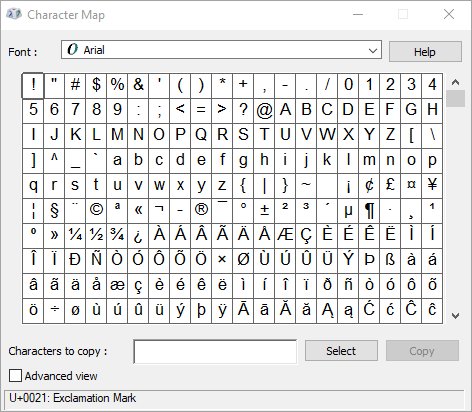
| Windows Character Map | Yes | No, it only shows the Basic Multilingual Plane |
Word, 03C0 then Alt + X |
Yes | Yes, type 1D70B then Alt + X |
| Greek keyboard layout on any device | Yes | No |
| Linux and ChromeOS Ctrl + Shift + U | Yes, with 3c0 |
Yes, with 1d70b, where the app supports it |
| HTML | π |
𝜋 |
A Word equation shows π in italic maths styling. That is formatting applied by the equation editor, and it is why copied equation text can look different in another app.
How to type π on Windows
The Alt code is the fastest route on a desktop keyboard. It uses the original code page 437 position of π, so it needs the numeric keypad.
- Click where π should go.
- Press Num Lock if its light is off.
- Hold Alt and type
227on the numeric keypad, not the top number row. - Release Alt, and π appears at the cursor.
Do not add a leading zero. 0227 selects the Windows code page instead, which places a different letter at that number.
If your keypad does nothing, turn on Num Lock first; the same keypad rule applies when you type the degree symbol.
How to type 𝜋 in other Windows apps
Teams, Outlook, browsers and Notepad all accept the Windows emoji panel, which carries a Symbols category. Character Map is the fallback for any app that ignores both.
- Click in the text box where π should go.
- Press Windows key + . (period) or Windows key + ; (semicolon) to open the emoji panel.
- Select Symbols in the category row and browse to π.
- If the panel does not suit the app, press the Windows key, type
Character Mapand press Enter. - Select Advanced view, set Character set to Unicode, then type
03C0in Go to Unicode. - Click Select, then Copy, and press Ctrl + V in your app.
Neither tool reaches the italic 𝜋. For that character, build it in Word with 1D70B and Alt + X, then copy it into the other app.
How to type π in Microsoft Word and Microsoft 365
Word, Outlook and other Office apps that convert Unicode codes turn 03C0 into π when you press Alt + X. PowerPoint is the exception in Microsoft's own list.
| Route | Do this | Result |
|---|---|---|
| Unicode code | Type 03C0, then press Alt + X |
The code turns into π |
| Code after other digits | Type U+03C0, then press Alt + X |
Word converts only the code after U+ |
| Symbol dialog | Insert > Symbol > More Symbols, change the font or subset to find π, then double-click it | π lands at the cursor; select Close |
| Alt code | Hold Alt and type 227 on the numeric keypad |
Same character, no code left to convert |
| PowerPoint | Copy π from Character Map and paste it | PowerPoint does not convert Unicode codes |
How to type 𝜋 in Microsoft Word
Word's equation editor understands \pi in both its UnicodeMath and LaTeX input formats. Math AutoCorrect converts the keyword when you press Space, Enter or a punctuation mark.
- Click where the formula should go.
- Press Alt + = to insert an equation.
- Type
\piand press Space; Word shows π in maths styling. - Finish the formula, then click outside the equation box.
- For the separate italic character 𝜋 in normal text, type
1D70Band press Alt + X instead.
The codes are case-sensitive: \pi gives π and \Pi gives Π.
How to type π on a Mac
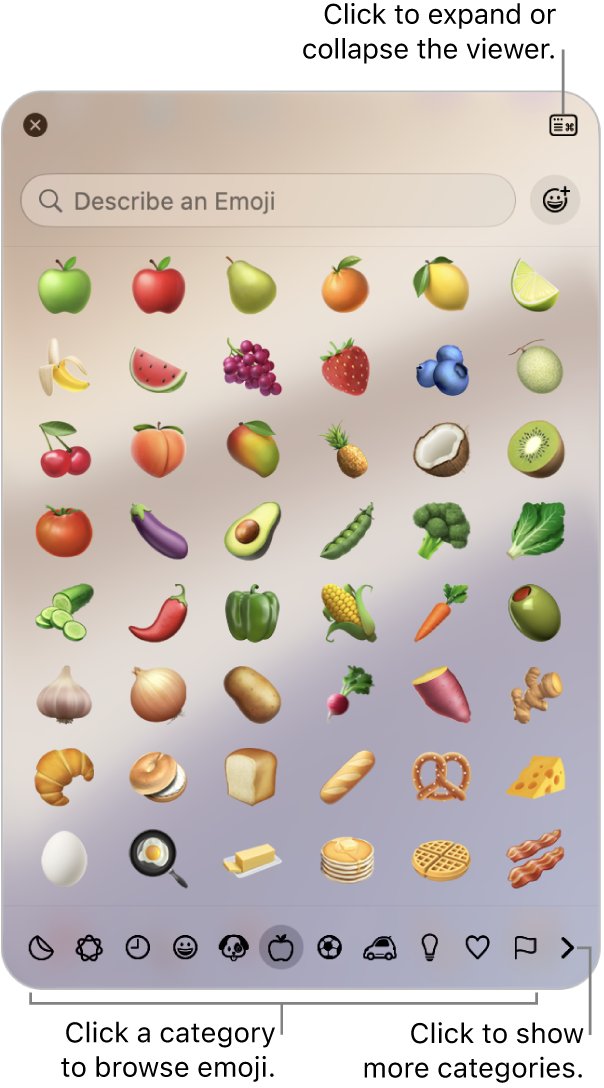
The Character Viewer is the documented route on every Mac. It opens over the app you are typing in and inserts at the cursor.
- Click where π should go.
- Press Control + Command + Space bar, press Fn + E or Globe + E, or choose Edit > Emoji & Symbols.
- Type
piin the search field. - Click π to insert it; double-click if the viewer is expanded.
- Select π again and click Add to Favorites to keep it at the top of the viewer.
To find a key combination for π on your layout, choose Show Keyboard Viewer from the Input menu, then hold Option and look for π on the onscreen keys.
For 𝜋 on a Mac, expand the Character Viewer and browse its maths symbols. Mac emoji and symbol shortcuts work the same way for every other character.
Type π on a Mac with Unicode Hex Input
The Unicode Hex Input source lets you type any four-digit code while holding Option. Add it once and switch to it whenever you need a symbol.
- Choose Apple menu > System Settings, then click Keyboard in the sidebar.
- Go to Text Input and click Edit.
- Click the Add button, search for
Unicode Hex Input, select it and click Add. - Switch to it from the Input menu, or press Control + Option + Space bar.
- Hold Option, type
03C0, then release Option to get π.
Press Control + Space bar to switch back to your previous input source.
How to type π on iPhone and iPad
The standard iPhone keyboard has no pi key. Adding the Greek keyboard gives you one, and you only do it once.
- Open the Settings app and tap General, then Keyboard.
- Tap Keyboards, then Add New Keyboard, and choose Greek.
- In any text field, touch and hold the globe or emoji key and tap the Greek keyboard.
- Tap π, then switch back to your usual keyboard the same way.
To type pi on iPhone or iPad without switching keyboards, set up a text replacement once, as shown in the reusable shortcuts table below.
How to type π on Android
Gboard adds keyboard languages without changing the phone's own language. A Greek layout puts pi on the keyboard.
- Open any app you can type in and tap a text field.
- Tap Settings at the top of the keyboard.
- Tap Languages > Add keyboard, pick Greek, choose a layout and tap Done.
- Touch and hold the space bar to switch to Greek.
- Tap π, then touch and hold the space bar again to switch back.
You can also add it from Settings > System > Keyboard > On-screen keyboard > Gboard > Languages. Samsung and other keyboards differ, so copying π is the fallback there.
How to type π on a Chromebook
ChromeOS handles Unicode entry itself, so the same shortcut works in every app. The code is the hex number without the U+ prefix.
- Click where π should go.
- Press Ctrl + Shift + U; an underlined u appears.
- Type
3c0. - Press Enter or Space to turn it into π.
- For 𝜋 on a Chromebook, type
1d70bat step 3 instead.
For a Greek layout instead, select the time, then Settings > Device > Keyboard > Change input settings, and add Greek under Input methods. Press Ctrl + Shift + Space to switch layouts.
How to type π on Linux
GTK and Qt applications, which covers GNOME and KDE desktops, accept the same Unicode shortcut as ChromeOS.
- Click where π should go.
- Press Ctrl + Shift + U and release the keys.
- Type
3c0. - Press Enter or Space to insert π.
- For 𝜋 on Linux, type
1d70bat step 3 instead.
Some setups also accept the code while you keep Ctrl + Shift held, ending when you release them. Apps outside GTK and Qt may ignore both forms, so use GNOME Characters, gucharmap or KCharSelect to copy π instead.
How to type π in Google Docs, Slides, and Sheets
Docs and Slides have a special characters picker that searches by Unicode value. Sheets has no picker, so you paste the character or build it with a formula.
- Open the document or presentation and click where π should go.
- Click Insert > Symbols > Special characters.
- Type
03C0in the search box, or draw π in the box on the right. - Click π to add it to the file.
- To insert 𝜋 in Google Docs, search for
1D70Binstead. - In Sheets, paste the copied character into a cell, or enter
=UNICHAR(960).
Excel: π versus the PI() function
The π character is only a label. Any formula that needs the number must use PI(), which takes no arguments.
| You need | Enter | Result |
|---|---|---|
| The value of pi | =PI() |
3.14159265358979, accurate to 15 digits |
| Half of pi | =PI()/2 |
1.570796327 at the default display |
| Area of a circle, radius in A3 | =PI()*(A3^2) |
28.27433388 for a radius of 3 |
| The π character in a cell | =UNICHAR(960) |
π as text |
| A label next to a result | ="π = "&ROUND(PI(),4) |
π = 3.1416 |
| Google Sheets | =PI() or =UNICHAR(960) |
Same functions; Google lists PI to 14 decimal places |
To use pi in Microsoft Excel as text, the Alt + 227 code also works while you edit a cell.
How to use π in HTML, CSS, and JavaScript
| Language | Code for π | Code for 𝜋 |
|---|---|---|
| HTML, named reference | π |
None |
| HTML, decimal reference | π |
𝜋 |
| HTML, hex reference | π |
𝜋 |
CSS string, for example in content |
"\3C0" |
"\1D70B" |
| JavaScript string | "\u03C0" |
"\u{1D70B}" |
| JavaScript number | Math.PI |
Approximately 3.14159 |
HTML character references such as π do not work inside a CSS string; CSS needs its own backslash escape.
A page saved as UTF-8 can also contain π typed directly, so the references matter mainly in templates and generated markup.
How to type π in LaTeX
LaTeX and equation markup use command names, and the same commands work in Word's LaTeX equation format.
| Command | Output | Use |
|---|---|---|
$\pi$ |
π (italic in maths mode) | The constant inside running text |
$A = \pi r^2$ |
A = πr² | A formula inside a sentence |
\Pi |
Π | Capital pi |
\varpi |
ϖ | Variant pi |
\prod |
∏ | Product operator |
\boldsymbol{\pi} |
Bold π | Vectors or emphasis |
Keep \pi inside maths delimiters such as $...$, because it is a maths-mode command.
Reusable shortcuts for frequent use
If you type π daily, set up one of these once and skip the codes from then on.
| Platform | Set it up | Then type |
|---|---|---|
| Word | File > Options > Proofing > AutoCorrect Options, open Math AutoCorrect and select Use Math AutoCorrect rules outside of math regions | \pi and Space anywhere in a document |
| Windows | Settings > Time & language > Language & region > Add a language, add Greek | Windows key + Space to switch, then the P key |
| Mac | System Settings > Keyboard > Text Replacements, click the add button, enter a shortcut and π | Your shortcut, such as pii |
| iPhone and iPad | In a text field, touch and hold the globe or emoji key, tap Keyboard Settings > Text Replacement, add π as the phrase | Your shortcut |
| Android | Add the Gboard Greek layout and turn on Show language switch key under Preferences | The switch key, then π |
| Chromebook | Add Greek under Input methods | Ctrl + Shift + Space, then π |
Pick a shortcut that is not a real word, such as pii, or the replacement fires in normal text. Text replacements made on a Mac and iPhone sync through iCloud.
How to check you typed the right pi character
π, 𝜋, Π and ∏ look alike at reading size. Check the code point before you send a document that will be searched or converted.
- Select the character you typed and press Ctrl + C.
- Press the Windows key, type
Character Mapand press Enter. - Select Advanced view, set Character set to Unicode, and type
03C0in Go to Unicode. - Read the Unicode value Character Map reports for the highlighted π.
- Paste your character beside the copy from Character Map and compare the two shapes.
If your character is missing from Character Map entirely, it is probably the italic maths pi 𝜋, which sits outside the range Character Map shows. Π (U+03A0) and ∏ (U+220F) are the other lookalikes.
Troubleshooting: when the pi shortcut fails
Alt + 227 does nothing on a laptop
The digits went in on the top row, Num Lock is off, or the keyboard has no numeric keypad.
- Press Num Lock and retype the code on the keypad while holding Alt.
- On a keyboard with no keypad, press Windows key + . and pick π from Symbols.
- Or enable the On-Screen Keyboard, open Options and select Turn on numeric keypad.
Alt + 227 types a different letter
A leading zero was typed, or the system uses an OEM code page other than 437, which stores another character at 227.
- Press Ctrl + Z to remove it.
- Retype
227with no leading zero. - If it still fails, use
03C0then Alt + X in Office, or the emoji panel elsewhere.
Alt + X does not convert 03C0
The app does not support Unicode conversion, or a digit before the code was read as part of it.
- Type
U+03C0instead, then press Alt + X. - In PowerPoint, copy π from Character Map and paste it.
- In apps outside Office, use the emoji panel.
Ctrl + Shift + U does nothing on Linux
The app is not a GTK or Qt program, or the input method does not handle Unicode entry.
- Try the held form: keep Ctrl + Shift down, type
u3c0, then release. - Open GNOME Characters, gucharmap or KCharSelect and copy π.
- Paste it with Ctrl + V.
The Mac shortcut does not open the Character Viewer
The viewer opens only where text can be entered.
- Click in a text field so a cursor appears.
- Choose Edit > Emoji & Symbols from the menu bar.
- If the app lacks that item, turn on Show Input menu in menu bar under System Settings > Keyboard > Text Input > Edit, then open the viewer from the Input menu.
Fixes when the symbol does not display correctly
π shows as an empty box or a question mark
The font has no glyph for the character and the app found no fallback font.
- Select the box and change the font to one that includes Greek letters.
- If it is 𝜋, replace it with π, which far more fonts include.
- Paste the text into another app to confirm the character itself is intact.
π looks different after you paste it
Word equations style π as maths, and the destination app uses its own font.
- Paste as plain text so the destination font applies.
- Compare it with π in Character Map to confirm the code point.
- If you need italic maths everywhere, use 𝜋 (U+1D70B) instead of styled π.
A web page shows π as text
The reference was escaped twice or placed inside a CSS string.
- Put
πdirectly in the HTML, not inside an already-escaped field. - In CSS, use
\3C0instead. - In JavaScript, use
\u03C0inside the string.
Pi symbol FAQ
How do you type the pi symbol on a keyboard?
On Windows, hold Alt and type 227 on the numeric keypad with Num Lock on. On a Mac, press Control + Command + Space bar and search for pi. On Linux and Chromebook, press Ctrl + Shift + U, type 3c0 and press Enter.
How do I type the pi symbol on a Windows PC?
Hold Alt and type 227 on the numeric keypad, then release Alt. Without a keypad, press Windows key + period to open the emoji panel and pick π from Symbols. Character Map, with Unicode code 03C0, is the third option.
How do I do the pi symbol on a laptop?
Press Windows key + period, open the Symbols category and click π. Alt codes need a numeric keypad, which most laptops lack. You can also turn on the numeric keypad in the On-Screen Keyboard and type Alt + 227 there.
How do I type the pi symbol in Word?
Type 03C0 and press Alt + X, and Word replaces the code with π. In an equation, press Alt + = and type \pi followed by a space. Insert > Symbol > More Symbols also lists π in the Greek characters.
How do I type the pi symbol in Teams?
Use a system route, because Teams has no pi shortcut of its own. On Windows, press Windows key + period and pick π from Symbols, or hold Alt and type 227 on the keypad. On a Mac, use Control + Command + Space bar.
How do I type the pi symbol in AutoCAD?
In the In-Place Text Editor, type \U+03C0, the Unicode string for π preceded by a backslash. You can also right-click and choose Symbol > Other to open Character Map and paste π. The diameter symbol in AutoCAD has its own control code.
What is the pi symbol called?
It is the Greek small letter pi, π, code point U+03C0. Pi is the 16th letter of the Greek alphabet. In maths it stands for the ratio of a circle's circumference to its diameter, about 3.14159. The capital form is Π.
Where can I copy the pi symbol for text?
Copy it from here: π. It pastes as the standard Greek letter U+03C0 in any app that supports Unicode. For the italic maths form, copy 𝜋, which is a separate character, U+1D70B, and is missing from some fonts.
How do you draw the pi symbol on a computer?
In Google Docs or Slides, choose Insert > Symbols > Special characters and draw π in the box on the right; the picker matches your sketch. By hand, pi is a horizontal bar with two short legs hanging below it.
Is there a Mac keyboard shortcut for pi?
Open Keyboard Viewer from the Input menu and hold Option to see where π sits on your layout. The Character Viewer, opened with Control + Command + Space bar, works on every layout. Unicode Hex Input also accepts Option + 03C0.
Bottom line: the pi shortcut worth learning
Learn Alt + 227 on Windows and Control + Command + Space bar on a Mac, and set up a text replacement on your phone. Those three cover nearly every place you type, and the Unicode codes, PI() and LaTeX commands only matter when you work in that specific app.