Run your query on Bing, scroll past the last result, and the Related searches block lists the queries Bing ties to yours.
That block is only part of the set: autosuggest, the questions block and Bing Webmaster Tools each hold related queries the results page never prints.
The fastest way to see Bing related searches
This takes about ten seconds and needs no account.
- Open bing.com and type your query into the search box.
- Press Enter.
- Scroll to the end of the result list, below the last blue link.
- Read the Related searches block. Each entry is a query other people ran around the same topic.
- Select any entry to load its own results page, which carries a fresh related-search block of its own.
Repeat that last step and the set widens fast. Everything below exists to widen it further.
Which method should you use?
The five routes return different data. Match your situation to a row.
| Your situation | Use this | Why |
|---|---|---|
| You want a quick list for one query | The Related searches block on the results page | No sign-in, no tool, about ten seconds |
| You want the phrasings people type mid-query | Bing autosuggest in the search box | Predicts queries as you type, drawn from real searches |
| You want search volume and trend numbers | Keyword Research in Bing Webmaster Tools | Microsoft's own volumes, filtered by country, language and device |
| You want the queries already sending you traffic | Search Performance in Bing Webmaster Tools | Your site's real impressions, clicks and average position on Bing |
| You want hundreds of queries in one pass | Third-party SEO tools, cross-checked against Bing | Scale, but no tool reads an official Bing feed |
| You want long-tail queries the blocks hide | Search operators and the alphabet method | Forces Bing to show sets a single query never triggers |
What you need before you start
| Route | What it needs | Limit to know |
|---|---|---|
| Related searches block | A browser | Bing decides some queries are not suited to enhanced features and shows no block |
| Autosuggest | See search suggestions as you type switched on in Bing Settings | Clearing cookies re-enables it after you turn it off |
| Keyword Research | A Bing Webmaster Tools account | Data covers the last six months; the default view is the previous three |
| Search Performance | A site added and verified in Bing Webmaster Tools | Collection starts the day you add the site, so there is no backdated data |
| Search operators | A browser | Only the first ten search terms in a query produce results |
Verification accepts four routes: DNS auto verification through Domain Connect, the BingSiteAuth.xml file in your site root, a <meta /> tag in the <head> of your home page, or a CNAME record at your DNS host. Sites already verified in Google Search Console can be imported instead.
How Bing Generates Related Searches (Algorithms, User Behavior, and Search Intent)
Microsoft groups autosuggest and the related blocks together as "suggestions". Its own documentation names the signals behind them.
| Signal | What Microsoft says it does | What that means for your list |
|---|---|---|
| Popularity of related searches | Suggestions are generated algorithmically and based on the popularity of related searches on Bing | Entries reflect demand, not your topic map |
| Search history | Bing uses your history to improve relevance if you allow it | A signed-in set can differ from a signed-out one |
| Trends | Trend signals feed into which suggestions appear | The block changes as a topic rises or fades |
| Location | Bing considers country and city, identified from signals like your IP address | A US set and a UK set are not the same set |
| Language | Language is a ranking and suggestion signal | Run the same query per market rather than translating one list |
| Device | Bing uses device characteristics, including mobile, tablet or desktop | Phone and desktop sets can diverge for the same query |
| Natural language generation | Suggestions use natural language generation trained on query sets to predict intended queries | Some suggestions are modelled phrasings, not verbatim past queries |
| Safety guardrails | Proactive and reactive interventions filter suggestions | Sensitive topics show a thinner block; you can still type the query yourself |
Those guardrails apply only to suggestions. Bing never blocks a query you type manually.
Where Bing puts each set of related queries
Related queries are not in one place. Four surfaces hold different slices of the same data.
| Surface | Where it appears | What it holds |
|---|---|---|
| Related searches | Below the last result on the results page | Short query variants tied to the one you ran |
| Related questions | Inside the results, as an expandable question block Microsoft describes as "People might also ask" | Question phrasings of the same topic |
| Autosuggest | The dropdown under the search box, before you press Enter | Predicted completions of what you are typing |
| Keyword Research | Bing Webmaster Tools, left-hand menu | Related keywords, Question keywords and Newly discovered, with volumes |
Method 1: Viewing Bing Related Searches Directly in Bing SERPs (Desktop and Mobile)
The results page holds more than the one block at the foot. Work it in layers.
- Run your core query on bing.com and scroll to the Related searches block at the end of the results.
- Copy every entry into a sheet before you click anything. The block is replaced the moment you load a new query.
- Open the related-questions block inside the results and copy each question. These are phrased as questions, so they feed a different set of headings.
- Select one entry from the block and copy the new page's block as well, then hand the rest to the recursion routine further down.
- Sign out of your Microsoft account and run the core query again. Search history only shapes results while you allow it, so a signed-out set shows the generic block.
- Run the same query on a phone and compare. Device type, location and language are all suggestion signals, so a mobile set can carry entries the desktop set does not.
Capture the block before every click. Nothing on the page stores the previous set for you.
Method 2: Using Bing Autocomplete and Search Suggestions to Expand Related Queries
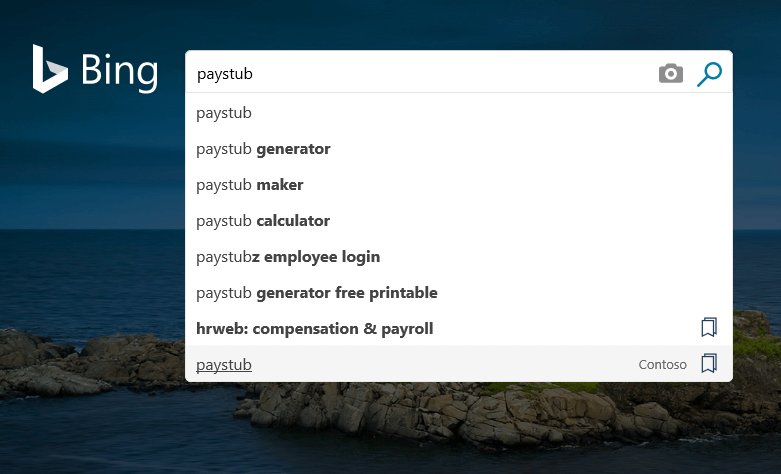
Autosuggest predicts the query as you type, so it exposes phrasings that never reach a results page.
- Type your root keyword into the Bing search box and stop. Do not press Enter.
- Copy the dropdown list. This is the suggestion set for the root on its own.
- Add a space and the letter
a, then copy the new list. Work throughbtoz, copying each list. This is the alphabet method. - Put a question word in front instead:
how,why,can,does,where. Each prefix returns its own set. - Add a trailing modifier such as
for,vs,withoutornear. Each one narrows the prediction differently. - Repeat the pass while signed out to strip your own history out of the predictions.
If the dropdown stays empty, open Bing Settings, go to Search, and select See search suggestions as you type.
Method 3: Finding Additional Bing Related Searches via Bing Webmaster Tools
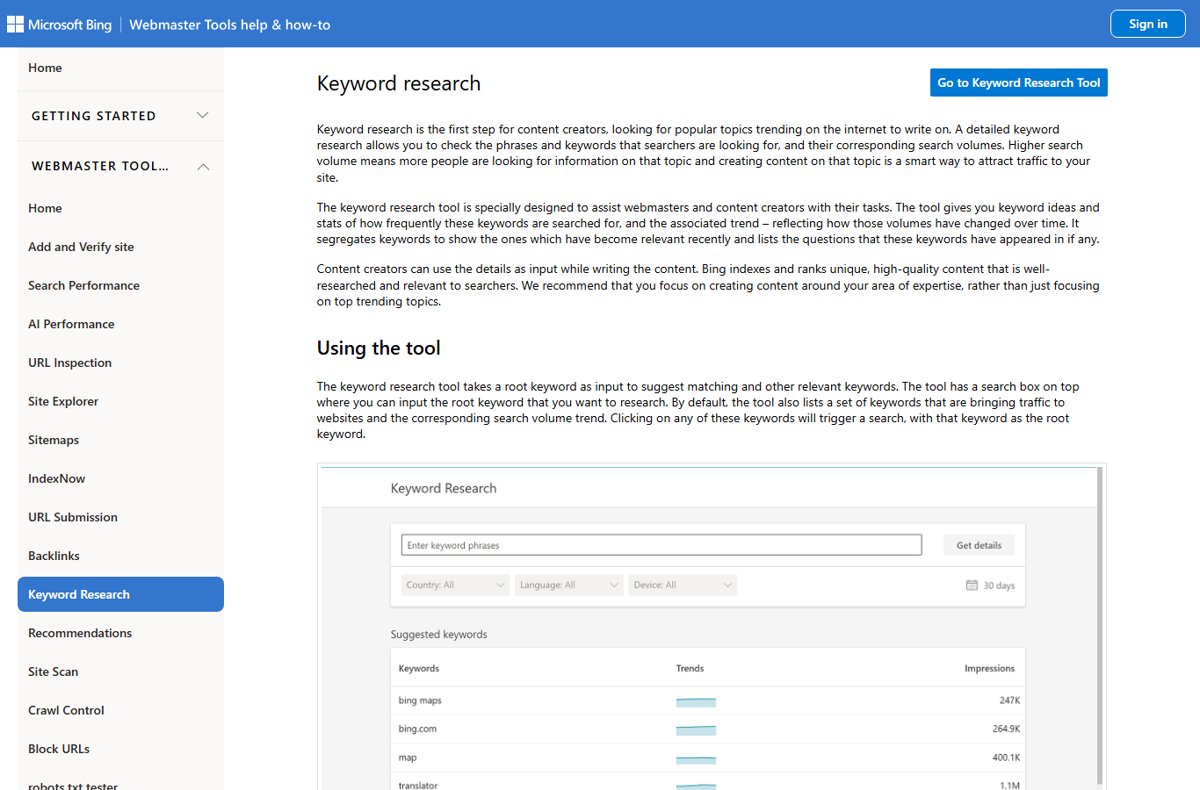
This is the only route that returns Microsoft's own numbers rather than a block of text. It is free and covers any keyword, not just your own site.
- Sign in at Bing Webmaster Tools with a Microsoft, Google or Facebook account.
- Select Keyword Research in the left-hand menu.
- Type your root keyword into the search box at the top of the tool.
- Set the country, language and device filters to the market you write for. The defaults cover all three.
- Set the timeframe. Any period inside the last six months is available; the default is the previous three months.
- Read Related keywords for keyword ideas sorted by relevance to the root, Question keywords for the questions users actually asked, and Newly discovered for ideas that only became relevant in the last 30 days.
- Scroll to the list of the top ten URLs ranking for the root keyword and note their associated topics. Feed any of those topics back in as a new root keyword.
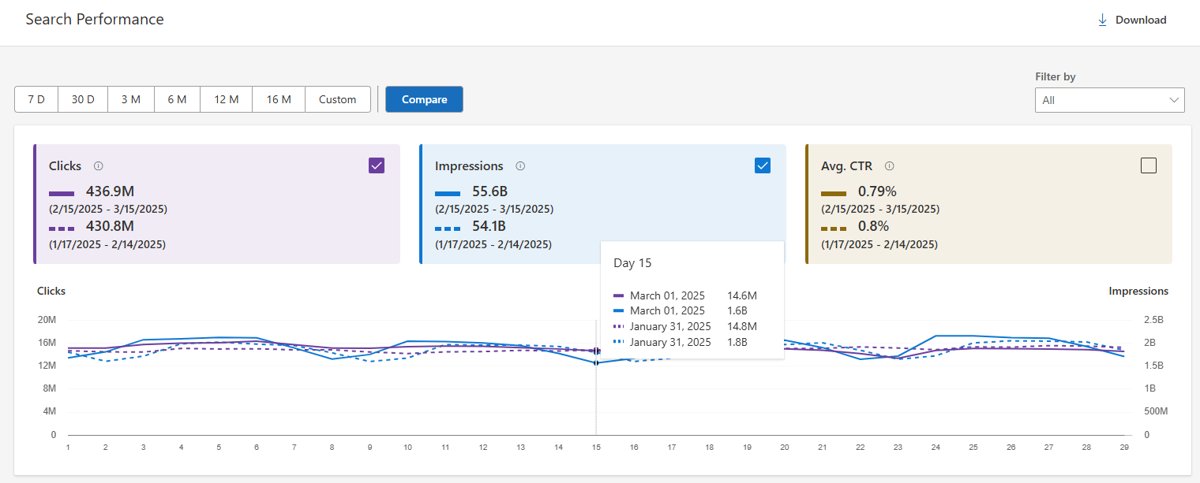
- Open Search Performance, select Keywords, and read the queries already producing impressions for your site. Select Download to export the table as CSV.
Search Performance also splits traffic by source, including Web and Chat, News, Images, Videos and Knowledge Panel. Keywords and Pages data is Web traffic only.
Method 4: Using Third-Party SEO Tools to Extract and Scale Bing Related Searches
Microsoft retired the Bing Search APIs, and the documentation for them now carries a notice that the content is retired and the service is no longer supported.
No third-party tool therefore reads an official Bing feed. Judge a tool on what it says about its own source.
| What you need from a tool | What to check before you trust it | Cross-check |
|---|---|---|
| Hundreds of related queries per root | Whether the vendor states that it collects Bing results itself, and how often | Spot-check twenty rows against live Bing results pages |
| Question keywords at scale | Whether questions come from Bing or from a generic question database | Compare against Question keywords in Keyword Research |
| Country-level breakdowns | Whether the tool exposes a country filter at all | Keyword Research shows a global breakdown of volume by country |
| Competitor query data | That the data is inferred, because no engine publishes another site's queries | Keyword Research lists the top ten ranking URLs for a root keyword |
Treat a paid tool as a shortcut to volume, never as the source of record. Microsoft's own tool settles any disagreement about Bing.
Method 5: Manual Techniques to Uncover Hidden Bing Related Searches (Query Modifiers and Alphabet Method)
Operators change which pages Bing ranks, which changes the related block it builds for that page of results.
- Run
site:example.com keywordto see the related block Bing builds for one domain's coverage of a topic. - Run
intitle:keywordto force pages with the term in the title, then read the block that set produces.inbody:andinanchor:work the same way. - Wrap a phrase in quotation marks to find the exact words in a phrase, then compare that block with the unquoted one.
- Exclude a dominant sense with
NOTor-, for examplebing related searches NOT api. TypeNOTandORin capitals, because lowercase versions are treated as stop words and ignored. - Group alternatives with parentheses and
OR, for example(keyword research OR query research) bing. - Add
+in front of a term Bing keeps dropping. Punctuation and stop words are ignored unless quoted or preceded by+. - Narrow by market with
loc:orlocation:and by language withlanguage:to pull the related set for a different country. - Run the alphabet pass from Method 2 against each operator variant, and keep queries under ten terms, since only the first ten produce results.
Bing’s full operator list includes filetype:, ext:, contains:, ip:, feed:, hasfeed:, url: and prefer:.
Check Microsoft Advertising Keyword Planner
Keyword Planner lives in Microsoft Advertising, not in Webmaster Tools, and needs a Microsoft Advertising sign-in.
It returns ad-side numbers the free tools do not publish, including competition and suggested bids.
- Sign in to Microsoft Advertising, then select Tools > Keywords from the navigation menu on the left.
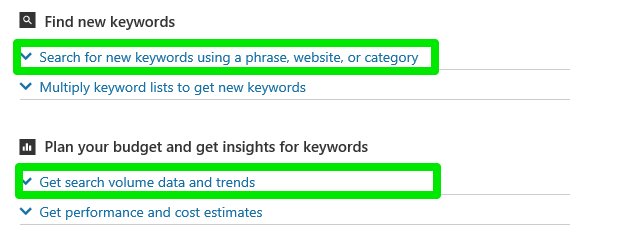
- Select Search for new keywords using a phrase, website, or category.
- Enter up to 200 words or phrases that describe the topic, the URL of a page on your site, or a relevant category.
- Enter targeting information if the market matters. Targeting changes the keyword suggestions, the historical statistics and the traffic estimates.
- Enter negative keywords, separated by commas, to keep an unwanted sense of the word out of the suggestions.
- Set the start and end months under Date range to pull search volume trends for a window you choose.
- Use the Search options section to return only keywords that contain certain words.
- Select Get suggestions, then read both tabs below the graph: suggested keywords and suggested ad groups.
- Select Export to take the suggestions out, or change the graph with Search volume trends, Breakdown by device or Breakdown by location.
Read Average monthly searches carefully. It averages the term over a 12-month period by default, and the date range and targeting settings feed the number while the language setting does not.
Competition is the number of advertisers bidding on the keyword relative to all other keywords across Microsoft Advertising, shown as Low, Medium or High. Volumes are rounded, so location splits may not sum as expected.
Keyword Planner extracts keywords from the HTML of a page you point it at. Content generated at runtime by JavaScript is not extracted, so a script-rendered page returns few keywords or none.
Expand the list recursively
Recursion turns twenty related searches into several hundred. Without a stop rule it also drifts off the topic and repeats itself.
- Put every query from the first pass into a seed queue and tag it layer 0.
- Work the queue in order instead of following whichever entry looks interesting. Breadth first keeps the layers comparable.
- Run each seed on Bing, copy its Related searches block and its questions block, and tag every new entry layer 1.
- Run the same seeds through autosuggest and tag those results layer 1 as well. The two surfaces rarely return the same list.
- Remove entries already in the sheet before starting the next layer, so each layer counts only what it added.
- Count the new entries per layer. Stop when a layer adds fewer than about one new query in five, because the set has saturated.
- Abandon any branch whose entries stop mentioning your topic. Suggestions follow demand, not your topic map.
- Re-seed instead from the topics listed against the top ten URLs in Keyword Research, which broadens the scope without drifting.
Three layers is the practical limit for most topics. Past that the sheet grows while the useful part of it does not.
A repeatable workflow for collecting related searches
Run the whole pass in one sitting, in this order, and the output is reproducible enough to compare against the next one.
- Fix the variables first: write down the country, language and device you are capturing for, and sign out so history is not shaping the set.
- Capture the Related searches block and the questions block for each root query.
- Run the alphabet pass and the question-prefix pass through autosuggest for the same roots.
- Run the operator variants for anything the plain query did not surface.
- Recurse through the seed queue until a layer stops adding new entries.
- Qualify the sheet in Keyword Research with the same country, language and device filters, adding volume, Question keywords and Newly discovered flags.
- Add Average monthly searches and Competition from Keyword Planner for any group where a commercial decision depends on it.
- Export Search Performance with Download and mark the queries your pages already rank for.
- Save the sheet with the capture date, country, language and device in the file name, so the next run is a like-for-like comparison.
Everything in that list is free except Keyword Planner, which needs a Microsoft Advertising account.
How to check you captured the whole set
A related-search list is easy to collect and easy to collect badly. Four checks catch the usual holes.
- Re-run the root query signed out, in a new browser window, and compare the block against your sheet. New entries mean your first pass was personalised.
- Paste each captured query back into Bing. Any query that returns a thin or empty results page was a modelled suggestion, not a real demand signal.
- Open Keyword Research and check your sheet against Related keywords and Question keywords for the same root. Entries in the tool that are missing from your sheet are the gap.
- Set the Keyword Research country filter to your target market and confirm the volumes are not being carried by a country you do not serve. The country filter does not apply to the global breakdown.
- After you publish, open Search Performance, select Keywords, and confirm the captured queries are producing impressions.
Why your list may differ from someone else's
Two people running the same query on the same day can collect different sets. Each cause is controllable except the last one.
| Factor | Effect on your list | How to control it |
|---|---|---|
| Signed in or signed out | Bing uses your search history to improve relevance if you allow it | Capture signed out, in a fresh window |
| Location | Bing identifies country and city from signals such as your IP address | Set a preferred location in Bing Settings; filter by country in Keyword Research |
| Language | Language is a ranking and suggestion signal | Capture per language; note that Keyword Planner volumes ignore the language setting |
| Device | Device characteristics, including mobile, tablet and desktop, feed relevance | Capture desktop and mobile separately, or set the device filter in Keyword Research |
| SafeSearch | Moderate is the default and filters explicit images and videos | Check which setting applies before calling a topic thin |
| Timing | Trends feed the suggestions, and Keyword Research reaches back six months | Date-stamp every capture and re-run quarterly |
| Generated phrasings | Suggestions use natural language generation trained on query sets | Run each captured query and drop the ones with no real results |
| Completeness | No route publishes a guaranteed-complete set of related queries | Treat every list as a dated sample, not an inventory |
Bing publishes no total count of related queries for a term. A list is complete for one market, one device and one date, and that is the strongest claim any method here supports.
How to Organize and Analyze Bing Related Searches for Keyword Research
A flat list of 300 queries is unusable. Structure it once, and every later pass drops straight in.
- Put every captured query in one sheet with columns for query, source, root keyword, layer depth, volume and intent.
- Record the source as SERP block, related question, autosuggest, Keyword Research or Keyword Planner. Sources disagree, and you need to see which one produced an entry.
- Remove duplicates on the query column, keeping the row that carries a volume figure.
- Group rows by root keyword so near-identical phrasings sit together. One page usually serves a whole group.
- Sort each group by search volume, and flag anything listed under Newly discovered as a rising idea.
- Tag each row with one intent, using the table in the next section.
- Mark every group that already has a ranking page of yours in Search Performance. Those need an update, not a new article.
Refresh the sheet quarterly. Keyword Research only reaches back six months, so older rows cannot be re-checked against their original numbers.
Using Bing Related Searches to Identify Search Intent and Content Opportunities
The phrasing of a related search is the intent signal. Sort by pattern and the content decision makes itself.
| Pattern in the related search | Intent | What satisfies it |
|---|---|---|
| Starts with how, why, what, can or does | Informational | A step guide or an explainer that answers in the first sentence |
| Contains best, top, vs or alternatives | Commercial investigation | A comparison table with a stated recommendation |
| Contains a brand plus login, download or settings | Navigational | A short page that links straight to the official destination |
| Contains price, buy, deal or free | Transactional | A pricing or availability page, kept current |
| Contains near me, a city or a country | Local | A page that states the market, since Bing weighs country and city |
| Contains not working, error or fix | Troubleshooting | Symptom-grouped fixes, one symptom per heading |
| Appears under Newly discovered | Emerging | A page published early, before the group gets crowded |
Question keywords in Keyword Research come from questions users actually asked around the related ideas, which makes them the safest source for FAQ headings.
How to turn suggestions and search history back on
Both switches are needed for a representative capture. Turning them off silently thins your results.
- Open Bing Settings, go to the Search section, and select See search suggestions as you type.
- Go to the Bing search history page and turn on the toggle under Show new searches here.
- On any bing.com page, select … in the upper-right corner, then select History to confirm new searches are being recorded.
- To clear the history again later, select Clear all under Manage or clear your search history.
Signed in with a Microsoft account, clear it instead from the Microsoft Privacy dashboard: select Browsing and search, then Clear all activities under the search history section.
Fix Bing related searches when they do not appear
No Related searches block on the results page
Bing decides some queries are not suited to enhanced search features and returns plain results instead.
- Shorten the query. Long, highly specific strings often carry no block.
- Drop operators such as
site:orfiletype:and run the plain keyword. - Open the related-questions block inside the results instead, which often survives when the foot block does not.
- Fall back to autosuggest, which is generated separately from the results page.
Results and related searches look incomplete on a sensitive topic
SafeSearch filters explicit content, and Moderate is the default setting.
- Open the Bing Settings page and find the SafeSearch setting.
- Check which of Strict, Moderate and Off is selected.
- Read the effect: Strict filters explicit text, images and videos, Moderate filters explicit images and videos but not text, and Off does not filter.
- Allow for accounts belonging to users under 18, which may be set to Strict automatically to comply with local law.
- Re-run the query once you know which setting applied, and compare the related block against a capture made under the same setting.
Bing shows different results, or your results look different from someone else's
Search history, location, language and device are all ranking and suggestion signals.
- Sign out of your Microsoft account and run the query again.
- Open Bing Settings and check the location and language values recorded there.
- Compare a desktop run with a phone run before deciding an entry is missing.
- Use Keyword Research with explicit country, language and device filters when you need a reproducible set.
Bing cannot find anything for a query you know exists
Stop words and punctuation are ignored, and only the first ten terms in a query count.
- Cut the query to ten terms or fewer.
- Wrap the exact string in quotation marks to force the phrase.
- Put
+in front of any term Bing appears to be dropping. - Capitalise
NOTandOR, because lowercase versions are ignored as stop words. - Check whether the page is indexed at all with
url:example.com/page.
Autosuggest shows nothing as you type
The suggestions checkbox is cleared, and it stays cleared until you clear cookies or switch it back on.
- Open Bing Settings and go to the Search section.
- Select See search suggestions as you type.
- Reload bing.com and type the root keyword again.
Your searches keep going to Bing from the address bar
Bing is the default search engine in Microsoft Edge, and Windows web search uses it too.
- Change the default in Microsoft Edge if you do not want it, using Change your default search engine in Microsoft Edge.
- Windows search box results are a separate case — switching that search to Google is possible on Windows 10.
- Keep bing.com bookmarked separately, because the related-search block only exists on Bing.
Keyword Research or Search Performance shows no data
Search Performance collection starts the day the site is added, and it can take a few days for data to appear.
- Confirm the site is verified, not just added, under Add and Verify site.
- Wait a few days after adding a new site before judging the report empty.
- Widen the timeframe, up to the six-month maximum.
- Clear the country, language and device filters, which default to all values.
What not to rely on as an all-related-searches solution
Several popular shortcuts do not return what they appear to return.
| Do not rely on | Why it fails | Use instead |
|---|---|---|
| The Bing Search APIs | Microsoft retired them; the documentation states the service is no longer supported | Keyword Research, or Keyword Planner for ad-side numbers |
| Bulk-scraped autosuggest endpoints | Microsoft documents autosuggest as a browser feature, not a public data source | The dropdown itself, plus Question keywords |
| Another engine's data as a stand-in | Bing ranks and suggests with its own signals and its own personalisation | Bing's own tools, filtered to your market |
| One results page | The block is one of four surfaces holding related queries | All four surfaces, captured in the same pass |
| A signed-in capture | Your own history shapes what the block shows you | A signed-out capture, compared against the signed-in one |
| A tool that does not name its data source | Volumes may be modelled from a different engine entirely | Cross-check a sample against Keyword Research |
| Keyword Planner for language splits | Average monthly searches is calculated without the language setting | The language filter in Keyword Research |
| A capture kept for a year | Keyword Research data only reaches back six months | A fresh quarterly capture, date-stamped |
Common Mistakes When Using Bing Related Searches and How to Avoid Them
| Mistake | Why it costs you | Do this instead |
|---|---|---|
| Treating the block as a volume ranking | Entries are ordered by relevance and popularity signals, not by a published volume figure | Attach volumes from Keyword Research before you prioritise |
| Writing one page per related search | Most entries in a group are the same query reworded | Group by root keyword and serve the group with one page |
| Ignoring Newly discovered | Those ideas only qualified in the last 30 days and are usually uncontested | Publish against them early |
| Reading Keyword Planner competition as SEO difficulty | Competition counts advertisers bidding on the keyword, not ranking difficulty | Use it for commercial intent, not for effort estimates |
Turning Bing Related Searches into an Actionable SEO and Content Strategy
Collection is a one-sitting job. What follows it runs on a quarterly cycle, and that cycle is where the traffic comes from.
| Stage | Action | Output |
|---|---|---|
| Group | Cluster the qualified sheet by root keyword and tag one intent per row | One page brief per group, not per query |
| Write | Answer the highest-volume question in the first sentence of each page | Pages that match the intent Bing recorded |
| Measure | Check Search Performance for impressions and average position on those queries | Evidence of which groups Bing accepted |
| Refresh | Re-run the capture quarterly and flag Newly discovered entries | Rising topics caught before the group crowds |
Bing Webmaster Tools is the part of this worth setting up permanently. It is the only source in the list that reports what Bing itself recorded for your pages.
Frequently asked questions
How do you search with Bing?
Open bing.com, type your query into the search box and press Enter. Narrow the results with the tabs above them, such as images, videos, news and shopping, or with search operators like site: and filetype: typed straight into the box.
Why do my searches go to Bing?
Bing is the default search engine in Microsoft Edge, and the Windows search box sends web queries there too. Change it in Edge under its search settings, or keep it and use the related-search block, which no other engine provides in the same form.
Why does Bing show different results to different people?
Bing uses information specific to each user to improve relevance, including search history, location, language, and device characteristics such as the operating system, browser, and whether the device is a phone, tablet or desktop. Sign out to see a less personalised set.
How does Bing know my location?
Bing attempts to identify your area from signals such as your IP address, and it considers both country and city when ranking results. You can set a preferred location yourself in Bing Settings, and control what device location is shared through your operating system.
Does Bing track my searches?
Bing keeps a search history that you can view, switch off or clear. Open the history page and turn off the toggle under Show new searches here to stop new searches being recorded, or select Clear all to remove what is already stored.
Where do I find my Bing search history?
On any bing.com page, select the three dots in the upper-right corner and then select History. For the full view, open the more-options icon in the History pane and select Open history page, where you can sort by type or date.
Can Bing search by image?
Yes. Select the Images tab on any results page, then select the camera icon in the search box. On a computer you can drag an image in, take a photo with your webcam, upload a file, or paste an image or a URL.
How do I identify images on Bing?
Use Bing Visual Search with the camera icon in the Images search box. Bing returns pages that are using the image, related images, and other information about it. On a phone you can take a photo or pick an image saved on the device.
How do I show up on Bing search?
Add and verify your site in Bing Webmaster Tools, then submit your sitemap. Verification accepts DNS auto verification, a BingSiteAuth.xml file, a meta tag in your home page head, or a CNAME record. Sites verified in Google Search Console can be imported.
How do I search a site with Bing?
Type site: followed by the domain and your keyword, with no space after the colon, for example site:techdows.com bing. The site: operator returns webpages that belong to the specified site, and the related-search block adapts to that narrowed result set.
Why can't Bing find anything for my query?
Only the first ten search terms in a query produce results, and stop words and punctuation are ignored unless quoted or preceded by a plus sign. Shorten the query, quote the exact phrase, and capitalise NOT and OR, which are ignored in lowercase.
Why am I seeing Microsoft Bing?
Microsoft Bing is the search engine behind Edge's address bar, Windows web search and Copilot answers in search. It is also where the AI answers appear; enabling and using Bing AI search covers those controls.