Bing's advanced search works by typing operators such as "exact phrase", site:, filetype: and a capitalised OR straight into the Bing search box.
This guide lists every symbol and keyword Microsoft currently documents, shows how Bing orders them when you combine several, and covers the filters that sit alongside them: SafeSearch, date freshness, image filters and Visual Search.
The fastest way to run an advanced search on Bing
Microsoft documents no separate advanced search form for Bing. The operators are the advanced search, and they work in any box that sends a query to Bing.
- Open Bing.com in any browser.
- Type your main words, then add a keyword such as
site:with no space after the colon, for example"heart disease" site:bbc.co.uk. - Put any phrase that must appear word for word inside quotation marks.
- Add
-orNOTin capitals before a word you want kept out of the results. - Press Enter and scan the result URLs to confirm the operator took effect.
If you already use Google's equivalents, most of the habits carry over; the Google advanced search guide covers that engine's own form and operators.
Which Bing operator should you use?
| You want to | Use | Example |
|---|---|---|
| Match an exact phrase | Quotation marks | "solar panel efficiency" |
| Search one website only | site: |
battery recall site:microsoft.com |
| Find a PDF or Word document | filetype: or ext: |
annual report filetype:pdf |
| Drop results that mention a word | NOT or - |
jaguar NOT car |
| Accept either of two words | OR or | inside parentheses |
sculpture (loc:US OR loc:GB) |
| Require a word in the page title | intitle: |
intitle:budget travel tips |
| Get results in one language | language: |
"antiques" language:en |
| Check whether a page is indexed | url: |
url:microsoft.com |
Understanding Bing Search Operators
Microsoft's Advanced search options page lists six symbols. They change how Bing treats the words you type rather than where it looks.
| Symbol | What it does | Example |
|---|---|---|
+ |
Finds pages that contain every term preceded by +, and forces Bing to include words it would normally ignore |
+how +to tie a tie |
" " |
Finds the exact words in a phrase | "to be or not to be" |
( ) |
Groups words so they are found or excluded together | laptop (review OR benchmark) |
AND or & |
Finds pages that contain all the terms or phrases | python AND pandas |
NOT or - |
Excludes pages that contain a term or phrase | mercury -planet |
OR or | |
Finds pages that contain either term or phrase | sneakers OR trainers |
Every search is an AND search by default, so AND only matters for readability. NOT and OR must be typed in capitals; in lower case Bing treats them as ordinary stop words and ignores them.
Bing also ignores stop words and punctuation, apart from the symbols above, unless they sit inside quotation marks or follow a +. Only the first 10 terms of a query are used.
Advanced Operators for Targeted Searching
Microsoft's Advanced search keywords page documents the colon-style operators below. Type each one with no space after the colon, or Bing reads it as a plain word.
| Keyword | What it returns | Example |
|---|---|---|
site: |
Pages that belong to the specified site | "heart disease" (site:bbc.co.uk OR site:cnn.com) |
filetype: |
Pages created in the file type you name | subject filetype:pdf |
ext: |
Pages with the file name extension you name | subject ext:docx |
contains: |
Sites that link to files of the type you name | music contains:wma |
intitle: |
Pages with the term in the page title | intitle:budget |
inbody: |
Pages with the term in the body text | inbody:spaces inbody:magog |
inanchor: |
Pages with the term in link anchor text | inanchor:msn |
ip: |
Sites hosted at a specific IP address, written as a dotted quad | IP:207.46.249.252 |
language: |
Pages in a specific language | "antiques" language:en |
loc: or location: |
Pages from a specific country or region | sculpture (loc:US OR loc:GB) |
prefer: |
Adds emphasis to a term or another operator to focus results | football prefer:organization |
feed: |
RSS or Atom feeds for the terms you search | feed:football |
hasfeed: |
Pages that contain an RSS or Atom feed | site:www.nytimes.com hasfeed:football |
url: |
Whether a domain or address is in the Bing index | url:microsoft.com |
Operators that appear in older tutorials but are missing from Microsoft's current keyword list are left out here, because Bing no longer documents how they behave.
Using Filters for Enhanced Search Experience
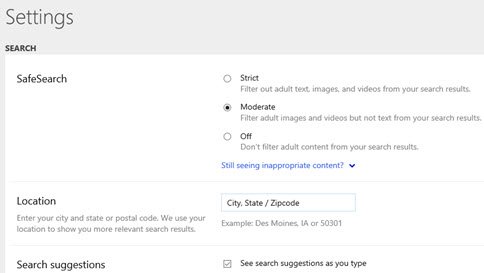
SafeSearch is the one filter Bing stores as an account-wide setting. It applies to every search until you change it.
- Go to Bing.com.
- Select the menu icon in the upper-right corner of the Bing window.
- Select Settings, then select More.
- Choose Strict, Moderate or Off under SafeSearch.
- Select Save at the bottom of the menu.
Strict filters explicit text, images and videos. Moderate, the default, filters explicit images and videos but not text. Off filters nothing. Microsoft notes that Bing may set SafeSearch to Strict automatically for users under 18, and schools can force it network-wide by mapping www.bing.com to strict.bing.com in DNS.
What Bing's date and image filters actually match
Microsoft's Bing developer documentation, now archived because the Bing Search APIs are retired, still gives the clearest definitions of the filters Bing applies to web and image results.
| Filter | Values Microsoft documents | What to know |
|---|---|---|
| Freshness (web) | Day (24 hours), Week (7 days), Month (30 days), or a date range | Dates are when Bing discovered the page, not when it was published |
| Size (images) | Small (under 200×200 px), Medium (200-500 px), Large (500 px or more), Wallpaper | Large means either width or height is at least 500 pixels |
| Color (images) | Color only, Monochrome, or a dominant colour such as Blue or Red | Dominant colour choices include Black, Blue, Brown, Gray, Green, Orange, Pink, Purple, Red, Teal, White and Yellow |
| Type (images) | Photo, Clipart, Line drawing, Animated GIF, Transparent | Transparent returns images with a transparent background |
| Aspect (images) | Square, Wide, Tall | Matches the aspect ratio of the image |
| Image content (images) | Face, Portrait | Portrait means head and shoulders |
| License (images) | Public, Share, Share commercially, Modify, Modify commercially | A license filter excludes images whose license is unknown |
Check the license on the source page before reusing any image. Microsoft's own wording says a Share licence may still forbid editing or commercial use.
Combining Operators and Filters for Advanced Searches
Bing evaluates operators in a fixed order: parentheses first, then quotation marks, then NOT, - and +, then AND and &, and finally OR and |. Because OR comes last, wrap every OR group in parentheses when it shares a query with other operators.
- Start with the exact phrase you need, in quotation marks:
"heart disease". - Add the sources, grouped in parentheses:
(site:bbc.co.uk OR site:cnn.com). - Add an exclusion with
NOTor-:NOT children. - Add a format or language keyword if needed:
language:en. - Check the whole query stays within 10 terms, then press Enter:
"heart disease" (site:bbc.co.uk OR site:cnn.com) NOT children language:en. - Set SafeSearch or open the image filters afterwards; they apply on top of the operators.
Copy-ready Bing queries for common research jobs
| Job | Query | Why it works |
|---|---|---|
| Find official PDFs on one site | security baseline filetype:pdf site:microsoft.com |
Two keywords narrow format and source at once |
| Compare coverage from two outlets | "heart disease" (site:bbc.co.uk OR site:cnn.com) |
Parentheses keep the OR from swallowing the phrase |
| Find pages whose title names a product | intitle:surface review NOT refurbished |
Title match plus exclusion cuts listing pages |
| Find UK or US pages only | sculpture (loc:US OR loc:GB) |
loc: filters by country or region |
| Find a site's RSS feed | site:www.nytimes.com hasfeed:football |
hasfeed: returns pages that carry a feed |
| Force a stop word to count | +the who tour dates |
+ keeps a word Bing would otherwise drop |
Utilizing Bing Visual Search
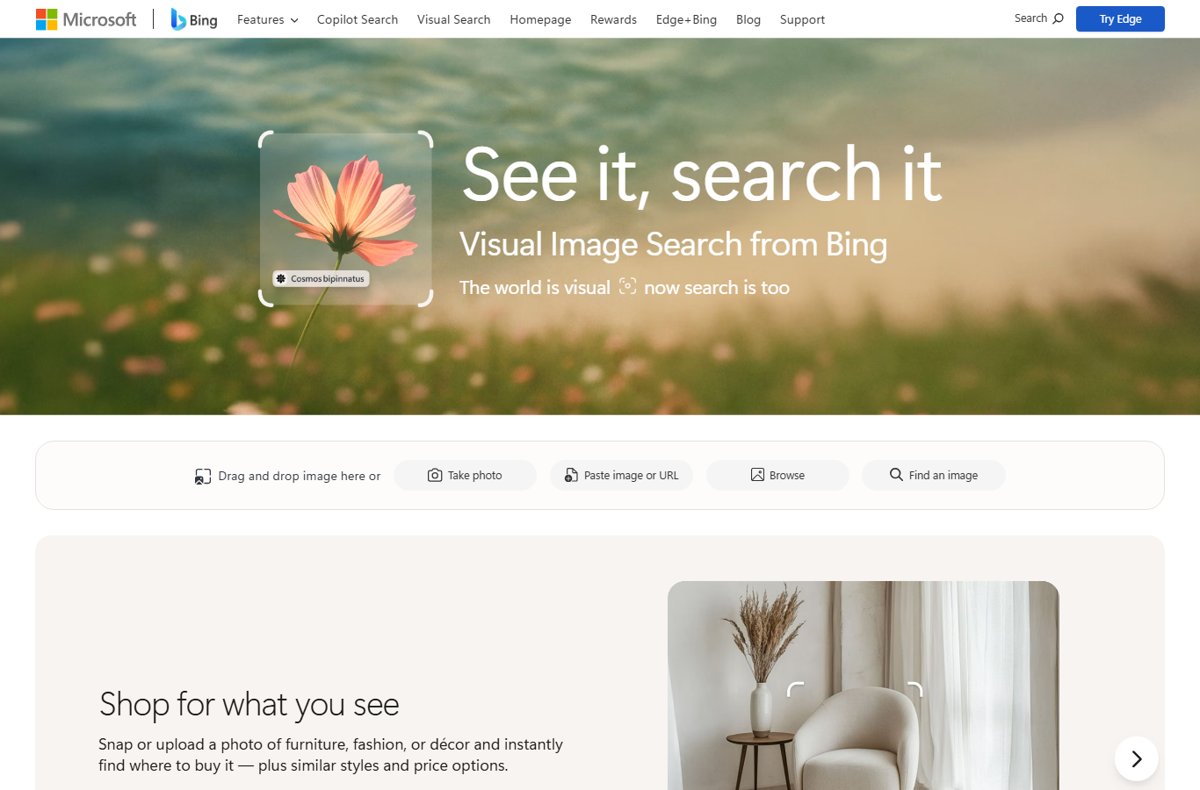
Visual Search replaces typed words with an image. Use it to identify an object, plant, animal or landmark, find similar images, shop for a product you photographed, or translate text in a picture.
- Go to Bing.com and open Bing Visual Search.
- Choose Drag and drop image here, Take photo, Paste image or URL or Browse.
- Read the matches, similar images and shopping results Bing returns for the image.
- In Microsoft Edge, right-click a page, select Visual Search, and frame any area of the page instead.
On a phone, tap the visual search icon in the Bing app or the Edge app. On Windows 11, the Snipping Tool can send a captured screenshot straight to an image lookup.
How to check an operator worked
- Read the web address shown under each result; with
site:every address should belong to the domain you named. - Open two or three results and use Ctrl + F to confirm an excluded word is really absent.
- Retype
NOTandORin capitals if results still contain both sides of your query. - Remove any space after a colon, such as
site: bbc.co.uk, and search again. - Run
url:followed by a page address to confirm whether Bing has indexed that page at all.
Microsoft notes that site: can still return results from other sites when the named site has few relevant pages. A handful of stray domains means the site is thin on the topic, not that the operator failed.
Limits that quietly change your results
| Limit | Effect | What to do |
|---|---|---|
| Only the first 10 terms count | Words past the tenth are dropped silently | Cut filler words and keep operators near the start |
| Lower-case not and or | Treated as stop words and ignored | Always type NOT and OR in capitals |
| Space after a colon | The keyword becomes a plain search word | Write site:example.com, never site: example.com |
site: and SafeSearch |
Microsoft warns site: results may include adult content regardless of SafeSearch |
Use Strict SafeSearch and trusted sites on shared devices |
| Regional availability | Some features are not offered in every country or region | Test the operator on a known query before relying on it |
Conclusion: Elevating Your Bing Search Experience
Learn four operators first: quotation marks, site:, filetype: and a capitalised NOT, and wrap any OR in parentheses. Those four cover most research jobs, and parentheses stop Bing's operator precedence from rewriting your query. Add SafeSearch, image filters and Visual Search only when the job needs them.
To send these queries from the browser address bar, set Bing as the browser's search engine first; setting Bing as the default in Opera shows how.
Frequently Asked Questions
Does Bing have an advanced search option?
Yes. Bing's advanced search is built from operators and keywords typed into the normal search box, such as quotation marks, site:, filetype: and a capitalised NOT. Microsoft documents them on its Advanced search options and Advanced search keywords pages.
Does Bing have an advanced search page like Google?
No separate form is documented. Microsoft's help covers advanced search as symbols and colon keywords you type into the search box. Google's form-based approach is covered in the techdows Google advanced search guide.
What is the full list of Bing search operators?
Microsoft documents six symbols (+, quotation marks, parentheses, AND or &, NOT or -, OR or |) and these keywords: contains:, ext:, filetype:, inanchor:, inbody:, intitle:, ip:, language:, loc: or location:, prefer:, site:, feed:, hasfeed: and url:.
Why does Bing ignore my OR or NOT?
Bing only recognises NOT and OR in capital letters. In lower case it treats them as stop words and drops them. Also wrap OR terms in parentheses, because OR has the lowest precedence of all Bing operators.
How do I search one website with Bing?
Add site: followed by the domain, with no space after the colon, for example battery recall site:microsoft.com. To search two sites, group them: (site:bbc.co.uk OR site:cnn.com). A few results from other sites can appear when the named site has little on the topic.
How do I find PDF files with Bing?
Add filetype:pdf to your query, for example annual report filetype:pdf. The ext: keyword works on the file name extension instead, such as ext:docx. Combine either one with site: to limit the files to one organisation.
How do I use Bing image search with advanced filters?
Search on Bing Images, then narrow the results by filters such as size, colour, image type, aspect, image content, date or license. License filters leave out images whose license is unknown, so always confirm reuse terms on the source page.
How many words can a Bing search use?
Bing uses only the first 10 terms of a query to find results. Anything after the tenth term is ignored, so put operators and the most important words at the start of the query.
Can I filter Bing results by date?
Yes. Microsoft defines Bing's freshness filter as Day, Week or Month, plus custom date ranges. Freshness is based on when Bing discovered a page, not when the publisher posted it, so a recently indexed old page can still appear.







How To See All Bing Related Searches - Techdows
[…] The full operator list, including filetype:, ext:, contains:, ip:, feed:, hasfeed:, url: and prefer:, is covered in Advanced Bing Search Operators and Filters. […]
How to Alter Safe Search Settings on Bing - Techdows
[…] Use Bing search operators and filters […]