Fix no sound on YouTube by unmuting the player, turning up your browser or device volume, and restarting the browser or device.
When those three checks do not bring the sound back, the steps below cover Chrome site settings, the Windows Volume mixer and audio services, and the settings on iPhone, Android, Mac and smart TVs.
No sound on YouTube
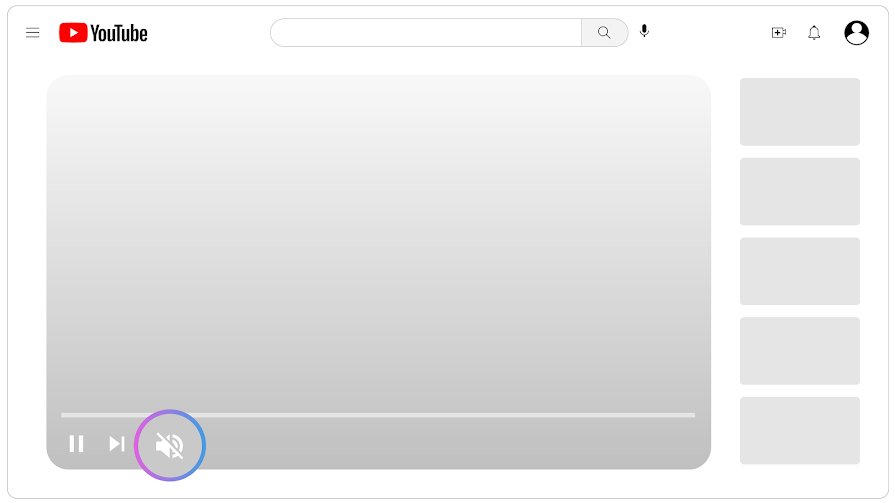
YouTube's own help page gives this order, and most cases end here. Start with the player, because a muted player looks like a broken device.
- Look at the volume button on the video player and select it if the sound is turned off.
- On a computer, press M to unmute the player, then use the Up arrow to raise the volume with the seek bar selected.
- Check that the sound is turned on for your browser or device.
- Check your device's sound settings.
- Restart your browser or device, then play the video again.
YouTube sound not working
Use the second column to go straight to the setting most likely to be off on your device.
| What you see | Where to look | Why |
|---|---|---|
| No sound on YouTube, other sites fine in the same browser | Chrome Site settings > Sound | A site's sound can be blocked on its own |
| No sound in one browser, other apps fine | Windows Volume mixer under Apps | An app can be muted while system sounds still play |
| No sound from anything on the PC | Settings > System > Sound > Output | The wrong output device may be selected |
| Windows says no output device is available | Device Manager > Sound, video and game controllers | The device or driver is missing or disabled |
| No sound on a phone | Media volume, not ringer volume | Phones keep separate volume levels for media |
| No sound in the TV app | Power cycle the TV or streaming device | YouTube lists this first for TV apps |
YouTube no sound on Chrome
Chrome allows sites to play sound by default, so this only applies if the setting was changed for youtube.com. Fix it per site rather than resetting the whole browser.
- Open YouTube in Chrome on your computer.
- Select View site information to the left of the web address.
- Select Site settings.
- Set Sound back to allow, or use Reset permissions if it is available.
- Reload the YouTube tab with F5.
- Open an Incognito window and try YouTube there if there is still no sound, because that rules out extensions.
On Android, the same setting is at More > Site controls > Permissions > Sound. YouTube also recommends keeping Chrome, Firefox or Safari on the newest version, and checking extensions, including ad blockers.
YouTube no sound on Windows 11: check the Volume mixer
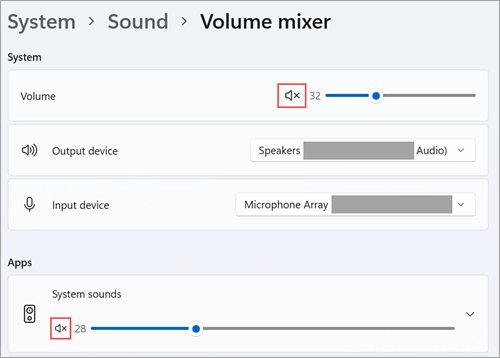
Microsoft notes that app volume controls can override system volume, which is why system sounds can work while YouTube stays silent.
- Play a YouTube video so that your browser shows up as an app playing audio.
- Go to Settings > System > Sound > Volume mixer.
- Under Apps, make sure your browser is not muted and its slider is turned up.
- Under Apps, confirm the correct Output device is selected for your browser.
- Go back to Sound and, under Output, select the speakers or headphones you are using.
- Set Audio enhancements to Off in the device's Advanced settings if the sound is still missing.
On Windows 10, right-click the volume icon, select Open Volume mixer, and make the same checks. For problems beyond YouTube, you can fix sound and audio problems in Windows 11 with the full set of driver steps.
No speakers or headphones are plugged in on Windows 11 [Fix]
Treat this message as a missing or undetected output device, because Windows has nothing to send YouTube's audio to. Check the hardware first, then the driver.
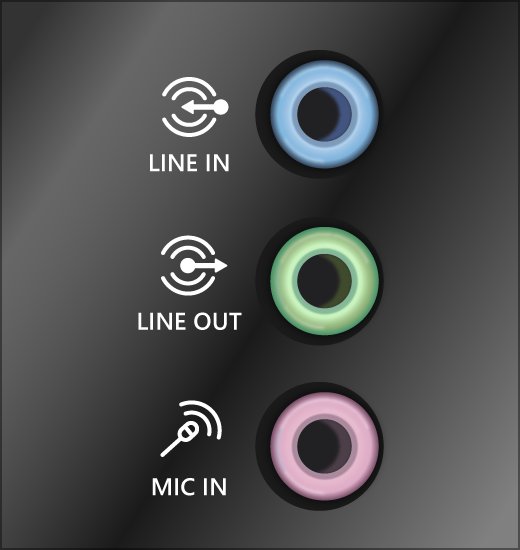
- Check speaker and headphone cables, power and the jack; some systems use green for output and pink for a microphone.
- Try a different USB port for USB speakers or headsets.
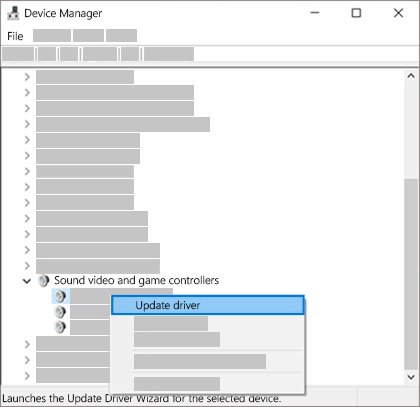
- Open Device Manager and expand Sound, video and game controllers.
- Right-click your audio device and select Enable device if the option is available.
- If it is not listed, select View > Show hidden devices, then Action > Scan for hardware changes.
- Install the latest audio driver from your PC or sound card maker's support site.
- Run the audio troubleshooter in the Get Help app, then restart your PC.
A monitor with no built-in speakers can also leave you silent if it is selected as the default output, so check that under Settings > System > Sound > Output.
Windows Audio Service stuck on Stopping
Microsoft says audio devices stop working properly when Windows Audio is stopped, so a service stuck in this state leaves every app silent. Restart the PC first, because that is the only route that does not force anything closed.
- Save your work and select Start > Power > Restart.
- Type services in the taskbar search box and open it, then check the Windows Audio entry.
- If it is still stuck, open Command Prompt as administrator and run
tasklist /svc /fi "SERVICES eq Audiosrv". - Note the PID, and check the output for other services sharing that process. Restart again instead if any are listed.
- Run
taskkill /pid <PID> /f, replacing<PID>with the number you noted. - Return to Services, right-click Windows Audio and select Start, then play a YouTube video.
- If the sound is still missing, right-click Windows Audio Endpoint Builder, select Restart, then select Yes.
How to fix no sound on YouTube on iPhone
An iPhone's volume buttons control media only while audio is playing, so press them with the video running. Otherwise, they change ringer and alert volume.
- Start the YouTube video and press the volume up button.
- Open Control Center and drag the volume slider up.
- Go to Settings > Sounds & Haptics and check Volume Limit under Built-In Speaker.
- Check that Limit Maximum Volume is not set too low.
- Disconnect Bluetooth headphones or speakers if the sound may be going to them.
- Update the YouTube app, then restart the iPhone.
How to fix no sound on YouTube on Android phone
Android keeps media, call, ring, notification and alarm volumes separate. YouTube uses the media level, which can be at zero while the ringer is loud.
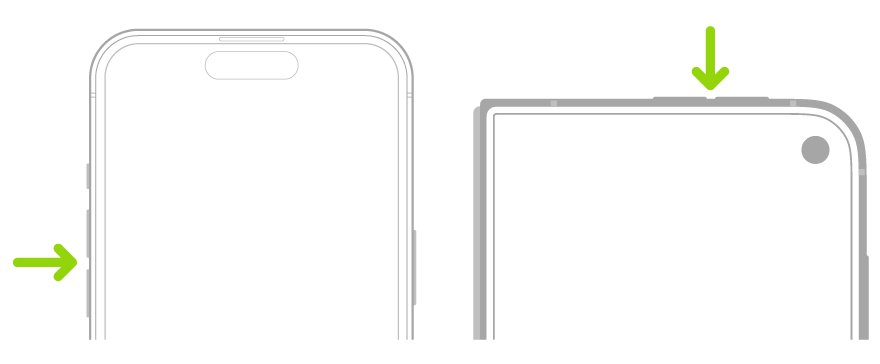
- Press a volume button.
- Tap the Menu at the right of the slider to show all levels.
- Slide Media volume up.
- Tap Play media to under Media volume and pick your phone if a Bluetooth device is selected.
- Update the YouTube app and restart the phone.
Samsung Galaxy phones run Android, so use the same media volume check, though the labels on your phone may differ slightly.
How to fix no sound on YouTube on MacBook
Browser and app volume on a Mac can only be equal to or lower than the computer's output volume, so check the system setting first.
- Choose Apple menu > System Settings, then click Sound in the sidebar.
- Click Output and select the device you want to hear.
- Drag the Output volume slider up.
- Clear the Mute checkbox.
- Restart your browser and play the video again.
YouTube no sound on TV
YouTube gives two checks for its TV app: power cycle the device and look for an app update. Check the TV's own volume as well.
- Turn off the TV or streaming device and unplug it.
- Plug it back in and turn it on.
- Check for an update to the YouTube app.
- Open a video and raise the volume on the TV remote.
How to tell if the sound problem is YouTube or your device
Run this test whenever the direct fixes do not help. It tells you which section to go back to.
- Play a different YouTube video, in case the first one has no audio track.
- Open YouTube in another browser. If sound plays there, the first browser's settings or extensions are the cause.
- Play sound from another app. If it works, YouTube or the browser is muted, so go back to the Volume mixer.
- Try headphones or another speaker if nothing plays. If those stay silent too, the problem is the device's audio settings or driver.
YouTube no sound fix for headphones, drivers and updates
No sound on laptop speakers
Plugged-in headphones can stop speakers working, and the output can be set to the wrong device.
- Unplug your headphones and test again.
- Select the speaker icon on the taskbar, then the arrow beside the volume slider.
- Choose your laptop's speakers.
No sound on Windows after an update
A new audio driver may be the problem if sound worked before Windows Update ran.
- Open Device Manager and expand Sound, video and game controllers.
- Right-click your audio device and select Properties.
- Open the Driver tab and select Roll Back Driver.
- Select Yes and restart.
No sound on HP laptop or other PC after trying everything
An outdated or malfunctioning driver can block all audio, including YouTube.
- In Device Manager, right-click your audio device and select Uninstall device.
- Tick Attempt to remove the driver for this device and select Uninstall.
- Restart so that Windows reinstalls the driver.
- Install the latest driver from your PC maker's support site if the sound does not return.
AirPods or Bluetooth headphones connected but no sound
Windows may be sending audio to another output, or the Bluetooth device itself may need attention.
- Select the headphones as your output under Settings > System > Sound.
- On Windows 11, you can fix AirPods connected but no sound by re-pairing them and checking the output.
Videos fail to play at all
This is a playback fault rather than a sound fault.
- Reload the page or restart the app, then fix YouTube on desktop and mobile if errors continue.
- Check your connection if the video also keeps pausing.
YouTube no sound FAQ
How to fix no sound on YouTube?
Select the volume button on the player to unmute it, or press M on a computer. Then check your browser and device sound settings, and restart your browser or device. If that fails, check the app's volume in the Windows Volume mixer or your phone's media volume.
How to fix no sound on laptop?
Select the speaker icon on the taskbar, choose the correct output, and raise the volume. Unplug headphones, turn off audio enhancements, and run the Get Help audio troubleshooter. If nothing changes, update or reinstall the audio driver from Device Manager, then restart.
How to fix no sound on PC?
Check cables, power and speaker volume, then select the correct device under Settings, System, Sound, Output. A monitor without speakers selected as the default output leaves you with no audio. After that, restart the Windows Audio services and update the driver.
How to fix no sound on Windows 11?
Run the audio troubleshooter in the Get Help app first, as Microsoft recommends for Windows 11. Then check the output device, turn off audio enhancements, set the default device, install Windows updates, and update, reinstall or roll back the audio driver.
How to fix no sound on Windows 10?
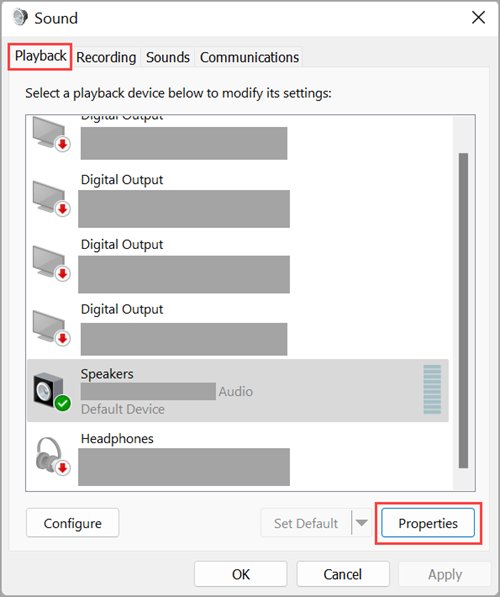
Right-click the volume icon, select Open Volume mixer, and make sure the app is not muted. Open Sounds and check that the correct device is the default on the Playback tab. Then restart Windows Audio and Windows Audio Endpoint Builder in services.msc, and update the driver.
How to fix no sound on iPad?
Start the video and raise the volume with the side buttons or Control Center. Check for Bluetooth headphones or speakers taking the audio, update the YouTube app, and restart the iPad. Try another app to see whether the problem is limited to YouTube.
How to fix no sound on Samsung Galaxy?
Press a volume button, open the full list of sliders, and raise the media volume, because YouTube uses that level and not the ringer. Then check that audio is not going to a paired Bluetooth device, update the YouTube app, and restart the phone.
What to do if sound doesn't work?
Work from simple to complex: check the mute button and volume, then the output device, then connections. After that, restart the device, install updates, and reinstall the audio driver. Testing a second app or device tells you whether the fault is in the app or the hardware.
Why will my sound not work?
The usual causes are a muted app or device, the wrong output device, loose cables, an outdated or damaged driver, or a stopped audio service. On phones, the media volume may be at zero or audio may be going to a Bluetooth device.