To delete a Gmail account, open your Google Account, go to Data & privacy, select Delete a Google service, and click Delete next to Gmail.
This guide covers deleting only Gmail or the whole Google Account, doing it from a computer or phone, what happens to your emails, and fixes when the option will not work.
Step-by-step guide: How to delete Gmail account
These steps remove Gmail but keep your Google Account, YouTube and Play purchases. You need a non-Gmail email address to stay signed in to the rest of Google.
- On your computer, open Gmail and sign in to the account you want to delete.
- Click your Profile picture at the top right, then click Manage your Google Account.
- On the left, click Data & privacy.
- Scroll to Data from apps and services you use and click Delete a Google service. Re-enter your password if asked.
- Next to Gmail, click Delete.
- Enter an existing non-Gmail email address you want to sign in with, then click Send verification email.
- Open the verification email at that address and click the link. Gmail is not removed until you do.
Why is deleting a Gmail account so confusing?
Gmail is one service inside a Google Account, so Google offers two different deletions. Removing Gmail only kills the address and mail; deleting the Google Account removes everything.
| What you delete | Gmail address and emails | YouTube, Drive, Photos | Play purchases |
|---|---|---|---|
| Gmail only | Emails and settings deleted after 30 days | Kept | Kept |
| Entire Google Account | Deleted | Deleted | Lost |
| Removing the account from a phone | Kept; only removed from that device | Kept | Kept |
A deleted Gmail address is never reissued, so nobody else can claim it.
How to delete Gmail account permanently with your Google Account
Choose this when you want nothing left at Google. Deleting one account does not touch any other Google Accounts you own.
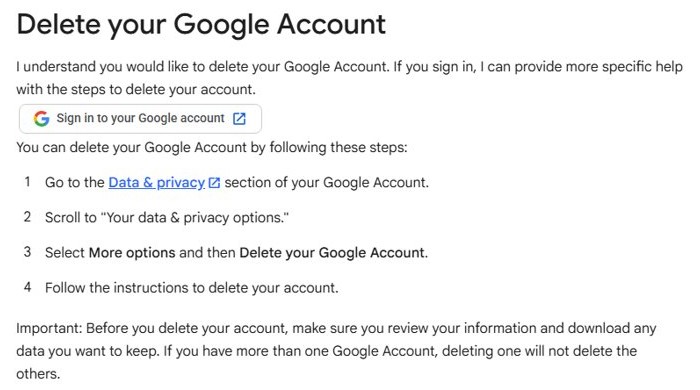
- Go to the Data & privacy section of your Google Account.
- Scroll to Your data & privacy options.
- Select More options > Delete your Google Account.
- Follow the on-screen instructions and confirm the deletion.
Signing out of Android phones and Chromebooks is part of the process when you delete a Google Account permanently.
How to delete Gmail account from phone
Google's deletion pages work in any mobile browser, so the steps match the computer version once you reach your Google Account.
- Open the Gmail app and tap your Profile picture.
- Tap Manage your Google Account.
- Open the Data & privacy tab.
- Tap Delete a Google service and sign in again if asked.
- Tap Delete next to Gmail, enter a non-Gmail address and send the verification email.
To only take the account off an Android phone, open Settings > Passwords & accounts, tap the account and tap Remove account. The account itself stays active.
Tips before you delete your Gmail account
| Do this first | Why |
|---|---|
| Download your mail with Google Takeout | Deleted emails are gone after 30 days |
| Change the login email on banks, social media and apps | Password resets will otherwise go to a dead address |
| Update your recovery email and phone | You need them if you change your mind |
| Have a non-Gmail address ready | Google requires one to keep the rest of your account |
| Ask your admin for work or school accounts | Only the administrator can remove Gmail from those |
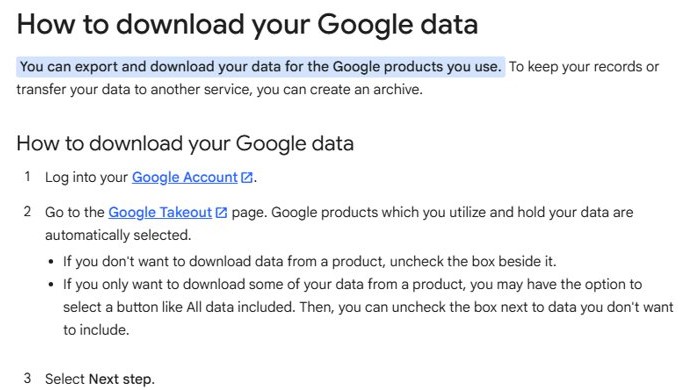
To export, open the Google Takeout page, keep Mail checked, select Next step, then choose a delivery method and file type.
Alternative ways to stop using Gmail
If you only want to move to a new address, forwarding plus an auto-reply keeps mail flowing while contacts update their records.
Forward all mail to a new address
Keeps incoming messages reaching you without opening Gmail.
- In Gmail, click Settings > See all settings.
- Open the Forwarding and POP/IMAP tab and click Add a forwarding address.
- Enter the new address, click Next > Proceed > OK, and confirm the verification link.
- Select Forward a copy of incoming mail to, then click Save Changes.
Tell senders about your new address
The vacation responder answers automatically.
- In Gmail, click Settings > See all settings.
- On the General tab, select Vacation responder on.
- Fill in the dates, subject and a message with your new address.
- Click Save Changes.
Just sign out of Gmail on a computer or in Microsoft Edge
Signing out leaves the account intact.
- Open Gmail and click your Profile picture.
- Click Sign out, or Sign out of all accounts if several are signed in.
How to confirm your Gmail account is deleted
- Check that you clicked the link in the verification email; until then, Gmail stays active.
- Open Manage your Google Account > Data & privacy and confirm Gmail is no longer listed under your services.
- Sign in to Google with the alternate address you added to confirm the rest of the account works.
Still not working? Troubleshoot common issues
Why can't I delete my Gmail account?
Work, school and organization accounts are controlled by an administrator.
- Check whether the address ends in your company or school domain.
- Ask that administrator to remove the account.
Gmail was not removed after clicking Delete
The alternate address has not been verified.
- Open the inbox of the alternate address.
- Look in spam for the Google verification email.
- Click the link, or repeat the delete steps to send a new one.
The alternate address is refused
Google needs an email address that is not Gmail.
- Use an Outlook, Yahoo, iCloud or work address you can open.
- Retry Delete next to Gmail.
You forgot the Gmail password
Google asks you to sign in again before deleting.
- Start Google account recovery from the sign-in page.
- Use a device and location where you usually sign in, and answer with your recovery email or phone.
- Return to Delete a Google service once you are back in.
Why did Google delete my Gmail account?
Google deletes or disables accounts for two main reasons: inactivity and policy violations.
| Reason | What happens | What you can do |
|---|---|---|
| Inactive for two years | Personal accounts unused across Google for 2 years may be deleted after email warnings | Sign in and read or send an email to stay active |
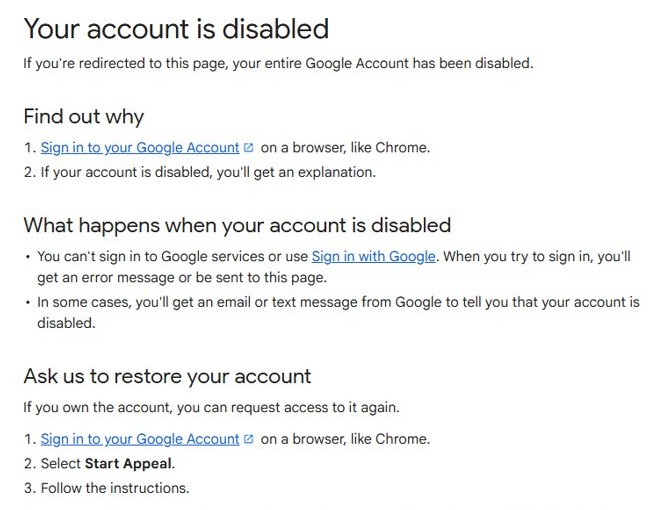
| Policy violation | The account is disabled and you see an explanation at sign-in | Sign in on a browser and select Start Appeal |
| Appeal rejected | The account stays disabled and is considered for deletion | Download data if the option appears |
Frequently asked questions
Can I delete my Gmail account permanently?
Yes. Removing Gmail from your Google Account deletes your emails and settings after 30 days, and the address can never be used again by anyone. Deleting the whole Google Account removes Gmail along with all other data.
Can I get my Gmail address back after deleting it?
Usually yes. Open Gmail, sign in to your Google Account and follow the on-screen steps. If a long time has passed, the address may return without your old emails.
Will deleting Gmail also delete my YouTube account?
No, not if you remove only Gmail. Your Google Account, YouTube activity and Google Play purchases stay. Deleting the entire Google Account does remove YouTube access and purchased content.
How do I delete a Gmail account from my phone?
Open the Gmail app, tap your profile picture, tap Manage your Google Account, open Data & privacy and tap Delete a Google service. Removing the account in Android Settings only takes it off that phone.
How do I remove a Gmail account from another device?
Sign out remotely. In Gmail, click your profile picture, open Manage your Google Account, click Security & sign-in, then Manage all devices, pick the device and click Sign out.
How do I remove a Gmail account in Microsoft Edge?
Open Gmail in Edge, click your profile picture and click Sign out. This signs out of the browser only; the account stays active until you delete it from your Google Account.
How long does Google keep my emails after I delete Gmail?
Gmail deletes your emails and settings 30 days after you remove the service. Download them with Google Takeout first if you want a copy.
Why would Google delete a Gmail account?
Google can delete personal accounts that have not been used across Google for two years, and it disables accounts that break its policies, such as for spam, phishing or account hijacking.
Quick summary
Back up with Google Takeout, then use Data & privacy > Delete a Google service > Gmail to drop only the address, or Delete your Google Account to remove everything. Removing Gmail alone keeps YouTube, Drive and purchases, while full account deletion cannot be undone after a certain time.
Closing other accounts at the same time works the same way: delete a Yahoo Mail account from its own account settings.