To log in to Bellsouth email, open currently.com in a web browser and sign in with your full @bellsouth.net address and your AT&T Mail password, because Bellsouth addresses now run on AT&T Mail.
This guide covers the web login, the server settings AT&T publishes for @bellsouth.net, setup on iPhone, Android and Outlook, secure mail keys, and fixes for the usual sign-in and setup errors.
How to Login to Bellsouth Email Online
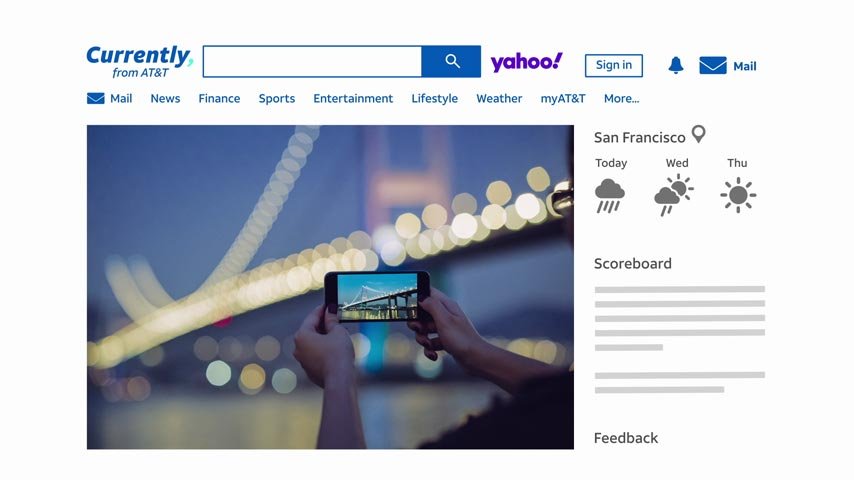
AT&T states that you can always check your AT&T email in a web browser at currently.com with your AT&T password. That includes @bellsouth.net addresses, which AT&T lists as one of its supported email domains.
- Open any web browser and go to currently.com.
- Choose the option to sign in to your mail.
- Enter your full email address, for example [email protected], as your AT&T ID.
- Enter your AT&T Mail password, not a secure mail key.
- Complete any verification prompt AT&T shows, then open your inbox.
Your Bellsouth username is always the complete address with @bellsouth.net at the end. AT&T asks for your AT&T ID as the email address, so type the whole address, not just the part before the @ sign.
Understanding Bellsouth Email and AT&T Account Access
Bellsouth email is not a separate service any more. AT&T runs it as AT&T Mail, alongside several other legacy domains, and one set of server settings covers all of them.
| What you have | What it means today |
|---|---|
| An @bellsouth.net address | An AT&T Mail account. AT&T lists @bellsouth.net among the domains its server settings apply to. |
| Other legacy domains | @ameritech.net, @att.net, @currently.com, @flash.net, @nvbell.net, @pacbell.net, @prodigy.net, @sbcglobal.net, @snet.net, @swbell.net and @wans.net use the same settings. |
| Your username (AT&T ID) | Your full email address, including @bellsouth.net. |
| Your AT&T Mail password | Used at currently.com, in webmail and in apps that support OAuth. |
| A secure mail key | A 16-character code AT&T requires instead of your password in email apps that do not support OAuth. |
| Your AT&T account profile | Where you create and manage secure mail keys for each email address and subaccount. |
Which login method should you use?
| Your situation | Use this | Password to enter |
|---|---|---|
| Checking mail on any computer or borrowed device | currently.com in a browser | Your AT&T Mail password |
| iPhone or iPad on iOS 9.0 or later | Apple Mail, Outlook Mobile or the Yahoo Mail app | Your AT&T Mail password (OAuth sign-in) |
| Android 5.0 Lollipop or later | Gmail, Outlook Mobile or the Yahoo Mail app | Your AT&T Mail password (OAuth sign-in) |
| Windows 10 PC | Windows Mail | Your AT&T Mail password (OAuth sign-in) |
| Mac on OS X 10.11 El Capitan or later | Apple Mail | Your AT&T Mail password (OAuth sign-in) |
| Outlook 2010, 2013, 2016 or 2019, or Thunderbird | Manual IMAP or POP3 setup | A secure mail key |
| Older Windows Mail (Windows 8 or earlier) or Mac Mail on 10.10 Yosemite or earlier | Manual IMAP or POP3 setup | A secure mail key |
AT&T recommends OAuth apps because OAuth encrypts your username and password. Each device and each app must use either OAuth or its own secure mail key.
What you need before you set up an email app
| Item | Where to get it |
|---|---|
| Full Bellsouth email address | Your existing @bellsouth.net address |
| AT&T Mail password | The password you use at currently.com |
| Secure mail key (non-OAuth apps only) | Your AT&T account profile, under Settings and Add secure mail key |
| Server names and ports (manual setup only) | The AT&T table in the next section |
Bellsouth Email Server Settings for Manual Setup
These are the settings AT&T publishes for AT&T Mail, and they apply to @bellsouth.net addresses. Both protocols require SSL.
| Protocol | Incoming server | Incoming port | Outgoing server | Outgoing port | SSL |
|---|---|---|---|---|---|
| IMAP | imap.mail.att.net | 993 | smtp.mail.att.net | 465 or 587 | Yes |
| POP3 | inbound.att.net | 995 | outbound.att.net | 465 | Yes |
Choose IMAP if you read mail on more than one device, because it keeps messages on the server. Choose POP3 only if you want mail downloaded to one computer. AT&T's Windows Mail article also says to turn on Outgoing server requires authentication and to use the same username for sending and receiving.
How to Setup Bellsouth Email on iPhone and Android
Apple Mail on iOS 9.0 or later and Gmail on Android 5.0 or later support OAuth, so you sign in with your normal AT&T Mail password. AT&T's shortcut: if the app offers Yahoo in its list of providers, the app is OAuth compatible, and you should pick Yahoo.
- Open the mail app on your phone and start adding a new email account.
- Select Yahoo from the list of email providers, as AT&T instructs for OAuth apps.
- Enter your full @bellsouth.net address.
- Enter your AT&T Mail password on the sign-in screen that opens.
- Choose whether to sync your calendar and contacts as well as mail.
- Open the inbox and wait for your Bellsouth messages to download.
Outlook Mobile and the Yahoo Mail app also support OAuth on both iPhone and Android. If your phone app has no Yahoo option, set it up manually with IMAP, the server settings above and a secure mail key.
How to Setup Bellsouth Email in Outlook or Other Mail Apps
AT&T lists Outlook 2010, 2013, 2016 and 2019 and Mozilla Thunderbird as non-OAuth apps. In those programs, the password field takes a secure mail key, never your AT&T password.
- Create a secure mail key for your Bellsouth address first, using the steps in the next section.
- In Outlook, select File > Add Account.
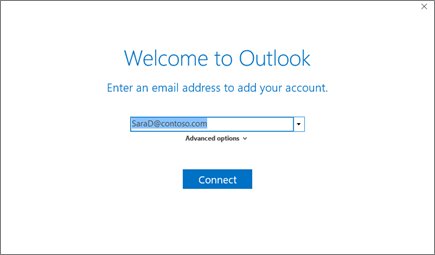
- Enter your full @bellsouth.net address and select Connect.
- If Outlook asks for the account type, choose IMAP.
- Enter imap.mail.att.net, port 993, SSL on, for incoming mail.
- Enter smtp.mail.att.net, port 465 or 587, SSL on, for outgoing mail.
- Paste your secure mail key as the password for both the IMAP and SMTP servers.
- Select Finish and send yourself a test message.
Thunderbird and older Apple Mail or Windows Mail take the same values in their manual setup screens. On a Windows 10 PC, Windows Mail supports OAuth; AT&T's steps pick Yahoo! as the provider and sign in with your address and password.
How to create a secure mail key for Bellsouth email
A secure mail key is a 16-character code that replaces your password in apps without OAuth. Create a separate key for each email address, each subaccount and each device.
- Go to your AT&T account profile and sign in with your AT&T ID and password.
- Choose Settings and confirm the account you are updating. Select Switch to update a different service.
- Select Add secure mail key, enter a nickname for the key and select Create.
- Copy the secure mail key to the clipboard.
- Open your email app and replace the existing password with the key. For IMAP, replace the password on both the IMAP and SMTP servers.
Secure mail keys never expire. Changing your AT&T Mail password does not require a new key, but AT&T deletes all keys when it locks or blocks your account.
How to check your Bellsouth email is working
- Sign in at currently.com and confirm your inbox loads with recent messages.
- Send a test message from the web inbox to your own @bellsouth.net address.
- Open your phone or desktop app and confirm the test message arrives.
- Reply from the app and confirm the reply shows in the Sent folder at currently.com when using IMAP.
If mail arrives but will not send, the outgoing server, port or password is wrong. If nothing arrives, check the incoming server and the password first.
Troubleshooting Bellsouth Email Login and Setup Problems
The Bellsouth sign-in page redirects to AT&T or currently.com
Bellsouth mail is part of AT&T Mail, so its web login lives at currently.com.
- Let the redirect finish instead of going back.
- Sign in with your full @bellsouth.net address and your AT&T Mail password.
- Check that the address bar shows currently.com or att.com before you type your password.
You forgot your Bellsouth password
The Bellsouth password is your AT&T Mail password, reset through AT&T.
- Open AT&T Mail support.
- Under Hot topics, select Reset your AT&T Mail password.
- Follow the reset steps, then sign in again at currently.com.
- Keep using your existing secure mail keys in apps; AT&T says a password change does not require new keys.
The password is rejected or the account is locked
AT&T locks or blocks accounts for safety reasons, and it deletes every secure mail key when it does.
- Open AT&T Mail support.
- Under Hot topics, select Find out how to unlock your email and follow the steps.
- Sign in at currently.com to confirm the account works.
- Create a new secure mail key for every app that used one, then paste it into each app.
Outlook, Thunderbird or a phone app keeps asking for the password
The app does not use OAuth and still holds your AT&T password instead of a secure mail key.
- Check the app against AT&T's non-OAuth list: Outlook 2010 to 2019, Thunderbird, Windows 8 Mail, Mac Mail on 10.10 or older.
- Create a secure mail key in your AT&T account profile.
- Replace the password on both the incoming and outgoing server with the key.
- Restart the app and send a test message.
Mail app setup fails with a server or connection error
A server name, port or SSL setting does not match AT&T's table.
- For IMAP, confirm imap.mail.att.net on port 993 and smtp.mail.att.net on port 465 or 587.
- For POP3, confirm inbound.att.net on port 995 and outbound.att.net on port 465.
- Turn on SSL for both servers and turn on outgoing server authentication.
- Use your full @bellsouth.net address as the username for both servers.
Security Tips for Your Bellsouth Email Account
| Tip | Why it matters |
|---|---|
| Use a strong, unique AT&T Mail password | The same password opens currently.com, webmail and every OAuth app. |
| Prefer OAuth apps over secure mail keys | AT&T says OAuth encrypts your username and password to protect you from hackers and fraudsters. |
| Give each device its own secure mail key | AT&T says each device you use to access your email has its own secure mail key. |
| Type your password only on currently.com or att.com | Fake Bellsouth login pages and phishing emails copy AT&T's sign-in screen. |
| Keep recovery details current in your AT&T profile | A working recovery option is how you get back in after a lockout. |
| Name each secure mail key clearly | Keys are created in your AT&T account profile with a nickname, so a clear name shows which device uses which key. |
Frequently Asked Questions
How do I log in to my Bellsouth email?
Go to currently.com in a web browser and sign in with your full @bellsouth.net address and your AT&T Mail password. Bellsouth addresses are AT&T Mail accounts, so AT&T's web inbox is the official place to read them online.
How do I log in to my Bellsouth email account on a phone?
Add a new account in Apple Mail, Gmail, Outlook Mobile or the Yahoo Mail app, choose Yahoo as the provider, and sign in with your full @bellsouth.net address and AT&T password. These apps use OAuth, so no secure mail key is needed.
How do I set up a Bellsouth email account in Outlook?
Create a secure mail key in your AT&T account profile, then add the account in Outlook with IMAP. Use imap.mail.att.net on port 993 and smtp.mail.att.net on port 465 or 587, both with SSL, and paste the key as the password.
How do I access my Bellsouth email?
Access it at currently.com in any browser, or in an email app on your phone or computer. Browsers and OAuth apps take your AT&T Mail password, while non-OAuth apps such as Outlook 2016 or Thunderbird need a 16-character secure mail key.
What are the correct Bellsouth email server settings?
AT&T lists IMAP as imap.mail.att.net port 993 incoming and smtp.mail.att.net port 465 or 587 outgoing. POP3 uses inbound.att.net port 995 and outbound.att.net port 465. SSL is required for all of them.
Do I need a secure mail key to set up Bellsouth email in Outlook or a phone app?
Only in apps that do not support OAuth, such as Outlook 2010 to 2019 and Thunderbird. Apple Mail, Gmail, Outlook Mobile, Yahoo Mail and Windows 10 Mail sign in with your normal AT&T Mail password instead.
What should I do if my Bellsouth email password is not working?
Confirm you typed the full @bellsouth.net address, then use Reset your AT&T Mail password on AT&T's email support page. If an app still fails, it probably needs a secure mail key instead of your password.
Is the Bellsouth home page login still available?
Bellsouth email is now handled by AT&T Mail, and AT&T points customers to currently.com to check email in a browser. Sign in there with your @bellsouth.net address rather than searching for an old Bellsouth portal.
Bottom Line
Read Bellsouth mail at currently.com with your full address and AT&T password, and use an OAuth app such as Apple Mail, Gmail or Outlook Mobile on your devices. OAuth apps take your normal password and encrypt the sign-in. Keep secure mail keys and the manual IMAP settings for older programs like Outlook 2016 or Thunderbird, where AT&T requires them.