When Hotmail will not load in the iPhone Mail app, delete the account and add it back with Outlook.com as the provider, because Microsoft stopped accepting Basic Authentication on September 16, 2024, and older setups can no longer sign in.
If a fresh setup still shows nothing, the cause is usually fetch settings, a full mailbox, cellular data turned off for Mail, or a block on the Microsoft account, and each one has a fix below.
How to fix Hotmail not loading on iPhone Mail
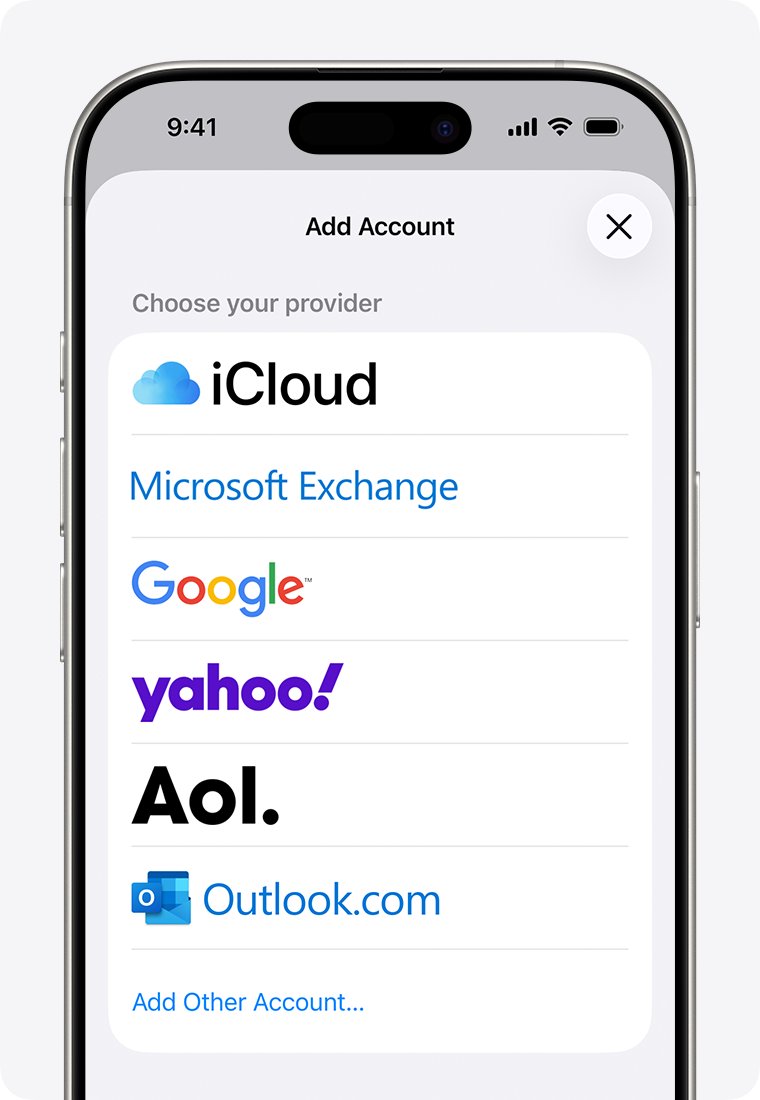
Apple lists Outlook.com as the provider for @hotmail.com, @live.com, @msn.com and @outlook.com addresses on iPhone. Remove the old account first, or Mail may say the account already exists.
- Sign in to Outlook.com in a browser and check that your email is there before you change anything on the iPhone.
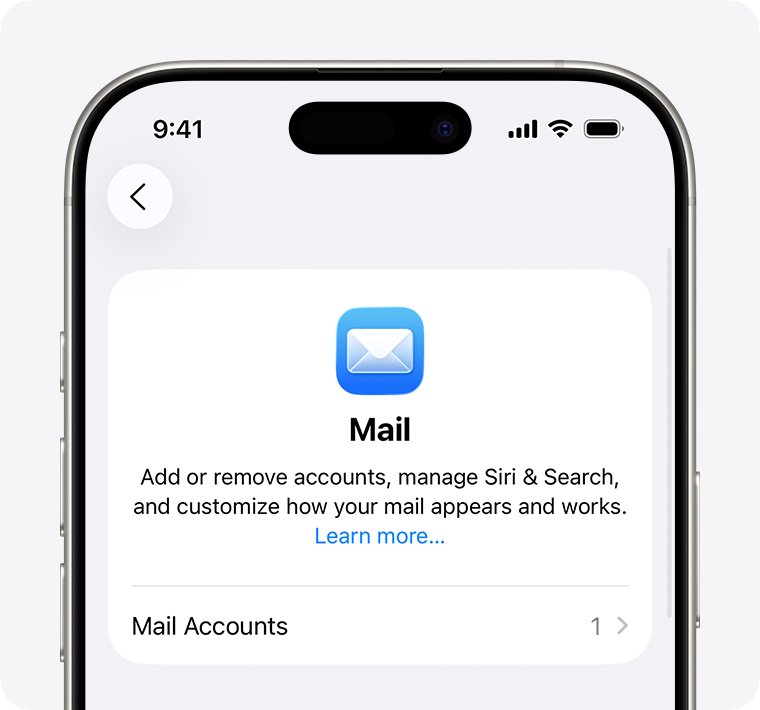
- Open Settings, tap Apps, then tap Mail.
- Tap Mail Accounts, tap your Hotmail account, then tap Delete Account.
- Go back to Mail Accounts and tap Add Account.
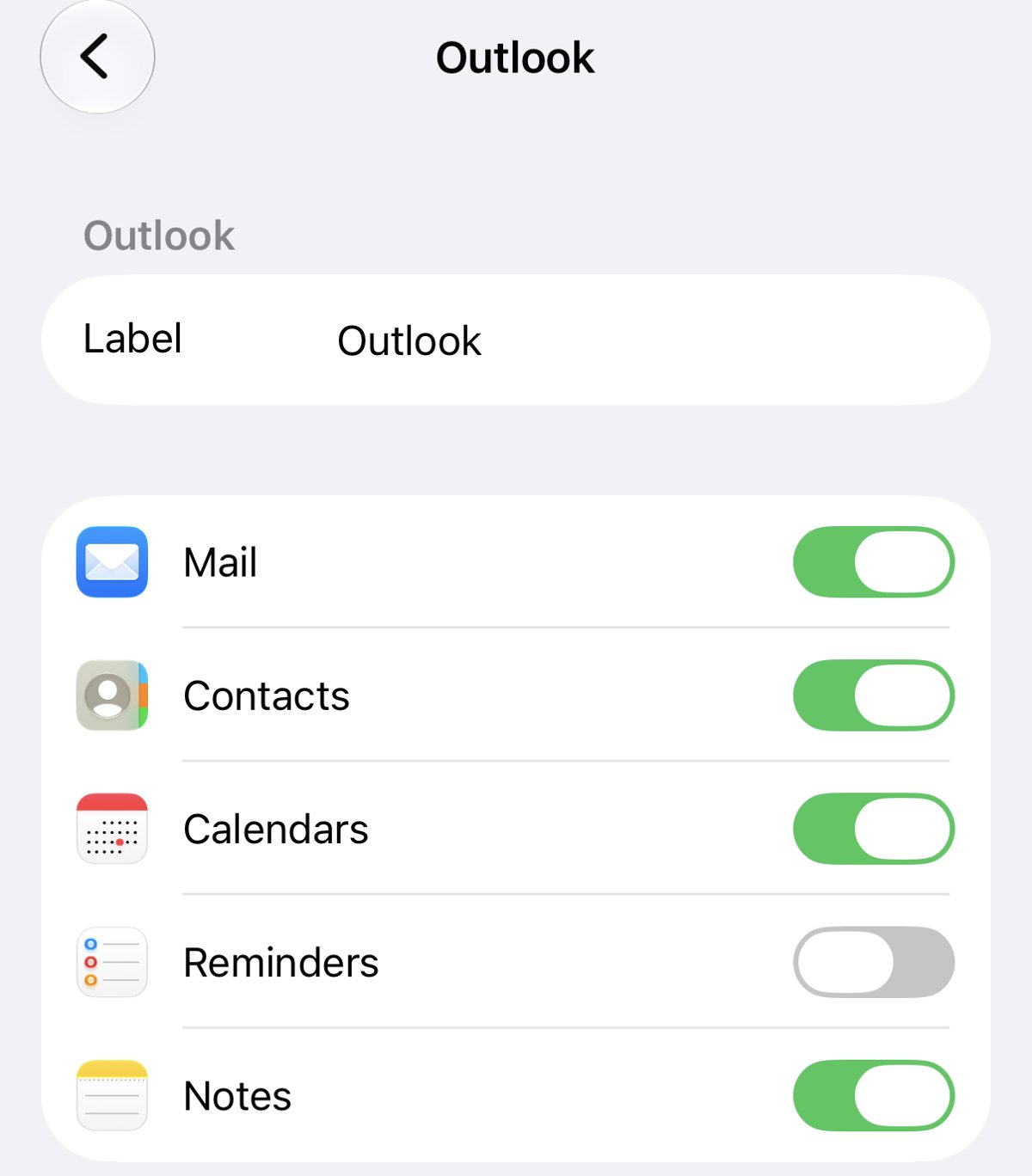
- Tap Outlook.com, enter your Hotmail address and password, then tap Sign in.
- Approve the sign-in request if your Microsoft account uses two-step verification.
- Answer Yes when asked Let this app access your info?
- Leave Mail turned on, then tap Save and open the Mail app.
Pick Outlook.com, not Other or a manual IMAP setup. Microsoft says Apple Mail supports Modern Authentication by default only when the account is set up as Outlook.com.
Why is my Hotmail not loading on iPhone?
Hotmail runs on Outlook.com, so most loading problems come from how the account was added to Mail or from the Microsoft account itself. Match what you see to a row.
| Cause | What you see | Fix |
|---|---|---|
| Account set up with Basic Authentication | Repeated password prompts or connection errors | Delete the account and add it back as Outlook.com |
| Wrong provider chosen | Account added as Other, IMAP or POP | Remove it and pick Outlook.com from the provider list |
| Fetch set to Manually | New mail appears only when you open the inbox and pull down | Change Fetch New Data to a schedule or Automatically |
| Mailbox or Microsoft storage full | Nothing new arrives and senders get mail returned | Free up space in Outlook.com storage settings |
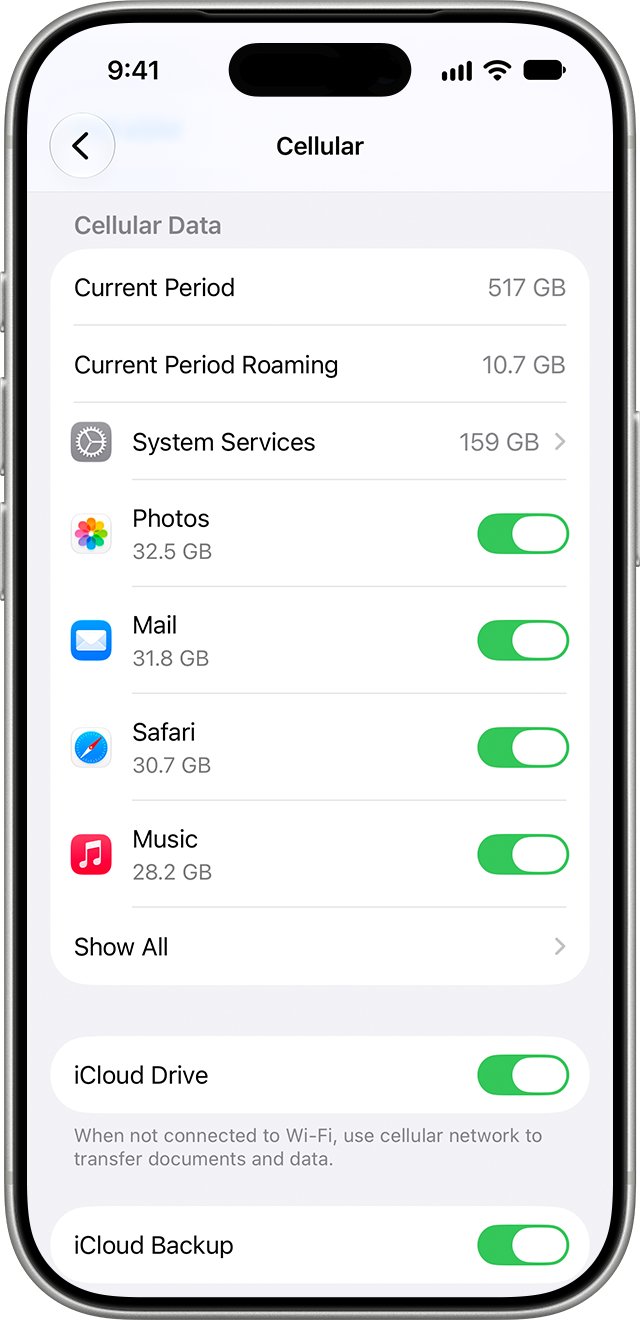
| Cellular data off for Mail | Hotmail loads on Wi-Fi but not away from it | Turn on Mail in Settings > Cellular |
| Account blocked by Microsoft | Outlook.com in a browser also refuses to sign in | Unblock it with Microsoft's Sign-in Helper |
| Outlook.com service problem | Webmail fails for everyone, not just you | Check Microsoft's Service Health Status site and wait |
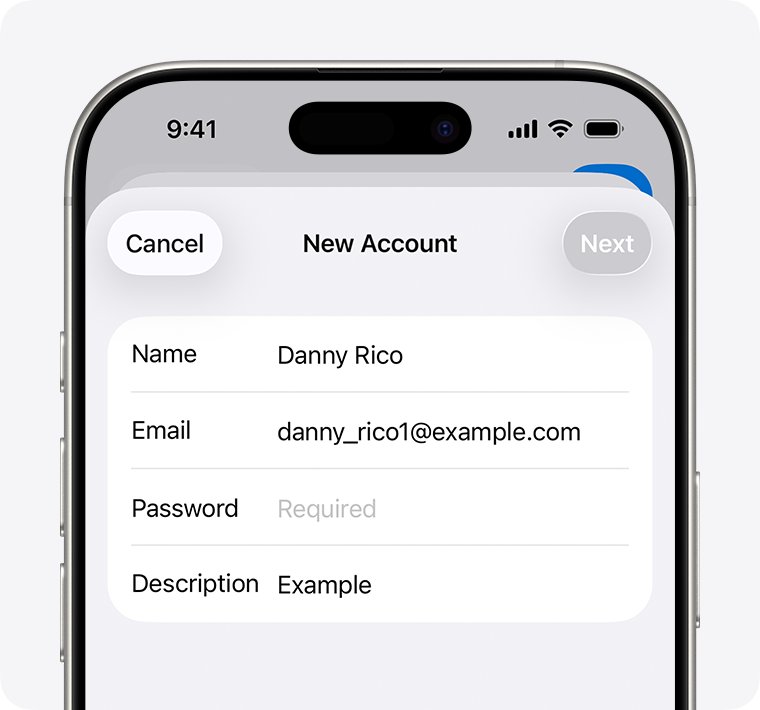
Hotmail login not loading on iPhone after re-adding the account
If the Outlook.com sign-in page stalls or loops, Microsoft's own fix for Apple Mail is to clear Safari's website data and restart before adding the account again.
- Delete the Hotmail account again in Settings > Apps > Mail > Mail Accounts.
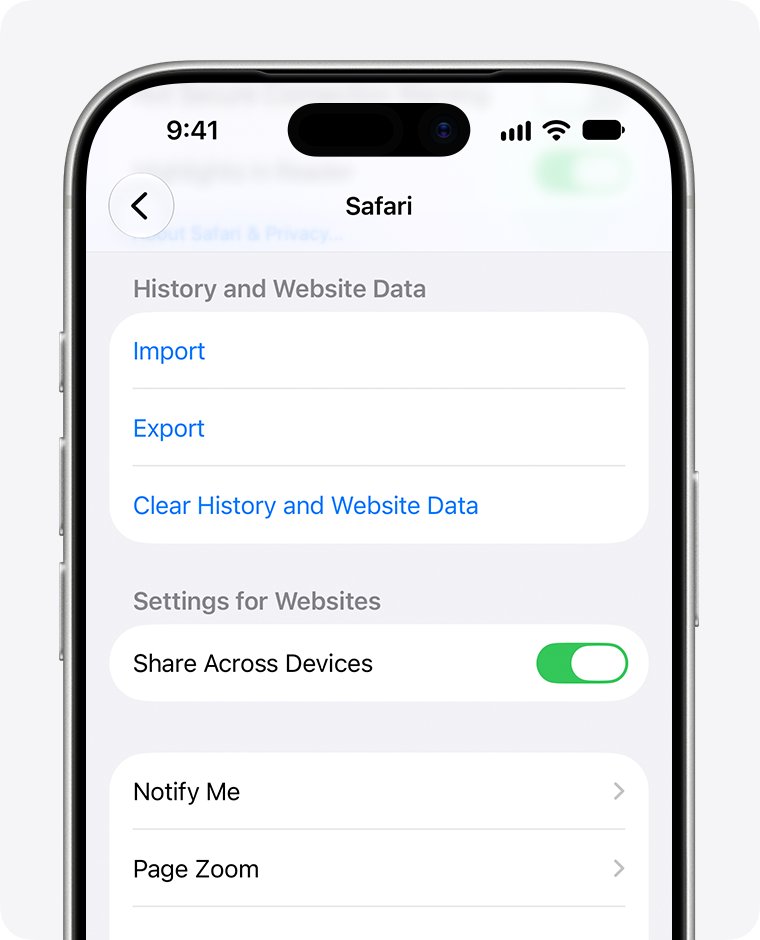
- Go to Settings, tap Apps, then tap Safari.
- Scroll down, tap Clear History and Website Data, choose the timeframe, then tap Clear History.
- Restart your iPhone.
- Add the account back with Add Account > Outlook.com and complete the Microsoft sign-in.
Clearing Safari history does not change your AutoFill information, but it does sign you out of websites in Safari.
Hotmail server not loading: test Outlook.com in Safari
A browser test tells you whether the problem is the iPhone setup or the account. Apple recommends signing in to your provider's website to check the email address and password.
- Open Safari and load any website to confirm the iPhone is online.
- Go to the Hotmail sign-in page and enter your full Hotmail address.
- Type your password by hand and sign in.
- If the inbox opens, the account is fine, so fix the setup in the Mail app.
- If the sign-in fails, reset the password or unblock the account before you touch Mail again.
- If Outlook.com will not load at all, check Microsoft's Service Health Status site for an outage.
Hotmail not loading new emails on iPhone
Mail uses Push or Fetch for each account. If Push is not available, the account falls back to Fetch, and the Automatically setting downloads new mail in the background only while the iPhone is charging and on Wi-Fi.
- Open Settings, tap Apps, then tap Mail.
- Tap Mail Accounts, then tap Fetch New Data.
- Under Fetch, choose a timed schedule if you want mail outside charging and Wi-Fi.
- Go to Settings > Notifications > Mail and set Alerts, Sounds and Badges for the account.
- Open Mail and pull down on the inbox to check for new messages now.
Hotmail inbox not loading because Outlook.com storage is full
Outlook.com gives you 15 GB of free email storage, separate from 5 GB of Microsoft cloud storage. If either one is full, you cannot send or receive email, and messages sent to you are returned to the sender.
- Sign in to Outlook.com in Safari or on a computer.
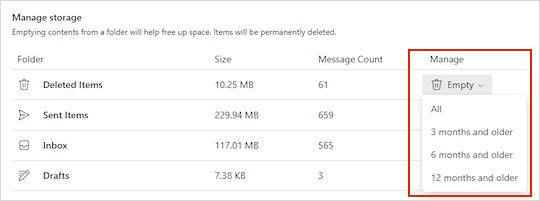
- Open Settings, select Account, then select Storage.
- Check how much space each folder uses in the breakdown.
- Permanently delete items you do not need, or those older than 3, 6 or 12 months.
- Empty Deleted Items, because it counts against the quota until it is emptied.
- Open Mail on the iPhone and pull down on the inbox once you are under the limit.
Senders whose messages bounced while the mailbox was full need to send them again.
Hotmail not loading on iPhone cellular data
When cellular data is off for an app, iPhone uses only Wi-Fi for it. That makes Hotmail look broken whenever you leave home.
- Open Settings and tap Cellular.
- Check that Cellular Data is turned on.
- Scroll down to the list of apps and turn on Mail.
- Tap Cellular Data Options, then Data Mode, and choose a mode other than Low Data Mode if you want background mail on cellular.
- Open Mail away from Wi-Fi and pull down on the inbox.
Low Data Mode pauses automatic updates and background tasks when iPhone is not on Wi-Fi, which delays new mail.
Hotmail account not loading on iPhone: password and sign-in errors
Mail keeps asking for the Hotmail password
The account was set up with Basic Authentication, which Outlook.com no longer accepts.
- Check the password on Outlook.com in Safari.
- Delete the account in Settings > Apps > Mail > Mail Accounts.
- Add it back with Add Account > Outlook.com.
"Account already exists" when you add Hotmail
The old account is still on the iPhone.
- Go to Settings > Apps > Mail > Mail Accounts.
- Tap the Hotmail account and tap Delete Account.
- Tap Add Account and choose Outlook.com.
Outlook.com account temporarily blocked
Microsoft noticed unusual sign-in activity and blocked the account to protect it.
- Open Microsoft's Sign-in Helper from the Unblock my Outlook.com account page.
- Enter the security code Microsoft sends, or change your password when asked.
- Add the account to Mail again once Outlook.com opens in a browser.
Hotmail stopped loading after you turned on two-step verification
The Mail setup cannot finish the extra verification step.
- Delete the account from Mail.
- Add it back as Outlook.com so the Microsoft sign-in can ask you to approve the request.
- Approve the sign-in request when Microsoft asks for it.
Hotmail not sending emails from iPhone
Messages that fail to send wait in the Outbox.
- In Mail, go to your list of mailboxes and tap Outbox.
- If there is no Outbox, your email was sent.
- Tap the message, check the recipient's address, then tap Send.
- If it still fails, check Outlook.com storage, because a full mailbox blocks sending too.
Outlook app vs iPhone Mail for Hotmail
| Your situation | Use this | Why |
|---|---|---|
| You want Hotmail next to other accounts in one inbox | iPhone Mail with the Outlook.com provider | It supports Modern Authentication when set up as Outlook.com |
| Mail still fails after a clean Outlook.com setup | Outlook for iOS | Microsoft recommends its own app for the best experience, and it is free |
| You only need to read a few messages right now | Outlook.com in Safari | It needs no account setup on the iPhone |
| You set up Hotmail with IMAP and server names | Switch to the Outlook.com provider | Manual setups are the ones most likely to rely on Basic Authentication |
In Outlook for iOS, select Settings > Accounts > Add Account > Email Account, enter your address and sign in. Server names for other apps are in the Hotmail IMAP and SMTP settings.
How to tell if Hotmail is syncing on iPhone Mail
- Open Mail, go to your list of mailboxes and check that the Hotmail inbox is listed.
- Pull down on the Hotmail inbox and wait for the update to finish.
- Compare the newest message with the newest one on Outlook.com in Safari.
- Send a test email to your Hotmail address from another account and check that it arrives.
- Reply from the iPhone and confirm the reply reaches the other account.
If the test arrives on Outlook.com but not on the iPhone, recheck Fetch New Data and cellular access for Mail.
Will deleting Hotmail from iPhone delete my emails?
Deleting the account removes downloaded email from the iPhone only, so mail stored on Outlook.com stays there and downloads again when you add the account back. Apple notes that removing an account does not cancel it, and that an iCloud or iTunes backup saves mail settings but not the email itself. Check that every message you need is on Outlook.com before you tap Delete Account.
Hotmail not loading on iPhone FAQ
Why does my Hotmail not load?
Most often the account was set up in a way Outlook.com no longer accepts, since Basic Authentication ended on September 16, 2024. Delete the account on the iPhone and add it back as Outlook.com. If webmail fails too, the account is blocked or the service has an outage.
Why won't my Hotmail load on my iPhone but works on my computer?
The account is fine, so the iPhone setup is the problem. Check that it was added with the Outlook.com provider, that Mail has cellular access, and that Fetch New Data is not set to Manual. Removing and re-adding the account fixes most cases.
Why is my Hotmail not loading new emails?
Mail may be on Fetch with the Automatically setting, which only downloads in the background while charging and on Wi-Fi. Pick a timed schedule under Fetch New Data. A full Outlook.com mailbox also stops new mail from arriving.
Why is MSN Hotmail not loading?
@msn.com addresses use the same Outlook.com service as Hotmail, so the fixes are the same. On iPhone, add the account with the Outlook.com provider. If Outlook.com will not open in a browser either, check the Service Health Status site or unblock the account.
Why will my Hotmail not receive emails?
A full mailbox or full Microsoft cloud storage stops Outlook.com from receiving email, and senders get their messages returned. Check Settings > Account > Storage on Outlook.com, delete what you do not need, and empty Deleted Items.
Why is my Hotmail not sending emails?
Look in the Mail Outbox for messages that failed and tap Send again. If they keep failing, check the password on Outlook.com, free up mailbox storage, and re-add the account as Outlook.com if Mail keeps asking for the password.
Why does Hotmail not work in the iPhone Mail app after an update?
A software update does not change the provider, so an old Basic Authentication setup can still be the cause. Re-add the account as Outlook.com first. Other iPhone Mail problems after an update have their own causes, such as categories hiding messages.
Should I choose Outlook.com or Microsoft Exchange for Hotmail on iPhone?
Choose Outlook.com. Apple lists Outlook.com as the provider for Hotmail, Live, MSN and Outlook.com addresses on iPhone and iPad. Microsoft Exchange is the provider Apple lists for those addresses on a Mac, where Mail can reject a Hotmail password for similar reasons.