The UniFi Network download is free from ui.com, and Ubiquiti ships it for Windows 11, Windows 10 and Mac. Install UniFi OS Server 5.1.42 to self-host the controller that adopts your access points, switches and gateways.
Ubiquiti still publishes the older UniFi Network Application 10.6.106 for machines that need the classic server. Both run on your own hardware, and neither asks for a licence key.
This guide covers which build fits your machine, the official links, setup on Windows and Mac, the firewall ports, updates, fixes for a server that will not start, and clean removal.
Which UniFi Network download do you need?
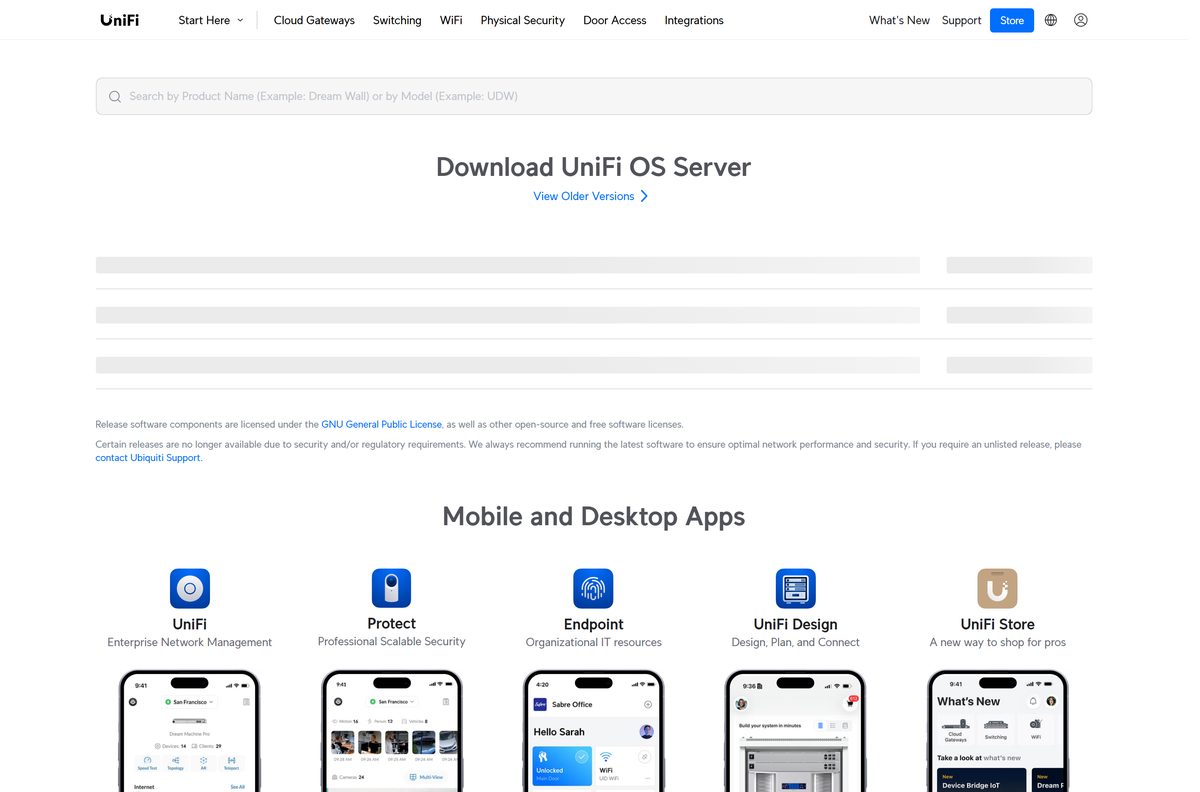
Ubiquiti publishes one release for every processor type. Match your machine to a row, then click the matching Download button on the Ubiquiti downloads page.
| Your machine | Build to click | Page |
|---|---|---|
| Windows 11 or Windows 10 PC with an Intel or AMD chip | UniFi OS Server 5.1.42 Windows (x64) | ui.com/download |
| Windows on Arm laptop, such as a Snapdragon X machine | UniFi OS Server 5.1.42 for Windows (arm64) | ui.com/download |
| Mac with Apple silicon (M1 or later) | UniFi OS Server 5.1.42 for macOS | ui.com/download |
| Mac with an Intel processor | UniFi OS Server 5.1.42 for macOS (Intel) | ui.com/download |
| A PC or Mac that must keep the classic server | UniFi Network Application 10.6.106 | Release list |
Ubiquiti prints no file size next to any build, so plan for the 10 GB of free disk space the requirements ask for.
Do not install the server on a UniFi Cloud Gateway or CloudKey. Those consoles already run the controller, and a device can only be managed by one host.
Download UniFi Network from the official Ubiquiti page
Every current build sits on one page at ui.com. The release lists show the version number and date beside each file, so you can confirm you are installing the newest one.
- Ubiquiti downloads page — Windows x64, Windows arm64, macOS, macOS Intel and Linux builds
- UniFi OS Server release list — Current 5.1.42 release plus earlier versions
- Network Server release list — Where the classic 10.6.106 application is listed
- Self-Hosting UniFi guide — Ubiquiti’s own requirements and setup instructions
- Classic server install guide — Steps for the Windows and macOS application
The Download buttons hand you the installer straight from Ubiquiti’s own file host. Any site that wraps it in a third-party setup program is not distributing Ubiquiti’s software.
How to install UniFi Network on Windows 11 and 10
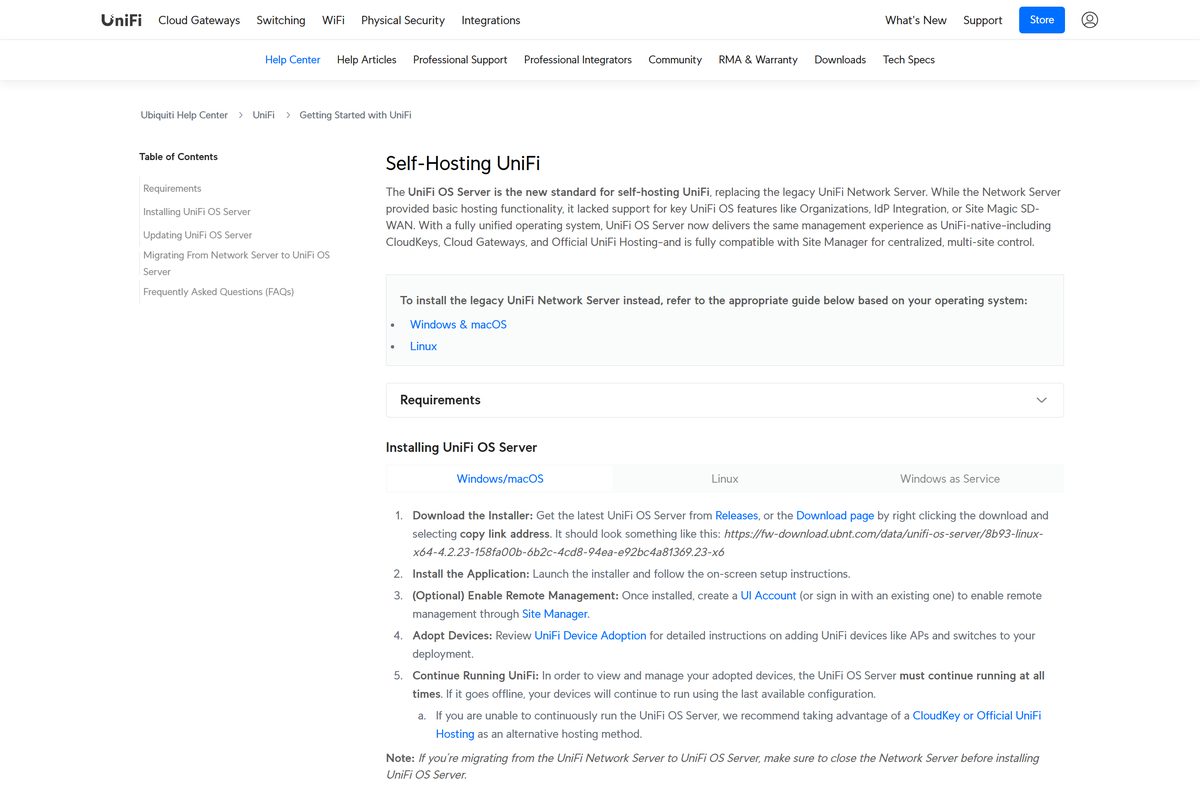
Setup installs Windows Subsystem for Linux 2, so the machine reboots at least once. A Hyper-V guest VM is not a supported host.
- Open the Ubiquiti downloads page and find Download UniFi OS Server.
- Click Download next to the Windows build that matches your processor.
- Run the downloaded installer and accept the User Account Control prompt.
- Let setup install WSL 2 and restart the PC when it asks.
- Open TCP 8080, TCP 8443, UDP 3478 and UDP 10001 in Windows Defender Firewall.
- Launch the server and sign in with a UI account if you want remote management through Site Manager.
- Open a browser, go to https://localhost:8443 and continue past the certificate warning.
- Work through the setup wizard, then adopt your first access point or switch.
The classic application installs the same way from UniFi-installer.exe , bundles MongoDB 3.6 and needs no WSL.
Which UniFi Network download do you need for your Mac?
Open the Apple menu and select About This Mac to read your chip. Ubiquiti ships separate Apple silicon and Intel builds.
| Your Mac says | Build | Page |
|---|---|---|
| Apple M1, M2, M3 or M4 | UniFi OS Server 5.1.42 for macOS | ui.com/download |
| Intel Core processor | UniFi OS Server 5.1.42 for macOS (Intel) | ui.com/download |
| Either chip, classic server wanted | UniFi Network Application 10.6.106 (UniFi-Network-Server.dmg) | Release list |
macOS Catalina 13.1.0 or later is the stated minimum. For the classic DMG, set Privacy & Security to App Store and identified developers, control-click UniFi.pkg and choose Open.
If macOS still refuses to launch it, open System Settings > Privacy & Security and select Open Anyway.
Should you install UniFi OS Server or the classic application?
UniFi OS Server replaced the legacy Network Server and adds Organizations, IdP integration and Site Magic SD-WAN, which the older application never supported.
Close the classic server before running the newer installer. On Windows and Mac it detects the old setup and offers to migrate it, and captive portals then move from port 8843 to port 8444.
Install UniFi OS Server 5.1.42 unless you need the server to run as a Windows service. UniFi OS Server cannot run as a Windows service yet, so that one job still belongs to the classic application. Everything else, including Site Manager integration and newer UniFi OS features, only exists in the newer release.
How to run UniFi Network as a Windows service
Running the controller as a service keeps it alive in the background after a reboot, with no signed-in user. This method applies to the classic application on Windows 10 and Windows 11 desktops, not Windows Server.
It is the one route that still needs a separate Java runtime: Java 17 or Java 21 for release 9.0 and later. See the Java JDK download guide if the machine has no JDK.
- Install the classic application from the release list.
- Install a matching Java runtime and set Set JAVA_HOME variable to Will be installed on local hard drive.
- Remove older Java versions if the JAVA_HOME variable refuses to stick.
- Open TCP 8080, TCP 8443, UDP 3478 and UDP 10001 in your firewall.
- Open Command Prompt as an administrator.
- Run cd “%UserProfile%\Ubiquiti UniFi\” to reach the install folder.
- Run java -jar lib\ace.jar installsvc and wait for the Complete Installation message.
- Run java -jar lib\ace.jar startsvc , then open https://localhost:8443 .
Before upgrading a machine set up this way, take a backup, then run java -jar lib\ace.jar uninstallsvc and repeat the steps above on the new version.
Is UniFi Network free?
Ubiquiti charges nothing for the self-hosted server and asks for no licence key. The release components carry the GNU General Public License alongside other open-source licences.
The paid options are separate: Ubiquiti hardware, and Official UniFi Hosting, which runs the same software in Ubiquiti’s cloud instead of on your machine.
Yes. Ubiquiti calls the self-hosted server completely license-free and available to all UniFi users. Nothing on the downloads page is gated behind a purchase or an account. A site selling a serial, an activator or a paid installer for it is not distributing Ubiquiti’s software.
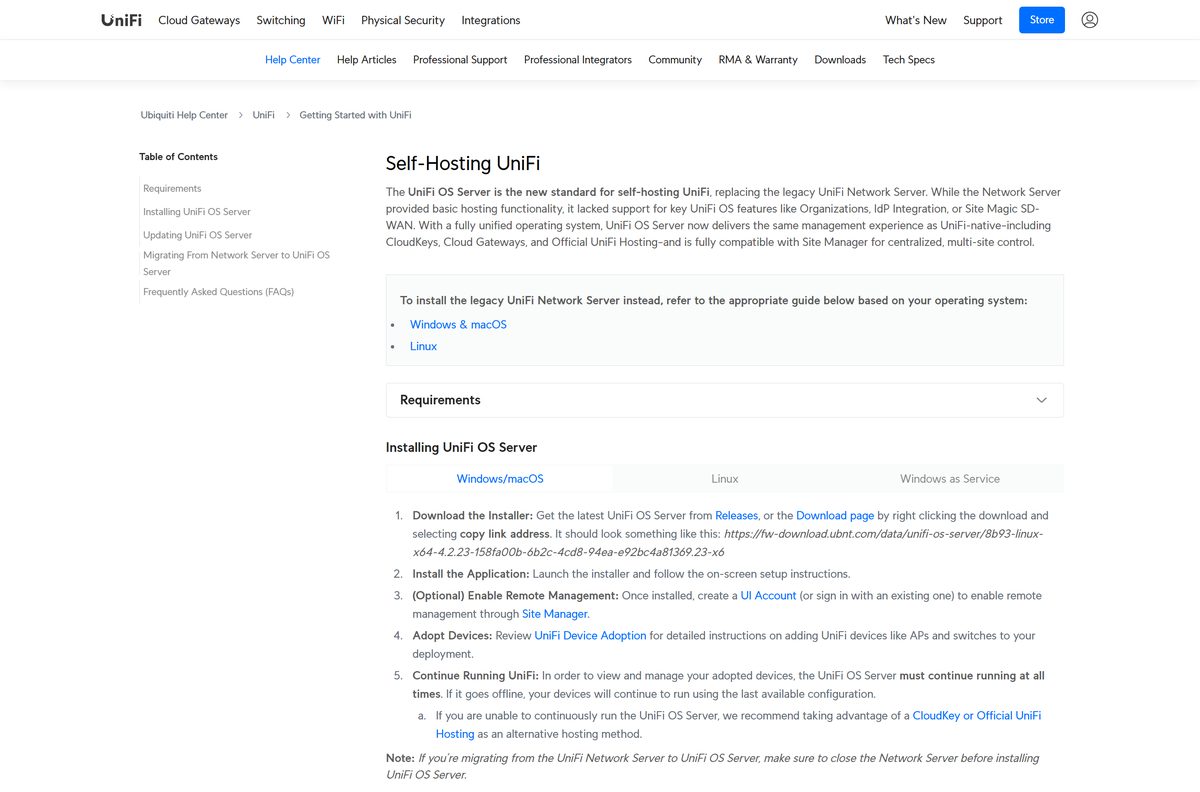
Check the UniFi Network system requirements
The published minimum is modest, but a self-hosted controller grows with every device you adopt. Add RAM and disk before the site does, not after.
| Field | Value |
|---|---|
| Software | UniFi Network Server |
| Developer | Ubiquiti Inc. |
| Latest version | UniFi OS Server 5.1.42; classic application 10.6.106 |
| Licence | Free, no licence key; GPL and other open-source licences |
| Windows | Windows 10 or later, Windows Server 2022; WSL 2 installed during setup |
| macOS | Catalina 13.1.0 or later, Apple silicon or Intel |
| Linux | Ubuntu 24.04 or later, Debian 13 or later |
| Architecture | x64 and arm64 on Windows and Linux; Apple silicon and Intel on Mac |
| CPU | x86-64 processor |
| RAM | 2 GB minimum |
| Storage | 10 GB free, 20 GB or more preferred |
| Offline installer | Yes, the installer runs locally |
| Official download source | ui.com/download |
| Last verified | 2026-09-22 |
Which firewall ports does the server need open?
A self-hosted controller sits behind your own firewall, so nothing opens these for you. Devices stay in Pending Adoption until TCP 8080 and UDP 10001 reach the server.
| Port | Protocol | What it carries |
|---|---|---|
| 8080 | TCP | Device and application communication |
| 8443 | TCP | Application interface and API in your browser |
| 3478 | UDP | STUN for adoption and remote access |
| 10001 | UDP | Device discovery during adoption |
| 8843 | TCP | Hotspot portal redirection over HTTPS |
| 8444 | TCP | Secure hotspot portal, used instead of 8843 by the newer server |
Ubiquiti’s required ports reference lists the rest, including DNS and NTP traffic.
How to check your version and update it
A self-hosted server never updates itself. The version shows in the interface at https://localhost:8443 under Settings > Control Plane.
- Open https://localhost:8443 and read the version in Settings > Control Plane.
- Compare it with the release date on the release list.
- Download a backup from UniFi Network System Settings before changing anything.
- Download the newer release on the machine hosting the server, not on another PC.
- Close every running instance of the application.
- Run the downloaded file and follow the setup wizard.
- Reopen https://localhost:8443 and confirm the new version number.
UniFi OS Server can also update from Update Manager in Site Manager. A classic server older than 8.6 has to be updated by hand.
Fix UniFi Network not installing or not starting
Most failures on a self-hosted machine come from ports, Java or the host itself. Find the symptom that matches yours.
The server starts but no nearby devices appear
The host firewall or an antivirus is blocking discovery traffic.
- Allow TCP 8080 and UDP 10001 between the host and your devices.
- Add the application to the allowed list in any antivirus or endpoint software.
- Confirm the devices sit on the same VLAN as the host.
- For a different subnet, follow Ubiquiti’s layer 3 adoption guide.
The application will not start at all
The host is short of resources, or the service method has the wrong Java version.
- Check the machine against the 2 GB RAM and 10 GB disk minimum.
- For a service install, confirm Java 17 or Java 21 is present for release 9.0 and later.
- Uninstall older Java versions that hold the JAVA_HOME variable.
- Install on a different machine if the host still refuses to run it.
The browser warns that your connection is not private
The server uses a self-signed certificate on port 8443.
- Select Advanced, then continue to the page.
- Upload your own TLS certificate under Settings > Control Plane > Console > Certificates.
Setup fails inside a virtual machine
Hyper-V guests are not a supported host for the newer server.
- Install on the physical machine instead of a Hyper-V guest.
- Never clone a running server VM outside a failover setup, because the copy reuses the same remote access tokens.
How to uninstall UniFi Network
Take a backup first. Removing the application removes the controller, and adopted devices keep running on their last configuration until another host adopts them.
- Download a backup from UniFi Network System Settings.
- On Windows, open Add or Remove Programs in Settings.
- Find Ubiquiti UniFi (remove only), select Uninstall and follow the prompts.
- On a Mac, delete the application from Applications.
- Delete the folder ~/Library/Application Support/UniFi/ .
- On Debian or Ubuntu, run sudo dpkg -P unifi in a terminal.
- Reboot the machine to clear residual files.
On a Mac, right-click UniFi.app and choose Show Package Contents rather than double-clicking it, which would start the application again.
Where else can you run UniFi Network?
Self-hosting means you own the uptime, the backups and the updates. Ubiquiti sells three hosts that do that work instead.
| Host | Who it suits | Cost |
|---|---|---|
| Self-hosted server on your PC or Mac | Admins comfortable running and updating a server | Free |
| UniFi Cloud Gateway (UDM, UCG) | Homes and small sites wanting one box | Hardware purchase |
| UniFi CloudKey and CloudKey Enterprise | Sites that also need Protect, Access or Talk | Hardware purchase |
| Official UniFi Hosting | Anyone who wants Ubiquiti to run the controller | Subscription |
Protect, Access, Talk and Connect cannot be self-hosted on a PC or Mac at all. Only the CloudKey line adds them on your own premises.
Frequently asked questions
Is the UniFi Network download free?
Yes. Ubiquiti describes the self-hosted server as completely license-free and available to all UniFi users. No key, account or purchase is needed. Official UniFi Hosting is a separate paid cloud service.
Where is the official UniFi Network download page?
The official page is ui.com/download. It lists UniFi OS Server 5.1.42 for Windows x64, Windows arm64, macOS, macOS Intel and Linux, each with its release date and release notes.
Does UniFi Network work on Windows 11?
Yes. Ubiquiti lists Windows 10 or later and Windows Server 2022 as supported. Setup installs WSL 2 on the way, so the PC restarts during installation. A Hyper-V guest VM is not supported.
How big is the UniFi Network download?
Ubiquiti publishes no file size on its downloads page. Plan for the stated storage minimum instead: 10 GB of free disk space, with 20 GB or more preferred for a busy site.
Is there a UniFi Network offline installer?
Yes. The installer from the downloads page is a full local installer. The machine still needs internet access afterwards for adoption, updates and remote management through Site Manager.
Is there a UniFi Network version for Mac?
Yes. Ubiquiti ships separate Apple silicon and Intel builds of UniFi OS Server, plus the classic UniFi-Network-Server.dmg. The stated minimum is macOS Catalina 13.1.0 or later.
Does UniFi Network run on ARM64 hardware?
Yes. There is an arm64 build for Windows on Arm laptops, an Apple silicon build for Mac, and an arm64 build for Linux. The classic application needs an x86-64 processor.
Is the UniFi Network download safe?
Yes, when it comes from ui.com. The Download buttons pull the installer from Ubiquiti’s own file host. Installers offered by download portals are repackaged and should be ignored.
What is the latest UniFi Network version?
UniFi OS Server 5.1.42, released on 10 September 2026, is the current self-hosted release. The classic UniFi Network Application sits at 10.6.106, released on 15 September 2026.
Does UniFi Network still need Java?
No, not for a normal install. Java stopped being a requirement at UniFi Network 7.5. Only the advanced Windows service method needs a separate runtime, which is Java 17 or Java 21 for release 9.0 and later.
Why won’t the UniFi Network server install?
The usual causes are a Hyper-V guest VM, a host below the 2 GB RAM minimum, or a blocked firewall port. Install on physical hardware, free up disk space and open TCP 8080 and UDP 10001.






