The official Second Life download is the free Second Life Viewer from Linden Lab, and it installs on Windows 11, Windows 10 and Mac in a few minutes. Create a free Basic account, run the installer, and log in to explore the virtual world.
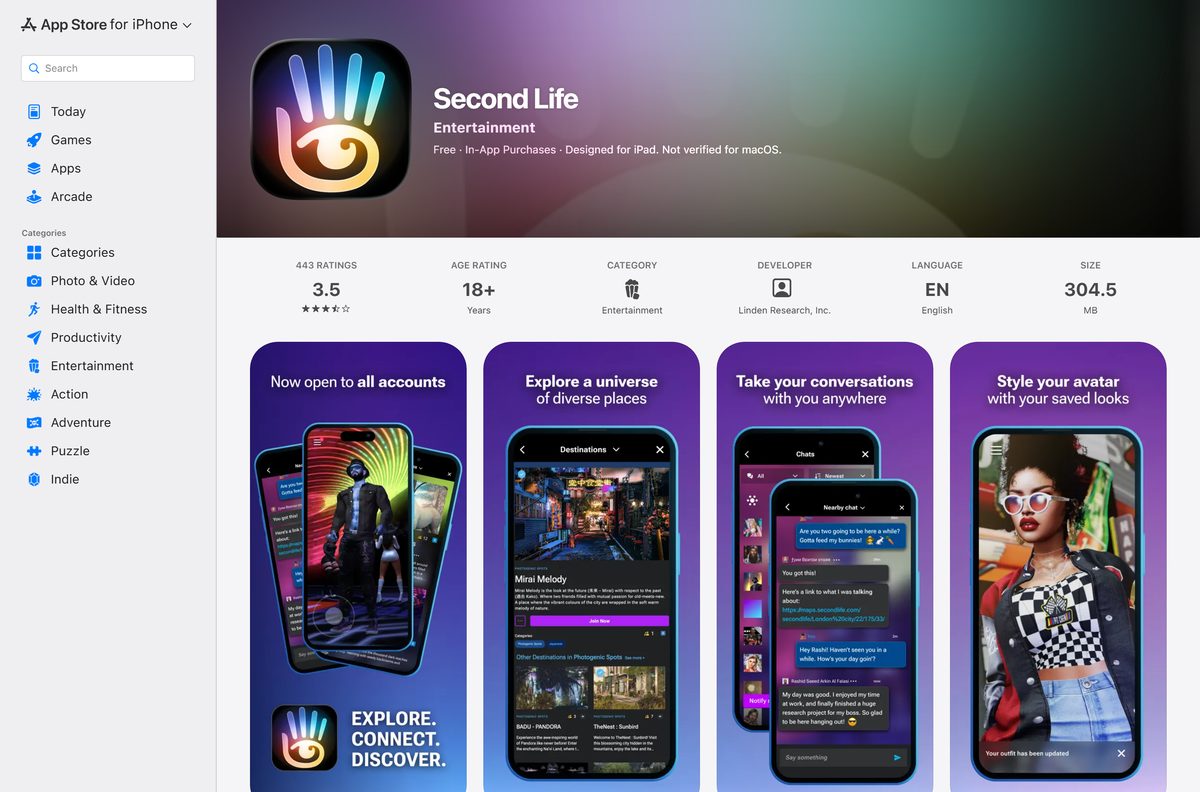
Linden Lab also publishes a free Second Life app for iPhone, iPad and Android phones, so you can chat and visit places away from your computer.
This guide covers which file fits your machine, the official links, install steps for Windows and Mac, what Premium adds, the system requirements, and fixes for installs and logins that fail.
Which Second Life download do you need?
Match your device to a row. Desktop rows are full installers from Linden Lab, and phone rows install from the app store.
| Your device | What to download | Size |
|---|---|---|
| Windows 11 or Windows 10, 64-bit Intel or AMD PC | Second_Life_26_3_0_31203661088_x86_64_Setup.exe | 273.64 MB |
| Mac on macOS 12 or later, Intel or Apple silicon | Second_Life_26_3_0_31203661088_universal.dmg | 368.8 MB |
| iPhone or iPad on iOS 15.0 or later | Second Life on the App Store | 304.5 MB |
| Android phone or tablet | Second Life on Google Play | Play states no size |
| Windows on ARM (Snapdragon) PC | No official build | Linden Lab does not support ARM CPUs on Windows |
The Mac file is a universal build, so one download covers both Intel Macs and Apple silicon Macs.
Download Second Life from the official sources
Linden Research, Inc. publishes the viewer on secondlife.com and the mobile app on both stores. Use these links and nothing else.
- Second Life downloads page — detects your system and offers the matching installer
- Second Life Viewer 26.3.0 for Windows (64-bit) — 273.64 MB · released August 17, 2026
- Second Life Viewer 26.3.0 for macOS (universal) — 368.8 MB · Intel and Apple silicon
- Second Life Viewer release notes — changes in the current release
- Second Life on the App Store — 304.5 MB · iPhone and iPad, iOS 15.0 or later
- Second Life on Google Play — Android, 1M+ downloads
Version 26.3.0 adds inventory favorites from a right-click on your avatar’s attachments and Windows Voice Clarity support on Windows 11.
How to install Second Life on Windows 11 and 10
Sign up for a free account on secondlife.com first, because the viewer asks for your username and password on its first launch.
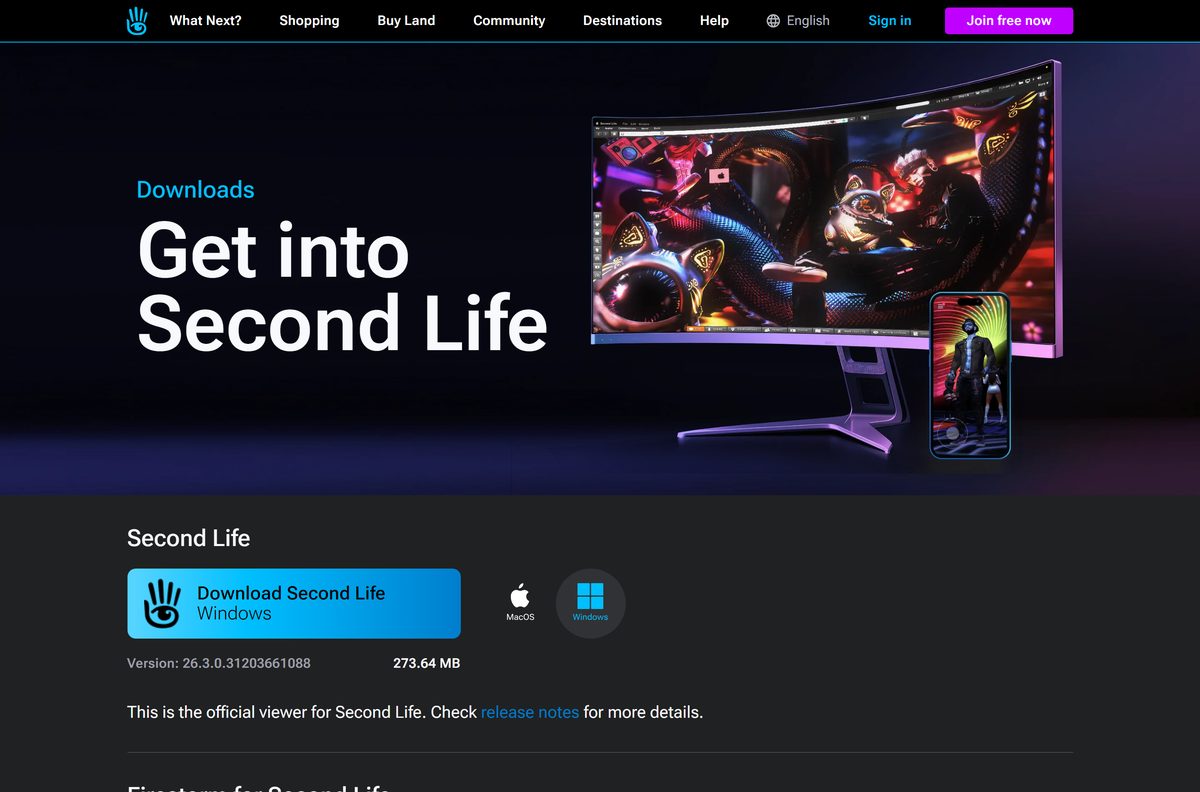
- Go to secondlife.com/downloads and select Download Second Life under Windows.
- Open your Downloads folder when the 273.64 MB file finishes.
- Double-click Second_Life_26_3_0_31203661088_x86_64_Setup.exe.
- Select Yes when User Account Control asks to allow changes.
- Follow the setup prompts and keep the default install folder.
- Wait for the files to copy, then close the installer.
- Open Second Life from the Start menu or the desktop shortcut.
- Enter your Second Life username and password, then select Log In.
A new version installs over the old one, so you do not need to uninstall before an update.
Install the Second Life app on iPhone, iPad or Android
The mobile app is free for every account on iOS and Android. It lets you edit outfits, explore destinations, move your avatar, and use nearby chat, group chat and IMs.
- On an iPhone or iPad, open Second Life on the App Store.
- Check that the seller reads Linden Research, Inc., then tap Get.
- On Android, open Second Life on Google Play and tap Install.
- Open the app when the install finishes.
- Log in with the same username and password you use on the desktop viewer.
The App Store listing is rated 18+ and needs iOS 15.0 or later.
How to install Second Life on a Mac
Every supported Mac uses the same universal .dmg. Check your macOS version first under Apple menu > About This Mac.
| Your Mac | What to do | Size |
|---|---|---|
| macOS 12 or later, Intel or Apple silicon | Download the universal .dmg, open it and drag the Second Life logo onto Applications | 368.8 MB |
| The .dmg finished downloading in your browser | Right-click the installer in the browser’s download list and choose Open | No extra download |
| macOS 11 or older | Update macOS first, then install the viewer | macOS 12 is the minimum |
After the copy finishes, open Second Life from Applications and log in with your account.
Is Second Life free?
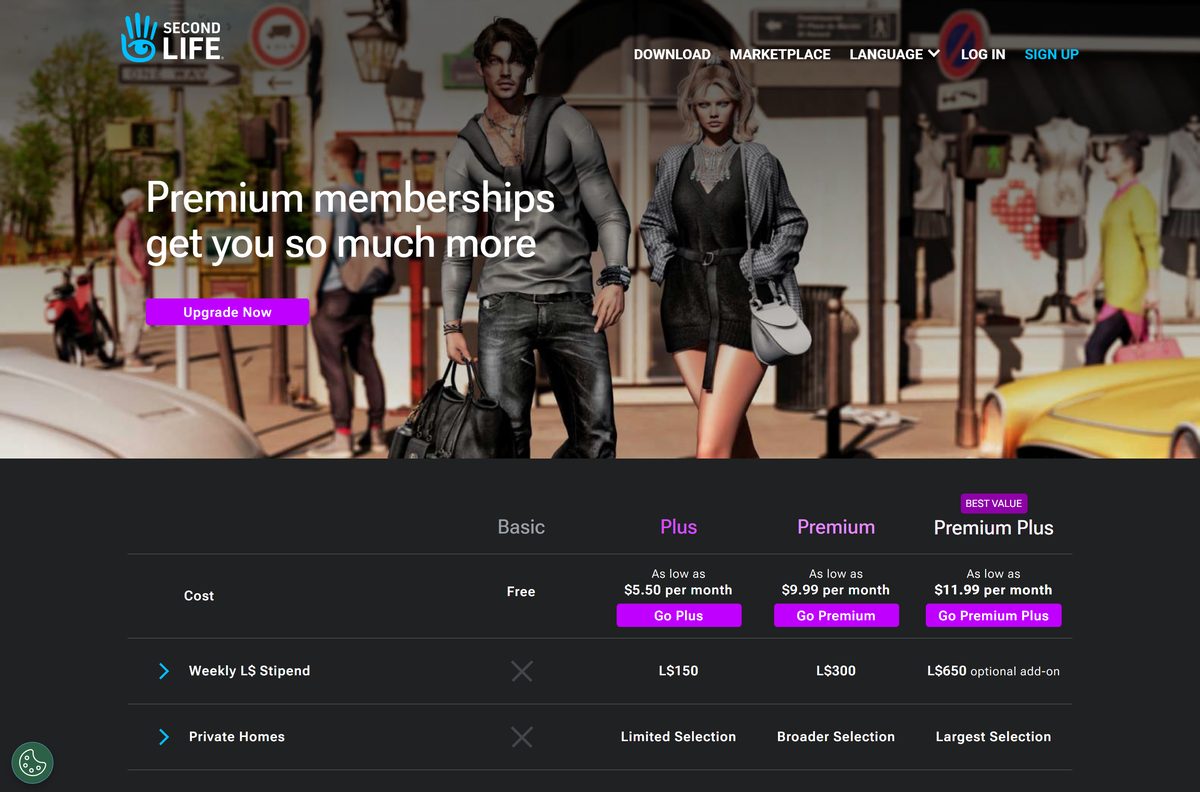
Yes. The viewer, the mobile app and a Basic account are free, and paid memberships are optional. The Basic tier costs nothing and never expires. Plus starts at $5.50 per month, and Premium and Premium Plus cost more, with prices shown for yearly billing paid in full. Paid tiers add a weekly Linden dollar (L$) stipend of L$150, L$300 or L$650 and a complimentary Linden Home for members 18 and older. Premium adds live chat support, and Premium Plus adds a phone support line.
Linden dollars are the in-world currency. You spend real money on L$ only if you buy them for Marketplace items or land.
Should you use the Second Life desktop viewer or the mobile app?
Install the desktop viewer on Windows or Mac as your main way in, and add the mobile app for chat and quick visits. Linden Lab calls the desktop viewer the official viewer for Second Life, and its system requirements and graphics settings are built around a PC or Mac with a dedicated GPU. The mobile app focuses on outfits, destinations, avatar movement, club audio and chat. Both use the same account, so friends, outfits and Linden dollars follow you.
Use the mobile app on a phone that meets iOS 15.0, or any Android device Google Play offers it to.
How to check your Second Life version and update it
The current official release is 26.3.0.31203661088. Compare your copy against it.
- Open the Second Life Viewer.
- Select Help in the top menu bar, then About Second Life.
- Read the version number in the window that opens.
- Open secondlife.com/downloads and compare the version shown under Windows.
- Download the newer installer if your number is lower.
- Close the viewer and run the new installer over the existing copy.
- Launch Second Life and log in.
On a phone, update the app through the App Store or Google Play like any other app.
Check if your PC or Mac meets the Second Life system requirements
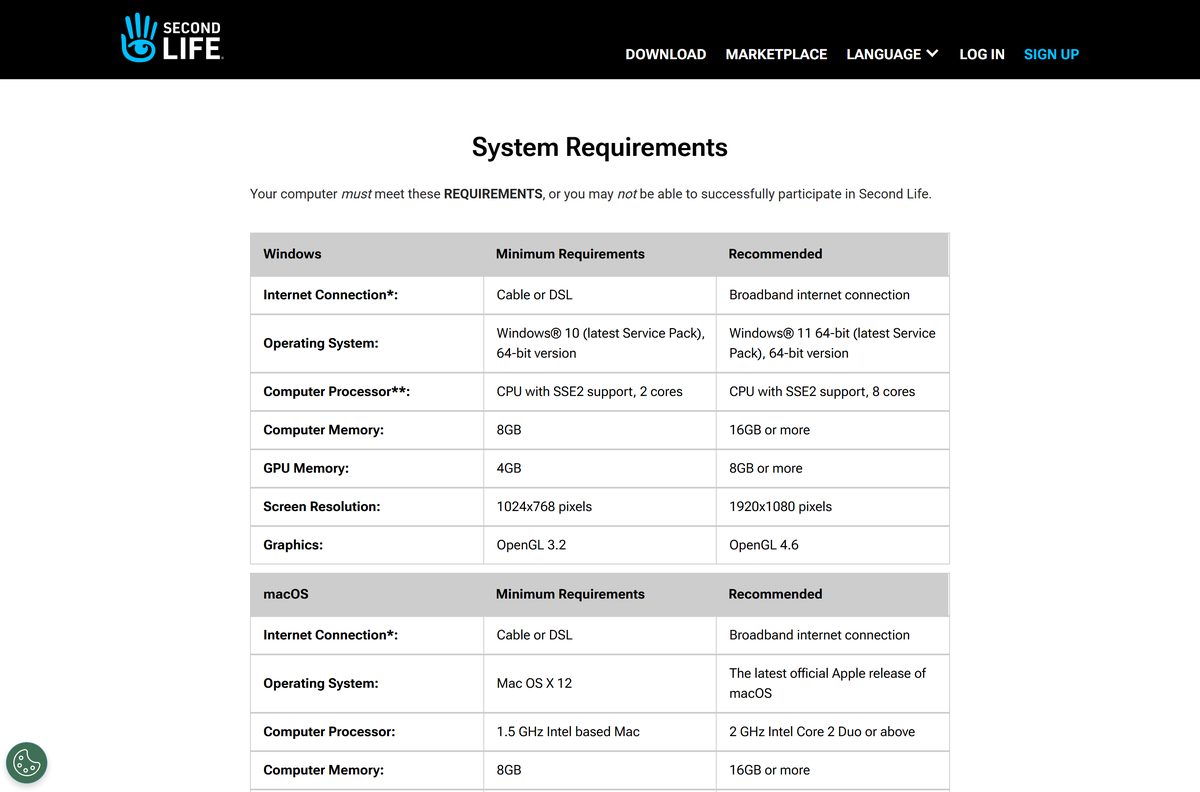
Second Life does not run over dial-up, satellite and some wireless internet services. Windows needs an x86-64 CPU.
| Field | Value |
|---|---|
| Software | Second Life Viewer |
| Developer | Linden Research, Inc. (Linden Lab) |
| Latest version | 26.3.0.31203661088 (August 17, 2026) |
| Price | Free Basic account; optional Plus, Premium and Premium Plus |
| Windows minimum | Windows 10 64-bit, 2-core CPU with SSE2, 8 GB RAM, 4 GB GPU memory, OpenGL 3.2, 1024×768 |
| Windows recommended | Windows 11 64-bit, 8-core CPU, 16 GB RAM or more, 8 GB GPU memory, OpenGL 4.6, 1920×1080 |
| macOS minimum | macOS 12, 1.5 GHz Intel Mac, 8 GB RAM, 4 GB GPU memory, OpenGL 3.2 |
| macOS recommended | Latest macOS, 16 GB RAM or more, 8 GB GPU memory, OpenGL 4.1 |
| Architecture | Windows x86-64 only; macOS universal (Intel and Apple silicon) |
| Linux | Community supported; no Linux build in the current official release |
| Internet | Cable, DSL or broadband |
| File size | 273.64 MB (Windows), 368.8 MB (Mac) |
| Official download source | secondlife.com/downloads |
| Offline installer | Yes, both are full installers; playing needs internet |
| Last verified | 2026-09-25 |
Fix Second Life not installing, launching or logging in
The installer will not run on a Snapdragon or other ARM Windows PC
Linden Lab supports only x86-64 CPUs on Windows.
- Open Settings > System > About and check System type.
- If it says ARM-based processor, use the mobile app or a Mac instead.
- Install on an Intel or AMD PC for the desktop viewer.
The viewer crashes or shows blank textures at launch
The graphics card is below OpenGL 3.2 or has less than 4 GB of memory.
- Compare your GPU against the requirements table above.
- Update the graphics driver from NVIDIA, AMD or Intel.
- Select a lower Graphics preset in the viewer’s preferences.
Menus or buttons fail to load after an update
Old viewer files are conflicting with the new install.
- Uninstall Second Life with the steps below.
- Restart the computer.
- Download a fresh installer from secondlife.com/downloads and install it again.
The login screen fails or hangs
A grid outage, a wrong password or a multi-factor code problem.
- Open Grid Status from the Second Life Community site to check for an outage.
- Use Change Password under Help on secondlife.com if the viewer rejects your password.
- Update to 26.3.0, which fixes the login screen staying visible after an MFA login.
The world never loads on your connection
Second Life does not work over dial-up, satellite and some wireless services.
- Connect over cable, DSL or fiber broadband.
- Plug into the router with Ethernet if Wi-Fi drops.
- Log in again.
How to uninstall Second Life
A clean uninstall and reinstall is the first fix Linden Lab suggests for a misbehaving viewer.
- Close the Second Life Viewer.
- On Windows 11, open Settings > Apps > Installed apps.
- Find Second Life, select the three-dot menu, then Uninstall, and confirm.
- On Windows 10, open Settings > Apps > Apps & features, select Second Life, then Uninstall.
- On a Mac, open Finder > Applications and drag Second Life to the Trash.
- Empty the Trash on the Mac, or restart the Windows PC.
Uninstalling the viewer does not delete your account, avatar or inventory, which live on Linden Lab’s servers.
Frequently asked questions
Is Second Life free to download?
Yes. The Second Life Viewer for Windows and Mac and the mobile app for iPhone and Android are free, and a Basic account costs nothing. Plus, Premium and Premium Plus are optional paid memberships, with Plus starting at $5.50 per month on yearly billing.
What is the official Second Life download page?
The official page is secondlife.com/downloads, run by Linden Lab. It offers the Windows installer and the Mac .dmg, links to the release notes and system requirements, and points to the free mobile app on the App Store and Google Play.
Does Second Life work on Windows 11?
Yes. Linden Lab lists Windows 11 64-bit as the recommended system and Windows 10 64-bit as the minimum. Version 26.3.0 also adds Windows Voice Clarity support on Windows 11. The PC needs an x86-64 Intel or AMD processor.
How big is the Second Life download?
The Windows installer for version 26.3.0 is 273.64 MB, and the universal Mac .dmg is 368.8 MB. The iPhone and iPad app is 304.5 MB on the App Store.
Is the Second Life installer an offline installer?
Yes. The Windows Setup.exe and the Mac .dmg are full installers, so you can copy them to another computer and install there. You still need a broadband connection to log in and play, because the world streams from Linden Lab’s servers.
Is there a Second Life download for Mac?
Yes. Linden Lab ships one universal .dmg that runs on Intel Macs and Apple silicon Macs with macOS 12 or later. Open the .dmg and drag the Second Life logo onto your Applications folder to install it.
Does Second Life run on ARM64 or 32-bit Windows?
No. The Windows viewer is a 64-bit x86-64 build, and Linden Lab states that ARM CPUs are not supported on Windows. On a Snapdragon PC, use the Second Life mobile app or a Mac instead.
Is there a Second Life viewer for Linux?
Not in the current official release, which ships for Windows and macOS only. Linden Lab describes its Linux viewer as community supported and says it may not work with every Second Life feature.
Is Second Life safe to download?
Yes, when you download it from secondlife.com or from the App Store and Google Play listings published by Linden Research, Inc. The App Store listing carries an 18+ age rating.
What is the latest version of Second Life?
The current official Second Life Viewer is version 26.3.0.31203661088, released on August 17, 2026. It adds inventory favorites from your avatar’s attachments, Windows Voice Clarity support and a fix for the login screen staying visible after an MFA login.
Why won’t Second Life install or open on my PC?
The most common causes are an ARM-based Windows PC, a graphics card below OpenGL 3.2 or with less than 4 GB of memory, and leftover files from an older viewer. Check the requirements, update the graphics driver, then uninstall and reinstall from secondlife.com/downloads.
Can I play Second Life on my phone?
Yes. The free Second Life app for iPhone, iPad and Android lets you change outfits, walk, fly and sit, visit destinations and chat with friends. It uses the same account as the desktop viewer.