Set the MaxTokenSize REG_DWORD value to 48000 under HKLM\SYSTEM\CurrentControlSet\Control\Lsa\Kerberos\Parameters on every computer in the Kerberos path, then restart those computers.
Windows 8, Windows Server 2012 and later already default to 48,000 bytes, so this guide also covers how to estimate a user's token, deploy the value with Group Policy, and fix HTTP 400 errors that the setting alone will not clear.
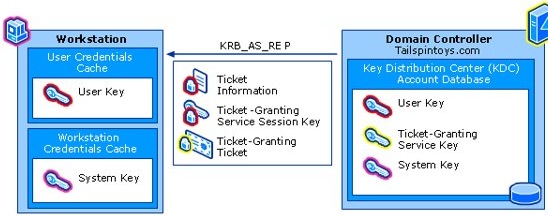
How to increase the MaxTokenSize of the Kerberos ticket?
Change the value on the client, the web server and any back-end server the user's token passes through. A web app with a SQL Server back end needs it on all of those machines, not just the one showing the error. Back up the registry first.
- Open Command Prompt or PowerShell as an administrator.
- Run
reg add HKLM\SYSTEM\CurrentControlSet\Control\Lsa\Kerberos\Parameters /v MaxTokenSize /t REG_DWORD /d 48000 /f. - Restart the computer, because the new value is not used until then.
- Repeat on every other computer that takes part in the authentication.
The reg add command creates the Parameters key if it is missing. Do not go above 48000 unless you have read the known issues further down.
Kerberos token size
When a user signs in, Windows builds a token holding the user's SID, the SIDs of every group the user belongs to, and any SIDs in the sIDHistory attribute. Kerberos stores that token in the Privilege Attribute Certificate inside the ticket-granting ticket. From Windows Server 2012, Active Directory claims for Dynamic Access Control go in the ticket too.
RPC and HTTP use MaxTokenSize to decide how much buffer to allocate for authentication. A ticket larger than that buffer fails, even though the password and account are fine.
| MaxTokenSize fact | Value |
|---|---|
| Default on Windows 8, Windows Server 2012 and later | 48,000 bytes |
| Default on Windows 7, Windows Server 2008 R2 and earlier | 12,000 bytes |
| Highest value Microsoft recommends | 48,000 bytes |
| Highest value allowed | 65,535 bytes |
| Registry location | HKLM\SYSTEM\CurrentControlSet\Control\Lsa\Kerberos\Parameters |
| Data type | REG_DWORD |
| Takes effect | After the computer restarts |
If the value is not present, the default for that Windows version applies. That is why most current networks never need the entry unless an older system sits in the path.
Max group membership limits for Active Directory
Two separate limits apply, and only one of them responds to MaxTokenSize. The ticket buffer is a Kerberos limit. The access token is a Local Security Authority limit that applies to Kerberos and NTLM alike.
| Limit | Number | Does raising MaxTokenSize help? |
|---|---|---|
| Group memberships for a security principal, per Active Directory limits | 1,015 groups | No |
| SIDs in the access token array | 1,024 SIDs, including generic ones Windows adds | No |
| Safe planning figure for custom security groups | About 1,010 groups, or 1,000 SIDs to stay clear of trouble | No |
| Universal groups that overflow the old 12,000-byte default | More than about 120 | Yes |
| Group members in one group | No fixed limit found in Microsoft testing, which reached 500 million members | Not relevant |
Nesting does not get around the access token limit, because transitive memberships count. To see the groups in your own token, run whoami /groups. That list leaves out the logon session SID, so treat the count as slightly low.
How to calculate Kerberos token size
Microsoft's formula is TokenSize = 1200 + 40d + 8s. The result is an estimate, because the 1,200-byte overhead shifts with the length of the DNS domain name and client name.
| Term | What it counts | Bytes each |
|---|---|---|
| 1200 | Estimated ticket overhead | 1,200 once |
| d | Universal groups outside the user's account domain, plus SIDs in sIDHistory |
40 |
| s | Universal groups inside the user's account domain, plus domain-local and global groups | 8 |
A user with 100 d entries and 1,000 s entries needs 1200 + 4000 + 8000 = 13,200 bytes. That overflows a 12,000-byte buffer but fits comfortably in 48,000.
Double the result if the account uses unconstrained delegation, which needs twice the space per SID. Microsoft disabled unconstrained delegation across incoming trusts by default in 2019 updates.
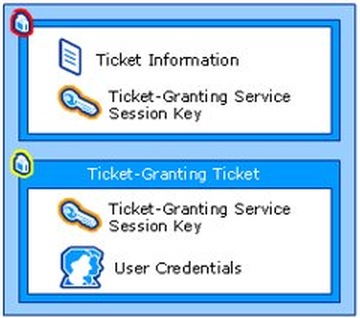
Getting Kerberos token size with PowerShell script
This script applies the formula to one account by querying Active Directory user info for its tokenGroups and sIDHistory attributes. It needs the ActiveDirectory module, which comes with the RSAT Active Directory tools or a domain controller. Replace jsmith with the SAM account name you want to test.
$user = Get-ADUser -Identity 'jsmith' -Properties tokenGroups, sIDHistory
$domain = $user.SID.AccountDomainSid.Value
$foreign = @($user.tokenGroups | Where-Object {
    $_.AccountDomainSid -and $_.AccountDomainSid.Value -ne $domain
}).Count
$s = $user.tokenGroups.Count - $foreign
$d = $foreign + $user.sIDHistory.Count
$size = 1200 + (40 * $d) + (8 * $s)
"d = $d, s = $s, estimated token size = $size bytes"
tokenGroups holds the SIDs from a transitive group expansion, so nested groups are counted. A SID from another domain counts toward d, and everything else counts toward s.
You should see: one line with the d count, the s count and the estimate in bytes. Compare it with the MaxTokenSize on the computers involved.
Domain-local groups from a resource domain only join the token in that domain, so the real figure there can be higher. Run the script on a handful of accounts rather than a whole directory, because Microsoft warns that reading tokenGroups is expensive on domain controllers and needs a global catalog.
Set maximum Kerberos SSPI context token buffer size in Group Policy
Use this Group Policy setting to push the value across a domain instead of editing each computer. If you enable it, Windows uses the configured value or the locally allowed maximum, whichever is smaller.
- Open Server Manager, select Tools, then Group Policy Management.
- Create a GPO linked to the domain or to the OU holding your computer accounts, or pick one already deployed.
- Right-click the GPO and select Edit.
- Go to Computer Configuration > Policies > Administrative Templates > System > Kerberos.
- Right-click Set maximum Kerberos SSPI context token buffer size and select Edit.
- Select Enabled, type
48000in Maximum size, and select OK. - Wait for replication to reach all domain controllers, then restart the affected computers after they apply the policy.
On devices managed through MDM, the same setting is the SetMaximumContextTokenSize policy in the Kerberos area of Policy CSP.
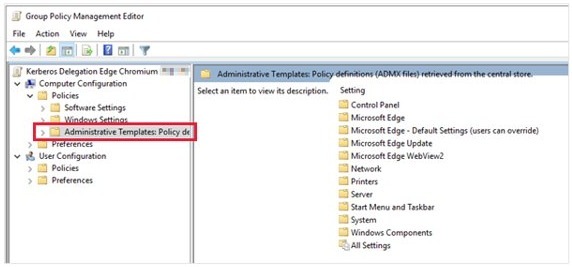
Deploy the MaxTokenSize registry value with Group Policy Preferences
Preferences write the registry value directly. Microsoft documents this route for Windows Server 2008 and 2008 R2 domains, where the Kerberos policy above is not in the default templates.
- Open Group Policy Management by running
gpmc.msc, then edit a GPO linked to the domain or computer OU. - Go to Computer Configuration > Preferences > Windows Settings.
- Right-click Registry, then select New > Registry Item.
- Set Action to Create and Hive to HKEY_LOCAL_MACHINE.
- Set Key Path to
SYSTEM\CurrentControlSet\Control\Lsa\Kerberos\Parameters. - Type
MaxTokenSizein Value name and choose REG_DWORD as the Value type. - Type
48000in Value data, select Decimal under Base, and select OK. - Let the GPO replicate, then restart the affected computers once they apply it.
How to check MaxTokenSize in the registry
Run this on each computer after its restart. A computer that missed the GPO shows up here straight away.
reg query HKLM\SYSTEM\CurrentControlSet\Control\Lsa\Kerberos\Parameters /v MaxTokenSizeThe command reads the one value from the Kerberos Parameters key. An error means the value is not set, so that computer is using its Windows default.
You should see: MaxTokenSize with type REG_DWORD and data 0xbb80, which is 48000 in hexadecimal.
Once every computer in the path reports the same value, sign in as the affected user and retry the resource that failed.
Enable Event ID 31 with Warning for large Kerberos tickets
From Windows Server 2012, domain controllers can log Event ID 31 in the System log when a ticket passes a size you choose. This shows you which accounts are close to the limit before they start failing.
- Edit a GPO that applies to your domain controllers in Group Policy Management.
- Go to Computer Configuration > Policies > Administrative Templates > System > KDC.
- Open Warning for large Kerberos tickets and select Enabled.
- Set the threshold to your
MaxTokenSizevalue, or the smallest value in use if computers differ. - Check the System log on domain controllers in Event Viewer for Event ID 31.
Too high a threshold lets failures happen with no warning, and too low a threshold fills the log with noise. If you leave the policy unconfigured, the threshold defaults to 12,000 bytes.
How to reduce Kerberos token size
A larger buffer hides the cause. Trimming the token also keeps you clear of the 1,024 SID limit, which no registry value can raise.
| Your situation | Do this | Why it helps |
|---|---|---|
| User sits in groups nobody needs | Remove the user from those security groups | Each membership costs 8 or 40 bytes and one SID |
| Unused groups are still security groups | Convert them to distribution groups | Distribution groups do not count against the access token, and you can convert them back |
| Accounts were migrated more than once | Remove sIDHistory where nothing relies on it |
Each history SID costs 40 bytes |
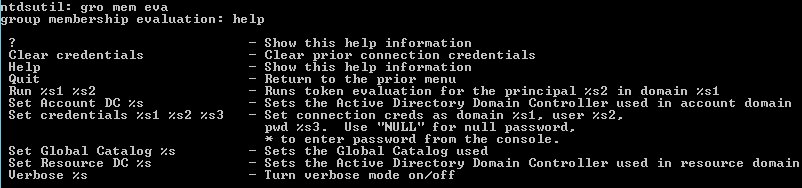
| You cannot tell which groups matter | Run the group membership evaluation in ntdsutil |
Its report shows how many SIDs each group adds through nesting |
| Many domain-local groups serve a few servers | Split those servers into separate resource domains | Domain-local SIDs only appear for the resource domain in use |
| Several trusts are in place | Configure the trusts to filter SIDs | Filtering reduces the ticket size impact |
| Domain controllers run Windows Server 2012 or later | Rely on resource SID compression, and phase out file-access groups once claims are deployed | Compression shrinks the SIDs held in the ticket |
HTTP 400 Bad Request using Kerberos (request header too long)
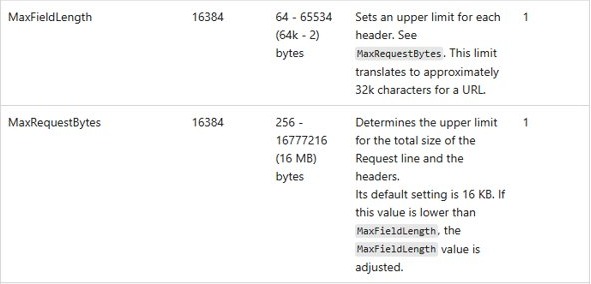
IIS rejects the request because the Kerberos ticket travels Base64-encoded in the Authorization header, and that encoding turns every 3 bytes into 4. The default MaxRequestBytes of 16,384 bytes leaves room for a token of roughly 12,000 bytes, so raising MaxTokenSize alone will not clear this error. Change these values on the IIS server.
- Calculate the user's token size in bytes with the formula above and call it T.
- Work out (4/3 x T) + 200. A 12,000-byte token gives 16,200 and a 48,000-byte token gives 64,200.
- Open
HKLM\SYSTEM\CurrentControlSet\Services\HTTP\Parametersin Registry Editor. - Create or edit the DWORD values
MaxFieldLengthandMaxRequestBytes, and enter your result as a decimal number in both. - Run
net stop http, thennet start httpin an elevated window. - Run
net stop iisadmin /yand note which IIS services stop with it. - Start each stopped service again, for example
net start "World Wide Web Publishing Service". - Reload the site as the affected user.
Microsoft rates changes to these two values as dangerous, because they let larger requests use more Http.sys memory. Use the calculated figure rather than the top of the range, which is 65,534 bytes for MaxFieldLength in the Http.sys table and 16 MB for MaxRequestBytes.
Removing the user from some groups is the other documented fix. Switching the site to NTLM also works in some setups, but Microsoft treats Kerberos as the more secure protocol, and NTLM is on its way out anyway.
MaxTokenSize maximum value and known issues
Bigger is not safer here. IIS uses a 64 KB HTTP request buffer, and Base64 makes a ticket about 133 percent of its original size, so 48,000 bytes is the most that fits.
| MaxTokenSize value | What Microsoft documents |
|---|---|
| 48,000 | Recommended and enough for most networks. A Kerberos error occurs if SIDs and claims together need more than this |
| Above 48,000 | An IIS error may occur once SIDs use the extra space |
| 65,535 | The highest value allowed |
| Above 65,535 | IPsec IKE fails, because it limits how large a security blob can be |
| 100,000 or more | Some versions of SMS Administrator have problems |
How to remove the MaxTokenSize registry value
- Open Registry Editor and go to
HKLM\SYSTEM\CurrentControlSet\Control\Lsa\Kerberos\Parameters. - Right-click MaxTokenSize, select Delete, and confirm with Yes.
- If a GPO set the value, set the Kerberos policy to Not Configured or remove the registry preference item as well.
- Restart the computer so Windows goes back to its default.
Microsoft advises removing Kerberos registry entries you added only for testing once you are finished.
Kerberos authentication fails when a user belongs to many groups
"The user's security context accumulated too many security IDs"
The access token passed the 1,024 SID limit. Event 4625 can show error 0xc000015a, and MaxTokenSize plays no part in this one.
- Run the group membership evaluation in
ntdsutilto see which groups add the most SIDs. - Remove the user from enough security groups to get under about 1,010, counting transitive and local groups.
- Wait for domain replication, then have the user sign in again.
"Out of memory" message or Group Policy not updating for one user
The ticket is larger than the MaxTokenSize buffer on one of the computers involved.
- Estimate the token with the PowerShell script.
- Run
reg queryon each computer in the path to find one with a smaller value. - Set the value to
48000on that computer and restart it.
HTTP 400 continues after you raised MaxTokenSize
MaxTokenSize controls the Kerberos buffer, while IIS applies its own header limits through Http.sys.
- Set
MaxFieldLengthandMaxRequestByteson the IIS server using the calculation above. - Restart the HTTP service and the IIS services.
Group Policy setting has no effect on MaxTokenSize
The GPO has not replicated, or the computer has not restarted since it applied the policy.
- Confirm the GPO is linked to the OU that holds the computer account.
- Force a Group Policy update with
gpupdate /forceon the computer and restart it. - Run
reg queryagain to read the value.
Kerberos MaxTokenSize FAQ
What is the default MaxTokenSize?
The default is 48,000 bytes on Windows 8, Windows Server 2012 and later. Windows 7, Windows Server 2008 R2 and earlier default to 12,000 bytes, which roughly 120 universal group memberships can overflow.
What is the maximum MaxTokenSize value?
The maximum allowed value is 65,535 bytes, but Microsoft recommends no more than 48,000. HTTP encodes the token in Base64, so anything larger may not fit the 64 KB request buffer that IIS uses.
Where is the MaxTokenSize registry key?
It is a REG_DWORD value under HKEY_LOCAL_MACHINE\SYSTEM\CurrentControlSet\Control\Lsa\Kerberos\Parameters. If the Parameters key does not exist under Kerberos, create it. The value applies to the whole computer rather than one user.
Do I need to restart after changing MaxTokenSize?
Yes. Computers must restart after you change the registry value, and computers receiving it by Group Policy must restart after they apply the policy. Changing the separate Http.sys header limits needs an HTTP service restart instead.
Which computers need the MaxTokenSize change?
Every computer taking part in the Kerberos authentication needs it, including client computers. In a web app with a database back end, that means the client, the IIS server, the SQL Server client and the database server.
Does MaxTokenSize raise the 1,015 group limit?
No. The group limit comes from the access token, which holds at most 1,024 SIDs whichever protocol is in use. MaxTokenSize only sizes the buffer for Kerberos tickets, so users above the limit must leave some groups.
Why does NTLM work when Kerberos fails for the same user?
The ticket buffer is a Kerberos limit, so an undersized buffer does not affect NTLM. Microsoft notes that NTLM works as expected under these conditions, although Group Policy may still fail to update for that user.
Is MaxTokenSize still needed on Windows Server 2022 or 2025?
Usually not, because those versions already default to 48,000 bytes. Microsoft expects 48,000 or larger to be enough for all scenarios now that resource SID compression is common and unconstrained delegation is deprecated.