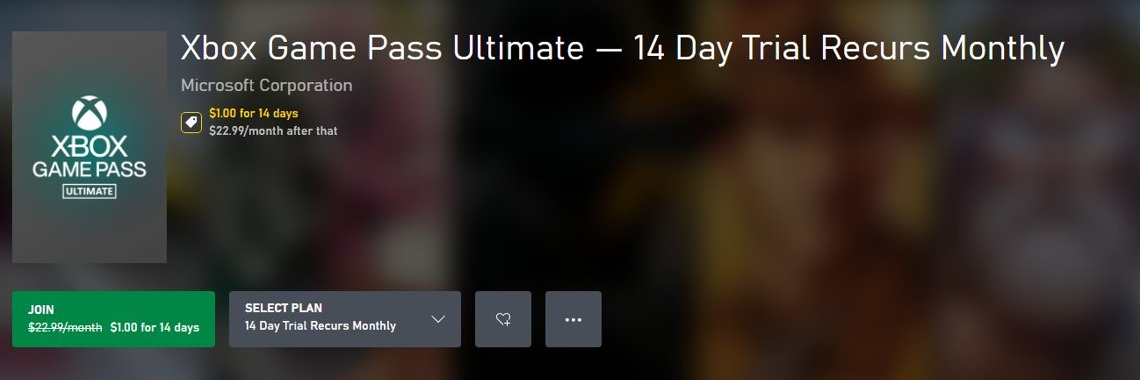
Claim a 3-month Xbox Game Pass Ultimate offer by entering its 25-character code at xbox.com/redeem, or by accepting the offer attached to your Microsoft account or new device; Xbox's own Ultimate store page lists no standing 3-month free trial, only $1.00 for 14 days.
The steps below cover the console, PC, phone and web routes, who qualifies, how to confirm the offer is active, and how to stop billing before it ends.
How to claim your Xbox Game Pass Ultimate free trial
A 3-month offer normally comes as a code from a purchase or promotion. The web route works from any browser, including a phone.
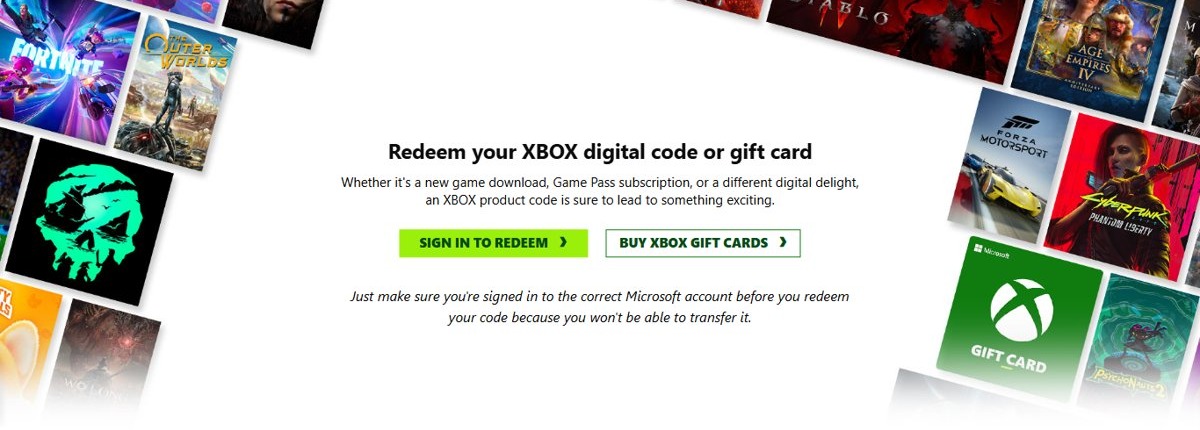
- Go to xbox.com/redeem and select Sign in to redeem.
- Sign in with the Microsoft account that should hold the subscription. Xbox Support cannot move a redeemed code to another account.
- Select Redeem now.
- Enter the 25-character code, formatted as XXXXX-XXXXX-XXXXX-XXXXX-XXXXX, and select Next.
- Follow the prompts, and read the billing terms before you accept.
- Check that Game Pass Ultimate appears at account.microsoft.com/services.
No code? Check the offer sources further down for a device or account offer, or use the current $1.00 introductory offer.
What the 3-month Xbox Game Pass Ultimate free trial actually is
It is a promotional offer, not a permanent plan. Xbox says promotional offers may not be valid for all members and run only for a limited time, so a code or offer in your hands carries its own terms.
| Offer type | What Xbox says about it | How you claim it |
|---|---|---|
| Ultimate store offer | Listed at $1.00 for 14 days, then $22.99 a month in the US | Buy it from the Game Pass Ultimate store page |
| Code from a purchase or promotion | A 25-character code; follow the instructions and terms that came with it | xbox.com/redeem, a console, Microsoft Store or the Xbox PC app |
| Offer on your account | Applied directly to your account without a code | The redeem-an-offer route on a console or the web |
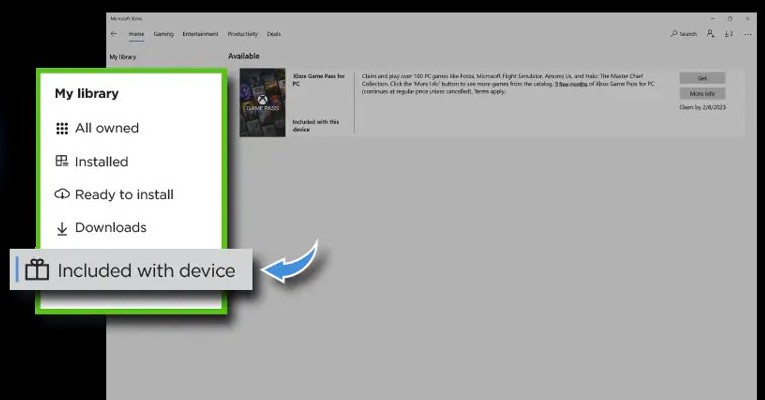
| Digital Direct offer | Included with new Xbox and Windows devices or handhelds, with no code to enter | On the device itself |
| Partner subscription | Game Pass can be provided through another partner's subscription | Through that partner's own instructions |
Everything included with Xbox Game Pass Ultimate during the trial
These are the benefits Xbox lists for the Ultimate plan. Terms attached to your own offer take priority if they differ.
| Benefit | What Xbox lists for Ultimate |
|---|---|
| Game library | 500+ games on console, PC and more devices |
| New releases | New games on day one, for select titles |
| Included memberships | EA Play, Fortnite Crew and Ubisoft+ Classics |
| Cloud gaming | Cloud playtime of 15 hours a month |
| Multiplayer | Online console multiplayer |
| Rewards | 4x Rewards points, with terms and a Microsoft account required |
| In-game benefits | Benefits for games like League of Legends and Call of Duty: Warzone |
Important things the free trial does not include: future Call of Duty titles at launch, since Xbox says they join Ultimate about a year later. Games also leave the library over time, so your access ends if a game leaves or your subscription expires.
How the trial compares to other Game Pass plans
Check which plan a code or offer actually names, because a cheaper plan's offer is not an Ultimate trial. Prices below are Xbox's US listings, and Xbox can change them with notice.
| Plan | Listed intro offer | Then | Games | Cloud playtime |
|---|---|---|---|---|
| Ultimate | $1.00 for 14 days | $22.99 a month | 500+ on console, PC and more | 15 hours a month |
| Premium | $1.00 for 14 days | $14.99 a month | 200+ on console, PC and more | 10 hours a month |
| PC Game Pass | $1.00 for 14 days | $13.99 a month | 300+ on PC only | Not included |
| Essential | First month for $1 | Regular monthly price | 50+ on console, PC and more | 5 hours a month |
Sign in on the store page to see your own price. Xbox shows "Sign in for your available offers" because eligibility changes by account.
Eligibility requirements: Who can (and cannot) claim the 3-month free trial
Xbox does not publish one fixed eligibility list, since each promotion has its own terms. These are the limits its pages do state.
| Requirement | Usually able to claim | Usually unable to claim |
|---|---|---|
| Subscription history | New subscribers, when an offer says so | Existing members on offers limited to new subscribers |
| Region | Accounts in a region the offer covers | Accounts elsewhere; offers are not valid in Russia, and others may be restricted |
| Age | Buyers 18 and older in Japan | Under-18 buyers in Japan, where Game Pass is sold only to users 18 and older |
| Payment | Accounts with a valid credit card, which Xbox requires for its promotional offers | Accounts with an expired card or an unpaid balance |
| Account standing | Accounts in good standing | Accounts under an Xbox network suspension, until it ends |
| Current subscription | Accounts with no conflicting subscription | Some accounts must wait until the current subscription ends |
Where the 3-month free trial offer comes from (Xbox console, Microsoft Store, bundles, promotions)
Where the offer came from decides where you claim it. Find your source below, then use the matching steps.
| Source | What you receive | Where to claim it |
|---|---|---|
| New Xbox console | A Digital Direct offer with no code | At console setup, or later from the console |
| New Windows PC or handheld | A Digital Direct offer with no code | In the Microsoft Store app on that device |
| Microsoft Store | The offer shown after you sign in | The Game Pass store page |
| Retail bundle or product insert | A 25-character code | xbox.com/redeem, a console, Microsoft Store or the Xbox PC app |
| Promotion or partner campaign | A code, or an offer on your account | The route in the promotion's instructions |
The same offer can show in one place and not another. Type xbox.com/redeem into your browser yourself instead of following a link in an unexpected email, because Microsoft warns about phishing emails on payment issues.
Microsoft account and payment setup: What you must do before activation
Redeemed codes stay on the account that used them, so settle the account first. If you are new to Xbox, create an Xbox account before you redeem anything.
- Sign in at account.microsoft.com with the account you play on.
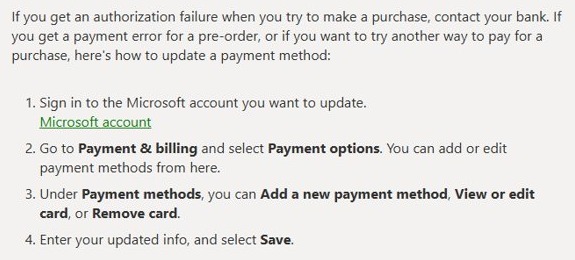
- Go to Payment & billing and select Payment options.
- Under Payment methods, select Add a new payment method, or View or edit card if the current card has changed.
- Enter your details and select Save.
- Contact your bank if you get an authorization failure, since some banks ask you to verify a transaction.
- Check your console's location under Profile & system > Settings > System > Language & location if you plan to redeem there.
PayPal works only with a credit card or confirmed bank account behind it. On a child's subscription, sign in with the child's account rather than your own when you change how it is paid.
Step-by-step: How to claim the 3-month free trial on an Xbox console
This route works on Xbox Series X|S and Xbox One. Sign in to the right profile before you begin, because the code attaches to that account.
- Press the Xbox button to open the guide, and select Store.
- Press the View button to open the side menu, and select Redeem.
- Enter the 25-character code and select Next.
- Follow the prompts to finish.
An offer that came with a new console has no code. You can redeem it during console setup or later, and Xbox keeps a separate help page for Digital Direct offers if you cannot find it.
Step-by-step: How to claim the 3-month free trial on PC, mobile, or web
Every route ends with the same 25-character code entry, so pick the one you have open. The Xbox mobile app is the exception.
| Where you are | Steps |
|---|---|
| Any browser | Open xbox.com/redeem, select Sign in to redeem, then Redeem now. Enter the code, select Next and follow the prompts |
| Microsoft Store on Windows | Open Microsoft Store, select your account in the top-right corner, then select Redeem code or gift cards. Enter the code, select Next and follow the prompts |
| Xbox app on a PC | Open the Xbox app, select your gamerpic in the top-left corner, then Settings. Select Redeem under Redeem a code, enter the code, select Next and follow the prompts |
| Xbox mobile app | Xbox's redeem page says you cannot redeem a code in the mobile app at this time. Open xbox.com/redeem in your phone's browser instead |
| A new Windows PC or handheld | Open the Microsoft Store app on that device to find the Digital Direct offer, and update the app if the offer is missing |
How to get Xbox Game Pass Ultimate for $1 for 14 days
This is the trial Xbox lists on its own Ultimate store page if you have no 3-month code. It is not free, and it continues at the regular price unless you cancel.
- Open the Xbox Game Pass Ultimate page on xbox.com and sign in to see your available offers.
- Check the introductory price and the monthly price that follows it.
- Select the plan and add a payment method if asked.
- Note the date the introductory period ends.
- Turn off recurring billing before that date if you do not want to continue.
How to confirm your trial is successfully activated
A finished redeem screen is not your record of the subscription. The subscription page shows the plan, the date and whether billing is active.
- On a console, press the Xbox button and go to Profile & system > Settings > Account > Subscriptions.
- Or go to account.microsoft.com/services and sign in with the same account.
- Select the subscription and check that it says Game Pass Ultimate rather than another plan.
- Note the expiration date and the subscription status.
- Check how you pay, because that shows which card a renewal would charge.
Nothing listed? You are probably signed in to a different Microsoft account from the one that redeemed the code.
What happens after the 3-month trial ends (auto-billing, cancellation, and downgrade options)
After a promotional period, Xbox says the subscription continues automatically at the regular price. Microsoft's terms add that some trial offers require auto-renewal to be on, so read your offer's end date when you claim it.
| Your choice | What happens | How to do it |
|---|---|---|
| Do nothing | Recurring billing charges the regular price, currently listed at $22.99 a month in the US | No action; Xbox notifies you before price changes |
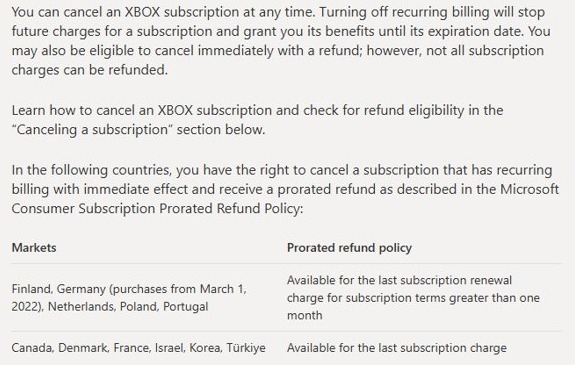
| Stop future charges | You keep the benefits until the expiration date, then the subscription ends | At account.microsoft.com/services, select Manage, then Turn off recurring billing |
| Move to a cheaper plan | No immediate charge; the new plan and price start on your next renewal date | Downgrade on a console, on the web or in the Xbox app |
| Ask for a refund | Xbox allows a refund of the most recent recurring charge if you cancel within 30 days of payment, once per account per subscription product | Cancel first, then check eligibility |
Cancel more than 2 days before the billing date, because Microsoft says later cancellations can still be charged. These steps to cancel Xbox Game Pass cover each route, and you can get a Microsoft refund if a charge slips through.
Common reasons the free trial doesn’t appear (and how to fix each one)
No free trial shows on the Game Pass store page
Offers vary by account, region and time, and some are for new subscribers only.
- Sign in, because the store shows your available offers only after sign-in.
- Check account.microsoft.com/services for a current or past Game Pass subscription on this account.
- Use the code or offer you were given, if you have one, instead of the store page.
The code says invalid, incorrect or already redeemed
The code was mistyped, was already used, is inactive, or has terms you have not met.
- Re-enter all 25 characters and check the Xbox status page for a service problem.
- Check whether the code was already redeemed on another of your accounts.
- Read the instructions or terms that came with the code.
- Contact the retailer about an inactive code.
An "Incorrect region" error appears
The code is for a country or region that does not match your account or device.
- Press the Xbox button to open the guide.
- Go to Profile & system > Settings > System > Language & location.
- Choose your country or region under Location, and restart the console if asked.
- Contact the retailer if the code itself does not match your Microsoft account's region.
You already have Game Pass and the code will not apply
Xbox can require the current subscription to end first, and codes for included subscriptions convert at set ratios.
- Select Manage at account.microsoft.com/services and check the expiration date.
- Turn off recurring billing on the current subscription.
- Redeem the code when the old subscription expires.
A payment error stops the offer
The card was declined, needs bank verification, or a VPN or balance is blocking the transaction.
- Contact your bank if the message says "Check with your bank".
- Update the card under Payment & billing > Payment options.
- Pay any past-due subscription balance at account.microsoft.com/services.
- Turn off any VPN if you see the "VPN detected" message, then try again.
The Digital Direct offer is missing on a new device
The Microsoft Store app may be out of date, or you passed the setup offer on a console.
- On Windows, update the Microsoft Store app and look again.
- On a console, use the redeem-later route instead of console setup.
- Use the chat option on Xbox Support if an error stops the redemption.
Frequently asked questions and expert tips to avoid losing the free trial
Is there a 3-month free trial of Xbox Game Pass Ultimate?
Not as a standing offer on Xbox's own Ultimate store page, which lists $1.00 for 14 days. A 3-month offer comes through a specific code, device or promotion, and its terms come with it. Xbox says such offers are limited in time.
How do I redeem a 3 month Game Pass Ultimate code?
Go to xbox.com/redeem, sign in with the account that should hold the subscription, enter the 25-character code and select Next. You can also redeem from Store on a console, from your account menu in Microsoft Store, or in the Xbox PC app.
Can I claim the free trial in the Xbox mobile app?
No. Xbox's redeem page says you cannot redeem a code in the Xbox mobile app at this time. Open xbox.com/redeem in your phone's browser instead, sign in, and enter the code there. The result is the same, and the code attaches to your account.
Do I need a credit card for the Game Pass free trial?
Xbox's Game Pass page lists a credit card as required for its promotional offers. Terms for a code from a retailer or partner can differ, so read what came with it. Add or update a card under Payment options in your Microsoft account.
Can I claim the trial if I already have Game Pass?
It depends on the offer, because promotional offers may be for new subscribers only. Xbox can ask you to wait until your current subscription ends, and codes for subscriptions included in Ultimate convert into your existing plan at set ratios instead of adding a new trial.
Will I be charged after the free trial ends?
Yes, if recurring billing stays on. Xbox says that after a promotional period the subscription continues at the regular price until you cancel. Check the end date at account.microsoft.com/services, and turn off recurring billing more than 2 days before the billing date.
How do I avoid losing the free trial?
Sign in to the correct account before you redeem, because Xbox Support cannot transfer a redeemed code. Read the code's terms, confirm the plan under Services & subscriptions, and note the end date so you can keep or stop the subscription in time.
Can I cancel the trial and keep playing until it ends?
Yes. Turning off recurring billing stops future charges and leaves your benefits active until the expiration date. Select Manage at account.microsoft.com/services, then Turn off recurring billing. Xbox may also offer an immediate cancellation with a refund, though not every charge is refundable.
Can I move a redeemed code to another Microsoft account?
No. Xbox says redeemed codes cannot be transferred to another Microsoft account by Xbox Support. Check which account you are signed in to before you select Next, particularly on a shared console or on a PC where several family accounts are in use.
What happens to my games when the trial ends?
You keep access to Game Pass games only while the subscription is active and the game stays in the library. Once the subscription expires or is cancelled, those games stop being available to you through Game Pass unless you buy them separately.