A good gaming desk setup puts your main monitor 20 to 30 inches away at brow height, keeps your forearms level with the desk, and hides every cable behind or under the surface.
Below are more than twenty setup ideas, from dual monitor and L-shaped layouts to RGB, minimal and small-room builds, with the ergonomics, accessories and Windows settings that make each one work.
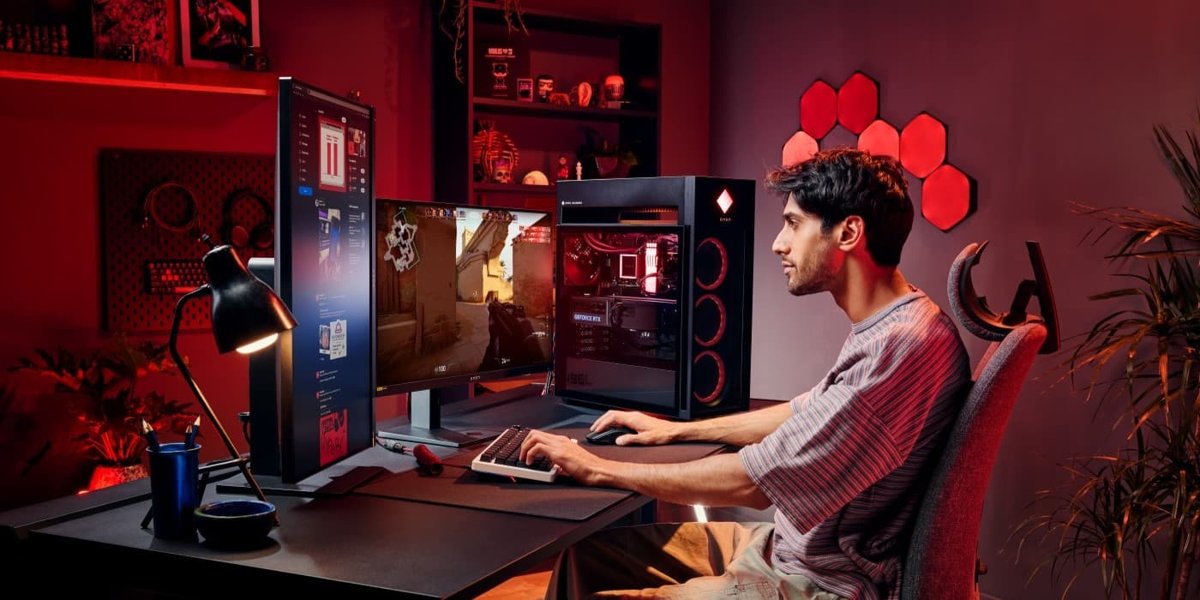
How to set up a PC gaming desk
Get the body position right first and the look second. Every idea further down sits on top of these steps.
- Place the desk so no window or lamp reflects on the screen; if glare remains, use blinds, shades or a different light fixture.
- Set your chair so your hips and knees are level, your thighs sit parallel to the floor and your feet rest flat or on a footrest.
- Adjust the chair or desk until your forearms rest parallel to the desk with straight wrists and elbows close to your sides.
- Put the main monitor 20 to 30 inches (50 to 75 cm) from your eyes, centred in front of you.
- Raise the monitor until the part you look at most lines up with your brow or slightly below it.
- Mount a power strip on or under the desk and run every cable to the back edge before you add accessories.
- Add lighting and decoration last, once nothing on the desk needs to move again.
What is a gaming desk
A gaming desk is a computer desk built around a gaming PC or console: a wide, deep surface, room for several monitors and somewhere for cables and power to go. Corsair's Platform:6 is a useful reference point for the numbers.
| Feature | Why it matters for gaming | Example figure (Corsair Platform:6) |
|---|---|---|
| Surface size | Fits two monitors, a full-size keyboard and a wide mouse pad | 72 x 30 in |
| Height | Lets you keep forearms level, or stand between sessions | Fixed 30 in, or 29 to 48 in on the motorised sit-stand model |
| Weight rating | Holds monitors, a PC and speakers without sagging | 330 lb desk capacity |
| Monitor arms | Free the surface and set screen height exactly | Dual arms, 18 lb each, VESA 75 x 75 and 100 x 100 mm |
| Cable and power management | Keeps power bricks and cables off the floor | Wire tray, desk-mounted power strips, rubber grommets |
| Mounting rails or pegboard | Holds lights, headsets and controllers above the desk | Aluminium T-channel rails and an optional pegboard frame |
Essential factors for an optimal gaming desk setup
| Factor | What to get right |
|---|---|
| Ergonomics | Monitor at brow height and 20 to 30 inches away; thighs parallel to the floor; back-to-thigh angle between 90 and 110 degrees; forearms supported |
| Desk space and layout | Main monitor centred in front of you; a second screen to the side you look at less; keyboard and mouse at the same height |
| Cable management | A cable tray or tie-downs along the back edge, a mounted power strip, and grommets for keyboard and mouse cables |
| Lighting | Screen brightness matched to the room, no reflections on the panel, and accent lighting behind or above the desk rather than in your eyes |
| Accessibility and functionality | USB ports and chargers within reach, a headset hook, and storage for controllers so the surface stays clear |
Two habits finish the job: stand for at least two minutes every hour, and every 20 minutes look about 20 feet away for 20 seconds.
Popular gaming desk setup styles and themes
| Idea | What it looks like | Best for |
|---|---|---|
| 1. Double or triple monitor setup | A main monitor centred on a dual or triple arm with side screens angled in | Sim racing, streaming, chat and guides beside the game |
| 2. Minimal PC gaming desk setup | One monitor on an arm, a wireless keyboard and mouse, and nothing else on the surface | Small rooms and anyone who hates dusting |
| 3. Classic and elegant design | Solid wood top, neutral colours, warm desk lamp instead of RGB | Shared living spaces and work-from-home desks |
| 4. L-shaped gaming desk setup | Gaming on one wing, work or streaming gear on the other | Corners and people who game and work at one desk |
| 5. RGB and LED-enhanced setups | Light strips behind the monitor and under the desk, synced to the keyboard and mouse | Night gaming and themed builds |
| 6. Compact and floating desk setups | A shallow wall-mounted shelf desk with the PC on the floor or on a wall bracket | Bedrooms and narrow spaces |
| 7. Nature-inspired and color-themed setups | Plants, wood tones, or a single colour scheme carried through the mat, peripherals and lighting | A calmer room that still looks deliberate |
| 8. Custom and themed setups | A franchise or game theme with posters, figures on a shelf and matching lighting | Collectors and stream backdrops |
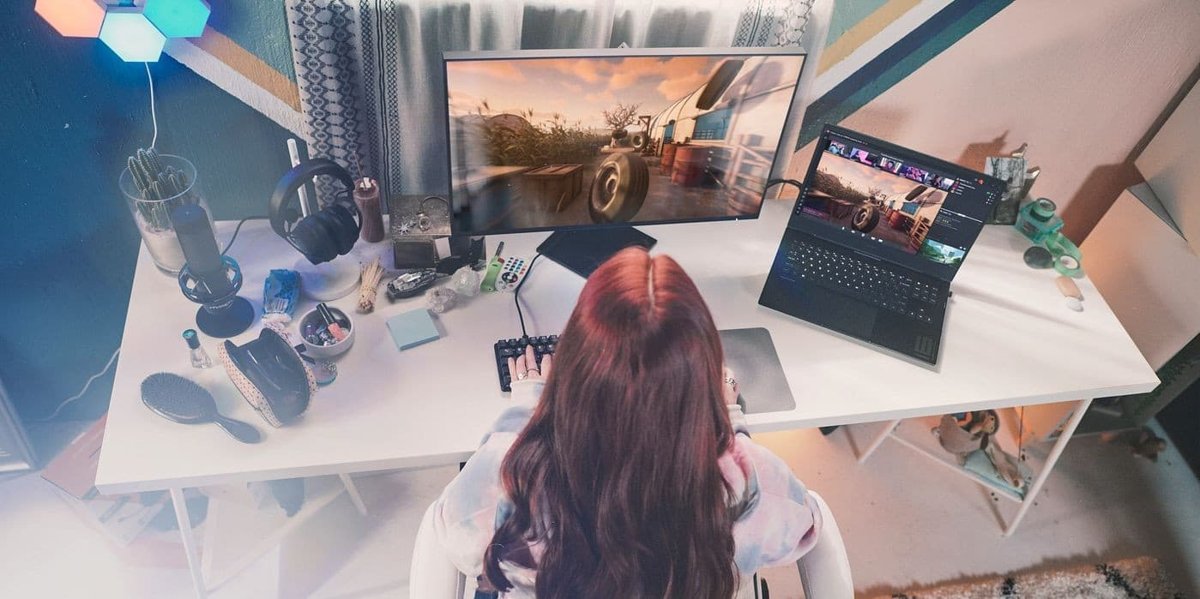
Innovative and creative gaming desk ideas
| Idea | How it works | What to check |
|---|---|---|
| 9. Sit-to-stand motorized desks | Motors raise and lower the desk; memory presets store a sitting and a standing height | Height range that suits you, and the weight rating with monitors and PC on top |
| 10. Integrated cable management and power solutions | A wire tray holds power bricks, a power strip mounts to the desk, and grommets pass cables through the top | Enough outlets and USB ports for every device |
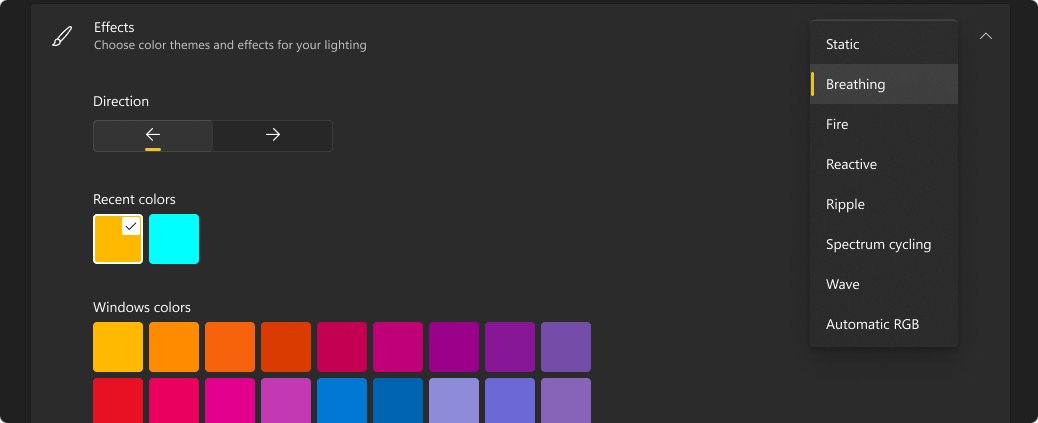
| 11. RGB and smart lighting integration | Windows 11 Dynamic Lighting or the vendor's app syncs compatible lights to one effect | Whether your devices support Dynamic Lighting |
| 12. L-shaped and modular designs | Side extensions or rail add-ons widen the desk after purchase | Extension weight limits and whether a full-tower case fits on one |
| 13. Material and finish innovations | Black laminate tops suit RGB builds; solid wood tops in a walnut stain suit classic rooms | Top thickness if you plan to clamp monitor arms |
| 14. Built-in storage and organization features | In-desk cubbies with USB ports, drawers and side pegboards for headsets and controllers | Storage that does not block your knees |
| 15. Overhead pegboard frame | A frame above the monitors holds lights, small shelves and a webcam | Shelf and frame weight limits |
Gaming desk setup ideas for a small room
In a small room, the trick is to get things off the desk surface and up onto arms, walls and shelves.
| Idea | Use it when | How |
|---|---|---|
| 16. Wall-mounted floating desk | Floor space is the problem | Mount a shallow desk to the wall studs and keep the PC on a stand beside it |
| 17. Vertical second monitor | You want a second screen but have no width | Turn the side monitor to portrait on an arm for chat, guides or code |
| 18. Monitor arms instead of stands | The surface is shallow | Clamp a VESA arm to the desk and push the screen back to the 20 to 30 inch mark |
| 19. Corner desk | The only free space is a corner | Put the main monitor on the diagonal and storage on the short wing |
Gaming and work desk setup
One desk can serve both jobs if switching between them takes seconds rather than rearranging.
| Idea | What it solves | How |
|---|---|---|
| 20. Sit-stand presets for work and play | Different heights for typing all day and gaming at night | Save a standing work height and a sitting gaming height to the desk's memory buttons |
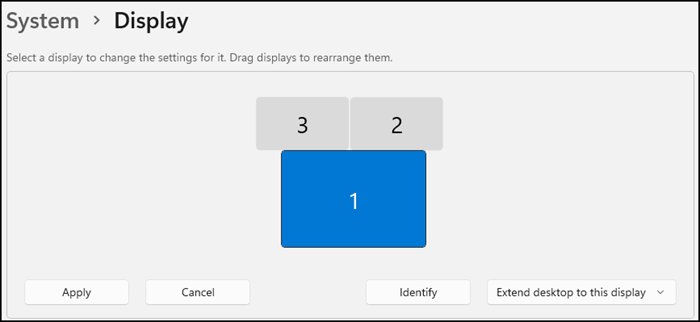
| 21. Game on the main display, work on the side display | Work windows cluttering the gaming screen | Set the gaming monitor as the main display in Windows and keep work apps on the second |
| 22. Hidden work gear | A work laptop and dock taking up space | Keep the laptop in an in-desk cubby or under-desk tray and connect it to your monitors only when needed |
How to set up dual monitors on a gaming desk
Any two monitors work together if your PC has the ports and cables for both. Mount them on a dual VESA arm to drop the stand legs and adjust each screen freely.
- Connect both monitors to the PC and switch them on.
- Press Windows key + P and select Extend.
- If the second screen is missing, open Settings > System > Display, expand Multiple displays and select Detect.
- Select the monitor you game on and tick Make this my main display; it keeps the taskbar and opens new apps.
- Open Advanced display under System > Display and pick the highest refresh rate in the list for each monitor.
- Centre the main monitor in front of you and angle the second one beside it.
How to sync RGB desk lighting in Windows 11
Windows 11 can control compatible RGB keyboards, mice and light strips from one page, without a separate app for each brand.
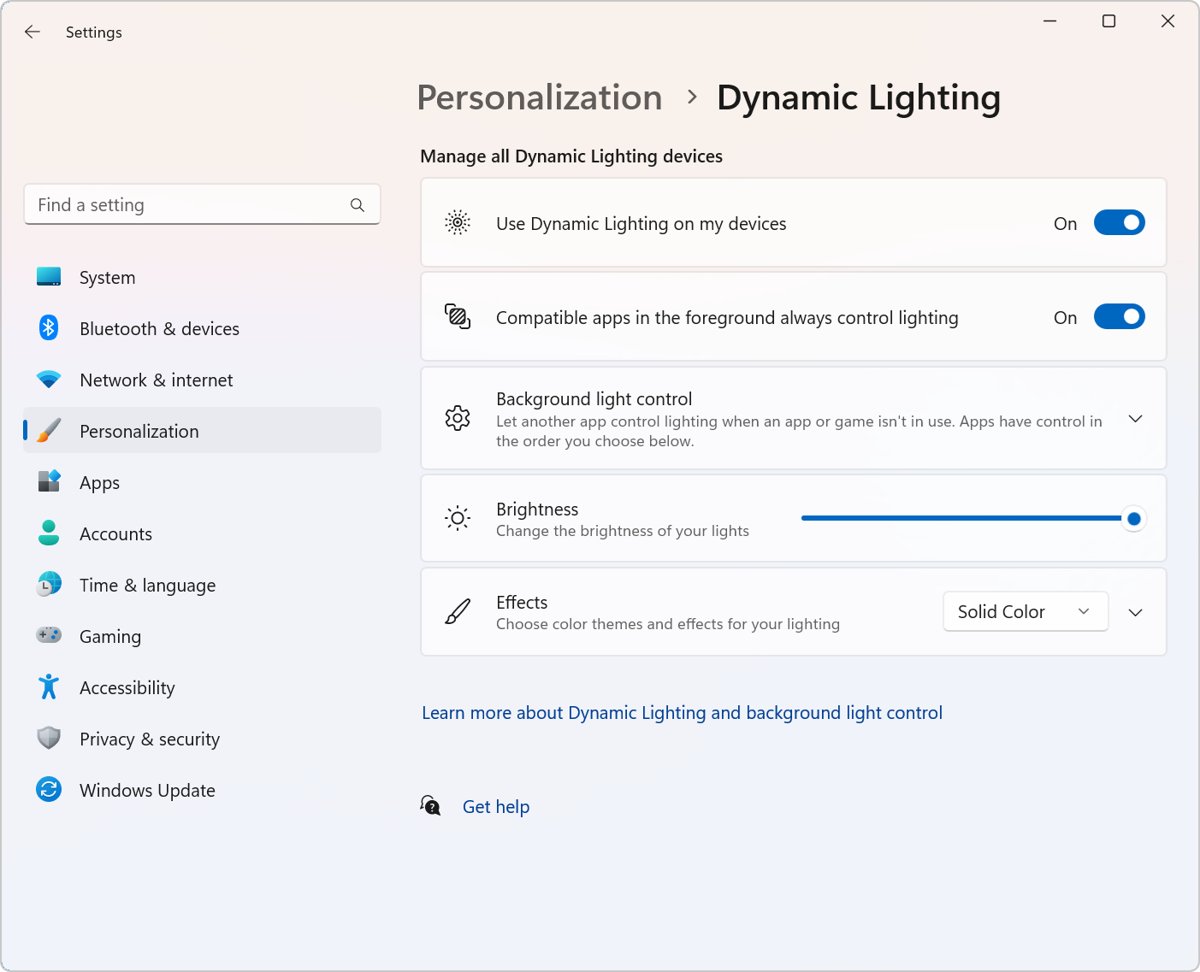
- Open Settings > Personalization > Dynamic Lighting.
- Turn on Use Dynamic Lighting on my devices.
- Set Brightness for all devices, or select one device to set it alone.
- Pick a colour and pattern under Effects.
- Turn off Compatible apps in the foreground always control lighting if you want your effect to stay during games.
- Rank the vendor apps under Background light control if more than one tries to control the lights.
L shaped desk gaming setup
An L-shaped desk works best when each wing has one job, so you turn your chair instead of moving gear.
- Pick the longer wing for gaming and centre the main monitor on it, 20 to 30 inches from your seat.
- Put the PC tower under or beside the short wing so its cables reach both sides.
- Use the short wing for a laptop, a stream setup or a second monitor.
- Mount the power strip in the corner, where both wings can reach it.
- Run cables along the back edge of each wing to that corner.
- Keep the corner itself for speakers or lighting, not for anything you need to reach.
Best desk for a gaming PC setup
| Your situation | Desk type | Why |
|---|---|---|
| Two or three monitors | Wide rectangular desk with monitor arms | Width for the screens and depth for a 20 to 30 inch viewing distance |
| You game and work at the same desk | L-shaped or sit-stand desk | A wing for each job, or a height preset for each |
| Small bedroom | Floating wall desk or compact desk with arms | Frees floor space and the desk surface |
| You sit for long sessions | Motorised sit-stand desk | Lets you stand for a few minutes every hour |
| Streaming setup | Desk with mounting rails or a pegboard frame | Holds lights and gear above the monitors |
Is your gaming desk the right height?
- Sit all the way back in the chair with your feet flat on the floor or a footrest.
- Rest your hands on the keyboard: your forearms should be parallel to the desk and your wrists straight.
- Look at the screen: your gaze should land at brow level or slightly below, without tilting your head.
- Check your shoulders are relaxed, not lifted, after a few minutes of play. If they lift, lower the desk or raise the chair and add a footrest.
Tips for personalizing and maintaining your setup
| Task | How |
|---|---|
| Personalizing your setup | Pick one colour scheme and carry it through the desk mat, peripherals, lighting and the rest of your gaming room; add a shelf for collectibles rather than covering the desk |
| Lighting that suits the room | Match screen brightness to the room, lower it in the evening, and keep accent lights behind the monitor |
| Maintaining your setup | Dust the desk, vents and peripherals regularly, and re-tie cables whenever you add a device |
| Re-checking ergonomics | Re-check monitor height and chair position after moving anything on the desk |
| Headset and audio | Keep the headset on a hook within reach and keep its volume at a comfortable level |
Gaming desk setup FAQ
What is a gaming desk?
A gaming desk is a computer desk designed around a gaming PC or console. It usually has a wide surface for several monitors, a high weight rating, and built-in cable management such as a wire tray, grommets or a mounted power strip.
How do you build a gaming desk setup?
Set the chair so your thighs are parallel to the floor, adjust the desk until your forearms rest level, then place the main monitor 20 to 30 inches away at brow height. Route cables to the back, then add lighting and decoration.
What accessories does a gaming desk setup need?
Start with a monitor arm, a mounted power strip, a cable tray or ties, a large desk mat and a headset hook. A footrest helps if your feet do not reach the floor once the chair is at the right height.
What is the best gaming desk setup for a small room?
A floating wall desk or a compact desk with the monitor on an arm saves the most space. Turning a second monitor to portrait adds screen space without adding width.
Is an L-shaped desk good for gaming?
Yes, if you use each wing for one job. Put the gaming monitor on the long wing and use the short wing for work, streaming gear or a laptop, with the power strip in the corner.
How far should a gaming monitor be from your eyes?
Apple's ergonomics guidance puts a screen 20 to 30 inches (50 to 75 cm) from your eyes, with the area you look at most at brow level or slightly below.
Can one desk work for gaming and work?
Yes. Use a sit-stand desk with height presets, or an L-shaped desk with a wing for each job, and set your gaming monitor as the main display in Windows so work apps stay on the second screen.