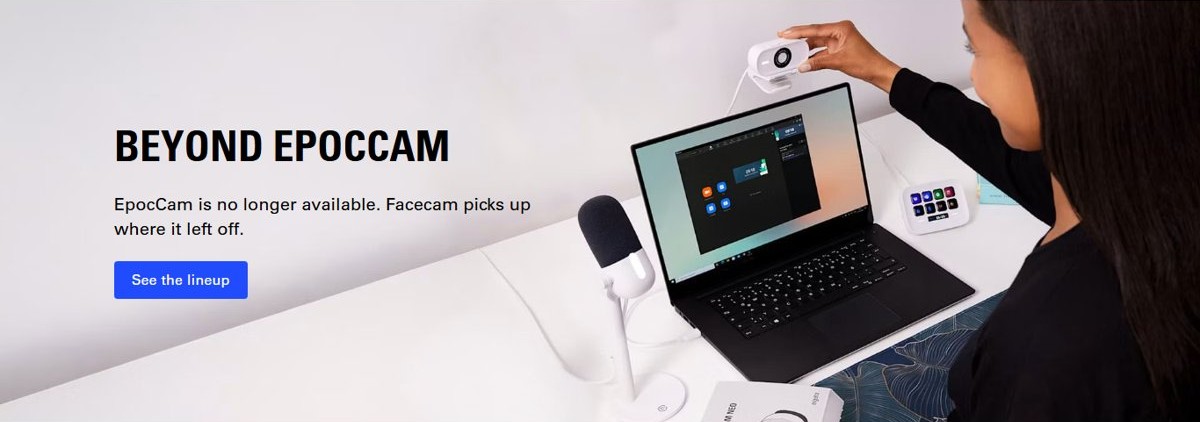
EpocCam is discontinued: Elgato's own EpocCam page now says “EpocCam is no longer available,” so Windows 10 users have no official download or support path left.
This guide explains what that means for a PC that still runs EpocCam, how to judge any installer you find, how to remove the drivers safely, and which supported apps or webcams replace it.
EpocCam today: status, system requirements, and the support reality
Elgato points EpocCam visitors to its Facecam webcams with one line: “Facecam picks up where it left off.” Its Downloads page lists Elgato Studio and Camera Hub material, and no EpocCam driver for Windows or macOS.
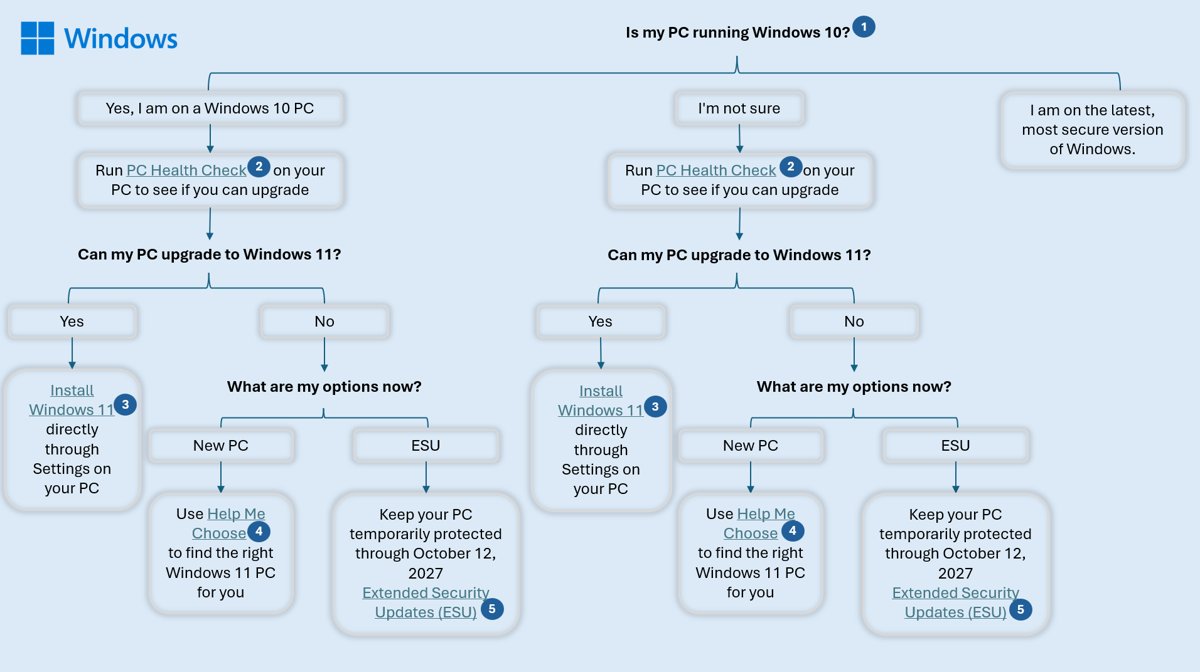
Windows 10 adds a second layer of risk. Microsoft ended Windows 10 support on October 14, 2025, and a PC without Extended Security Updates no longer gets security fixes.
| Your situation | What to do | Why |
|---|---|---|
| EpocCam still works on your Windows 10 PC | Keep using it short term, and plan a move to a supported app or webcam | No new drivers or fixes will arrive from Elgato |
| EpocCam stopped working after an update | Remove the EpocCam drivers and switch to Camo, DroidCam or a USB webcam | There is no newer official driver to install |
| You need to install EpocCam on a new PC | Do not install it from a mirror site | Elgato no longer distributes it, so any copy you find is unofficial |
| You have an iPhone and Windows 10 | Use Camo or DroidCam | Both list Windows desktop clients and current iPhone apps |
| You have an Android phone and Windows 11 | Use Phone Link's Use as connected camera | Built into Windows 11, with no extra driver |
| You want no phone in the setup | Buy a dedicated webcam | Elgato itself recommends Facecam as the EpocCam successor |
What Elgato/Corsair says now
Some background first: EpocCam turned an iPhone into a webcam for Windows and Mac video apps, using an app on the phone and a driver on the computer. Elgato, a Corsair brand, sold and supported it until it was pulled.
| Elgato source | What it says today |
|---|---|
| EpocCam product page (elgato.com/s/epoccam) | “EpocCam is no longer available. Facecam picks up where it left off.” |
| Same page, system details | No EpocCam requirements, pricing or feature list; only Facecam models are listed, for Windows and Mac |
| Elgato Downloads page | No EpocCam driver or app; camera software listed is Elgato Studio, which replaces Camera Hub |
| Facecam bundle | “Every Facecam comes with Camera Hub — free software designed to get the most out of your webcam.” |
Elgato no longer publishes system requirements for EpocCam, so any requirement list you find elsewhere is unofficial and cannot be checked against the vendor.
Practical interpretation for Windows 10 users
Treat EpocCam on Windows 10 as end-of-life software on an end-of-life operating system, and move to a supported option before it breaks. Elgato has withdrawn EpocCam, and Windows 10 stopped receiving security updates on October 14, 2025. The consumer Extended Security Updates (ESU) program protects a Windows 10 PC until October 12, 2027, but ESU patches Windows, not a withdrawn third-party camera driver.
A working EpocCam install will not stop on a fixed date. It simply has no one fixing it when a Windows update, a phone update or a video app change breaks the connection.
Where to download — safety, provenance, and “free shipping” marketing
The only trustworthy source for EpocCam was Elgato, and Elgato no longer offers it. That leaves no safe place to download it today.
| Source | Status | Verdict |
|---|---|---|
| elgato.com | Product page says EpocCam is no longer available; no download listed | No official copy exists |
| Phone app stores | Elgato does not list a current EpocCam app | Do not trust a look-alike app with a similar name |
| Driver mirror and freeware portals | Repackaged installers of unknown origin | Avoid: you cannot prove the file is Elgato's |
| Marketplace listings selling “EpocCam” | Resellers of software Elgato no longer sells | Avoid: see the marketplace section below |
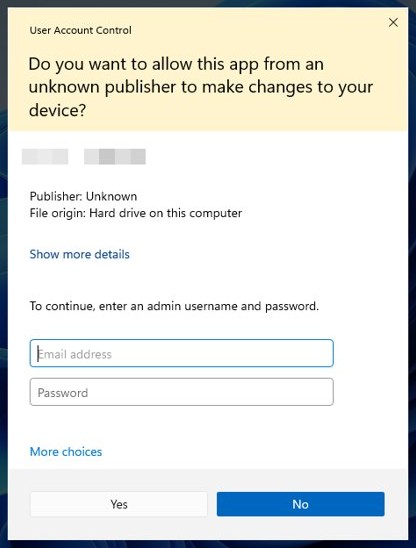
A safe download test has four parts: the file comes from the vendor's own domain, the vendor still lists it, the installer's User Account Control prompt shows a verified publisher, and the publisher name matches the vendor. An EpocCam installer found today fails the first two.
The distribution problem: official vs mirror downloads
A camera driver runs with administrator rights and sees every frame your camera sends. That makes its origin matter more than for an ordinary app.
| Question | Official download | Mirror download |
|---|---|---|
| Who built the file? | The vendor, under its signing certificate | Unknown; may be repacked or bundled |
| Does the vendor still support it? | Yes, while it is listed | No; EpocCam is no longer listed anywhere by Elgato |
| What does UAC show? | Gray prompt with a verified publisher | May show a yellow prompt: unsigned or untrusted |
| Who fixes a bug or security flaw? | The vendor | No one |
Market listings and “free shipping” claims
Skip any marketplace listing that sells EpocCam as a product, key or “lifetime” licence, whatever it promises about free shipping or instant delivery. EpocCam was software tied to Elgato's own app and driver, and Elgato no longer sells it. A third-party seller cannot deliver a supported copy, and shipping language on a software listing shows the seller is not the vendor.
If the listing bundles a physical webcam, judge the webcam on its own maker's support page, not on the EpocCam name in the title.
Pre-install checks
These checks apply only if you already hold an EpocCam installer that you downloaded from elgato.com before it was withdrawn.
- Confirm where the installer came from. If you cannot trace it to elgato.com, delete it and use an alternative instead.
- Select Start > Settings > Update & Security > Windows Update and select Check for updates, so Windows is fully patched first.
- Select Start > Settings > Privacy > Camera, select Change under Allow access to the camera on this device, and make sure Camera access for this device is on.
- On the same page, turn on Allow desktop apps to access your camera, because video apps such as Zoom run as desktop apps.
- Make sure the EpocCam app is still installed on your phone. If it is gone, Elgato no longer offers it, so move to Camo or DroidCam.
Step-by-step: Installing EpocCam on Windows 10 (legacy path)
Elgato no longer publishes installation documentation for EpocCam, so this sequence covers only the Windows side that Microsoft documents: the elevation prompt, the restart and the camera choice inside your video app.
- Double-click the EpocCam installer you kept from elgato.com.
- Read the User Account Control prompt before you select anything. A gray prompt with a verified publisher is expected; a yellow prompt means the file is unsigned or untrusted, so select No.
- Select Yes only when the verified publisher matches Elgato, then follow the installer to the end.
- Restart the PC so Windows loads the new camera driver.
- Open the EpocCam app on your phone and keep the phone unlocked.
- Open your video app, go to its camera or video settings, and pick the EpocCam camera from the camera list.
- If the camera list does not show EpocCam, use the troubleshooting section below.
Troubleshooting quick hits
These fixes come from Microsoft's Windows 10 camera troubleshooting steps and apply to any virtual or USB camera, EpocCam included.
EpocCam camera does not appear in Zoom, Teams or other video apps
Windows camera privacy settings block desktop apps.
- Select Start > Settings > Privacy > Camera.
- Make sure Camera access for this device is on.
- Turn on Allow desktop apps to access your camera.
- Restart the video app and pick the camera again in its settings.
EpocCam is missing from Device Manager
Windows has not detected the virtual camera driver.
- Select Start, type device manager and open it.
- Expand Cameras, Imaging devices and Sound, video and game controllers.
- If the camera is not listed, open the Action menu and select Scan for hardware changes.
- Restart the PC and check the lists again.
EpocCam stopped working after a Windows update
An updated driver or Windows change broke the old driver.
- In Device Manager, right-click the camera and select Properties.
- On the Driver tab, select Roll Back Driver, then select Yes.
- Restart and test the camera in the Camera app.
- If Roll Back Driver is greyed out, remove EpocCam and switch to a supported alternative.
Security software blocks the phone camera
Some antivirus suites have their own camera-access protection.
- Open your antivirus app and find its webcam or camera protection setting.
- Add your video app to the allowed list rather than turning protection off.
- Check the antivirus vendor's help site if the setting is hard to find.
If a built-in or USB webcam shows the same faults, reset the Windows camera drivers and Camera app with the full Windows 10 and 11 steps.
Security, privacy, and enterprise risk
| Risk | Why it matters on Windows 10 | What to do |
|---|---|---|
| Unsupported camera driver | No vendor fixes for bugs or security flaws | Replace it with a supported app or webcam |
| Unofficial installers | Mirrors cannot prove the file is Elgato's | Install nothing that did not come from elgato.com |
| Unpatched operating system | Windows 10 has had no free security updates since October 14, 2025 | Enrol in ESU or upgrade to Windows 11 |
| Camera access by every desktop app | Windows 10 cannot limit camera access per desktop app | Turn Allow desktop apps to access your camera off when you are not on a call |
| Network video stream | A phone webcam sends video over Wi-Fi or USB | Use apps from vendors that still ship updates |
Expanded mitigations
If EpocCam has to stay on a PC for now, these steps limit the exposure without lowering any Windows protection.
- Keep Windows 10 patched through Settings > Update & Security > Windows Update, and enrol in ESU if the PC cannot move to Windows 11.
- Run Windows as a standard user, so a driver install always needs an administrator's credentials.
- Turn off Allow desktop apps to access your camera in Settings > Privacy > Camera between calls.
- Check the User Account Control prompt colour on every driver install, and refuse yellow prompts.
- Remove EpocCam completely once a replacement works, using the uninstall steps below.
Driver provenance and enterprise procurement
In a managed fleet, a withdrawn driver is a procurement problem as much as a technical one.
| Procurement question | EpocCam (legacy) | Supported replacement |
|---|---|---|
| Is the product still sold by the vendor? | No | Yes: Camo, DroidCam or a Facecam-class webcam |
| Can the vendor supply the installer? | No | Yes, from the vendor's own site or store |
| Will security fixes arrive? | No | Yes, while the product is supported |
| Does the OS still get updates? | Windows 10 only with ESU, until October 12, 2027 | Windows 11 is supported |
UAC elevation prompts show gray for an app signed by a verified publisher and yellow for one that is unsigned or untrusted, which gives help-desk staff a quick check on any installer.
How to uninstall EpocCam from Windows 10
- Select Start > Settings > Apps.
- Find the EpocCam entry in the app list, select it, then select Uninstall.
- If it is not listed there, search for Control Panel on the taskbar and open it.
- Select Programs > Programs and Features, right-click the EpocCam entry and select Uninstall or Uninstall/Change.
- Open Device Manager, expand Cameras, Imaging devices and Sound, video and game controllers, and check that no EpocCam device is left.
- If one remains, right-click it, select Properties, open the Driver tab, select Uninstall Device, tick Delete the driver software for this device and select OK.
- Restart the PC.
Alternatives you should consider (practical tradeoffs)
| Your setup | Best replacement | Tradeoff |
|---|---|---|
| iPhone + Windows 10 or 11 | Camo (Reincubate) | Free app; advanced features sit behind a subscription |
| iPhone + Windows, lowest cost | DroidCam | Free use is limited to 640×480; HD needs the Pro upgrade |
| Android phone + Windows 11 | Phone Link connected camera | Windows 11 only; no Windows 10 support |
| Daily calls, no phone tied up | Dedicated webcam | Costs money up front, but needs no phone app |
Other free virtual webcam apps for Windows can sit on top of any of these cameras if you need overlays or scene switching.
Camo (Reincubate) for Windows 10
| Detail | Camo |
|---|---|
| Developer | Reincubate Ltd |
| Phone app | Camo Camera on the App Store, requires iOS 15.6 or later |
| Computer app | Camo Studio, supports Windows 10 or later and macOS 10.13 or later |
| Connection | Wireless or USB |
| Price | Free app; paid monthly and annual subscriptions exist |
Camo is the closest like-for-like swap for an iPhone EpocCam user on Windows 10, because its desktop app still lists Windows 10 support.
DroidCam webcam app for Windows
| Detail | DroidCam |
|---|---|
| Developer | DEV47 APPS LTD |
| iPhone app | DroidCam Webcam & OBS Camera, requires iOS 15.0 or later |
| Computer client | Windows and Linux; works with Zoom, Skype, Discord and most other programs |
| Connection | Wi-Fi or USB; USB may need extra setup |
| Free tier | Unlimited use at standard definition (640×480) |
| Pro upgrade | In-app purchase; up to 1080p as a PC webcam and 4K as an OBS camera, no watermark |
Native phone / Windows integration: use an Android phone as a webcam with Phone Link
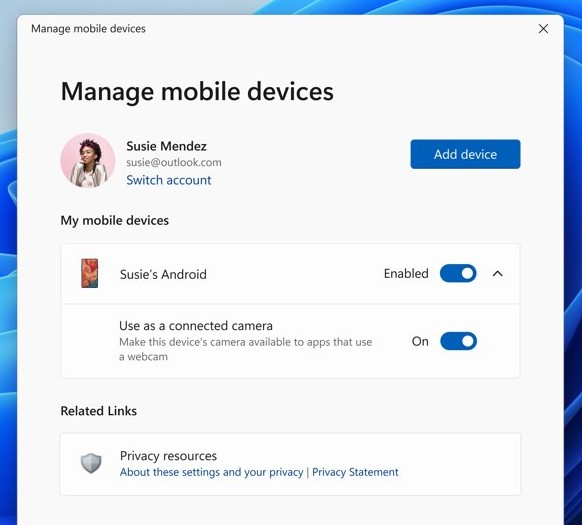
Windows 11 can use an Android phone as a webcam with no third-party driver. It needs Windows 11, Android 10 or later and Link to Windows version 1.24022.0 or later, so it does not work on Windows 10 or with an iPhone.
- Open Settings on the Windows 11 PC.
- Select Bluetooth & devices.
- Scroll down and select Mobile devices.
- If the phone is not linked yet, select Add device and finish the linking steps.
- Select your phone and turn on Use as connected camera.
- Open your video app and choose the phone camera in the app's camera settings.
If the phone stream stops, select the button in the new phone camera window to refresh it.
Dedicated webcams instead of a phone webcam app
| Factor | Phone webcam app | Dedicated webcam |
|---|---|---|
| Extra cost | Often free, with paid upgrades | Hardware purchase |
| Phone tied up during calls | Yes | No |
| Driver or companion app | Phone app plus a PC client | Plugs in; vendor software optional |
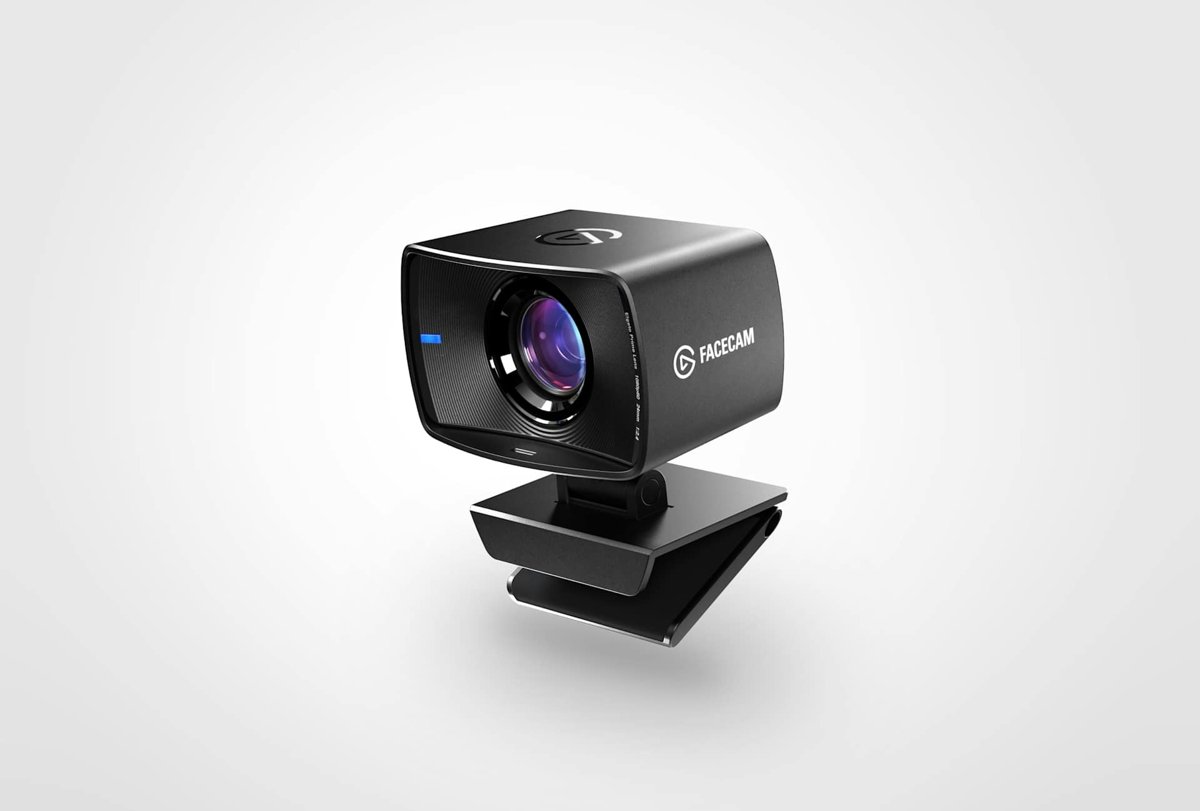
| Elgato's own replacement | None | Facecam, listed for Windows and Mac |
Elgato ships Camera Hub with every Facecam, and its Downloads page now describes Elgato Studio as the app that fully replaces Camera Hub.
Feature comparison: EpocCam (legacy) vs modern alternatives
This table gives an overview of each option side by side, using only what each vendor lists today.
| Option | Phone | Computer | Price | Status |
|---|---|---|---|---|
| EpocCam | App no longer offered | No driver offered | Not sold | Discontinued by Elgato |
| Camo | iPhone, iOS 15.6 or later | Windows 10 or later, macOS 10.13 or later | Free, with subscriptions | Supported |
| DroidCam | iPhone, iOS 15.0 or later | Windows, Linux | Free at 640×480; Pro upgrade for HD | Supported |
| Phone Link camera | Android 10 or later | Windows 11 only | Free, built in | Supported |
| Elgato Facecam | Not needed | Windows, Mac | Hardware purchase | Supported |
How to replace EpocCam with another webcam app on Windows 10
Install the replacement first, test it, then remove EpocCam, so you are never left without a camera before a call.
Test a free tier before buying a paid upgrade or a webcam, and for an office deployment, run the steps on one PC before the rest.
- Pick the replacement from the alternatives table that matches your phone and Windows version.
- Install the phone app from the App Store, and the PC app from the vendor's own site or store.
- Check the User Account Control prompt shows the vendor as a verified publisher before you select Yes.
- Open your video app and choose the new camera in its camera settings.
- Make a short test call to check video and sound.
- Uninstall EpocCam and remove any leftover EpocCam device from Device Manager.
- Restart the PC and run one more test call.
Critical analysis: strengths, weaknesses, and risks
EpocCam's idea still works, but the product has no future on Windows 10. Using a phone you already own as a webcam is now a supported feature of Camo, DroidCam and Windows 11 itself, while EpocCam has lost its vendor, its downloads and its updates.
Notable strengths of EpocCam’s legacy offering
| Strength | Still true today? |
|---|---|
| Reused the phone you already owned as a webcam | Yes, but supported apps now do the same |
| Backed by a camera vendor, Elgato | No, Elgato has withdrawn it |
| Worked with ordinary video apps through a Windows camera driver | Only for existing installs, with no fixes coming |
Key weaknesses and operational risks
| Weakness | Consequence | Response |
|---|---|---|
| No official download | New PCs cannot get a trusted installer | Use a supported alternative |
| No driver updates | A Windows or phone update can break it for good | Keep a replacement ready |
| No vendor support | No one answers when it fails | Move business use first |
| Runs on Windows 10 | No free OS security updates since October 14, 2025 | Use ESU or upgrade to Windows 11 |
Balanced view
An EpocCam install that still works can stay for a short transition, and nothing more. Removing a working camera the day before a call helps no one, but every week it stays adds risk with no upside, because no update will ever fix a new fault.
EpocCam on Windows 10 FAQ
Is EpocCam still available?
No. Elgato's EpocCam page says “EpocCam is no longer available. Facecam picks up where it left off.” Elgato's Downloads page lists no EpocCam driver, so there is no official way to get it today.
Does EpocCam still work on Windows 10?
An existing install can keep working, but Elgato no longer supports it and will not release driver fixes. Windows 10 itself stopped getting free security updates on October 14, 2025, so treat the setup as temporary.
Is it safe to download EpocCam from a third-party site?
No. Elgato no longer distributes EpocCam, so any installer on a mirror or freeware site is unofficial and cannot be traced to the vendor. A camera driver runs with administrator rights, which makes an unknown file a real risk.
What replaced EpocCam?
Elgato points EpocCam users to its Facecam webcams. For a phone-based replacement on Windows, Camo and DroidCam both offer iPhone apps with Windows clients, and Windows 11 can use an Android phone through Phone Link.
How can I use my iPhone as a webcam on Windows 10?
Use Camo or DroidCam. Camo's desktop app, Camo Studio, supports Windows 10 or later and its iPhone app needs iOS 15.6 or later. DroidCam's iPhone app needs iOS 15.0 or later and has a Windows client.
Can Windows 10 use an Android phone as a webcam without an app?
No. The Phone Link connected-camera feature needs Windows 11, Android 10 or later and Link to Windows 1.24022.0 or later. On Windows 10 you need a third-party webcam app with its own Windows client.
Is DroidCam free?
Yes, with limits. DroidCam offers unlimited free use at standard definition (640×480). The Pro upgrade, an in-app purchase, removes watermarks and allows up to 1080p as a PC webcam and 4K as an OBS camera.
How do I remove EpocCam drivers from Windows 10?
Uninstall EpocCam from Settings > Apps or from Programs and Features in Control Panel. Then open Device Manager, check the Cameras, Imaging devices and Sound, video and game controllers lists, and uninstall any EpocCam device left behind.
Does Windows 10 still get security updates?
Only through Extended Security Updates. Microsoft ended Windows 10 support on October 14, 2025, and the consumer ESU program protects a Windows 10 device until October 12, 2027.
Final recommendations (actionable)
Install Camo or DroidCam if you use an iPhone, Phone Link if you have an Android phone and Windows 11, or a dedicated webcam if you want no phone in the setup, then uninstall EpocCam. Each of these has a vendor that still ships updates, while EpocCam has none, and on Windows 10 every unsupported driver adds to the risk of an operating system that no longer gets free fixes.