Apple Music album artwork shows up in the OneDrive app when OneDrive backs up your Windows Music folder, so turn off the Music folder backup in OneDrive settings and keep the files on your PC.
This guide explains why the images appear, how to check what OneDrive is backing up, how to move or add Apple Music artwork, and what to do when iTunes stops showing your music.
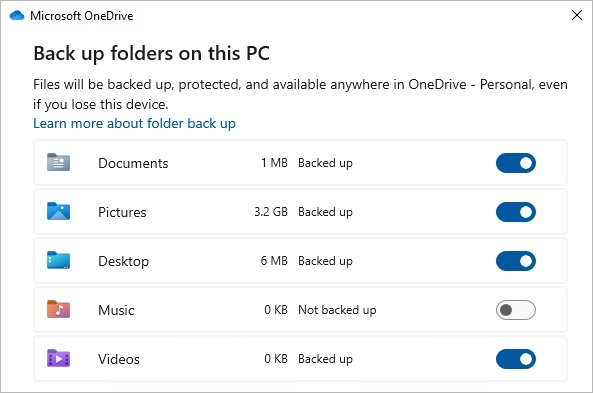
How to stop OneDrive from backing up the Apple Music folder
Apple Music stores its media in Home\Music\Apple Music by default. OneDrive folder backup can include the whole Music folder, so everything inside it reaches OneDrive and every device signed in to it.
- Select the OneDrive cloud icon in the Windows notification area.
- Select the Help & Settings icon, then select Settings.
- Go to the Sync and backup tab and select Manage backup.
- Turn off the toggle for Music.
- When OneDrive asks where the files should stay, choose to keep them only on your PC, which removes them from OneDrive.
- Wait for OneDrive to finish moving the files, then reopen the OneDrive app on your iPhone.
Keeping the files only on the PC is the choice that protects your Apple Music library. The other choice keeps them only in OneDrive and removes them from the computer, which leaves Apple Music pointing at missing files.
Why Apple Music artwork appears in OneDrive photos
Nothing in Apple Music uploads to OneDrive on purpose. Two default settings meet in one folder, and the OneDrive app then shows the image files it finds there.
| Piece | What it does | Effect on the OneDrive app |
|---|---|---|
| Apple Music media folder | Keeps your songs and library data in Home\Music\Apple Music | Its files sit inside the Windows Music folder |
| OneDrive folder backup | Can back up Desktop, Documents, Music, Pictures and Videos | A backed-up Music folder uploads everything inside it |
| OneDrive photo views | Show pictures that are already stored in your OneDrive | Image files from the Music folder appear next to your camera photos |
| OneDrive mobile app | Always shows every folder in your OneDrive | The iPhone app lists the uploaded images even though the iPhone never took them |
Moving from iTunes to the Apple Music app for Windows creates the new Apple Music folder inside Music, which is why the images often appear right after the switch.
How to tell if OneDrive is backing up your Music folder
Check the backup panel first, then trace one of the stray images back to its OneDrive backup folder.
- Open OneDrive Settings, go to Sync and backup and select Manage backup.
- Look at the Music row. A folder that says Not backed up is not the source.
- In the OneDrive app, open one of the unwanted images and view its details to see the file name.
- In Apple Music, select Songs in the sidebar, select the More button for a song, choose Properties, then select File.
- Read the path next to location at the bottom of the pane. A path inside your OneDrive folder confirms the library is being uploaded.
You can also select the More button for an item and choose Show in Explorer to open its folder directly.
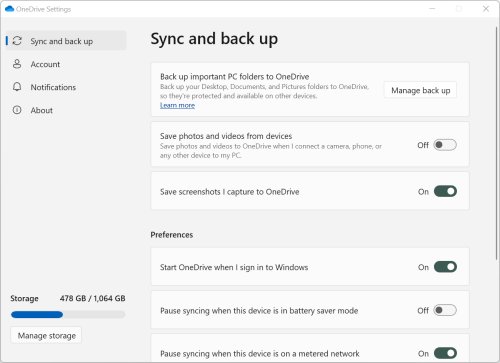
Change where Apple Music files are stored on Windows
If you want Music backed up for other files, move new Apple Music imports to a folder that OneDrive does not back up instead. Apple recommends leaving the Apple Music folder where it is for best results, so use this only when you need it.
- Open the Apple Music app.
- Select the Sidebar Actions button at the top of the sidebar, choose Settings, then select Files.
- Select the down arrow, select Change, and choose a folder outside OneDrive.
- To return to the default folder later, open the same pane, select the down arrow and select Reset.
Only songs you import from now on go to the new folder. Songs already imported stay where they are, so stopping the Music folder backup is still the fix for files already in OneDrive. If you are looking for the missing Apple Music menu bar, the Sidebar Actions button replaces it.
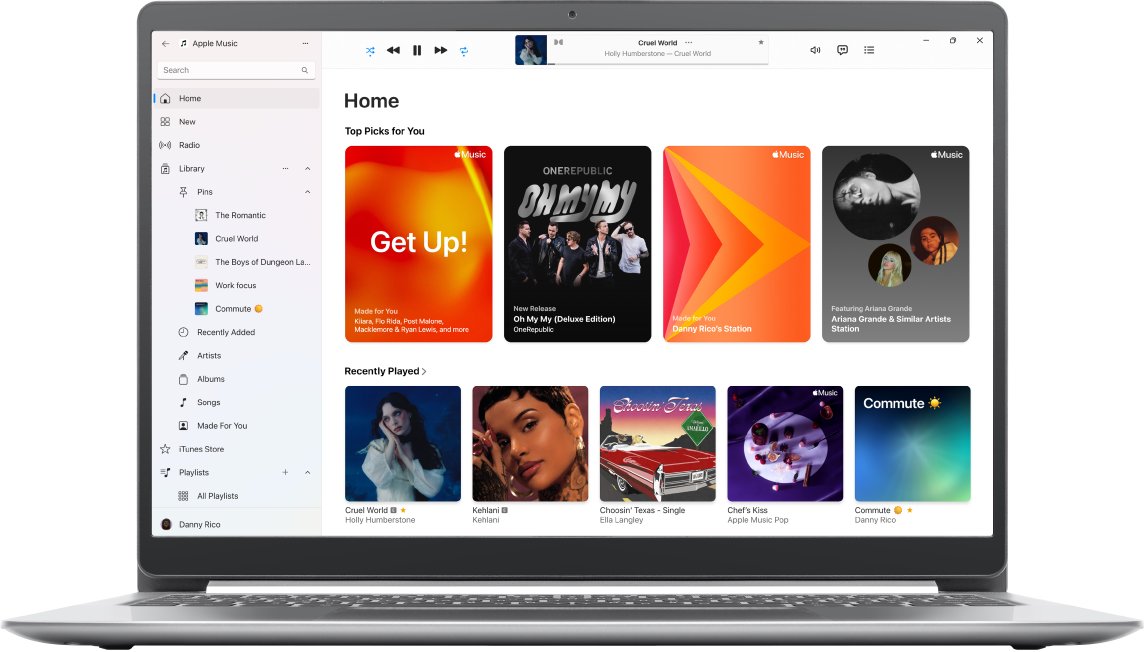
How to add artwork to Apple Music on Windows
Songs from the iTunes Store or Apple Music come with artwork. You can add your own image to any song or playlist in your library.
- Open the Apple Music app and select Songs in the sidebar.
- Select the More button for a song and choose Properties.
- Select Artwork.
- Select Add Artwork, choose an image file and select Open, or drag the image onto the artwork area.
- For a playlist, select it in the sidebar, open its artwork options, then choose an image file or one of the cover options and select Done.
JPEG, PNG, GIF, TIFF and Photoshop images work. WAV songs must be converted to another format before they can take artwork.
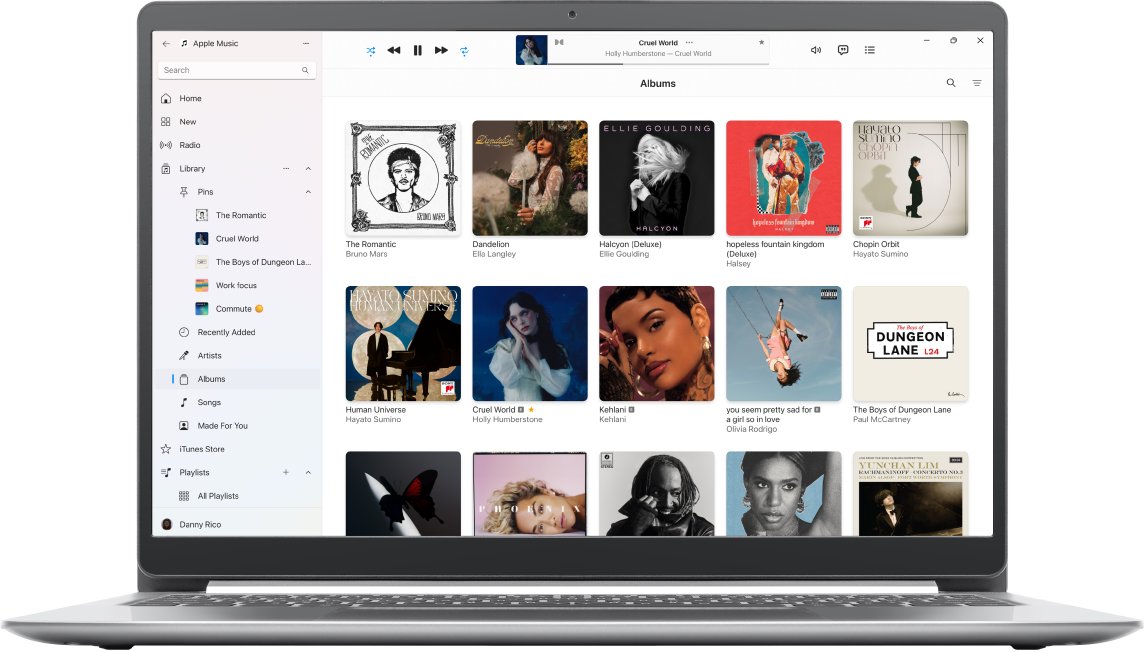
Get album artwork in Apple Music vs iTunes on Windows
The automatic artwork command people remember belongs to iTunes. Apple's Apple Music for Windows guide documents only adding artwork by hand.
| App | Add artwork to one item | Fetch artwork for the whole library |
|---|---|---|
| Apple Music for Windows | More > Properties > Artwork > Add Artwork | Not listed in Apple's guide; store purchases and Apple Music downloads arrive with artwork |
| iTunes for Windows | Edit > [Item] Info > Artwork > Add Artwork | File > Library > Get Album Artwork |
The iTunes route works only while iTunes still shows Music in its pop-up menu. Once the Apple Music app is installed, Apple sends you to that app for music instead.

Can iTunes play music from OneDrive
Apple Music, which now handles music on Windows, can add songs from any folder on the PC, including your OneDrive folder. The catch is OneDrive Files On-Demand: online-only files are not on the PC until opened and cannot open without internet.
- In File Explorer, right-click the music folder inside OneDrive.
- Select Always keep on this device and wait for the green check marks.
- In Apple Music, select Sidebar Actions, then Library, then Add Folder to Library.
- Choose the OneDrive music folder and wait for the songs to appear.
By default Apple Music links to the files where they are. If OneDrive later frees up space or the folder moves, those songs may stop playing until you add them again.
How to make an album in OneDrive
Albums let you group the photos you actually want, which helps once stray images are cleared out of OneDrive.
- On the OneDrive website, select the photos you want and select Add to album.
- Select New album and give it a name, or pick an existing album.
- In the OneDrive mobile app, select the photos, then tap the More (three-dot) icon.
- Tap the plus-circle icon to create a new album, or choose an existing album from the list.
Apple Music and OneDrive problems on Windows 11
iTunes shows only podcasts and TV after switching to Apple Music
Apple now handles music in the Apple Music app; iTunes on Windows is for podcasts and audiobooks.
- Open iTunes and check the pop-up menu at the top left for Music.
- If Music is missing, open the Apple Music app instead. Apple says this is the app to use for your library.
- If Apple Music is not installed, open Microsoft Store, search for Apple Music and select Get.
- Sign in with the same Apple Account to see your library and iTunes Store purchases.
"Some files couldn't be moved" when stopping OneDrive Music backup
Some files in the Music folder are online-only, so OneDrive cannot move them back to the PC.
- Open the Music folder in File Explorer.
- Right-click the folder and select Always keep on this device.
- Wait for the downloads to finish, then turn off the Music toggle in Manage backup again.
Songs no longer appear in Apple Music after moving the folder
The music library or songs were moved out of the Apple Music folder, so the links broke.
- Find your Apple Music folder in File Explorer.
- Drag the folder onto the Apple Music window. Playlists and ratings return if the library file is inside it.
- If songs are still missing, search File Explorer for a song title, or for MP4 or MP3, and drag the results onto Apple Music.
"If you sync your Music folder, the content in your Playlists folder might not work"
Playlist files in the Music folder point at song paths, and backup can break those links.
- Leave the Music toggle off in Manage backup if you rely on playlist files.
- Keep playlists inside Apple Music instead, where they live in the library rather than as loose files.
Album artwork still showing in OneDrive Memories on iPhone
Pictures in Memories and On this day are files that are still stored in your OneDrive.
- Open the image in the OneDrive app and view its details for the file name.
- On the OneDrive website, search for that file name to find its folder.
- Confirm the folder is the old Music backup, then delete only the image files you do not need.
- In the iPhone app, select Me, open Settings, select Camera upload and use Organise by source to check that no extra iPhone folders are uploading.
Apple Music artwork and OneDrive FAQ
Why is Apple Music artwork in my OneDrive?
OneDrive is backing up your Windows Music folder, and Apple Music keeps its media in Home\Music\Apple Music. Turn off the Music toggle under OneDrive Settings > Sync and backup > Manage backup, and choose to keep the files only on your PC.
How to add artwork to Apple Music?
On Windows, select Songs, select the More button for a song, choose Properties, then select Artwork. Select Add Artwork and pick an image, or drag the image onto the artwork area. JPEG, PNG, GIF, TIFF and Photoshop files work.
How to get album artwork in Apple Music on Windows?
Songs bought from the iTunes Store or downloaded from Apple Music arrive with artwork. For other songs, add an image through Properties > Artwork. Apple's Windows guide for Apple Music lists no automatic Get Album Artwork command; that command is documented for iTunes.
Can iTunes play music from OneDrive?
Apple Music, which handles music on Windows now, can add songs from your OneDrive folder like any other folder. Mark the folder Always keep on this device first, because online-only files cannot open without an internet connection.
How to make an album in OneDrive?
On the OneDrive website, select the photos, choose Add to album, then select New album and name it. In the mobile app, select the photos, tap the three-dot icon, then tap the plus-circle icon or choose an existing album.
Will stopping OneDrive Music backup delete my Apple Music library?
Not if you choose to keep the files only on your PC. That option removes them from OneDrive and leaves the library on the computer. The other option keeps them only in OneDrive and removes them from the PC.
Why does iTunes only show podcasts after installing Apple Music?
Apple has moved music on Windows to the Apple Music app, and iTunes now manages podcasts and audiobooks. If Music is missing from the iTunes pop-up menu, Apple says to use the Apple Music app you installed.
Can I move the Apple Music folder out of OneDrive?
You can change where new imports go under Settings > Files > Change in Apple Music, but songs already imported stay put, and Apple advises keeping the default folder for best results. Stopping the OneDrive Music backup is the cleaner fix.