You can download Adobe Photoshop for free from Adobe’s official website, but the desktop version is a seven-day trial. The trial includes the complete current version of Photoshop for desktop, web, and mobile. Adobe asks you to choose a subscription and provide payment details when starting the trial, and billing begins after seven days unless you cancel it first.
To begin, open Adobe’s official Photoshop free-trial page, select Start free trial, sign in or create an Adobe account, and download Photoshop through the Creative Cloud desktop app.
Do not download “Photoshop full version free,” cracks, portable builds, key generators, or old installers from unofficial websites. These files may contain malware, steal Adobe credentials, break updates, or install a modified copy that cannot be verified.
| Photoshop option | Cost | What it includes |
|---|---|---|
| Photoshop desktop free trial | Free for seven days | The current full desktop app, Photoshop on the web and mobile, updates, and included plan features |
| Photoshop mobile | Free download with premium features | Editing tools for supported iPhone and Android phones; some features require a paid plan |
| Adobe Express | Free plan available | A simpler browser and mobile editor for templates, social graphics, resizing, and quick edits |
| Photoshop subscription | Paid after the trial | Photoshop on desktop, web, and mobile, plus the benefits listed for the selected Adobe plan |
How to Download Adobe Photoshop for Free
- Open the official Adobe Photoshop free-trial page.
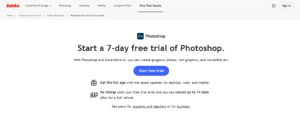
- Select Start free trial.
- Choose the Photoshop plan, Photography plan, Creative Cloud Pro plan, or another option offered in your country.
- Sign in with an existing Adobe account or create a new one.
- Enter the billing information requested by Adobe.
- Confirm the trial and download the Creative Cloud installer.
- Open the downloaded installer and complete the Creative Cloud desktop app setup.
- Find Photoshop in the Apps section and select Install.
The trial starts when you complete Adobe’s checkout process, not when you first open Photoshop. Adobe states that the trial automatically becomes a paid membership after seven days unless it is cancelled.
Download Photoshop only from Adobe
Adobe distributes the current desktop version through Creative Cloud rather than as a normal standalone Photoshop installer. A website offering a direct “Photoshop 2026 setup.exe” or an activated portable build is not providing Adobe’s normal consumer installation method.
The Creative Cloud app manages the download, installation, licensing, updates, previous supported versions, Adobe Fonts, cloud services, and other Adobe applications associated with your account.
Can you download Photoshop without Creative Cloud?
The current subscription version normally requires the Creative Cloud desktop app for installation and licence management. Adobe offers direct Creative Cloud installer links when the normal web download fails, but Photoshop itself is still installed and managed through Creative Cloud.
Photoshop on the web can run in a supported browser without installing the desktop app, but it is part of eligible Photoshop plans and does not provide every desktop workflow or plug-in.
Adobe Photoshop’s System Requirements
The rival requirements for Windows 7, 2 GB of RAM, OpenGL 2.0, and a GTX 1050 are outdated. The current Photoshop 27.x release requires a modern 64-bit operating system, at least 8 GB of RAM, a DirectX 12 GPU, and newer processor instruction support.
| Component | Minimum for Photoshop 27.x | Recommended |
|---|---|---|
| Operating system | Windows 11 24H2 or 23H2; Windows 10 22H2 or Windows 10 21H2 LTSC | A current, fully updated supported Windows release |
| Processor | Multicore Intel, AMD, or supported Windows on ARM processor | A recent multicore processor |
| Processor instructions | AVX2 and SSE 4.2 or later on Intel and AMD systems | A newer processor with strong single-core and multicore performance |
| Memory | 8 GB of RAM | 16 GB or more |
| Graphics | DirectX 12 feature level 12_0 or later, 1.5 GB of GPU memory, and a GPU newer than seven years | At least 4 GB of GPU memory for 4K displays and GPU-intensive features |
| Display | 1280 x 800 or higher | 1920 x 1080 or higher |
| Storage | 10 GB available for installation, plus temporary working space | 100 GB free and a fast internal SSD, with additional SSD space for scratch disks |
| Internet | Required for installation, activation, membership validation, and online services | A stable broadband connection for downloads, cloud services, and AI features |
Check whether your PC can run Photoshop
- Press Windows + R.
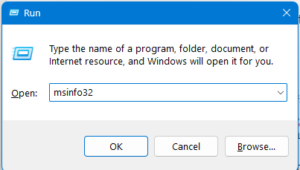
- Enter
msinfo32and press Enter.
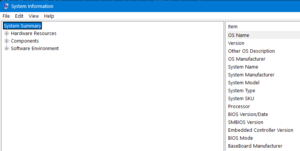
- Check OS Name, Version, System Type, Processor, and Installed Physical Memory.
- Press Windows + R again, enter
dxdiag, and open the Display tab to review the GPU and driver. - Open Settings > System > Storage to check free disk space.
A PC can meet the minimum requirements and still struggle with large RAW files, hundreds of layers, high-resolution canvases, neural filters, AI processing, or several Adobe apps running together. More RAM and fast scratch-disk storage often improve real-world performance more than meeting the minimum specification alone.
Can Photoshop run on Windows 7?
The current Photoshop release does not support Windows 7. Installing the Creative Cloud desktop app through an older compatible installer does not make the latest Photoshop application compatible with Windows 7.
A person who previously purchased and registered Creative Suite 5, 5.5, or 6 may be able to download the matching legacy installer from the Adobe account page when Adobe still makes that product available. A valid serial number is required, and the old version does not receive the current Photoshop features, normal bug fixes, or modern security support.
Windows 7 is also unsupported by Microsoft. Do not move a production photo-editing workflow to an obsolete operating system simply to run an old Photoshop version.
How to Install Adobe Photoshop
- Download the Creative Cloud installer after starting the Photoshop trial or purchasing a plan.
- Open
Creative_Cloud_Set-Up.exe. - Approve the Windows administrator prompt.
- Sign in with the Adobe account associated with the trial or subscription.
- Allow the Creative Cloud desktop app to finish installing.
- Open the Apps section.
- Find Photoshop and select Install.
- Wait while Creative Cloud downloads and installs the current version.
- Select Open, or launch Photoshop from the Start menu.
Adobe installs the Creative Cloud desktop app in its default location and does not let you choose another location for that app. Photoshop installation preferences can offer more control, but you still need free space on the Windows system drive for Creative Cloud components and temporary files.
Install a previous Photoshop version
A paid Creative Cloud member can install versions that Adobe currently makes available:
- Open Creative Cloud.
- Find Photoshop under Apps.
- Select the three-dot More actions menu.
- Select Other versions.
- Choose an available version and select Install.
Creative Cloud removes the previous major version during an update by default. To keep it, open Creative Cloud preferences, enable auto-update for Photoshop, open its advanced options, and clear Remove older versions. Keeping the prior release is helpful when a plug-in, action, printer workflow, or client project has not been tested with the newest version.
How long does Photoshop take to install?
There is no fixed installation time. It depends on the connection, Adobe’s servers, storage speed, security scanning, and whether Creative Cloud must update itself first. On a normal broadband and SSD-based PC, installation should not automatically take several hours. A very slow or stuck installation usually indicates a download, permission, network, storage, or Creative Cloud problem.
What Is Adobe Photoshop?
Adobe Photoshop is a professional raster-image editor for photography, compositing, digital painting, graphic design, web assets, typography, image analysis, and selected video or animation workflows. It is built around pixels, layers, masks, channels, selections, filters, colour modes, and nondestructive adjustment tools.
The current Photoshop 2026 desktop release is in the 27.x series. Adobe’s June 2026 version 27.8 added more model choices for Generate Image, including Adobe and partner AI models, alongside updates for OpenColorIO and Windows HDR colour matching.
Photoshop now spans desktop, web, iPhone, and Android. The mobile apps include layers, selections, object removal, text, adjustments, Generative Fill, Generative Expand, and Harmonize, although feature availability differs between platforms and some tools require a subscription.
Generative AI features
Photoshop’s current generative features include Generative Fill, Generative Expand, Generate Image, Generate Background, Generate Similar, Harmonize, and generative enhancement tools. These features can use Adobe Firefly or supported partner models and may consume generative credits according to the selected plan and model.
AI does not replace normal selections, masks, colour correction, retouching, and compositing. The strongest results usually come from combining generated content with manual refinements and reviewing output for unwanted details, intellectual-property concerns, and factual accuracy.
Can You Buy Photoshop Permanently?
No. Adobe sells the current Photoshop application through Creative Cloud subscriptions rather than a new perpetual desktop licence. Adobe’s US pricing page currently lists the standalone Photoshop annual plan at US$22.99 per month when billed monthly, while the Photography 1TB plan is US$19.99 per month and includes Photoshop and Lightroom. Prices, taxes, promotions, billing terms, and included generative credits vary by country and can change.
Photoshop CS6 was the final perpetual Creative Suite version, but Adobe no longer sells it as a new product. People who previously purchased and registered an eligible old Adobe product may be able to retrieve the corresponding installer from their account. That does not make CS6 a current or supported alternative to Photoshop 2026.
How to Cancel the Photoshop Free Trial
- Sign in at Adobe Account Plans.
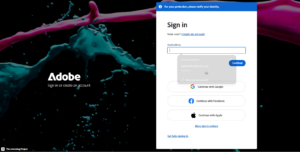
- Select Manage plan for the trial.
- Select Cancel your plan.
- Review the plan and select Continue to cancel.
- Choose a reason and continue.
- Review the cancellation details and select Confirm cancellation.
- Check for Adobe’s confirmation email and verify the plan status in your account.
Cancel through Apple, Google, Microsoft, or another provider when the subscription was purchased through that provider instead of Adobe. Adobe states that most plans qualify for a full refund when cancelled within 14 days of the initial purchase, but the exact result depends on the plan and purchase terms.
FAQ
How can I get Adobe Photoshop for free?
Use Adobe’s official seven-day Photoshop trial. The desktop trial is the complete current app and automatically becomes a paid subscription unless you cancel before the trial ends.
Is Photoshop free on Windows 11?
The current desktop app is not permanently free on Windows 11. Adobe offers a seven-day trial. Photoshop mobile has a free tier, and Adobe Express provides a separate free plan for simpler editing.
Can I install the latest Photoshop on Windows 10?
Yes, on Windows 10 22H2 or Windows 10 21H2 LTSC when the hardware meets Adobe’s requirements. Other Windows 10 versions are not listed for Photoshop 27.x.
Can I install Photoshop on Windows 7?
Not the current release. Only a previously purchased legacy version may work, and Adobe no longer provides modern support or security fixes for old perpetual Photoshop releases.
How much does Photoshop cost?
Adobe’s US page lists standalone Photoshop at US$22.99 per month for the annual plan billed monthly. The Photography 1TB plan is listed at US$19.99 per month and includes Photoshop and Lightroom. Check Adobe’s local pricing page because regional prices and promotions vary.
Can I buy Photoshop permanently?
No. Adobe does not offer the latest Photoshop as a perpetual purchase. The current version requires a Creative Cloud subscription.
Does the trial require a credit card?
Adobe asks for billing information when starting the normal Photoshop trial because it converts to a paid plan after seven days unless cancelled.
Can I install Photoshop on two computers?
Adobe allows an individual account to remain activated on up to two computers, but the apps may be actively used on only one computer at a time. The account should not be shared with another person.
Will Photoshop work without the internet?
Many desktop editing features work after installation, but internet access is required for installation, activation, periodic membership validation, cloud documents, collaboration, downloads, and online or generative AI services.
What happens to PSD files after cancelling?
PSD files saved locally remain on the computer and can be copied or backed up normally. Paid application access ends according to the subscription terms. Adobe also reduces Creative Cloud storage for a cancelled account, so download or move cloud files before exceeding the post-cancellation limit.
Is Photoshop Express the same as Photoshop?
No. Adobe Express and Photoshop Express are simplified products for quick edits and content creation. They do not replace the full desktop application’s advanced layer, masking, colour, automation, plug-in, and professional production workflows.
Full Specifications
| Current desktop release | Photoshop 2026, version 27.8 as of June 2026 |
|---|---|
| Licence | Seven-day trial followed by a Creative Cloud subscription unless cancelled |
| Developer | Adobe |
| Supported current Windows releases | Windows 11 24H2 or 23H2; Windows 10 22H2 or 21H2 LTSC |
| Architecture | 64-bit Intel, AMD, and supported Windows on ARM systems |
| Minimum RAM | 8 GB |
| Recommended RAM | 16 GB or more |
| Minimum free installation space | 10 GB, with more space required for temporary files and scratch disks |
| GPU requirement | DirectX 12 feature level 12_0 or later, at least 1.5 GB of GPU memory, and a supported recent GPU |
| Platforms | Windows, macOS, web, iPhone, iPad, and supported Android phones |
| Primary uses | Photo editing, retouching, compositing, graphic design, digital painting, typography, web graphics, and AI-assisted image creation |
| Official download | Adobe Photoshop free-trial page |