Double-click the .xlsm file to open it in Microsoft Excel, then select Enable Content only if you trust the file and need its macros to run.
This guide covers Excel on Windows and Mac, Excel for the web, Google Sheets and LibreOffice Calc, plus how to unblock a downloaded file and what to do when an XLSM file will not open.
Step by step tutorial on how to open an XLSM file
An XLSM file opens in Excel like any other workbook. The one extra decision is whether its macros are allowed to run.
- Make sure a compatible program is installed. Excel 2007 or later on Windows and Excel for Mac both handle .xlsm files.
- Double-click the file in File Explorer to open it in Excel.
- Select Enable Editing if a yellow Protected View bar appears and you trust the source.
- Select Enable Content on the Security Warning bar if you trust the file and need its macros.
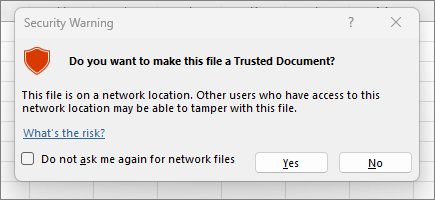
- Choose Yes if a Security Warning dialog asks whether to make the document trusted.
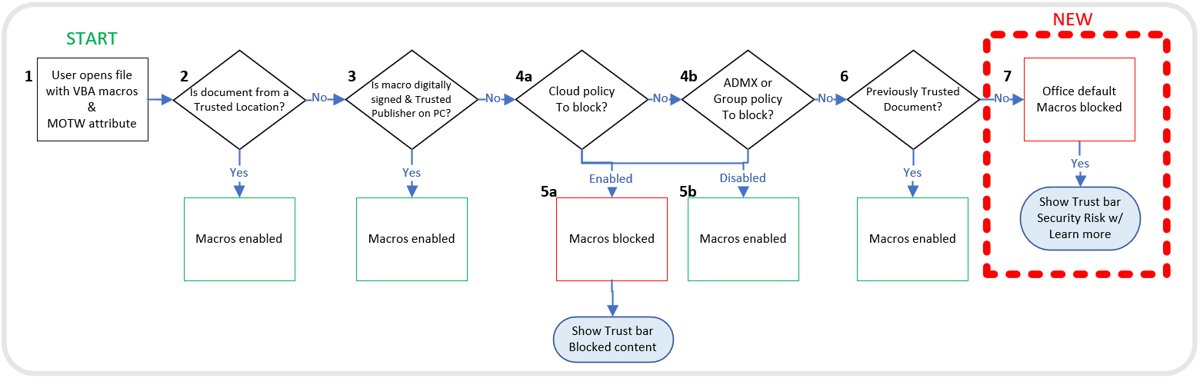
A file downloaded from the internet can show a red Security Risk banner instead, and that banner has no Enable Content button. Office uses different yellow and red macro warnings depending on where the file came from, and the unblock steps further down clear the red one.
What is an XLSM file?
An XLSM file is an Excel Macro-Enabled Workbook. It holds normal worksheets and can also hold the code that automates them.
| Detail | XLSM file |
|---|---|
| Full name | Excel Macro-Enabled Workbook |
| Extension | .xlsm |
| File format | XML-based, part of the Open XML formats |
| Macro support | Stores VBA macro code or Excel 4.0 macro sheets (.xlm) |
| Who created the format | Microsoft, introduced with Excel 2007 |
| File size | Automatically compressed, up to 75 percent smaller in some cases |
Only Office files whose extension ends in "m", such as .docm, .xlsm and .pptm, can contain macros.
Open XLSM file without Excel or online
Several apps read the data in an XLSM file, but most do not run its macros. Match your need to the row below before you pick an app.
| App | Can it open .xlsm? | Do the macros run? |
|---|---|---|
| Excel for Windows | Yes, open and edit | Yes, after Enable Content or Unblock |
| Excel for Mac | Yes, .xlsm is a listed workbook format | Yes, depending on the Security setting |
| Excel for the web | Yes, open and edit | No, you can't create, run or edit VBA macros there |
| Excel for Android or iOS | Yes, open and edit | No, VBA functions won't run |
| Google Sheets | Yes, Drive can open and convert it | No, macros aren't supported when you edit with Sheets |
| LibreOffice Calc | Yes, through its macro-enabled Excel filter | Some Excel scripts, once Executable code is on |
| Apple Numbers | Not stated by Apple for .xlsm | No, Apple lists macros as not supported |
How to open an XLSM file in Excel
Use this route when double-clicking opens the wrong app, or when the file sits in a folder you already have open in Excel.
- Open Excel from the Start menu.
- Select File > Open.
- Go to the folder that holds the workbook.
- Select the .xlsm file and select Open.
If you are not sure where the workbook is saved, open File Explorer and check your Downloads and Documents folders first.
Open XLSM file online in Excel for the web
Excel for the web opens and edits a workbook that contains macros, and the macros stay in the file. They just cannot run in the browser.
- Upload the .xlsm file to OneDrive in your browser.
- Select the file to open it in Excel for the web.
- Edit the cells as normal.
- Select Open in Desktop App above the ribbon when you need to view or edit the macros.
Excel for the web can refuse some workbooks with VBA projects and show a message that the workbook can't be opened. The desktop app is the fix in that case.
How to open an XLSM file in Google Sheets
Google lists .xlsm among the Excel formats Drive can open in Sheets. The workbook opens for editing, but its macros do not work while you edit with Sheets.
- Upload the .xlsm file to Google Drive.
- Double-click the file in Drive to open it in Google Sheets.
- Edit the data in the sheet.
- Rebuild any automation you need in Apps Script, which Google suggests in place of macros.
The Office Editing for Docs, Sheets & Slides Chrome extension adds Office Compatibility Mode, which also lists .xlsm. The basics of Google Sheets apply once the workbook is open.
How to open an XLSM file in LibreOffice Calc
LibreOffice Calc can load Excel macro code for you to read. It can also run some Excel scripts once you turn that option on.
- Open LibreOffice Calc.
- Select File > Open and choose the .xlsm file.
- Select Tools > Options > Load/Save > VBA Properties if you need the macros.
- Under the Microsoft Excel settings, turn on Load Basic code and Executable code.
- Close the file and open it again so the setting applies.
With Executable code off, the VBA code is commented out, so you can inspect it but it cannot run. That is the safer state for a file you did not create.
How to open an XLSM file on a Mac
Excel for Mac treats .xlsm as a normal workbook format. By default it warns you each time it finds a macro, even a harmless one.
- Double-click the .xlsm file in Finder to open it in Excel.
- Respond to the macro warning, enabling macros only if you trust the file.
- Select Excel > Preferences > Security if you want to review the setting.
- Keep Disable all macros with notification selected, which is the default.
The internet-file macro block described below only affects Office on Windows. It does not apply to Office on a Mac, on Android or iOS, or on the web.
How to unblock macros in a downloaded XLSM file
Windows adds a Mark of the Web to browser downloads and email attachments saved to an NTFS drive. Excel then blocks the macros and shows the Security Risk banner.
Unblock a file only when you trust its source, because Microsoft names macros as a common route for malware and ransomware.
- Close the workbook in Excel.
- Right-click the .xlsm file in File Explorer and select Properties.
- On the General tab, select the Unblock checkbox.
- Select OK.
- Open the file again and select Enable Content if Excel still asks.
PowerShell does the same job with Unblock-File -Path "C:\Users\YourName\Downloads\report.xlsm". Replace the example path with your own.
No Unblock checkbox usually means the file is on a network share. Those files need the location added to Trusted sites, which is a decision for whoever manages the network.
Open XLSM file without running macro
You can read and check an XLSM file with its macros switched off. Excel's default setting already does this until you say otherwise.
- Open the file in Excel.
- Leave the Security Warning bar alone and do not select Enable Content.
- Read or check the workbook; features that rely on the macros stay unavailable.
- Select File > Options > Trust Center > Trust Center Settings > Macro Settings if macros ran without asking.
- Choose Disable VBA macros with notification or Disable VBA macros without notification, then select OK.
Microsoft does not recommend Enable VBA macros, because it makes your computer vulnerable to potentially malicious code.
How to create XLSM file
A workbook needs the .xlsm format before Excel will keep its macros, because .xlsx cannot store VBA code.
- Open the workbook in Excel.
- Select File > Save As > Browse.
- Choose the folder you want.
- Set Save as type to Excel Macro-Enabled Workbook (*.xlsm).
- Select Save.
Keep a backup of the original before you convert it. From there, you can build out the workbook with essential Excel formulas and shortcuts.
How to use XLSM file macros in Excel
Macros do nothing until you run them, unless the workbook is built to start one when it opens. Run them from the Developer tab.
- Select File > Options > Customize Ribbon.
- Under Main Tabs, check the box next to Developer and select OK.
- On the Developer tab, select Macros.
- Select the macro in the Macro name box.
- Select Run.
How to check if an XLSM file contains macros
The .xlsm extension means a file can contain macros, not that it does. The Macro dialog shows what is actually there.
- Open the file and show the Developer tab using the steps above.
- Select Developer > Macros.
- Read the Macro name list.
- Treat an empty list as no macros you can run from this dialog.
XLSM vs XLSX, XLS, XLSB, XLTM and XLAM
The last letters of an Excel extension tell you what the file can hold. All of these formats work in desktop Excel.
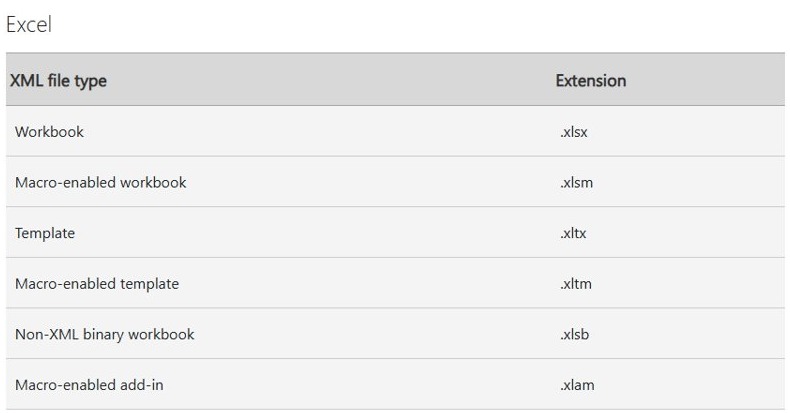
| Extension | What it is | Holds macros? |
|---|---|---|
| .xlsx | Default XML-based Excel workbook | No, cannot store VBA macro code |
| .xlsm | XML-based macro-enabled workbook | Yes |
| .xlsb | Excel Binary Workbook | Yes |
| .xls | Excel 97-2003 binary workbook | Yes |
| .xltm | Macro-enabled Excel template | Yes |
| .xlam | XML-based macro-enabled add-in | Yes, supports VBA projects |
An .xlam file is an add-in, so load it through File > Options > Add-ins instead of double-clicking it like a workbook.
XLSM file pros
| Advantage | Why it helps |
|---|---|
| Automation in the workbook | VBA code travels inside the file, so repeated tasks run from one workbook |
| Works in desktop Excel on Windows and Mac | The same format is supported on both |
| Compressed storage | Open XML files can be up to 75 percent smaller in some cases |
| Better recovery from damage | Data components are kept separate, so a file can still open if one part is damaged |
XLSM file cons
| Drawback | What it means for you |
|---|---|
| Security risk | Macros are a common way to spread malware, so never enable them in a file you did not expect |
| Extra prompts | Expect Protected View, Security Warning or Security Risk bars on files from other people |
| Macros don't run everywhere | Excel for the web, mobile Excel and Google Sheets all open the file without running VBA |
| Blocked macros on downloads | Files from the internet need Unblock before their macros can run on Windows |
Can't open XLSM files in Windows 11
These fixes also apply to Windows 10. Match what you see to the heading, then work through its steps.
XLSM file won't open when you double-click it
Windows has no app set for .xlsm, or another app has taken over the file type.
- Select Start > Settings > Apps > Default apps.
- Type
.xlsmin the search box. - Select the matching result in the list.
- Choose Excel as the app that opens the file type.
Excel says the file name extension doesn't match the file format
The file was renamed, saved in another format or damaged. A malicious user can also rename a file on purpose.
- Check who sent the file, and open it only if you can verify the source.
- If the file was renamed by accident, open it and use File > Save As to save it with the correct extension.
- If a trusted sender emailed it, save the attachment to your computer and open it from Excel.
- Ask the sender to resend it as an .xlsb or .xls file if it still fails.
XLSM file not opening because it is corrupted
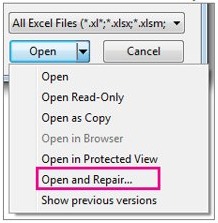
Part of the workbook is damaged, so a normal open fails. Excel has a built-in repair for this.
- Select File > Open in Excel and go to the folder that holds the file.
- Select the file in the Open dialog.
- Click the arrow next to the Open button and choose Open and Repair.
- Choose Repair to recover as much data as possible.
- Choose Extract Data if Repair can't recover it, to pull out values and formulas.
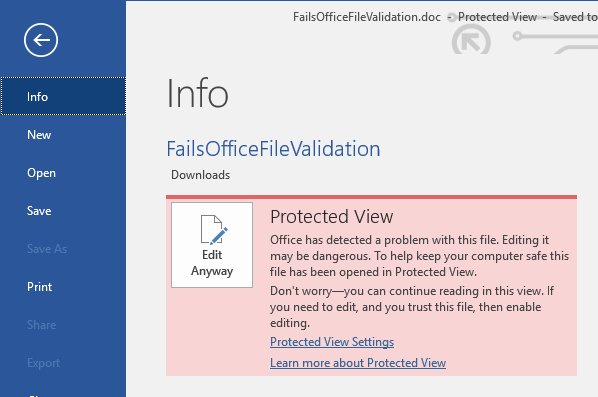
XLSM file opens read-only in Protected View
Excel opens files from the internet, some attachments and unsafe locations in a read-only mode.
- Select Enable Editing on a yellow bar if you trust the source.
- On a red bar, select File > Edit Anyway only if you trust both the source and the content.
Macros don't run after the XLSM file opens
A macro setting is blocking them, or you are using an app that cannot run VBA.
- Check that you are in desktop Excel, not Excel for the web or mobile Excel.
- Select File > Options > Trust Center > Trust Center Settings > Macro Settings.
- Choose Disable VBA macros with notification so Excel can offer the prompt, then select OK.
- Close the file, open it again and select Enable Content if you trust it.
XLSM file FAQ
What is an XLSM file?
An XLSM file is an Excel Macro-Enabled Workbook. It is an XML-based workbook format that can store VBA macro code or Excel 4.0 macro sheets, which a standard .xlsx workbook cannot do.
How do I open an XLSM file without Excel?
Use Excel for the web, Google Sheets or LibreOffice Calc. All three read the workbook's data. Excel for the web and Google Sheets will not run its macros, and LibreOffice Calc runs only some Excel scripts once you enable that option.
Can I open an XLSM file in Google Sheets?
Yes. Upload the file to Google Drive and double-click it to open it in Sheets. Macros are not supported when you edit with Sheets, so Google suggests rebuilding that automation in Apps Script.
Is it safe to enable macros?
It is safe only when you trust both the file and its source. Microsoft describes VBA macros as a common way for attackers to deploy malware and ransomware, so leave them off in any unexpected attachment or download.
Can I create macros in an XLSM file?
Yes, in desktop Excel. Show the Developer tab, then record or write a macro and save the workbook as Excel Macro-Enabled Workbook. Excel for the web cannot create, run or edit VBA macros.
What should I do if Excel doesn't open my XLSM file?
Set Excel as the default app for .xlsm in Settings, then try again from File > Open. If Excel reports damage, click the arrow next to Open and choose Open and Repair. Then try Repair, followed by Extract Data.
How do I open an XLSM file without running macros?
Open it in Excel and do not select Enable Content. Under the default Macro Settings, macros stay disabled and you can still read the workbook. Files with a Security Risk banner stay blocked until you unblock them.
How do I download an XLSM file?
Save it from your browser or email like any other file. Windows adds a Mark of the Web to that copy, so Excel blocks its macros until you select Unblock in the file's Properties, which you should do only for trusted files.
How do I open an XLAM file?
An .xlam file is an Excel add-in, so load it through File > Options > Add-ins or the Developer ribbon. Add-ins from the internet load disabled until you remove the Mark of the Web from the file.