Bing hides working tools behind ordinary queries: type periodic table, guitar tuner or polynomial solver and an interactive tool opens above the web results.
This guide covers those tools, Visual Search, My saves, the image license filter, the new image search, Image Creator and Video Creator, how Bing ranks results, and how to turn off AI Copilot responses.
Hidden Bing search features you didn’t know existed
Most of these work on bing.com in any browser without signing in. My saves and Microsoft Rewards points follow your Microsoft account, so sign in if you use more than one device.
| Hidden feature | How to open it | What it does |
|---|---|---|
| Built-in tools and answers | Search calculator, periodic table, solar system or stopwatch |
Opens a working tool at the top of the results page |
| Visual Search | Images tab, then the camera icon in the search box | Searches the web with a photo: similar images, products, pages that use the image, even recipes |
| My saves | Select + on an image, video, place or shopping result | Keeps results on one page you can reopen later |
| License filter | Bing Images, License filter | Shows images by Creative Commons license type, from public domain to free to modify and use commercially |
| New image search version | New Version toggle in the Images section | Groups image results into labeled sections with short summaries and sources |
| Bing Image Creator | bing.com/create | Free AI images with a choice of GPT-4o or DALL-E3 |
| Bing Video Creator | Bing mobile app menu, Video Creator | Turns a text prompt into a 5-second video, powered by Sora |
| AI Mode | AI Mode tab, or bing.com/copilotsearch | An AI-generated answer with cited sources and the related web results |
| Advanced search keywords | Type site:, filetype:, language: or loc: in the query |
Limits results to one site, file type, language or country |
| Bing Translator | bing.com/translator | Translates text between languages in the browser |
| Search history switch | … at the top right of Bing, then History | Lists your past searches and lets you pause or clear them |
Microsoft notes that some Bing features are not available in every country or region, so a tool can be missing outside the US.
What to search on Bing to open its hidden tools
Microsoft's Bing help lists each of these queries as the way to open a built-in study or utility tool. Type the query as shown and the tool appears above the regular results.
| Type this in Bing | Tool that opens | Use it for |
|---|---|---|
calculator |
Calculator | Arithmetic without leaving the results page |
sinx |
Function graphing | Plotting an equation on a graph |
polynomial solver |
Polynomial solver | Solving polynomial equations |
volume of a pyramid |
Geometry calculator | Area and volume of shapes |
volume of octahedron |
Geometric shapes | Measurements such as the volume of a shape |
multiplication table |
Multiplication table | Times-table practice |
21 number |
Number theory | Facts about a single number |
miles in 1 kilometer |
Unit converter | Converting distance, weight and other units |
1 btc to usd |
Currency converter | Converting currencies, including bitcoin |
periodic table |
Periodic table | Looking up any element |
hg element |
Element visualizer | One element's properties |
ch4 compound |
Molecular structure visualizer | Seeing how a molecule is built |
solar system |
Solar system | An interactive map of the planets |
constellations |
Constellation map | Finding star patterns |
stopwatch |
Stopwatch | Timing a task in the browser |
guitar tuner |
Guitar tuner | Tuning a guitar |
this day in history |
On this day | Events that happened on today's date |
citation book |
Citation reference | Generating a citation for a source |
words that start with a |
World of words | Word lists for puzzles and writing |
house of tudor |
Family tree | Family trees of historical houses |
martin luther king jr |
Famous speeches | Reading historic speeches |
how long is the nile river |
Smart answers | A direct answer to a factual question |
The web results stay underneath every tool, so a search still returns normal links if the tool is not what you wanted.
How to search Bing with an image using Visual Search
Visual Search lets you search the web with a picture instead of words. It finds similar images, products, pages that use the image and recipes for food photos.
- Open Bing and select the Images tab at the top of any results page, or go straight to Bing Images.
- Select the camera icon in the search box.
- On a PC, drag an image into the box, paste an image or its URL, browse to a picture on your computer, or take a photo with your webcam.
- On a phone, take a photo or pick an image saved on the device.
- Review the results: pages that use the image, related images and other information Bing found.
Taking a photo on a PC needs a webcam. Microsoft says uploaded photos may be used to improve Bing image processing, so avoid uploading private pictures.
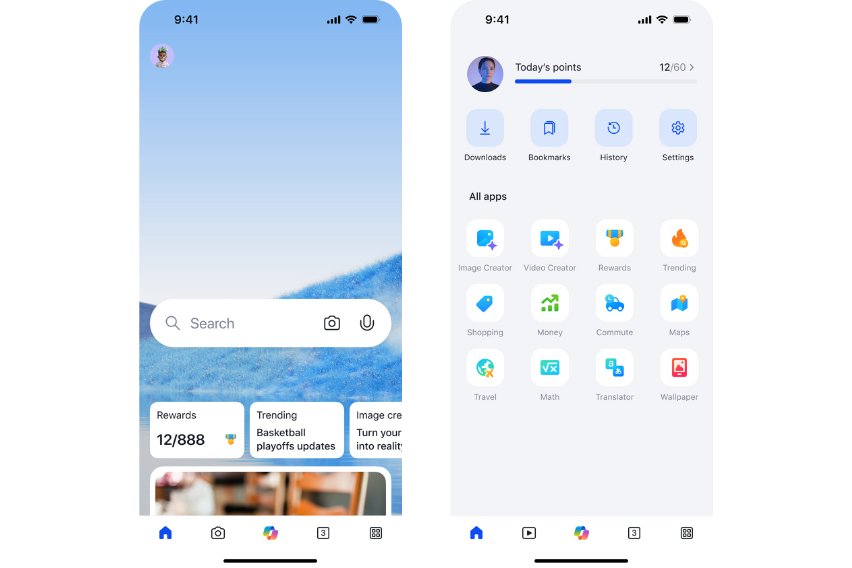
How to save search results with Bing
My saves keeps images, videos, places and shopping results on one page. Only you can see what you save.
- Sign in to Bing with your Microsoft account so your saves follow you to every device.
- Search for something and open the image, video, place or shopping results.
- Select the + on any result you want to keep.
- To open your saved results, select Settings, then My saves.
- To remove one, select ••• on the saved result, then select Remove.
Saving also works without signing in, but those saves clear when you switch browsers or clear your cookies.
How to filter Bing images by license type
Search on Bing Images, open the License filter, and pick the option that matches how you plan to use the picture. The filter follows the Creative Commons licensing system.
| License filter option | What it allows | How many results |
|---|---|---|
| Public domain | The creator waived exclusive rights as far as the law allows | Varies |
| Free to share and use | Share and use; editing and commercial use might not be allowed | Typically the most results |
| Free to share and use commercially | Share and use for personal or commercial purposes; editing might not be allowed | Fewer |
| Free to modify, share, and use | Modify, share and use; commercial use might not be allowed | Fewer |
| Free to modify, share, and use commercially | Modify, share and use for personal or commercial purposes | Typically the fewest results |
Bing does not verify the license on any image. Open the site the image came from, confirm its actual license, and read the Creative Commons terms and attribution rules before you use it.
If filtered results show images that do not match the license you picked, select Feedback at the bottom of the image results page to report them.
How to turn on the new Bing Image Search version
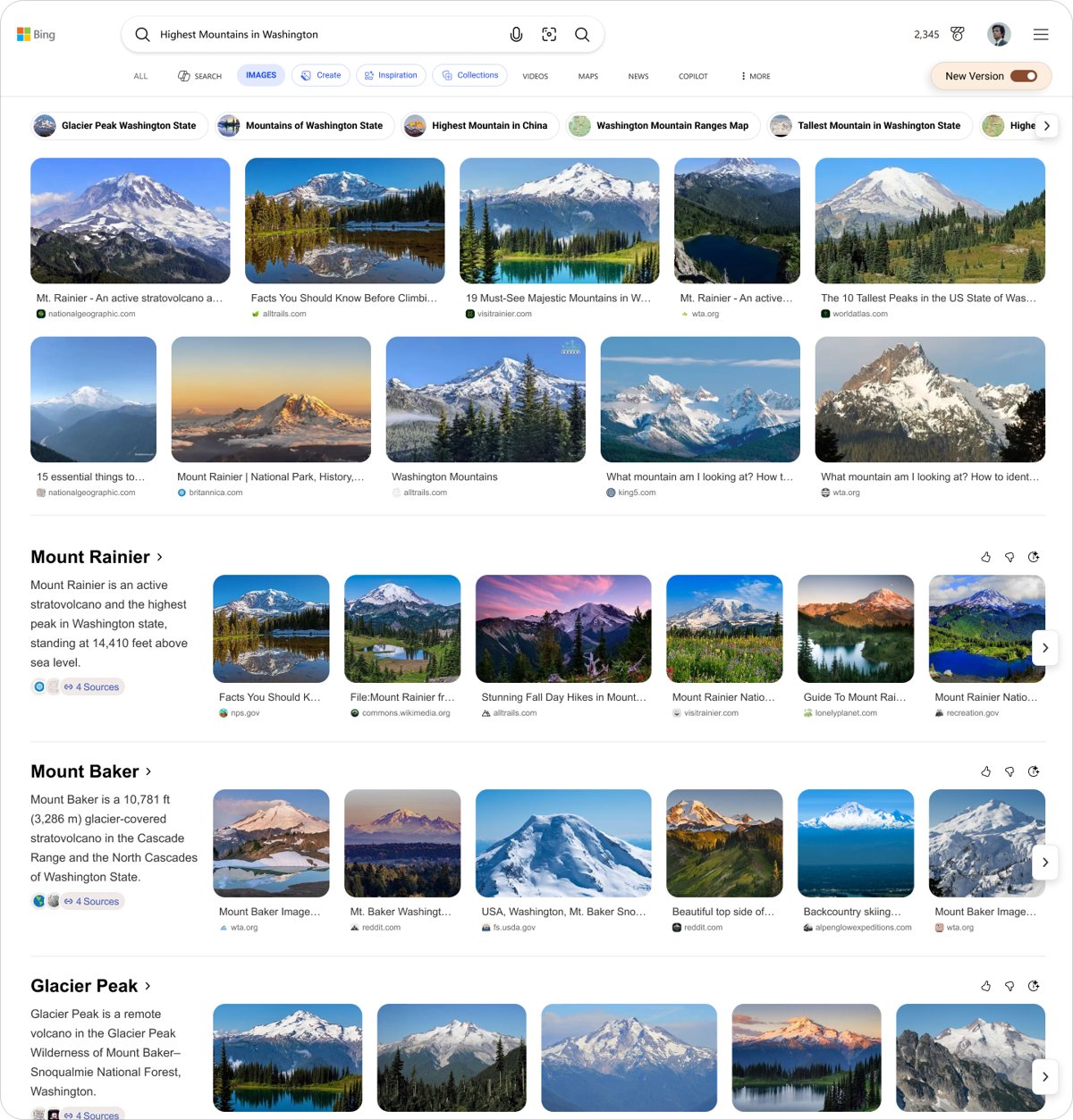
The new Bing Image Search sorts results into labeled groups, each with a short summary and its sources, instead of one long grid of pictures.
- Search for a visual topic on Bing in a desktop browser, for example
highest mountains in Washington. - Select Images.
- Select the New Version toggle at the top right of the Images section.
- Scroll through the two rows of top images, then the labeled sections below them.
Microsoft launched it on May 21, 2026 for US desktop users, with no sign-in needed, and plans mobile and other markets later. Once you opt in, Bing keeps the new version for your future image searches.
How to use Bing Image Creator and Video Creator for free
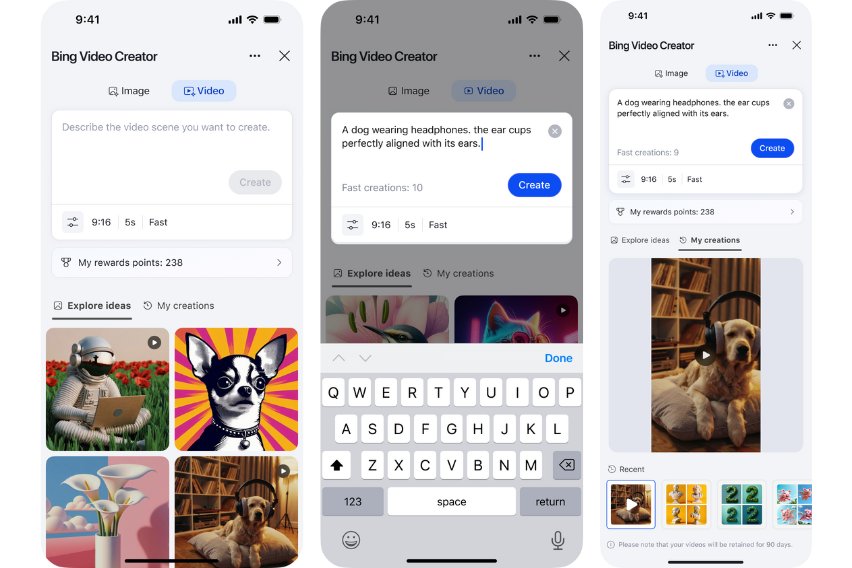
Both creators are free with a daily or starting allowance of fast creations. Typing a prompt straight into the Bing search bar or the Edge address bar works only when Bing is your default search engine.
| Detail | Bing Image Creator | Bing Video Creator |
|---|---|---|
| Where to open it | bing.com/create, the Bing app, AI Mode, or the Bing search bar | Bing mobile app: tap the menu at the bottom right and select Video Creator, or type "Create a video of…" in the app's search bar |
| AI model | GPT-4o or DALL-E3, switched with one click | Sora |
| Free allowance | 15 fast creations a day, then 10 Microsoft Rewards points per fast creation; standard speed is unlimited | 10 fast creations, then 100 Microsoft Rewards points per fast creation, or standard speed |
| What you get | Images from a text prompt | 5-second videos in 9:16 format; up to three can be queued at once |
| How long it is kept | — | Up to 90 days, with download, share and copy-link options |
| Where it is available | Worldwide except Russia and China | Worldwide except China and Russia |
Every video from Bing Video Creator carries C2PA content credentials that mark it as AI-generated.
How Bing delivers smarter search results: From queries to insights
Bing crawls the web, builds an index, then ranks pages with machine learning. Microsoft lists the ranking parameters in general order of importance, and their weight varies from search to search.
| Stage or signal | What Bing does with it |
|---|---|
| Crawling | Bingbot discovers new and updated pages, starting with known pages not yet indexed and pages it expects have changed |
| Indexing | Pages join the Bing index and are analyzed to decide which pages, news, images and videos can answer a query |
| Relevance | Matches the page and the link text pointing to it against the intent of the query, including synonyms and abbreviations |
| Quality and credibility | Weighs a site's reputation, level of discourse, level of distortion and whether it publishes original, attributed content |
| User engagement | Looks at which results people click, how long they stay and whether they rewrite the query |
| Freshness | Generally prefers content that stays up to date |
| Location and language | Considers your country and city, where the page is hosted and the page language |
| Page load time | Treats a slow page as a less helpful result |
| Personal data | Uses search history, location, language and device type; you can change these in Bing Settings |
| Answers and AI summaries | Shows a direct answer at the top or side of the page; some are generated by AI and link to the sources they used |
Paid ads are labeled, and payment cannot raise a page's organic position. Bing says it does not rank Microsoft products above third-party ones in algorithmic results.
Bing also shows related searches next to results, built from popular searches, trends, location and your search history.
How to turn off AI Copilot responses in Bing search
Bing has no single switch that removes AI answers. Its settings cover SafeSearch, voice search, search suggestions and personalization, so each AI feature is avoided or turned off where it lives.
| What you want to stop | What to do | What changes |
|---|---|---|
| AI Mode answers | AI Mode opens from the AI Mode tab, suggested topics under an answer, or bing.com/copilotsearch; skip those and stay on All or Web | Searches return the standard results page |
| AI summary at the top of results | Scroll past it; Bing keeps the blue links below every answer | You read the web results directly |
| Suggestions while you type | On the Bing Settings page, under Search, clear See search suggestions as you type | Bing stops predicting queries in the search box |
| Copilot new tab page in Microsoft Edge | Select Settings and more (…) > Copilot and AI, then turn off Copilot new tab page | New tabs no longer open the Copilot chat and search page |
| Copilot in Edge reading your pages | In the same Copilot and AI menu, turn off Allow Copilot to read context clues on the web | Copilot stops using the current page, open tabs and browser history |
| Bing answers in the Edge address bar | Edge Settings > Privacy, search, and services > Search and connected services > Address bar and search, then change Search engine used in the address bar | Address-bar searches go to the engine you pick |
Bing labels AI-generated answers and links them to their source websites, so you can check a summary against the page it came from.
Bing search settings: SafeSearch, suggestions and homepage video
| Setting | Where it is | What it changes |
|---|---|---|
| SafeSearch | Settings icon at the top right of Bing.com > Settings > More, choose Strict, Moderate or Off, then Save | Strict filters explicit text, images and videos; Moderate, the default, filters images and videos only |
| Search suggestions | Settings page > Search > See search suggestions as you type | Turns autosuggest on or off |
| Search history | … > History > Open history page, then the Show new searches here toggle | Pauses new history; existing history stays until you clear it |
| Homepage image | Settings and quick links > turn off Show homepage image | Removes the background image or video from the homepage |
| Homepage video | Settings and quick links > Settings > More > Homepage > Videos and panoramas | Don't play automatically stops autoplay; Show a still image shows images only |
| Location and language | Bing Settings | Changes the location and language Bing uses to rank local results |
To lock Strict SafeSearch on a PC or network, map www.bing.com to strict.bing.com in the hosts file or in DNS. That mapping also disables the SafeSearch controls for everyone using it.
Why is Bing blocking my searches or not working?
SafeSearch is locked on Bing and will not change
Bing can set Strict automatically for users under 18, and a strict.bing.com mapping on the PC or network disables the SafeSearch controls.
- On Windows 11, open Settings > Privacy & security > Search permissions and check SafeSearch. Strict there is shared with Bing in your browser.
- On Windows 10, check the same setting under Settings > Search > Permissions & History.
- On a school or work network, ask the administrator whether www.bing.com is mapped to strict.bing.com.
- On a home PC, sign in as an administrator and remove the
www.bing.comline fromC:\Windows\System32\drivers\etc\hosts. - If the account belongs to someone under 18, expect Strict to stay on where local law requires it.
Bing search keeps coming up when you search
Web searches from the Windows search box are powered by Bing, and Microsoft Edge sends address-bar searches to the engine set in its settings.
- In Edge, run a search in the address bar with the engine you want to use.
- Select Settings and more, then Settings.
- Select Privacy, search, and services > Search and connected services > Address bar and search.
- Pick your engine under Search engine used in the address bar.
Bing settings or saves keep resetting
When you are not signed in, Bing keeps choices such as search suggestions and My saves in browser cookies, which clear with your browsing data.
- Sign in to Bing with your Microsoft account.
- Allow cookies for bing.com in your browser.
- Set the option again on the Bing Settings page and select Save where the page shows it.
Can't turn off Bing search history
The Search History page needs JavaScript and cookies to save the toggle.
- Turn on JavaScript and cookies in your browser.
- Open Bing, select … at the top right, then History, and open the history page.
- Turn off Show new searches here.
Bing Image Creator does not open from the address bar
Typing an image prompt in the search bar or Edge address bar requires Bing as the default search engine.
- Go to bing.com/create directly.
- Or set Bing under Search engine used in the address bar in Edge and type the prompt again.
Bing search hidden features FAQ
What to search on Bing?
Try queries that open Bing's built-in tools: periodic table, solar system, calculator, guitar tuner, this day in history or 1 btc to usd. Each one shows an interactive tool at the top of the results page, and the normal web results stay underneath it.
Does Bing have advanced search?
Yes. Bing supports keywords such as site:, filetype:, language:, loc: and intitle:, plus AND, OR and NOT. Type NOT and OR in capitals, and leave no space after a keyword's colon. The advanced Bing operators work together in one query.
Does Bing have private browsing?
Use your browser's private mode. In Microsoft Edge, select Settings and more > New InPrivate window to run Bing searches InPrivate. Edge then keeps no history, cookies or site data on the device after you close it.
How to unblock SafeSearch on Bing?
Select the settings icon on Bing.com, then Settings > More, choose Moderate or Off under SafeSearch, and select Save. If the setting will not change, a strict.bing.com mapping, an under-18 account or Windows SafeSearch set to Strict is holding it.
How to lock SafeSearch on Bing?
Map www.bing.com to strict.bing.com. On a network, set www.bing.com as a CNAME for strict.bing.com in DNS. On one PC, add the strict.bing.com IP address with www.bing.com to the hosts file as an administrator. Add edgeservices.bing.com too for the Edge sidebar.
How to clear Bing search?
On the Bing Search History page, select Clear all under Manage or clear your search history. If you are signed in with a Microsoft account, also delete your Bing search history on the Privacy dashboard under Browsing and search.
Why is my search using Bing?
Windows Search uses Bing for web results and search suggestions, and Microsoft Edge sends address-bar searches to Bing unless you change it. In Edge, go to Address bar and search and pick another option under Search engine used in the address bar.
Is Bing secure to search?
Bing serves every search over a secure HTTPS connection, warns you about sites it believes contain malware, and offers SafeSearch and Microsoft Family Safety for filtering. Signed-in users can review or delete search data on the Microsoft Privacy dashboard.
Why is Bing blocking my searches?
Bing removes results only in narrow cases, such as legal demands, child abuse material, spam pages or leaked personal data, and shows a removal notice at the bottom of the page. Missing adult results usually mean SafeSearch is set to Strict.