Yes, an iPhone remains findable after power off: with Find My network turned on, a supported iPhone can be located for up to 24 hours after it is turned off, or up to 5 hours in power reserve mode.
This guide explains what the message means, how to locate a turned off iPhone from another device or iCloud.com, how to turn the feature off, and what to do when Find My shows no location.
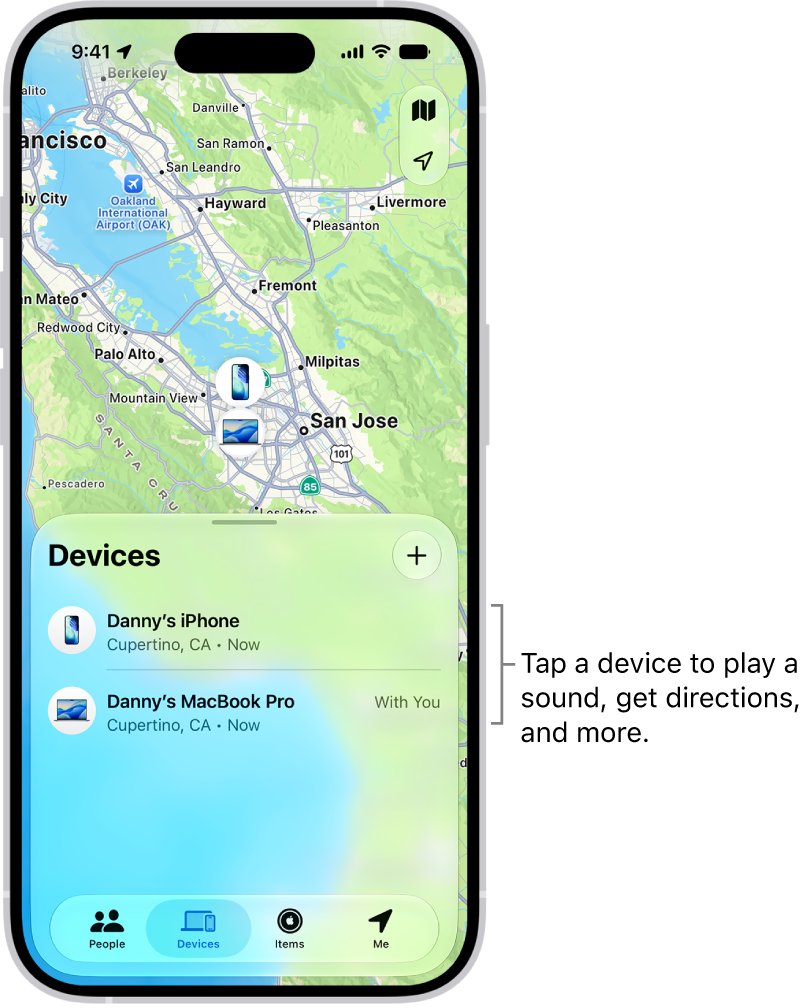
How to keep an iPhone findable after power off
The feature depends on three switches in the Find My settings. Turn all three on before the phone is ever lost, because none of them can be switched on remotely.
- Open Settings on the iPhone and tap your name at the top.
- Tap Find My. If you are asked to sign in, enter your Apple Account details.
- Tap Find My iPhone, then turn on Find My iPhone.
- Turn on Find My network so the iPhone can be located while it is offline or switched off.
- Turn on Send Last Location so the iPhone sends its location to Apple when the battery becomes critically low.
Activation Lock comes with Find My iPhone, so nobody else can activate and use the phone even after it is completely erased.
What does iPhone findable after power off mean?
The message is a reminder, not a fault. Switching the iPhone off does not stop the Find My network from reporting roughly where it is.
| Question | Answer |
|---|---|
| What keeps a switched-off iPhone findable | The Find My network setting in Settings > [your name] > Find My > Find My iPhone |
| What the Find My network is | A crowdsourced network of over a billion Apple devices that detect nearby devices over Bluetooth and report an approximate location to the owner |
| Can strangers see your iPhone's location? | No. Apple describes the reports as anonymous and encrypted, and only the owner sees the location |
| Which iPhones support it | Apple says "a supported iPhone" and does not publish a model list |
| Does it need Wi-Fi or cellular while off | No. Nearby Apple devices relay the location instead |
| Is it the same as Send Last Location? | No. Send Last Location uploads one last position when the battery is critically low |
How long does an iPhone stay findable after it is turned off?
How you lost power decides how long the phone keeps reporting. A shutdown from the power-off slider gives the longest window.
| Situation | How long it can be located | What Find My shows afterwards |
|---|---|---|
| Turned off with the power-off slider, Find My network on | Up to 24 hours | The last known location |
| Battery ran out (power reserve mode) | Up to 5 hours | The last known location |
| Battery critically low, Send Last Location on | One final location sent to Apple | That location, shown on iCloud.com for up to 24 hours |
| Any offline device, Find My app | Last known location kept for up to seven days | "No location found" after seven days |
| Find My iPhone was off before the loss | Not at all | The iPhone is not listed and cannot be marked as lost |
Power reserve also keeps Express Mode cards, passes and keys working for up to five hours, but Apple notes that power reserve is not available after you turn the iPhone off yourself.
How to find a powered off iPhone with the Find My app
Use any other Apple device signed in to your Apple Account, or a Family Sharing member's device, where your iPhone appears below their own devices.
- Open the Find My app on the other iPhone, iPad or Mac.
- Tap Devices, then tap the name of the missing iPhone.
- Check the map for its current or last known location.
- Tap Directions to open the location in Maps.
- If it shows "No location found", turn on Notify When Found under Notifications so you get an alert when it is located.
- Tap Play if you are close; an offline iPhone shows Sound Pending and plays it when it next connects to Wi-Fi or cellular.
Allow notifications for the Find My app, or the Notify When Found alert never reaches you.
How to find iPhone when turned off on iCloud.com
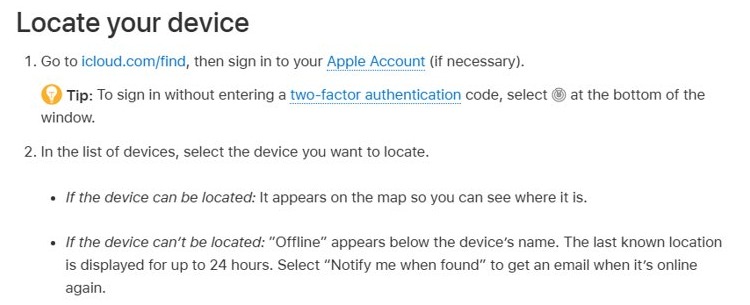
Use this route when you have no other Apple device. Signing in to Find Devices does not need a verification code, so it works even when the lost iPhone is your trusted device.
- Go to icloud.com/find in any web browser.
- Sign in with your Apple Account. If you are asked for a verification code, select Find Devices instead.
- Review the list under All Devices and select the missing iPhone.
- Note the location on the map, or play a sound if you are nearby.
- Select Lost Mode if the phone is not where you expected.
iCloud.com shows a location while the iPhone is on and connected, and a Send Last Location report for up to 24 hours. AirTags and other Find My network accessories need the Find My app instead.
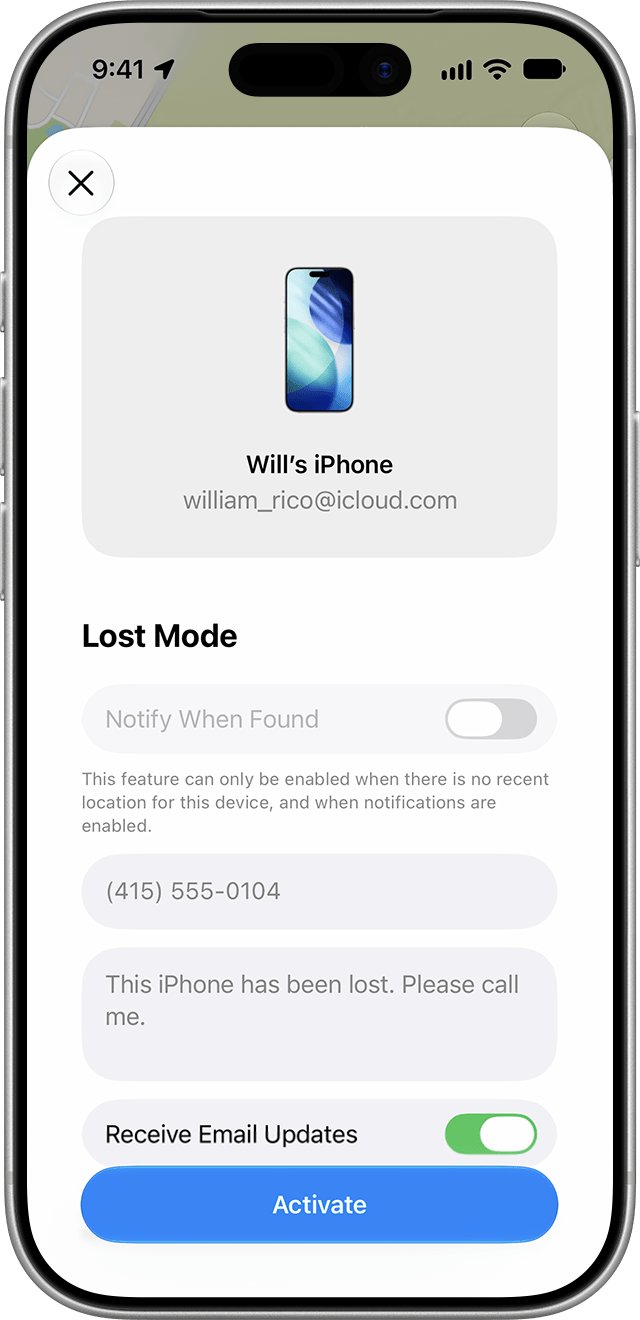
Mark a turned off iPhone as lost in Find My
Lost Mode locks the iPhone with your passcode, suspends Apple Pay cards and passes, and can show a phone number on the screen. You can set it up while the phone is off; it takes effect when the phone comes online.
- Open Find My on another device and tap Devices.
- Select the missing iPhone and tap the More button.
- Scroll down to Lost iPhone, then turn on Lost Mode.
- Follow the onscreen steps to show your contact details on the missing iPhone.
- Tap Activate.
An offline iPhone only appears online and in Lost Mode once it is turned on and connected to Wi-Fi or cellular. Apple will never contact you to say your iPhone has been found, so treat any such message as a scam.
Find My network vs Send Last Location vs Find My iPhone
Each switch covers a different moment, so the safest setup is all three on.
| Setting | What it covers | Keep it on if |
|---|---|---|
| Find My iPhone | Locating, sound, Lost Mode, remote erase and Activation Lock | You want any way to find or protect the phone |
| Find My network | Locating the iPhone while offline, up to 24 hours after it is turned off or 5 hours in power reserve | You want the phone findable after power off |
| Send Last Location | One location report when the battery becomes critically low | You often let the battery run flat |
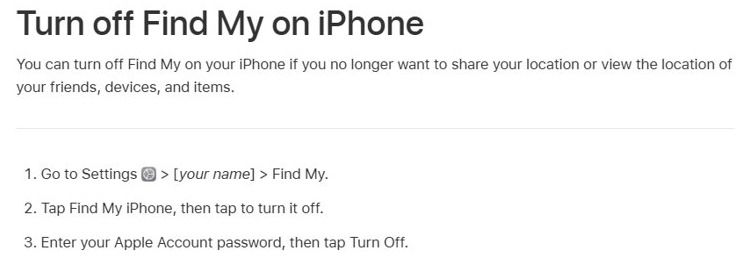
How to turn off iPhone findable after power off
Turning off Find My network removes the findable-after-power-off feature but keeps the rest of Find My working while the phone is on and connected.
- Open Settings and tap your name.
- Tap Find My, then tap Find My iPhone.
- Turn off Find My network.
- To switch off Find My completely instead, turn off Find My iPhone, enter your Apple Account password and tap Turn Off.
Leave Find My iPhone on unless you are selling or giving the phone away. With it off, a lost iPhone does not appear in Find My at all and cannot be marked as lost or erased remotely.
Check that your iPhone shows in Find My after power off
Run this test at home with a second Apple device or a browser, so you know the setting works before you need it.
- On the iPhone, confirm Find My iPhone and Find My network are on in Settings > your name > Find My > Find My iPhone.
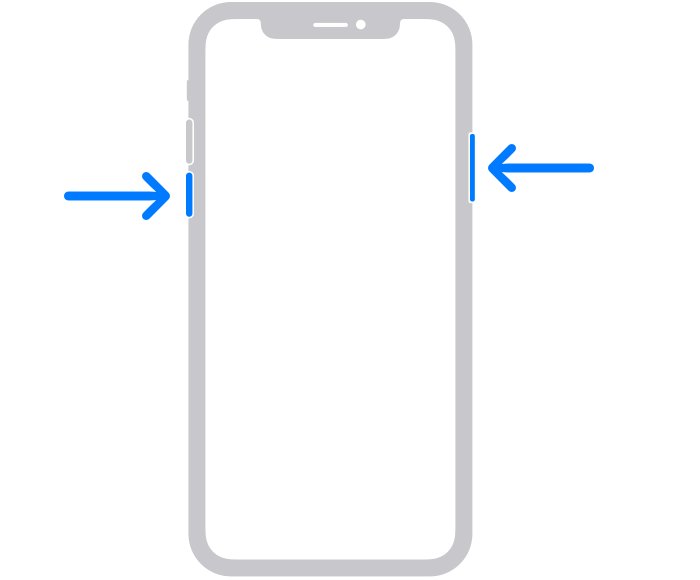
- Press and hold the side button and either volume button until the power-off slider appears, then drag the slider.
- Wait 30 seconds for the iPhone to turn off.
- Open Find My on another device, or sign in at icloud.com/find.
- Confirm the iPhone is listed with a location on the map; an offline device shows its location but cannot play a sound.
- Press and hold the side button until the Apple logo appears to turn the iPhone back on.
On an iPhone with a Home button, hold the side button alone to reach the power-off slider.
iPhone findable after power off not working: fixes
Find My shows "No location found" for a turned off iPhone
More than seven days have passed since the iPhone last sent its location, or no Apple device has passed close enough to report it.
- Open Find My, select the iPhone and turn on Notify When Found.
- Mark the iPhone as lost so it locks the moment it reconnects.
- If it is permanently lost, report it to the police and your carrier, and file an AppleCare+ with Theft and Loss claim if you have one.
The iPhone shows "Offline" in Find My
The phone is powered off, its battery has run out, it is not on a known Wi-Fi or data network, or more than 24 hours have passed since Send Last Location reported.
- Play a sound, send a message, lock or erase it from Find My anyway; the iPhone receives the command when it is turned on and connects to the internet.
- Check the last known location in the Find My app, which keeps it for up to seven days.
Why is my Find My iPhone off, or the iPhone is not listed?
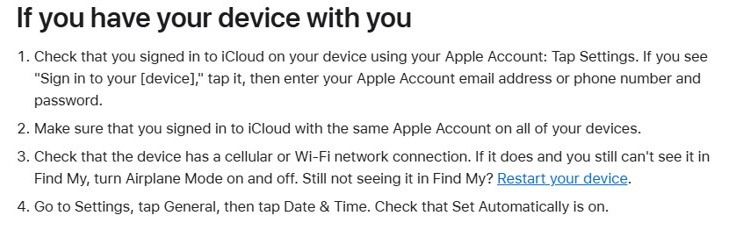
Find My was never set up, the iPhone is signed in with a different Apple Account, or the date and time are wrong.
- Open Settings; if you see Sign in to your iPhone, tap it and sign in with your Apple Account.
- Use the same Apple Account on all of your devices.
- Go to Settings > General > Date & Time and turn on Set Automatically.
- Turn Airplane Mode on and off, then restart the iPhone if it is still missing.
iPhone dead says iPhone is findable and will not turn on
The battery is too low to start iOS, so only the power reserve screen appears.
- Charge the iPhone for one hour, then try again.
- Force restart it: press and quickly release volume up, press and quickly release volume down, then hold the side button until the Apple logo appears.
- If it still will not start, arrange service with Apple.
Why does my iPhone keep powering off?
A low charge, an aged battery or cold temperatures can trigger an unexpected shutdown when the battery cannot deliver peak power.
- Open Settings, tap Battery, then tap Battery Health.
- Read the Peak Performance Capability message for a recorded unexpected shutdown.
- Arrange a battery service if the screen reports degraded battery health.
iPhone will not power off
The screen is frozen or unresponsive, so the power-off slider does not respond.
- Force restart the iPhone with the volume up, volume down and side button sequence.
- Once it restarts, open the power-off slider again and drag it.
iPhone findable after power off FAQ
Can an iPhone be found when it is turned off?
Yes, if Find My iPhone and Find My network were on before it was turned off. A supported iPhone can then be located for up to 24 hours after power off, and its last known location stays in the Find My app for up to seven days.
How do I find my iPhone when it is turned off?
Open the Find My app on another Apple device, tap Devices and select the iPhone, or sign in at icloud.com/find. The map shows its current or last known location, and Directions opens it in Maps.
How do I make my iPhone findable when off?
Go to Settings, tap your name, tap Find My, then tap Find My iPhone. Turn on Find My iPhone, Find My network and Send Last Location. The setting has to be on before the phone is lost.
Does Find My iPhone work when the battery is dead?
Partly. In power reserve mode a supported iPhone stays findable for up to 5 hours, and Send Last Location uploads one last position when the battery becomes critically low. After that, Find My shows the last known location.
Why does my iPhone say iPhone is findable?
The iPhone is reminding you that Find My network is on, so it can still be located while switched off or out of battery. The message is not an error and does not need fixing.
Can you find an iPhone if it has been off for days?
Only its last known location, which the Find My app keeps for up to seven days. After seven days without a report, Find My shows "No location found"; turn on Notify When Found to get an alert when it reconnects.
Does turning off Find My network stop the findable message?
Yes. Turn off Find My network in Settings > your name > Find My > Find My iPhone. The iPhone then cannot be located while it is off, but Find My still works while it is on and connected.
Can a thief turn off a findable iPhone to hide it?
Switching it off does not stop the Find My network from reporting it for up to 24 hours. Turning off Find My iPhone itself needs your Apple Account password, and Activation Lock blocks anyone else from using it.
Should you keep iPhone findable after power off turned on?
Keep Find My iPhone, Find My network and Send Last Location all turned on. Together they give up to 24 hours of tracking after a shutdown, 5 hours in power reserve and a last location before the battery dies, and none of them can be switched on remotely once the phone is gone.