Hotmail accounts in Apple Mail now have to connect with Modern Authentication (OAuth2), because Microsoft ended Basic Authentication for every Outlook.com, Hotmail and Live account on September 16, 2024.
This guide covers how to re-add a Hotmail account in Mail on iPhone, iPad and Mac so it uses the new sign-in, the IMAP and SMTP settings for manual setups, and fixes for password prompts and sync errors.
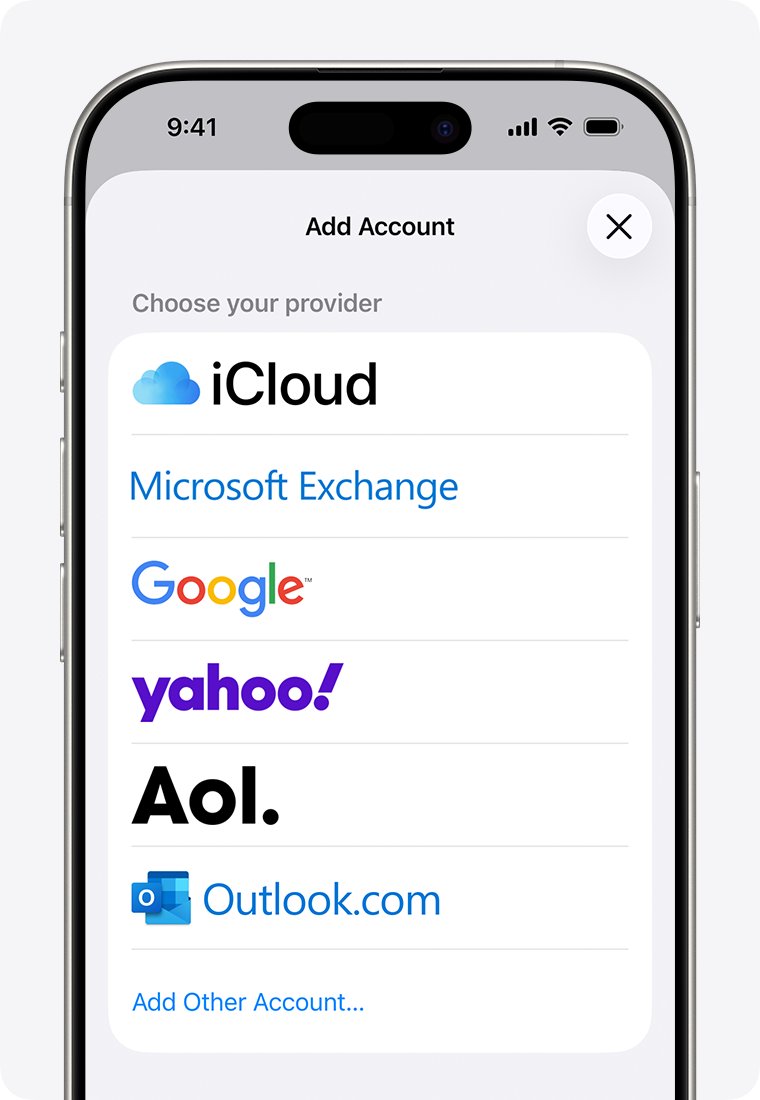
Re-add Hotmail as Outlook.com in Mail on iPhone or iPad
Apple Mail uses Modern Authentication by default when the account is set up as Outlook.com. Repeated password prompts mean the account was added the old way and needs to be removed and added back.
- Open Settings, tap Apps, then tap Mail.
- Tap Mail Accounts, tap your Hotmail account, then tap Delete Account.
- Go back to Mail Accounts and tap Add Account.
- Choose Outlook.com from the list.
- Enter your Hotmail address and password, then tap Sign in.
- If two-step verification is on, approve the sign-in request.
- Answer Yes to Let this app access your info?, then tap Save.
Mail, Contacts, Calendars and Reminders are turned on by default. Turn off the sliders for any type of data you do not want on the iPhone before you tap Save.
What changed for Hotmail in Apple Mail?
Basic Authentication sends the username and password with every request, and the password is often stored on the device. Microsoft retired it for personal Outlook accounts because stolen passwords are easy to reuse.
| Date | What Microsoft changed |
|---|---|
| June 11, 2024 | End of support for Basic Authentication announced for Outlook accounts |
| End of June 2024 | Accounts still using Basic Authentication contacted by email |
| Until September 16, 2024 | Recurring password prompts possible in Outlook and other email apps |
| September 16, 2024 | Basic Authentication no longer works for any Outlook account, including Hotmail and Live |
| March 1, 2026 | Devices running ActiveSync versions lower than 16.1 can no longer connect |
Modern Authentication (OAuth2) is the replacement. The email app opens a Microsoft sign-in page, you sign in there, and the app gets permission to sync instead of storing your password.
Which account type to choose for Hotmail in Apple Mail
The right choice depends on the device. Picking the wrong provider is the most common reason a Hotmail account keeps asking for its password.
| Your device or app | Choose this when adding the account | Why |
|---|---|---|
| iPhone, iPad or Apple Vision Pro | Outlook.com | Apple lists it as the provider for @hotmail.com, @live.com, @msn.com and @outlook.com |
| Mac | Microsoft Exchange | Apple lists Exchange as the provider for Microsoft consumer addresses on Mac |
| Older app with no Outlook.com option | Check with the app maker for Modern Authentication support | Basic Authentication no longer connects |
| You want the full Outlook experience on iPhone | Outlook for iOS | Microsoft's own app also uses Modern Authentication |
Set up Hotmail in Apple Mail on Mac with Microsoft Exchange
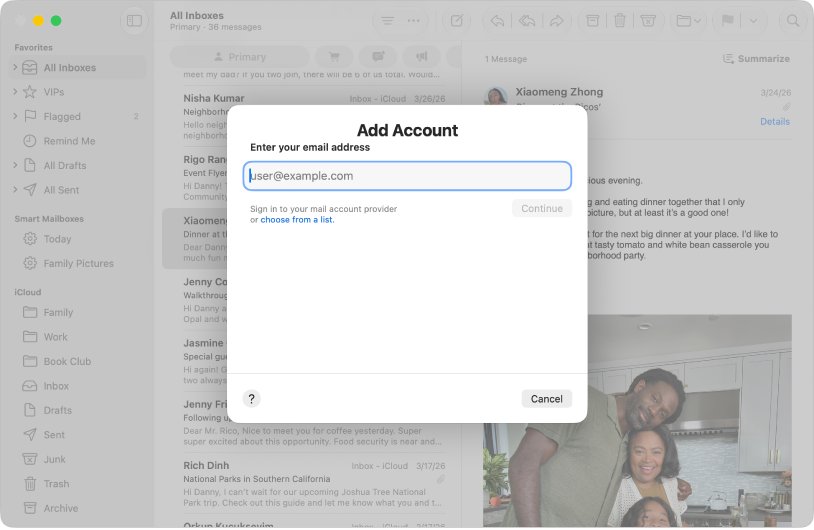
On a Mac, Apple's provider list maps @hotmail.com, @live.com, @msn.com and @outlook.com to Microsoft Exchange. Remove the old account first, or Mail may say the account already exists.
- In Mail, choose Mail > Settings, then click Accounts.
- Select the Hotmail account and click the remove button. If Mail sends you to Internet Accounts, remove it there from Apple menu > System Settings > Internet Accounts.
- Choose Mail > Add Account.
- Click choose from a list, select Microsoft Exchange, then click Continue.
- Enter your Hotmail address and follow the onscreen instructions to sign in with your Microsoft account.
- Open the Hotmail inbox in the Mail sidebar once setup finishes.
Removing the account deletes its messages from the Mac only. Copies stay on the Outlook.com server, but move anything stored only on the Mac to an On My Mac mailbox before you remove it.
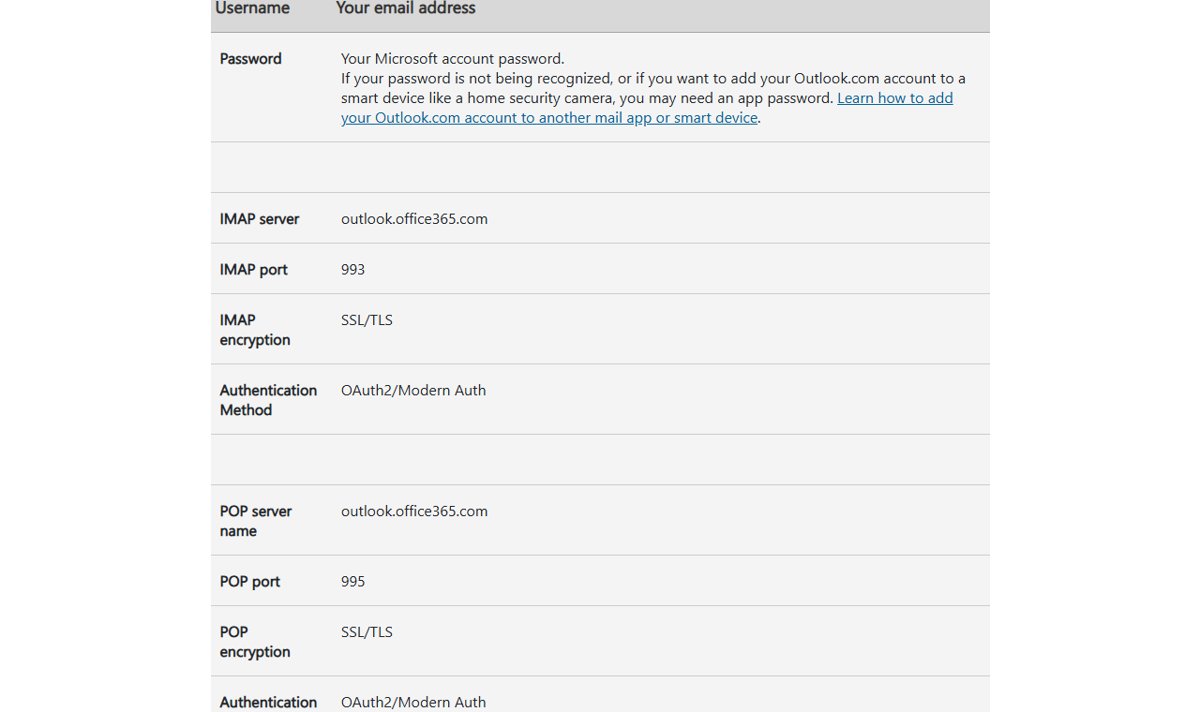
Hotmail IMAP and SMTP settings for Apple Mail
Use manual settings only when an app has no Outlook.com or Exchange option. Every connection must use OAuth2 / Modern Auth, so an app that only supports a normal password will fail.
| Setting | IMAP (incoming) | POP (incoming) | SMTP (outgoing) |
|---|---|---|---|
| Server | outlook.office365.com | outlook.office365.com | smtp-mail.outlook.com |
| Port | 993 | 995 | 587 |
| Encryption | SSL/TLS | SSL/TLS | STARTTLS |
| Authentication | OAuth2/Modern Auth | OAuth2/Modern Auth | OAuth2/Modern Auth |
| Username | Your full email address | Your full email address | Your full email address |
| Password | Your Microsoft account password | Your Microsoft account password | Your Microsoft account password |
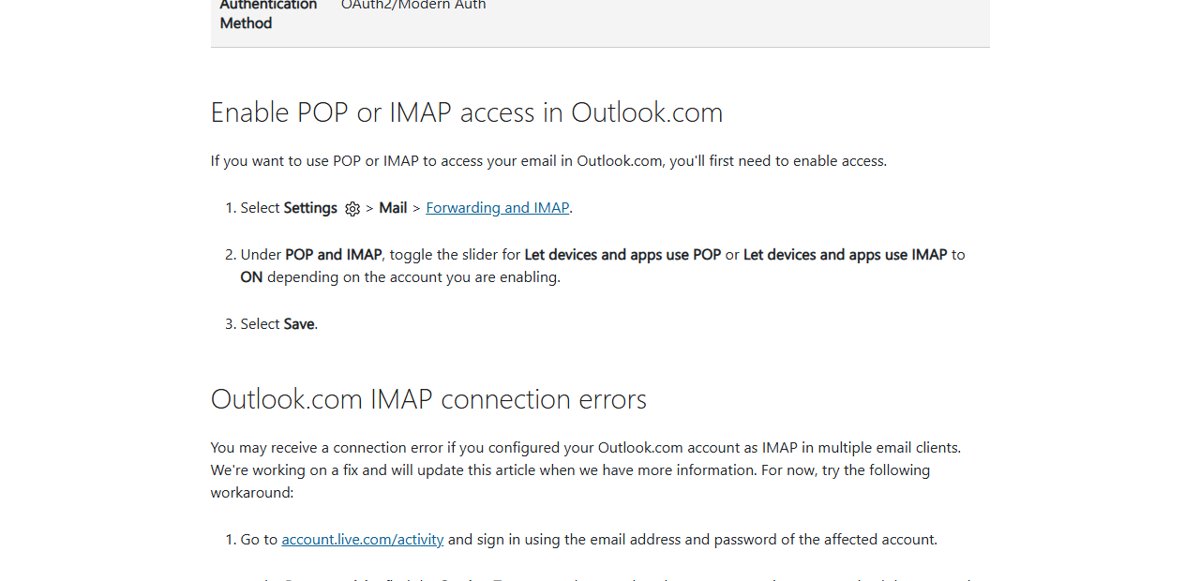
POP and IMAP access is turned off by default in Outlook.com. The next section shows how to turn it on.
Turn on POP or IMAP access in Outlook.com
Mail apps that connect over IMAP or POP need access enabled on the Outlook.com side first. The Outlook.com and Exchange options in Apple Mail do not need this step.
- Sign in to Outlook.com in a browser with your Hotmail address.
- Select Settings > Mail > Forwarding and IMAP.
- Under POP and IMAP, turn on Let devices and apps use IMAP, or Let devices and apps use POP.
- Select Save.
If you have trouble getting into the web inbox, use the Hotmail sign in page and sign in with the same Microsoft account.
Check that Hotmail syncs in Apple Mail
- Open Mail and select the Hotmail inbox. Recent messages from Outlook.com should appear.
- Send a test email to your Hotmail address from another account and confirm it arrives without a password prompt.
- Reply from Apple Mail and confirm the reply reaches the other account.
- On Mac, choose Mail > Settings > Accounts, select the account and check that the status shows a green dot for online.
- Leave Mail open for a few hours and confirm no new password prompt appears.
Fix Hotmail problems in Apple Mail
Apple Mail keeps asking for the Hotmail password
The account was set up with Basic Authentication, which Outlook.com no longer accepts.
- Delete the account under Settings > Apps > Mail > Mail Accounts.
- Add it again with Add Account > Outlook.com on iPhone or iPad, or Microsoft Exchange on Mac.
- Sign in on the Microsoft page and approve any two-step verification request.
Re-adding the account does not fix the sign-in loop on iPhone
Saved website data can interfere with the Outlook.com sign-in flow.
- Remove the Hotmail account again.
- Open Settings > Apps > Safari and tap Clear History and Website Data.
- Restart the iPhone.
- Add the account back as Outlook.com and complete the sign-in.
"Account already exists" when adding Hotmail
The old account is still on the device.
- Remove the existing account from Mail, or from Internet Accounts on Mac.
- Add it again and choose the correct provider for your device.
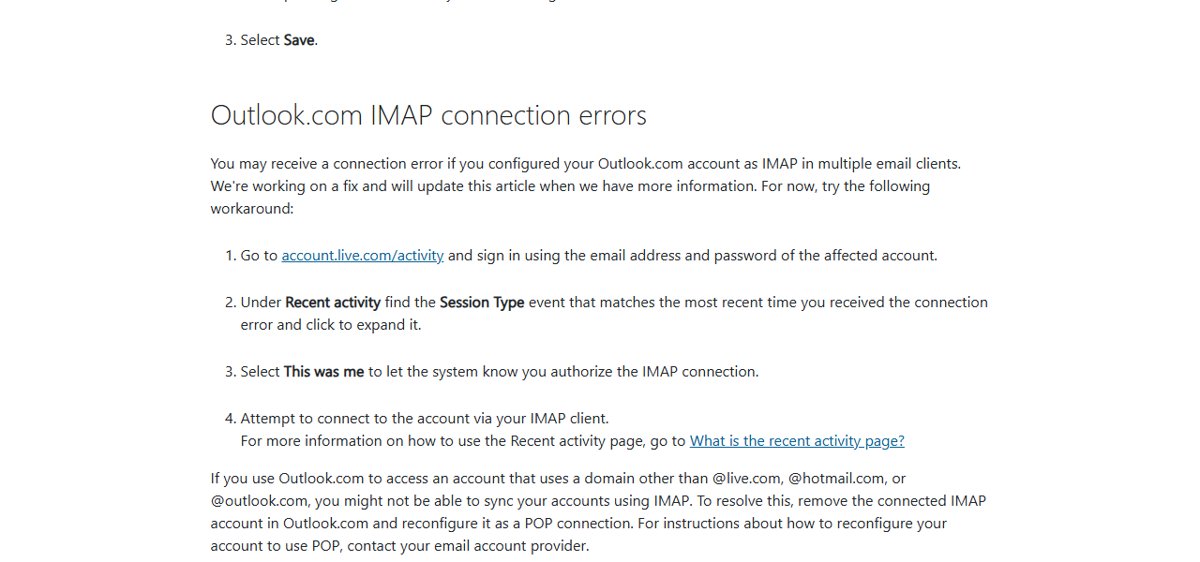
IMAP connection error in another mail app
Outlook.com can flag a new IMAP sign-in, especially when the account is set up in several apps.
- Go to account.live.com/activity and sign in with the affected account.
- Under Recent activity, expand the session that matches the time of the error.
- Select This was me.
- Connect the account in the mail app again.
Hotmail password not recognised in a manual setup
The app does not support OAuth2, or the device needs an app password.
- Check the app's add-account screen for an Outlook.com option and use it.
- Ask the app's support whether it supports Modern Authentication for IMAP, POP and SMTP.
- For a smart device that cannot sign in with Modern Auth, follow Microsoft's instructions for an app password.
Apple Mail and Hotmail protocols FAQ
What is IMAP protocol?
IMAP (Internet Message Access Protocol) is the standard an email app uses to read mail that stays on the server, so every device shows the same folders and read status. For Outlook.com and Hotmail, the IMAP server is outlook.office365.com on port 993 with SSL/TLS.
What protocols are used in email?
Email uses IMAP or POP to receive messages and SMTP to send them. Microsoft accounts can also sync through Exchange. For Hotmail, every one of these connections now needs OAuth2 Modern Authentication instead of a plain username and password.
Does Apple Mail use IMAP?
Apple Mail supports IMAP and POP accounts, and it also has built-in Outlook.com and Microsoft Exchange options. For a Hotmail address, choose Outlook.com on iPhone or iPad and Microsoft Exchange on Mac, which sign in with Modern Authentication.
Which protocol is used for outgoing mail?
Outgoing mail uses SMTP. For Hotmail and Outlook.com, the SMTP server is smtp-mail.outlook.com on port 587 with STARTTLS encryption and OAuth2/Modern Auth sign-in, using your full email address as the username.
What email protocol does Outlook use?
Outlook connects to Outlook.com accounts directly with Outlook.com sync and Modern Authentication. Outlook versions configured for Outlook.com over POP or IMAP do not support Modern Authentication and stopped connecting after Basic Authentication ended.
How do I use Apple Mail with Outlook?
Add your Outlook.com or Hotmail address in Apple Mail by choosing Outlook.com on iPhone or iPad, or Microsoft Exchange on Mac, then sign in on Microsoft's page. For a work or school Microsoft 365 address, choose Microsoft Exchange.
When did Hotmail stop working with Basic Authentication?
On September 16, 2024. From that date, apps that connect to Outlook.com, Hotmail or Live accounts with only a username and password fail to sign in, and the account must be added with Modern Authentication.
Do I need the Outlook app to keep Hotmail on my iPhone?
No. The built-in Mail app works with Hotmail when the account is added as Outlook.com. Outlook for iOS is a free alternative from Microsoft if you also want its calendar and account features.
Best way to keep Hotmail working in Apple Mail
Remove any Hotmail account that keeps asking for a password and add it back through the Outlook.com option on iPhone or iPad, or Microsoft Exchange on Mac. Those options sign in with Modern Authentication, which is the only method Outlook.com accepts since September 16, 2024, and they need no manual server settings.