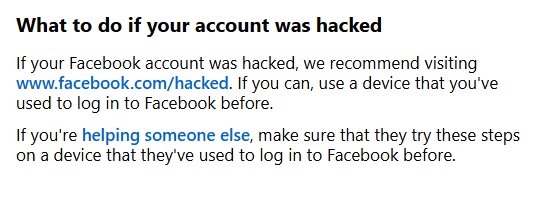
To get your Facebook account back after being hacked, go to facebook.com/hacked on a phone or computer you have logged in from before and follow the prompts.
This guide covers the signs of a hacked account, reversing an email change, recovering without your email or phone number, securing the account afterwards, and fixes when recovery stalls.
How to get your Facebook account back after being hacked
Facebook's own recovery page works even if you are not sure the account was hacked. A familiar device helps Facebook recognise you, so use your usual phone, an old phone or a family computer you signed in on before.
- Pick up a device you have used to log in to Facebook before.
- Open your usual browser and type
www.facebook.com/hackedinto the address bar. - Choose the option that best describes what happened to the account.
- Follow the on-screen prompts to confirm the account belongs to you.
- Set a new password when Facebook asks for one, and make it one you have never used on another site.
- Review the email addresses, phone numbers and sessions Facebook shows you, and remove anything that is not yours.
If you are helping a friend or relative, have them run these steps on the device they normally use for Facebook.
How do you know if you've been hacked?
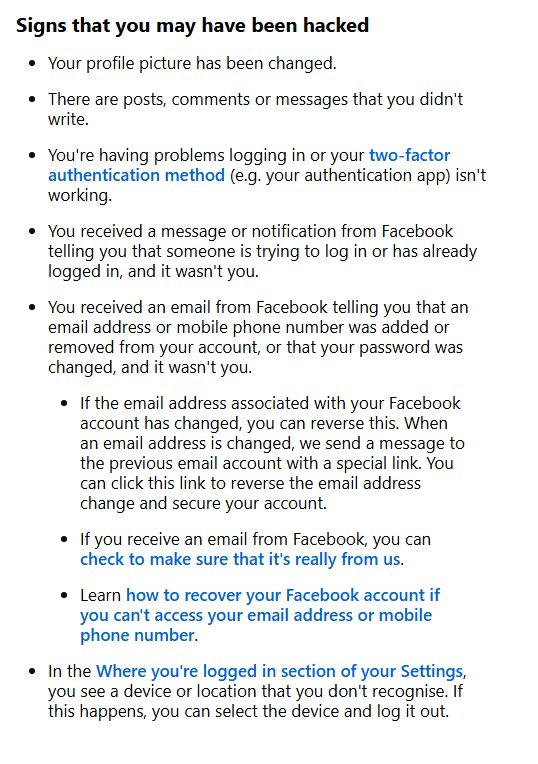
Facebook lists these signs. Any one of them is reason enough to start recovery and change your password.
| Sign | What it usually means | What to do |
|---|---|---|
| Your profile picture changed and you did not change it | Someone else is signed in to your profile | Start at facebook.com/hacked |
| Posts, comments or messages you did not write | The account is being used to spread spam or scams | Recover the account, then warn your friends |
| You cannot log in, or your two-factor authentication app stops working | The password or security settings were changed | Use facebook.com/hacked on a familiar device |
| A Facebook alert says someone tried to log in or did log in | Your password may have leaked or been phished | Change your password and log out unknown sessions |
| An email says your email, phone number or password changed | The attacker is taking over the account | Use the reverse link in that email straight away |
| An unknown device or location under Where you're logged in | Another session is active on your account | Select the device and log it out |
How to recover your hacked Facebook account
Attackers often swap your email address for their own. When an email address is changed, Facebook sends a message with a special link to the previous address, and that link reverses the change.
- Open the inbox of the email address that used to be on your Facebook account.
- Find the Facebook message about the email address change, including in the spam or junk folder.
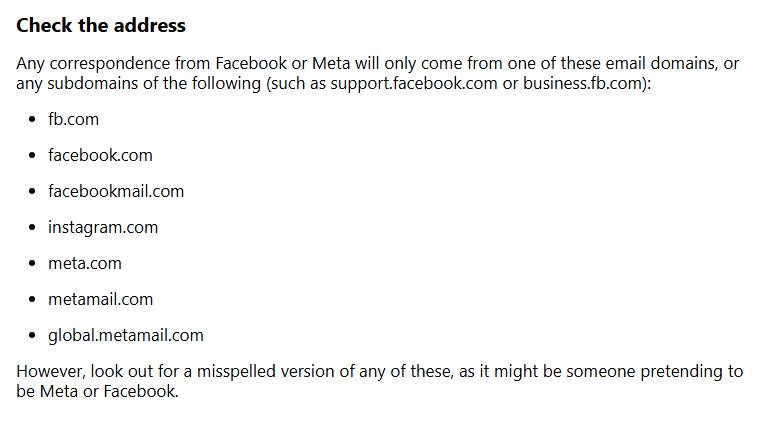
- Confirm the sender uses a real Facebook domain such as
facebookmail.combefore you click anything. - Select the link in that message to reverse the email change and secure your account.
- On the Facebook login screen, select Forgotten password? if you still cannot sign in.
- Enter your email address, mobile number, full name or username, then select Search.
- Follow the on-screen instructions to get a reset code and set a new password.
Facebook only lets you reset a password a certain number of times a day. If you hit the limit, wait and try again later rather than requesting code after code.
Recover a hacked Facebook account without access to email or phone
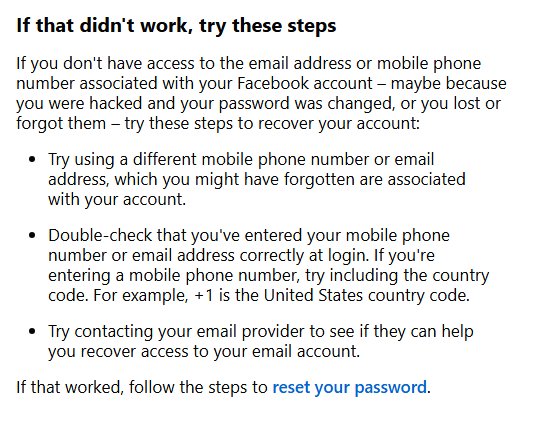
If the attacker changed the password and you no longer get Facebook's codes, use the account search page. Try it on a device you have logged in from before.
- Type
facebook.com/login/identifyinto your usual browser. - Enter an email address or mobile number that might be on the account. Add the country code to a phone number, for example +1 for the United States.
- If no account appears, search by your account name or username instead. A friend can copy your username from the web address of your profile.
- Select No longer have access to these? when Facebook shows your contact details.
- Enter new contact details when asked. They must be an email address or number that has never been used on your Facebook account.
- Complete the checks Facebook asks for to prove the account is yours.
- Reset your password once every security check has passed.
Facebook may ask you to confirm your identity by uploading a valid ID or recording a video selfie. If you cannot see No longer have access to these?, your email provider may be able to help you get back into the old inbox first.
How to secure your Facebook account
Do this as soon as you are back in, before you post or message anyone. On some accounts the menu says Meta Account settings instead of Accounts Centre.
- Select your profile picture at the top right, then Settings and privacy > Settings.
- Select Accounts Centre > Password and security > Change password, pick the account and set a new, unique password.
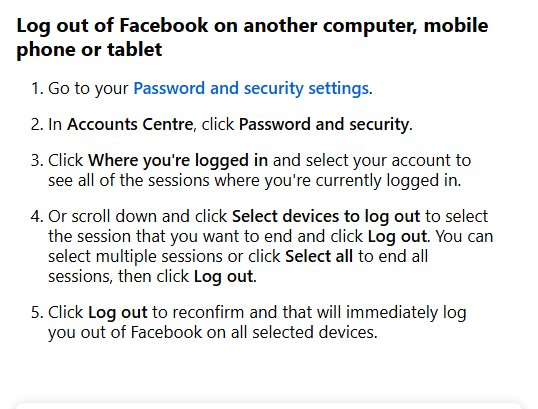
- In Password and security, select Where you're logged in and choose your account.
- Select Select devices to log out, tick every session you do not recognise or choose Select all, then select Log out twice to confirm.
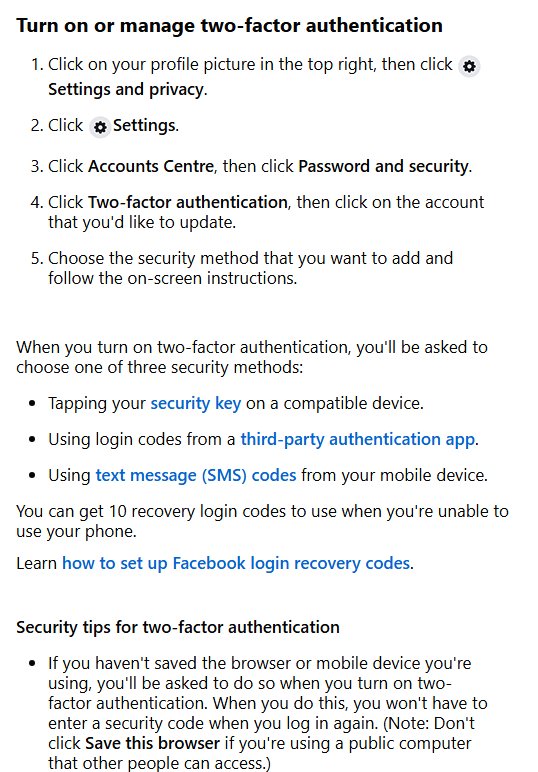
- Back in Password and security, select Two-factor authentication and choose your account.
- Pick a security key, an authentication app or text message (SMS) codes, and follow the on-screen instructions.
- Save the 10 recovery login codes Facebook offers somewhere offline, so a lost phone cannot lock you out.
Then remove apps and browser add-ons you do not recognise, and check your contact details in Accounts Centre so only your own email and phone number remain.
Review Facebook security emails and active sessions after recovery
Facebook keeps a list of the security emails it sent you, which shows whether a password reset or contact change came from you.
- Go to
facebook.com/recent_emails/security, or open Settings and privacy > Settings > Accounts Centre > Password and security > Recent emails. - Read the SECURITY tab, which holds security emails from the last year, such as password change requests.
- Open the OTHER EMAILS tab for anything else Facebook sent in the last two days.
- Open Where you're logged in again and confirm every session listed is one of your own devices.
- Check that only your own email addresses and phone numbers appear on the account.
If a suspicious email is not in that list, it did not come from Facebook. Delete it and do not use its links.
Tips for how to get your Facebook account back after being hacked
| Tip | Why it helps |
|---|---|
| Use a phone or computer you have logged in from before | Facebook recognises the device, which helps confirm you own the account |
| Try every email address and phone number you have ever used | An older address may still be linked, so find your Facebook email if you are unsure |
| Include the country code with your phone number | A number entered without it may not match the account |
| Act on Facebook's change emails quickly | The reverse link in the email is the fastest way to undo an email swap |
| Ask your email provider for help if the inbox was hacked too | Getting the inbox back restores Facebook's reset emails |
| Report suspicious posts and messages sent from your account | Friends who received them can be warned before they click |
| Ignore anyone offering paid account recovery | Facebook never asks for your password by email, and these offers are a common scam |
Tell your friends the account was hacked once you are back in, so they ignore any odd links or money requests sent in your name. If you need help beyond these pages, there are a few ways to contact Facebook directly.
Protect your Facebook account from hackers
| Protection | How to do it |
|---|---|
| A unique password | Never reuse your Facebook password elsewhere and never share it; avoid your name and common words |
| A passkey | Create one in your security settings; passkeys are unique per account and resist phishing |
| Two-factor authentication | Turn it on under Password and security with a security key, an authentication app or SMS |
| Security Checkup | Run it from a computer to review your security settings in one pass |
| Login alerts | Turn on alerts about unrecognised logins |
| Check the web address | Only enter your login on facebook.com; type www.facebook.com yourself when in doubt |
| Verify Facebook emails | Real messages come only from domains such as facebook.com, facebookmail.com, fb.com and meta.com |
| Skip unknown friend requests | Scam accounts use friendships to tag you and send malicious messages |
| Keep your browser updated | Remove suspicious apps and browser add-ons that can steal sessions |
| Log out on shared computers | If you forget, log out remotely from Where you're logged in |
Can't get into Facebook account after a hack
Facebook's reset code never arrives
The code went to spam, the phone has no signal, or the request is still on its way.
- Check the spam or junk folder of the email address on the account.
- Make sure your phone has a signal if the code comes by text message.
- Wait a few minutes, then request a new code.
"No longer have access to these?" is missing
Facebook cannot offer the self-service route for this account or device.
- Switch to a device you have logged in to Facebook from before.
- Run
facebook.com/hackedagain from that device. - Try every other email address or phone number that may be linked to the account.
Two-factor codes do not work after the hack
The attacker may have changed the security method, or your authentication app is out of sync.
- Enter one of the 10 recovery login codes if you saved them.
- Use facebook.com/hacked and pick the option about trouble logging in.
- Once back in, set up two-factor authentication again with a method you control.
"We've suspended your account" after the hack
Activity by the attacker broke the Community Standards, so Facebook suspended the account.
- Log in to Facebook to see the appeal prompt.
- Submit the appeal within 180 days and follow the prompts.
- Do not wait: an account that is not appealed in time is permanently disabled.
Password reset says you have tried too many times
Facebook caps how many times a password can be reset in a day.
- Stop requesting new codes for the rest of the day.
- Try again the next day from the same familiar device.
- Check the spam folder for codes you already requested before asking for another.
Frequently asked questions about hacked Facebook accounts
How do I get my Facebook account back?
Go to facebook.com/hacked on a device you have logged in from before and follow the prompts. If you only forgot the password, select Forgotten password? on the login screen and reset it with the code Facebook sends to your email or phone.
Why can't I get into my Facebook account?
The usual reasons are a changed password, an email or phone number you no longer reach, two-factor codes that stopped working, or a suspension. Start at facebook.com/hacked if you suspect a hack; otherwise use the Forgotten password? link.
How do I get my Facebook account unlocked?
Log in and follow the checks Facebook shows you, which can include confirming your identity with an ID upload or a video selfie. Do it from a device you have used for Facebook before, as that helps Facebook recognise you.
Why did my Facebook account get suspended?
Facebook suspends accounts when activity on them may break its Community Standards, which can include spam a hacker posted. You can appeal by logging in within 180 days; after that, or if the appeal fails, the account is permanently disabled.
Why did my Facebook account get disabled?
An account is disabled when a suspension is not appealed within 180 days, when an appeal fails, or straight away for severe violations. A disabled account cannot ask for another review, and nobody can see or use it.
What should I do if I can't access my email linked to Facebook?
Use facebook.com/login/identify, find your account, then select No longer have access to these? and add new contact details that were never on the account. Your email provider may also help you recover the inbox.
Can Facebook help me recover my hacked account?
Yes. Facebook's recovery page at facebook.com/hacked walks you through confirming the account is yours and resetting the password. It works best on a phone or computer you have logged in from before.
Is it important to inform my friends if my account was hacked?
Yes. Hackers often message friends with scam links or money requests. Tell your friends to ignore anything odd sent in your name during the hack and to report those messages.
How can I prevent my Facebook account from getting hacked again?
Use a unique password or a passkey, turn on two-factor authentication, save your recovery codes and run Security Checkup. Only type your login on facebook.com and ignore emails asking for your password.
How do I get my old Facebook account back?
Search for it at facebook.com/login/identify with any email, phone number or username it used, then follow the reset steps. If it cannot be recovered, you can start a new account from your old one.
How do I get rid of my Facebook account after a hack?
Recover and secure the account first, because you must be logged in to remove it. Then you can delete or deactivate the account from Accounts Centre settings.