Microsoft is investigating reports that PCs running Windows 10 Insider Preview build 18999 (20H1) get stuck when you shut them down or restart them. Instead of powering off, an affected device sits on the shutdown screen and does not finish. Microsoft has added the problem to the build’s list of known issues.
What Microsoft says
Build 18999 was released to Windows Insiders in the Fast ring on October 8, 2019, as part of the 20H1 development branch. After the release, Microsoft updated the announcement on the Windows Insider Blog with two new known issues, both marked [ADDED]:
- “We’re investigating reports that some devices are getting stuck during shutdown or restart.”
- On Surface devices, Bluetooth devices may not reconnect as expected after closing the device lid. As a workaround, toggle Bluetooth off and back on in the Settings app, or reboot.
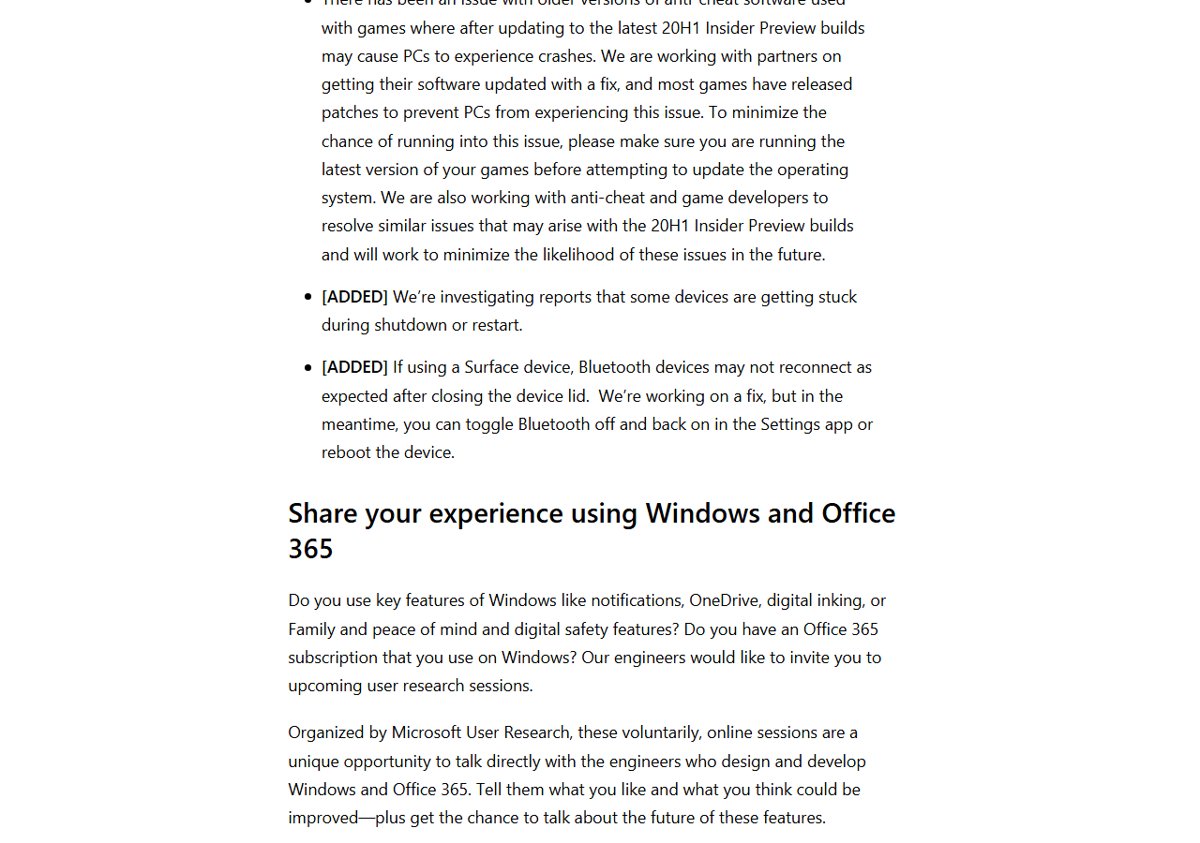
The shutdown hang does not affect every PC on the build, and Microsoft has not yet given a cause. Insiders who hit it are asked to report it.
What to do if your PC is affected
- Send feedback. Open the Feedback Hub, search for the shutdown or restart hang and upvote the existing report, or add your own with a reproduction. This is how Insider issues get prioritized.
- Save your work before shutting down. If the PC hangs, apps may already be closed, but anything unsaved can be lost when you force a power-off.
- Force a power-off only as a last resort. If the screen has been stuck for several minutes, hold the power button until the PC turns off, then start it again.
- Watch the Insider Blog. Microsoft lists workarounds and fixes in the known-issues section of each new flight.
Pre-release builds are expected to carry bugs like this. Microsoft’s own warning for each 20H1 flight is that builds “may contain bugs that might be painful for some”. If you rely on the PC for work, the Slow or Release Preview rings are safer than Fast.
Fix and workaround
A week later, Microsoft’s announcement for build 19002 said it was working on a fix and pointed affected Insiders to a forum post with workaround options. On October 18, 2019, it released build 19002.1002, which “includes a fix for the issue causing some devices to get stuck during shutdown or restart”. We cover the details in Microsoft’s workaround for the build 18999 shutdown issue.
Today
The 20H1 branch shipped as Windows 10 version 2004, and the build 18999 bug is long fixed. If a current PC hangs at shutdown, the usual causes are drivers, pending updates or power settings; see our guide to Windows 11 power and sleep settings, and our walkthrough for installing Insider Preview builds if you want to test new features today.