To delete your Google Account permanently, open your Google Account, go to Data & privacy, scroll to Your data & privacy options, select More options > Delete your Google Account, and follow the instructions.
This guide covers what you lose, backing up with Google Takeout, deleting on a computer, Android, iPhone or iPad, removing only Gmail, child and work accounts, and recovering a deleted account.
How to Delete a Google Account on a Computer
These steps work in any browser on a Windows PC, Mac or Chromebook. Deleting one Google Account does not delete any other Google Account you own.
- Sign in to the account you want to delete, then open
https://myaccount.google.com. - On the left, select Data & privacy.
- Scroll to Your data & privacy options.
- Select More options > Delete your Google Account.
- Sign in again if Google asks you to confirm it is you.
- Read what will be deleted, then follow the on-screen instructions to confirm and delete the account.
Back up anything you want to keep with Google Takeout before step 6. Once the account is gone, you cannot sign in to download it.
Before You Delete: What Happens When You Delete a Google Account?
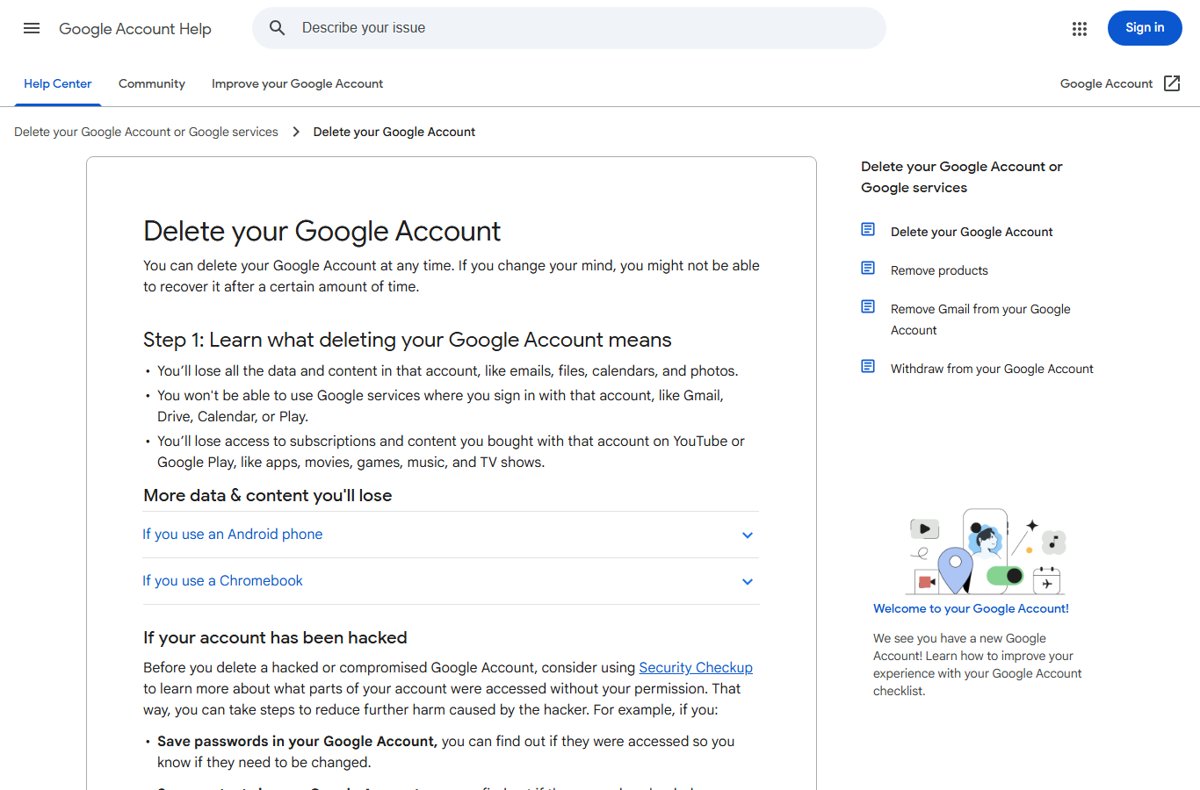
Deleting the account removes everything stored in it, not just your inbox. Google lists these consequences on its own deletion help page.
| What is affected | What happens after deletion |
|---|---|
| Emails, files, calendars and photos | All data and content in the account is deleted |
| Gmail, Drive, Calendar, Play and other services | You can no longer sign in to any Google service with that account |
| YouTube and Google Play purchases | You lose subscriptions and bought content such as apps, movies, games, music and TV shows |
| Contacts | Contacts stored only in the Google Account are lost |
| Android phone | You can no longer get or update apps from the Play Store with that account, and you may lose game progress and other Play data |
| Chromebook | Chrome apps and extensions tied to that account stop working; the device still works with another Google Account |
| Apps that use Sign in with Google | Deleting the Google Account also deletes all associated linked apps |
| Your Gmail address | You can no longer sign in with it; a removed Gmail address cannot be used by anyone in the future |
| Other Google Accounts you own | Not affected; each account is deleted separately |
Deleting a Google Account is not the same as deleting Gmail. You can remove just Gmail and keep the account for YouTube, Play purchases and your activity, as shown further down.
Delete the whole account, only Gmail, or just remove it from a device?
Many people who search for this only want one part gone. Match your goal to a row before you delete anything.
| Your goal | Do this | Why |
|---|---|---|
| Close everything tied to the account for good | Delete your Google Account | Removes all data, purchases and sign-ins for that account |
| Stop using Gmail but keep YouTube, Play purchases and activity | Remove Gmail from your Google Account | The account stays; Gmail deletes your emails and settings after 30 days |
| Remove one product, such as YouTube or Gmail | Data & privacy > Delete a Google service | Removes only the product you select |
| Stop the account appearing on a phone you are selling or giving away | Remove the account from the device | Deletes the account's email, contacts and settings from that device only; the account itself is not deleted |
| Delete a supervised child's account | Use Family Link from the parent account | Only available while the child is under 13 or the applicable age in your country |
| Delete a work or school account | Ask your organization's administrator | Accounts set up by an organization are managed by its admin |
| Close a Google Ads account | Cancel it in Google Ads under Account status | Canceling Ads does not delete the Google Account it signs in with |
A Quick Checklist Before You Click Delete
Tick every row before the final confirmation. Each one protects something you cannot get back after the account is gone.
| Check | Why it matters |
|---|---|
| Data exported with Google Takeout and the archive opened | Email, Drive files, Photos and contacts are deleted with the account |
| New email address set on bank, social media and app accounts | Those services send password resets to your Gmail address, which stops working |
| Apps that use Sign in with Google switched to another login | Linked apps are deleted along with the Google Account |
| Google Play and YouTube subscriptions and purchases reviewed | Bought apps, movies, music and subscriptions are lost |
| Recovery email and phone up to date | They help if you change your mind and try to recover the account |
| Account confirmed as personal, not work, school or a child's account | Those accounts are deleted by an admin or a parent, not from your own settings |
| Hacked account reviewed with Security Checkup | Security Checkup stops working for the account once it is deleted |
Step 1: Review What Is Connected to Your Google Account
Start by listing what depends on the account. Linked apps, purchases and other people's access all break when it is deleted.
- Open
https://myaccount.google.com/linkedappsto review the apps and sites that have access to your Google Account. - Note every app or website you sign in to with Sign in with Google, and add a password or a different login to each one.
- Review the apps, movies, books and subscriptions you bought on Google Play and YouTube, and cancel or use up anything you pay for.
- Check whether the account was set up by your work, school or another organization; if it was, stop here and contact that administrator.
- If the account was hacked, open Security Checkup first to see which passwords, contacts or Google Wallet payments were accessed.
Google says Security Checkup can no longer review activity once the account is deleted, so a compromised account should be checked before this point.
Step 2: Download and Back Up Your Google Data
Google Takeout exports your data from Gmail, Drive, Calendar, Photos, Contacts, YouTube and other products into an archive. Downloading does not delete anything from Google's servers.
If you let Chrome save passwords to your Google Account, move those passwords somewhere safe as well, because they are stored in the account.
- Sign in to the Google Account, then open the Google Takeout page at
https://takeout.google.com. - Leave the products you want selected; Google preselects every product that holds your data.
- Uncheck any product you do not want, or select All data included on a product to pick only part of it.
- Select Next step.
- Choose a delivery method: Send download link via email, or add the archive to Drive, Dropbox, Microsoft OneDrive or Box.
- Choose One-time archive, a file type (Zip or Tgz) and a maximum archive size; larger exports are split into several files.
- Create the export and wait for Google's email with the link, then download and open every file.
An archive can take from a few minutes to a few days, though most people get the link the same day. Do not send the archive to Drive, since Drive is deleted with the account. Accounts in the Advanced Protection Program get the archive scheduled two days later.
Step 3: Update Your Email, Recovery Options, and Devices
Google's own checklist asks you to replace your Gmail address elsewhere and update recovery info before deleting. Signing the account out of your devices comes last.
- Change the email address on online banking, social media, shopping and app accounts that still use your Gmail address.
- Give your contacts your new email address.
- In your Google Account, confirm the recovery email and recovery phone are current, in case you try to recover the account later.
- On Android, open Settings > Passwords & accounts (or Users & accounts), tap the account, then tap Remove account and confirm.
- On a phone you are selling or handing to someone else, remove the account before you factory reset it.
Removing the account from a phone deletes its email, contacts and settings from that phone only. The Google Account itself still exists until you delete it.
Step 4: Go to Google’s Delete Account Page
The delete option sits under Data & privacy in your Google Account on every platform. Use whichever entry point matches your device.
| Device | How to open Data & privacy | Then |
|---|---|---|
| Computer | Go to https://myaccount.google.com and select Data & privacy on the left |
Scroll to Your data & privacy options > More options > Delete your Google Account |
| Android | Open Settings > Google > your name > Manage your Google Account, then tap Data & privacy at the top | Scroll to Your data & privacy options > More options > Delete your Google Account |
| iPhone or iPad | Open the Gmail app, tap your profile picture > Manage your Google Account, then tap Data & privacy; without Gmail, use myaccount.google.com in Safari |
Scroll to Your data & privacy options > More options > Delete your Google Account |
Check the email address at the top of the page before continuing. If you are signed in to several accounts, only the one shown is deleted.
Step 5: Confirm Permanent Deletion
The last screen is where the account actually goes. Nothing is deleted until you complete it.
- Enter your password if Google asks you to verify it is you.
- Read the list of what will be deleted, including your data, Google services and purchases.
- Go back to Step 2 now if you have not downloaded your data.
- Confirm each statement Google asks you to acknowledge.
- Select the delete button to permanently delete the account.
Google says you might be able to recover the account for a certain amount of time after this, but not after longer periods. It does not publish an exact number of days.
How to Delete a Google Account on Android
On Android, the delete option is inside the Google section of the Settings app. Menu names can vary slightly between phone makers.
- Open your phone's Settings app.
- Tap Google, tap your name, then tap Manage your Google Account.
- At the top, tap Data & privacy.
- Scroll to Your data & privacy options and tap More options.
- Tap Delete your Google Account and sign in again if asked.
- Follow the on-screen instructions to confirm the deletion.
- Remove the deleted account from the phone under Settings > Passwords & accounts > the account > Remove account.
After deletion, the phone cannot download or update Play Store apps with that account. Add another Google Account, or create a new Google Account, to keep using the Play Store.
How to Delete a Google Account on iPhone or iPad
An iPhone or iPad has no Google entry in Settings. Open your Google Account from the Gmail app or from Safari instead.
- Open the Gmail app, or go to
https://myaccount.google.comin Safari if you do not use Gmail. - In Gmail, tap your profile picture or initial at the top right, then tap Manage your Google Account.
- At the top, tap Data & privacy.
- Scroll to Your data & privacy options and tap More options.
- Tap Delete your Google Account, sign in if asked, and follow the on-screen instructions to confirm.
- Sign out of the deleted account in the Gmail, YouTube and other Google apps on the device.
Delete Gmail only and keep your Google Account
Removing Gmail leaves the rest of the account working, including YouTube, your activity and Google Play purchases. You need a non-Gmail email address to sign in with afterwards.
- On a computer, open Gmail and select your profile picture at the top right > Manage your Google Account.
- On the left, select Data & privacy.
- Scroll to Data from apps and services you use and select Delete a Google service; sign in again if asked.
- Next to Gmail, select Delete.
- Enter an existing non-Gmail email address you want to sign in with, then select Send verification email.
- Open that inbox and select the link in Google's email; your Gmail address is not removed until you verify it.
Gmail deletes your emails and settings after 30 days. Nobody else can ever use the removed Gmail address, and you may be able to get it back by signing in to Gmail and following the prompts.
Delete a child's account or a Google Workspace account
Supervised child accounts and work or school accounts cannot be deleted the normal way. The parent or the organization's admin controls them.
| Account type | Who can delete it | What to know |
|---|---|---|
| Child's account supervised with Family Link, child under 13 (or the applicable age) | The parent, from the Family Link parent device or a computer | All the child's emails, files, photos and Play purchases are lost; a parent has a limited time to restore it |
| Supervised child aged 13 (or the applicable age) or older | The child, from their own Google Account | The parent option is not available at this age |
| Child's account plus the family group both deleted | Nobody can restore it | Delete the child's account before the family group if you might need it back |
| Google Workspace work or school account | The organization's administrator, in the Google Admin console | Data not transferred to another user is deleted; an admin can restore the user for up to 20 days |
| Google Workspace account on a Vault litigation hold | An admin, after a Vault admin lifts the hold | The hold must be removed first, which can take up to 48 hours |
Removing a child's account from their Android phone or Chromebook only takes it off that device. Supervision and the account itself remain.
How to check the Google Account is deleted
A deleted account can no longer sign in anywhere. Test it on a device that is not already signed in.
- Open a private or guest browser window.
- Go to
https://accounts.google.comand enter the deleted email address. - Confirm Google does not let you sign in to Gmail, Drive or YouTube with it.
- Check that apps using Sign in with Google with that account now ask you to log in another way.
- On your phone, confirm the account no longer appears under Settings > Passwords & accounts or in your Google apps.
If the account still signs in normally, the deletion was not completed. Repeat Step 4 and Step 5 while signed in to the right account.
Can you recover a deleted Google Account?
Yes, for a limited time. Google says a recently deleted account may still be recoverable, which restores access to the account and its data, but an account deleted a while ago may not come back.
- Open Google's Account recovery page, linked from Google's help article on recovering a recently deleted account, and enter the deleted email address.
- Answer the questions that confirm it is your account; take your best guess rather than skipping one.
- Use a device, browser and location where you usually signed in, and enter the most recent password you remember.
- If the account is restored, create a new password you have not used with this account before.
- If recovery fails, create a replacement Google Account instead.
A parent can try to restore a deleted Family Link child account from the parent account, unless the family group was deleted too.
Common Problems and How to Fix Them
Find the problem you see below. Each one comes from what people search for when deletion does not go to plan.
You want to delete the Google Account but have no password
Google only lets a signed-in owner delete an account.
- Go to the Account recovery page and enter the email address.
- Answer as many questions as you can, from a device and location you usually use.
- Check your spam folder for an email titled Your Google support inquiry.
- Once you are back in, follow Step 4 and Step 5 to delete the account.
There is no option to delete the account
The account is managed by a work, school or other organization, or it is a supervised child account.
- For a work or school account, ask the administrator to delete it in the Google Admin console.
- For a child under 13 (or the applicable age), ask the parent to delete it from Family Link.
- For a supervised child who is older, delete it from your own Google Account, or stop supervision first.
"Why did Google delete my account?"
The account was disabled for a policy violation, or deleted after two years of inactivity.
- Sign in to the account in a browser such as Chrome to see Google's explanation.
- If it is disabled and you own it, select Start Appeal and follow the instructions.
- If sign-in offers a download option, save your data while you can.
- If it was deleted for inactivity, try the Account recovery page; Google sends warnings to the account and the recovery email before deleting inactive accounts.
You deleted Gmail but the Google Account still exists
Removing Gmail only deletes the Gmail service, by design.
- Sign in with the alternate email address you verified.
- Open Data & privacy > More options > Delete your Google Account.
- Follow the on-screen instructions to delete the whole account.
You want to delete a Google Ads account permanently
A Google Ads account is canceled separately from the Google Account, and only by a user with Admin access.
- Sign in to Google Ads with an Admin user.
- Open the Admin menu and select Account settings.
- Open the Account status section.
- Select Cancel my account; ads stop within 24 hours and unused prepaid funds are refunded.
Frequently Asked Questions
How do I delete my Google Account permanently?
Open myaccount.google.com, select Data & privacy, scroll to Your data & privacy options, and select More options > Delete your Google Account. Follow the instructions to confirm. Download your data with Google Takeout first, because everything in the account is deleted.
How do I delete a Google Account permanently on a PC?
In any browser on the PC, sign in and go to myaccount.google.com. Select Data & privacy on the left, then More options > Delete your Google Account under Your data & privacy options. Sign in again if asked and confirm the deletion.
Can I delete a Google Account?
Yes. Google lets you delete your personal Google Account at any time from Data & privacy. Work or school accounts are deleted by the organization's administrator, and a supervised child's account under 13 is deleted by the parent through Family Link.
How do I remove a Google Account permanently from my phone?
Removing the account from a phone and deleting it are different. To take it off an Android phone, open Settings > Passwords & accounts, tap the account and select Remove account. To delete it permanently, use Data & privacy > Delete your Google Account.
Can I delete my Google Account permanently immediately?
The deletion takes effect when you confirm it, and you can no longer sign in. Google may still let you recover a recently deleted account for a limited time, so the account is not beyond recovery at that exact moment.
Can I delete my Gmail account without deleting my Google Account?
Yes. Go to Data & privacy > Delete a Google service, select Delete next to Gmail, and enter a non-Gmail address to sign in with. Gmail deletes your emails after 30 days, and the rest of the account keeps working.
How do I delete a Google Ads account permanently?
In Google Ads, an Admin user opens Account settings in the Admin menu, expands Account status and selects Cancel my account. Ads stop within 24 hours. Canceling Ads does not delete your Google Account, and a canceled account can later be reactivated.
Why did Google delete my account?
Google disables accounts that break its policies, such as spam, hacking or impersonation, and can delete personal accounts that are inactive across Google for two years. Sign in on a browser to see the reason, and select Start Appeal if you think it is wrong.
Why is Google deleting my account?
A warning usually means the account has not been used for two years. Google emails the account and its recovery address first. Signing in and using a service, such as reading email or watching a YouTube video, counts as activity and keeps the account.
How long do I have to recover a deleted Google Account?
Google does not publish a fixed number of days. It says a recently deleted account may be recoverable through the account recovery page, and one deleted a while ago may not be. Google Workspace admins can restore a deleted user for up to 20 days.


![How to Keep Your Dell Drivers Updated on Windows 11/10 [2026]](https://techdows.com/wp-content/uploads/2026/09/Driver-details-panel-showing-an-NVIDIA-GeForce-920Ms-provider-and-version-519x338.jpg)