Microsoft 365 Personal, Family and Premium include the desktop apps Word, Excel, PowerPoint, Outlook and OneNote, plus Access on PCs, Microsoft Teams, Microsoft Editor, Microsoft Forms, Microsoft Defender and OneDrive cloud storage.
Business and enterprise plans add Exchange email, SharePoint, Bookings, Planner, Lists, Loop and admin tools, while Microsoft 365 Basic gives you only the web and mobile apps with 100 GB of storage.
What apps does Microsoft 365 include?
The apps you get depend on the plan, not on the Microsoft 365 name. Find your plan in the left column to see what it installs.
| Your plan | Office apps you get | Other apps and services |
|---|---|---|
| Microsoft 365 Basic | Word, Excel, PowerPoint and OneNote on the web, iOS and Android only | Ad-free Outlook with a 100 GB mailbox, 100 GB OneDrive storage, ongoing support |
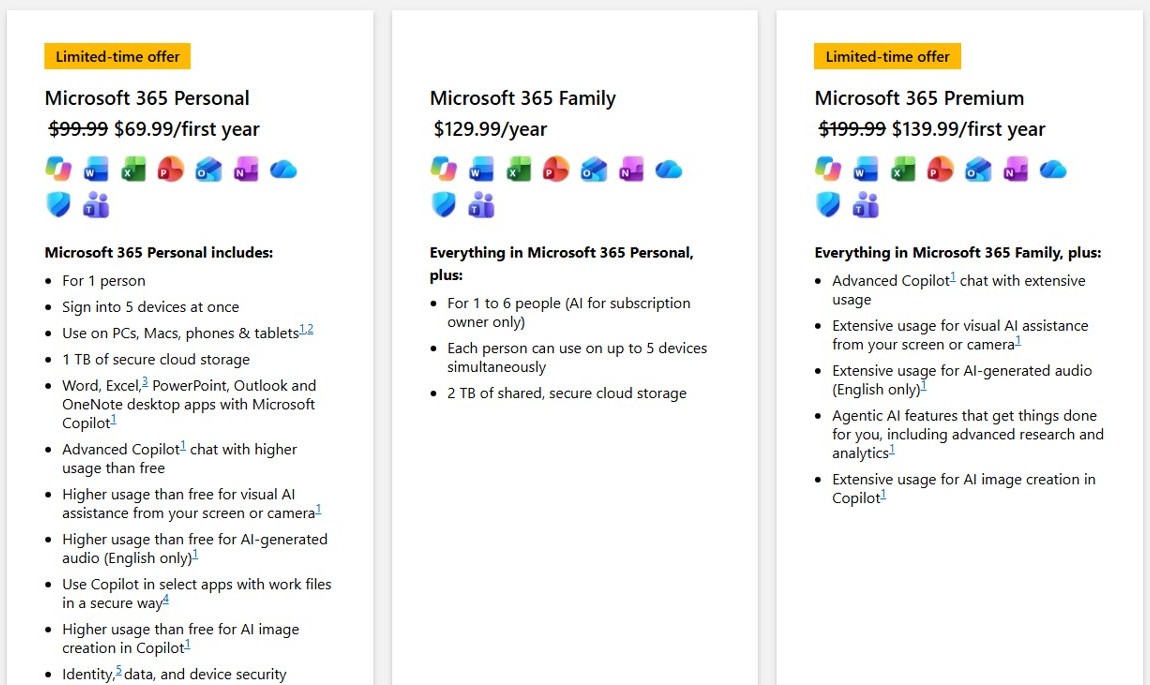
| Microsoft 365 Personal | Desktop Word, Excel, PowerPoint, Outlook, OneNote and Access (PC only) | Teams, Microsoft Editor, Microsoft Forms, Microsoft Defender, 1 TB OneDrive, Copilot in the apps |
| Microsoft 365 Family | The same apps as Personal for each of up to 6 people | Everything in Personal; Copilot features go to the subscription owner only |
| Microsoft 365 Premium | The same apps as Family | Everything in Family plus extensive Copilot usage and agentic AI features |
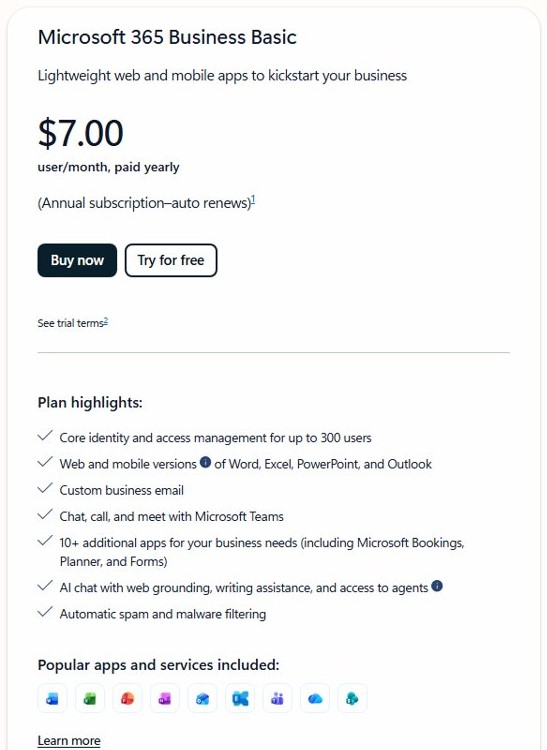
| Microsoft 365 Business Basic | Web and mobile Word, Excel, PowerPoint and Outlook | Exchange email, Teams, OneDrive, SharePoint, Bookings, Planner, Forms |
| Business Standard or Business Premium | Desktop Word, Excel, PowerPoint, Outlook, OneNote and Access (PC only) | Everything in Business Basic plus Loop and Clipchamp; Premium adds device and data security |
| Microsoft 365 E3, E5 or E7 | Desktop, web and mobile Word, Excel, PowerPoint, Outlook and other apps | Teams, Windows Enterprise, Intune; E5 and E7 add Teams Phone and Power BI |
If you only need to open and edit documents now and then, the free web and mobile versions of Word, Excel, PowerPoint and OneNote work with any Microsoft account.
List of Microsoft 365 applications and services
Microsoft 365 is a bundle of desktop apps, web apps and cloud services. This list covers each app Microsoft names on its plan comparison pages and the plans that carry it.
| App or service | What it does | Plans that include it |
|---|---|---|
| Word | Documents, letters, reports | Every plan (web and mobile only on Basic and Business Basic) |
| Excel | Spreadsheets, charts, data analysis | Every plan (web and mobile only on Basic and Business Basic) |
| PowerPoint | Presentations and slideshows | Every plan (web and mobile only on Basic and Business Basic) |
| Outlook | Email, calendar and contacts | Every plan; ad-free on paid plans |
| OneNote | Digital notebooks with text, audio, photos and video | Every plan |
| Access (PC only) | Desktop database builder | Personal, Family, Premium, Business Standard, Business Premium |
| Microsoft Teams | Chat, calls and video meetings | Personal, Family, Premium and the business plans sold with Teams |
| Microsoft Editor | Spelling, grammar and writing suggestions | Personal, Family, Premium |
| Microsoft Forms | Surveys, quizzes and polls | Personal, Family, Premium and all business plans |
| Microsoft Defender | Online security alerts and device protection for households | Personal, Family, Premium |
| OneDrive | Cloud storage and file sharing | Every plan |
| Exchange | Custom business email such as [email protected] | Business and enterprise plans |
| SharePoint | Team sites for files, pages and video | Business and enterprise plans |
| Bookings and Shifts | Appointment and staff scheduling | Business plans sold with Teams |
| Planner, To Do and Lists | Task and project tracking | Business and enterprise plans |
| Microsoft Loop | Shared project workspaces | Business Standard and Business Premium |
| Sway | Digital storytelling and slideshows | Business plans |
| Clipchamp | Web-based video editing | Business Standard and Business Premium |
| Visio for the web | Diagrams and flowcharts | Business plans (web only) |
| Power Apps and Power Automate | Low-code apps and workflow automation | Business plans (Power Automate cloud flows only on most) |
| Viva Engage, Viva Learning, Viva Insights | Employee communities (formerly Yammer), learning and personal insights | Business plans |
| Copilot Studio and Agent Builder | Build AI agents for work | Business plans with Copilot |
Microsoft Publisher was on this list until October 2026. It has been retired and is no longer part of any Microsoft 365 plan.
Microsoft 365 plans
Microsoft sells four families of plans. Home plans run on a personal Microsoft account, while the business, enterprise and education plans run on a work or school account an admin manages.
| Plan family | Plans in it | Who it is for | Listed price |
|---|---|---|---|
| Home | Basic, Personal, Family, Premium | Individuals and households | $19.99, $99.99, $129.99 and $199.99 a year |
| Business | Business Basic, Business Standard with Copilot, Business Premium with Copilot | Organizations with 1 to 300 employees | $7.00, $23.50 and $32.00 per user per month, paid yearly |
| Enterprise | Microsoft 365 E3, E5, E7 (plus Office 365 and Frontline plans) | Organizations of any size | $39.00, $60.00 and $99.00 per user per month, paid yearly |
| Education | Microsoft 365 Education A1, A3, A5, A7 | Schools, colleges and universities | Quoted through a Microsoft sales partner |
Education A1 is web-based only. A3 adds the desktop apps and device management, A5 adds advanced security and analytics, and A7 adds AI and governance tools on top.
Microsoft 365 pricing changes come often and promotional first-year discounts are common, so check the checkout page before you buy.
Microsoft 365 Basic included apps
Microsoft 365 Basic is the cheapest paid plan, and it is mainly a storage and email upgrade. It does not install any desktop Office apps on a PC or Mac.
| Included in Basic | Detail |
|---|---|
| Word, Excel, PowerPoint, OneNote | Free versions on the web, iOS and Android only |
| Outlook | Secure, ad-free inbox with 100 GB mailbox storage |
| OneDrive | 100 GB of cloud storage |
| Users | 1 person, 1 account |
| Support | Ongoing technical support |
| Not included | Desktop apps, Access, Microsoft Defender, Microsoft Editor, Teams all-day calling, Copilot features |
Basic replaced the old OneDrive 100 GB standalone subscription. Upgrade to Personal if you need the desktop apps.
Microsoft 365 personal apps included
Personal is the single-user plan with the full desktop app set. You can sign in on up to 5 devices at once across PCs, Macs, phones and tablets.
| App or feature | What Personal gives you |
|---|---|
| Word, Excel, PowerPoint, Outlook, OneNote | Desktop apps with Copilot built in |
| Access | Included on Windows PCs only |
| Microsoft Teams | All-day video calling and Copilot in Teams |
| Microsoft Editor and Microsoft Forms | Included |
| Microsoft Defender | Identity, data and device security; identity theft monitoring is US only |
| OneDrive | 1 TB of cloud storage with ransomware protection |
| Copilot | Higher usage than the free tier for chat, image creation and AI audio |
Microsoft 365 family apps included
Family includes every app in Personal for up to 6 people. Each person you share the subscription with signs in with their own Microsoft account and can use the apps on up to 5 devices at the same time.
| Question | Family | Premium |
|---|---|---|
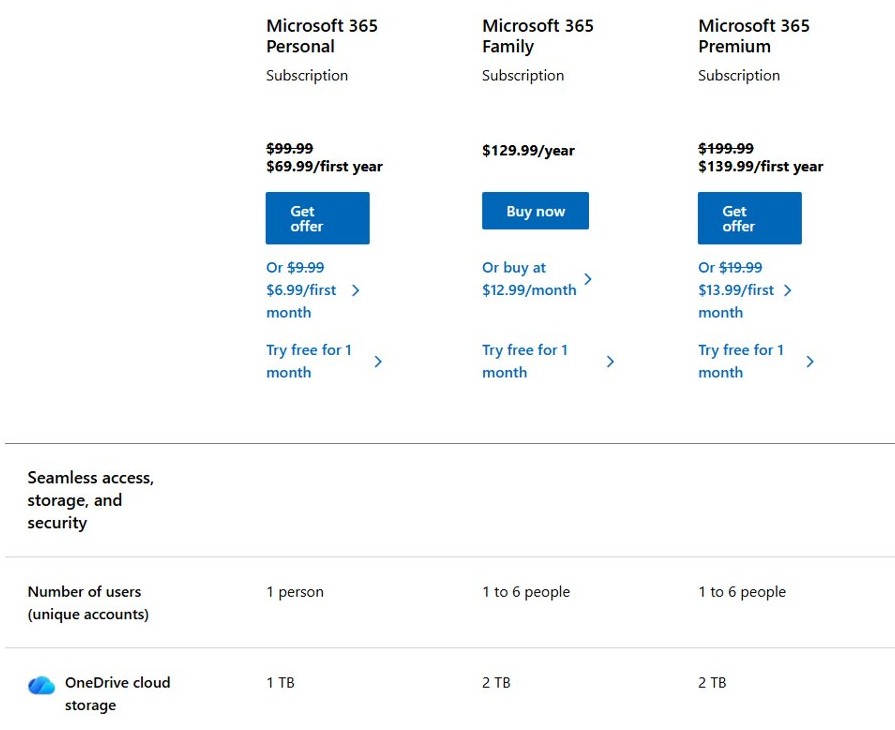
| Number of people | 1 to 6 | 1 to 6 |
| Desktop Word, Excel, PowerPoint, Outlook, OneNote | Every member | Every member |
| Access (PC only), Teams, Editor, Forms, Defender | Every member | Every member |
| Copilot in the apps | Subscription owner only, higher than free usage | Subscription owner only, extensive usage |
| Agentic AI for research and analytics | Not included | Included |
| Listed price | $129.99 a year or $12.99 a month | $199.99 a year or $19.99 a month |
AI features cannot be shared with other members. If several people in a household want Copilot inside Word or Excel, each one needs a plan of their own.
Microsoft 365 Business Basic vs Standard vs Premium apps
All three business plans cover 1 to 300 users and include Exchange email, OneDrive with 1 TB per user, SharePoint and Teams in the versions sold with Teams. The split is desktop apps and security.
| Feature | Business Basic | Business Standard | Business Premium |
|---|---|---|---|
| Word, Excel, PowerPoint, Outlook | Web and mobile only | Desktop, web and mobile | Desktop, web and mobile |
| Access (PC only) | No | Yes | Yes |
| Devices per user | Web and mobile apps only | 5 PCs or Macs, 5 tablets, 5 phones | 5 PCs or Macs, 5 tablets, 5 phones |
| Bookings, Planner, Forms, To Do, Lists | Yes | Yes | Yes |
| Loop and Clipchamp | No | Yes | Yes |
| Copilot in Word, Excel, PowerPoint | Add-on | Included | Included |
| Mailbox | 100 GB plus 50 GB archive | 100 GB plus 50 GB archive | 100 GB plus 1.5 TB archive |
| Security extras | Spam and malware filtering | Spam and malware filtering | Intune, Defender for Business, Defender for Office 365 Plan 1, Purview, Windows 11 Pro upgrade |
Business Standard already includes Copilot, so you do not need the add-on to use it in Word, Excel and PowerPoint.
Microsoft 365 vs Office Home 2024 apps
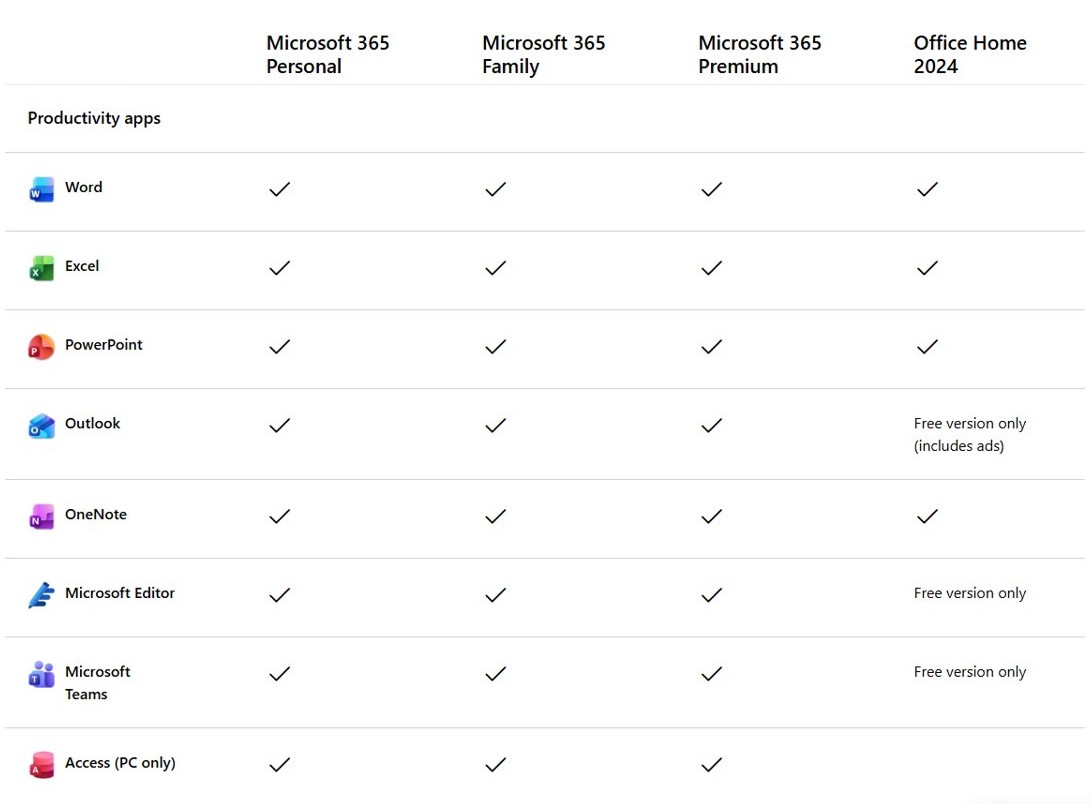
Office Home 2024 is a one-time purchase for 1 PC or Mac, not a subscription. It gives you fewer apps and no cloud storage beyond the free 5 GB.
| App or feature | Microsoft 365 Personal or Family | Office Home 2024 |
|---|---|---|
| Word, Excel, PowerPoint, OneNote | Included | Included |
| Outlook | Included, ad-free | Free version only, with ads |
| Access (PC only) | Included | Not included |
| Teams, Editor, Forms | Included | Free versions only |
| Microsoft Defender | Included | Not included |
| OneDrive storage | 1 TB per person | Free 5 GB |
| Devices | Up to 5 at once per person | 1 PC or Mac |
| Copilot in the apps | Included for the owner | Free version only |
Office Home & Business 2024 adds the classic desktop Outlook to the same one-time licence, still for 1 PC or Mac.
Is Microsoft Publisher still included in Microsoft 365?
No. Microsoft Publisher reached end of life in October 2026 and was removed from Microsoft 365 subscriptions as the removal update rolled out from October 1, 2026.
| Date | What changed |
|---|---|
| Until October 1, 2026 | Publisher worked as normal for Microsoft 365 subscribers |
| On or shortly after October 1, 2026 | Subscribers lost access to Publisher and can no longer open or edit .pub files in it |
| October 13, 2026 | Support ended for the perpetual Publisher in Office 2021 and Office LTSC 2021 |
Microsoft points Publisher users to Word and PowerPoint for branded templates, labels, envelopes, calendars and business cards. A .pub file saved as PDF can be opened in Word for editing, though complex layouts may shift.
Where can I find Microsoft 365 apps
Once your plan is active, each app installs as its own program. You do not open a single Microsoft 365 program to reach them.
- On Windows, select Start, type the app name such as Word or Excel, and select it in the results.
- On a Mac, open Finder, select Applications, and open Microsoft Word, Microsoft Excel or another app.
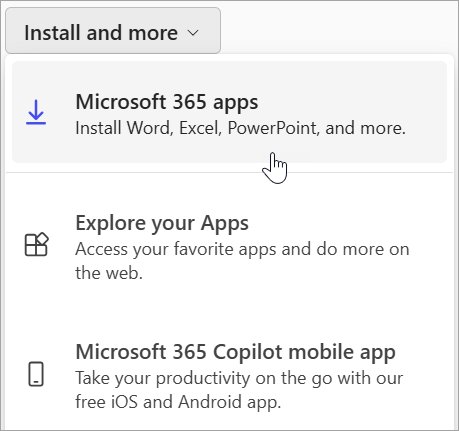
- If the apps are missing, sign in to your Microsoft account with the account that owns the plan and install them from your subscription.
- To use the web versions on any computer, go to m365.cloud.microsoft in a browser and sign in.
- On a phone or tablet, install Word, Excel, PowerPoint, Outlook or OneNote from the App Store or Google Play and sign in with the same account.
Once you install and activate the desktop apps, sign in to each app with the same account. Access appears only on Windows, so you open Access in Microsoft 365 from the Start menu.
Microsoft 365 apps FAQ
What apps are included with Microsoft 365?
Personal, Family and Premium include desktop Word, Excel, PowerPoint, Outlook, OneNote and Access (PC only), plus Teams, Editor, Forms, Defender and OneDrive storage. Business plans add Exchange, SharePoint, Bookings, Planner and Loop.
What apps does Microsoft 365 Basic include?
Microsoft 365 Basic includes ad-free Outlook with a 100 GB mailbox and 100 GB of OneDrive storage. Word, Excel, PowerPoint and OneNote are available only as the free web, iOS and Android versions, with no desktop apps.
What apps does Microsoft 365 Personal include?
Microsoft 365 Personal includes desktop Word, Excel, PowerPoint, Outlook and OneNote with Copilot, Access on Windows PCs, Teams, Microsoft Editor, Microsoft Forms, Microsoft Defender and 1 TB of OneDrive storage for one person on up to 5 devices.
What apps does Microsoft 365 Family include?
Microsoft 365 Family includes the same apps as Personal for up to 6 people: Word, Excel, PowerPoint, Outlook, OneNote, Access (PC only), Teams, Editor, Forms and Defender. Copilot features in the apps are limited to the subscription owner.
What is Microsoft 365 Apps?
Microsoft 365 Apps is the name for the installable desktop app package of Word, Excel, PowerPoint, Outlook, OneNote and Access that IT admins deploy and update. It is part of business and enterprise plans rather than a separate home product.
Where can I find Microsoft 365 apps?
On Windows, search for the app name from the Start menu. On a Mac, look in the Applications folder. If they are not installed, install them from the Microsoft account that owns the plan, or use the web versions at m365.cloud.microsoft.
Where is the Microsoft 365 app located?
Microsoft's hub app, the Microsoft 365 Copilot app, installs automatically on most Windows PCs that have the desktop apps and appears in the Start menu. Its web version is at m365.cloud.microsoft, and mobile versions are in the App Store and Google Play.
What are all the Microsoft 365 apps?
The full set across plans is Word, Excel, PowerPoint, Outlook, OneNote, Access, Teams, Editor, Forms, Defender, OneDrive, Exchange, SharePoint, Bookings, Shifts, Planner, To Do, Lists, Loop, Sway, Clipchamp, Visio for the web, Power Apps, Power Automate and Viva.