Chrome soon will allow saving passwords to your Google account instead of to password manager in the device and it also lets you move passwords saved on the device in Chrome to Google Account for secure sign-in on all devices. You can enable and test this feature in Chrome 89 Canary now.
Chrome already allows accessing payment methods in your Google Account. The upcoming Chrome update will make it easier to manage passwords iressepctive of whether you’ve syncing enabled or not for your device.

Save passwords to Google Account in the Chrome browser
- Launch Chrome browser
- Visit chrome://flags
- Search for “account data storage” and enable the following flags
“Enable the account data storage for passwords”
“Enable the account data storage for autofill”

- Click the dropdown arrow and select “Enabled”
- Restart the browser.
To test out the feature
- If you’ve already signed into Chrome browser, turn off Sync
- This signs you out of all Google services
- Sign back into Chrome again and ensure the sync is turned off.
Navigate to chrome://settings/passwords page to notice the page showing passwords saved to Google Account and to the device.
Chrome manage passwords page also offers an option to move passwords to Google Account.

When you visit a website where Chrome autofill credentials for you, you’ll be prompted whether to save the password to your Google Account or the device.
Chrome also asks to Move the password to Google Account.
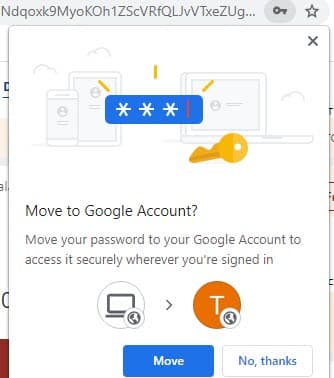
There is another variation of this prompt, check the below screenshot

What’s your take on this feature where Chrome now not making Sync mandatory to sign-in to your devices, it uses the account info instead for that?
Related articles:
Chrome to offer ‘Presentation Mode’ for PDFs
‘Chrome labs’: enable new experimental features in Chrome through the Toolbar menu
Chrome Canary on Android lets you Take Screenshots in Incognito Mode
How to Enable and use ‘Chrome Actions’ in Chrome 87 right now




How to Recover Google Account Without Old Phone: Step-by-Step Guide - Techdows
[…] you let Chrome save passwords to your Google Account, that account becomes the key to every other login, which makes these backups worth ten minutes […]
How to delete google account permanently in 5 easy steps - Techdows
[…] you let Chrome save passwords to your Google Account, move those passwords somewhere safe as well, because they are stored in the […]