A bug in Windows 10 Mav 2019 update with F.lux v4.104 running in the background creates tinted screenshots with any screen capturing application, this applies to even Snip & Sketch also and dimming features and full screen effects of f.lux may not work. Here is a workaround that fixes tinted screenshots issue if you’re using latest f.lux on Windows 10 version 1903.
We’ve recently covered, on Windows 10 version 1903 we’re noticing screenshots captured with Snagit are yellow colored and said disabling F.lux for Snagit editor fixes the issue, that worked partially and the issue came back.

F.lux team acknowledged the issues their application having on Windows 10 May 2019 Update and said this is due to “Faster Startup” which causes color profiles to not load when you start/shutdown system with it was enabled, then f.lux will use “fallback mode”.
Thus, F.lux team recommending to disable Faster startup to fix these issues, do note this may affect system startup time, so consider this into account before following.
Note: Microsoft already documented here that on Windows 10 May 2019 Update color profiles and night mode may not work properly, confirmed they’re working on it and will release an update in upcoming release.
Fix Tinted Screenshots issue on Windows 10 version 1903 with F.lux running
1. Press Start, type Power & sleep Settings
2. Click on “Additional Power settings” under Related Settings
3. Click “Choose what the Power buttons do”
4. Click on “Change settings that are currently unavailable”
5. Uncheck “Turn on faster Startup”, click “Save Changes” and restart your computer.
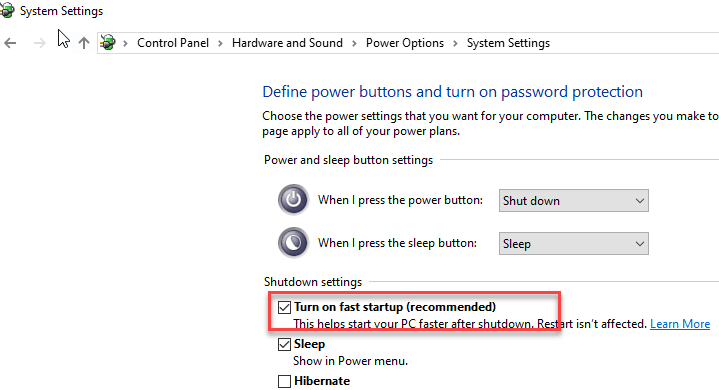
This will solve most of the issues F.lux having with Windows 10 latest feature update. Do you f.lux? Have you noticed any issues? Let us know in the comments below.
Related articles:
F.lux 4.84 adds grayscale mode for distraction-free reading
F.lux 3.0 Beta for Windows Adds Movie Mode and Safe Mode




