Widget Launcher is a free Microsoft Store app from Chan Software Solutions that pins clocks, weather, notes, RSS feeds and a CPU meter directly on the Windows 11 desktop, outside the built-in Widgets board.
This guide covers installing the right listing, what the free app includes, which extensions cost money, what the privacy policy says, how to measure its resource use and how to fix or remove it.
How to pin desktop widgets with Widget Launcher on Windows 11
The free app is the listing with product ID 9WZDNCRDQFBT. Several similarly named apps exist, so check the publisher before you install.
- Select Start, then open Microsoft Store.
- Search for Widget Launcher and open the result published by Chan Software Solutions.
- Select Get and wait for the install to finish, then select Open.
- Pick a widget such as the world clock, weather or sticky notes from the app's built-in widget list to place it on the desktop.
- Drag the widget to the spot on the desktop where you want it to stay.
- Press Ctrl + Alt + W to bring all widgets to the foreground when windows cover them; the shortcut is configurable in recent versions.
Background / overview
Widget Launcher has been on the Microsoft Store far longer than the Windows 11 Widgets board. The current 6.x releases are packaged for Windows 10 and Windows 11 desktops.
| Fact | Value from the Microsoft Store listing |
|---|---|
| Publisher | Chan Software Solutions |
| Store product ID | 9WZDNCRDQFBT |
| First released on the Store | October 2013 |
| Latest listing update | June 2026 (package 6.0.4.0) |
| Categories | Productivity, with Personalization as a second category |
| Price | Free, with paid add-ons sold as separate Store products |
| Average rating | 4.3 out of 5 from more than 17,600 ratings |
| Age rating | ESRB E, PEGI 3 |
What Widget Launcher is and how it works
The Store describes it as the next generation of desktop gadgets for Windows 11: one host app that runs built-in widgets and loads extra widgets and skins installed as extensions.
| Part | What it does |
|---|---|
| Core concept | A launcher app hosts every widget, so you install one app and add or remove individual widgets inside it |
| Built-in widgets | Clocks, weather, RSS, notes, calculator, calendar, CPU meter and more ship free with the app |
| Extensions | Extra widgets and skins are separate Microsoft Store apps that Widget Launcher detects and loads |
| Skins | Two skins are included; more are sold on the Store |
| Developer interface | A built-in interface lets developers debug extensions they create |
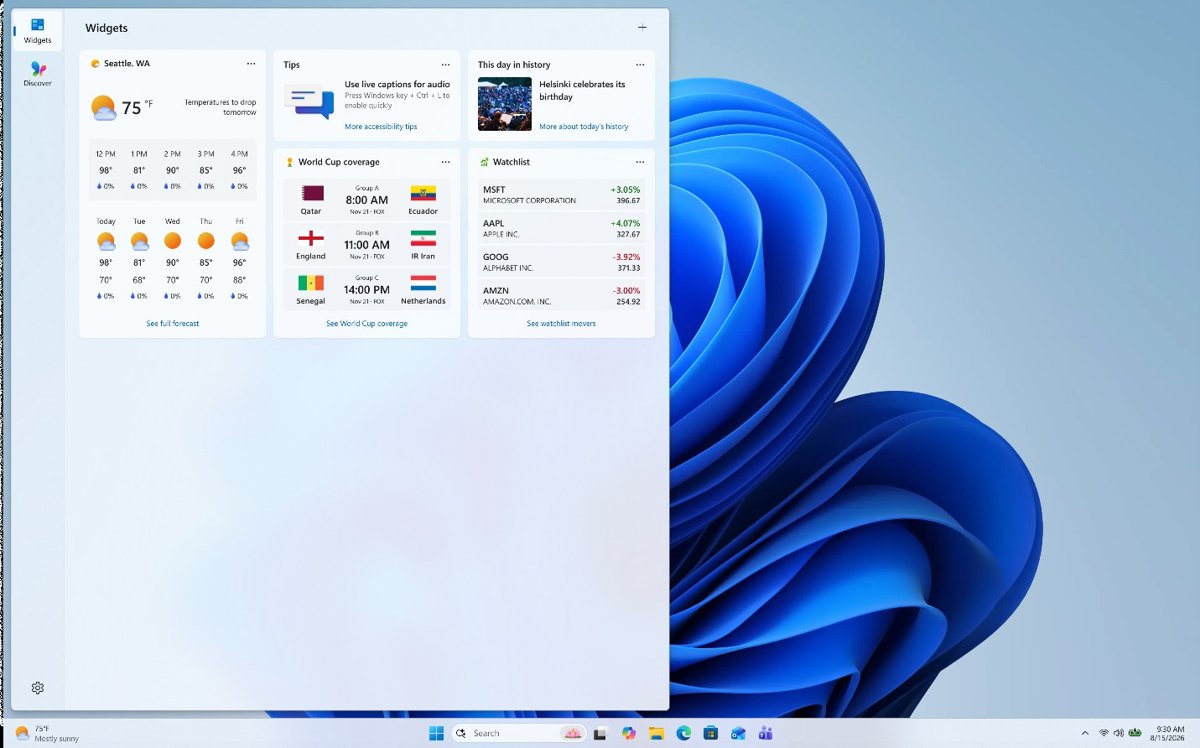
| Where widgets appear | On the desktop itself, not inside the Windows 11 Widgets board opened with Windows key + W |
Packaging and runtime requirements
These values come from the Store's catalog data for the current 6.0.4.0 package.
| Requirement | Detail |
|---|---|
| Windows version | Windows 10 version 1809 (build 17763) or later, including Windows 11 |
| Architecture | x64 package for the 6.x releases; older 3.3.x packages were x86 |
| Package type | MSIX bundle installed through the Microsoft Store |
| Download size | Up to about 240 MB |
| Network | An internet connection is listed as a minimum requirement |
| Storage | A solid state drive is recommended for faster start times |
| Declared capabilities | internetClient and runFullTrust |
| Languages | English, Czech, German, Spanish, French, Italian, Japanese, Korean, Polish, Brazilian Portuguese, Russian, Turkish and Chinese |
The runFullTrust capability means the package includes a full-trust desktop component that runs at medium integrity, outside the AppContainer sandbox that limits ordinary Store apps.
Installation & first impressions
Windows Package Manager can install the same Store listing from Terminal, which is handy on a fresh PC. The msstore source uses the Store product ID as the package ID.
winget install 9WZDNCRDQFBT -s msstoreInstalls Widget Launcher from the Microsoft Store source. Add –accept-package-agreements and –accept-source-agreements to skip the license prompts in a script.
You should see: Winget reports Successfully installed, and Widget Launcher appears under Start > All apps.
On first launch the app opens with its two free skins and the built-in widget set, so you can place a clock or weather widget before buying anything. You can also pin Widget Launcher to the taskbar to reach its widget list quickly.
Simplicity vs. power
The free app covers most desktop gadget needs. Paid extensions add depth for specific jobs.
| Your situation | Install this | Why |
|---|---|---|
| You want a clock, weather and notes on the desktop | Widget Launcher alone | All three ship free in the base app |
| You want detailed CPU, disk, memory and network graphs | Performance Monitor for Widget Launcher ($1.99) | The free CPU meter shows only processor load |
| You want rotating wallpapers, a dictionary and a translator | Pro Widgets for Widget Launcher ($4.79) | Bundles six extra widgets and a wallpaper rotator |
| You want a different look | Aero Glass Skin ($2.79) or Royal Skin ($2.59) | Skins change color and transparency of every widget |
| You want news cards without another app | The built-in Windows 11 Widgets board | Already installed and opened with Windows key + W |
Features and the default widget set
Notable included widgets in recent versions are the Large Clock added in 6.0.0 and the redesigned notes widget in 6.0.2.
| Built-in widget | What it shows |
|---|---|
| Weather | Current conditions and a 5-day forecast |
| World Clocks | Times for several cities at once |
| Digital Clocks and Large Clock | A single clock in digital or large format |
| RSS Feeds | Headlines from feeds you add |
| Sticky Notes | Short text notes on the desktop |
| Slideshow | Rotating pictures |
| CPU Meter | Processor load |
| Calculator, Unit Converter and Currency Converter | Quick sums and conversions |
| Calendar | A month view on the desktop |
Customization options
| Option | What it changes | Cost |
|---|---|---|
| Included skins | Color and transparency of every widget | Free (two skins) |
| Hide widget controls | Removes the control buttons from widgets for a cleaner desktop (added in 6.0.0) | Free |
| Bring-to-front shortcut | Ctrl + Alt + W raises all widgets above open windows; the key combination is configurable (6.0.2) | Free |
| Redesigned color picker | Finer control over widget colors (6.0.2) | Free |
| Extra skins | Aero Glass gives a glossy transparent look; Royal uses deep colors and gradients | $2.79 and $2.59 |
| Extra widgets | Clipboard History, Mini Browser, Partitions and Awake extensions | Free |
Limitations in the UI
| Limitation | What it means for you |
|---|---|
| Separate from the Windows Widgets board | Its widgets never appear in the board opened with Windows key + W, and board widgets cannot be pinned through it; you can still remove or reinstall the Widgets board on its own |
| Widgets sit at desktop level | Open windows cover them until you press Ctrl + Alt + W or minimize the windows |
| No native Arm64 package listed | The 6.x package is x64 only, so Arm-based PCs rely on Windows emulation |
| Extensions are separate installs | Each extra widget or skin is its own Store product to install, update and remove |
| Thin publisher documentation | The publisher's developer page is still under construction, and support is by email only |
Performance: memory, CPU and stability
Resource use depends on how many widgets you run and how often they refresh, so measure it on your own PC rather than trusting a single number.
- Right-click Start and select Task Manager.
- Select Processes and find Widget Launcher in the list.
- Read its CPU and Memory columns with your usual widgets on the desktop.
- Select Startup apps and read the Startup impact value for Widget Launcher if it is listed.
- Close widgets you do not use and check the Memory column again to see what each one cost.
Task Manager rates startup impact as High when an app uses more than 1 second of CPU or more than 3 MB of disk at sign-in, so a Low or Medium rating means it barely slows boot.
Pricing, ads and pro extensions
The base app and its full license cost nothing. Paid items are separate Store products from the same publisher, listed here at US prices.
| Product | US price | What it adds |
|---|---|---|
| Widget Launcher | Free | The launcher and every built-in widget |
| Pro Widgets for Widget Launcher | $4.79 | Wallpaper Rotator, World Clocks with themes, Resource Monitor, Date Indicator, Album Slideshow, Dictionary and Translator |
| Performance Monitor for Widget Launcher | $1.99 | CPU, disk, memory and network monitors |
| Digital World Clocks for Widget Launcher | $1.99 | Digital clocks for several time zones in 12- or 24-hour format |
| Aero Glass Skin for Widget Launcher | $2.79 | Glossy transparent skin |
| Royal Skin for Widget Launcher | $2.59 | Deep colors and rich gradients |
| Clipboard History, Mini Browser, Partitions, Awake | Free | Clipboard log, web-page widgets, desktop zones and a keep-awake tool |
The Store listing does not disclose in-app advertising, and its content rating flags in-app purchases.
Safety, data persistence and privacy
| Area | What the official listing and policy say |
|---|---|
| Distribution | Signed MSIX package delivered and updated through the Microsoft Store |
| System access | runFullTrust, so the desktop part is not sandboxed like a standard Store app |
| Network | internetClient, needed for weather, RSS and currency data |
| Location | Older x86 packages declared location access; the current x64 package does not list it |
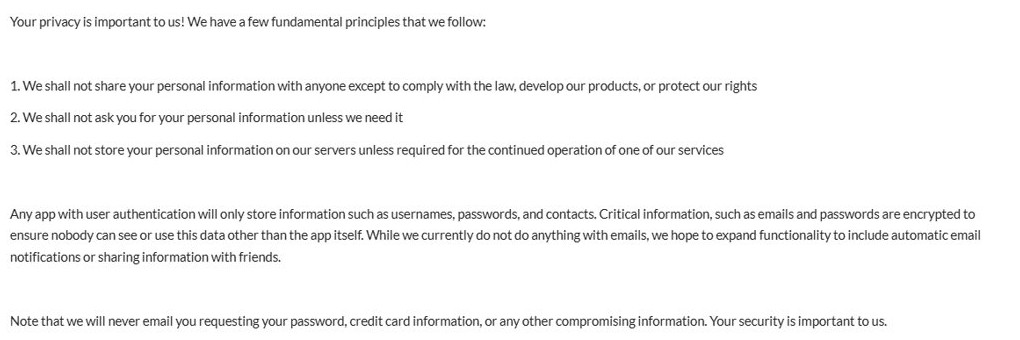
| Personal data | The policy says data is not shared except to comply with the law, and emails and passwords are encrypted |
| Server storage | The policy says personal information is not stored on the publisher's servers unless required for operation |
Notes persistence: a mixed picture
Sticky notes live inside the app's own data, so anything that wipes that data also wipes the notes.
| Action | Effect on your notes | What to do first |
|---|---|---|
| Restart or sign out | Notes stay as long as Widget Launcher starts again | Nothing |
| Store update | Notes are kept, though the notes widget was redesigned in 6.0.2 | Copy important text elsewhere before a major update |
| Repair in Settings | Fixes the app without removing data | Nothing |
| Reset in Settings | Returns the app to a fresh install and deletes its data | Copy note text into a file first |
| Uninstall | Removes the app and its data | Copy note text into a file first |
Extensions and security
| Check | Why it matters |
|---|---|
| Publisher is Chan Software Solutions | Official extensions come from the same publisher as the launcher |
| Title ends with for Widget Launcher | Official extensions state that they require Widget Launcher to run |
| Installed from the Microsoft Store | Store packages are signed and update automatically |
| Widget Launcher Pro is a different product | It is a $4.69 shortcut launcher from another publisher, not an upgrade of this app |
| Mini Browser loads web pages | Each web widget runs as its own isolated browser, so treat it like any browser tab |
Privacy and ads
Treat Widget Launcher as low-data but not fully documented: its privacy policy is short, undated and does not mention ads or analytics either way. The policy only commits to not sharing personal information except to comply with the law and to encrypting emails and passwords, while weather and RSS widgets need internet access to work.
Real‑world problems reported by the community
Widget Launcher will not open or crashes
A damaged app install or an outdated Windows or Store build.
- Select Start > Settings > Windows Update > Check for updates and install anything offered.
- Open Microsoft Store, select Library > Get updates.
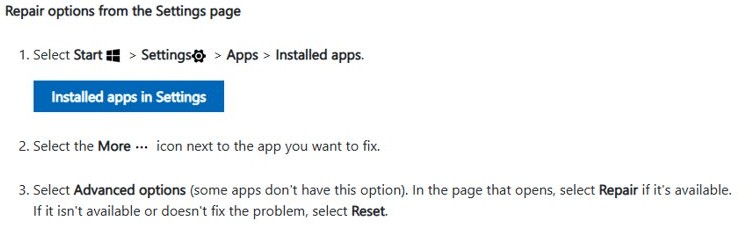
- Select Start > Settings > Apps > Installed apps.
- Select More next to Widget Launcher, then Advanced options > Repair.
- If Repair does not help, copy your notes and select Reset.
Widgets disappear after a restart
Widget Launcher is not set to start when you sign in.
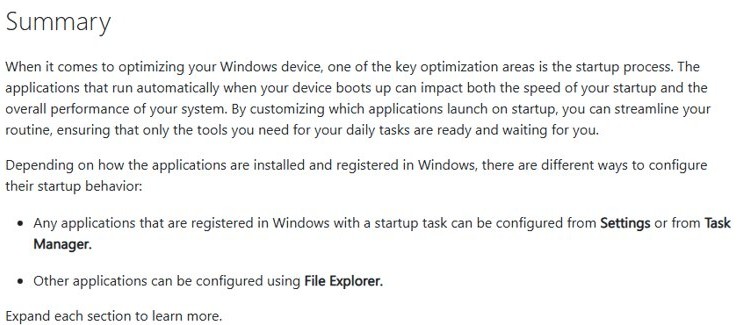
- Select Start > Settings > Apps > Startup.
- Set the toggle next to Widget Launcher to On.
- Sign out and back in to confirm the widgets return.
Widgets are hidden behind open windows
Widgets sit at desktop level, below normal app windows.
- Press Ctrl + Alt + W to bring the widgets to the foreground.
- If the shortcut does nothing, update Widget Launcher manually from Library in Microsoft Store, since the shortcut arrived in version 6.0.2.
A purchased extension does not show up
The extension is not installed on this PC or the launcher has not refreshed.
- Open Microsoft Store and select Library.
- Find the extension and select Install if it shows as not installed.
- Close Widget Launcher fully and open it again so it detects the extension.
Alternatives and where Widget Launcher fits
| Option | Where widgets appear | Best for | Cost |
|---|---|---|---|
| Widget Launcher | Pinned on the desktop | Always-visible clocks, notes and system meters | Free, paid add-ons |
| Windows 11 Widgets board | A panel opened from the taskbar or Windows key + W | Weather, news, stocks and photos cards | Built in |
| Xbox Game Bar widgets | An overlay opened with Windows key + G | Performance and audio widgets while gaming | Built in |
The Windows Widgets board can also open on hover; you can stop the Widgets board opening on hover if it gets in the way of desktop widgets near the taskbar.
How to evaluate and install Widget Launcher safely (practical steps)
- Open Microsoft Store and search for Widget Launcher.
- Confirm the publisher line reads Chan Software Solutions and the price reads Free.
- Scroll to System Requirements and confirm your PC meets the Windows version and x64 requirement.
- Read the permissions listed on the page and the linked privacy policy.
- Select Get, then Open to start the app.
- Add paid extensions later only from the same publisher, after the free widgets prove useful.
Critical analysis: strengths and notable risks
| Strengths | Risks and caveats |
|---|---|
| Free base app with a broad built-in widget set | Full-trust desktop component, not a sandboxed Store app |
| Distributed and updated through the Microsoft Store | Short, undated privacy policy with no word on analytics |
| Long track record, on the Store since 2013 | Notes live in app data and vanish on Reset or uninstall |
| Large rating base averaging 4.3 out of 5 | No native Arm64 package for the current release |
| Extensions add depth without bloating the base app | Look-alike listings from other publishers use similar names |
How to uninstall Widget Launcher on Windows 11
- Copy the text of any notes you want to keep into a file.
- Select Start > Settings > Apps > Installed apps.
- Find Widget Launcher, select More > Uninstall.
- Confirm with Uninstall.
- Repeat for any extensions or skins you installed, since each is a separate app.
Widget Launcher FAQ
Is Widget Launcher free?
Yes. Widget Launcher and its built-in widgets are free on the Microsoft Store. Extra widget packs and skins are sold separately, from $1.99 for Performance Monitor up to $4.79 for Pro Widgets, while several extensions such as Clipboard History are free.
Is Widget Launcher safe?
Widget Launcher is a signed Microsoft Store app from Chan Software Solutions with a 4.3 average from over 17,600 ratings. It declares full-trust and internet access, so install only the official listing and its extensions from the same publisher.
Who makes Widget Launcher?
Chan Software Solutions publishes Widget Launcher and its official extensions on the Microsoft Store. The listing's package name refers to Ambient Software, and support is handled by email through the address on the Store page.
Does Widget Launcher work on Windows 10?
Yes. The current package requires Windows 10 version 1809 or later, so it runs on supported Windows 10 PCs as well as Windows 11, on x64 hardware.
How do I make Widget Launcher start with Windows?
Open Settings > Apps > Startup and turn the Widget Launcher toggle on. Your widgets then return automatically each time you sign in instead of disappearing after a restart.
How do I bring desktop widgets in front of open windows?
Press Ctrl + Alt + W. Version 6.0.2 added this shortcut to bring all Widget Launcher widgets to the foreground, and the key combination can be changed in the app.
Is Widget Launcher Pro the same app?
No. Widget Launcher Pro is a paid shortcut launcher from a different publisher. The official paid upgrade for Widget Launcher is the Pro Widgets for Widget Launcher extension from Chan Software Solutions.
Are Widget Launcher widgets the same as Windows 11 Widgets?
No. Windows 11 Widgets live on the Widgets board opened with Windows key + W, while Widget Launcher pins its own widgets directly on the desktop.
Verdict and recommendations
Install the free Widget Launcher from Chan Software Solutions if you want clocks, notes or a CPU meter pinned on the Windows 11 desktop, and buy extensions only once the free widgets earn their place. It is free, Store-delivered and long established, while its full-trust package and thin privacy policy are reasons to stick to the official listing and keep copies of important notes.