LinkedIn is a free professional network, owned by Microsoft, where more than 1 billion members in over 200 countries and territories keep a public work profile, connect with colleagues, find jobs and hire.
This guide covers what the site does, who gains most from it, what a free account gets you versus Premium, how to create and fill in a profile, and which privacy and security settings to change first.
What Is LinkedIn?
LinkedIn describes itself as the world's largest professional network. Its stated mission is to connect the world's professionals to make them more productive and successful.
Join LinkedIn if you work, study, hire or sell to other businesses. A basic account is free, takes an email address or phone number and a password to create, and gives you a searchable professional profile that recruiters, colleagues and clients can find. A LinkedIn profile works as a living resume that people can look up by name. Recruiters search it, employers post jobs on it, and your connections see your job changes and posts. Staying off it means someone searching for you finds nothing, or finds another person with your name.
LinkedIn started in co-founder Reid Hoffman's living room in 2002 and launched on May 5, 2003. Microsoft completed its purchase of the company in December 2016. LinkedIn earns money from membership subscriptions, advertising and recruiting products, which is why the core network costs nothing.
Core Features of LinkedIn
Every feature below works on a free account unless the row says otherwise. Most of them start from the icons at the top of the LinkedIn homepage, such as Me, My Network and Jobs.
| Feature | What it does | Where to find it |
|---|---|---|
| Profile | A professional page with your headline, experience, education, skills, certifications, projects and recommendations | Me > View Profile |
| Connections | Sending an invitation that is accepted creates a 1st-degree connection; you can then message each other and see more of each other's profiles | Connect on a profile, or People you may know and pending invitations under My Network |
| Feed and posts | Shows posts from your network, companies you follow and content LinkedIn thinks is relevant; you choose each post's visibility before you share it | LinkedIn homepage |
| Jobs | Search in plain language, filter results, turn on job alerts, save jobs and apply | Jobs icon at the top of the homepage |
| Easy Apply and Apply | Easy Apply sends your application on LinkedIn; Apply sends you to the company's or a third-party site | On each job posting |
| #OpenToWork | Tells recruiters, or all members, that you want a new job, with your preferred roles and locations | Your profile, or Jobs > Preferences > Open to work |
| Recommendations | Request and give written endorsements of someone's work | Your profile's Recommendations section |
| LinkedIn Pages | Free pages for companies, schools and Showcase pages, separate from personal profiles | For Business > Create a Company Page |
| LinkedIn Learning | Video courses to build new skills; included with Premium Career and other Premium plans | Premium subscription |
You can use LinkedIn in a browser, in the mobile apps or in the LinkedIn app for Windows 11.
Why Should You Be on LinkedIn?
The value depends on what you want from it. Find your situation and use the feature in the middle column first.
| Your situation | What to use on LinkedIn | Why it helps |
|---|---|---|
| Looking for a job | #OpenToWork, job search with alerts, Easy Apply | Stating your roles and locations helps your profile appear when recruiters search for candidates |
| Happy in your job | A complete profile and a small network of people you have worked with | Your profile stays findable by name, and colleagues can reach you when they move to new companies |
| Student or recent graduate | Education, courses, projects, test scores and volunteer sections | These sections show what a short work history cannot |
| Freelancer or service provider | The providing services option in your introduction section | Visitors see that you offer services right next to your work history and recommendations |
| Hiring for a team | The hiring option on your profile, job posts, or Recruiter Lite | Recruiter Lite is LinkedIn's subscription for finding and hiring talent |
| Selling to other businesses | Sales Navigator | LinkedIn built it to generate leads, with custom lead lists and real-time alerts |
| Running a company or school | A free LinkedIn Page | Members can follow the Page and learn about your products, services and open jobs |
| Building skills | LinkedIn Learning through Premium Career | Premium Career includes unlimited LinkedIn Learning, and a Learning licence from your employer or school can also verify your workplace or school |
What a free LinkedIn account gives you vs Premium
LinkedIn offers a basic, free account and several paid Premium plans. Eligible members can try Premium free, often for one month, though trial length varies by region.
| Feature | Basic (free) | Premium Career | Premium Business |
|---|---|---|---|
| Find colleagues and classmates, view and search member profiles | Yes | Yes | Yes |
| Request and give recommendations | Yes | Yes | Yes |
| InMail credits to message people outside your network | None | 5 | 15 |
| Who viewed your profile | Three most recent viewers in the last 90 days | Full list for up to 365 days | Full list for up to 365 days |
| LinkedIn Learning | No | Unlimited access | Unlimited access |
| Private browsing and applicant insights | No | Yes | Yes |
| Message proofreader and profile writing help | No | Yes | Yes |
| Top Choice job | No | Yes | Yes |
| Business insights and a custom button | No | No | Yes |
The free account also receives unlimited InMail messages and can save up to three searches with weekly alerts.
Other plans target specific jobs. Premium All-in-One (30 InMail credits) adds advanced search plus $50 a month each in post boosting and job posting credit. Sales Navigator Core (50 credits) adds lead lists and alerts, Recruiter Lite (30 credits) adds candidate tracking, and Premium Company Page adds features for a LinkedIn Page.
A Premium free trial needs a valid credit card and converts to a paid plan unless you cancel before it ends. If you cancel a free trial, you cannot start another for at least 12 months. Cancelling Premium returns the account to the free plan.
What you need before you join LinkedIn
| Requirement | Detail from LinkedIn's terms and Help |
|---|---|
| Age | At least 16, or older where local law requires parental consent below a higher age |
| Name | Your real name; a profile must represent a real person |
| Number of accounts | One LinkedIn account per person, created only for yourself |
| Sign-up details | An email address or phone number, and a password |
| Primary email address | Needed to send connection invitations, so add one even if you sign up by phone |
| A business | Use a LinkedIn Page, not a profile; you need a personal account first to create a Page |
LinkedIn may log out, and later restrict, a profile that represents a company instead of a person. If you made one by mistake, change the name to your real name and create a Page for the organisation.
How to create a LinkedIn account
Signing up is free. The sign-up page asks only for a login and password; the screens that follow ask for profile basics.
- Go to linkedin.com/signup in your browser, or open the LinkedIn mobile app.
- Enter your Email or phone number.
- Enter a Password. Select Show to check it for typos.
- Read the User Agreement, Privacy Policy and Cookie Policy linked on the page, then select Agree & Join.
- Follow the on-screen prompts to finish creating the account and add your first profile details.
- If you signed up with a phone number, add an email address later from Settings & Privacy so you can send invitations.
Creating a page for a business instead? Select Get help next to Looking to create a page for a business? on the sign-up screen, or create a Page after you join.
How to set up your LinkedIn profile
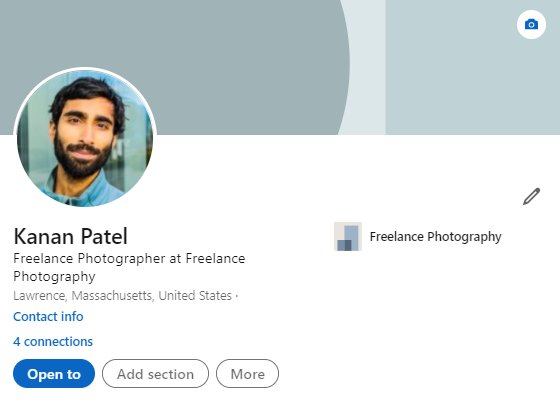
The introduction section at the top of your profile is the first thing visitors see. Your network is not notified when you edit it.
- Select the Me icon at the top of your LinkedIn homepage, then select View Profile.
- Select the Camera icon in your introduction section, choose Upload photo or Use camera, adjust the image and select Save photo.
- Select the Edit icon in your introduction section.
- Fill in Headline, Current position, Education, Location and Industry, and add a Background photo if you want one.
- Set whether you are open to finding a new job, hiring or providing services, then select Save.
- Add Experience, Skills and a Summary from the prompts under Suggested for you.
- Request recommendations from people you have worked with.
LinkedIn says a profile photo increases your credibility because people can see who is sending the invitation to connect. Skills also help others find you in search.
How to Maximize Your Presence on LinkedIn
A finished profile is the start. These actions, in this order, make the profile findable and trusted.
- Reach an All-star profile level by adding all seven recommended sections: profile photo, location, industry, education, position, skills and summary.
- Connect with people you have worked or studied with. Select Connect on their profile, or More > Connect when Follow is the main button.
- Verify your identity, workplace or school from your profile. Verification is free, and LinkedIn reports verified members see 60% more profile views on average.
- If you are job hunting, turn on #OpenToWork and choose who can see it.
- In Jobs, run a search, apply filters and turn on the alerts toggle so new matches come to you.
- Post or comment on topics from your field. Pick the post's visibility before you share, because you cannot change it afterwards.
Send invitations only to people you have a reason to know. LinkedIn may temporarily stop you sending invitations if members report yours as unwanted or spam.
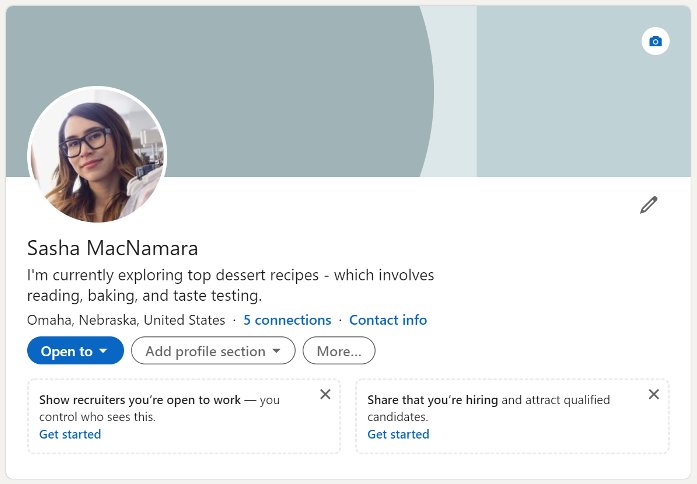
Where LinkedIn's privacy settings live
Almost every privacy control sits under Me > Settings & Privacy, which you can also reach by typing linkedin.com/psettings/ into the address bar. The page has six sections.
| If you want to | Go to | What to change |
|---|---|---|
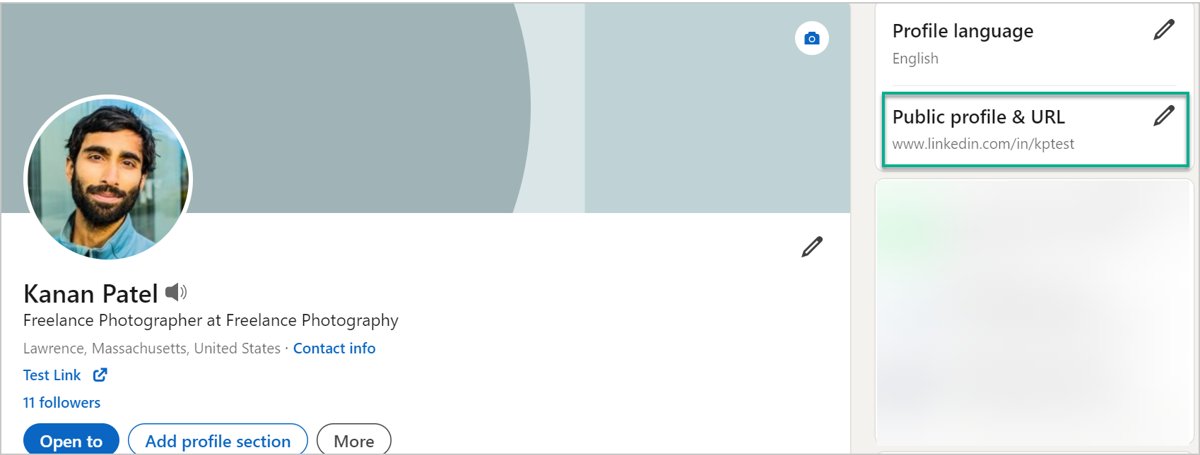
| Hide your profile from Google, Bing and people who are not signed in | Me > View Profile > Edit next to Public profile & URL | Turn Your profile's public visibility off, or turn off single sections |
| Stop people finding you by email or phone number | Settings & Privacy > Visibility | Discoverability by email and Discoverability by phone number: choose connections only or Nobody |
| Control who sees your profile, network and activity | Settings & Privacy > Visibility | Profile, network and activity options |
| Limit who can reach you and how your data is used | Settings & Privacy > Data privacy | Messaging, job seeking preferences and data use options |
| Reduce targeted ads | Settings & Privacy > Advertising data | The information LinkedIn uses to pick ads for you |
| Cut down emails and alerts | Settings & Privacy > Notifications | Notification types and frequency |
| Protect your sign-in | Settings & Privacy > Sign in & security | Password, phone numbers and two-factor authentication |
Search engines can take several weeks or months to reflect a public profile change, and LinkedIn does not control that refresh. Turning off your public profile can also make account recovery harder, because LinkedIn may ask for your public profile URL.
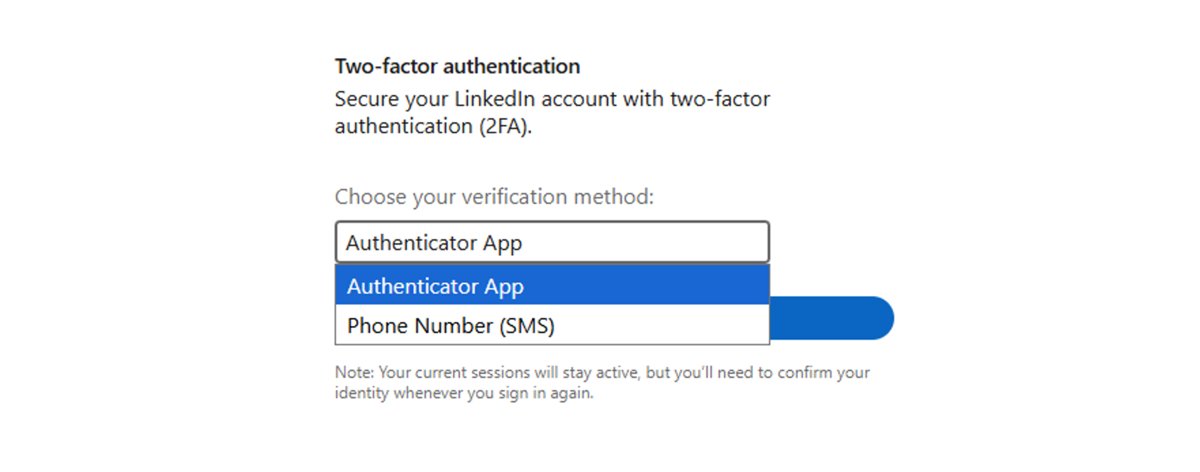
Turn on two-factor authentication for your LinkedIn account
Two-factor authentication asks for a code from your phone as well as your password. The phone number you use for it does not appear on your profile. Techdows covered the original setup in turning on LinkedIn two-step verification; the current steps are below.
- Select the Me icon at the top of your LinkedIn homepage, then select Settings & Privacy.
- Select Sign in & security on the left, then Two-factor authentication.
- Select Turn on. Enter your password or approve the change in the LinkedIn app if asked.
- Select Set up, choose Authenticator App or Phone Number (SMS) from the dropdown and select Continue.
- Scan the code with an authenticator app such as Microsoft Authenticator, or enter the code sent by text to your phone.
Keep it on if you use Sales Navigator, Recruiter or Campaign Manager. Those products require two-factor authentication on your LinkedIn account, and turning it off blocks access to them.
How to check your profile is ready
- Select Me > View Profile and look under Suggested for you. When the profile level meter disappears, your profile has an All-star rating.
- Select Edit next to Public profile & URL to see the version people see when they are not signed in.
- Check the badge next to your name if you verified; signed-in members can select it to see your active verifications.
- Open Who's viewed your profile after a few days. Views in the list show people are finding you.
- Open Settings & Privacy > Sign in & security and confirm Two-factor authentication shows as on.
Fix common LinkedIn account problems
You see no one in Who's viewed your profile
Your own profile viewing option is set to private mode, which hides viewer insights from you too.
- Open Who's viewed your profile.
- Check your profile viewing options in Settings & Privacy > Visibility.
- Set them to show your name and headline so viewer insights can appear.
There is no Connect button on someone's profile
The member has made Follow the main button on their profile.
- Select More on their profile.
- Select Connect.
- Choose how you know the person, or send a message first if LinkedIn asks.
Your old profile still shows in Google or Bing results
Search engines refresh on their own schedule, which can take weeks or months.
- Confirm the change is saved in your public profile settings.
- Wait for the search engine to recrawl the page.
- If the result stays wrong, contact the search engine directly to request a correction.
You cannot start a Premium free trial
You used a trial before, cancelled one in the last 12 months, or your card was declined.
- Check LinkedIn free Premium trial eligibility in LinkedIn Help.
- Check your card details or try a different payment method.
- Compare plans with the table above before you pay for one.
Your #OpenToWork status disappeared
LinkedIn removes it when you stop replying to recruiter InMails and do not confirm you are still looking.
- Check your email for LinkedIn's confirmation request.
- Turn #OpenToWork back on from your profile or Jobs > Preferences > Open to work.
- Reply to recruiter messages, even to decline.
Common Misconceptions About LinkedIn
| Misconception | What LinkedIn's own pages say |
|---|---|
| LinkedIn is only for job seekers | It also serves hiring managers, salespeople, freelancers and organisations through Pages, Sales Navigator and Recruiter Lite |
| You need Premium to use LinkedIn | The basic account is free and covers profiles, connections, search, recommendations and job applications |
| Open to Work always tells your boss | The Recruiters only option hides it from recruiters at your current company, though LinkedIn says it cannot guarantee complete privacy; All LinkedIn Members shows it to everyone, including coworkers |
| A business can run a personal profile | Profiles must represent real people; organisations need a LinkedIn Page |
| Verification costs money | Adding a verification is free and optional, and you can remove it at any time |
| A free Premium trial has no strings | It needs a credit card and turns into a paid plan unless you cancel before it ends |
| Hiding your public profile hides you everywhere | It hides the public version from non-members and search engines; signed-in members still see your profile according to your Visibility settings |
In Conclusion
Create a free LinkedIn account, bring the profile to All-star, connect with people you have actually worked with and turn on two-factor authentication. Try Premium only when you have a specific need, such as InMail to recruiters or LinkedIn Learning courses. The free account already makes you findable to recruiters, colleagues and clients, and the privacy settings let you decide how much of that profile the public web sees. Premium adds reach and insight, not the core network.
Frequently Asked Questions
What is the main purpose of LinkedIn?
LinkedIn's stated mission is to connect the world's professionals to make them more productive and successful. In practice, members use it to keep a public work profile, build a network of colleagues, find and apply for jobs, hire, and promote their business through LinkedIn Pages.
What does LinkedIn provide?
A free account gives you a professional profile, connections and messaging, a feed, job search with alerts and Easy Apply, recommendations and free company Pages. Paid plans add InMail credits, full profile viewer history, LinkedIn Learning, Sales Navigator for sales teams and Recruiter Lite for hiring.
Why should I create a LinkedIn profile?
A profile lets recruiters, colleagues and clients find you by name and see your work history, skills and recommendations in one place. Recruiters search LinkedIn for candidates, and a complete profile with the seven recommended sections appears more often in search results.
Why should I use LinkedIn if I am not looking for a job?
Your network keeps working while you are not job hunting. Former colleagues can reach you when they move, clients can check your background, and the feed keeps you current in your field. Updating a profile now is easier than building one in a hurry later.
Is having a LinkedIn profile important?
For most working professionals, yes. Your public LinkedIn profile can appear when people search your name on Google or Bing, so having one controls what they find. Freelancers, job seekers and anyone selling to businesses gain the most from it.
Why should I verify my LinkedIn account?
A verification badge shows that your identity, workplace or school has been checked, which gives people more confidence to connect with you. LinkedIn reports verified members see 60% more profile views and 50% more engagement on average. Verification is free and optional.
Why do businesses use LinkedIn?
Businesses use free LinkedIn Pages to show their products, services, brand and open jobs to members who follow them. Paid tools add more: Sales Navigator for finding leads, Recruiter Lite for hiring, and Premium Company Page for turning Page visitors into customers.
Why should I use LinkedIn Sales Navigator?
Use Sales Navigator if you sell to other businesses. LinkedIn built it to generate leads and build a client base, with its own interface, custom lead and account lists, lead recommendations, real-time alerts and 50 InMail credits. It also requires two-factor authentication on your account.
Why should you take LinkedIn Learning courses?
LinkedIn Learning courses build skills you can then list on your profile, where skills help others find you in search. Individuals get unlimited access through Premium Career and other Premium plans; LinkedIn does not sell single courses or a separate personal Learning subscription.
How is LinkedIn helpful?
LinkedIn puts your work history, skills and recommendations in one searchable profile, so recruiters and clients can find you. It also gives you a job board with alerts and Easy Apply, a network you can message, a feed from your field and, with Premium, LinkedIn Learning courses.

![How to appear offline on Steam [easy & quick guide]](https://techdows.com/wp-content/uploads/2026/10/Steam-Friends-List-in-a-browser-with-the-status-line-under-the-profile-name-600x338.jpg)