A CFG file is a configuration file that a program reads to load its settings, and because most are plain text, you can open one in Notepad on Windows or TextEdit on Mac.
This guide covers how to identify a CFG file, which editor to use, where programs keep them, how to edit or create one without breaking the program, and what to do when one will not open or save.
Open a CFG file with Notepad or TextEdit
Opening a CFG file only displays its text. Nothing runs until the program that owns the file reads it again.
- On Windows, right-click the CFG file in File Explorer and select Open with > Choose another app.
- Select Notepad in the list of apps to show the file's text.
- On a Mac, Control-click the CFG file in the Finder, choose Open With, then choose TextEdit.
- Read the settings, or close the window without saving if you only wanted to look.
What is a CFG file and is it safe?
CFG is short for configuration. A program stores its options in the file, such as a window size, a server address or a key binding, and reads them when it starts.
| Question | Answer |
|---|---|
| What is inside | Settings written as text, usually one per line, such as volume = 80 |
| Which program uses it | Only the program that created it; the .cfg extension does not belong to a single app |
| Does it run on its own | No. Windows and macOS treat it as a document, so double-clicking it opens it in an app or asks you to pick one |
| Is it safe to open | Yes. Reading the file in a text editor or a preview window changes nothing |
| Is it safe to edit | Only with a backup copy. One wrong value can stop the owning program from starting or reset its settings |
| Is it safe to delete | Deleting it removes your custom settings; some programs then create a fresh file with defaults, others report an error |
| CFG files from the internet | Read one in a text editor before you copy it into a program's folder, because the program acts on every line |
Renaming a CFG file to .txt or any other extension does not convert it. It only changes which app Windows or macOS offers to open it.
Understanding what a CFG file is
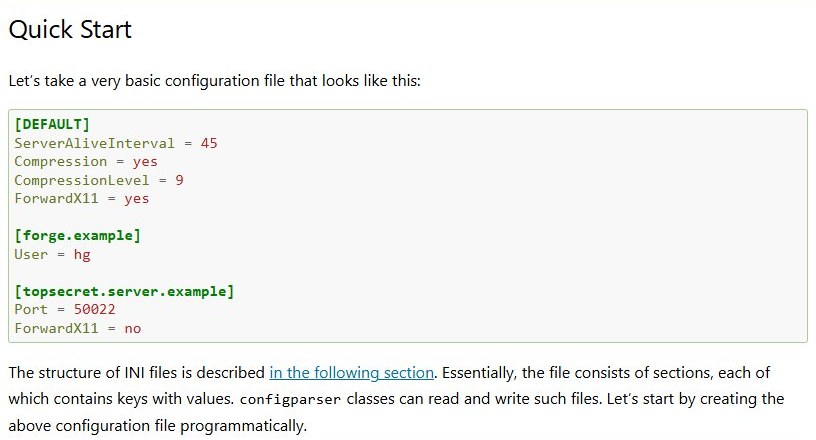
Many CFG files use the same layout as Windows INI files: named sections, then settings under each one.
Python's configparser documentation describes this structure in detail, and the same rules help you read most INI-style CFG files.
| Part | Looks like | What it means |
|---|---|---|
| Section header | [network] |
Starts a group of related settings; every line below belongs to it until the next header |
| Setting | timeout = 30 or timeout: 30 |
A key and its value, separated by an equals sign or a colon |
| Comment | # default port or ; default port |
A note for people; the program skips the line |
| Multi-line value | A value continued on an indented line | Lines indented deeper than the key continue that key's value |
| Default section | [DEFAULT] |
In Python's parser, values here apply to every other section unless a section overrides them |
Section names are case sensitive in Python's parser, but keys are not. Other programs set their own rules, so copy the spelling already in the file.
Understanding CFG files
A CFG file has no effect by itself. It matters only when its program opens it, which is why the same file name can mean different things in different apps.
| When | What the program does | What it means for you |
|---|---|---|
| At start-up | Reads the CFG file and applies each setting | Your edits take effect the next time the program starts |
| A setting is missing | Uses its built-in default for that option | Removing one line resets just that option |
| A value is invalid | Ignores the line, resets it, or stops with an error | A typo in one value can stop the program from starting |
| While running or on exit | Some programs write their current settings back to the file | Close the program before you edit, or it can overwrite your change |
| Several files are read | Some programs read more than one file, and the last one read wins | Python's configparser works this way: an override file replaces matching keys |
Common types of CFG files
| Type | How to recognize it | Example |
|---|---|---|
| INI-style settings | [section] headers and key = value lines |
A Python project's setup.cfg, which holds option defaults for setup.py commands |
| Generated configuration | The vendor's documentation says a tool builds the file | GRUB 2's /boot/grub2/grub.cfg on Red Hat Enterprise Linux, rebuilt by grub2-mkconfig |
| Command list | One command per line, often with no sections | PC game settings files that hold console commands and key bindings |
| Binary data | Random symbols and boxes in Notepad or TextEdit | Settings stored in a program's own format; change them inside the program instead |
Examples of CFG files
| File | Used by | What it contains | How to change it |
|---|---|---|---|
setup.cfg |
Python projects | INI-style option defaults for setup.py commands, such as [bdist_wheel] followed by universal=1 |
Edit it in any code editor, then rebuild the package |
/boot/grub2/grub.cfg |
The GRUB 2 boot loader on Red Hat Enterprise Linux | Boot menu entries and kernel options | Change /etc/default/grub, then run grub2-mkconfig -o /boot/grub2/grub.cfg to rebuild it |
| An INI-style app settings file | Programs that use INI parsers, including Python's configparser | [DEFAULT] with lines such as Compression = yes and ServerAliveInterval = 45 |
Change the value after the equals sign and restart the program |
| Game settings files | Many PC games | Graphics options, console commands and key bindings | Use the game's options menu first; edit the file only when a setting is missing there |
How to identify a CFG file
File Explorer and the Finder can hide file name extensions, so a file shown as settings may really be settings.cfg.
Start by turning extensions on. You can open File Explorer from the taskbar or the Start menu.
- On Windows 11, open File Explorer and select View > Show > File name extensions.
- On Windows 10, open File Explorer, select the View tab and tick File name extensions in the Show/hide group.
- On a Mac, choose Finder > Settings, click Advanced and select Show all filename extensions.
- Look for
.cfgat the end of the name;settings.cfg.txtis a text file, not a CFG file. - Note the folder that holds the file, because the parent folder usually names the program that reads it.
- Open the file in Notepad or TextEdit and read the first lines, which often carry a comment naming the program.
Best CFG file editor for Windows and Mac
Avoid Microsoft Word, Pages and other word processors for CFG files. They can save formatting that the program cannot read.
| Your situation | Use this | Why |
|---|---|---|
| Quick look or small edit on Windows | Notepad | Built into Windows and opens any plain-text file |
| Quick look on a Mac without opening an app | Quick Look: select the file and press the Space bar | Shows the text in a preview window, and nothing can be changed |
| Small edit on a Mac | TextEdit | Built into macOS; open the file with File > Open |
| Long file or frequent edits on Windows | Notepad++ | Free Windows source code editor and Notepad replacement that supports several languages |
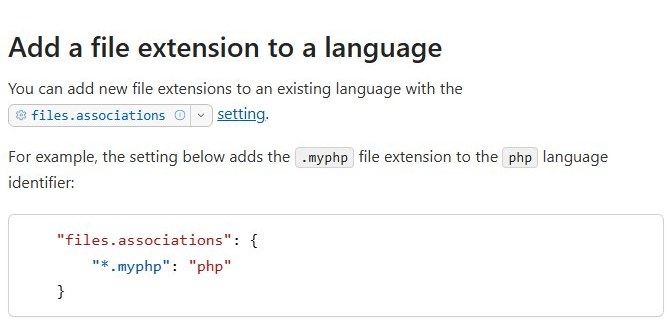
| Same editor on Windows, Mac and Linux | Visual Studio Code | Runs on all three; map *.cfg to the ini language for color-coded sections |
| The file shows random symbols | No text editor; use the program's own settings screen | The file is binary, and saving it from a text editor can corrupt it |
In Visual Studio Code, add "files.associations": {"*.cfg": "ini"} to your settings so every CFG file opens with INI highlighting.
How to open a CFG file on Windows
- Open File Explorer and go to the folder that holds the CFG file.
- Right-click the file and select Open with.
- Select Choose another app to see the apps installed on your PC.
- Select Notepad, or Notepad++ or Visual Studio Code if you installed one, and confirm your choice.
- Read or change the settings, then select File > Save if you edited anything.
- If no listed app suits the file, select Open with > Search the Microsoft Store to find one.
How to open CFG files on Windows 10 and 11
Set a default app once and every CFG file opens in it on a double-click. The steps are the same on Windows 10 and Windows 11.
- Open Settings and select Apps > Default apps.
- Type
.cfgin the search box for file types. - Select the
.cfgresult. - Choose Notepad or another editor from the list of apps.
- Double-click any CFG file in File Explorer; it now opens in that editor.
How to open CFG files on Mac
- Select the CFG file in the Finder.
- Choose File > Open With, then choose TextEdit.
- If TextEdit is not listed, open TextEdit from Applications, choose File > Open, select the file and click Open.
- Read or change the settings, then choose File > Save if you edited anything.
You can also drag the CFG file onto the TextEdit icon in the Dock or the Finder.
Opening CFG files on Mac
| What you want | Do this | Result |
|---|---|---|
| Peek at the settings | Select the file and press the Space bar; press it again to close | A read-only Quick Look preview |
| Edit one file | Control-click the file and choose Open With > TextEdit | Opens this file only |
| Open every CFG file in the same app | Select the file, choose File > Get Info, click the arrow next to Open with, choose an app, then click Change All | Every .cfg file opens in that app on a double-click |
| See the full file name | In Get Info, expand Name & Extension and deselect Hide extension | The .cfg ending shows for that file |
| Color-coded editing | Install Visual Studio Code for macOS and open the file with File > Open | Sections, keys and comments shown in different colors |
Click Change All only when you want every CFG file to open in that app. For one file, use Open With instead.
Configuring software on Windows and Mac
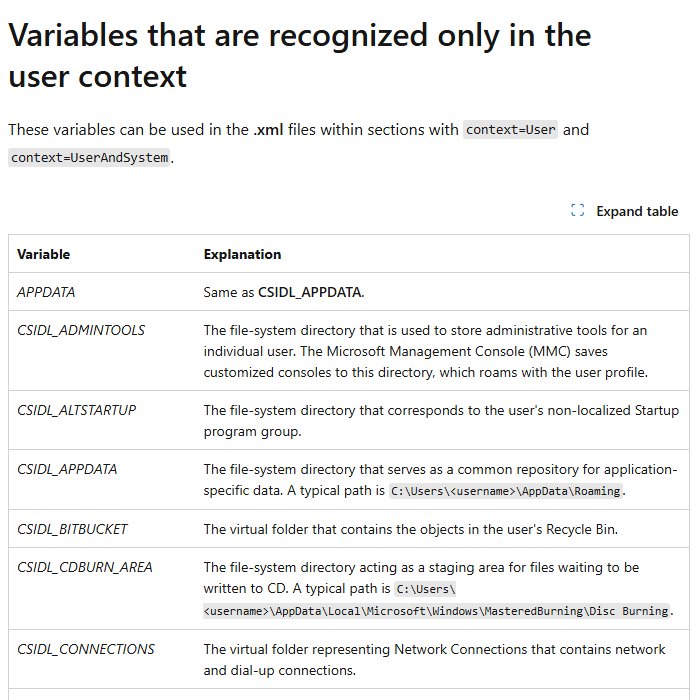
A program's own documentation names its CFG file and folder. When it does not, look in the standard places Windows and macOS give programs for settings.
| Location | Windows | Mac |
|---|---|---|
| Per-user settings | %APPDATA%, typically C:\Users\<username>\AppData\Roaming |
~/Library/Application Support/, in a folder named after the app's bundle identifier, such as com.example.MyApp |
| Per-user, this PC only | %LOCALAPPDATA%, typically C:\Users\<username>\AppData\Local |
Not applicable |
| Settings for all users | %PROGRAMDATA%, typically C:\ProgramData |
Not applicable |
| Program's install folder | The Program Files folders: C:\Program Files, or C:\Program Files (x86) for 32-bit programs on 64-bit Windows |
Inside the app bundle, which holds the files the app needs to run; leave it alone |
| App preferences | Not applicable | ~/Library/Preferences, which apps manage through system interfaces; change these settings inside the app |
On Windows, press Windows + R, type %appdata% and press Enter to open the per-user folder, which File Explorer hides until you show hidden files. On a Mac, choose Go > Go to Folder in the Finder and type ~/Library/Application Support/.
How to open and edit CFG files without corrupting them
| Do this | Why |
|---|---|
| Use a plain-text editor, never a word processor | Word processors can add formatting the program cannot read |
| Read the file before you change it | Quick Look or Notepad shows at once whether the file is text or binary |
| Keep the exact name and the .cfg extension | The program looks for that name, and a new extension changes which app opens it |
| Change one setting at a time | If the program fails afterwards, you know which line caused it |
| Keep the spelling and case already in the file | Programs differ on case rules; Python's parser treats section names as case sensitive |
| Use the program's settings screen when it has the option | The program then writes a valid value for you |
These best practices apply to every CFG file, from a game's key bindings to a boot loader's menu.
Editing CFG files safely
- Close the program that uses the CFG file, so it cannot overwrite your change when it exits.
- Copy the file and give the copy a backup name, such as
settings.cfg.bak. - Open the original file in Notepad, TextEdit or your code editor.
- Change only the value after the
=or:and leave the key name as it is. - Save with File > Save, keeping the same name and the .cfg extension.
- Start the program and test the setting you changed.
- If the program fails to start, delete the edited file and rename the backup copy to the original name.
A copy ending in .bak is a common convention for backups. BAK files hold the earlier version, and renaming one back restores it.
Creating a CFG file
Create a CFG file only when a program's documentation asks for one and lists the settings it accepts. A file with made-up keys does nothing.
| Step | Windows (Notepad) | Mac (TextEdit) |
|---|---|---|
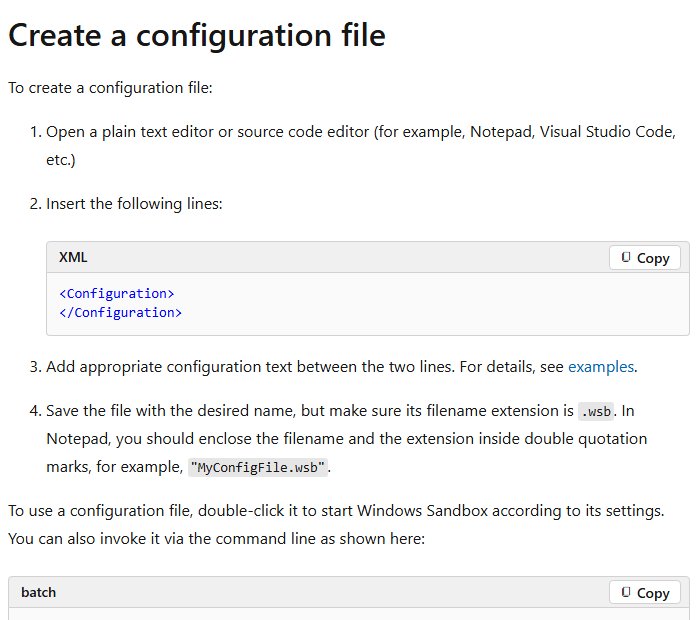
| Start a plain-text file | Open Notepad | Open TextEdit, choose File > New, then Format > Make Plain Text |
| Add the settings | Type each setting on its own line, such as [general] and then language = en |
Type the same layout |
| Keep the .cfg extension | Select File > Save as and type the name in double quotation marks, such as "settings.cfg", so Notepad does not add .txt |
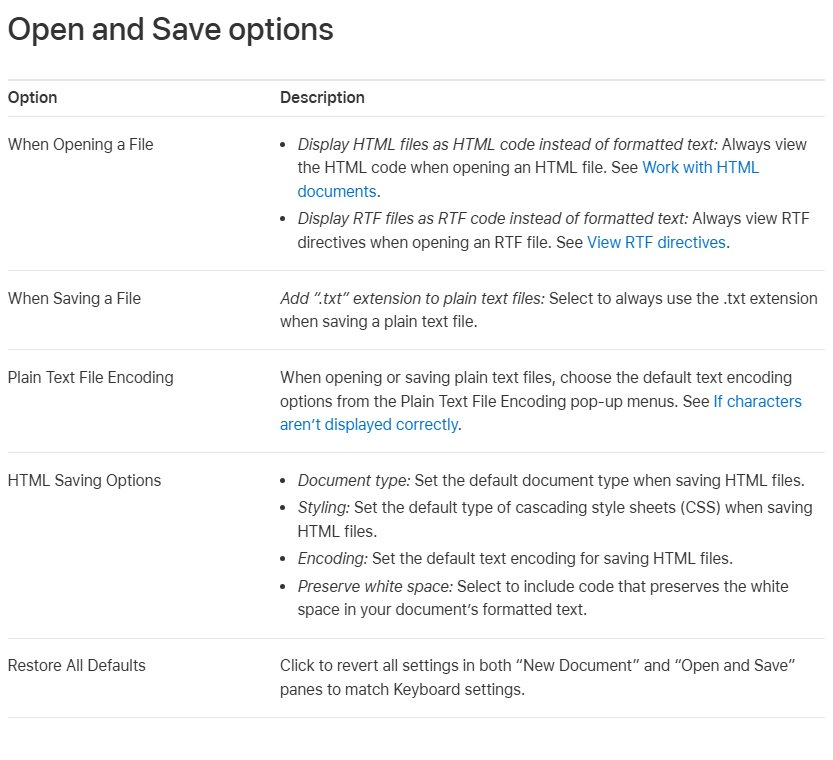
In TextEdit > Settings > Open and Save, deselect Add ".txt" extension to plain text files before you save |
| Save it where the program looks | The folder the program's documentation names | The folder the program's documentation names |
How to convert a CFG file to TXT
A CFG file that opens as readable text is already a text file. Converting it only means saving a copy with a .txt name, and the content stays identical.
- Turn on file name extensions in File Explorer or the Finder so you can see
.cfg. - Copy the CFG file and paste the copy in the same folder.
- Rename the copy, replacing
.cfgwith.txt, and confirm the change when Windows or macOS asks. - Open the .txt copy in Notepad or TextEdit to share or print it.
- Leave the original .cfg file in place, because the program still reads that one.
Common issues when opening CFG files
Windows asks which app to use every time
No default app is set for the .cfg extension.
- Open Settings > Apps > Default apps.
- Type
.cfg, select the result and choose Notepad.
The CFG file opens in the wrong program
Another installed program registered the .cfg extension for itself.
- On Windows, right-click the file and select Open with > Choose another app, then pick your editor.
- Make the change permanent under Settings > Apps > Default apps.
- On a Mac, use File > Get Info, choose the editor under Open with and click Change All.
The CFG file shows random symbols or boxes
The file is binary, not plain text.
- Close the editor without saving.
- Change the setting through the program's own options screen instead.
- Restore your backup copy if the file was already saved from a text editor.
Double-clicking a CFG file on a Mac opens nothing useful
macOS has no suitable app assigned to the extension.
- Control-click the file and choose Open With > TextEdit.
- Use File > Get Info > Open with > Change All to make TextEdit the default.
You cannot find the CFG file
Extensions are hidden, or the file sits in a per-user app data folder.
- Turn on file name extensions in File Explorer or the Finder.
- Check
%APPDATA%,%LOCALAPPDATA%and%PROGRAMDATA%on Windows. - On a Mac, choose Go > Go to Folder and check
~/Library/Application Support/.
Troubleshooting common CFG file issues
Notepad saved the file as settings.cfg.txt
Notepad added its default .txt extension.
- Turn on file name extensions in File Explorer.
- Rename the file and delete the trailing
.txt. - Next time, type the name in double quotation marks in the Save as dialog.
TextEdit adds .txt to the CFG file
The option that adds .txt to plain text files is on.
- Choose TextEdit > Settings > Open and Save.
- Deselect Add ".txt" extension to plain text files.
- Rename the saved file in the Finder so it ends in
.cfgagain.
You cannot save changes to the CFG file
The file is in a protected folder such as C:\Program Files, which needs administrator permission.
- Save the edited file to your desktop instead.
- Copy it into the original folder and approve the administrator permission prompt.
- If your workplace manages the program, ask your IT admin to make the change.
The program ignores your CFG changes
The program was running and rewrote the file, or it reads a different copy.
- Close the program completely and make the edit again.
- Search the program's folders for a second file with the same name.
- Start the program only after you save the file.
The program will not start after you edited the CFG file
A typo or an invalid value in the line you changed.
- Delete the edited file.
- Rename your backup copy to the original file name.
- Make the change again, one setting at a time.
Changes to grub.cfg disappear on Linux
A tool rebuilds the file, so direct edits are overwritten.
- Make the change in
/etc/default/grubinstead. - Run
grub2-mkconfig -o /boot/grub2/grub.cfgto rebuild the file on Red Hat Enterprise Linux.
CFG file FAQ
What is a CFG file used for?
A CFG file stores settings for the program that created it, such as display options, server addresses or key bindings. The program reads the file when it starts and applies each value, so a change to the file changes how that program behaves the next time it opens.
Is it safe to open a CFG file?
Yes. Opening a CFG file in Notepad, TextEdit or Quick Look only shows its text and runs nothing. Care is needed when you edit or replace one, because the program that reads the file acts on every line in it.
What program opens a CFG file on Windows?
Notepad opens most CFG files on Windows 11 and Windows 10. Right-click the file, select Open with > Choose another app and pick Notepad. Notepad++ and Visual Studio Code are free alternatives that handle long files and code better.
How do I open a CFG file on a Mac?
Control-click the file in the Finder, choose Open With and select TextEdit. To read it without editing, select the file and press the Space bar for a Quick Look preview. Use File > Get Info > Change All to make TextEdit the default for CFG files.
Can I edit a CFG file in Notepad?
Yes. Close the program that uses the file, keep a backup copy, change the value after the equals sign and save with File > Save. Saving over the existing file keeps its name and the .cfg extension.
How do I create a CFG file?
Open Notepad, type the settings the program's documentation lists, then choose File > Save as and type the name in double quotation marks, such as "settings.cfg". On a Mac, make the TextEdit document plain text and turn off the setting that adds .txt.
Can I convert a CFG file to a TXT file?
Yes. Copy the CFG file and rename the copy with a .txt extension. The text inside stays the same, so the copy opens in any text editor, while the program keeps using the original .cfg file.
Can I delete CFG files?
You can, but deleting a CFG file removes the settings it held. Some programs create a new file with default settings at the next start, while others report an error. Rename the file instead of deleting it when you only want to test the defaults.
Why does my CFG file open in the wrong app?
Another installed program has registered the .cfg extension. On Windows, open Settings > Apps > Default apps, search for .cfg and pick your editor. On a Mac, use File > Get Info, choose the app under Open with and click Change All.
Is a CFG file the same as an INI file?
Not always. Many CFG files use the same layout as Windows INI files, with [section] headers and key = value lines, but the .cfg extension only signals a configuration file. Each program decides the syntax its own CFG file uses.
Should you edit or delete a CFG file?
Edit a CFG file only when the program's settings screen cannot make the change, and never delete one you have not backed up. The file is plain text and safe to read, but the program trusts every line in it. A backup copy and one change at a time turn any mistake into a quick rename.