NSFW stands for "not safe for work" and warns that a link, image or post is something you would not want on your screen at the office, in class or in public.
This guide covers what the label covers, how to add it to your own posts and messages, how it differs from SFW and NSFL, and where Google, Bing, YouTube and Instagram let you filter sensitive content.
What does NSFW stand for?
NSFW is an acronym for "not safe for work." It is a warning label, not a description of the content itself.
| Letter | Word | What it tells the reader |
|---|---|---|
| N | Not | The content fails a basic test |
| S | Safe | The test is about who could see your screen, not about danger |
| F | For | Links the warning to a setting |
| W | Work | The setting is any shared or public place: an office, a classroom, a train |
Read it as "open this later, when you are alone." The opposite tag is SFW, "safe for work," which tells the reader the link is fine to open anywhere.
Should you tag a post or link NSFW? Quick decision table
Match what you are about to share to a row. The test is simple: would you be comfortable if a manager or teacher glanced at the screen?
| What you are sharing | Tag it? | Why |
|---|---|---|
| Swearing in a video title or thumbnail | Yes, NSFW | Strong language read out loud or seen on screen draws attention |
| Graphic injury or medical photos | Yes, NSFW (or NSFL if disturbing) | Readers need the choice before the image loads |
| Suggestive or revealing images | Yes, NSFW | This is the most common reason the tag exists |
| Loud audio that plays automatically | Yes, NSFW | Sound gives away what you are viewing |
| A plain news article or recipe | No | Over-tagging makes real warnings easier to ignore |
| A meme with mild jokes | Usually no, or mark it SFW | SFW reassures readers who are at work |
What kind of content is labeled NSFW?
NSFW covers anything that would embarrass you, offend people nearby or break a workplace policy if it appeared on your screen.
| Category | Typical examples | Why it gets the tag |
|---|---|---|
| Sexual or suggestive material | Nudity, revealing photos, explicit jokes | Breaks almost every workplace and school acceptable-use policy |
| Violence and gore | Accident footage, injury photos, fights | Shocking to anyone who opens it without warning |
| Strong language | Profanity in titles, captions or audio | Unprofessional on a shared screen or speaker |
| Offensive humor | Crude memes, slurs, shock jokes | Can offend coworkers even when meant as a joke |
| Disturbing real events | Crime scenes, medical procedures | Upsetting regardless of where you view it |
The label reflects the poster's judgment. One person's mild joke is another person's NSFW, so a tag is a courtesy rather than a fixed category.
How do you use NSFW correctly?
Put the tag where the reader sees it before they click or scroll. A warning after the image is no warning at all.
- When posting content: put NSFW at the start of the title or caption, for example "NSFW: unedited crash footage from the race."
- Use the platform's own sensitive-content or age-restriction setting as well, if it has one, so the post is blurred or hidden by default.
- When sharing a link: add (NSFW) next to the link in your message, before anyone taps it.
- Add a few words on why, such as "NSFW, language" or "NSFW, graphic injury," so readers can judge the risk.
- When describing someone else's post: keep the warning in your reply or repost, for example "Heads up, the video in this thread is NSFW."
- Skip the tag when the content is clean. Write SFW instead if people are likely to hesitate before opening it.
NSFW works in capitals or lowercase, but capitals stand out better in a busy feed or chat. Like the internet abbreviation YMMV, it is informal and belongs in chat, social posts and forums rather than formal email.
NSFW versus related warnings
Several warning labels sit next to NSFW. Each one tells the reader something different, so pick the one that matches the content.
| Label | Stands for | Meaning | Use it when |
|---|---|---|---|
| NSFW | Not safe for work | Not suitable for a shared or public screen | Content is explicit, crude or graphic |
| SFW | Safe for work | Fine to open anywhere | You want to reassure someone at work or school |
| NSFL | Not safe for life | Disturbing enough that you may regret seeing it at all | Content is gory or traumatic, not just awkward |
| CW | Content warning | Flags a specific topic before the post | A subject such as death or illness could upset readers |
| TW | Trigger warning | Similar to CW, aimed at readers with past trauma | The topic could cause real distress |
| Spoiler | Spoiler | Reveals a plot point | The issue is story details, not explicit content |
NSFW is about where you view something. NSFL, CW and TW are about how the content affects you wherever you are.
Does NSFW always mean sexual content?
No. NSFW often marks sexual or suggestive content, but it equally covers gore, profanity, crude humor and loud or shocking audio. The tag answers one question: would this cause trouble on a screen others can see? A clip full of swearing passes that test as badly as a revealing photo, so both get the label. Add a word of context ("NSFW, language") so readers know which kind it is.
How platforms handle NSFW content
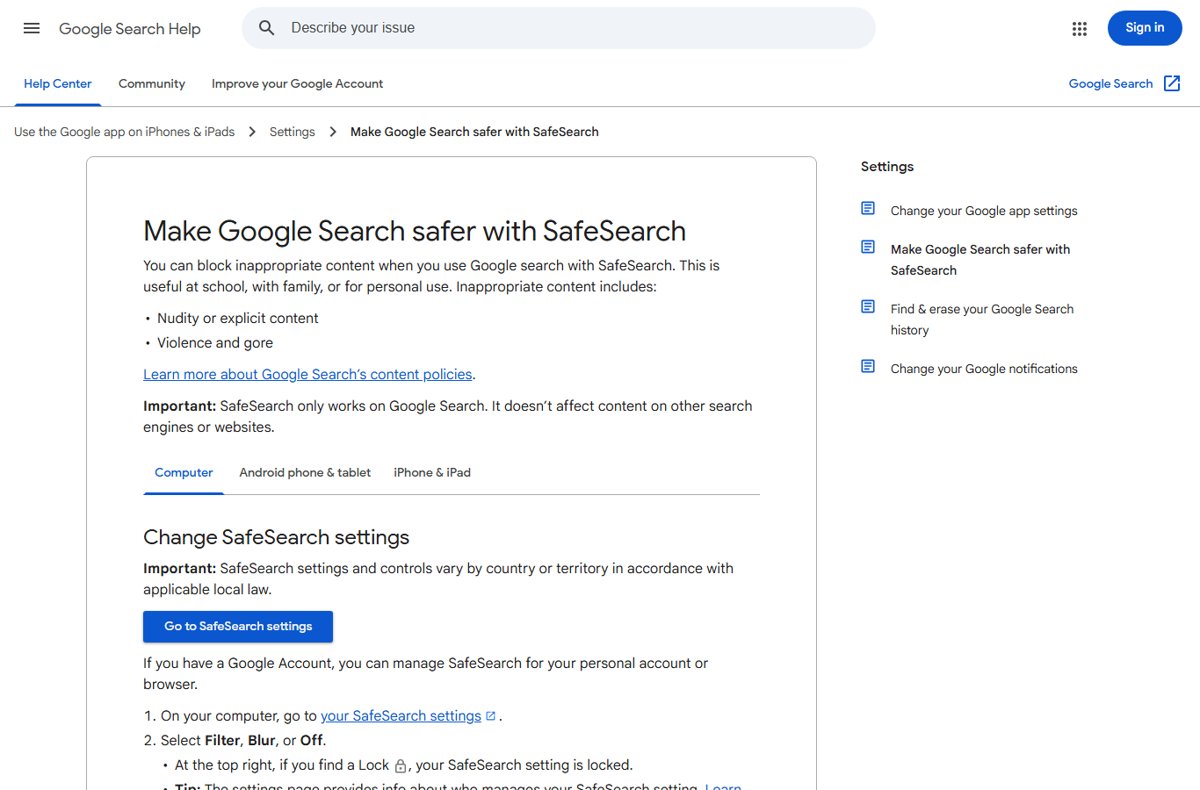
Most large platforms do not use the word NSFW in their settings. They call it sensitive, explicit or mature content and give you a filter you can turn up or down.
| Platform | Setting name | Options | Where to change it |
|---|---|---|---|
| Google Search | SafeSearch | Filter blocks explicit results; Blur blurs explicit images (the default when Filter does not apply); Off shows all results | Go to google.com/safesearch, or select your profile picture at the top right of Google Search results |
| Bing | SafeSearch | Strict filters explicit text, images and videos; Moderate filters explicit images and videos but not text (the default); Off filters nothing | Bing Settings page, pick a SafeSearch filter, then click Save |
| YouTube | Restricted Mode | On or off, per browser and per profile | Select your profile photo, then Restricted Mode, then Activate Restricted Mode |
| Sensitive Content Control | Less or More sensitive content in Explore, Search, Reels and recommendations | Profile > Menu > Content Preferences > Sensitive content, select an option, then tap Confirm |
Google SafeSearch affects Google Search only, not other sites or search engines. YouTube Restricted Mode also hides comments on the videos you watch while it is on.
Instagram's control only changes how much borderline content gets recommended. Posts that break Instagram's Community Standards, such as adult nudity, are removed rather than filtered.
NSFW in work and school environments
An NSFW tag protects the reader, not the poster. Opening tagged content on a work or school device can still break that organization's rules, and many networks filter it before it reaches you.
| Where you are | What is often already in place | What it means for you |
|---|---|---|
| School network or school account | Google lets K-12 schools manage SafeSearch for students under 18 | The SafeSearch page shows a lock and you cannot change it |
| Office or public Wi-Fi | Administrators can lock Google SafeSearch to Filter for a whole network | Explicit results stay hidden even if your account says Off |
| Library, university or public PC | YouTube says these networks may turn Restricted Mode on | Mature videos and comments stay hidden |
| Network that maps Bing to strict.bing.com | Microsoft documents this for schools and businesses | Bing returns Strict SafeSearch results and the controls are disabled |
| Bing account for a user under 18 | Microsoft may set SafeSearch to Strict to comply with local law | Explicit content is filtered automatically |
Treat any NSFW tag you see at work as a reason to wait. Filters on the network do not make it acceptable to try to get around them.
Common mistakes when using NSFW
| Mistake | Why it causes problems | Do this instead |
|---|---|---|
| Tagging after the image or link | The reader has already seen it | Put NSFW before the link, image or video |
| Tagging everything "just in case" | Readers learn to ignore the warning | Use it only when content would really embarrass someone |
| Assuming a tag makes anything acceptable | Platforms still remove content that breaks their rules | Check the site's own guidelines before posting |
| Using NSFW for disturbing content | Readers expect awkward, not traumatic | Use NSFL or a content warning for gore |
| Sending NSFW links to a work account | The message itself can break workplace policy | Send it to a personal account, or do not send it |
| Leaving out why it is NSFW | The reader cannot judge the risk | Add a short reason: language, violence, nudity |
How to say NSFW aloud
| Way to say it | How it sounds | When people use it |
|---|---|---|
| Letter by letter | "en-ess-eff-double-you" | The most common spoken form |
| Full phrase | "not safe for work" | Clearer when the listener does not know the acronym |
| As a word | Not used | NSFW has no vowels, so it is never said as one word |
In a meeting or on a call, say the full phrase. It avoids confusion and sounds less like internet slang.
NSFW examples in texts, chats and posts
Copy the pattern that fits your situation. Each one puts the warning first and says why.
| Situation | Example message |
|---|---|
| Sharing a funny clip with swearing | "NSFW (language): this stand-up bit is great, headphones on." |
| Posting a graphic sports injury | "NSFW / NSFL: replay of the leg injury, do not open if you are squeamish." |
| Warning a friend before they click | "Don't open that link at work, it's NSFW." |
| Reassuring a coworker | "It's SFW, just a cat video." |
| Describing a thread | "Thread is fine, but the third reply has an NSFW image." |
| Texting someone | "Sending you a meme later, it's a bit NSFW." |
NSFW meaning FAQ
What does SFW mean?
SFW means "safe for work." It tells you a link, image or video is fine to open in an office, a classroom or anywhere other people can see your screen. It is the opposite of NSFW.
What does SFW mean in slang and in texts?
In slang and text messages, SFW still means "safe for work." People add it to reassure the reader that a link is clean, for example "it's SFW, just a funny dog video." On forums it is also used to describe clean images or communities.
What does NSFW mean in texting?
In a text, NSFW means the message, photo or link that follows is not something to open around other people. Wait until you are alone before you open it, and do not forward it to a work phone.
What does N.S.F.W. mean?
N.S.F.W. with periods means the same as NSFW: "not safe for work." The periods are optional and rarely used online. NSFW and nsfw are the common forms.
What does NWSF or NWFS mean?
NWSF and NWFS are usually typos of NSFW, with the letters swapped. Read them as "not safe for work" when the context is a warning before a link or image.
What does SWF mean, and is it the same as SFW?
No. SWF is a file format for Adobe Flash animations and games, not a warning label. Adobe ended Flash Player support after December 31, 2020, and blocked Flash content from running from January 12, 2021.
Does NSFW mean illegal?
No. NSFW only means the content is unsuitable for a work or public screen. Most NSFW content, such as swearing or crude jokes, is legal. Platforms still remove content that breaks their own rules, tag or no tag.
What is the difference between NSFW and NSFL?
NSFW means "not safe for work": awkward or explicit if others see it. NSFL means "not safe for life": disturbing enough, usually gore or real tragedy, that you may regret seeing it anywhere.
Should I open an NSFW link at work if it has a warning?
No. The warning exists so you can wait. Opening it on a work device or network can still break your employer's acceptable-use policy, even when the network does not block it.
Is NSFW the same as Restricted Mode or SafeSearch?
No. NSFW is a label people write themselves. Restricted Mode on YouTube and SafeSearch on Google and Bing are filters that hide mature or explicit content automatically, whether or not anyone tagged it.
The bottom line: when to tag something NSFW
Add NSFW, with a short reason, before any link or post you would not want a manager, teacher or stranger to see on your screen. The tag gives readers the choice to wait. Pair it with the platform's own sensitive-content setting, use NSFL for disturbing material, and skip it for clean content so the warning keeps its weight.