Replace the battery on an iPhone SE by booking Apple battery service at a Genius Bar, an Apple Authorized Service Provider or by mail; Apple still services the 2nd and 3rd generation, but not the 1st.
This guide covers how to identify your model, where to see the fee, how to prepare the phone, the DIY route on the 3rd generation, and what to check once the new battery is in.
How to replace the battery on an iPhone SE
Apple states that built-in lithium-ion batteries should be serviced by Apple or an authorized service provider, so start with Apple's own service page.
- Open Apple Service and Repair for iPhone Battery at support.apple.com/iphone/repair/battery-replacement.
- Under How much will it cost?, open Choose your device, select iPhone SE, then pick your Model.
- Read the Battery service line under Estimated service cost.
- Select Get started and tell Apple what is happening with the battery.
- Choose In Person for a Genius Bar or Apple Authorized Service Provider, or By Mail for a prepaid shipping box.
- Back up the iPhone and deal with Find My before you hand it over.
- Track the repair in My Support or the Apple Support app, signed in with your Apple Account.
Apple inspects the iPhone before setting the final fee. Service options vary with parts availability and location, and send-in service is not offered in every country or region.
Can iPhone SE battery be replaced?
Yes on two of the three generations. Apple's obsolete list names plain "iPhone SE", the name of the original 2016 model, and neither the 2nd nor the 3rd generation appears on its vintage or obsolete lists.
Apple keeps service and parts available for at least 5 years after it last distributed a product for sale, which matters when you work out how long the iPhone SE 2020 stays supported.
| Generation | Apple battery service | Apple repair manual for DIY |
|---|---|---|
| iPhone SE (1st generation), 2016 | No. Apple ended all hardware service for obsolete products, and service providers cannot order parts | None listed |
| iPhone SE (2nd generation), 2020 | Yes | None listed. Self Service Repair covers specific models introduced in 2021 or later |
| iPhone SE (3rd generation), 2022 | Yes | Yes, iPhone SE (3rd generation) Repair Manual, manual ID GPCNKY |
How to tell which iPhone SE you have
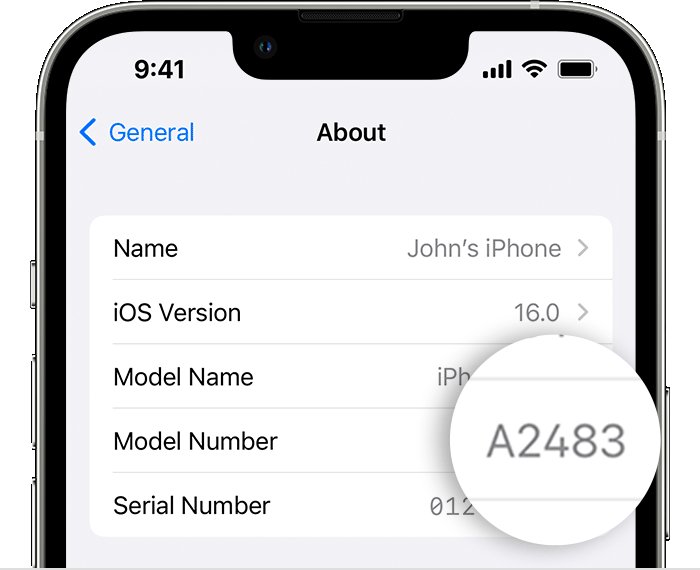
The 2nd and 3rd generation look almost identical, so go by the iPhone model number. Open Settings, tap General, tap About, then tap the part number next to Model Number to reveal it.
| iPhone SE | Display | Model numbers | How to spot it |
|---|---|---|---|
| 1st generation (2016) | 4-inch | A1723, A1662, A1724 | Aluminum back with a stainless steel logo, Sleep/Wake button on the top edge |
| 2nd generation (2020) | 4.7-inch | A2275 (US, Canada), A2298 (China mainland), A2296 (other regions) | Glass back, side button on the right, Quad-LED True Tone flash |
| 3rd generation (2022) | 4.7-inch | A2595 (US, Canada and others), A2782 (Japan), A2784 (Russia and neighbors), A2785 (China), A2783 (other regions) | Glass back, side button on the right, LED True Tone flash |
On the 1st generation, the model number is also printed on the back. On the 2nd and 3rd generation, it is on the upper side of the SIM tray slot and needs bright light to read.
iPhone SE battery replacement cost
Apple lists the out-of-warranty fee per model in the Estimated service cost panel on its battery service page, so select iPhone SE there for the current figure. What you actually pay depends on your coverage and on who does the work.
| Your situation | What you pay | What to watch for |
|---|---|---|
| Out of warranty, repaired by Apple | The Battery service estimate | Tax may apply, and a shipping fee may be added if Apple ships the iPhone |
| Active AppleCare plan | No extra charge if capacity drops below 80% | Check your coverage status first |
| Apple Limited Warranty, first year | Nothing for a defective battery | Batteries worn down by normal use and accidental damage are not covered |
| Apple Authorized Service Provider | The provider's own fee | Providers set their own fees and give their own estimate |
Apple guarantees its service and replacement parts for 90 days or the remaining term of your warranty, whichever is longer.
How to check iPhone SE battery health
Check this first, because Apple's Battery Health screen tells you whether the battery actually needs replacing. It is available on iPhone 6 and later, which includes every iPhone SE.
- Open the Settings app.
- Tap Battery.
- Tap Battery Health.
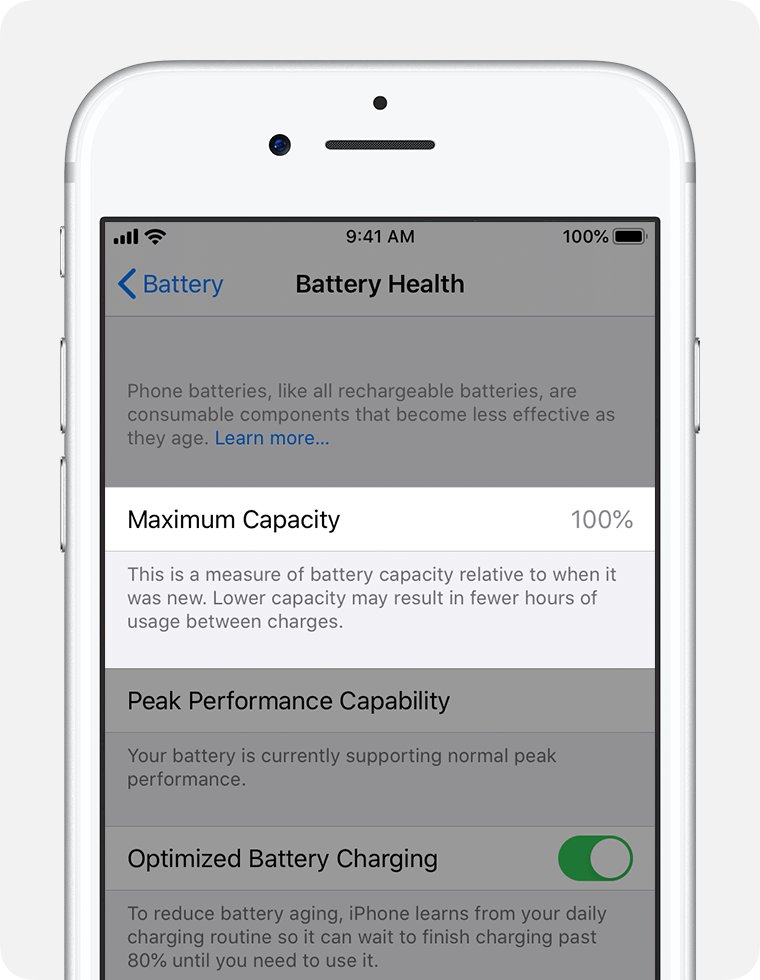
- Read the maximum capacity percentage, which compares the battery with its capacity when new.
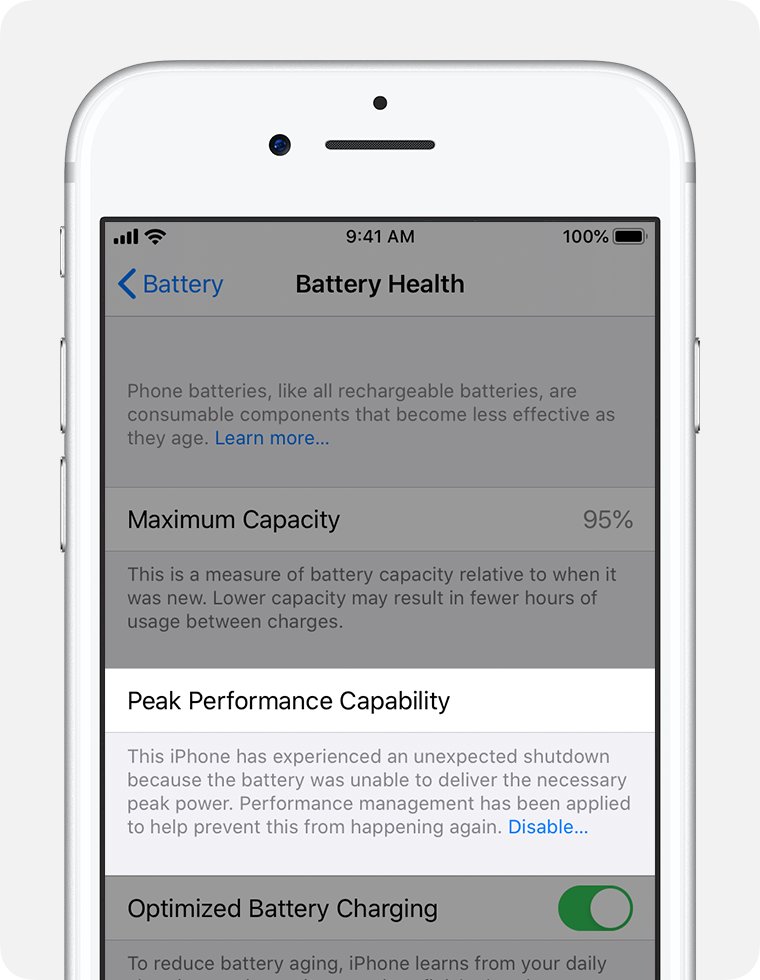
- Read the message under Peak Performance Capability, then match it to the table in the next section.
When to replace iPhone SE battery
Batteries in iPhone 14 models and earlier, which covers every iPhone SE, are designed to retain 80 percent of their original capacity at 500 complete charge cycles under ideal conditions.
| Message on the Battery Health screen | What it means | What to do |
|---|---|---|
| Your battery is currently supporting normal peak performance. | The battery can still deliver normal peak performance | No replacement needed for performance |
| This iPhone has experienced an unexpected shutdown… Performance management has been applied | The battery could not deliver peak power, so iOS may limit top performance | A new battery can improve performance |
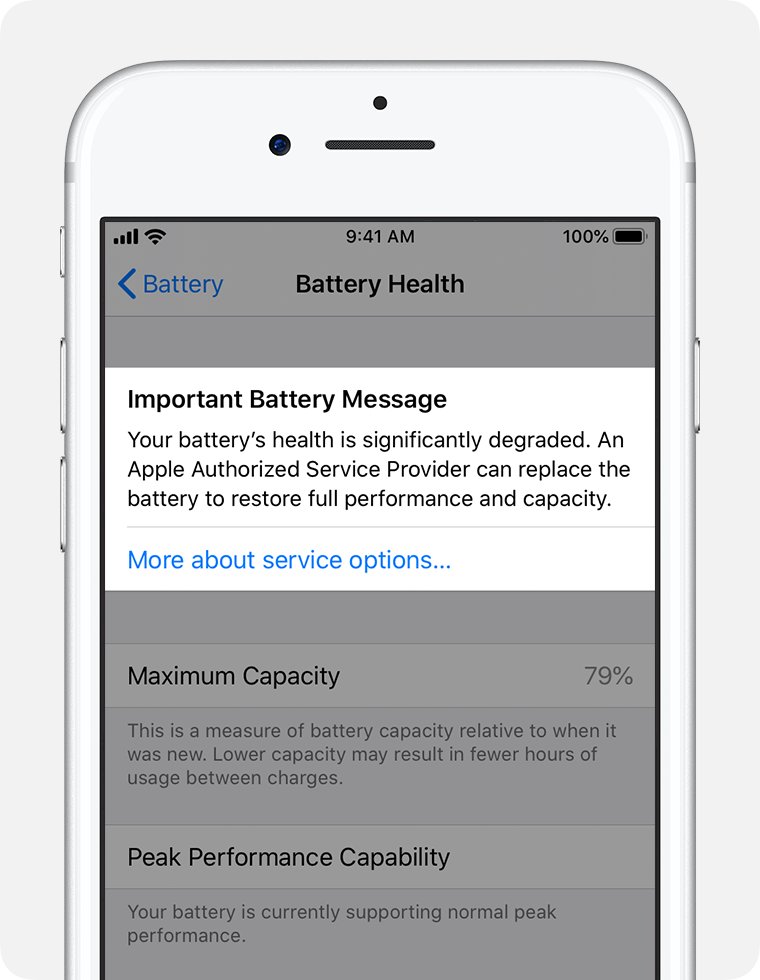
| Your battery's health is significantly degraded. | Not a safety issue, but battery and performance problems become more noticeable | Book battery service |
| Unable to verify this iPhone has a genuine Apple battery. | Applies to the 2nd and 3rd generation; the health figures may be inaccurate | Get service to have the battery checked |
| Important Battery Message. This iPhone is unable to determine battery health. | The form this message takes on iPhone X and earlier, including the 1st generation | Apple can no longer service the 1st generation |
If the screen reads normal and the phone still runs out early, find what is draining the iPhone battery before you pay for service. A phone that stopped charging after a spill has a different problem, so try the iPhone water damage charging fixes first.
Where to replace iPhone SE battery
| Your situation | Use this | Why |
|---|---|---|
| An Apple Store is nearby | Genius Bar (In Person) | Technicians inspect the iPhone and use genuine Apple parts, and Apple's warranty covers the repair |
| You prefer a local shop in Apple's network | Apple Authorized Service Provider | Apple's warranty covers the repair, though the provider sets its own fee |
| No store nearby, or no time for an appointment | By Mail | Apple sends a prepaid shipping box and no appointment is needed |
| You use a repair shop outside Apple's network | Independent Repair Provider | Genuine parts are available, but only the provider's own warranty, if any, covers the work |
| 3rd generation, out of warranty, and you have repair experience | Self Service Repair | Apple supplies the manual, parts and tools in certain countries and regions |
How to back up iPhone SE before a battery replacement
Apple's repair terms warn that data may be lost during service and make the backup your responsibility.
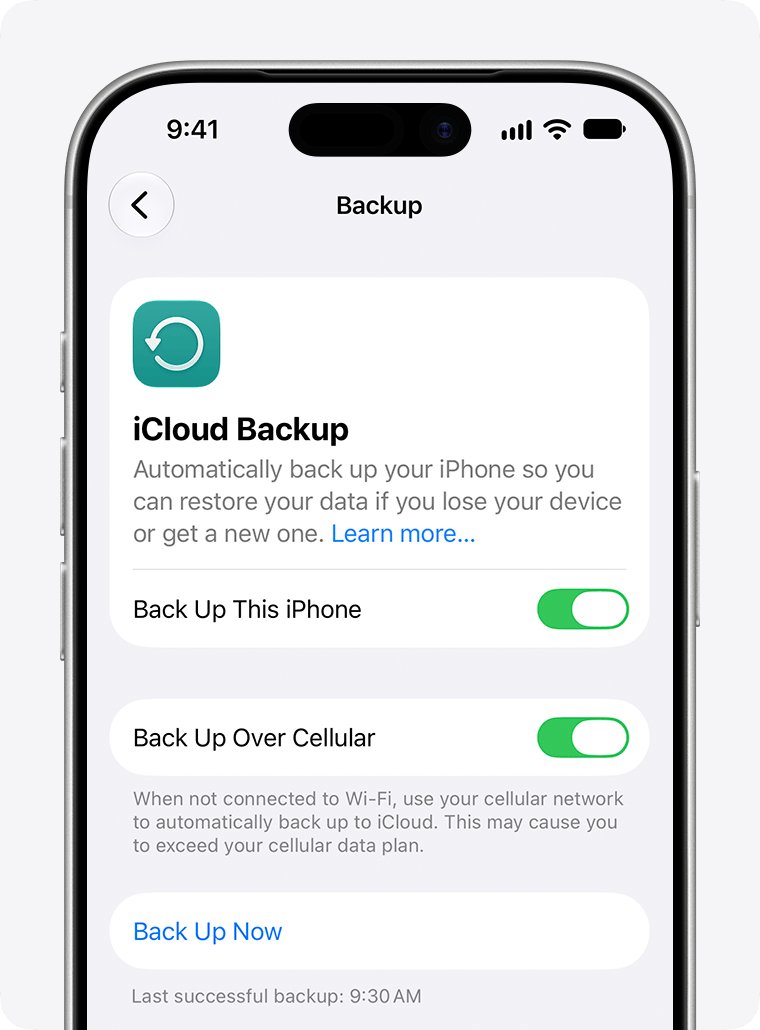
- Connect to Wi-Fi, open Settings, tap your name, tap iCloud, tap iCloud Backup, then tap Back Up Now.
- Stay on Wi-Fi until the backup finishes, then check that the status icon next to Saved to iCloud is green.
- Open Settings, tap Wallet & Apple Pay, then turn off Apple Cash.
- Open Wallet, select each card or pass, tap the More button, tap Card Details or Pass Details, then tap Remove Card or Remove Pass.
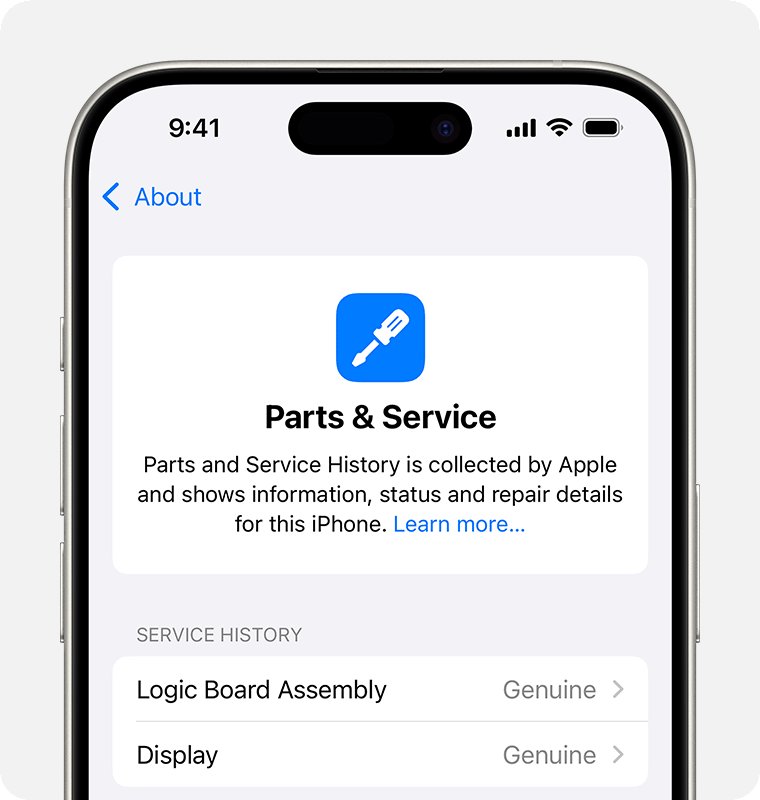
- Open Settings, tap General, tap About, and check Parts and Service History for Finish Repair next to a part.
- On iOS 27 or later, open Find My, select your iPhone, tap the More button, tap Repair or Trade In, then tap Enable.
- On iOS 26 or earlier, open Settings, tap your name, tap Find My, tap Find My iPhone, then turn it off.
If you mail the phone, leave out the case, power adapter and cable, because Apple does not return anything extra in the box.
Can you replace iPhone SE battery yourself?
Only the 3rd generation has an Apple repair manual, and Apple writes it for people who already have repair experience. The battery procedure itself states that only trained technicians should replace the battery.
Repairs done outside Apple or its authorized network are not covered by Apple's warranty or AppleCare, and they can make later Apple repairs cost more or rule them out.
| Stage | What Apple's manual requires |
|---|---|
| Manual | iPhone SE (3rd generation) Repair Manual at support.apple.com/en-us/101527. You enter its manual ID, GPCNKY, when ordering parts |
| Tools | 4.7-inch repair tray, battery press, ESD-safe tweezers, nylon probe (black stick), ESD-safe cleaning solution, ethanol or isopropyl alcohol wipes |
| Safety gear | Heat-resistant gloves, safety glasses with side shields, sand and a sand container |
| Before you open it | Fully discharge the battery. Do not repair the iPhone if you cannot determine the battery level |
| Removal | Take out the display and Taptic Engine, then pull the four adhesive strips. Stop the repair if all four break and cannot be retrieved |
| Installation | Clean old adhesive from the enclosure, seat the new battery, then slide it through the battery press three times |
| Afterwards | Charge the iPhone for a few minutes, because a new battery is not charged, then run Repair Assistant |
Apple warns that improper battery replacement can cause overheating, venting or fire. For most owners, Apple says a professional repair provider using genuine parts is the best way to get a safe result.
How to check iPhone SE battery after replacement
This check works on the 2nd and 3rd generation with iOS 15.2 or later. Apple lists the battery as the part you can look up on these models.
- Open Settings, tap General, then tap About.
- Scroll to the Parts and Service History section, which appears only on an iPhone that has been repaired.
- Look for Genuine or Used next to Battery, which means genuine Apple parts and processes were used.
- Tap the part, with the iPhone connected to the internet, to see the service date.
- Open Settings, tap Battery, tap Battery Health, and confirm the significantly degraded message has gone.
iPhone SE battery replacement problems
Apple won't replace the battery on my iPhone SE
Apple ended hardware service for obsolete products, and the original iPhone SE is on that list.
- Check the model number in Settings > General > About, or on the back of the phone.
- If it reads A1723, A1662 or A1724, plan on a new phone and transfer your data to the new iPhone.
- If it is any other SE model number, start again from Get started on Apple's battery service page.
Find My won't turn off for the iPhone SE repair
The setting cannot be changed on the phone, and Apple might not service an iPhone on iOS 26 or earlier with Find My on.
- Open the Find My app on another device, or go to icloud.com/find in a browser.
- Select your iPhone.
- Select Repair or Trade-In or Remove This Device.
- Follow the onscreen instructions to prepare it for repair.
Battery shows Unknown in Parts and Service History
The part is not genuine, is not working as expected, or was not verified and linked to the iPhone after the repair.
- Ask whoever did the repair which part they fitted and whether the repair was finished.
- Get service from Apple or an Apple Authorized Service Provider to have the battery checked.
- Keep the result for later, because an Unknown part can lower the iPhone's trade-in value.
Finish Repair appears next to the battery
The new part has not been calibrated, so the repair stays unfinished until Repair Assistant completes it.
- Connect the iPhone to the internet, because genuine parts are calibrated with data stored on Apple's servers.
- Complete the repair with Repair Assistant.
- If it will not finish, contact Apple before you book service, because an unfinished repair can mean an out-of-warranty fee or refused service for that part.
iPhone SE battery replacement FAQ
Can iPhone battery be replaced?
Yes. Apple describes every rechargeable iPhone battery as a consumable that eventually needs replacing, and it offers battery service for a charge once the phone is out of warranty. The exception is an obsolete model, such as the original iPhone SE.
Can I replace my iPhone battery myself?
Only on specific iPhone models introduced in 2021 or later, through Self Service Repair in certain countries or regions. Apple aims it at people with repair experience, and the work is not covered by Apple's warranty or AppleCare.
Can Apple replace my iPhone battery?
Yes, as long as the model is not obsolete. Apple replaces it at a Genius Bar or by mail, and its authorized providers do the same work. You pay the out-of-warranty fee unless a warranty or AppleCare plan covers it.
Does Apple change iPhone batteries?
Yes. Apple-certified technicians change them using genuine Apple parts, which may be new or previously used parts that pass Apple's functional tests. You can follow the repair in My Support or the Apple Support app.
Can you change battery in iPhone SE 2020?
Yes. The iPhone SE (2nd generation) from 2020 is not on Apple's vintage or obsolete lists, so Apple and its authorized providers can still replace the battery. Apple lists no repair manual for this model, so DIY through Apple is not an option.
When should I replace my iPhone SE battery?
Replace it when Battery Health says the battery is significantly degraded, when performance management has been applied after an unexpected shutdown, or when you need to charge more and more often. Apple says the degraded message does not indicate a safety issue.
Can I replace the battery on an iPhone 12?
Yes. The iPhone 12 line appears in Apple's battery service tool, so you can select it under Choose your device, read the Battery service estimate and book in person or by mail. The same preparation steps apply before you hand it over.
Is it worth replacing the battery on an iPhone SE?
Replace the battery on a 2nd or 3rd generation iPhone SE if the phone otherwise still does what you need and Battery Health reports a degraded battery or an unexpected shutdown. Plan on a new phone if you have the 1st generation. Apple says a replacement battery restores full performance and capacity on a degraded phone, and service is still available for the two later models. The 1st generation cannot get Apple service or parts from Apple's network, and Apple's documentation page for it points to the iOS 15 user guide.