To reset PRAM on an Intel-based Mac, turn it on and immediately hold Option + Command + P + R for about 20 seconds, then reset the SMC with the keys or power-cord steps for your model.
This guide covers MacBook, iMac, Mac mini and Mac Pro models, what each reset changes, and what to do on an Apple silicon Mac, where neither key procedure applies.

How to reset PRAM and SMC on a Mac
Apple uses NVRAM and PRAM as two names for the same memory, so the NVRAM reset is the PRAM reset. These steps cover both resets on an Intel-based Mac.
- Choose Apple menu > About This Mac. If you see Chip, the Mac has Apple silicon, so plug it in, restart it, and stop here.
- If you see Processor, shut down the Mac.
- Turn on the Mac, then immediately press and hold Option, Command, P and R together.
- Release the keys after about 20 seconds. The Mac might appear to restart during that time.
- Let the Mac finish starting up, then shut it down again.
- Reset the SMC using the steps for your Mac type in the table below, then turn the Mac on.
Resetting the SMC does not affect NVRAM or PRAM, so the two resets do not undo each other.
Reset NVRAM, PRAM and SMC by Mac type
| Your Mac | NVRAM or PRAM reset | SMC reset |
|---|---|---|
| Apple silicon, any model | Not needed, and the steps do not apply | Automatic: plug in the Mac, then restart it or shut it down and turn it back on |
| Intel laptop with the T2 chip | Option + Command + P + R for about 20 seconds | Left Control, left Option and right Shift for 7 seconds, then add the power button for 7 more seconds |
| Intel laptop without the T2 chip | Option + Command + P + R for about 20 seconds | Left Shift, left Control, left Option and the power button together for 10 seconds |
| Intel desktop, with or without the T2 chip | Option + Command + P + R for about 20 seconds | Shut down, unplug the power cord for 15 seconds, plug it back in, wait 5 seconds, then press the power button |
How to find out if a Mac has Apple silicon or the T2 chip
The SMC keys differ by chip, so identify the Mac first. Apple lists the T2 chip on MacBook Pro and MacBook Air models introduced from 2018 through 2020, except the M1 models. It also lists iMac (Retina 5K, 27-inch, 2020), iMac Pro, Mac mini (2018) and the Mac Pro introduced in 2019.
- Choose Apple menu > About This Mac.
- Read the first label: Chip means Apple silicon, and Processor followed by an Intel name means an Intel-based Mac.
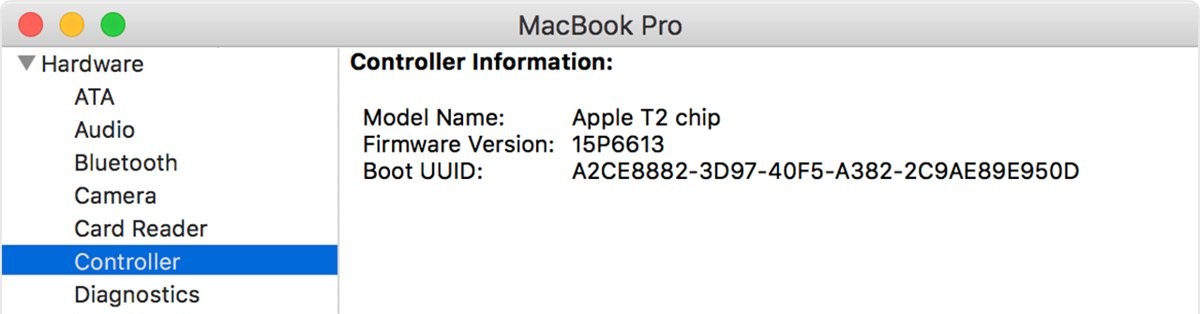
- On an Intel-based Mac, hold Option and choose Apple menu > System Information.
- Select Controller or iBridge in the sidebar, depending on your macOS version.
- Look for Apple T2 chip on the right. If it does not appear, follow the steps for a Mac without the T2 chip.
How to reset PRAM
This reset applies only to Intel-based Macs and can return the stored settings listed further down this page to their defaults.
- Shut down the Mac.
- Turn on the Mac, then immediately press and hold Option, Command, P and R together.
- Keep holding the keys for about 20 seconds, even if the Mac appears to restart.
- Release the keys and let the Mac finish starting up.
- Readjust any system settings that were reset.
How to reset SMC on a MacBook with the T2 chip
Apple makes a plain power cycle the first step on these Macs and reserves the key reset for a problem that persists.
- Shut down the Mac, hold the power button or Touch ID for 10 seconds, wait a few seconds, then turn it back on. Continue only if the problem remains.
- Shut down the Mac again.
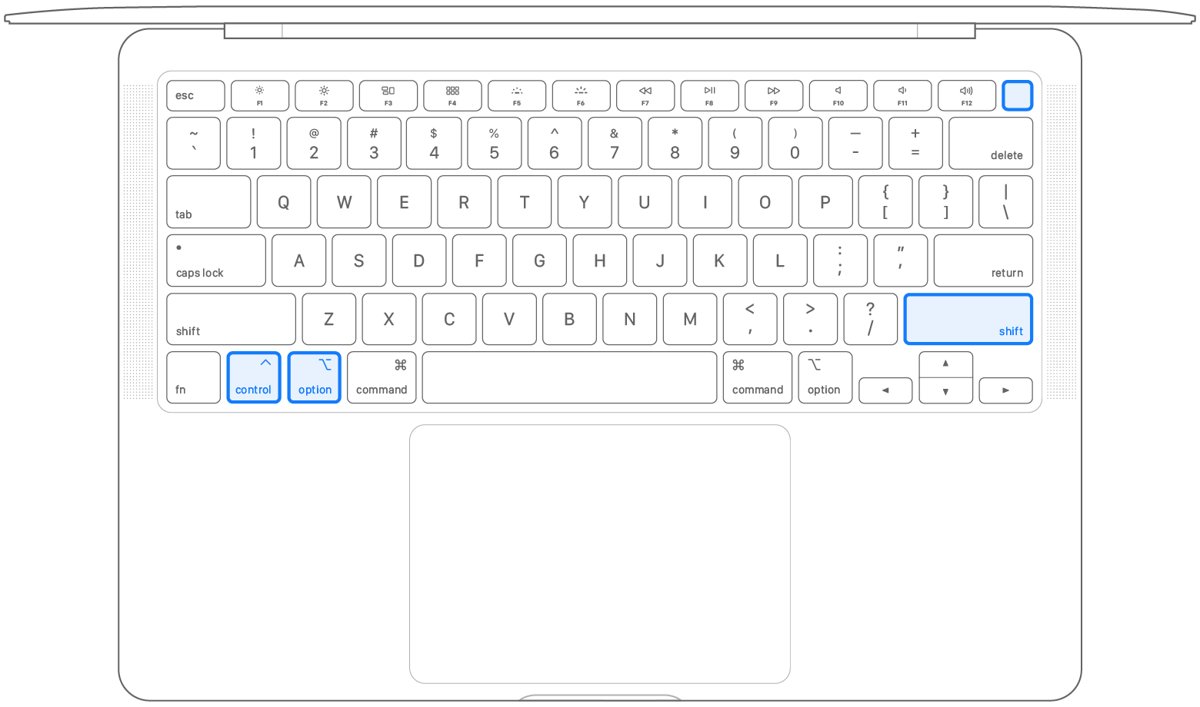
- On the built-in keyboard, press and hold Control on the left, Option on the left and Shift on the right. The Mac might turn on.
- Keep holding all three keys for 7 seconds, then press and hold the power button as well. A Mac that is on turns off now.
- Keep holding all four for another 7 seconds, then release them.
- Wait a few seconds, then press the power button to turn on the Mac.
How to reset SMC on a MacBook without the T2 chip
- Shut down the Mac.
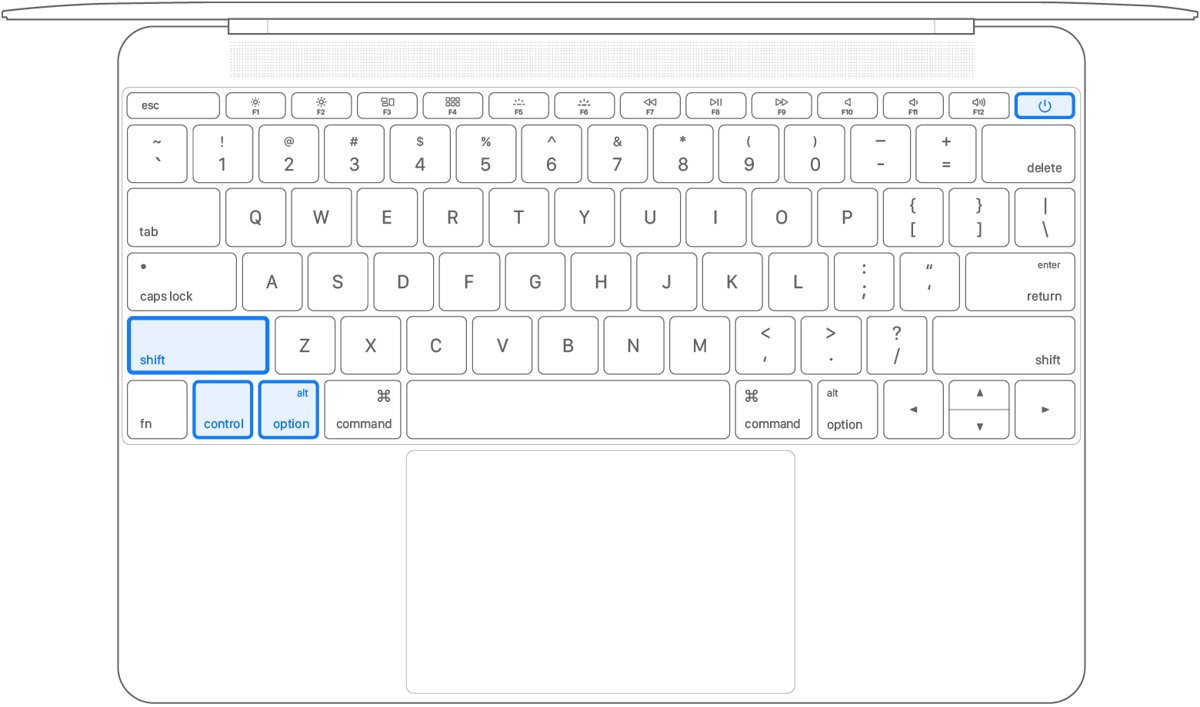
- On the built-in keyboard, press and hold Shift, Control and Option, all on the left side.
- While holding those three keys, press and hold the power button as well.
- Keep holding all four for 10 seconds.
- Release all the keys, then press the power button to turn on the Mac.
All three modifier keys here sit on the left side of the keyboard, while the T2 procedure uses the right Shift key. Check the side before you press them.
How to perform an SMC reset on an iMac, Mac mini or Mac Pro
Intel desktop Macs use the power cord instead of a key combination, and the steps are the same with or without the T2 chip.
- Shut down the Mac, then unplug the power cord.
- Wait 15 seconds, then plug the power cord back in.
- Wait 5 seconds, then press the power button to turn on the Mac.
How to reset SMC and NVRAM on an Apple silicon Mac
There is no key combination on these Macs. The SMC resets automatically at restart, and Apple states the NVRAM reset steps do not apply and are not needed.
- Make sure the Mac is plugged into power.
- Choose Restart from the Apple menu.
- Or choose Shut Down from the Apple menu, then press the power button to turn it on again.
MacBook Pro reset SMC and PRAM
MacBook Pro models fall into all three groups, so match the year first. A MacBook Pro (13-inch, M1, 2020) is Apple silicon despite sharing its year with T2 models.
| MacBook Pro | Chip | PRAM reset | SMC reset |
|---|---|---|---|
| M1 or later | Apple silicon | Not needed | Restart while plugged in |
| Intel, introduced 2018 through 2020 | Intel with T2 | Option + Command + P + R for about 20 seconds | Left Control, left Option, right Shift for 7 seconds, then add power for 7 seconds |
| Intel, introduced 2017 or earlier | Intel without T2 | Option + Command + P + R for about 20 seconds | Left Shift, left Control, left Option and power for 10 seconds |
Slow Mac fix: reset your Mac SMC and PRAM
General slowness is not on Apple's list of SMC symptoms, which covers power, thermal and hardware behavior. Rule out a busy process first, and use the resets when the Mac also runs hot or its fans stay loud.
- Install all available Mac software updates.
- Open Activity Monitor and look for processes putting a heavy load on the CPU.
- Move the Mac to a hard, flat surface and keep its vents clear.
- Restart the Mac.
- If the fans still run fast or the laptop stays warm on an Intel-based Mac, reset the SMC.
- Reset PRAM only if startup disk, resolution or other stored settings also look wrong.
If the Mac is still slow, move on to other Mac storage and update fixes rather than repeating the resets.
How to tell if a PRAM or SMC reset fixed your Mac
Neither reset shows a confirmation message, so test the symptom that made you run it.
- After a PRAM reset, look at sound volume, display resolution, startup disk and time zone, and note any that changed.
- After an SMC reset, repeat the action that failed, such as charging the battery, opening the camera or pressing the power button.
- Watch the fans during light use if fast fans were the reason for the reset.
- If the symptom remains, run Apple Diagnostics to test the hardware.
What PRAM and NVRAM store on a Mac
PRAM is the older name for what Apple now calls non-volatile memory, or NVRAM: a small amount of memory your Mac uses to store and quickly access system settings. The exact settings vary by Mac and by connected devices.
| Stored setting | What you notice if it was reset |
|---|---|
| Sound volume | The Mac plays sound at a different level |
| Display resolution | The screen shows a different resolution |
| Startup-disk selection | The disk you chose is no longer selected |
| Time zone | The clock shows a different local time |
What the SMC controls on a Mac
The System Management Controller manages power on your Mac. Apple says you most likely do not need to reset it, but it can resolve uncommon power, thermal or hardware issues.
| SMC area | Examples |
|---|---|
| Power | Power button behavior and USB port power |
| Battery | Battery and charging |
| Thermal | Fans and other thermal features |
| Lid | Lid open and close behavior |
| Sensors | Ambient light, motion sensor and keyboard backlighting |
| Status indicators | Sleep and battery lights |
Reset NVRAM and SMC: problems each one can fix
| Problem | Reset to try | On Apple silicon |
|---|---|---|
| Battery is not charging | SMC, after checking the adapter and power-cycling the Mac | Shut down, close the lid for 30 seconds, then try charging |
| Mac is not turning on | SMC, after trying the power button and unplugging accessories | Not needed |
| Fans are running fast | SMC, once vents are clear | Close and reopen the lid, or restart |
| Laptop gets too warm | SMC, after checking Activity Monitor | Close and reopen the lid, or restart |
| Built-in camera is not working | SMC, after checking software updates and camera permissions | Restart |
| Sound volume, resolution, startup disk or time zone are wrong | NVRAM or PRAM | Not needed |
Mac settings to change after a PRAM reset
A PRAM reset can return some stored settings to their defaults, so check them once the desktop appears.
- Choose Apple menu > System Settings.
- Set your sound volume and display resolution back to what you use.
- Check that the time zone is correct.
- Select General in the sidebar, then select Startup Disk on the right. You may need to scroll down.
- Select the disk you want to use, then select Restart.
PRAM or SMC reset not working on a Mac
Mac does not recognize Option + Command + P + R at startup
The keys were pressed too early or one at a time, or a firmware password or PC-style keyboard is getting in the way.
- Shut down the Mac instead of restarting it. If it will not shut down, hold the power button for up to 10 seconds.
- Turn it on and wait a few seconds so the Mac can recognize the keyboard, then press all the keys together.
- Use a Mac keyboard rather than a PC-style one, and connect a wireless keyboard to the Mac with its cable if possible.
- If a firmware password is set, turn it off as Apple directs, run the reset, then turn the password back on.
Mac starts in Windows instead of macOS
Boot Camp is set to start Windows, and Apple says to switch to macOS before using startup keys.
- Change the Startup Disk setting so the Mac starts in macOS.
- Shut down or restart the Mac, then try the key combination again.
Settings reset every time a desktop Mac is unplugged
Sound volume or time zone resetting at each shutdown and unplug can mean the small battery NVRAM uses has failed.
- Note which settings reset each time you unplug the Mac.
- Arrange service for the Mac so the battery can be replaced.
Battery still not charging after an SMC reset
The adapter or the battery itself is the more likely fault at this point.
- Confirm you are using the correct power adapter, because too little wattage can charge slowly or unreliably.
- Shut down the Mac, close the lid for 30 seconds, then try charging again.
- Run Apple Diagnostics to test for battery issues.
Mac still will not turn on after an SMC reset
The Mac may have a startup fault or need service.
- Confirm the power cable is undamaged and connected to a working outlet.
- Hold the power button or Touch ID for about 10 seconds, then press and release it normally.
- Disconnect all accessories and repeat the previous step.
- If the Mac still does not turn on, arrange service through Apple.
PRAM and SMC reset FAQ
How do you reset PRAM and SMC on an Intel-based Mac?
Hold Option, Command, P and R for about 20 seconds as the Mac starts to reset PRAM. Then shut down and reset the SMC with the keys for a laptop, or by unplugging the power cord on a desktop.
How do I reset PRAM?
Shut down the Intel-based Mac, turn it on, and immediately hold Option, Command, P and R together. Release the keys after about 20 seconds, even if the Mac appears to restart, and let it finish starting up.
How do I reset SMC?
The method depends on the Mac. Intel laptops use a key combination with the power button, Intel desktops use a 15-second power cord unplug, and Apple silicon Macs reset the SMC automatically when you restart them while plugged in.
How do you perform an SMC reset on a MacBook Pro?
On an Intel MacBook Pro with the T2 chip, hold left Control, left Option and right Shift for 7 seconds, then add the power button for 7 more. Older models use left Shift, Control, Option and power for 10 seconds.
Is NVRAM the same as PRAM?
Yes. Apple treats NVRAM and PRAM as the same reset on Macs, and both names refer to the small memory that stores settings such as sound volume, display resolution, startup-disk selection and time zone.
Do I need to reset SMC and PRAM on an M1 or later Mac?
No. Apple silicon Macs have no key procedure for either reset. The SMC resets automatically when you restart a Mac that is plugged in, and Apple says the NVRAM reset steps are not needed on these computers.
Does resetting the SMC reset PRAM too?
No. Apple states that resetting the SMC does not affect NVRAM or PRAM. They are separate procedures with separate keys, so an Intel-based Mac with both kinds of symptom needs each reset run on its own.
Should you reset NVRAM before selling a Mac?
Yes, on an Intel-based Mac. Apple says the reset clears user settings from memory and restores certain security features as part of preparing the Mac to sell, give away, trade in or recycle. The Mac then starts up to the setup assistant.