When iTunes won't accept your password, sign in with your current Apple Account password, or change it on your iPhone and use the new one, because iTunes has no password of its own.
This guide covers the sign-in fix, how to find or reset the password, the right email address, locked accounts, verification codes, and the separate passcode and backup passwords that people mix up with it.
iTunes keeps saying password is incorrect
Apple ID is now called Apple Account, and signing in to iTunes uses the same email address or phone number and password. Do not keep retrying a password that fails, because too many incorrect entries lock the account.
- Open iTunes on your PC and choose Account > Sign In.
- Enter an email address or phone number on file for your Apple Account.
- Check that Caps Lock is off, type the password again and click Next.
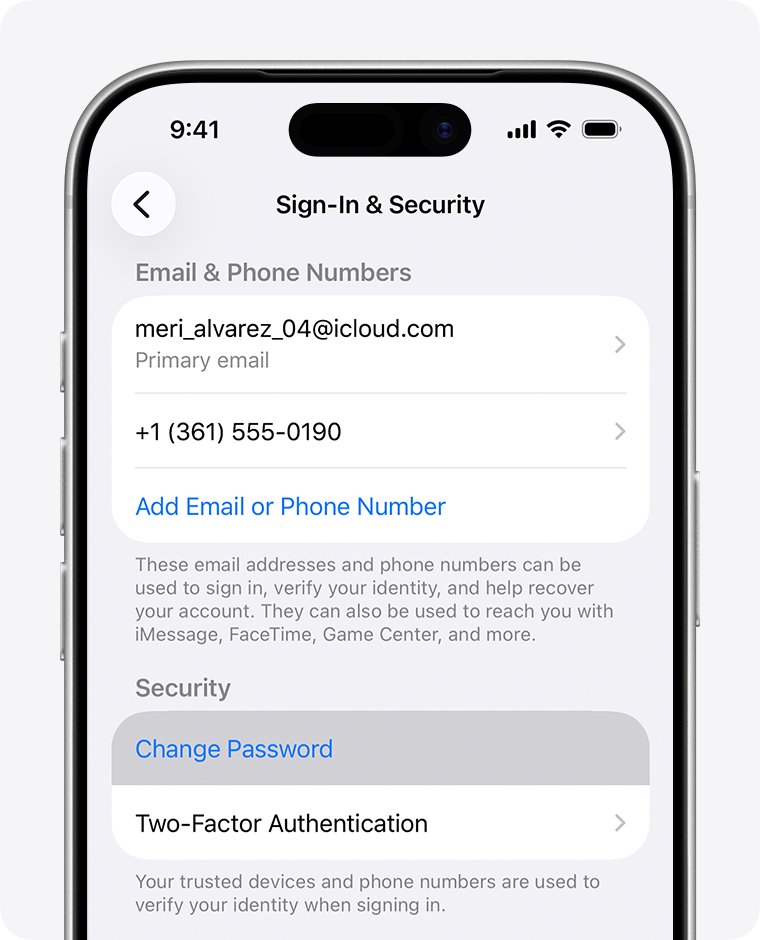
- If iTunes still refuses it, open Settings on a signed-in iPhone or iPad and tap your name.
- Tap Sign-In & Security, then Change Password, and set a new password.
- Return to iTunes, choose Account > Sign In and enter the new password.
- Enter the six-digit verification code if iTunes asks for one.
A password change applies to every app that uses your Apple Account, so the old password stops working everywhere. No signed-in device nearby? Use the forgotten-password section below.
Why is my iTunes password not working
| What you see | Likely cause | What to do |
|---|---|---|
| Password rejected, and you changed it recently on another device | The change applies to all Apple apps, so the old password is gone | Sign in with the new password |
| Password rejected, and you are unsure of it | A forgotten or mistyped password | Change it on a trusted device, or select Forgot password? |
| Password rejected on every email address you try | The wrong email or phone number for the account | Look up the addresses on file in Sign-In & Security |
| Password accepted, then a request for a code | Two-factor authentication on a new device or browser | Approve the code, or choose Didn't Get a Code? |
| "Disabled for security reasons" or "locked" | Too many incorrect entries, by you or someone else | Reset the password or select Request Access |
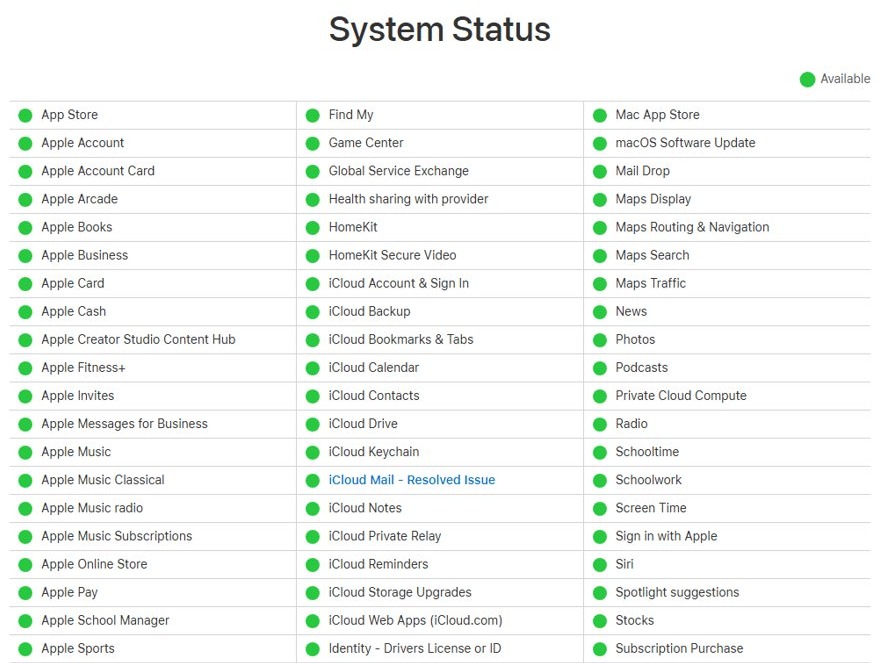
| Sign-in fails with a password that works on your iPhone | A wrong PC clock, a connection problem or a Store outage | Correct the date and time, then check Apple's System Status page |
| iPhone Lock Screen rejects your entry | That screen wants the device passcode, not the Apple Account password | Use Forgot Passcode? |
| iTunes asks for a password to open a backup | That is the separate encrypted backup password | Enter it, or reset it on the device |
What is my iTunes password
Your iTunes password is your Apple Account password. Several other Apple prompts ask for a different secret, which is the usual reason a correct password gets refused.
| Where you are asked | What it wants | Where to change it |
|---|---|---|
| iTunes, Apple Music, Apple TV app, App Store, iCloud | Apple Account password | Settings > your name > Sign-In & Security > Change Password |
| iPhone or iPad Lock Screen | Device passcode | Face ID & Passcode or Touch ID & Passcode in Settings |
| Mac login window | Mac login password | Users & Groups settings on the Mac |
| iTunes or Apple Devices app, opening an encrypted iPhone backup | Backup password you created for that device | Reset All Settings on the device, then back up again |
| An app made by another developer | App-specific password from account.apple.com | Sign-In and Security > App-Specific Passwords |
Changing or resetting your Apple Account password also revokes every app-specific password, so generate new ones for those apps afterwards.
How to find my iTunes password
If you once saved the password for an Apple website, the Passwords app on your iPhone or Mac still has it.
- On an iPhone or iPad with iOS 18 or later, open the Passwords app and unlock it with Face ID, Touch ID or your passcode.
- On iOS 17 or earlier, open Settings and tap Passwords instead.
- On a Mac with macOS Sequoia, open the Passwords app; on macOS Sonoma or earlier, open System Settings and select Passwords.
- Look for an entry for an Apple website, such as apple.com or icloud.com, and select it.
- Enter that password in iTunes and click Next.
Apple's routes for a password you cannot find are changing it or resetting it, so move to the next section if no saved entry works.
How to change iTunes password
Changing the password on a trusted device is the easiest route, and it can spare you account recovery. A trusted device is an iPhone, iPad, Apple Watch, Apple Vision Pro or Mac already signed in with two-factor authentication.
- On your iPhone or iPad, open Settings and tap your name.
- Tap Sign-In & Security, then Change Password.
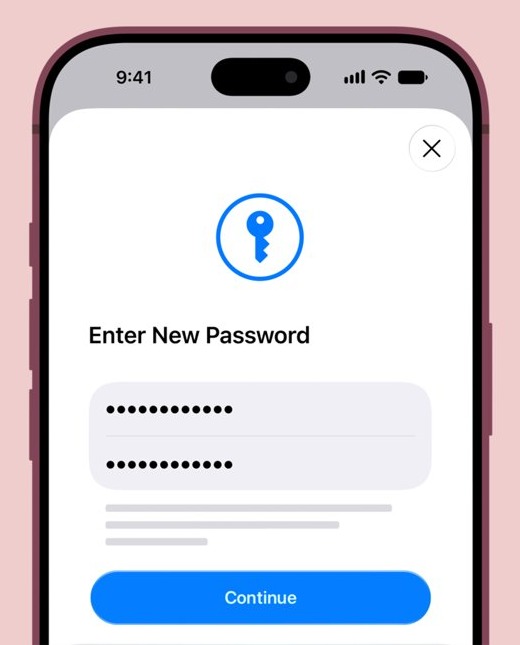
- Follow the onscreen instructions to set the new password.
- Tap Keep All Devices Signed In, or Remove Other Devices to make them sign in again.
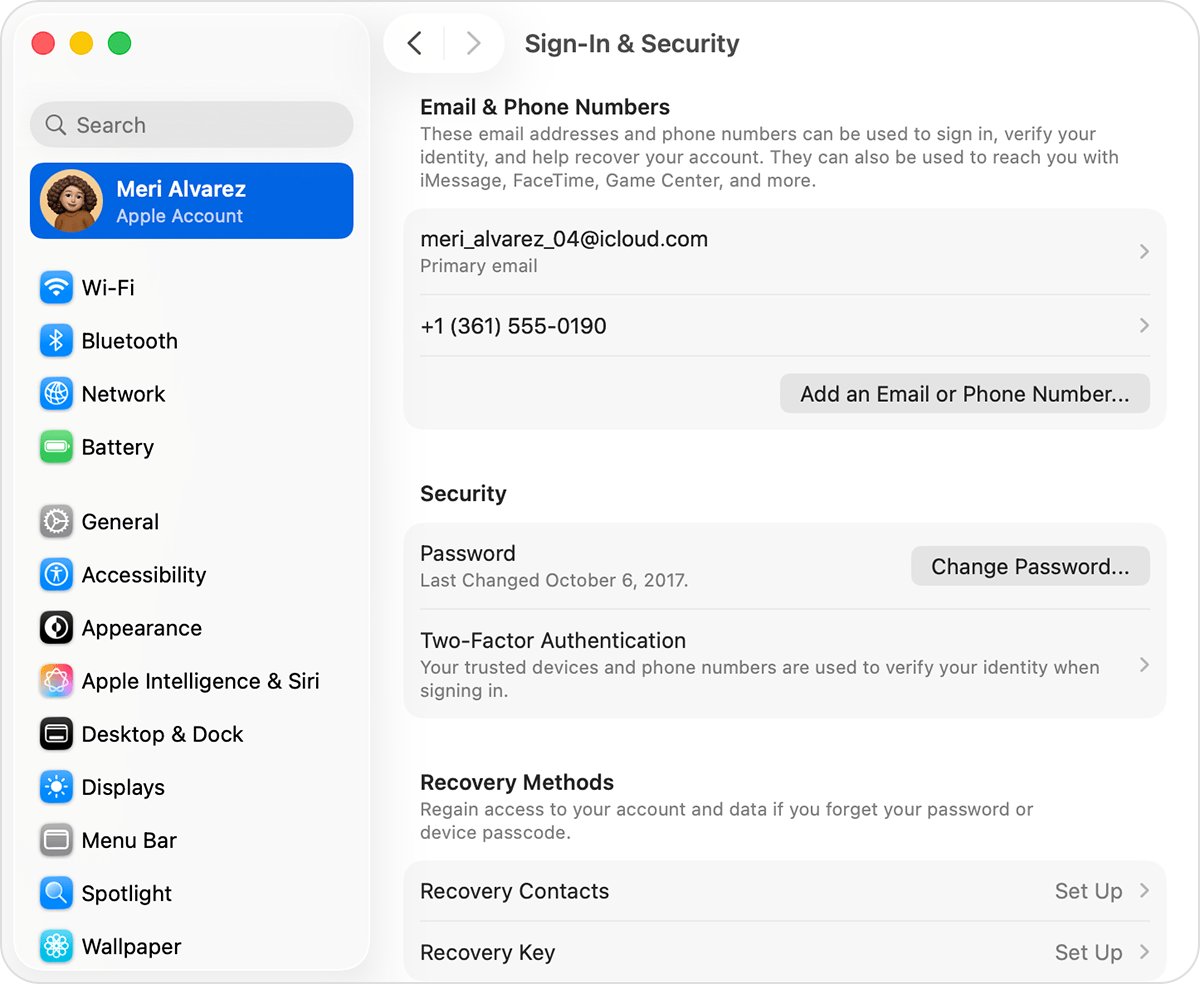
- On a Mac, choose Apple menu > System Settings, click your name, click Sign-In & Security, then Change Password.
- With no trusted device, try account.apple.com: sign in and choose Password under Sign-In and Security.
Stolen Device Protection can add a one-hour wait before the change goes through. In iTunes, Account > View My Account > Edit at account.apple.com opens the same account page once you can sign in.
What if I forgot my iTunes password
With no signed-in device in reach, you can still reset your Apple Account password using the recovery details on file. If you will have your trusted device or number back soon, wait for it, because that restores access faster.
- On the sign-in screen, select Forgot password? or Forgot password or don't have an Apple Account?
- Enter an email address or phone number on your Apple Account.
- Follow the onscreen instructions, which send you to a trusted device or ask for recovery factors.
- Have these ready: a code sent to your trusted phone number, a recovery contact's six-digit code, your account email, or the CVV of the card on the account.
- If a correct CVV is declined by the card issuer, select Don't have access to this card.
- Set the new password, then sign in to iTunes with it.
Can't reset iTunes password
When you have no trusted device and no recovery factors, request account recovery. Apple warns it can take several days or more, and contacting Apple cannot speed it up.
- On a device with iOS 17 or later, go to iforgot.apple.com in Safari and follow the instructions.
- On a borrowed device or one at an Apple Store, open the Support app, scroll to Support Tools, select Reset Password, then Help Someone Else.
- If you started on the web, turn off all your Apple devices during the wait.
- If you started on a device with iOS 17 or iPadOS 17 or later, keep using that device.
- Sign in to iTunes with the new password once recovery finishes.
Activity from another signed-in device cancels the request, and so does signing in with a password you remember. If you find an old signed-in device, change the password on it instead.
Apple ID not accepting password
The password can be right while the email address is wrong for that account. Any email address or phone number on file works to sign in, so look up the ones you have.
- On an iPhone or iPad, open Settings, tap your name and select Sign-In & Security to see the addresses and numbers.
- On a Mac, choose Apple menu > System Settings, click your name and select Sign-In & Security.
- On a Windows PC, open iCloud for Windows and read the address under your name.
- Go to account.apple.com and see whether the sign-in screen remembers your address.
- Search your inbox for Apple receipts and for repair, support or billing emails, which can show the address.
- Enter that address in iTunes with your password.
A masked address such as j*@icloud.com does not reveal its length, because the number of asterisks can differ from the number of characters. A family member in your Family Sharing group can also check it in their settings.
Why can't I log into iTunes with the right password
If the same password works on your iPhone, the problem is on the PC or with the service. These are the checks Apple lists for iTunes Store sign-in problems.
- Select Start > Settings > Time & language > Date & time on your PC.
- Turn on Set time automatically and Set time zone automatically.
- In iTunes, choose another item from the pop-up menu, such as Podcasts, then click Store again.
- Open a website in a browser to confirm your internet connection works.
- Open Apple's System Status page and look at Apple Account and iTunes Store.
- Choose Account > Sign In and try again.
If the PC runs Windows 11, you can also fix iTunes sign-in on Windows 11 by clearing the DNS cache or switching to the Apple Music app.
iTunes password correct but no verification code
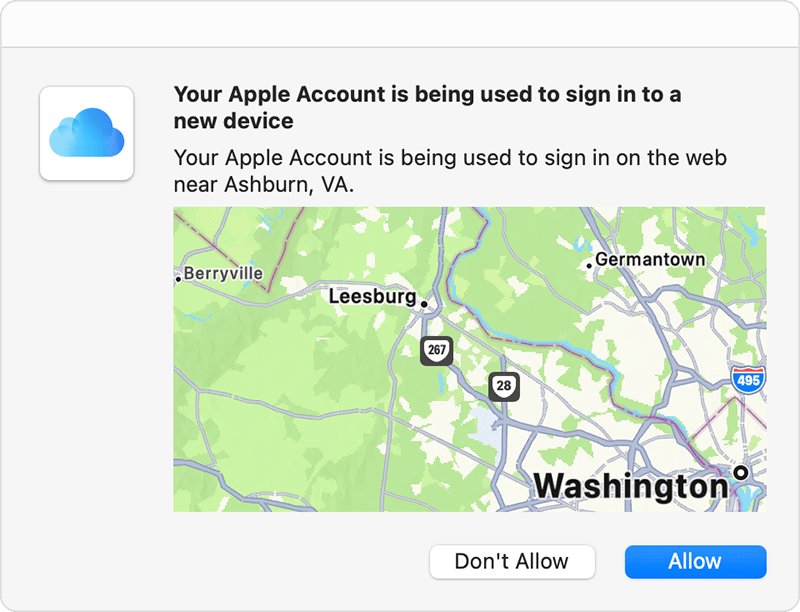
A new device or browser asks for your password and a six-digit code. You are asked again on that device only after a full sign-out, an erase, or a password change required for security reasons.
- Look for the sign-in notification on a trusted iPhone, iPad, Mac or Apple Watch.
- Choose Allow to see the verification code.
- If nothing appears, select Didn't Get a Code? or Can't get to your devices? in the sign-in window.
- Choose to have the code sent to your trusted phone number by text or phone call.
- Check the Unknown Senders filter in Messages if the text does not reach your inbox.
- Enter the code in iTunes to finish signing in.
If you have permanently lost your trusted number, choose Can't use [phone number] on that screen and follow the steps to recover the account.
Apple App Store not accepting password
The App Store uses the same Apple Account password as iTunes, so a reset fixes both. Face ID or Touch ID can replace the password prompt for purchases, which changes what the App Store asks you for.
- Open Settings, tap your name and tap Sign-In & Security to confirm the account details.
- Go back, tap Media & Purchases, then Password Settings.
- Choose Always Require or Require After 15 Minutes.
- If Password Settings is missing, Face ID or Touch ID is on for purchases.
- To enter a password instead, open Face ID & Passcode or Touch ID & Passcode in Settings and turn off the option next to iTunes & App Store.
- Try the purchase again with your current password.
Why won't my iPhone accept my password
The Lock Screen wants your device passcode, so an Apple Account password will not unlock it. After five incorrect attempts, the screen changes to [Device] Unavailable. The same steps apply to an iPad.
- On the [Device] Unavailable screen, tap Forgot Passcode? in the bottom corner.
- Tap Enter Previous Passcode, which works for 72 hours after a passcode change on iOS 17 or iPadOS 17 and later.
- Enter your old passcode.
- Follow the onscreen instructions to set a new passcode.
Forgot Passcode? needs a cellular or Wi-Fi connection, a signed-in Apple Account and Find My turned on. If your old passcode fails too, you can unlock or reset the iPhone another way.
iTunes won't accept my backup password
An encrypted iPhone backup has its own password, created when Encrypt local backup was turned on. Your Apple Account password does not open it, and a new backup password does not unlock older backups.
- On the iPhone or iPad, open Settings and tap General.
- Tap Transfer or Reset [Device], then Reset.
- Tap Reset All Settings and enter your device passcode.
- Tap Reset All Settings again and follow the prompts.
- Reconnect the device to iTunes or the Apple Devices app.
- Create a new encrypted backup and set a new password.
This resets settings such as brightness, Home Screen layout and wallpaper, but it does not affect your data or saved passwords. On iOS 10 or earlier, the backup password cannot be reset.
How to sign into iTunes without password
You cannot sign in to iTunes on a PC without a password: reset the Apple Account password instead of looking for a way around it. Apple's iTunes sign-in asks for your Apple Account and password, and two-factor authentication adds a code on top. Neither step replaces the other.
After sign-in, iPhone and iPad settings can reduce how often you type it. Require After 15 Minutes skips the prompt for 15 minutes after you enter it, and you can turn off password protection for free items.
How to tell if iTunes accepted my password
- Open the Account menu in iTunes and look for Sign Out, which means you are signed in.
- Choose Account > View My Account and check that the Account Information window opens with your details.
- Click See All below Purchase History to load your recent purchases.
- If the Apple Music app is installed, click your name at the bottom of its sidebar and choose View My Account.
I can't get into my iTunes account
"This Apple Account has been disabled for security reasons"
You or someone else entered the password or other account details incorrectly too many times.
- Stop entering the password in iTunes.
- Select Forgot password? on the sign-in screen and reset the password.
- Sign in to iTunes with the new password.
"Your Apple Account is locked" or "not active"
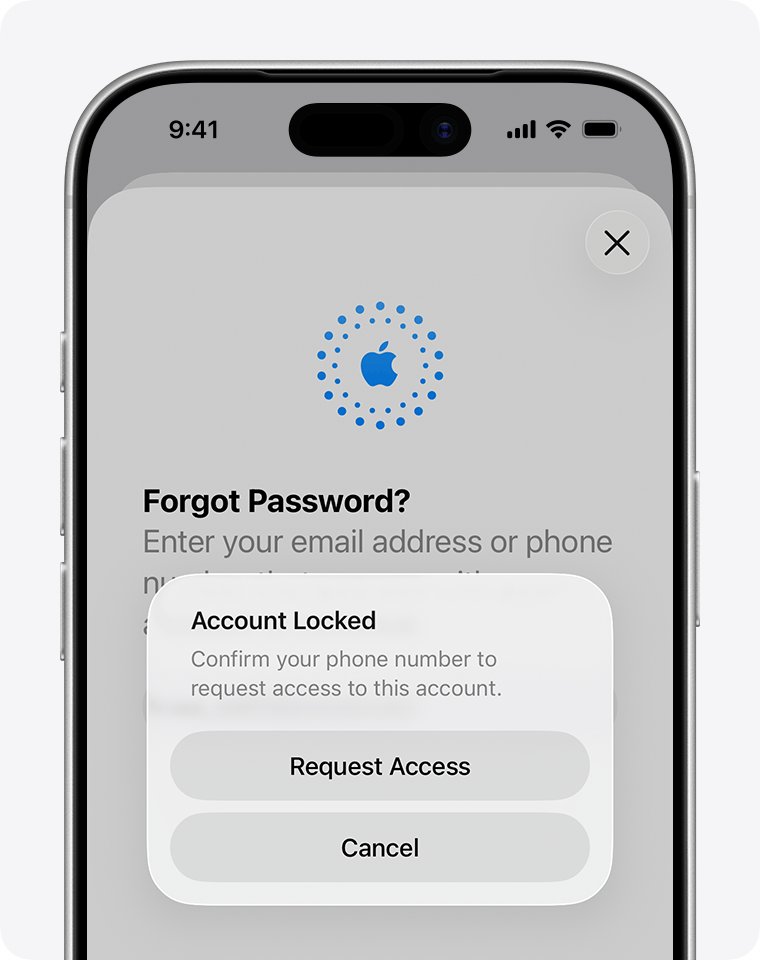
The account has been locked and needs an access request.
- Tap Request Access on the alert.
- Follow the onscreen steps to request access to the account.
- If the request is denied, or you see "This Apple Account is locked and can't be used", create a new Apple Account.
"Your Media & Purchases account has been disabled"
Store access is disabled on the account.
- Tap Continue on the alert to request reactivation.
- Follow the onscreen steps.
- Sign in to iTunes again once the request is complete.
My Apple password stopped working and I did not change it
Apple lists a password that no longer works as a sign that someone else has access to the account.
- Reset the password with Forgot password?, or go to iforgot.apple.com if you cannot.
- Go to account.apple.com and correct any personal or security details you do not recognize.
- Select Devices and remove any device you do not recognize.
- Ask your email provider and cellular carrier to confirm you control each address and number on the account.
Signed in, but iTunes will not let me buy anything
A problem with a previous purchase or your payment details is blocking the Store.
- Choose Account > View My Account and sign in.
- Click Manage Payments next to Payment Information.
- Correct the details and click Done.
Signed in, but my music is not in iTunes
Once Apple Music or the Apple TV app is installed, music, TV shows and movies move to those apps.
- Open the Apple Music app, or the Apple TV app for films and TV.
- Click your name at the bottom of the sidebar, or click Sign In.
- Sign in with the same Apple Account.
A denied request needs more than a reset, so try to fix the locked or inactive Apple Account before you create a new account.
iTunes password FAQ
Why is my iTunes password not working?
iTunes uses your Apple Account password, so a change on any device replaces the old one. The password can also fail with the wrong email address, a wrong PC clock or a locked account. Change the password on a trusted iPhone, then sign in again.
Why won't Apple accept my password?
Apple rejects a password that was changed elsewhere, mistyped, or entered with the wrong account address. Too many incorrect entries also lock the account. Check the addresses in Sign-In & Security, then change or reset the password if it still fails.
What is my iTunes password?
It is your Apple Account password, the one formerly called your Apple ID password. iTunes has no separate password, and the same password signs you in to the App Store, Apple Music and iCloud with any email address or phone number on file.
What if I forgot my iTunes password?
Change it on a signed-in iPhone, iPad or Mac under Sign-In & Security. With no signed-in device, select Forgot password? on the sign-in screen and provide your recovery factors. If you cannot provide them, request account recovery at iforgot.apple.com.
How do I find my iTunes password?
Look in the Passwords app on an iPhone with iOS 18 or a Mac with macOS Sequoia for a saved entry for an Apple website. On iOS 17 or earlier, look in Settings under Passwords. If no entry works, change or reset the password.
How do I change my iTunes password?
On your iPhone or iPad, open Settings, tap your name, tap Sign-In & Security, then tap Change Password. You can also go to account.apple.com and choose Password under Sign-In and Security. The new password applies to iTunes straight away.
Why can't I reset my iTunes password?
A reset needs a trusted device or recovery factors such as your trusted phone number. Without them, start account recovery at iforgot.apple.com or in the Support app on a borrowed device. It can take several days or more, and Apple cannot shorten it.
Can I sign into iTunes without a password?
No. iTunes on a PC signs you in with your Apple Account and password, and two-factor authentication adds a six-digit code on a new device. Reset the password if you no longer know it, then sign in with the new one.
Why can't I log into iTunes?
Usually the password, the account address or the verification code is the cause. If those are right, correct the PC's date, time and time zone, test your internet connection and look at the Apple Account and iTunes Store entries on Apple's System Status page.
Why won't my Apple ID password work?
Apple ID is now Apple Account, and the same details still work, so the rename is not the cause. Check for a recent password change, the right address and a locked account. A password that stops working unexpectedly can also mean someone else changed it.
Why doesn't my iPhone accept my passcode?
The passcode is separate from your Apple Account password, so entering that password will not unlock the iPhone. After five incorrect attempts, the Unavailable screen offers Forgot Passcode? On iOS 17 and later, you can enter your previous passcode for 72 hours after changing it.
Why can't I access my iTunes account?
The account may be locked, not active or disabled, usually after too many incorrect entries. Reset the password for a security lock, select Request Access for a locked or inactive account, and select Continue if Media & Purchases is disabled.