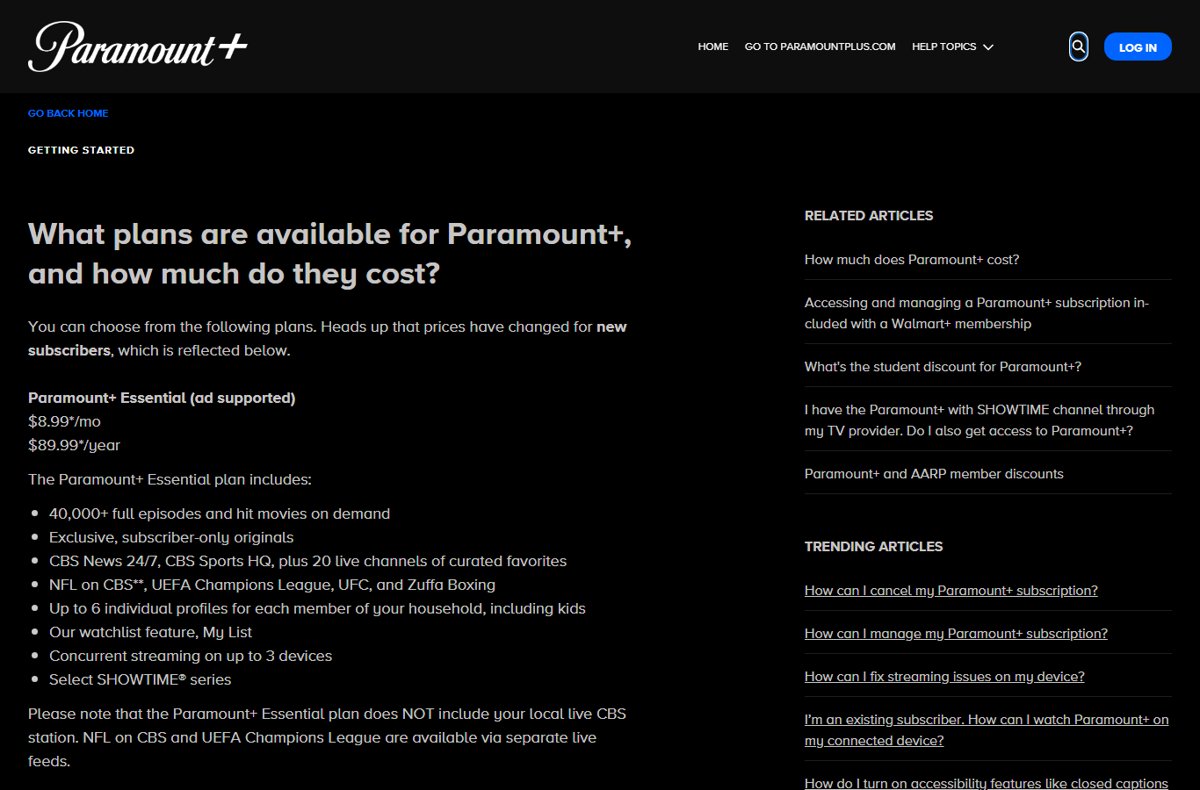
Paramount+ has two US plans: Essential at $8.99 a month ($89.99 a year) with ads, and Premium at $13.99 a month ($139.99 a year) without ads on demand, plus local live CBS, all of SHOWTIME and downloads.
Prices and features below come from the Paramount+ Help Center, checked on October 11, 2026, and cover US pricing, discounts, billing, cancellation and which plan suits which viewer.
Paramount+ prices at a glance
These are the current prices for new US subscribers, plus applicable taxes. They took effect on January 15, 2026.
| Plan | Monthly price | Annual price | Ads on demand |
|---|---|---|---|
| Paramount+ Essential | $8.99 | $89.99 | Yes, ad-supported |
| Paramount+ Premium | $13.99 | $139.99 | No ads (promos, trailers and live TV breaks still appear) |
Existing subscribers who are subject to a price change get an email 30 days before the new price applies.
Premium costs $5.00 more per month, or $50.00 more per year on annual billing.
Essential vs. Premium: the real differences
Paramount+ itself says the biggest difference is ads. Four more features separate the plans, and everything else is shared.
| Feature | Essential | Premium |
|---|---|---|
| Ads on on-demand shows and movies | Yes | No |
| Your local, live CBS station | No | Yes |
| SHOWTIME | Select SHOWTIME series | All of SHOWTIME, plus SHOWTIME East and West live |
| 4K UHD, Dolby Vision or HDR10 | No | Select titles |
| Download movies and shows | No | Yes (iPhone, iPad and Android) |
| Concurrent streams | 3 | 3 |
| Profiles | Up to 6 | Up to 6 |
| Live NFL on CBS, UEFA Champions League, UFC, Zuffa Boxing | Yes, on separate live feeds | Yes |
What Paramount+ Essential includes
Essential is the ad-supported plan. Note that it does not include your local live CBS station.
| Included with Essential | Detail |
|---|---|
| On-demand library | 40,000+ full episodes and hit movies |
| Originals | Exclusive, subscriber-only originals |
| Live channels | CBS News 24/7, CBS Sports HQ and 20 live channels of curated favorites |
| Live sports | NFL on CBS, UEFA Champions League, UFC and Zuffa Boxing via separate live feeds |
| Profiles | Up to 6 individual profiles, including kids profiles |
| Watchlist | My List |
| Simultaneous streams | Up to 3 devices at once |
| SHOWTIME | Select SHOWTIME series on demand |
What Paramount+ Premium includes
Premium includes everything in Essential, plus the items below.
| Added with Premium | Detail |
|---|---|
| No ads on demand | Paramount+ promos, trailers and sponsorships still appear, and live content has ad breaks |
| Local live CBS | Your local CBS station, including the NFL on CBS where your market carries the game |
| All of SHOWTIME | The full SHOWTIME library, plus SHOWTIME East and West live feeds |
| Picture quality | Select programming in 4K UHD, Dolby Vision or HDR10, depending on your device and connection |
| Downloads | Up to 25 titles in the library; available for 30 days, or 48 hours after you start playback |
Does Paramount+ include local CBS?
Only Premium includes your local, live CBS station. Essential still streams NFL on CBS games on a separate live feed, but not the station's full schedule.
| Live content | Essential | Premium |
|---|---|---|
| Local CBS station, live | No | Yes |
| NFL on CBS | Yes, on a separate live feed (games vary by market) | Yes, on the local station |
| CBS News 24/7 and CBS Sports HQ | Yes | Yes |
| 20+ curated live channels | Yes | Yes |
| Commercials during live TV | Yes | Yes |
You do not need cable or satellite for live TV. A broadband connection and a supported device are enough, though the stream can run several seconds behind the over-the-air broadcast.
What sports are included with Paramount+?
Both plans carry the major live sports at no extra cost. Premium subscribers still see ads during live events.
| Sport | Essential | Premium | Notes |
|---|---|---|---|
| NFL on CBS | Yes | Yes | Games vary by market |
| UFC | Yes | Yes | Every numbered event and every UFC Fight Night, live and on demand, with Spanish and Portuguese streams |
| UEFA Champions League | Yes | Yes | Premium adds more live top soccer |
| Zuffa Boxing | Yes | Yes | Live |
| CBS Sports HQ | Yes | Yes | 24/7 live sports news channel |
UFC replaces pay-per-view on Paramount+: there is no extra fee for numbered events on either plan.
Which Paramount+ plan is best for you?
Match your situation to a row. If a discount or bundle applies to you, check that first, because it can change the answer.
| Your situation | Choose | Why |
|---|---|---|
| Budget viewer who tolerates ads | Essential | Same library, originals and live sports for $5 less per month |
| SHOWTIME fan | Premium | Essential carries only select SHOWTIME series |
| You want your local CBS station and NFL on CBS live | Premium | Only Premium includes the local live CBS station |
| You mainly watch UFC or Champions League | Usually Essential | Both events stream live on Essential, and live events carry ads on both plans anyway |
| Family with kids | Either plan | Both include 6 profiles, kids programming and 3 streams at once |
| Traveler or commuter | Premium only if downloads matter | Only Premium can download to iPhone, iPad or Android |
| Student, teacher or Walmart+ member | Check the discount first | Students and teachers get 50% off; Walmart+ includes Essential |
| You own a 4K HDR TV | Premium | 4K UHD, Dolby Vision and HDR10 are Premium-only on select titles |
Are Paramount+ annual plans worth it?
Annual billing saves about 17% on either plan if you would keep the subscription for a full year anyway.
| Plan | 12 months billed monthly | Annual price | You save |
|---|---|---|---|
| Essential | $107.88 | $89.99 | $17.89 |
| Premium | $167.88 | $139.99 | $27.89 |
Annual plans are sold only through paramountplus.com, the App Store, Google Play, Roku and Amazon. New gift card subscribers cannot buy an annual plan at signup.
Skip annual billing if you only want one season or one sports window, because cancelling does not refund the unused months.
How to get Paramount+ cheaper
Six official routes lower the price. Discounts for students, teachers and the military are verified by SheerID and must be claimed on the web.
| Route | What you get | How to claim it |
|---|---|---|
| 1. Use the Walmart+ benefit | Essential at no extra cost; Premium for +$5.49/month | Walmart account > Walmart+ > Video Streaming Choice > Make Your Pick > Paramount+ |
| 2. Use the student discount | 50% off any plan, monthly or annual, for 1 year (re-verify yearly) | Verify at paramountplus.com/account/edu/ (college or university students only) |
| 3. Use the teacher, faculty or staff discount | 50% off any plan for 1 year (re-verify yearly) | Verify on desktop or mobile web |
| 4. Use the military discount | 50% off any plan for the life of the subscription | Verify on desktop or mobile web |
| 5. Check television-provider access | Premium at no extra charge with the Paramount+ with SHOWTIME channel from a participating provider | Sign in at paramountplus.com/partner |
| 6. Select annual billing | About 17% off versus paying monthly | Pick the annual option at signup or under Edit Plan |
Student discounts cannot be added to an existing subscription; you must cancel and resubscribe through the student page. The same applies to Walmart+: cancel your current plan and wait until the billing cycle ends.
Participating TV providers include AT&T U-verse, Cox, DIRECTV, Hulu + Live TV, Mediacom, Optimum, Spectrum, TDS and YouTube Primetime Channels. YouTube TV is not a participating provider. The AARP discount ended on December 1, 2025.
Free trials and promotional pricing
Do not plan around a free trial: on October 11, 2026, the Paramount+ offers page states there are no active promotional offers. Paramount+ runs offers from time to time, and most are for new subscribers only. Existing subscribers are not eligible unless the offer terms say so, so check the terms on the signup page before you subscribe.
If you redeem a promo or coupon code, read its terms before switching plans, because a plan change can affect it.
Billing, upgrades, and renewals
Paramount+ renews automatically every month or year, and billing dates cannot be changed. Change your plan on the platform where you first subscribed.
- Go to paramountplus.com and sign in.
- Click your name in the top-right corner, then select Account.
- In the Subscription & Billing section, next to Paramount+ Plan, click Edit Plan.
- Select the new plan or billing cadence (monthly or annual).
- Click Switch Plan, then confirm the new plan on your Account page.
On iPhone, iPad or Android, tap Profile > Account > Manage Account. On Apple TV, Android TV, Fire TV or Roku, open Settings > My Account > Manage Account.
A downgrade to Essential keeps Premium features until the billing cycle ends. Billed through Apple, Google Play, Amazon, Roku or a partner such as Walmart+? Billing questions go to that company, not Paramount+.
How to cancel Paramount+
Cancel through the same platform that bills you. Uninstalling the app does not cancel the subscription.
| You pay through | Where to cancel |
|---|---|
| paramountplus.com, smart TV or game console | paramountplus.com > your username > Account > Cancel subscription |
| iPhone or iPad (Apple) | Settings > your name > Subscriptions > Paramount+ > Cancel Subscription > Confirm |
| Apple TV | Settings > Users & Accounts > your account > Subscriptions > Paramount+ > Cancel Subscription |
| Google Play | g.co/play/subscriptions on a phone or computer > Paramount+ > Cancel subscription |
| Amazon or Fire TV | amazon.com/appstoresubscriptions > Actions next to Paramount+ > Cancel your subscription |
| Roku | Highlight Paramount+ on the home screen, press \* > Manage Subscription > Cancel Subscription |
| Prime Video Channels | Account & Settings > Your subscriptions > Paramount+ > Unsubscribe |
After cancellation, you keep access until the end of the current billing period, and paid fees are not refunded except where the law requires it. You can resubscribe any time by signing in with the same email.
Devices and geographic availability
| Question | Answer |
|---|---|
| Supported devices | Android phones and tablets, Android TV, Google TV, Apple TV, Apple Vision Pro, iPhone and iPad, computers, Chromecast, Fire TV, Roku, LG, Samsung, VIDAA and Vizio TVs, PlayStation, Xbox, Xfinity and Xumo, Cox Contour, DISH Hopper 3, DIRECTV Gemini, Portal TV |
| Streams at once | 3 on either plan; the number of registered devices is not limited |
| Download devices | iPhone and iPad on iOS 16+, Android phones and tablets on Android 6+ (Premium only) |
| Where a US account works | The 50 states including Alaska and Hawaii, American Samoa, Guam, the U.S. Virgin Islands, the U.S. Minor Outlying Islands and the Northern Mariana Islands |
| Puerto Rico | Not included yet |
| Other countries | Paramount+ runs separate services in select markets, with different content and pricing |
On a Windows PC you can stream in a browser or install the Paramount+ app.
How to check which Paramount+ plan you have
- Go to paramountplus.com and sign in.
- Click your name in the top-right corner and select Account.
- Read the plan name next to Paramount+ Plan in the Subscription & Billing section.
- If the plan is billed by Apple, Google Play, Amazon, Roku or Walmart+, check that company's subscriptions page for the price and renewal date.
When should you skip Paramount+?
Skip a direct subscription if you already get Paramount+ through Walmart+ or a participating TV provider, if you live outside the US, or if you need a DVR. Walmart+ and the Paramount+ with SHOWTIME channel already include a plan, US accounts stream only in the US and listed territories, and Paramount+ has no DVR. Premium is also not fully ad-free: live TV, live sports and Paramount+ promos still carry ads.
Paramount+ plans and pricing: frequently asked questions
How much does Paramount+ cost a month?
Paramount+ Essential costs $8.99 a month and Paramount+ Premium costs $13.99 a month in the US, plus applicable taxes. These prices apply to new subscribers since January 15, 2026.
How much is the Paramount+ Premium plan?
Paramount+ Premium costs $13.99 a month or $139.99 a year. It adds ad-free on-demand streaming, your local live CBS station, all of SHOWTIME, select 4K titles and downloads on top of Essential.
What are the Paramount+ plans?
There are two plans: Paramount+ Essential, which is ad-supported, and Paramount+ Premium, which is ad-free on demand. Both stream the same library, originals and major live sports on up to 3 devices at once.
What is the difference between the Paramount+ plans?
The biggest difference is ads. Premium also adds your local live CBS station, all of SHOWTIME, select 4K UHD and HDR titles, and the ability to download shows and movies to a phone or tablet.
Is Paramount+ Premium completely ad-free?
No. Premium removes ads from on-demand shows and movies, but all plans include Paramount+ promos, trailers and sponsorships. Live TV and live events, including UFC, have ad breaks on Premium too.
Does Paramount+ include SHOWTIME?
Yes. Essential includes select SHOWTIME series, and Premium includes all of SHOWTIME plus the SHOWTIME East and West live feeds. There is no separate SHOWTIME plan to buy.
Can I watch UFC on Paramount+ Essential?
Yes. Every UFC numbered event and UFC Fight Night streams live on both Essential and Premium at no extra cost, with no pay-per-view fee.
How many devices can stream Paramount+ at once?
Three. Both plans allow up to 3 concurrent streams, and Paramount+ does not limit how many devices you register to the account.
Can I download Paramount+ shows and movies?
Only on Premium, on iPhone or iPad with iOS 16 or later and Android 6 or later. You can hold 25 downloads, each available for 30 days or 48 hours after you start watching.
Does Paramount+ have a DVR?
No. Paramount+ has no DVR feature. Premium subscribers can download titles to watch offline, and all subscribers can stream more than 40,000 episodes and movies on demand.
The bottom line: which Paramount+ plan should you choose?
Choose Essential at $8.99 a month if you mainly watch on-demand shows, UFC or Champions League and can tolerate ads; choose Premium at $13.99 a month if you want your local CBS station, all of SHOWTIME, downloads or 4K. Both plans share the library, live sports and 3 streams, so the $5 gap buys only ad-free on-demand viewing and four specific features. Check the Walmart+, student, teacher, military and TV-provider routes before you pay full price.