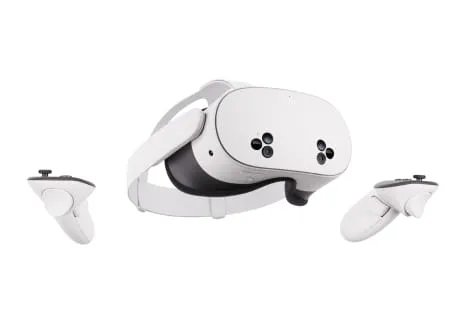
Yes, the Oculus Rift S is still a workable PC VR headset if you already own one or find a cheap, tested unit, because Meta's Windows app still runs it on Windows 10 and Windows 11.
It is no longer sold new, though, and Meta now files it under legacy headsets, so this guide covers the real requirements, what to check before buying, how it compares with the Quest 3 and Quest 3S, and fixes for the common faults.
Is the Oculus Rift S still supported in 2025?
Meta still publishes Rift S help pages and PC requirements, and its PC app still installs and manages Rift S content.
Those pages now sit in the Help Centre's Legacy headsets section, and the old Rift S product page redirects to the Meta Quest lineup.
Keep using a Rift S you already own, and buy a used one only when it is cheap, fully tested and your PC meets the requirements below. The headset still runs through Meta's current PC app on Windows 10 and Windows 11, but Meta no longer sells it, so replacement parts and new units come only from the used market.
Oculus Rift S PC requirements for Windows 10 and Windows 11
The Rift S is not standalone. It needs a Windows PC with a dedicated graphics card for every session.
| Component | Minimum | Recommended |
|---|---|---|
| Processor | Intel i3-6100, AMD Ryzen 3 1200 or FX4350, or better | Intel i5-4590 or AMD Ryzen 5 1500X, or better |
| Graphics card | NVIDIA GTX 1050 Ti or AMD Radeon RX 470, or better (alternatives: GTX 960 4 GB or R9 290) | NVIDIA GTX 1060 or AMD Radeon RX 480, or better (alternatives: GTX 970 or R9 290) |
| Memory | 8 GB RAM or more | 8 GB RAM or more |
| Operating system | Windows 10 or later | Windows 10 or later |
| USB | One USB 3.0 port | One USB 3.0 port |
| Video output | Mini DisplayPort, using the adapter included with the Rift S | DisplayPort |
Windows 11 counts as "Windows 10 or later", so a Windows 11 PC that meets the rest of the table is supported.
Oculus Rift S specs and features in 2025
Meta's current pages document the Rift S mainly through its connections and setup options. The table lists what those pages confirm.
| Feature | Oculus Rift S | Original Oculus Rift |
|---|---|---|
| Type | PC-tethered headset, not standalone | PC-tethered headset, not standalone |
| Video connection | DisplayPort (Mini DisplayPort with the included adapter) | HDMI 1.3 |
| USB ports needed | One USB 3.0 port | Three USB 3.0 plus one USB 2.0 (recommended), or one USB 3.0 plus two USB 2.0 (minimum) |
| IPD adjustment | Set in software through the PC app's Device page | Not covered on the same Meta page |
| Controllers | Touch controllers, paired as Oculus Rift S and Touch | Touch controllers |
| PC software | Meta's PC app (formerly the Oculus app), also used for Quest Link | Same app |
| Help Centre status | Listed under Legacy headsets | Listed under Legacy headsets |
The single USB 3.0 port and one DisplayPort make the Rift S far simpler to cable than the original Rift, which is the main practical difference between the two.
How to set up the Oculus Rift S on a Windows 11 PC
- Download and install Meta's PC app from the Meta Quest Link page on meta.com.
- Plug the headset's DisplayPort cable into a DisplayPort output on your graphics card, using the included Mini DisplayPort adapter if the card needs it.
- Plug the headset's USB cable into a USB 3.0 port on the PC.
- Open the app, sign in with your Meta account and select Device to confirm the headset appears.
- Select Oculus Rift S and Touch, scroll to IPD, set your measurement with the + and – buttons and select OK.
- To run SteamVR or other games from outside the Meta store, select Settings, open the General tab and turn on Unknown Sources.
Oculus Rift S PC VR compatibility and software support
The Rift S runs two kinds of PC VR content: titles bought through Meta's store and titles launched through SteamVR.
| What you want to run | What it needs | Why |
|---|---|---|
| Games from the Meta store | Meta's PC app installed and signed in | Rift content downloads into the app's Software library folder |
| SteamVR games | Steam, SteamVR and Unknown Sources turned on in the Meta app | Meta treats content from outside its store as an unknown source |
| Any PC VR title on Windows 11 | A PC that meets the Rift S table above | Meta lists Windows 10 or later for the Rift S |
| Windows 7 or 8.1 | Not supported | Meta ended Windows 7 and 8.1 support on 14 January 2020, and Steam requires Windows 10 or later from 1 January 2024 |
| Moving your library to another drive | A second library location in the app | Meta lets you move installed Rift S content between library folders |
SteamVR's own store page lists the Oculus Rift among supported headsets, with a GTX 970 or R9 290 as its minimum graphics card.
Oculus Rift S display, tracking and controller performance check
These checks tell you whether a particular Rift S still performs as it should, which matters more than its age.
| Check | What good looks like | What to do if it fails |
|---|---|---|
| Display | Both lenses show a clear, evenly lit image with no dead or flickering areas | Reseat the DisplayPort cable on the graphics card and update the graphics driver |
| Image sharpness | Text in the home environment looks sharp after setting IPD | Re-measure and set IPD under Device in the app |
| Headset tracking | The view stays steady when you stand still and turns smoothly when you move | Restart the PC app and test again; if it persists, treat the unit as faulty |
| Touch controllers | Both controllers appear in the headset and track your hands | Restart the PC app and test again; a controller that still fails needs replacing |
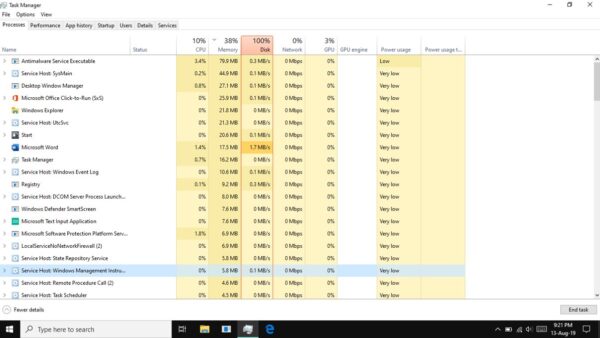
| Software | The app opens, lists the headset and starts a game | Restart OVRService from Task Manager |
Oculus Rift S price, availability and used-market risks
Meta no longer sells the Rift S, so any unit you buy today is used or old stock from another seller.
Meta's current price list does not include it, so the price depends entirely on the seller and the unit's condition.
| Risk | Why it matters | What to check before buying |
|---|---|---|
| Damaged headset cable | The cable carries DisplayPort and USB, and the headset cannot run without it | See the headset working on the seller's PC, or get a return window |
| Missing adapter | Many laptops and some cards have only Mini DisplayPort | Confirm the Mini DisplayPort adapter is in the box |
| Missing or faulty Touch controllers | Most Rift S games need both controllers | Check both controllers track and every button responds |
| No warranty from Meta on a used unit | Repairs and replacements are not guaranteed | Buy from a seller who accepts returns |
| PC does not meet requirements | A weak graphics card gives a black screen or poor performance | Compare your GPU and ports with the requirements table first |
| Lens scratches | Scratches blur the image permanently | Inspect both lenses under light before paying |
Rift S vs modern VR headsets like Meta Quest 3 and Quest 3S
Meta's current headsets are the Quest 3 and Quest 3S. Both run on their own and can also play PC VR games through Meta's Link app.
| Feature | Oculus Rift S | Meta Quest 3S | Meta Quest 3 |
|---|---|---|---|
| Works without a PC | No | Yes | Yes |
| PC VR connection | DisplayPort plus USB 3.0, always wired | Link USB cable or Air Link over Wi-Fi | Link USB cable or Air Link over Wi-Fi |
| Display resolution per eye | Not listed on Meta's current pages | 1,832 x 1,920 | 2,064 x 2,208 |
| Refresh rates | Not listed on Meta's current pages | 72, 90 and 120 Hz | 72, 90 and 120 Hz |
| Storage | Uses the PC's drive | 128 GB or 256 GB | 512 GB |
| Sold new by Meta | No | Yes | Yes |
For PC VR through Link, Meta recommends an NVIDIA RTX 20-series or AMD Radeon RX 6000-series card and 16 GB of RAM, so a Quest can need a stronger PC than the Rift S minimum.
How to check the Oculus Rift S is working on Windows 11
- Open Meta's PC app and select Device.
- Confirm Oculus Rift S and Touch appears in the device list.
- Put on the headset and check that the home environment loads in both lenses.
- Move both Touch controllers in front of the headset and confirm they appear in view.
- Launch one installed game from the app library and play for a few minutes without freezes.
Oculus Rift S black screen, stuck loading and SteamVR not working fixes
Oculus Rift S screen is black
The headset is not getting a video signal from a supported graphics card, or the graphics driver is out of date.
- Plug the DisplayPort cable into a DisplayPort output on your graphics card, not a port that bypasses it.
- Check your graphics card against the Rift S minimum of a GTX 1050 Ti or RX 470.
- Download the latest graphics driver from NVIDIA or AMD.
- On NVIDIA cards, note Meta's warning that driver 595.71 and later can freeze the Link app in the headset, and use the earlier driver Meta links if that happens.
- Restart the PC and reopen Meta's PC app.
Oculus Rift S stuck on loading
The Oculus runtime service or the PC app has stalled.
- Close Meta's PC app.
- Open Task Manager and select the Services tab.
- Right-click OVRService, select Stop, then right-click it again and select Start.
- Open the app, select Settings, open the Beta tab and click Restart.
- If it still hangs, press Windows + R, type
%LOCALAPPDATA%\Oculus\and save the OculusSetup.log file for Meta Store Support.
SteamVR not working with Oculus Rift S
Meta's app blocks content from outside its store until Unknown Sources is allowed.
- Open Meta's PC app and confirm the headset shows under Device.
- Select Settings and open the General tab.
- Turn on the Unknown Sources toggle and confirm.
- Start SteamVR from Steam and launch the game again.
Oculus software will not download or install
Security software is blocking the installer or downloads.
- Open your antivirus settings and add Oculus as a trusted program.
- Update the antivirus software to its latest version.
- Run the installer again.
Who should still consider the Oculus Rift S?
| Your situation | Is the Rift S a good fit? | Why |
|---|---|---|
| You already own a working Rift S | Yes, keep using it | Meta's app still supports it on Windows 10 and Windows 11 |
| You play seated or standing PC VR at one desk | Yes, if the price is low | The wired connection is not a drawback when you stay near the PC |
| You want VR without a PC | No | The Rift S cannot run without a Windows PC |
| Your laptop has no DisplayPort or Mini DisplayPort output | No | The headset needs a DisplayPort video output |
| You want a warranty and long-term support | No, choose a Quest 3S or Quest 3 | Meta lists the Rift S as a legacy headset and no longer sells it |
| You want wireless PC VR | No | Only Quest headsets offer Air Link over Wi-Fi |
Oculus Rift S frequently asked questions
Is the Oculus Rift S still supported?
Yes, in a limited form. Meta still publishes Rift S help pages and its PC app still installs Rift S content, but the headset sits under Legacy headsets in the Help Centre and is no longer sold new.
Does the Oculus Rift S still work?
Yes. A working Rift S still runs PC VR games through Meta's PC app on Windows 10 and Windows 11, as long as the PC meets the graphics, USB 3.0 and DisplayPort requirements.
Is the Oculus Rift S compatible with Windows 11?
Yes. Meta lists Windows 10 or later as the operating system requirement for the Rift S, and its PC app supports Windows 11. The PC still needs a GTX 1050 Ti or RX 470 class card or better.
Is the Oculus Rift standalone?
No. Both the original Oculus Rift and the Rift S are PC-tethered headsets that need a Windows PC with a dedicated graphics card. Meta's standalone headsets are the Quest models, such as the Quest 3 and Quest 3S.
What is the Oculus Rift?
The Oculus Rift is Meta's original PC VR headset, sold under the Oculus brand. The Rift S replaced it, using one DisplayPort and one USB 3.0 port instead of HDMI and several USB ports.
Is the Oculus Rift S still good?
It is still good enough for wired PC VR if you already own one. It is a weaker buy than a Quest 3S, which works without a PC, adds wireless Air Link and is still sold new with a warranty.
Do I need a powerful PC to use the Rift S?
Not by current standards. Meta's minimum is an Intel i3-6100 or Ryzen 3 1200, a GTX 1050 Ti or RX 470, 8 GB of RAM, one USB 3.0 port and a DisplayPort or Mini DisplayPort output.
Why is SteamVR not working with my Oculus Rift?
Meta's PC app blocks games from outside its store by default. Open the app, select Settings, then the General tab, and turn on Unknown Sources, then start SteamVR again.
What is the difference between the Oculus Rift and the Rift S?
The Rift uses HDMI and needs several USB ports, while the Rift S uses DisplayPort and a single USB 3.0 port. Both are PC-tethered, use Touch controllers and run through the same Meta PC app.
Bottom line: is the Oculus Rift S still worth it?
Keep a working Rift S for wired PC VR, but buy a Quest 3S or Quest 3 if you are buying a headset today. The Rift S still runs on Windows 11 through Meta's app, yet it is a legacy headset with no new sales, while the Quest models work without a PC and still play PC VR through Link.