Windows has no sound on a MacBook Pro when Apple's Boot Camp drivers are missing, and on a 2011 or older MacBook Pro installed in UEFI mode Apple offers no supported audio driver at all.
This guide shows how to tell which case you have, how to install or repair the Boot Camp audio drivers, and how to get sound back on a 2011 model.
How to fix MacBook Pro UEFI Windows sound
Match the Mac to Apple's Windows support list first, because the fix depends on the model year.
- In macOS, choose Apple menu > About This Mac and note the model name, such as MacBook Pro (13-inch, Early 2011).
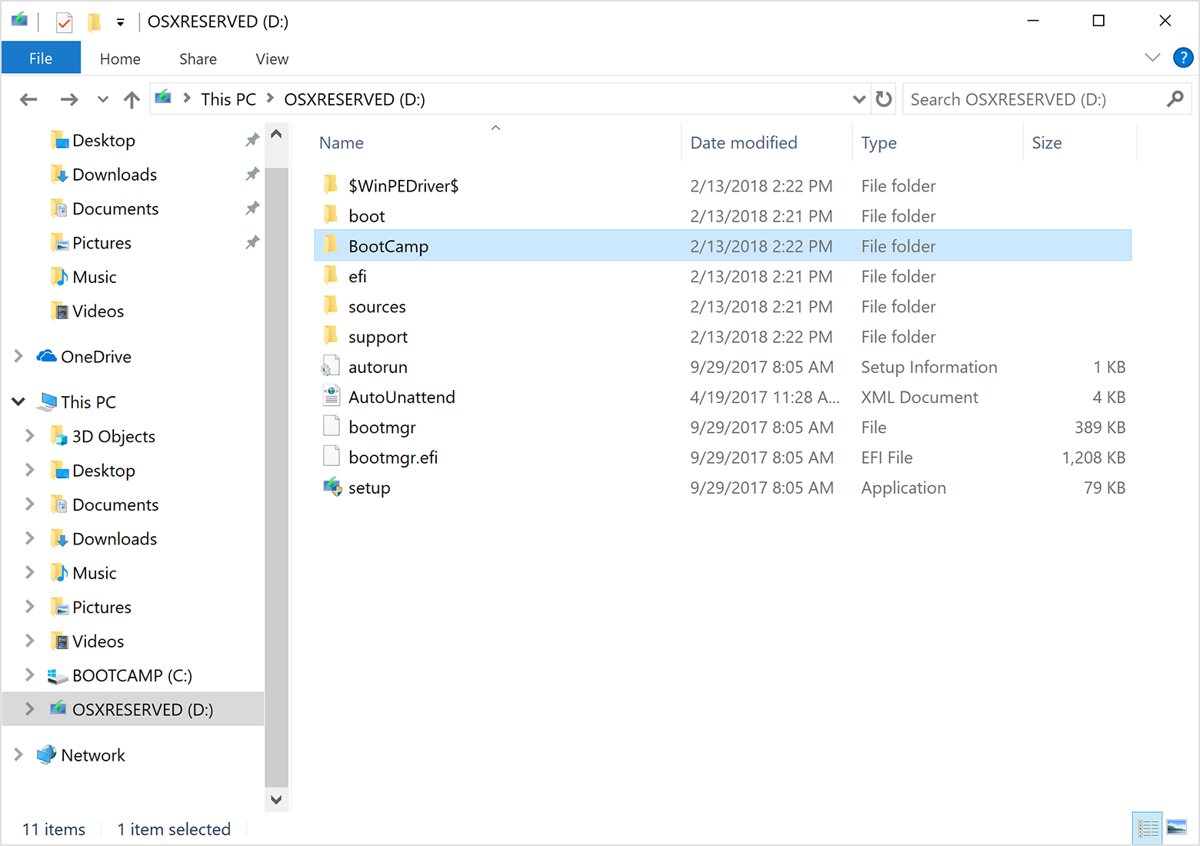
- If the MacBook Pro is from 2012 or later, start up in Windows and open the BootCamp folder on the OSXRESERVED partition, usually the D: drive.
- Open Setup from that folder, click Yes when Boot Camp asks to make changes, then click Repair.
- Click Finish, then click Yes to restart the Mac.
- If the MacBook Pro is from 2011 or earlier and Windows 10 was installed in UEFI mode, reinstall Windows with Boot Camp Assistant using a Windows version Apple lists for that model.
- After the restart, open Settings > System > Sound and select the built-in speakers under Output.
MacBook Pro Windows sound fix by model year
| Your MacBook Pro and Windows setup | What to do | Why |
|---|---|---|
| 2012 to 2020 Intel model, Windows 10 from Boot Camp Assistant | Run Setup from the BootCamp folder and click Repair | Apple's Windows support software includes the audio driver |
| 2012 to 2020 model, no OSXRESERVED partition | Download Windows Support Software to a USB drive | Apple lists missing speaker audio as a problem this download fixes |
| Sound stopped after a Windows update | Run Windows Update and Apple Software Update | Boot Camp driver updates arrive through both |
| 2011 or older model, Windows 10 installed in UEFI mode | Reinstall Windows with Boot Camp Assistant | Apple lists no Windows 10 support for these models |
| 2011 model, Windows 7 or 8.1 from Boot Camp Assistant | Reinstall the Boot Camp support software | Apple supports both versions on 2011 MacBook Pro models |
| MacBook Pro with Apple silicon | Boot Camp does not apply | Boot Camp runs only on Intel-based Macs |
Which MacBook Pro models support Windows 10 with Boot Camp
Apple publishes a separate support list for each Windows version. Windows 10 support starts with the 2012 MacBook Pro, while the 2011 models stop at Windows 8.1.
| Windows version | MacBook Pro models Apple supports | Boot Camp support software |
|---|---|---|
| Windows 10 | 2012 to 2020, excluding MacBook Pro (13-inch, M1, 2020) | Installed by the Boot Camp installer after setup |
| Windows 8.1 | 15-inch and 17-inch Mid 2010 through Retina Mid 2015, including all 2011 models | Boot Camp 6 adds support for some Mac features |
| Windows 7 64-bit | All 2011 MacBook Pro models (13-inch, 15-inch and 17-inch, Early and Late 2011) | Version 5 |
| Windows 7 32-bit | All 2011 MacBook Pro models | Version 4 |
Windows 7 reached end of support on January 14, 2020, and Windows 8.1 on January 10, 2023. Neither receives security updates from Microsoft now.
How to find your MacBook Pro model year
The model name decides which Boot Camp drivers exist for the Mac. Apple pairs every model name with a model identifier, which Windows also shows as the System Model when you find the computer model in Windows.
- Start up the Mac in macOS.
- Choose Apple menu > About This Mac.
- Read the model name, for example MacBook Pro (15-inch, Late 2011).
- Compare the year with the Windows support table above.
- If you see the identifier instead of the name, MacBookPro8,1, MacBookPro8,2 and MacBookPro8,3 are the 13-inch, 15-inch and 17-inch 2011 models.
- MacBookPro9,1 and MacBookPro9,2 are the 15-inch and 13-inch Mid 2012 models, the oldest MacBook Pro models on Apple's Windows 10 list.
How to check if Windows is installed in UEFI mode on a MacBook Pro
System Information in Windows shows the firmware mode Windows started in.
- Select Start and type
msinfo32in the search box. - Open System Information from the results.
- Select System Summary in the left pane.
- Read the BIOS Mode value on the right.
- UEFI means Windows was installed in UEFI mode; Legacy means it started in legacy BIOS mode.
On a 2011 MacBook Pro running Windows 10, a UEFI value confirms a setup that sits outside Apple's support list. Community workarounds that patch the firmware tables for audio are not supported by Apple.
Install Boot Camp drivers to fix MacBook Pro sound
The Boot Camp installer puts Apple's Windows support software, including the drivers, on the Mac. Running it again with Repair restores a missing audio driver.
Connect a USB mouse or keyboard first, because Bluetooth input may not work until the drivers are installed.
- Start up the Mac in Windows.
- Open File Explorer and open the OSXRESERVED partition, usually drive D:.
- Open the BootCamp folder and run Setup from that folder.
- Click Yes when Boot Camp asks to make changes to your device.
- Click Repair to start the installation.
- Click Finish, then click Yes to restart the Mac.
From Command Prompt, the same installer runs with D:\BootCamp\setup.exe. The package also restores the keyboard keys, so it can fix Boot Camp brightness control at the same time.
Download Windows support software for MacBook Pro sound
Use this route when the Mac has no OSXRESERVED partition. Apple lists no audio from the built-in speakers in Windows as one of the problems it fixes.
- In macOS, install the latest macOS updates.
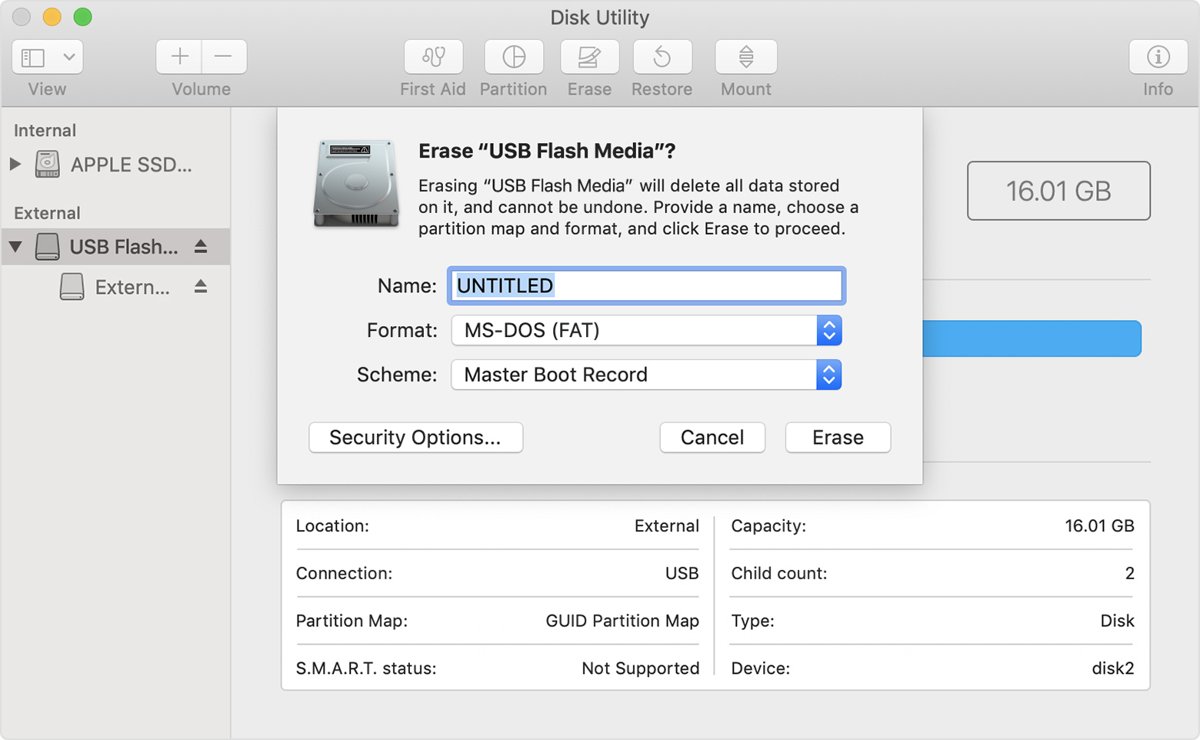
- Open Disk Utility from Applications > Utilities, choose View > Show All Devices, and select a USB flash drive of 16GB or more.
- Click Erase, choose MS-DOS (FAT) as the format and Master Boot Record as the scheme, then erase the drive.
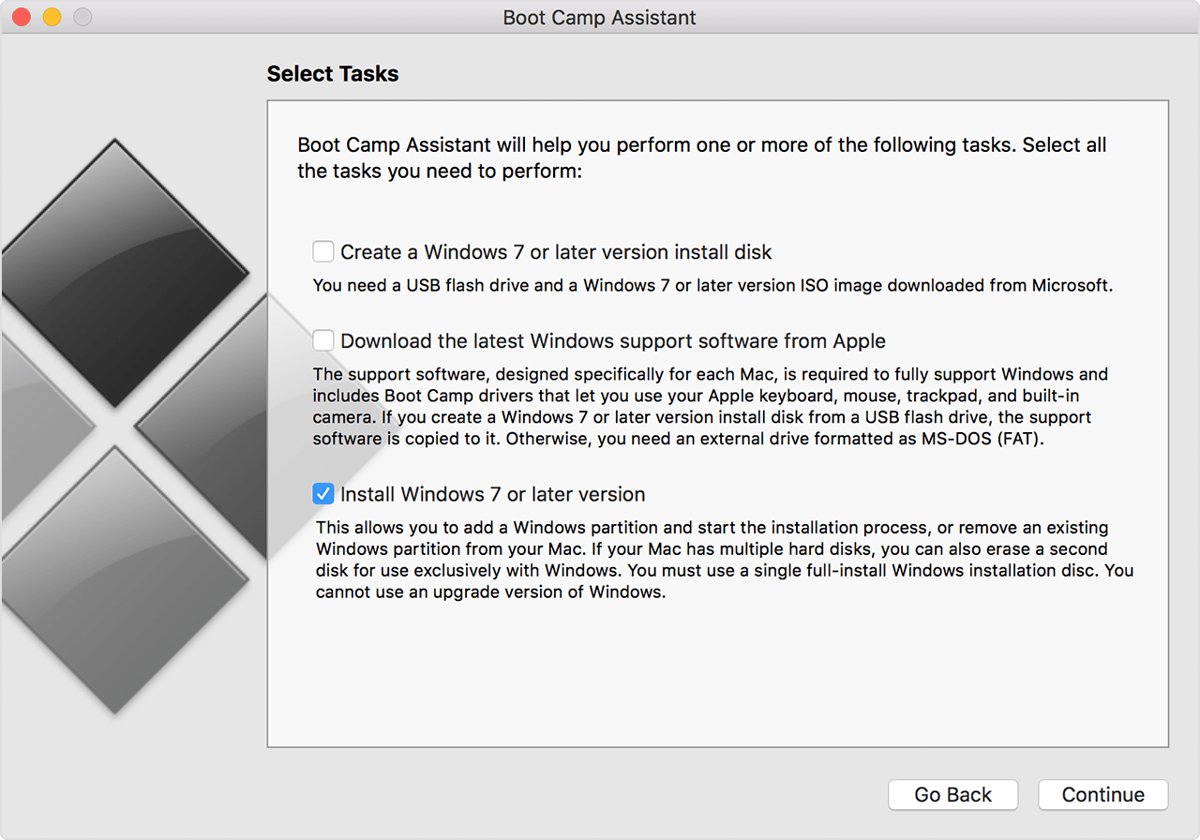
- Open Boot Camp Assistant from Applications > Utilities.
- From the Action menu, choose Download Windows Support Software and save it to the USB drive.
- Start up in Windows with the USB drive connected, then open Setup in the WindowsSupport or BootCamp folder on the drive.
- Click Repair, then click Finish and restart the Mac.
If Windows warns that the software has not passed Windows Logo testing, choose Continue Anyway.
Update Boot Camp audio drivers in Windows 10
Boot Camp support software updates come from both Windows Update and Apple Software Update, so install what each one offers before you reinstall the audio driver by hand.
- Open the Start menu, choose Settings, then select Update & Security.
- Click Check for updates and install the updates Windows offers.
- Open the Start menu and choose Apple Software Update.
- Select the available updates and click Install.
- Follow the onscreen instructions, then restart the Mac.
Apple Software Update checks once a week by default. Change that in Edit > Preferences.
Reinstall Windows on a 2011 MacBook Pro with Boot Camp Assistant
A 2011 MacBook Pro gets Apple audio drivers only through a Boot Camp Assistant install of Windows 7 or Windows 8.1. Back up the Windows files you want to keep before you start.
- In macOS, install the latest updates available for the Mac.
- Open Boot Camp Assistant from the Utilities folder in Applications.
- Follow the onscreen instructions and choose a size for the Windows partition.
- Let the Mac restart into Windows Setup and install Windows on the BOOTCAMP partition.
- When Windows starts, let the Boot Camp installer add the Windows support software, then restart.
- To switch between macOS and Windows, restart and hold the Option key.
Both Windows versions Apple supports on 2011 models are past end of support, so weigh that before relying on this setup.
How to tell if Boot Camp audio drivers are installed
- Look for the Boot Camp icon in the notification area on the right side of the taskbar.
- Select Start, type Device Manager, and open it.
- Expand Sound, video and game controllers and check that an audio device is listed without a warning icon.
- Open Settings > System > Sound and check that the built-in speakers appear under Output.
- Press the volume keys on the Mac keyboard and confirm the volume changes.
MacBook Pro no sound in Windows 10
"No audio output device is installed"
Windows has no working driver for the Mac's audio hardware.
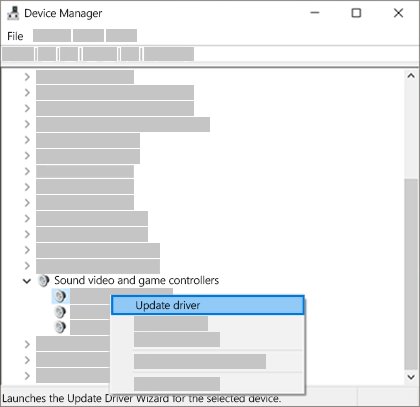
- Open Device Manager and expand Sound, video and game controllers.
- If the device is listed, right-click it and select Enable device if that option appears.
- If nothing is listed, select View > Show hidden devices, then Action > Scan for hardware changes.
- Run the Boot Camp Setup and click Repair, then restart.
Sound settings are grayed out or the speakers are missing under Output
The audio driver is missing or not loading.
- Install the Windows support software from the OSXRESERVED partition or a USB drive.
- Restart the Mac.
- Check Settings > System > Sound again.
- On a 2011 MacBook Pro in UEFI mode, reinstall Windows with Boot Camp Assistant.
Volume icon looks normal but the MacBook Pro speakers are silent
The wrong output device is selected, sound is muted, or audio enhancements interfere.
- Open Settings > System > Sound and select the built-in speakers under Output.
- Check that the volume is not muted and the slider is turned up.
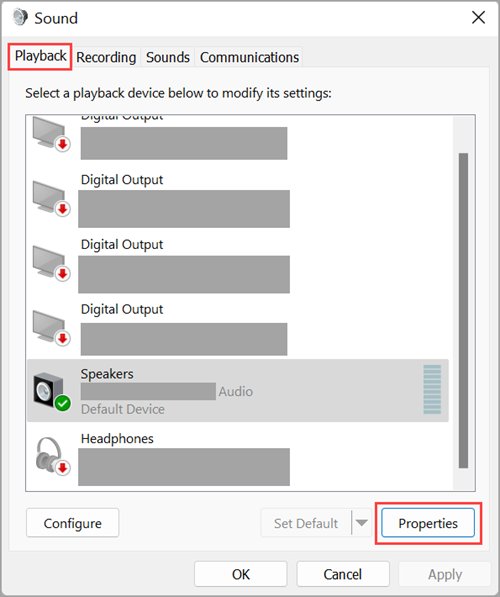
- Select More sound settings > Playback, right-click the speakers and select Set as default.
- Select the speakers under Output and set Audio enhancements to Off.
MacBook Pro sound stopped after a Windows update
The Apple drivers fell behind the Windows build or the driver install is damaged.
- Run Windows Update, then Apple Software Update, and restart.
- In Device Manager, right-click the audio device and select Uninstall device.
- Restart so Windows reinstalls the driver.
- If sound is still missing, run the Boot Camp Setup and click Repair.
MacBook Pro UEFI Windows sound FAQ
Why is there no sound in Windows on my MacBook Pro?
The usual cause is a missing Boot Camp audio driver. Run Setup from the BootCamp folder and click Repair. On a 2011 or older MacBook Pro with Windows 10 in UEFI mode, Apple provides no supported driver, so reinstall Windows with Boot Camp Assistant.
Does a 2011 MacBook Pro support Windows 10 with Boot Camp?
No. Apple's Windows 10 list for MacBook Pro starts with the 2012 models. The 2011 MacBook Pro models are supported with Windows 7 and Windows 8.1, both of which are now past Microsoft's end of support.
Where are the Boot Camp drivers on a Mac?
After a Boot Camp Assistant install, the drivers sit in the BootCamp folder on the OSXRESERVED partition, usually drive D: in Windows. Without that partition, download Windows Support Software to a USB drive from the Action menu in Boot Camp Assistant.
How to change MBR to UEFI?
On a Windows PC, MBR2GPT converts the system disk from MBR to GPT without deleting data, and the firmware must then boot in UEFI mode. It does not add Apple driver support, so it will not restore sound on a 2011 MacBook Pro.
How to fix UEFI partition?
On a UEFI PC, bcdboot C:\Windows copies fresh boot files from the Windows folder to the EFI system partition and adds a Windows Boot Manager entry to the firmware boot list. On a Mac, Boot Camp Assistant manages the Windows partition.
Can Windows 7 be converted to UEFI with MBR2GPT?
Not officially. Microsoft does not support MBR2GPT conversion of disks with Windows 7, 8 or 8.1 installed. It recommends upgrading to a supported Windows version first, then converting the disk.
Does Boot Camp work on a MacBook Pro with Apple silicon?
No. Boot Camp runs only on Intel-based Macs. Apple's Windows 10 list excludes the MacBook Pro (13-inch, M1, 2020) and later Apple silicon models.