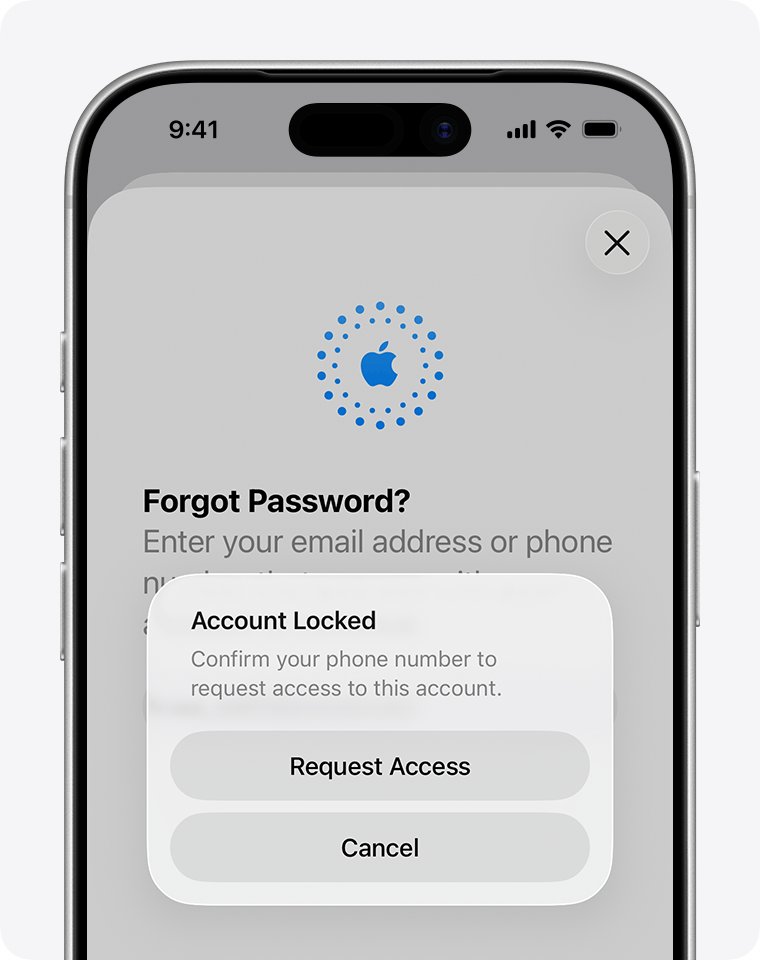
A locked iCloud account can't sign in to Find My, so reset your Apple Account password or tap Request Access first, then go to icloud.com/find and select the Find Devices button, which needs no verification code.
Try a family member's iPhone at the same time, because it uses their own sign-in. The steps below cover each lock message, tracking a lost iPhone after a password change, Lost Mode, and the fix when the iPhone itself is iCloud locked.
How to use Find My iPhone when iCloud is locked
A locked Apple Account blocks every Apple service, including Find Devices on iCloud.com. Unlock the account, then use the route that skips the two-factor code.
- On the sign-in screen, select Forgot password?, or tap Request Access if the alert offers it.
- Follow the onscreen instructions and set a new password. If Apple asks whether to keep other devices signed in, choose Keep All Devices Signed In.
- In a web browser, go to icloud.com/find and enter your Apple Account and new password.
- If you are asked for a verification code, select the Find Devices button at the bottom of the window.
- Select the lost iPhone in the list of devices to see it on the map.
- Select Mark As Lost if you can't get to it right away.
Apple ID is now called Apple Account, and it is the same sign-in your iCloud account uses.
iCloud locked for security reasons: what each message means for Find My
The wording of the alert decides how you fix a locked Apple Account and when Find My works again.
| What you see | Can you use Find My yet? | What to do |
|---|---|---|
| "This Apple Account has been disabled for security reasons" | No | Reset the password, then sign in at icloud.com/find |
| "This Apple Account has been locked for security reasons" | No | Reset the password, then sign in at icloud.com/find |
| An alert that the account is locked or not active | No | Tap Request Access in the alert, or go to iforgot.apple.com/unlock |
| "This Apple Account is locked and can't be used" | No, unless a family device can see the iPhone | Use a family device, create a new Apple Account, or start an Activation Lock support request |
| A request for a code sent to the lost iPhone | Yes; this is not a lock | Select the Find Devices button at icloud.com/find |
| "Your Media & Purchases account has been disabled" | This message is about store purchases | Tap Continue in the alert to request reactivation |
How to find my iPhone without a verification code on iCloud.com
This is the route when your only trusted device is the iPhone you lost. Your password must still work, and you can use any web browser on a phone, tablet or computer.
- Go to icloud.com/find in a browser.
- Sign in with the Apple Account you used to set up Find My on the iPhone.
- Select the Find Devices button at the bottom of the window instead of entering a code.
- Select the iPhone in the list of devices.
- Check the map, or play a sound if the iPhone could be nearby.
A friend's phone works for this too. Open icloud.com/find in its browser and sign in to your own Apple Account.
How to find a lost iPhone on a family member's iPhone
If you are in a Family Sharing group and you set up location sharing before the loss, your iPhone can appear in Find My on their device. This uses their sign-in, not your locked one.
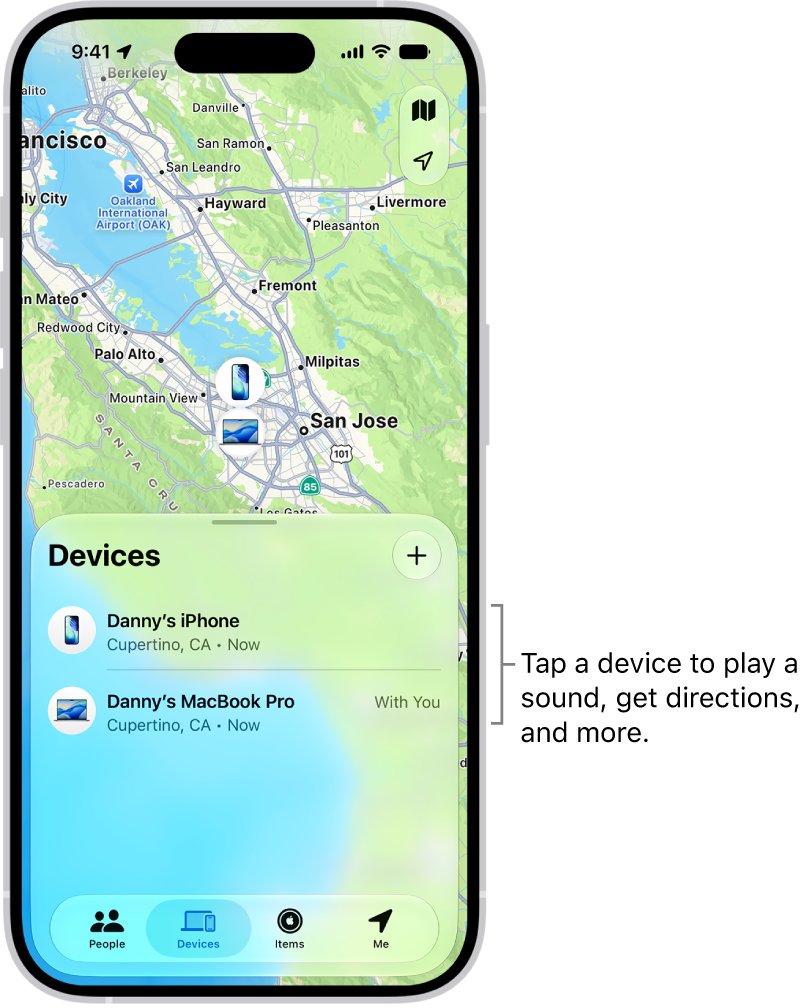
- On the family member's iPhone, open the Find My app and go to the Devices tab.
- Scroll down and select your missing iPhone, which appears underneath their devices.
- Check the map to see its location.
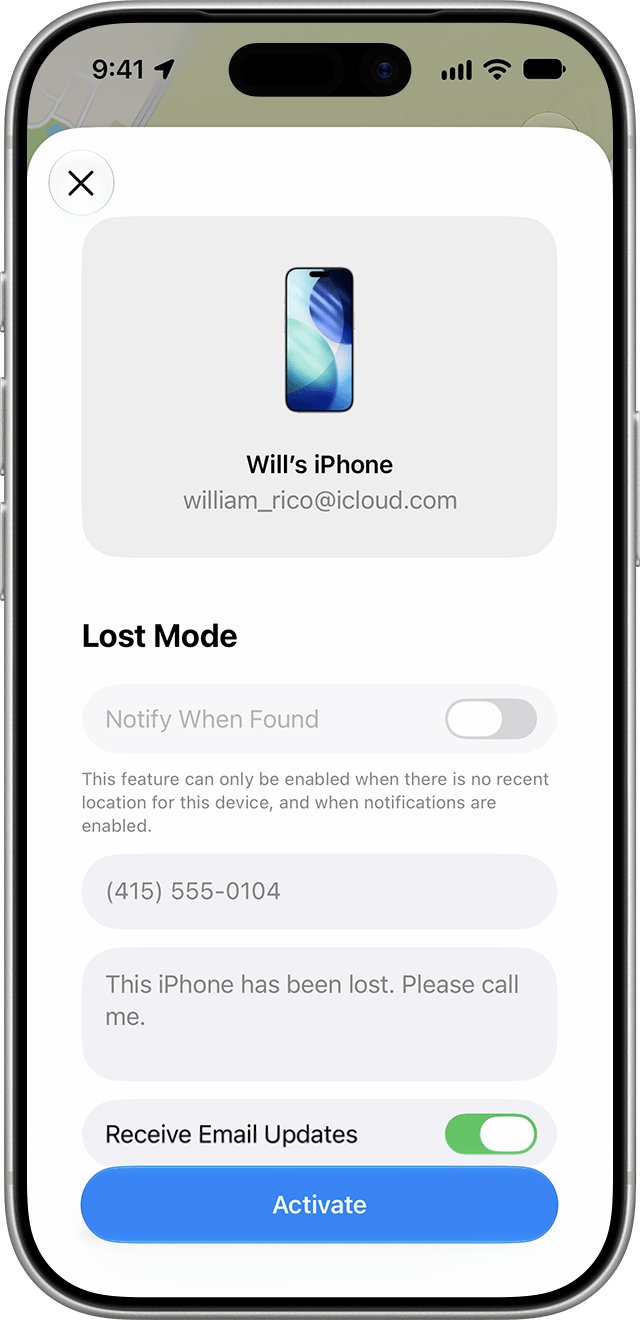
- Tap the More button, scroll down to Lost iPhone, and turn on Lost Mode.
- Follow the onscreen steps to add a phone number and message, then tap Activate.
How to unlock iCloud on a trusted iPad or Mac
A device already signed in to your account can change the password without account recovery. Check old iPads and Macs too.
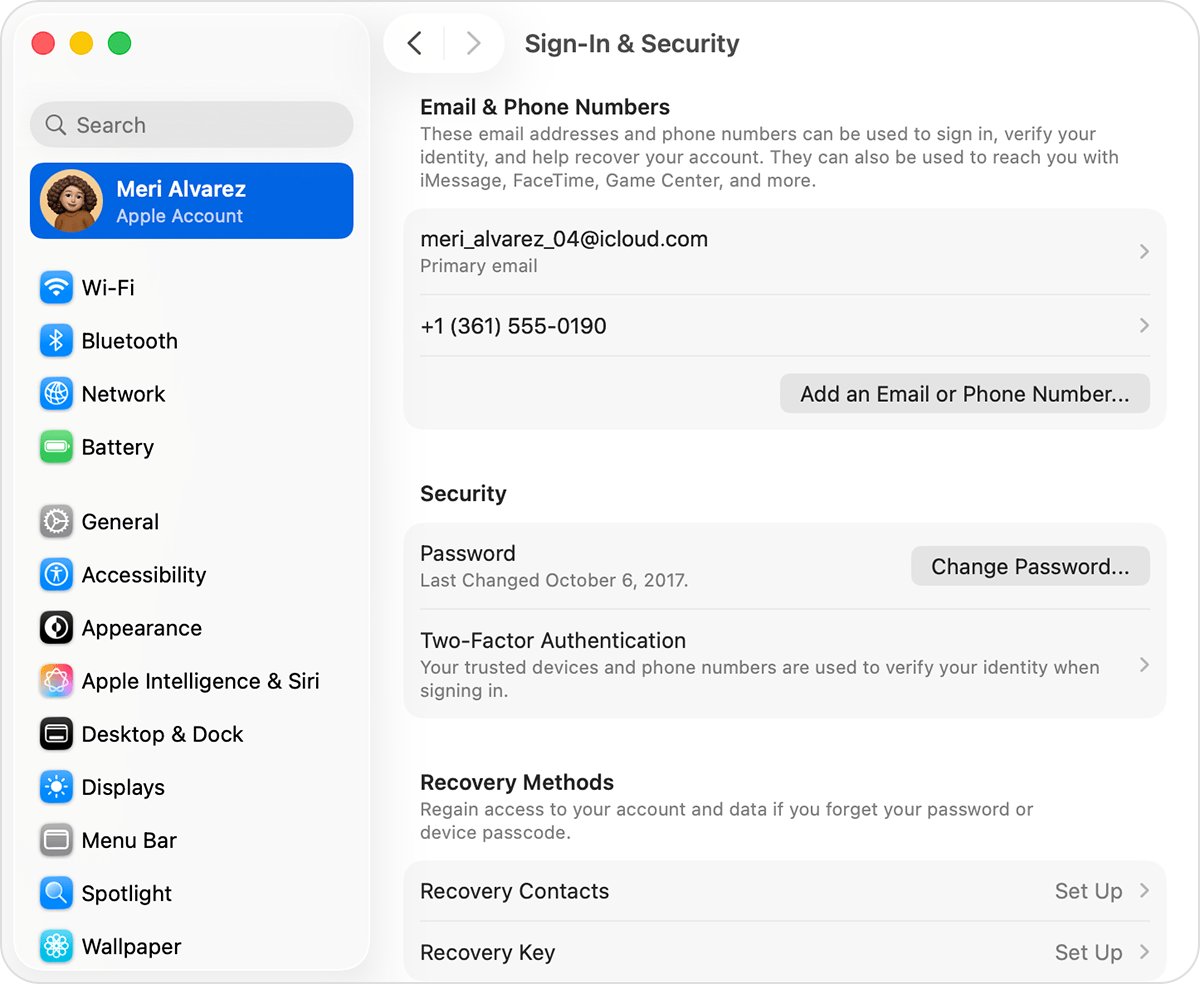
- On the iPad, open Settings and tap your name. On a Mac, choose Apple menu > System Settings and click your name.
- Tap or click Sign-In & Security, then Change Password.
- Follow the onscreen instructions to set a new password.
- When asked about other devices, choose Keep All Devices Signed In so your lost iPhone isn't asked to sign in again.
- Open Find My on that device, or go to icloud.com/find, and select the lost iPhone.
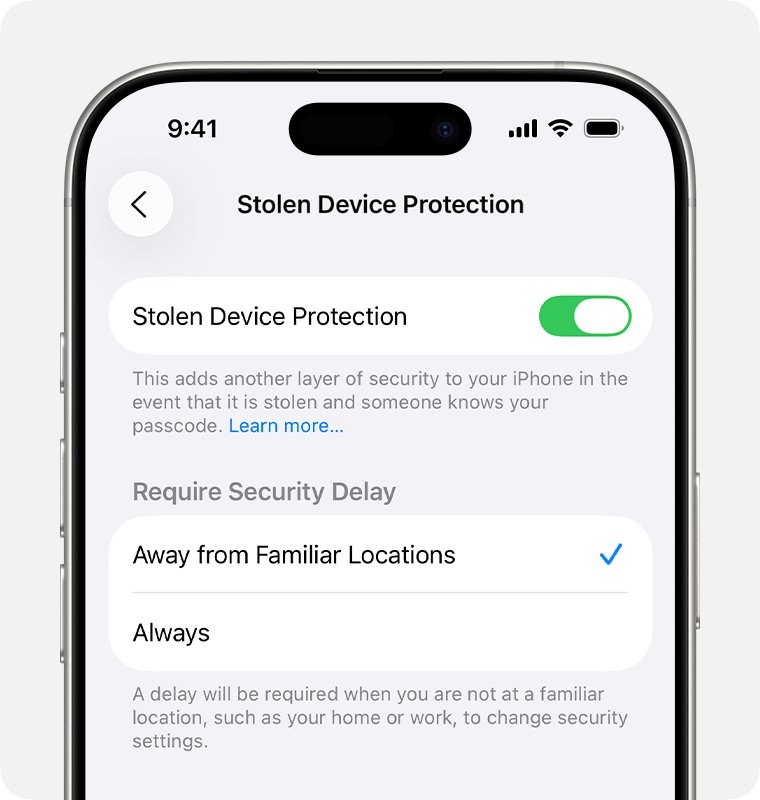
With Stolen Device Protection on, you might have to wait an hour before you can change the password. The delay protects you if a thief has the iPhone and its passcode.
How to get into a locked iCloud without a trusted device
With no signed-in device left, Apple asks for recovery factors. If you will get a trusted device or number back soon, wait for it, because you regain access faster that way.
| What you still have | What to do |
|---|---|
| Your trusted phone number on a new phone or SIM | Select Forgot password? and enter the two-factor code sent to that number |
| A recovery contact | Ask them for the 6-digit code |
| Access to your Apple Account email address | Keep that inbox ready, because Apple might ask you to verify it |
| The credit card on the account | Enter its CVV; if the issuer declines, select Don't have access to this card |
| A recovery key or security key | Follow Apple's separate process for that optional feature |
| None of these | Start account recovery at iforgot.apple.com in Safari on a device with iOS 17 or later, or in the Apple Support app under Support Tools > Reset Password > Help Someone Else |
You can run full Apple Account recovery from a borrowed device, but it can take several days or more, and Apple Support can't shorten the wait. Use a family device to track the iPhone in the meantime.
Can you still track a lost iPhone after changing the iCloud password?
Yes, in the normal case. Apple lists two ways a device leaves Find My: Remove This Device on iCloud.com and signing out on the device itself. A password change isn't one of them.
| After the password change | What happens | What to do |
|---|---|---|
| You sign in at icloud.com/find | You use the same Apple Account and the new password | Select the Find Devices button if a code goes to the lost iPhone |
| Apple asks about other signed-in devices | Remove Other Devices requires signing in again on those devices | Choose Keep All Devices Signed In while the iPhone is missing |
| Stolen Device Protection is on | The location of your devices may not be visible at iCloud.com for a period of time | Check again later, and mark the iPhone as lost in the meantime |
| The iPhone is offline | It appears as Offline, with its last known location for up to 24 hours | Select Notify me when found |
How to lock my iPhone with Lost Mode on iCloud.com
Lost Mode locks the iPhone with its passcode and suspends payment cards used with Apple Pay. Turn it on as soon as you get back into your account.
- Go to icloud.com/find and sign in with your Apple Account.
- Select the Find Devices button if a code is requested.
- In the list of devices, select the iPhone.
- Select Mark As Lost.
- Create a passcode if the iPhone doesn't already have one.
- Enter a phone number where you can be reached, and a message. Both appear on the Lock Screen.
If the iPhone is offline, the message appears once it connects to the internet. Apple will never contact you to say your iPhone has been found, so treat such a message as a scam.
How to erase a lost iPhone on iCloud.com
Try everything else first, because erasing can't be undone. Activation Lock stays on after the erase, so the iPhone still needs your Apple Account and password to be reactivated.
- Go to icloud.com/find and sign in with your Apple Account.
- Select the iPhone in the list of devices.
- Select Erase This Device.
- Follow the onscreen instructions and add a phone number or message if you are asked for one.
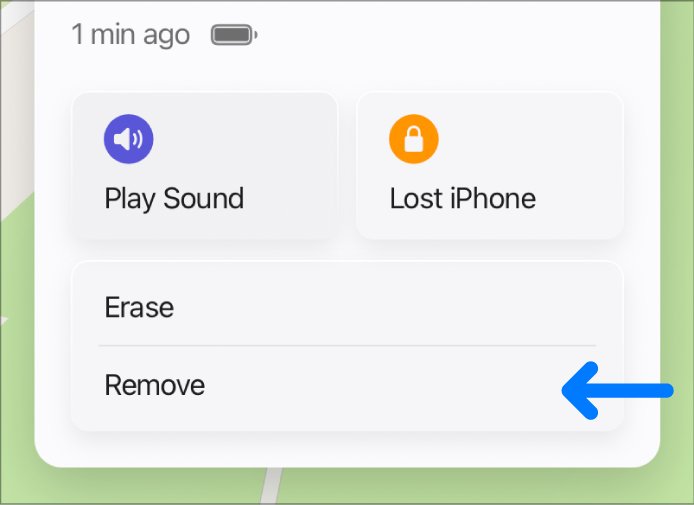
- Leave the iPhone in your device list. Removing it from Find My also removes Activation Lock.
If the iPhone is offline, the erase begins the next time it comes online. Report a stolen iPhone to local law enforcement and contact your wireless carrier. If AppleCare+ with Theft and Loss covers it, keep it on your account until your claim is approved.
Why can't iCloud find my phone?
A working sign-in doesn't guarantee a location. If the list is empty, you can fix the missing devices in Find My.
| What you see | Why | What to do |
|---|---|---|
| The iPhone isn't in the list at all | Find My wasn't turned on before the loss, or you signed in with a different Apple Account | Sign in with the account that set up Find My; otherwise report it to the police and your carrier |
| Offline below the name on iCloud.com | The iPhone isn't online, and the last known location shows for up to 24 hours | Select Notify me when found to get an email |
| No location found in the Find My app | The iPhone can't be located right now | Turn on Notify When Found |
| An old location with the Find My network on | The app can show an offline device, with the last known location stored for up to 7 days | Open the Find My app on a device signed in to the same account |
| No location after a password change | Stolen Device Protection can hide locations for a period of time | Check again later |
Check if iPhone is iCloud locked
An iCloud locked iPhone is a different problem from a locked account. Activation Lock turns on with Find My and links the device to an Apple Account, so check for it before you buy a used iPhone.
- Turn on or wake the iPhone. On iOS 15 or later, an iPhone Locked to Owner screen means Activation Lock is on.
- If a passcode Lock Screen or the Home Screen appears, the iPhone hasn't been erased. Ask the seller to erase it.
- Begin the setup process on the erased iPhone.
- If you are asked for the previous owner's Apple Account, the iPhone is still linked to their account, so ask them to enter the password.
- A Hello screen means the iPhone is ready to use.
To check if a MacBook is iCloud locked, choose Apple menu > System Settings on your own Mac, click your name, click iCloud, click See All, then click Find My Mac. Activation Lock stays enabled while Find My is on.
How to fix iCloud locked iPhone
Activation Lock comes off with the owner's Apple Account or an Apple support request backed by proof of purchase. You can unlock an owner-locked iPhone with either one.
- On the lock screen, enter the Apple Account and password used to set up the iPhone, or the device passcode.
- If you forgot the account, try an email address or phone number you regularly use for Apple services.
- If you forgot the password, select Forgot password? or reset the Apple Account password on a trusted device.
- If the iPhone was sold or given away and is offline, have the owner go to icloud.com/find, select the device, and click Remove This Device.
- If you own the iPhone and have proof of purchase, start an Activation Lock support request at al-support.apple.com.
iCloud account locked and Find My not working
iCloud account locked and cannot be used
Your request to regain access was denied, so Apple shows "This Apple Account is locked and can't be used."
- Look for any device still signed in to the account and change the password there.
- Use a family member's Find My to protect the lost iPhone.
- Create a new Apple Account for your other Apple services.
- If you need help with Activation Lock and have proof of purchase, start an Activation Lock support request.
iCloud.com asks for a verification code you can't get
The code goes to your trusted device, which is the lost iPhone.
- Go to icloud.com/find rather than icloud.com.
- Sign in with your Apple Account and password.
- Select the Find Devices button at the bottom of the window.
Can't find my iCloud password
iCloud has no separate password; it uses your Apple Account password.
- Select Forgot password? on the sign-in screen.
- Follow the onscreen instructions, which can send you to a trusted device or ask for a code at your trusted number.
- If you can't remember the email address, try other addresses or phone numbers you might have added, because any one on file works.
Can't find iCloud on iPhone
iCloud sits under your name in Settings, and it only shows once you are signed in.
- Open Settings.
- Tap your name, then tap iCloud.
- If your name isn't there, tap Apple Account and sign in.
- To check Find My, tap your name, tap Find My, then tap Find My iPhone.
Account recovery confirmation email never arrived
It can take up to 72 hours, or the request may have been canceled.
- Wait the full 72 hours, then check spam or junk folders.
- Go to iforgot.apple.com and enter the same email address and phone number you used to start the request.
- Submit a new request only if the site shows that the request isn't active.
Locked iCloud and Find My iPhone FAQ
Why is my iCloud locked?
Your Apple Account locks automatically to protect it, usually after you or someone else enters the password or other account information incorrectly too many times. Reset the password to regain access, or tap Request Access if the alert offers it.
I am locked out of my iCloud. Can I still find my iPhone?
Not with your own sign-in until the account is unlocked. A family member in your Family Sharing group can check their Find My app if your iPhone shares its location with them. Once you reset the password, use icloud.com/find with the Find Devices button.
Why can't iCloud find my phone?
The iPhone may be offline, Find My may not have been on before you lost it, or you may be using a different Apple Account. iCloud.com shows the last known location for up to 24 hours. With no Find My set up, the iPhone won't appear at all.
How do I lock my iCloud?
To lock a lost device, go to icloud.com/find, select the device, then select Mark As Lost. This puts it in Lost Mode and locks it with your passcode. To protect the account itself, change your Apple Account password in Sign-In & Security.
How do I fix an iCloud locked iPhone?
Enter the Apple Account and password used to set up the iPhone, or the device passcode. The owner can also remove an offline device at icloud.com/find. If you own the iPhone and have proof of purchase, start an Activation Lock support request.
How do I check for an iCloud lock?
Turn on the device. An iPhone Locked to Owner screen on iOS 15 or later means Activation Lock is on. If setup asks for a previous owner's Apple Account, the device is still linked to them. A Hello screen means it is ready to use.
Can Apple Support unlock my iCloud account?
Apple Support can't shorten an account recovery wait, because the waiting period is fixed. For a locked account, use Forgot password? or Request Access. For Activation Lock with proof of purchase, submit an Activation Lock support request.
Can't find my iCloud password. What should I do?
iCloud uses your Apple Account password, so select Forgot password? on any sign-in screen and follow the instructions. Apple directs you to a trusted device, asks for recovery factors, or offers account recovery after a waiting period.