To view a VCF file in Windows 11, right-click it, choose Open with, and pick Notepad to read every name, number and email it holds.
This guide covers reading a vCard as text, opening it as a contact in classic Outlook, importing it into iCloud Contacts, and fixing files that show garbled or missing details.
How to view VCF file on PC
A VCF file is a vCard: a plain-text file that stores contact details. Notepad ships with Windows 11 and shows the whole file without importing anything.
- Open File Explorer and find the .vcf file.
- Right-click the file and select Open with.
- Select Notepad from the list. If it is missing, select Choose another app and pick Notepad.
- Read the contact data. Each contact starts with
BEGIN:VCARDand ends withEND:VCARD. - Close Notepad without saving to keep the file unchanged.
What is a VCF file?
VCF stands for virtual contact file, also called a vCard. Phones, iCloud, Google Contacts and Outlook all export contacts in this format, so one file can carry a single contact or an entire address book.
Like an EML email file, a vCard is readable text, and the lines inside follow a simple label-and-value pattern. Knowing the common labels makes a vCard easy to read in Notepad.
| Line in the file | What it holds |
|---|---|
| BEGIN:VCARD / END:VCARD | Start and end of one contact |
| VERSION | vCard version, such as 3.0 or 4.0 |
| FN | Full name as displayed |
| N | Name split into surname, given name and other parts |
| TEL | Phone number, often with a type such as CELL or WORK |
| Email address | |
| ADR | Postal address split by semicolons |
| ORG / TITLE | Company and job title |
| PHOTO | Contact picture, usually a long block of encoded text |
VCF file viewer for PC: which app to use
| Your situation | Use this | Why |
|---|---|---|
| You only need to read the details | Notepad | Built into Windows 11, nothing gets imported |
| You use classic Outlook for Windows | Outlook contact window | Shows the vCard as a formatted contact card you can save |
| You want the contacts on your iPhone too | iCloud Contacts on iCloud.com | Imports every contact in the file and syncs it to Apple devices |
| The file holds hundreds of contacts | iCloud import or Notepad search | Each contact becomes its own entry, or press Ctrl + F to find one name |
View VCF file in Outlook application
Classic Outlook for Windows reads vCard files and turns them into contact items, so a .vcf opens as a familiar contact card.
- Right-click the .vcf file in File Explorer and select Open with.
- Select Outlook from the app list.
- Review the name, phone numbers and email in the contact window that opens.
- Select Save & Close if you want to keep the contact in Outlook, or close the window to discard it.
A vCard attached to an email works the same way: open the attachment in Outlook to see the contact card.
How to view VCF files online with iCloud Contacts
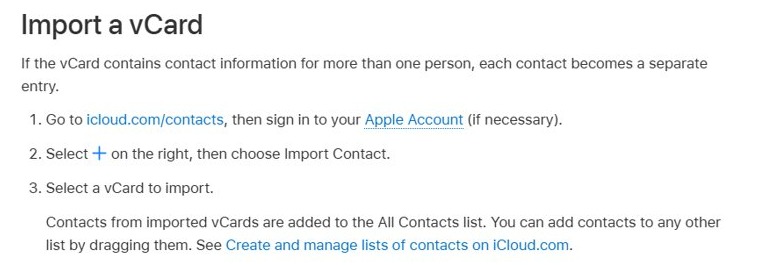
iCloud.com imports a vCard in the browser on any Windows 11 PC. When the file contains more than one person, each contact becomes a separate entry.
- Go to icloud.com/contacts in your browser and sign in to your Apple Account.
- Select the More button on the right, then choose Import Contact.
- Select the .vcf file on your PC.
- Open All Contacts to view the imported entries.
Imported contacts sync to every Apple device signed in to the same account, so skip this route if you only want a quick look.
How to read a VCF file with many contacts
A full address-book export can run to thousands of lines. Notepad handles it, but searching beats scrolling.
- Open the .vcf file in Notepad.
- Press Ctrl + F to open the find box.
- Type the name, number or email you want and press Enter.
- Press F3 to jump to the next match.
- Count contacts by searching for
BEGIN:VCARD; each match is one contact.
How to tell the VCF file opened correctly
- In Notepad, confirm you see lines starting with
BEGIN:VCARD,FN,TELandEMAILin readable text. - In Outlook, confirm the contact window shows the name in the title bar and the numbers filled in.
- In iCloud Contacts, confirm the new names appear under All Contacts.
VCF file not opening or showing wrong details
Names show strange characters
The file uses a character encoding the app did not detect, common with non-English names.
- Open the file in Notepad instead of the other app.
- Check the encoding shown in the status bar at the bottom right.
- If the text still looks wrong, export the contacts again from the source phone or account.
Outlook shows only the first contact
A single Outlook contact window displays one vCard entry at a time.
- Open the file in Notepad to see every contact.
- Use the iCloud Contacts import if you need each contact as its own entry.
Double-clicking opens the wrong app
Another app is set as the default for .vcf files.
- Right-click the file and select Open with > Choose another app.
- Select Notepad or Outlook.
- Select Always to make it the default for .vcf files.
A long block of random text fills the file
The contact has a photo stored as encoded text in the PHOTO line.
- Scroll past the block or press Ctrl + F to search for the next
TELorEMAILline. - Leave the block untouched; editing it breaks the picture.
VCF file on Windows 11 FAQ
How do I open a VCF file in Windows?
Right-click the file, select Open with and choose Notepad. Notepad shows the contact details as text. Choose Outlook instead if you want a formatted contact card you can save.
How do I view a VCF file in Excel?
Excel has no vCard viewer, so a .vcf opened in Excel shows raw lines in one column. Import the file into a contacts service first, then export a CSV from that service and open the CSV in Excel.
How do I read a VCF file on PC without importing it?
Open it in Notepad. A vCard is plain text, so Notepad shows every field without adding anything to Outlook, iCloud or your phone.
How do I open VCF files on a computer with many contacts?
Notepad opens large vCard files, and Ctrl + F finds a single name. To browse them as entries, import the file into iCloud Contacts, which creates one entry per person.
How do I get a VCF file?
Export one from your contacts app. On iCloud.com, you can export your iCloud contacts: select contacts, choose the More button and select Export vCard. Google Contacts also exports contacts as a vCard file from its Export option.
How do I use a VCF file?
Import it into the contacts app you use, such as iCloud Contacts or Outlook, to add the people inside it. You can also attach it to an email to share contact details.
Is a VCF file safe to open?
A vCard is a text file and Notepad only displays it. Open unexpected vCards from unknown senders in Notepad rather than importing them, and delete them if you do not recognise the contact.