To use the Bing Rewards dashboard, sign in at rewards.bing.com with your Microsoft account, then use the Dashboard, Earn and Redeem tabs to check your balance, complete activities and spend points.
This guide covers every area of the dashboard: the points balance, level, daily set, streak protection, monthly bonuses, redemptions, order history and the fixes for the problems members hit most often.
The fastest way to use the Rewards dashboard each day
This routine covers the parts of the dashboard that pay out daily. It works the same in a desktop or phone browser.
- Open rewards.bing.com and select Sign in with the Microsoft account that holds your points.
- Check your points balance and your level at the top of the Dashboard tab.
- Complete every card in the Daily set until it shows a green checkmark.
- Open Ready to claim if it lists points, and claim them before they expire.
- Run your capped Bing searches while signed in to the same account.
- Open Redeem when a reward you want becomes available at your balance.
What the Bing Rewards Dashboard Is
Bing Rewards is now Microsoft Rewards. Former Bing Rewards members were moved to Microsoft Rewards automatically, and the dashboard still lives on the Bing domain at rewards.bing.com.
The program is free and needs only a Microsoft account. The dashboard is where points from Bing, Microsoft Edge, Xbox and the Microsoft Store all land in one balance.
| Dashboard area | Where to find it | What you do there |
|---|---|---|
| Points balance and level | Top of the Dashboard tab; level at the top-left | See your total and how close you are to Silver or Gold |
| Daily set | Main activities area of Dashboard | Finish the day's cards for points and a streak |
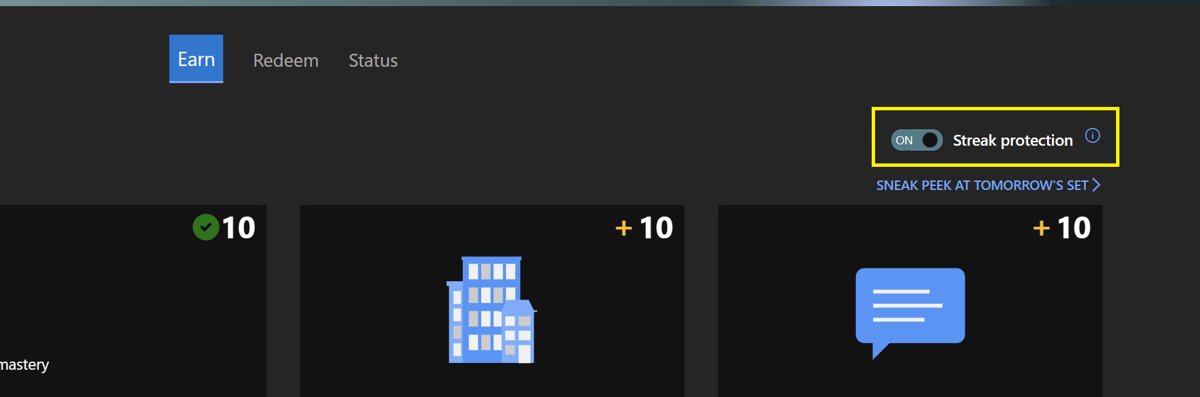
| Streak protection | Toggle next to Streak protection on desktop, next to Daily set on mobile | Protect a streak on days you will miss |
| Ready to claim | Dashboard, when monthly bonuses are available | Claim Default Search, Bing Star and level bonuses |
| Earn | Tab in the top menu | Find quizzes, trivia and other activities, refreshed daily |
| Redeem | Tab in the top menu | Spend points on gift cards, sweepstakes and donations |
| Order history | Inside Redeem, and in the page footer | Track redemptions, resend emails, get gift card codes |
| Refer and Earn | Tab in the top menu | Invite friends to join Rewards |
| About | Tab in the top menu | Level requirements, benefits and the official FAQ |
How to Access the Microsoft Rewards Dashboard
Every route ends on the same dashboard, as long as you sign in with the same Microsoft account. Microsoft support pages also link it through an Open Rewards dashboard button.
- Desktop: type rewards.bing.com into any browser's address bar and press Enter.
- Select Sign in and enter your Microsoft account email and password.
- Bookmark the page so it is one click away tomorrow.
- From Bing: go to bing.com, sign in at the top-right, and open the Microsoft Rewards flyout.
- Phone: open rewards.bing.com in the mobile browser, or search in the Bing or Microsoft Edge app while signed in.
- Android: install Microsoft Launcher, which Microsoft lists as a quick way to reach the dashboard.
- Xbox: open the Rewards hub on the console, the Xbox PC app or the Xbox mobile app (players aged 18 and over).
If you have no Microsoft account yet, create one for free first. Under-13s, or the child age in your country, need a parent or guardian to consent when the account is created.
How to Track Points, Streaks, and Daily Sets
Your level resets every calendar month, so the monthly total matters as much as the lifetime balance. Streaks are counted in your device's time zone.
- Read your available points balance at the top of the Dashboard tab.
- Check your level at the top-left of the page: Member, Silver or Gold.
- Scroll to the Daily set and confirm each card is finished; a completed set shows a green checkmark.
- Check the streak count on the dashboard to see how many days in a row you have completed the set.
- Turn on the toggle next to Streak protection if you expect to miss a day.
- Select the Streak Protection title in the information bar to see how many of your 14 yearly protection days remain.
- Open the points breakdown page to see which activities earned today's points.
Streak protection days cannot be earned or bought. Every member gets 14 per calendar year, and they reset on 1 January. The toggle must be on before you can see the remaining days.
Ways to Earn Points from the Dashboard
The dashboard lists some activities and credits others that happen elsewhere. Match your habit to a row, since daily limits apply and vary by country.
| Your habit | Earning route | What it pays |
|---|---|---|
| You open the dashboard daily | Complete the Daily set cards | The points printed on each card, plus a streak |
| You like trivia | Open quizzes and bonus tiles on Earn | Card points; activities are updated daily |
| You search the web | Search on Bing, or the Windows taskbar search box, while signed in | 3 points per search, up to 15, 30 or 60 a day by level |
| You search on a phone | Bing app, Bing as default, or the Microsoft Edge app | Same daily search cap as on PC |
| You use Microsoft Edge | Browse with Edge on desktop and mobile | Edge earning offers shown on your dashboard |
| You play on Xbox | Complete selected games or quests from the Rewards hub | Quest points; Store games and add-ons earn up to 4x points per dollar |
| You shop at Microsoft Store | Buy qualifying items while signed in | 1x to 10x points per dollar on select hardware; up to 20,000 points a month |
| You want monthly bonuses | Keep Bing as default and meet level targets, then use Ready to claim | Default Search 30/90/210, Bing Star up to 300/900/2,100, level bonus 60/180/420 |
Subscriptions and gift card purchases do not earn Store points. A purchase qualifies for only one Rewards offer at a time, so a featured offer replaces the standard rate.
For a walkthrough of the daily trivia card itself, see the Techdows guide on playing the Bing homepage quiz.
How Microsoft Rewards levels change what the dashboard pays
These are the US figures listed on the Rewards About page. Some support pages still use an older Level 1 and Level 2 naming, so trust the level shown on your own dashboard.
| Feature | Member | Silver | Gold |
|---|---|---|---|
| Requirement each month | Join for free | 500 points earned | 750 points earned plus 2 level-up activities |
| Bing search points per day (3 per search) | 15 | 30 | 60 |
| Store points per dollar, select hardware | 1x | 10x | 10x |
| Monthly level bonus | 60 | 180 | 420 |
| Default search bonus per month | 30 | 90 | 210 |
| Bing Star bonus per month, up to | 300 | 900 | 2,100 |
| Redemption discount coupon | None | 100 points | 200 points |
Level-up activities include searching on Bing 7 days in a row, checking in to the Bing app 7 days in a row, completing the daily set 7 days in a row, and keeping Bing as your default search engine for 14 days.
Monthly bonuses appear within the first 5 days of the month and must be claimed on rewards.bing.com, usually within about 30 days.
How to Redeem Points for Rewards
Eligible rewards become visible on the Redeem page once your balance is high enough. Points have no cash value; about 5,000 points usually redeems something worth $5.
- Select Redeem in the top menu of rewards.bing.com.
- Browse gift cards, sweepstakes, games and nonprofit donations offered in your region.
- Select the reward you want and confirm the order.
- Enter a mobile or landline number when asked, then type the code sent to it; VoIP numbers are refused.
- Apply your Silver or Gold discount coupon if the order screen offers it.
- Check the confirmation email sent to your Microsoft account's primary email address.
Microsoft and Xbox gift cards are deposited straight into your Microsoft account balance as promotional balance, which can expire under the promotion's terms. Redeem in the region you signed up in and never through a VPN.
How to find a reward code or track an order in Order history
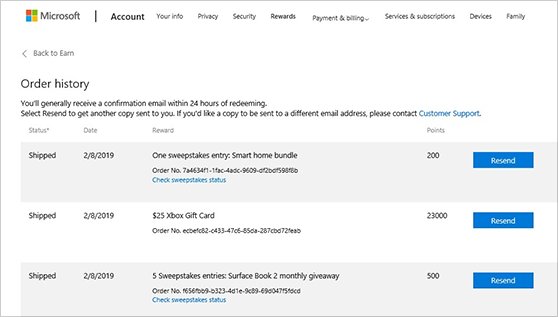
Every redemption is listed in Order history, with its status and the code or link for digital rewards.
- Sign in at rewards.bing.com and select Redeem.
- Select Order history.
- Find your order and read the Status column.
- Select Order Details at the far right to see the redemption code or link.
- Select Resend to get another copy of the confirmation email.
Sweepstakes results are posted at rewards.bing.com/redeem/winners, with full terms on each sweepstake's own page.
How to check the dashboard credited your points
- Note your balance before starting an activity.
- Finish the activity, then reload rewards.bing.com.
- Confirm the card shows a checkmark and the Daily set shows a green checkmark once all cards are done.
- Compare the new balance with the old one.
- Open the points breakdown page to see the credit listed against the activity.
- Check the streak counter went up by one day.
A ticked card with an unchanged balance usually means Give Mode is on or you are signed in to another account; both are covered below.
Common Dashboard Issues and Fixes
Points are not showing after an activity
Give Mode is on, you used a different account, or browser data is not syncing with the Rewards database.
- Check the account shown at the top-right of bing.com and rewards.bing.com.
- Sign out and back in with the account that holds your points.
- Check whether Give Mode is on; while it is, your own balance does not update.
- Turn Give Mode off if you want future points kept.
The dashboard will not load or displays incorrectly
A VPN or proxy hides your real market, or Rewards is not offered in your country.
- Disconnect any VPN or proxy and reload the page.
- Confirm your country is on Microsoft's Microsoft Rewards regions list.
- If you moved country, check the Rewards About page FAQ on changing your country.
- Sign in again at rewards.bing.com with the correct account.
Searches are not counting
Your daily search counter is maxed for your level, the searches look automated, or you are outside your market.
- Compare today's searches with your level's cap: 5, 10 or 20 searches.
- Wait for the counter to reset the next day.
- Type each search yourself; bot, macro and automated queries are never credited.
- Search from your home region without a VPN.
The daily set or streak is not showing correctly
The set was not finished on time, or a VPN or different time zone hid the completion.
- Finish every card in the Daily set, not only one.
- Set your device to your real time zone and turn off any VPN.
- Turn on Streak protection before a day you know you will miss.
A redemption fails or an order is cancelled
A VoIP number, a VPN, a phone number used on too many accounts, redeeming across regions, or the reward being out of stock.
- Use a mobile or landline number; one number covers at most six accounts.
- After too many failed verification attempts, wait 48 hours before trying again.
- Redeem only from the region you signed up in, never while travelling.
- Fill in the Microsoft Rewards Support form on support.microsoft.com if the order is still stuck.
Tips for Getting More Value from Microsoft Rewards
| Tip | Why it pays | Detail |
|---|---|---|
| Build a simple daily routine | Daily set streaks and search points only count day by day | Daily set, then searches, then Ready to claim |
| Reach Silver or Gold each month | Higher search caps and bigger monthly bonuses | 500 points for Silver; 750 plus 2 level-up activities for Gold |
| Keep Bing as your default search | Default search bonus of up to 210 points | Also a Gold level-up activity after 14 days |
| Claim bonuses promptly | Unclaimed bonus points expire | Usually about 30 days after they appear |
| Choose rewards with the best value | A larger item stretches points further than many small ones | Compare the points price with the reward's cash value |
| Use your level coupon | Cuts the points price of a redemption | 100 points for Silver, 200 for Gold |
| Use linked services like Xbox | Game and quest points join the same balance | Sign in with the same Microsoft account everywhere |
| Earn or redeem at least once a year | Points expire after 12 months with no earning or redeeming | Any activity keeps the account active |
The Microsoft Services Agreement allows one Rewards account per person and six per household, and caps redemptions at 550,000 points per calendar year.
Bottom Line
Treat the dashboard as a two-minute daily check: finish the Daily set, run your searches, claim anything in Ready to claim, and redeem from the Redeem tab when a reward is worth it. Streaks, level bonuses and coupons only reward consistency. With about 5,000 points per $5 of value, the members who get the most out of Rewards are the ones who open the dashboard every day and keep one account signed in everywhere.
Frequently Asked Questions
Is Bing Rewards the same as Microsoft Rewards?
Yes. Bing Rewards became Microsoft Rewards, and former Bing Rewards members were moved over automatically. The dashboard still runs at rewards.bing.com and uses the same Microsoft account.
How do I get to my Microsoft Rewards dashboard?
Go to rewards.bing.com and sign in with your Microsoft account. You can also open it from the Rewards flyout on bing.com, from the Open Rewards dashboard button on Microsoft support pages, or from the Rewards hub on Xbox.
How do I check my points balance?
Sign in at rewards.bing.com. Your available points appear at the top of the Dashboard tab, and the points breakdown page shows which activities earned them. Players 18 and over can also see the balance in the Xbox Rewards hub.
How often does the dashboard update my points?
Activity points usually appear after you finish the activity and reload the dashboard. Monthly bonuses appear within the first 5 days of the month in Ready to claim. If a balance never moves, check Give Mode and the signed-in account.
What should I do if my daily set or streak is not showing correctly?
Finish every card in the Daily set, turn off any VPN, and keep your device on your real time zone, because streaks follow the device time zone. Check you are signed in to the right account, then reload rewards.bing.com.
Where can I check my level and how far I am from the next one?
Your level appears at the top-left of rewards.bing.com. Silver needs 500 points earned in a calendar month, and Gold needs 750 points plus two level-up activities in the same month.
How do I claim points on the dashboard?
Open rewards.bing.com and select Ready to claim when it shows points. Monthly Default Search, Bing Star and level bonuses must be claimed there, usually within about 30 days, or they expire.
How do I find my gift card code after redeeming?
Select Redeem, then Order history on rewards.bing.com. Find the order and select Order Details at the far right to see the code or link. Select Resend to get the confirmation email again.
What is the best way to get more points each day?
Complete the full Daily set, use your capped Bing searches, keep Bing as your default search engine, and claim monthly bonuses. Reaching Silver or Gold raises the daily search cap from 15 to 30 or 60 points.
Do Microsoft Rewards points expire?
Yes. Points expire if your account has no earning or redeeming activity for 12 months. Any qualifying search, activity or redemption keeps the account active.





How to Claim Robux From Microsoft Rewards - Techdows
[…] come from everyday Microsoft activity while you are signed in. The Bing Rewards dashboard guide walks through every tile on the dashboard if you are new to […]
Microsoft Bing Rewards: How to Earn and Redeem Them - Techdows
[…] Bing Rewards dashboard guide walks through every tile on the dashboard once you are signed […]