YouTube offers no setting that switches the desktop site back to its classic design, so the working route is a community uBlock Origin filter that turns the October 2026 watch-page test off in your browser.
This guide explains what the classic design looked like, what the test changes, which tools can undo it and where they fall short, and how to report the layout to YouTube so the complaint is counted.
Restore the old YouTube website layout on desktop
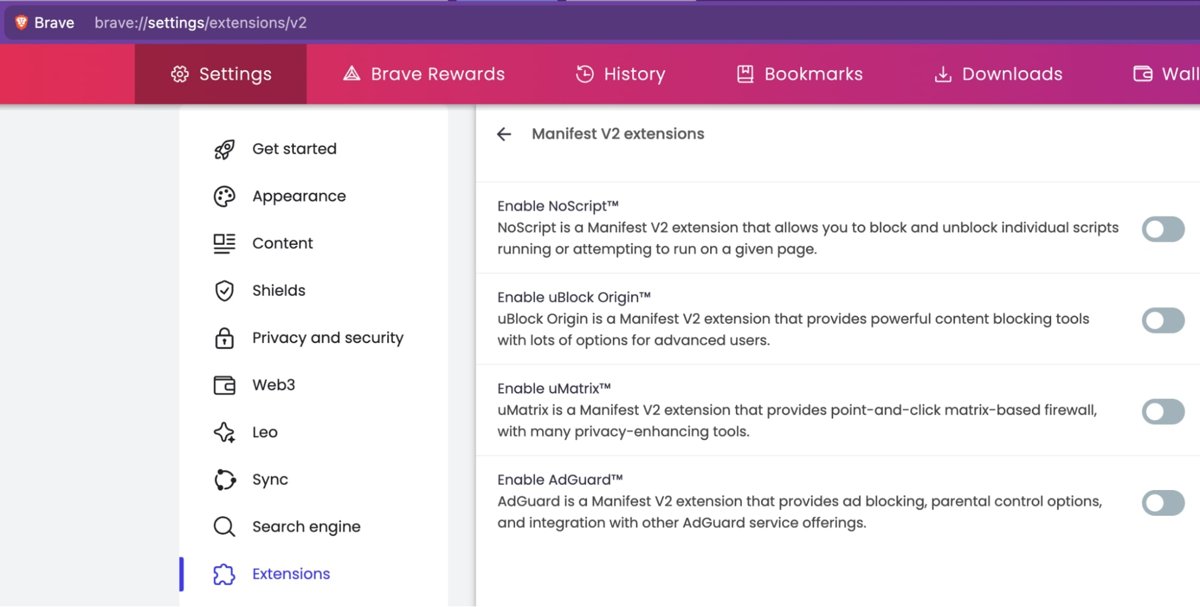
This route needs the full uBlock Origin extension, which still installs in Firefox and, through its own extension page, in Brave.
- Install uBlock Origin by Raymond Hill from Firefox Add-ons, or from
brave://settings/extensions/v2in Brave. - Click the uBlock Origin icon in the toolbar and open its dashboard from the popup.
- Open the pane that holds your own custom filters.
- Paste the community filter from the section below on new lines.
- Apply the change, then close and reopen any YouTube tabs.
- Play a video and check that comments sit under the player again.
The filter is a community fix, not a YouTube feature, so it can stop working whenever YouTube changes its code.
Old YouTube layout on Firefox, Brave, Edge and Chrome
| Your situation | What to do | Why |
|---|---|---|
| You use Firefox | Install full uBlock Origin and add the filter | Firefox Add-ons still lists full uBlock Origin as a Recommended extension |
| You use Brave | Install uBlock Origin from brave://settings/extensions/v2, then add the filter | Brave hosts uBlock Origin itself and calls this best-effort support |
| You use Chrome | Use Firefox or Brave for YouTube, or send feedback | Chrome 138 disabled Manifest V2 extensions such as full uBlock Origin, and they cannot be turned back on |
| You use Edge | Use Firefox or Brave for YouTube, or send feedback | The Edge Add-ons listing marks uBlock Origin as incompatible and says it may be removed |
| You only have uBlock Origin Lite | Do not rely on it for this filter | uBO Lite is a declarative Manifest V3 blocker, and its listing does not document this kind of scriptlet filter |
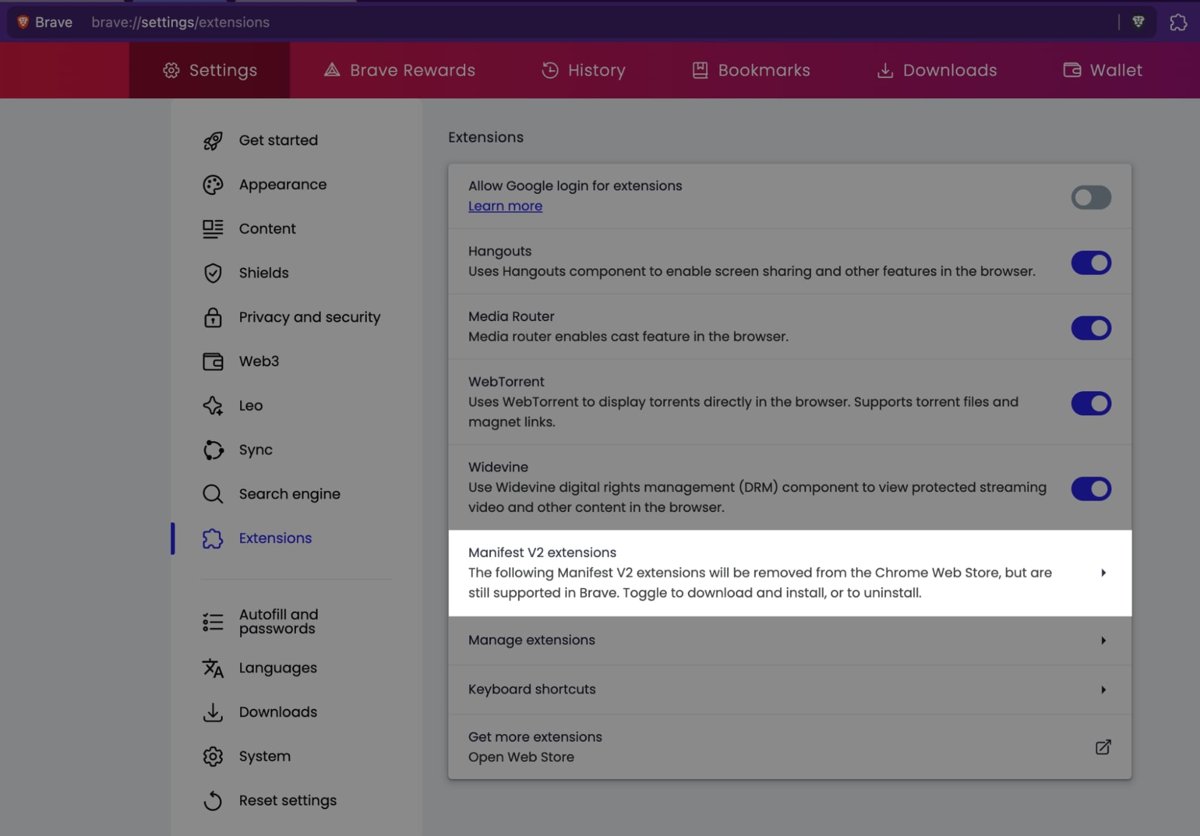
| You are a YouTube Premium member | Open youtube.com/new and check whether a layout test appears there | YouTube's feature-test page lets eligible Premium members try new features |
| You do not want extensions at all | Send feedback and wait | No official setting restores the old design |
Can you revert YouTube to the old desktop layout?
Yes, in a browser that runs full uBlock Origin. The filter does not change your YouTube account; it changes how the page builds itself in that one browser.
- Open Firefox and go to the uBlock Origin page on Firefox Add-ons.
- Add the extension to Firefox and accept the permissions it lists.
- Open the uBlock Origin dashboard and go to the custom filters pane.
- Paste all 15 lines of the filter exactly as shown, with no leading spaces.
- Add the theater mode line on its own line if the Theater mode button disappeared.
- Apply the change and reload youtube.com.
- Repeat the paste on every computer and browser profile where you watch YouTube.
The filter is per browser profile. Signing in to YouTube on another computer brings back the test layout there until that browser has the filter too.
Is there an official old YouTube layout opt-out?
YouTube's own page for feature tests is youtube.com/new. It states that eligible Premium members get early access to try new features for a limited time.
- Sign in to YouTube in your desktop browser.
- Go to
youtube.com/new. - Look for a watch-page or layout experiment in the list.
- If one appears and shows as active, turn it off on that page.
- Reload a video page to see the result.
Only treat this as an official route if the layout test is actually listed. When the page shows No features are available right now, the test is not something you can switch off there.
Document and report a YouTube layout problem
Feedback sent from the watch page goes straight to YouTube; creators do not see it. A clear report with a screenshot is more useful to YouTube than a comment under a video.
- Open a video that shows the new layout and leave the comments panel visible.
- Select your profile picture at the top right.
- Select Send feedback.
- Describe what moved, for example: comments and description in a side panel, large recommendations below the player.
- Name your browser, its version and your screen width, and say whether the layout appears on every video.
- Choose to include a screenshot, then highlight the side panel and hide any personal details.
- Click Send.
YouTube says it may not reply to every report. Its Known Issues page lists problems it is already working on.
Old YouTube layout script for uBlock Origin
Reddit user u/s4muka11 posted this filter in r/youtube on 7 October 2026 as a temporary fix, describing it as wonky but usable for now. It is unofficial and community-made.
youtube.com##+js(set, yt.config_.EXPERIMENT_FLAGS.web_watch_eligible_to_switch_to_grid, false)
youtube.com##+js(set, yt.config_.EXPERIMENT_FLAGS.web_watch_enable_single_column_grid_view, false)
youtube.com##+js(set, yt.config_.EXPERIMENT_FLAGS.web_fixed_panel_watch_next_grid_swap, false)
youtube.com##+js(set, yt.config_.EXPERIMENT_FLAGS.web_live_chat_panel_watch_next_grid_swap, false)
youtube.com##+js(set, yt.config_.EXPERIMENT_FLAGS.web_watch_fixed_default_panels, false)
youtube.com##+js(set, yt.config_.EXPERIMENT_FLAGS.web_engagement_panel_show_description, false)
youtube.com##+js(set, yt.config_.EXPERIMENT_FLAGS.web_watch_move_summary_to_sd, false)
youtube.com##+js(set, yt.config_.EXPERIMENT_FLAGS.web_watch_hero_list, false)
youtube.com##+js(set, yt.config_.EXPERIMENT_FLAGS.web_watch_split_scroll, false)
youtube.com##+js(set, yt.config_.EXPERIMENT_FLAGS.web_side_rail_dismissible_panels, false)
youtube.com##+js(set, yt.config_.EXPERIMENT_FLAGS.kevlar_watch_hide_comments_while_panel_open, false)
youtube.com##+js(set, yt.config_.EXPERIMENT_FLAGS.kevlar_watch_cinematics, false)
youtube.com##.ytSideRailViewModelHost
youtube.com##ytd-watch-flexy:style(--ytd-watch-flexy-fixed-side-menu-width: 0px !important)
youtube.com##ytd-watch-flexy #columns::after:style(width: 0 !important; display: none !important)
The first 12 lines set YouTube's own experiment flags for the grid watch page, the fixed side panels, the description panel and split scrolling to false before the page draws. The last three lines hide the side rail and remove the empty space it leaves.
You should see: Comments and the description sit under the video again, and the recommendation list returns to the right-hand column.
For the Theater mode button, add this line from a reply in the same thread: youtube.com##+js(set, yt.config_.EXPERIMENT_FLAGS.disable_theater_mode, false)
The poster says the filter also covers live chat and fills the empty space better after an update.
Confirm the old YouTube website layout is back
- Open any ordinary video, not a Short or a live stream.
- Scroll down: the title, channel row and description box should sit directly under the player.
- Keep scrolling: comments should follow the description in the same column.
- Look to the right of the player: the list of recommended videos should fill that column.
- Select the Theater mode button and confirm the player widens.
- Open a live stream and check that the chat sits in the right-hand column.
If any of these still show the side panel, the filter is not loading. The troubleshooting section below covers the usual causes.
What is the new YouTube UI on desktop?
The new UI is a test of the desktop watch page, reported by Android Authority, Ubergizmo and other outlets on 7 October 2026. Here is what the classic design looked like next to it.
| Page area | Classic youtube.com design | October 2026 test |
|---|---|---|
| Under the player | Title, channel, description, then comments | Large recommendation thumbnails |
| Right-hand column | Recommendations list, or live chat on streams | Side panel with comments and the description |
| Scrolling | One page scroll for everything | Separate scroll areas for the panel and the page |
| Recommendations | Compact list with small thumbnails | Bigger grid-style tiles below the video |
Old vs new YouTube desktop layout: what changed
| Change | What you notice | Undone by the filter |
|---|---|---|
| Comments moved to a side panel | Comments open beside the video instead of below it | Yes |
| Description moved to the same panel | The description is no longer under the title | Yes |
| Recommendations moved below the player | Large thumbnails take the space where comments were | Yes |
| Split scrolling | The panel and the page scroll separately | Yes |
| Theater mode affected | The Theater mode button can be missing | Yes, with the extra line |
YouTube ran a similar test in 2024 and rolled it back, according to the same news reports. If you missed that round, you can move the comments back under the video with the narrower fix for this layout.
Why users object to the YouTube desktop redesign
The complaints follow from the layout itself rather than from any single bug.
| Complaint | What causes it |
|---|---|
| The design feels too large | Big recommendation tiles fill the space under the player |
| Comments and descriptions are harder to find | Both now sit in a panel that has to be open and scrolled separately |
| Scrolling feels worse | Two scroll areas on one page instead of one |
| Less fits on a laptop screen | The side panel takes width that the player and list used to share |
| Some viewers like it | Wide monitors leave room for the panel beside the video |
What YouTube has said about the redesign
No official explanation of the October 2026 watch-page test has been announced, so treat any stated goal you read as someone else's guess. YouTube's Help Center documents feedback and the youtube.com/new test page, but neither describes this layout or its purpose.
Is YouTube bringing back the old layout?
| Signal | What it points to |
|---|---|
| Only some accounts and browsers see the new layout | A test group, not a full rollout |
| The filter works by switching experiment flags off | YouTube itself labels these parts of the page as experiments |
| A similar test ran in 2024 and was rolled back | Tests of this layout have ended before |
| No setting or announcement for it | Nothing has been made permanent yet |
That can change quickly. A test that YouTube likes becomes the default for everyone, and the flags the filter relies on can be renamed or removed.
YouTube redesign backlash: what the evidence shows
| Evidence | What it shows | Limit |
|---|---|---|
| News reports on 7 October 2026 | The test exists and drew attention quickly | Reporters describe reactions; they do not measure them |
| Community filters posted within a day | Enough people wanted it gone to build a workaround | Filter authors are a small, technical group |
| The 2024 test was rolled back | YouTube has dropped this kind of layout before | YouTube did not say why |
| Feedback sent through YouTube | This is the data YouTube actually counts | It is not public |
Loud posts are not the same as numbers. The only measure YouTube sees is feedback and usage, which is why a clear report matters.
What the 2026 YouTube layout reports mean for desktop users
Treat the October 2026 layout as a live test that may spread or may be rolled back, and keep the filter only as a stop-gap while sending feedback. The reports describe a test group rather than a launch, and YouTube has not announced a setting or a final decision.
If you want every workaround ranked side by side, you can undo the October 2026 YouTube layout with the full list.
Old YouTube layout extension, userscript or custom CSS?
| Tool | What it can do | Limits |
|---|---|---|
| uBlock Origin filter | Sets experiment flags before the page loads and hides leftover space | Needs full uBlock Origin; breaks when YouTube renames the flags |
| Userscript manager | Runs a script that rearranges the page after it loads | The page can flash the new layout first; scripts from strangers can read the pages they run on |
| Custom CSS extension | Hides or resizes parts of the page | Cannot move comments back under the video by itself |
| Old YouTube layout extensions | Promise a one-click classic design | Each needs broad site access; check the developer and recent reviews before installing |
| Modified YouTube apps | Claim to restore old designs | Unofficial builds can carry malware and break YouTube's terms; avoid them |
The filter is the smallest change of the set. It touches only youtube.com and adds no new extension if you already use uBlock Origin. Back in 2019, viewers could still disable the new desktop look of that era with a browser tweak.
Old YouTube design not coming back: fixes
Nothing changes after adding the filter in Chrome or Edge
Current Chrome disables Manifest V2 extensions such as full uBlock Origin, and Edge lists it as incompatible.
- Open
chrome://extensionsand check whether uBlock Origin shows as disabled. - Install Firefox or Brave and add full uBlock Origin there.
- Paste the filter in that browser and reload YouTube.
Why does my YouTube layout keep changing back?
YouTube updated its page code, so one or more experiment flags in the filter no longer match.
- Open the uBlock Origin popup on a YouTube video and confirm it is switched on for the site.
- Check the original community thread for an updated version of the filter.
- Replace the old lines with the new ones and apply the change.
- Close every YouTube tab and open a fresh one.
The Theater mode button is missing
The test can switch theater mode off through its own flag.
- Add
youtube.com##+js(set, yt.config_.EXPERIMENT_FLAGS.disable_theater_mode, false)as a new line. - Apply the change and reload the video.
- Select the Theater mode button in the player controls to test it.
A blank strip remains where the side panel was
One of the last three CSS lines is missing or was pasted with extra spaces.
- Compare your pasted lines with the filter above, line by line.
- Remove any leading spaces or line breaks inside a line.
- Apply the change and reload YouTube.
YouTube itself will not load or play after the change
A broken filter line or an unrelated playback fault.
- Pause uBlock Origin for youtube.com from its popup and reload.
- If YouTube works, re-paste the filter carefully.
- If it still fails, fix YouTube not working on desktop before trying the filter again.
Risks of old YouTube layout extensions and filters
Use the community filter only in full uBlock Origin from an official store, and remove it once YouTube ends the test. It is unofficial, it depends on internal flag names YouTube can change at any time, and copies posted elsewhere can be altered. Never install a modified YouTube client to get the old design back.
Old YouTube layout FAQ
How do I get the old YouTube layout back?
Add the community uBlock Origin filter to full uBlock Origin in Firefox or Brave, then reload youtube.com. YouTube has no setting for the classic design, so the filter is the only working route on desktop. It is unofficial and can stop working after a YouTube update.
How do I restore the old YouTube layout in Chrome?
Current Chrome cannot run full uBlock Origin, because Chrome 138 disabled Manifest V2 extensions and they cannot be turned back on. Watch YouTube in Firefox or Brave with the filter instead, or send feedback to YouTube from your profile menu.
Why has YouTube changed its layout?
YouTube is testing a desktop watch page that moves comments and the description into a side panel. No official explanation of the October 2026 test has been announced, and only some accounts see it.
Why did my YouTube layout change?
Your account or browser was placed in YouTube's October 2026 watch-page test. The change comes from YouTube, so nothing on your computer caused it, and the community filter is the only way to turn it off locally.
Why does YouTube keep changing the layout?
YouTube tests new designs on a share of viewers and keeps or drops them based on results. A similar layout ran in 2024 and was rolled back, according to news reports. The same approach explains why the layout can come and go.
Can I return YouTube to the old layout with a setting?
No. YouTube offers no setting that restores the classic watch page. Premium members can check youtube.com/new, which lists feature tests they can try, but switch off the layout there only if it actually appears.
Is there an extension for the old YouTube layout?
Several extensions claim to restore it, but each needs access to the pages you visit. The community filter in uBlock Origin does the same job without adding another extension, so it is the lower-risk choice.
How do I change my YouTube layout back after the test ends?
Remove the community filter lines from uBlock Origin's custom filters and apply the change. When YouTube ends the test, the classic design returns for everyone, and the filter is no longer needed.
Does sending feedback to YouTube help?
Yes. Feedback goes straight to YouTube, which says it uses reports to fix problems and improve products. Select your profile picture, choose Send feedback, describe the layout and include a screenshot.
Bottom line: is the old YouTube design worth restoring?
Add the community filter to full uBlock Origin in Firefox or Brave to restore the classic youtube.com watch page today, and send YouTube feedback so the test is counted against. No official setting exists, Chrome and Edge no longer run full uBlock Origin, and the filter is the least intrusive tool that works until YouTube decides the test's fate.



How to revert YouTube new layout (October 2026) - Techdows
[…] you want the whole classic design rather than one panel, you can restore the old youtube.com design on desktop with the tools and limits covered […]