To log in to a Verizon router, connect to its Wi-Fi or plug in with Ethernet, open mynetworksettings.com (or 192.168.1.1) in a browser, and enter the admin password printed on the router label.
This guide covers Fios and 5G Home equipment, the login address for each model, the Verizon Home app, privacy warnings, forgotten passwords and a factory reset.
Quick answer: How to log in to a Verizon router
These steps come from Verizon's own sign-in article for the Verizon Router (CR1000A) and work the same way on its Internet Gateways.
- Connect your computer, phone or tablet to the Verizon router's Wi-Fi, or plug a computer into it with an Ethernet cable.
- Open a web browser and type mynetworksettings.com in the address bar, then press Enter.
- If that name does not load, type 192.168.1.1 instead. Askey 5G Home gateways (ASK-NCQ1338 and ASK-NCQ1338FA) use 192.168.0.1.
- If the browser shows Your connection is not private, click Advanced, then the Proceed link.
- Enter the admin password printed on the router's label and click Log In.
The first time you sign in to a Verizon Router, an Easy Setup Wizard opens to walk you through setup.
Which Verizon login route should you use?
| Your situation | Use this | Why |
|---|---|---|
| You want every router setting, such as DHCP, port forwarding or backups | Browser at mynetworksettings.com | The Admin WebGUI holds the full menus, including Advanced |
| You only need to change the Wi-Fi name or password, restart the router or pause devices | Verizon Home app | Signs in with your My Verizon details, not the router admin password |
| mynetworksettings.com will not load | The router IP address | 192.168.1.1 or 192.168.0.1 skips name lookup |
| You never changed the admin password | The password on the router label | Verizon prints the default admin password there |
| You changed the admin password and forgot it | Factory reset | A reset restores the label password but erases your custom settings |
What you need before logging in
Verizon notes that the admin page only opens from a device connected to that router. It cannot be reached from outside your home network.
| Item | What it is | Where to find it |
|---|---|---|
| A connection to the router | Wi-Fi, or an Ethernet cable into a LAN port | The Wi-Fi name and password are on the router label |
| Wi-Fi turned on | The router's wireless radio must be enabled for a Wi-Fi login | If Wi-Fi was switched off in the admin page, use Ethernet |
| A web browser | Edge, Chrome, Safari or Firefox | Any device on the network |
| Admin password | Unlocks the router settings | Label on the rear of the Verizon Router, or the bottom of an Internet Gateway |
| My Verizon sign-in | Needed only for the Verizon Home app | The same email or user ID you use for My Verizon |
Find your Verizon router’s admin password
Three different passwords get mixed up here. Only the admin password opens the router settings page.
| Password | What it unlocks | Where it is |
|---|---|---|
| Admin password (Verizon calls it the Network Settings password on the Verizon Router) | The router's Admin WebGUI | Printed on the label on the rear of the Verizon Router (CR1000A) or the bottom of an Internet Gateway, unless you changed it |
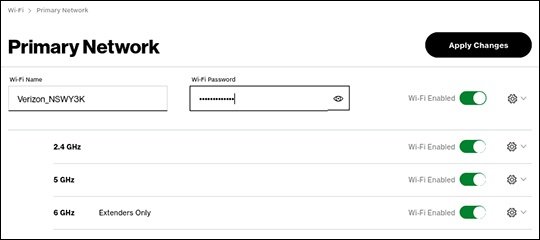
| Wi-Fi password | Joining the wireless network | Also on the label; viewable after login under Wi-Fi > Primary Network |
| My Verizon password | Your Verizon account, My Verizon app and Verizon Home app | Set when you registered your account; it is never on the router |
If the label password no longer works, someone changed it. Jump to the password troubleshooting section below.
Log in from a computer
A wired connection is the most reliable route, because it works even when the router's Wi-Fi is turned off.
- Plug an Ethernet cable from the computer into one of the router's LAN ports, or join the router's Wi-Fi network.
- Disconnect from any VPN or work network on that computer.
- Open a browser and go to mynetworksettings.com.
- If the page does not open, type https://192.168.1.1, or https://192.168.0.1 on an Askey gateway.
- Accept the certificate warning for this address, as shown in the privacy warning section below.
- Type the admin password from the router label and click Log In.
Log in from a phone or tablet
The browser login works on a phone too. It shows the same Admin WebGUI, so expect a desktop-style layout.
- Open Settings on the phone or tablet and join your Verizon router's Wi-Fi network.
- Turn off mobile data if the phone keeps switching away from Wi-Fi.
- Open Safari, Chrome or another browser and enter mynetworksettings.com.
- If it fails, enter 192.168.1.1, or 192.168.0.1 on an ASK-NCQ1338 or ASK-NCQ1338FA gateway.
- Tap through the privacy warning to the login screen.
- Enter the admin password from the router label and tap Log In.
For quick jobs on a phone, the Verizon Home app in the next section is easier than the browser page.
Use the My Verizon app for common router settings
Verizon now routes home router management through the Verizon Home app, which you sign in to with your My Verizon credentials. It works with Fios Home Internet, 5G Home Internet, LTE Home Internet, Verizon Home Internet Lite and Wi-Fi Backup, on current Verizon routers and extenders.
The app is free and optional. Verizon lists Wi-Fi name and password changes, turning networks on or off, restarts, saving settings, speed tests, LED control and parental control schedules among its features.
- Install Verizon Home from Google Play or Apple's App Store.
- Open the app and sign in with the email or user ID and password you use for the My Verizon app or website.
- Tap Equipment to see your router or gateway and its details.
- Open the Wi-Fi controls to change the network name or password, or to turn a network on or off.
- Use the router controls to restart it or run a speed test.
5G Home gateway owners also get Gateway 5G Optimizer under Equipment, which tests signal strength to help place the gateway.
Common Verizon router login addresses
Verizon lists one web name and two IP addresses. The web name only works from a device on your Verizon network.
| Address | Works on | Notes |
|---|---|---|
| mynetworksettings.com | Verizon Router (CR1000A) and Verizon Internet Gateways | Try this first |
| 192.168.1.1 | Verizon Router (CR1000A), WNC-CR200A, ARC-XCI55AX | Verizon gives it as https://192.168.1.1 for the gateways |
| 192.168.0.1 | Askey gateways ASK-NCQ1338 and ASK-NCQ1338FA | Verizon gives it as https://192.168.0.1 |
What to do if you see a privacy warning
Verizon expects a Your connection is not private message on these pages. The router uses its own security certificate, which browsers do not recognise for a local address. Proceed only when the address bar shows mynetworksettings.com or your router's IP address.
- Check the address bar shows mynetworksettings.com, 192.168.1.1 or 192.168.0.1.
- Click Advanced on the warning page.
- Click the Proceed to 192.168.X.X (unsafe) link. On a Verizon Router, click Proceed.
- Wait for the router login screen, then enter the admin password.
Default usernames and passwords for Verizon routers
Verizon's login steps ask only for a password; there is no user name field to fill in. Each router ships with its own unique admin password printed on its label, so no single default password covers every Verizon router.
| Credential | Default | Notes |
|---|---|---|
| User name | None requested | The login screen asks only for the password |
| Admin password | Printed on the router label | Rear label on the Verizon Router; bottom label on Internet Gateways |
| Wi-Fi name and password | Printed on the router label | Separate from the admin password |
| After a factory reset | Back to the label values | A reset wipes any admin or Wi-Fi password you set |
Logging in to popular Verizon router models
Find your model on the router label, or use Verizon's How to Identify Verizon 5G Home Equipment page.
| Model | Login address | Admin password |
|---|---|---|
| Verizon Router (CR1000A), used with Fios and with some 5G Home setups | mynetworksettings.com or 192.168.1.1 | Network Settings password on the rear label |
| Verizon Internet Gateway WNC-CR200A (5G Home) | mynetworksettings.com or https://192.168.1.1 | Bottom label |
| Verizon Internet Gateway ARC-XCI55AX (5G Home) | mynetworksettings.com or https://192.168.1.1 | Bottom label |
| Verizon Internet Gateway ASK-NCQ1338 or ASK-NCQ1338FA (5G Home) | mynetworksettings.com or https://192.168.0.1 | Bottom label |
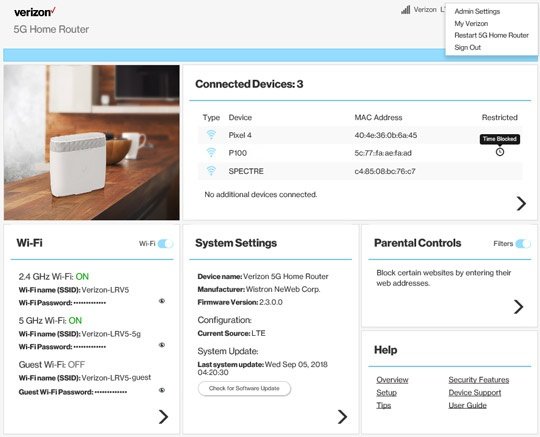
| 5G Home Router (LVSKR1) | Admin WebGUI; check the router label for the address | Router label; change it under Admin Settings |
| Other Fios routers, such as the CR1000B, Fios Router G3100, Quantum Gateway G1100 or older Actiontec units | Check the router label first, then the model's Verizon support page | Router label |
How to check you are logged in
- On a new Verizon Router, confirm the Easy Setup Wizard opens after the password is accepted.
- On a set-up router, confirm the Home screen shows an Advanced button and menus such as Wi-Fi and Status.
- Click Status and scroll to the Modem section. A Firmware Version entry proves you reached the admin pages.
- In the Verizon Home app, confirm your router appears under Equipment.
A login screen that keeps coming back means the password was rejected, not that the page is broken.
What you can change after logging in
Menu paths below are the ones Verizon publishes for each device family.
| Task | Where to do it |
|---|---|
| Change your Wi-Fi name and password | Verizon Router and Internet Gateways: Wi-Fi > Primary Network, edit Wi-Fi name (SSID) and Wi-Fi Password, then Apply changes. Passwords are 8-63 characters and case-sensitive |
| Turn guest Wi-Fi on or off | 5G Home Router: Wi-Fi > Enable Guest Wi-Fi switch; guest passwords are 8-28 characters |
| Check connected devices | Internet Gateways: Devices > Devices lists online and offline devices |
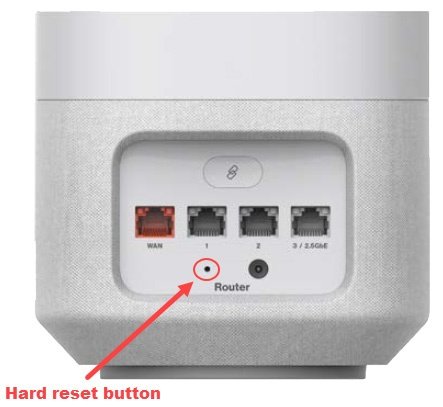
| Restart the router | 5G Home Router: dropdown menu at the upper right > Restart 5G Home Router. Verizon Router: hold the rear reset button for at least 3 seconds. Gateways: unplug power for about 10 seconds |
| Update firmware | Check the current version under Status > Modem > Firmware Version, then compare it with Verizon's Software Updates page |
| Back up or restore settings | Verizon Router: Advanced > Utilities > Save & Restore |
| Configure advanced settings | Internet Gateways support DHCP, LAN settings, DMZ, IP passthrough or bridge mode and parental controls; the 5G Home Router adds port forwarding and MAC filters |
After changing the Wi-Fi name or password, reconnect every device to the new network.
Troubleshooting: Verizon router login page will not open
mynetworksettings.com does not load
Verizon says the page only opens with an active connection to the router, so the device is usually on another network.
- Make sure you are connected to the Verizon router, not a neighbour's network, a hotspot or mobile data.
- Disconnect any VPN or private relay service on the device, then reload the page.
- Type the address into the browser address bar rather than a search box.
- Enter the IP address for your model instead: 192.168.1.1 or 192.168.0.1.
- Add https:// in front of the IP address if the plain address fails.
Cannot log in to the Verizon internet gateway over Wi-Fi
Wi-Fi may be turned off on the gateway, or the wireless link is unstable.
- Connect a computer to a LAN port on the gateway with an Ethernet cable.
- Open https://192.168.1.1 (WNC-CR200A, ARC-XCI55AX) or https://192.168.0.1 (Askey models).
- Sign in and turn Wi-Fi back on if it was switched off.
Cannot log in to the Verizon Fios router at all
A frozen router or stale connection stops the admin page from answering.
- Restart the router: hold the rear reset button on a Verizon Router for at least 3 seconds, or unplug the power for about 10 seconds.
- Wait for the router to finish starting. Verizon says a gateway reboot can take up to 5 minutes.
- Reconnect your device and open mynetworksettings.com again.
Troubleshooting: The password does not work
The password on the label is rejected
The admin password was changed after setup, or the Wi-Fi password was typed instead.
- Check you are typing the admin (Network Settings) password, not the Wi-Fi password.
- Type it exactly as printed, including capital letters.
- Try any admin password you set yourself during the Easy Setup Wizard.
- If none works, factory reset the router using the next section.
Your My Verizon password is rejected on the router
Your Verizon account password never opens the router settings page.
- Use the password from the router label on the mynetworksettings.com screen.
- Use your My Verizon credentials only in the Verizon Home app, My Verizon app or the Verizon website.
Reset a Verizon router when you cannot log in
A factory reset deletes every change to the configuration, including the network name, Wi-Fi password and admin password. All devices must reconnect afterwards. Verizon recommends a backup first if you can still sign in.
- If you can still log in, save a backup under Advanced > Utilities > Save & Restore > Save as file.
- Find the Reset button on the rear panel of the Verizon Router.
- Press and hold it for at least 10 seconds to restore factory defaults.
- Wait for the router to restart.
- Reconnect using the Wi-Fi name and password on the router label.
- Open mynetworksettings.com and sign in with the admin password on the label.
On 5G Home gateways and the 5G Home Router, follow Verizon's model-specific Factory Reset article, which offers a reset from the device or from the admin page.
Security tips after you log in
- Change the admin password. On an Internet Gateway, click Advanced, then System > System Settings, enter the new password twice and click Apply Changes.
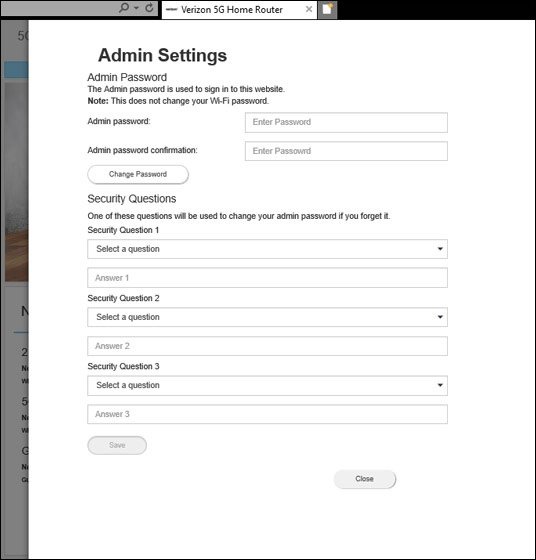
- On a 5G Home Router, open the dropdown menu at the upper right, click Admin Settings, enter an 8-32 character password and click Change Password, then set security questions.
- Keep the admin password different from the Wi-Fi password, since anyone on your Wi-Fi can reach the login page.
- Change the Wi-Fi password periodically under Wi-Fi > Primary Network.
- Check Status > Firmware Version against Verizon's Software Updates page.
- Save a configuration backup so a reset does not cost you your settings.
- Give visitors guest Wi-Fi instead of your main network password.
Frequently asked questions
How do I log in to my Verizon Fios router?
Connect to the Fios router's Wi-Fi or plug in with Ethernet, then open mynetworksettings.com or 192.168.1.1 in a browser. Enter the Network Settings password printed on the label on the rear of the router and click Log In.
How do I log in to my Verizon internet gateway?
From a device connected to the gateway, open mynetworksettings.com. If it fails, use https://192.168.1.1 on the WNC-CR200A and ARC-XCI55AX, or https://192.168.0.1 on the ASK-NCQ1338 models. Enter the admin password from the bottom label.
How do I log in to Verizon internet settings from my phone?
Join the router's Wi-Fi, open a browser and go to mynetworksettings.com, then enter the admin password from the label. For simple jobs such as changing the Wi-Fi password, the Verizon Home app is easier and uses your My Verizon sign-in.
What is the default Verizon router password?
There is no single default. Each Verizon router has its own admin password printed on its label, on the rear of the Verizon Router or the bottom of an Internet Gateway. A factory reset brings back that label password.
What is mynetworksettings.com?
It is the web address Verizon gives for its router admin page. It only opens from a device connected to your Verizon router, and it leads to the same login screen as 192.168.1.1 or 192.168.0.1.
How do I log in to my Verizon Fios account?
Your Fios account is separate from the router. Sign in to My Verizon at secure.verizon.com/signin or in the My Verizon app. The router admin password on the label never works for your account.
Why can't I log into my Verizon account with my router password?
They are different credentials. The router label password opens only mynetworksettings.com, while My Verizon and the Verizon Home app need your Verizon account user ID and password.
Can I log in to my Verizon router away from home?
Not through the browser. Verizon states that the admin page opens only from a device connected to the router by Wi-Fi or Ethernet, so connect to your home network first, then open mynetworksettings.com.

How to log in to Comcast Xfinity router - Techdows
[…] providers use different addresses. For example, you sign in to a Verizon router at mynetworksettings.com instead of […]