To force a Blue Screen of Death in Windows 11, set the CrashOnCtrlScroll registry value to 1, restart, then hold the right Ctrl key and press Scroll Lock twice.
This guide covers the keyboard method, the power button and NotMyFault alternatives, crash dump settings, how to confirm the dump was written, and how to remove the setting afterwards.
Manually initiate a blue screen of death in Windows 11/10
Windows has a built-in keyboard crash that raises stop code MANUALLY_INITIATED_CRASH (bug check 0xE2). It works with USB keyboards, PS/2 keyboards and Hyper-V virtual keyboards once a registry value is set.
Save your work first. The crash stops Windows immediately, and anything unsaved is lost.
- Select Start, type
cmd, right-click Command Prompt and select Run as administrator. - For a USB keyboard, run
reg add HKLM\SYSTEM\CurrentControlSet\Services\kbdhid\Parameters /v CrashOnCtrlScroll /t REG_DWORD /d 1 /f. - For a PS/2 keyboard, or a laptop's built-in keyboard, also run
reg add HKLM\SYSTEM\CurrentControlSet\Services\i8042prt\Parameters /v CrashOnCtrlScroll /t REG_DWORD /d 1 /f. - Inside a Hyper-V virtual machine, run
reg add HKLM\SYSTEM\CurrentControlSet\Services\hyperkbd\Parameters /v CrashOnCtrlScroll /t REG_DWORD /d 1 /fin the guest. - Restart the PC. The value is read only at startup.
- Hold down the rightmost Ctrl key and press Scroll Lock twice.
- Wait while the stop screen shows the percentage of the crash dump written, then let Windows restart.
Many laptops use the PS/2 driver for the built-in keyboard and the USB driver for an external one. Setting both values lets either keyboard trigger the crash.
Which way to force a blue screen should you use?
| Your situation | Use this | Stop code you get |
|---|---|---|
| Desktop or laptop with a Scroll Lock key | Right Ctrl + Scroll Lock twice after the CrashOnCtrlScroll registry change | MANUALLY_INITIATED_CRASH (0xE2) |
| Laptop or tablet with no Scroll Lock key | Custom key combination with Dump1Keys and Dump2Key, or the power button hold | 0xE2, or MANUALLY_INITIATED_POWER_BUTTON_HOLD (0x1C8) |
| PC frozen so the keyboard does not respond | Hold the power button for 7 seconds after the PowerButtonBugcheck change | MANUALLY_INITIATED_POWER_BUTTON_HOLD (0x1C8) |
| You can sign in and want a crash from the command line | Microsoft Sysinternals NotMyFault | DRIVER_IRQL_NOT_LESS_OR_EQUAL (0xD1) |
| Server with no keyboard attached | NMI switch on the hardware or its management console | NMI_HARDWARE_FAILURE (0x80) |
| Hyper-V virtual machine | Debug-VM with -InjectNonMaskableInterrupt from the host | Depends on the guest's NMI handling |
Enable a crash dump file before you force a blue screen
A forced crash is only useful if Windows writes a dump file. The dump settings apply to every kernel-mode crash, whether it was accidental or forced.
- Open Control Panel and select System and Security > System.
- Select Advanced system settings, then open the Advanced tab.
- Under Startup and Recovery, select Settings.
- Under Write debugging information, choose Automatic memory dump, Kernel memory dump, Active memory dump or Complete memory dump.
- Check the Dump file path. The default is
%SystemRoot%\Memory.dmp; point it at a drive with enough free space if needed. - Clear Automatically restart if you want the stop screen to stay visible instead of rebooting.
- Select OK and restart the computer.
Administrator rights are required to change these settings. A work PC may block the change through network policy.
Force a blue screen by holding the power button
Windows 10 version 1809 and later can crash on a long power button hold. This helps when the PC is frozen and the keyboard no longer responds.
The device needs a GPIO-based power button and firmware that routes the power event to Windows, which mainly means modern laptops and tablets.
- Open Command Prompt as administrator.
- Run
REG ADD HKEY_LOCAL_MACHINE\SYSTEM\CurrentControlSet\Control\Power /v PowerButtonBugCheck /t REG_DWORD /d 0x1 /f. - Restart the PC if the value did not exist before. A change to an existing value takes effect without a restart.
- Press and hold the power button for 7 seconds.
- Release the button as soon as the black screen says Please release the power button.
- Let the percentage counter finish so the dump is written completely.
Holding past roughly 10 seconds triggers the firmware hard power-off and can corrupt the dump. On some ARM64 laptops the firmware timer is shorter, so release right after 7 seconds.
This method shows a black progress screen, not the usual stop screen, and records bug check 0x1C8.
How to force a blue screen from CMD with NotMyFault
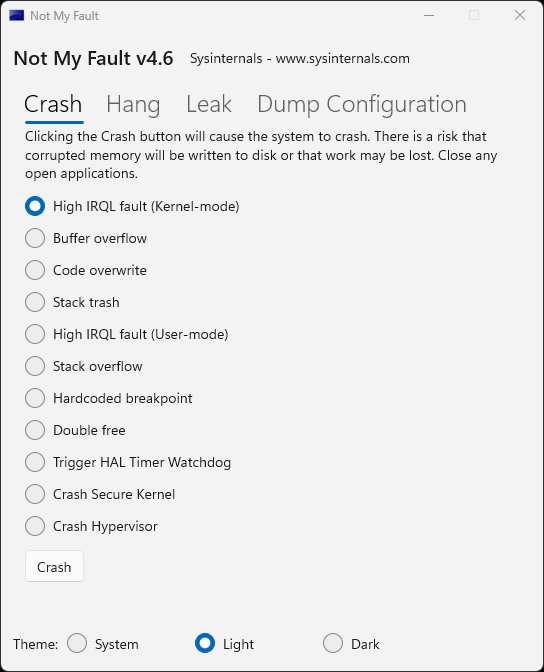
NotMyFault is a free Microsoft Sysinternals tool by Mark Russinovich that crashes, hangs or leaks kernel memory on purpose. It needs no registry change and no restart, but it does need administrator rights.
Get it from the NotMyFault page on learn.microsoft.com, extract it, and open an elevated Command Prompt in that folder.
notmyfaultc64.exe /crash 0x01Runs the 64-bit command-line version and selects crash type 0x01, a high IRQL fault in kernel mode. Other crash types include 0x02 buffer overflow, 0x03 code overwrite, 0x04 stack trash and 0x06 stack overflow.
You should see: Windows halts with a stop error (bug check 0xD1, DRIVER_IRQL_NOT_LESS_OR_EQUAL), writes the dump file and restarts.
To capture a complete dump, Microsoft's support article runs notmyfaultc64.exe /getdumptype = full before the crash command. The download also includes a GUI version for anyone who prefers to click a button.
Force a blue screen in a Hyper-V virtual machine
From a Windows 11 host with Hyper-V enabled, you can crash a guest without touching its keyboard by injecting a non-maskable interrupt (NMI).
- On the host, right-click Start and open Windows PowerShell or Terminal as administrator.
- Run
Debug-VM "VM name" -InjectNonMaskableInterrupt -Force, replacingVM namewith the virtual machine's name. - Watch the guest console for the stop screen and the dump progress counter.
Physical servers without a keyboard use the same idea: enable the NMI switch in the BIOS or the remote management console. Microsoft notes that a test NMI shows STOP 0x00000080, and that the NMICrashDump registry value has no effect on Windows 8 and later.
Change the key combination that forces a blue screen
Laptops without a Scroll Lock key need a different second key. Windows reads two values, Dump1Keys and Dump2Key, from a crashdump subkey for each keyboard driver.
When you define a custom combination, set CrashOnCtrlScroll to 0 or delete it.
- Open Command Prompt as administrator.
- Run
reg add HKLM\SYSTEM\CurrentControlSet\Services\kbdhid\crashdump /v Dump1Keys /t REG_DWORD /d 0x2 /fto make the rightmost Ctrl the first key. - Run
reg add HKLM\SYSTEM\CurrentControlSet\Services\kbdhid\crashdump /v Dump2Key /t REG_DWORD /d 0x3d /fto make Spacebar the second key. - Repeat both commands with
i8042prtin place ofkbdhidfor a PS/2 or built-in laptop keyboard. - Delete CrashOnCtrlScroll with
reg delete HKLM\SYSTEM\CurrentControlSet\Services\kbdhid\Parameters /v CrashOnCtrlScroll /fand the matchingi8042prtcommand. - Restart, then hold the rightmost Ctrl and press Spacebar twice.
Dump1Keys is a bitmap for the first key: 0x01 right Shift, 0x02 right Ctrl, 0x04 right Alt, 0x10 left Shift, 0x20 left Ctrl, 0x40 left Alt. Add values together to allow more than one, such as 0x11 for either Shift key.
Dump2Key is an index into the keyboard driver's scan code table, not the scan code itself. The value 0x3d for Spacebar comes from Microsoft's own example.
How to check the forced blue screen wrote a dump file
- After the restart, open File Explorer and go to
C:\Windows. - Look for
MEMORY.DMPwith a timestamp that matches the crash. Automatic, kernel and complete dumps go there by default. - If you chose a small memory dump, open
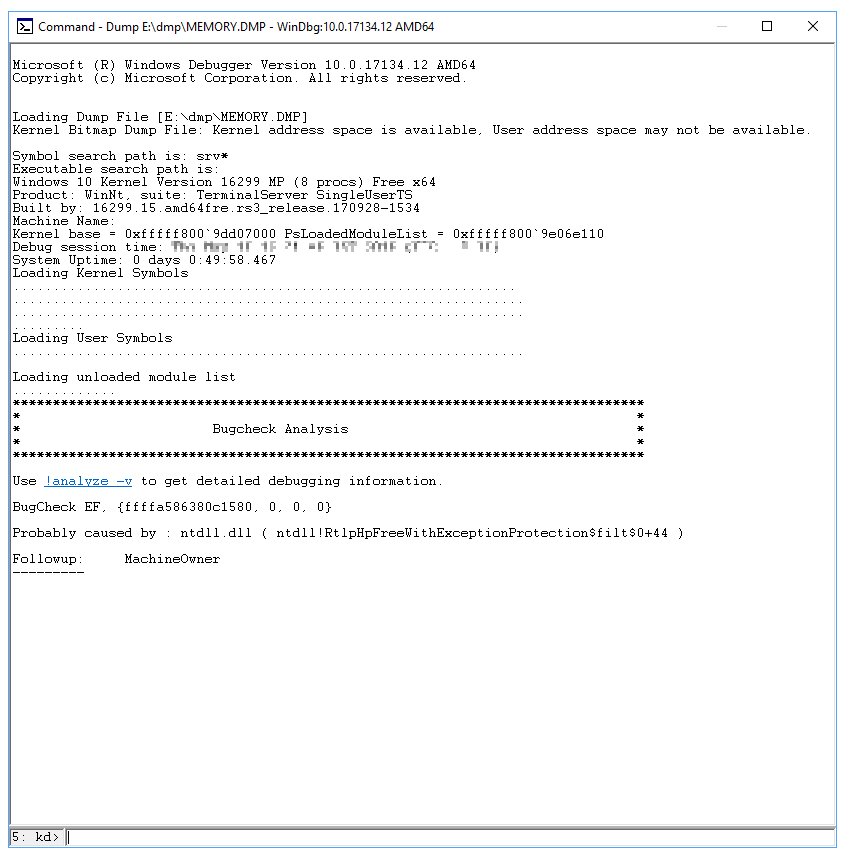
C:\Windows\Minidumpinstead. Each crash gets its own file with the date in the name. - Install WinDbg from Microsoft, open it, select File > Open Crash Dump (or press Ctrl + D) and choose the file.
- Run
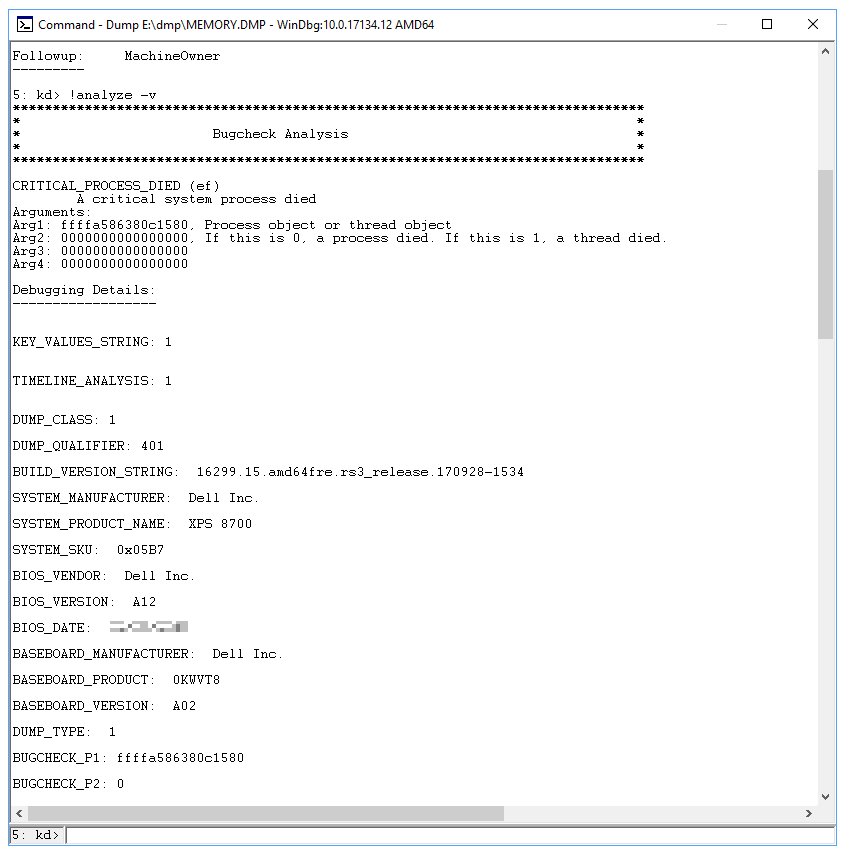
!analyze -vin the command window. - Confirm the bug check code: 0xE2 for the keyboard, 0x1C8 for the power button, or 0xD1 for NotMyFault crash type 0x01.
No dump file usually means Write debugging information was set to (none), or the page file on the system drive was too small to hold the dump.
MANUALLY_INITIATED_CRASH blue screen and other stop codes explained
A stop code tells you what halted Windows. Forced crashes use codes that clearly mark the crash as deliberate, which keeps them apart from real faults in a dump analysis.
| Stop code | Hex value | What it means |
|---|---|---|
| MANUALLY_INITIATED_CRASH | 0xE2 | The keyboard crash combination was pressed after the registry change |
| MANUALLY_INITIATED_POWER_BUTTON_HOLD | 0x1C8 | The power button was held for 7 seconds with PowerButtonBugcheck enabled |
| DRIVER_IRQL_NOT_LESS_OR_EQUAL | 0xD1 | NotMyFault crash type 0x01, or a real driver accessing memory at the wrong IRQL |
| NMI_HARDWARE_FAILURE | 0x80 | A non-maskable interrupt, from a server NMI switch or a hardware fault |
| BAD_POOL_CALLER | 0xC2 | A thread made a bad memory pool request, usually a faulty driver |
| DAM_WATCHDOG_TIMEOUT | 0x1EB | The Desktop Activity Moderator did not unfreeze user processes in time after resume from modern standby |
On Windows 11 version 24H2 and later, the stop screen uses a simpler layout that shows the stop code and, when available, the module name.
Turn off the forced blue screen setting
Remove the values once testing is done, so nobody triggers a crash by accident.
- Open Command Prompt as administrator.
- Run
reg delete HKLM\SYSTEM\CurrentControlSet\Services\kbdhid\Parameters /v CrashOnCtrlScroll /f. - Run
reg delete HKLM\SYSTEM\CurrentControlSet\Services\i8042prt\Parameters /v CrashOnCtrlScroll /fif you set the PS/2 value. - Run
reg delete HKLM\SYSTEM\CurrentControlSet\Control\Power /v PowerButtonBugCheck /fif you enabled the power button crash. - Delete any Dump1Keys and Dump2Key values under the
crashdumpsubkeys in the same way. - Restart the PC.
Fix BAD_POOL_CALLER blue screen on Windows 11
These two stop codes appear on their own, not because of a forced crash. Microsoft's fixes for each are below.
BAD_POOL_CALLER (0xC2) blue screen on Windows 11
A driver made an invalid memory pool request, often at the wrong IRQL or by freeing the same memory twice.
- Remove or update any driver you installed shortly before the crashes started.
- Type
verifierin an elevated Command Prompt to open Driver Verifier Manager, and enable the memory pool checks for the suspect drivers only. - Restart and use the PC until the next crash; the dump now names the faulting driver.
- Search Control Panel for Memory and select Diagnose your computer's memory problems to rule out faulty RAM.
- Open Event Viewer > Windows Logs > System and find the MemoryDiagnostics-Results entry for the test result.
- Turn Driver Verifier off again with
verifier /resetonce the driver is identified.
DAM watchdog timeout blue screen in Windows 11 (DAM_WATCHDOG_TIMEOUT, 0x1EB)
The Desktop Activity Moderator could not unfreeze user session processes in time after the PC resumed from modern standby.
- Note when the crash happens; this code points at waking from sleep on a modern standby device.
- Install pending updates in Settings > Windows Update, including optional driver updates.
- Check the PC maker's support site for a newer BIOS or UEFI firmware and chipset drivers.
- Open the dump in WinDbg and run
!analyze -vto see which process or driver held up the resume.
How to check why a blue screen happened in Windows 11
How to know what caused a blue screen
The stop code and the faulting module are stored in the dump file and the system log.
- Note the stop code and any
.sysfile name shown on the stop screen. - Open Event Viewer > Windows Logs > System and look for critical errors at the time of the crash.
- Open
C:\Windows\MEMORY.DMPor the newest file inC:\Windows\Minidumpin WinDbg. - Run
!analyze -vand read the bug check code, parameters and probable cause. - Look up the code in Microsoft's bug check code reference on learn.microsoft.com.
Why a PC suddenly gets a blue screen
A new driver, new hardware, failing memory, file system errors or corrupted system files are the usual triggers.
- Remove or update recently added drivers, services or hardware.
- Open Device Manager and check for devices marked with an exclamation point.
- Run
sfc /scannowfrom an elevated Command Prompt to repair corrupted system files. - Run Windows Memory Diagnostic and check the drive for file system errors.
- Keep 10 to 15 percent of the system drive free, and check the PC maker's site for a BIOS or UEFI update.
Specific stop codes have specific fixes, such as the PAGE_FAULT_IN_NONPAGED_AREA blue screen. Updates have triggered stop errors too, as when KB4586781 caused blue screens on Windows 10.
Forced blue screen in Windows 11 FAQ
How do I purposely blue screen Windows 11?
Add the CrashOnCtrlScroll DWORD with a value of 1 under the kbdhid or i8042prt Parameters registry key, restart, then hold the right Ctrl key and press Scroll Lock twice. Windows halts with MANUALLY_INITIATED_CRASH and writes a dump file.
How do I force a blue screen from CMD?
Run Microsoft Sysinternals NotMyFault from an elevated Command Prompt with notmyfaultc64.exe /crash 0x01. It crashes Windows straight away with stop code 0xD1, without a registry change or a restart beforehand.
How do I force a blue screen on Windows 10?
The same methods work on Windows 10. The USB keyboard crash works on every Windows 10 version, and the power button hold crash needs Windows 10 version 1809 or later.
Is it safe to force a blue screen of death?
It does not damage hardware, but it stops Windows instantly, so unsaved work in open apps is lost. Save and close everything first, and remove the registry values when testing is finished.
How does a blue screen work?
When Windows detects a condition that makes it unsafe to keep running, it halts in a bug check. If crash dumps are enabled, it writes memory to a dump file, shows the stop code and restarts.
Why does Ctrl + Scroll Lock not cause a blue screen?
The registry value is usually on the wrong driver key or the PC was not restarted. Set CrashOnCtrlScroll under both kbdhid and i8042prt, restart, and use the rightmost Ctrl key, not the left one.
How do I stop the PC restarting before I can read the blue screen?
Open Advanced system settings, select Settings under Startup and Recovery, and clear Automatically restart. The stop screen then stays visible until you power the PC off.
How do I determine what caused a blue screen?
Open the latest dump file from C:\Windows\MEMORY.DMP or C:\Windows\Minidump in WinDbg and run !analyze -v. It reports the bug check code, its parameters and the probable faulting driver.
How do I fix a blue screen error?
Remove or update recently added drivers and hardware, run sfc /scannow, run Windows Memory Diagnostic, and install Windows and BIOS updates. Then look up the specific stop code in Microsoft's bug check reference.