To find your Apple ID on iPhone, open Settings, tap your name at the top, then tap Sign-In & Security to see every email address and phone number you can sign in with.
Apple now calls the Apple ID an Apple Account, and this guide also covers FaceTime, Messages, the App Store, iPad, Mac, PC and what to try when you are signed out.
Step by step tutorial: How to find Apple ID on iPhone
This route works when your iPhone is already signed in to your account.
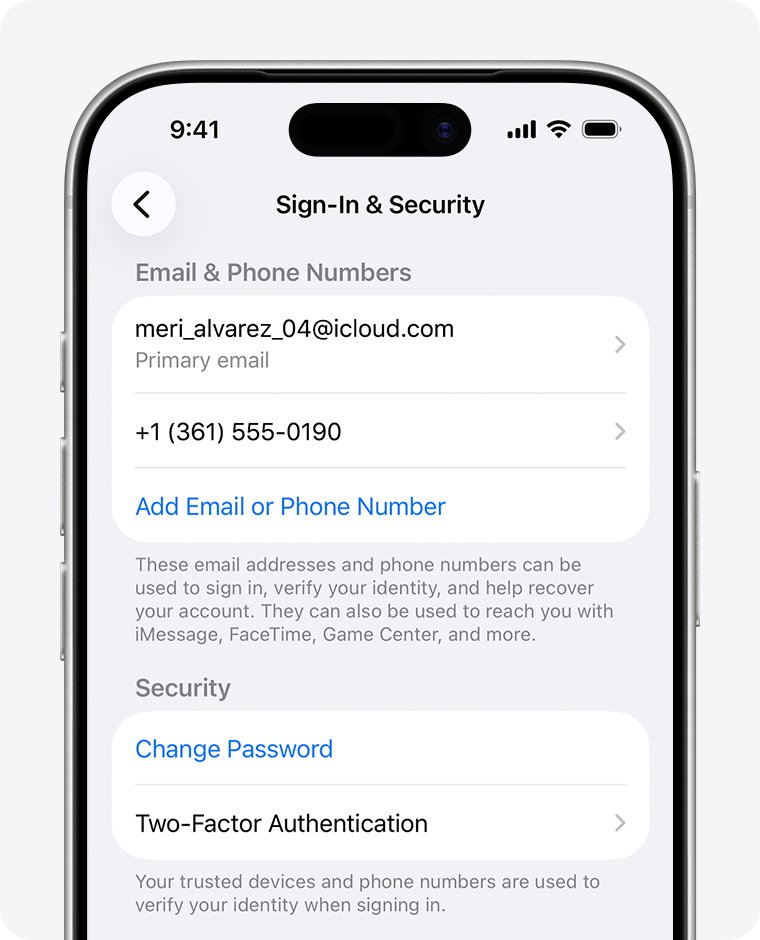
- Open the Settings app on your iPhone.
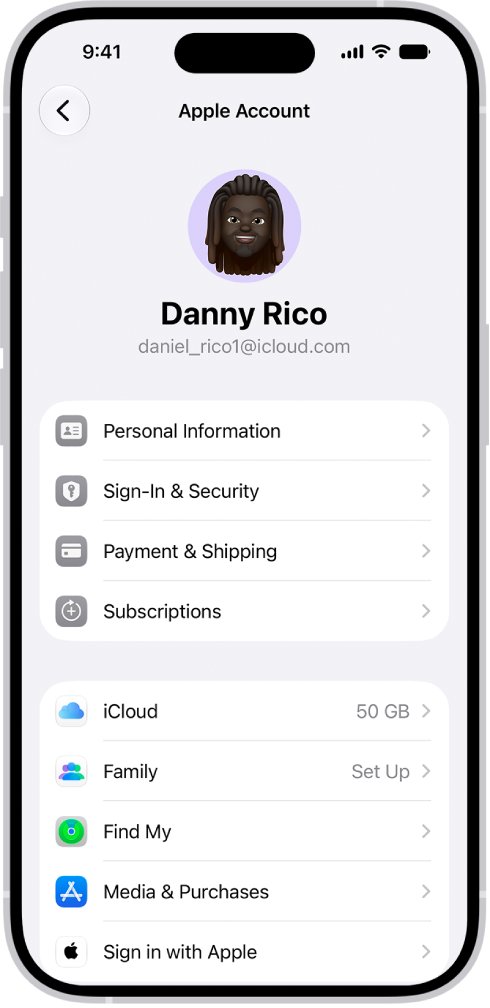
- Tap your name at the top of the screen.
- Tap Sign-In & Security.
- Read the email addresses and phone numbers listed. Each one can be used to sign in to your Apple Account.
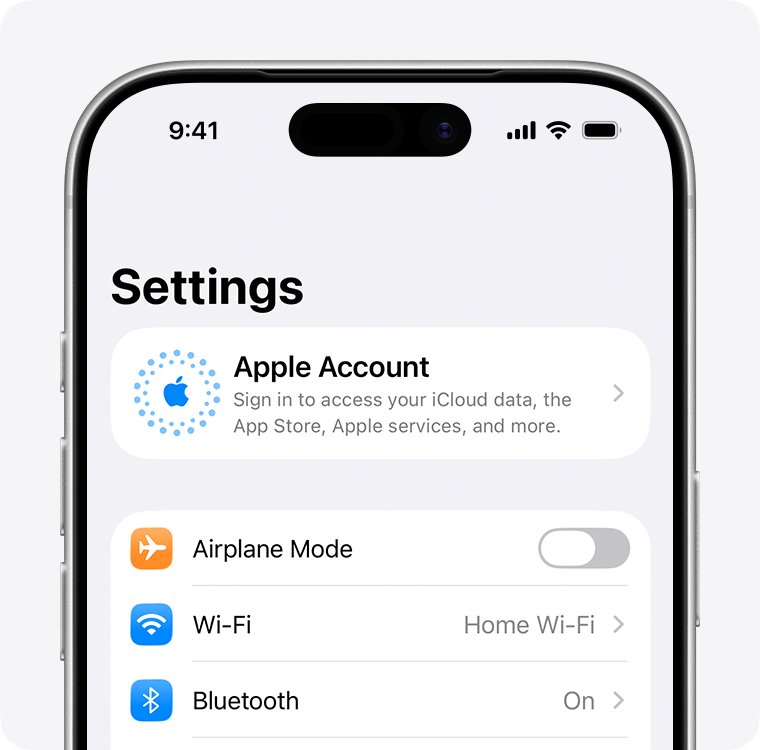
If the top of Settings shows Apple Account instead of your name, this iPhone is not signed in. Jump to the signed-out steps further down.
Is Apple ID the same as Apple Account?
Yes. Apple renamed the Apple ID to Apple Account, and your existing sign-in details did not change. iCloud is a separate thing, and iCloud and your Apple ID are related without being the same.
| Question | Answer |
|---|---|
| What does the Settings app call it now? | Apple Account. The iOS 12 guide still says Apple ID. |
| Do I need a new sign-in? | No. The same email address or phone number and password still work. |
| What counts as my Apple ID? | Any email address or phone number on file can be used to sign in. |
| Can a phone number be the user name? | Yes, for new accounts created in China mainland or India. |
| What is the primary email? | The main address on the account, which you can change in Sign-In & Security. |
Find Apple ID on iPhone when signed in or signed out
Match your situation to a row, then go straight to that route.
| Your situation | Where to look | What you get |
|---|---|---|
| iPhone is signed in | Settings > your name > Sign-In & Security | Every sign-in email and phone number |
| FaceTime or iMessage is set up | Settings > Apps > FaceTime or Messages | The addresses those apps use |
| You use apps from the App Store | App Store > person icon | The account the store is using |
| You own another Apple device or a PC | iPad or Mac settings, or iCloud for Windows | The same account details |
| No device is signed in | account.apple.com sign-in screen | A remembered email or phone number, if the site saved one |
| Nothing above works | Apple emails in your inbox, or a Family Sharing member | Your primary email, sometimes masked |
How to view Apple ID in FaceTime on iPhone
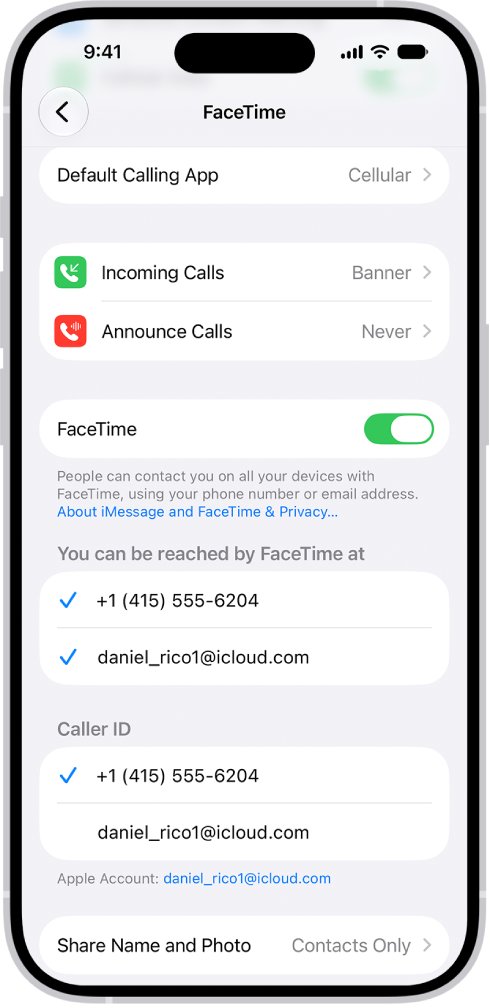
FaceTime lists the addresses tied to your Apple Account. It is not available in all countries or regions.
- Open Settings.
- Tap Apps, then tap FaceTime.
- Look below You can be reached by FaceTime at for your email address and phone number.
- Look below Caller ID to see which address appears on your outgoing calls.
A sign-in screen here means FaceTime is not signed in to an Apple Account on this iPhone.
How to know Apple ID in iPhone Messages settings
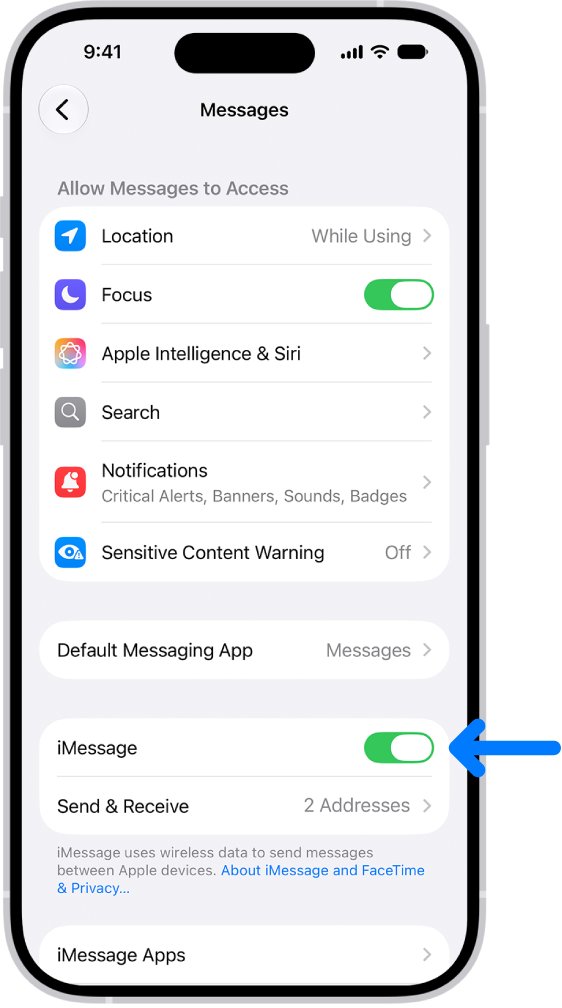
iMessage lists the phone numbers and email addresses it can use, which makes it a useful second check.
- Open Settings.
- Tap Apps, then tap Messages.
- Tap Send & Receive.
- Read the options below You can receive iMessages to and reply from.
On iOS 17, the path is Settings > Messages > Send & Receive, with no Apps step.
How to check Apple ID in the App Store on iPhone
The App Store can show an account when the top of Settings gives you nothing, because Apple lists it as a separate place to check.
- Open the App Store.
- Tap the person icon.
- Check the account screen for the Apple Account the store is signed in with.
If the screen offers Create New Apple Account, the App Store is not signed in. Try the signed-out steps below before you create one, because you may already have an account.
How to find Apple ID on iPhone 16, iPhone 13, iPhone 11 and iPhone 6
The model matters less than the iOS version it runs. To see yours, go to Settings > General > About.
| iPhone model | iOS | Path |
|---|---|---|
| iPhone 11 through iPhone 18 Pro, plus iPhone 16e, 17e, Air, Duo and SE (2nd and 3rd generation) | iOS 27 | Settings > your name > Sign-In & Security |
| Any model still on iOS 17 | iOS 17 | Settings > your name, or Settings > Messages > Send & Receive |
| iPhone 6, iPhone 6 Plus and any other model still on iOS 12 | iOS 12 | Settings > your name, then your contact information |
On iOS 12, a signed-out iPhone shows Sign in to your iPhone at the top of Settings instead of a name.
How to find Apple ID on iPad
- Open Settings on your iPad.
- Tap your name.
- Tap Sign-In & Security and read the email addresses and phone numbers listed.
How to find Apple ID on Mac
- Open the Apple menu and choose System Settings.
- Click your name.
- Select Sign-In & Security and read the email addresses and phone numbers listed.
How to find Apple ID on PC
- Open iCloud for Windows on your PC.
- Look under your name for your Apple Account primary email address or phone number.
How to determine my Apple ID when signed out
Work down this list when no device shows the account.
- Go to account.apple.com in Safari and see whether the sign-in screen remembers your email address or phone number.
- Try signing in with an email address or phone number you regularly use for Apple services.
- Search your inbox for receipts and for repair, support or billing emails from Apple. Your primary email address can appear in the body of the message.
- Ask a member of your Family Sharing group to check their Family Sharing settings for your Apple Account information. They can start at Settings > Family.
- Use Get suggestions on Apple's forgotten address page if you still have no match.
A masked address such as j*@icloud.com can mislead you, because the number of asterisks can differ from the number of characters.
How to check your Apple ID on account.apple.com
Signing in is the proof. An address you found is only useful if Apple accepts it.
- Go to account.apple.com.
- Enter the email address or phone number you found.
- Enter your password.
- Enter the six-digit verification code if you use two-factor authentication.
- Open Sign-In and Security and select Email & Phone Numbers to see what is on the account.
If the address is right but the password is not, you can reset your Apple Account password and sign in again.
How to change Apple ID on iPhone
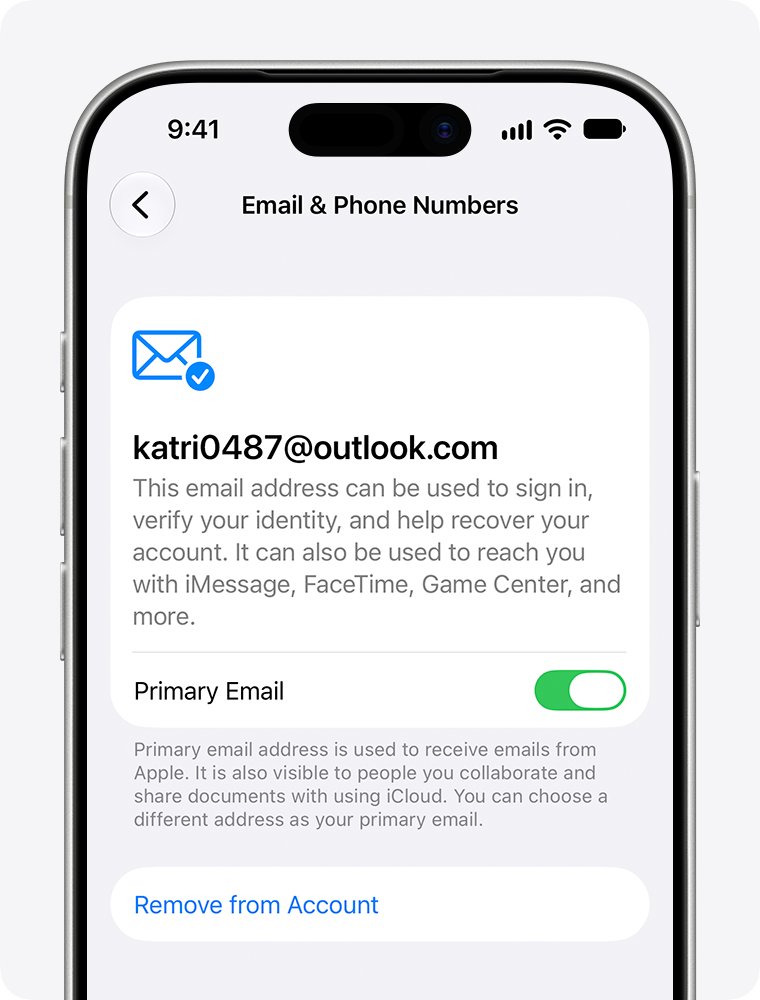
You can swap the primary email without losing contacts, purchases or other account information. The new address cannot already belong to another Apple Account, and you must be able to open it to verify it.
- Open Settings and tap your name.
- Tap Sign-In & Security.
- Tap your primary email address.
- Tap Remove from Account, or turn off Primary Email to keep the address as a non-primary one.
- Choose another address on your account as the new primary, or add a new one.
- Follow the onscreen steps to enter and verify the new primary address.
If an iCloud address is the only one on the account, you see Change Email Address instead. That option needs iOS 18.1 or later.
Tips: How to keep track of your Apple ID
A few minutes of setup now can save a long wait later. Apple warns that account recovery can take several days or more.
| Tip | Where to do it | Why it helps |
|---|---|---|
| Add a second email or phone number | Settings > your name > Sign-In & Security | Any address on file can sign you in |
| Add a recovery contact | Settings > your name > Sign-In & Security > Recovery Contacts | A trusted person can help if you get locked out |
| Keep your primary email reachable | Your email provider | You need access to verify account email changes |
| Keep Apple receipts in your inbox | Your email app | Receipts can show your primary email later |
| Join a Family Sharing group | Settings > your name > Family | A family member can look up your account details |
Why can't I find my Apple ID on iPhone?
Settings shows Apple Account instead of your name
This iPhone is not signed in, so it has no account to display.
- Tap Apple Account at the top of Settings.
- Choose Use Another Apple Device if you have a signed-in iPhone or iPad nearby, or Sign in Manually if you know your address.
- Use the signed-out steps above if neither option helps.
You know the email, but the password fails
The address is fine and the password is the problem.
- Tap Forgot password? on the sign-in screen and follow the prompts.
- Try another email or phone number on the account if you think the password is right.
- Start account recovery at iforgot.apple.com if you cannot reset it.
Apple says your account is locked, not active or disabled
Finding the address will not help until access is restored.
- Open the Apple Account Support page.
- Select Regain access under Access a locked account and follow the steps.
You cannot create an account because you may already have one
Apple says trouble creating an account can mean an account already exists.
- Try signing in at account.apple.com with the address you used.
- Select Forgot password? if the address is recognized.
If you end up in recovery, you can track the Apple Account recovery wait and avoid the actions that cancel it.
Apple ID on iPhone FAQ
How do I find Apple ID on my phone?
Open Settings on your iPhone, tap your name, then tap Sign-In & Security. The screen lists the email addresses and phone numbers you can use to sign in, and any of them works as your Apple ID.
How can I view my Apple ID if the iPhone is signed out?
Settings cannot show an account on a signed-out iPhone. Check account.apple.com for a remembered address, search your inbox for Apple receipts, look on another signed-in device, or ask a member of your Family Sharing group to check their settings.
How can I reset my Apple ID password?
On a signed-in iPhone, open Settings, tap your name, tap Sign-In & Security, then tap Change Password. If you are signed out, tap Forgot password? on the sign-in screen and follow the prompts, or start at iforgot.apple.com.
How do I find my Apple ID password?
The Sign-In & Security screen shows your addresses and a Change Password option, not the password itself. You may be able to find the password without resetting it. Otherwise, change or reset it from your iPhone.
Can I change my Apple ID?
Yes. Open Settings, tap your name, tap Sign-In & Security, then tap your primary email address and choose or add a new one. You must verify the new address, and it cannot already belong to another Apple Account.
What if I don't have an Apple ID?
Create one during iPhone setup or in the App Store. In the App Store, tap the person icon, tap Create New Apple Account, then enter an email address, a password and your country or region. You can choose None for payment.
Can I have multiple Apple IDs?
You can use two Apple Accounts, but Apple does not allow more than one at a time on the App Store and other media services. You also cannot update content you bought with a different Apple Account.
Why can't I find my Apple ID?
The most likely cause is that the device you are checking is not signed in. Try another Apple device, iCloud for Windows, account.apple.com or your inbox. Any email address or phone number on file can sign you in.
Is my Apple ID my email address?
It usually is. You sign in with an email address or phone number on file, and an iCloud address can be one of them. New accounts created in China mainland or India can use a mobile number as the user name.