The top 5 free GoPro editing software picks for Windows 11 are GoPro Player, DaVinci Resolve, Microsoft Clipchamp, Adobe Express and the Video Sequencer in Blender.
This guide lists what each free version can do with GoPro footage, where each one stops, how to get clips onto your PC, and what to do when Windows does not see the camera.
GoPro editing software for Windows PC
All five cost nothing to start with. The last column shows where each free version stops, so match it against the footage you shoot.
| Software | How it runs on Windows 11 | Good for | Free version limit |
|---|---|---|---|
| GoPro Player | Desktop app for Windows 10 or later | Trimming, frame grabs, batch export and 360 reframing | HyperSmooth Pro stabilization is a paid in-app purchase |
| DaVinci Resolve | Desktop app | Multitrack editing, color grading, effects and audio | 8-bit video, up to 60fps and up to Ultra HD 3840 x 2160 |
| Microsoft Clipchamp | Windows app, or Edge and Chrome | Quick edits with no prior experience | Watermark-free exports at up to 1080p |
| Adobe Express | Web browser, no download | Short social clips from templates | 1GB per upload, 30 minutes of video and 5GB of storage |
| Blender Video Sequencer | Desktop app | Cuts, masking and grading for people who already use Blender | No paid tier; free and open source |
Best software for editing GoPro videos
The right pick depends on the footage and the finished video. Start with the row closest to the job you have today.
| Your situation | Use this | Why |
|---|---|---|
| You only need to trim a clip and export it | GoPro Player | Frame-by-frame trimming and batch export are free |
| You shot 360 video on a MAX camera | GoPro Player | It reframes 360 footage into standard photos and videos |
| You are making your first edit | Microsoft Clipchamp | Microsoft designs it for people with no prior editing experience |
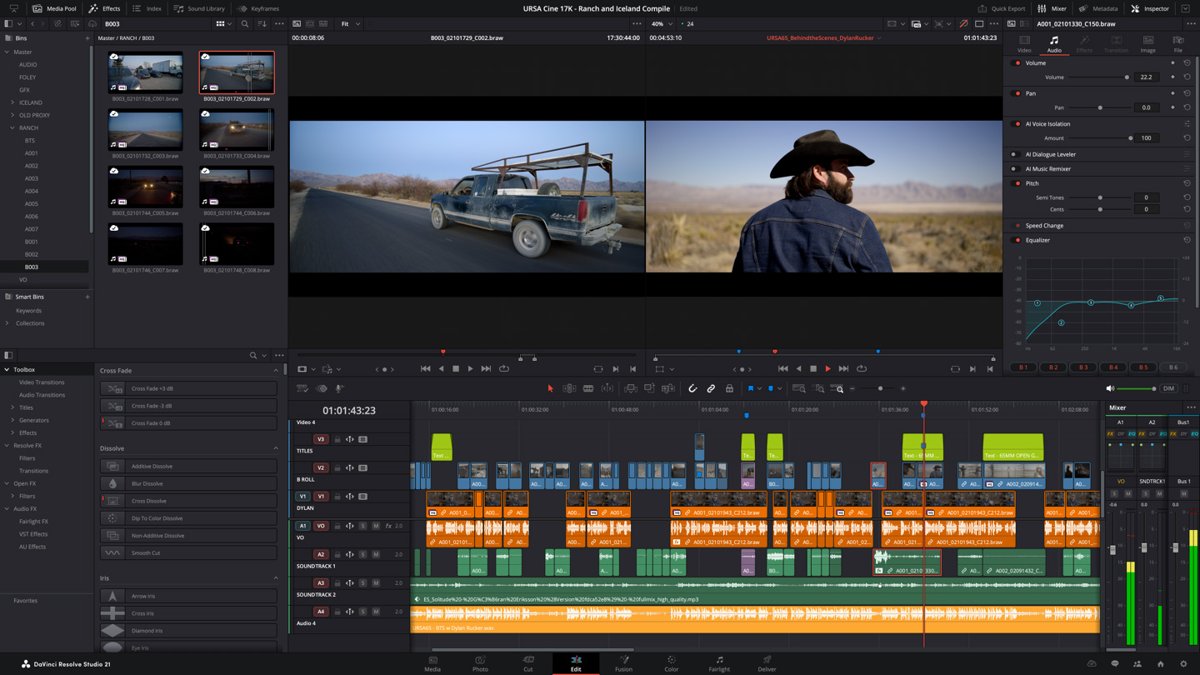
| You want multitrack editing and color grading | DaVinci Resolve | Edit, Color, Fusion and Fairlight tools come in the free version |
| You want a 4K export at no cost | DaVinci Resolve | It exports up to Ultra HD, while the free Clipchamp plan stops at 1080p |
| You recorded 10-bit video | Test one clip in DaVinci Resolve first | Blackmagic lists 8-bit formats for the free version and 10-bit under the paid Studio version |
| You do not want to install anything | Adobe Express | It runs in the browser and exports without a watermark |
| You already model or animate in Blender | Blender Video Sequencer | Your edit stays inside the app you already know |
These five suit GoPro footage in particular. For a wider list that includes Mac and mobile apps, compare the best free video editors for Windows or Mac.
GoPro Player: free GoPro editing software for PC
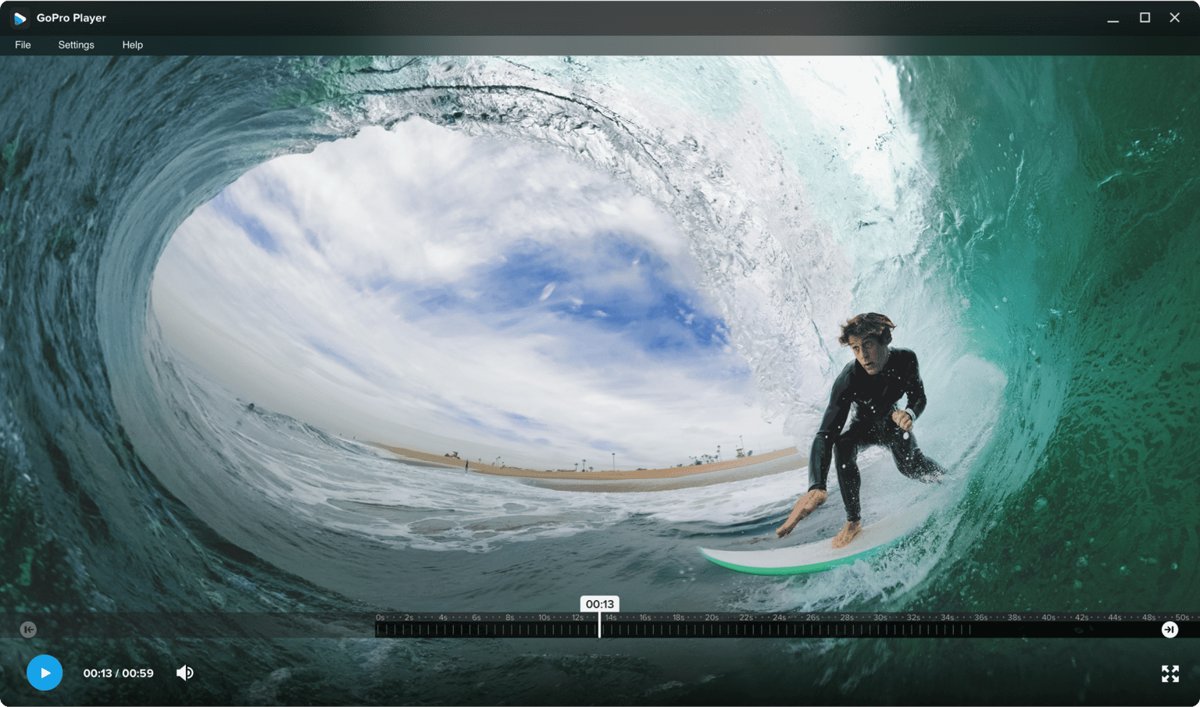
GoPro Player is GoPro's own desktop app, and it runs on Windows 10 or later with a graphics card that supports HEVC decoding. It works with GoPro HERO and MAX cameras and handles HEVC, H.264, H.265, Apple ProRes and CineForm files.
| What you want to do | GoPro Player tool | Cost |
|---|---|---|
| Cut a clip to length | Trim, with frame-by-frame accuracy | Free |
| Pull a full-resolution photo from a video | Frame Grab | Free |
| Straighten a tilted shot after filming | Horizon Leveling | Free |
| Turn 360 footage into a standard video | Reframe, with keyframes for transitions | Free |
| Process many clips while you step away | Batch Export | Free |
| Stabilize footage beyond what the camera did | HyperSmooth Pro | Paid in-app purchase |
HyperSmooth Pro handles all video modes on HERO8 and later. On HERO7, HERO6, HERO2018, HERO5 Session and HERO5, the clip needs EIS and HyperSmooth off during capture. The feature does not work on 360 content.
DaVinci Resolve: free GoPro video editing for serious projects
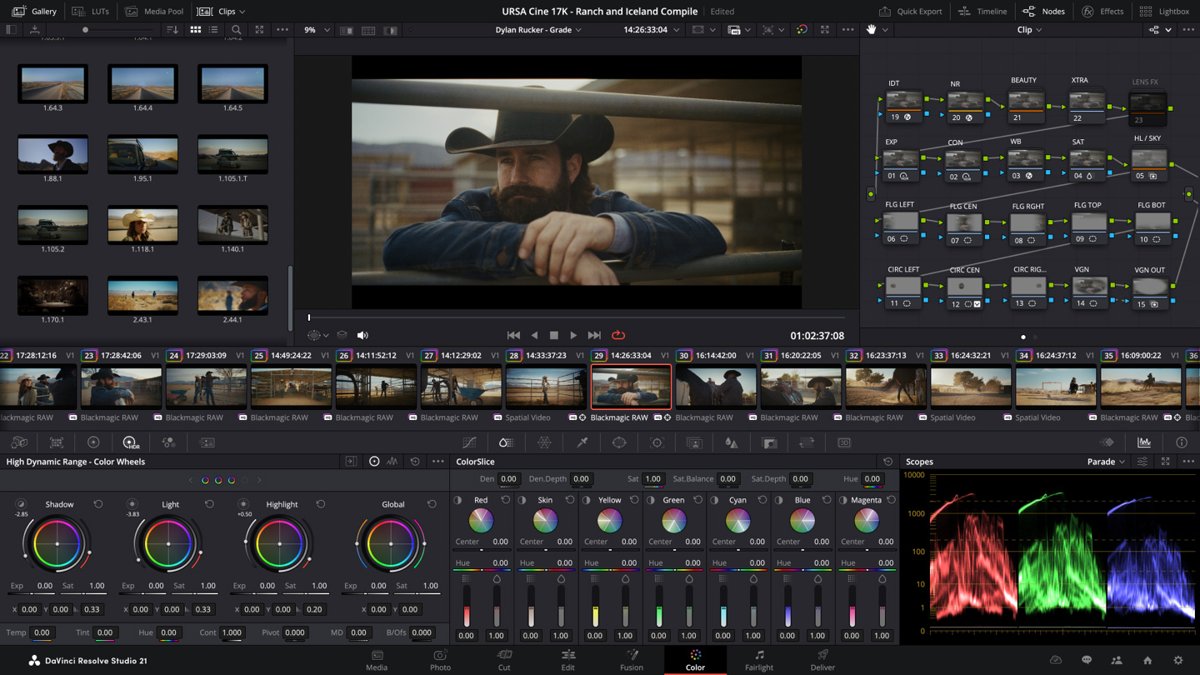
DaVinci Resolve 21 from Blackmagic Design is the most complete option on this list, with editing, color, visual effects and audio in one app. The free version covers the features most GoPro projects need, but it has hard format limits.
| Feature | DaVinci Resolve (free) | DaVinci Resolve Studio (paid) |
|---|---|---|
| Video formats | Virtually all 8-bit formats | Adds 10-bit video |
| Frame rate | Up to 60fps | Up to 120fps |
| Resolution | Up to Ultra HD 3840 x 2160 | Beyond 4K |
| Collaboration and HDR grading | Included | Included |
| AI tools and noise reduction | Not included | Neural Engine, Magic Mask, temporal and AI spatial noise reduction |
Check your camera's capture settings before you commit to a long edit. Footage above 4K, above 60fps or in 10-bit falls outside what Blackmagic lists for the free version. You can download DaVinci Resolve for Windows from Blackmagic's site.
Microsoft Clipchamp: GoPro video editing software free on Windows 11
Clipchamp may already be on your PC, so search for it from Start first. You can also download Clipchamp for Windows from the Microsoft Store. Any account can import 4K clips, but free accounts export at up to 1080p.
- Open Clipchamp and select Create a new video.
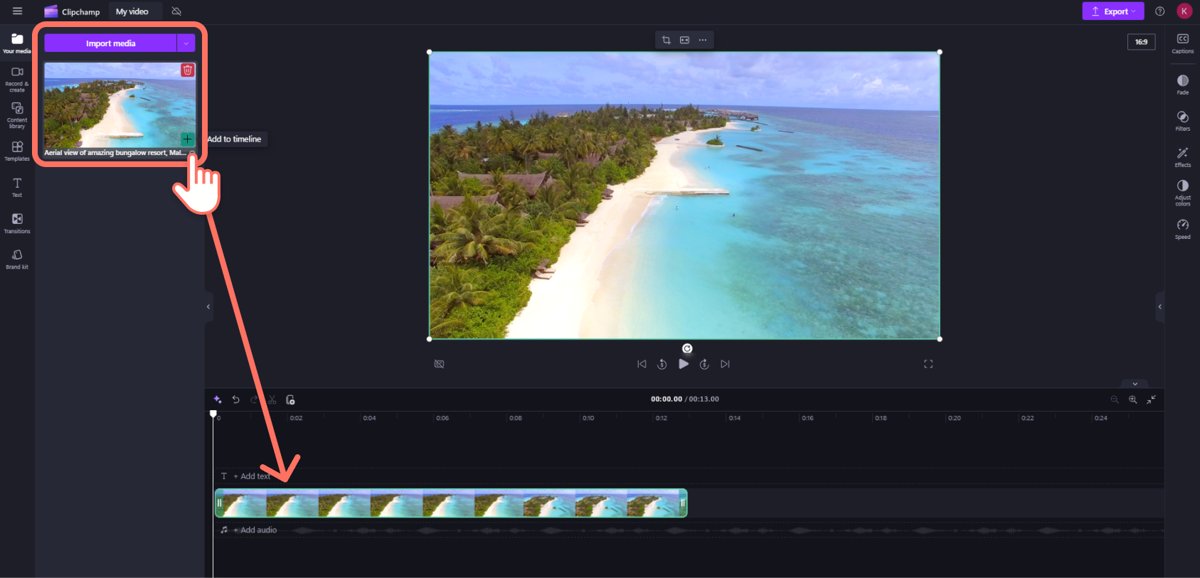
- Open My media and select Import media to add your GoPro clips.
- Drag the clips onto the timeline.
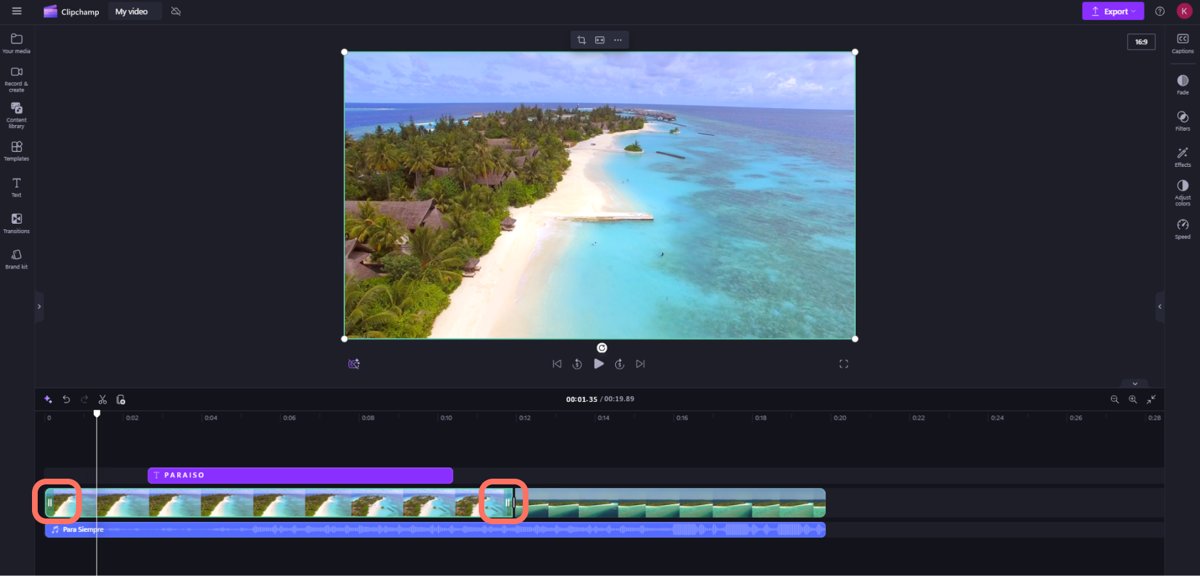
- Drag the green bars at either end of a clip to trim it, or move the seeker and select Split to cut it.
- Add titles from the Text tab and music from Content library > Audio.
- Select Export in the top-right corner and choose 1080p.
Microsoft says Clipchamp works best with H.264 and can handle HEVC without converting it first, though HEVC files can be slower to import. MP4 is one of its recommended containers because it needs no conversion.
Adobe Express: free GoPro video editing online
Adobe Express runs in your browser, so nothing is installed on the PC and no credit card is needed for the free plan. It suits short clips best because of the upload and length limits below. You can also get Adobe Express for Windows through its download page.
| Question | Free plan answer |
|---|---|
| Which files can you upload? | MP4, MOV and M4V, up to 1GB per file |
| How long can a video be? | Up to 30 minutes; paid plans go up to 2 hours |
| How much cloud storage do you get? | 5GB |
| Is there a watermark on export? | No, Adobe says exports are watermark-free |
| How can you share the result? | Download a high-resolution MP4, or post it directly to social channels |
A long high-resolution clip can pass the 1GB limit. Trim it in GoPro Player first, then upload the shorter file.
Blender Video Sequencer for GoPro footage
Blender is a free and open source 3D creation suite with a video editor built in. It has no paid tier to run into, but it is a 3D app first, so it suits people who already use Blender better than first-time editors.
| GoPro editing job | What the Video Sequencer offers |
|---|---|
| Assemble a timeline | Cuts and splicing, with up to 32 slots for video, images, audio, masks and effects |
| Correct the color | Color grading, with a luma waveform, chroma vectorscope and histogram |
| Fix the sound | Audio mixing, syncing, scrubbing and waveform display |
| Change the pace | Speed control, transitions and keyframes |
| Apply a look to several clips | Adjustment layers and filters |
Blender needs 64-bit Windows 8.1 or later, 4 CPU cores, 8GB of RAM and 2GB of graphics memory at minimum. The project recommends Windows 11, 8 cores, 32GB of RAM and 8GB of graphics memory.
Does GoPro have editing software?
Yes, but the Quik app is no longer the answer on a PC. GoPro discontinued its Quik desktop apps to focus on mobile editing, so GoPro Player is the GoPro tool to install on Windows 11.
| GoPro software | Where it runs | What it does |
|---|---|---|
| GoPro Player | Windows and Mac | Plays, trims and exports GoPro footage and reframes 360 video |
| Quik app | iPhone, iPad and Android | Mobile editing; premium tools need a subscription |
| Quik for desktop | Discontinued | No longer developed |
| GoPro 360 plug-ins | Adobe Premiere and After Effects | Work with 360 footage inside those Adobe editors |
| GoPro Media Library | Desktop browser, for subscribers | Uploads, reviews and shares footage stored in the GoPro Cloud |
How to edit GoPro videos on Windows 11
Copy the footage to your PC before you edit. GoPro warns that playing clips directly from the SD card causes choppy playback.
- Power on the camera, then connect it to the PC with a USB cable.
- Check for the USB symbol on the camera's front LCD screen, or the top display on HERO11 Black Mini.
- Open File Explorer and select the camera under Devices.
- Copy the videos to a folder on your PC, or use an SD card adapter to copy them from the card.
- Open the clips in GoPro Player to trim them, level the horizon or reframe 360 footage.
- Import the exported clips into DaVinci Resolve, Clipchamp, Adobe Express or Blender to build the full edit.
- Export the finished video at a resolution your chosen editor allows on its free version.
GoPro camera is not recognized when plugged into a computer USB port
Work through these fixes in order and test the connection after each one. An SD card adapter is the way around the cable if the camera still refuses to connect.
Windows does not detect the GoPro over USB
The camera was off when connected, or the cable, port or driver is at fault.
- Power on the camera before you plug it in, then look for the USB symbol on the front LCD screen.
- Unplug the cable from both the camera and the PC, then plug it back in.
- Try a different USB cable, then a different USB port.
- Disconnect the camera, restart the PC and reconnect the camera.
- Connect another device with the same cable and port to rule them out.
- Make sure the USB port drivers are up to date, or try a different computer.
- Manually update the camera, factory reset it and repeat these steps.
HERO9 Black or HERO8 Black does not appear on the PC
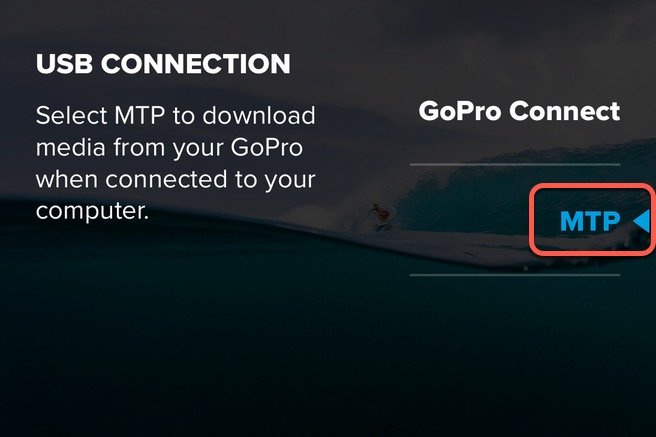
These cameras have a USB connection setting that must be set to MTP for file transfer.
- Swipe down on the rear LCD, then swipe left.
- Tap Connections, then tap USB Connection.
- Tap MTP and reconnect the camera.
Windows shows a "USB device not recognized" message
Windows sees the device but reports a problem with it.
- Open Start, type device manager and open it.
- Find the device with a yellow exclamation mark.
- Right-click the device, select Properties and note the code under Device status.
- Look up that code in Microsoft's list of Device Manager error codes and follow its steps.
The camera still fails, possibly because of the SD card
GoPro says the SD card can have a compatibility issue.
- Put the SD card in an SD card adapter and connect it to the PC.
- Copy every file you can from the card to the PC.
- Format the SD card, put it back in the GoPro and reconnect the camera.
- If the adapter does not see the card either, contact the SD card manufacturer.
GoPro video choppy or slow to edit on a Windows PC
GoPro footage plays back choppy on the computer
The clip is playing directly from the SD card.
- Copy the footage from the card to a folder on your PC.
- Play the copied file instead of the one on the card.
4K GoPro clips are slow in Clipchamp
Microsoft says performance depends on video length, memory, graphics card and CPU.
- Check that the PC has at least 8GB of RAM; Microsoft says 16GB is better.
- Compress the clip to 1080p first if you will not export in 4K.
Photos says "You need an extension to use this file"
The clip is HEVC, and the Photos app Video Editor needs an extension to read it.
- Install the HEVC Video Extensions from the Microsoft Store.
- Open the clip again, or open it in GoPro Player instead.
Free GoPro editing software FAQ
Does GoPro have editing software?
Yes. GoPro Player runs on Windows and Mac and trims, exports and reframes GoPro footage. The Quik app handles editing on iPhone, iPad and Android, but GoPro has discontinued the Quik desktop apps, so it is not an option on a Windows PC.
Is GoPro editor free?
GoPro Player is free apart from HyperSmooth Pro stabilization, which is a paid in-app purchase. Trim, Frame Grab, Horizon Leveling, 360 reframing and Batch Export cost nothing. The Quik mobile app has premium tools that need a GoPro subscription.
How do I edit GoPro on Windows 11?
Copy the clips from the camera or SD card to your PC, then open them in an editor. GoPro Player handles trimming and 360 reframing, while DaVinci Resolve or Clipchamp can combine several clips with titles and music into one finished video.
What is the best free software to edit GoPro videos?
DaVinci Resolve has the deepest free feature set, with multitrack editing, color grading and exports up to Ultra HD. GoPro Player is the better choice for quick trims, 360 footage and batch exports. Neither adds a paid requirement for those core jobs.
What is the easiest GoPro editing software?
Microsoft Clipchamp is a good starting point because Microsoft designs it for people with no prior editing experience. It may already be installed on Windows 11. For a simple trim with no timeline, GoPro Player is the more direct tool.
What is the best GoPro editing software for beginners?
Start with Clipchamp if you want titles, music and a simple timeline, or Adobe Express if you prefer working in a browser from templates. Both export without a watermark on their free plans. DaVinci Resolve and Blender take longer to learn.
Can I edit 4K GoPro video for free?
Yes. DaVinci Resolve handles 8-bit video up to Ultra HD 3840 x 2160 at up to 60fps in its free version. Clipchamp imports 4K on any account, but its free plan exports at up to 1080p, and 4K export needs a paid plan.
Why is my computer not reading my GoPro?
The camera usually needs to be powered on before you plug it in, and it should then show a USB symbol on the front LCD. If it does not, try another cable and port, restart the PC, or set HERO9 and HERO8 Black to MTP.